Yes! You can use AI to fill out Form 1003, Uniform Residential Loan Application

Form 1003, also known as the Uniform Residential Loan Application (URLA), is the official document used by nearly all mortgage lenders in the United States. It collects detailed information about a borrower's finances, including income, assets, debts, and employment history, which is crucial for the lender to assess creditworthiness and approve a mortgage loan. Completing this extensive form is a critical step in the home-buying or refinancing process. Today, this form can be filled out quickly and accurately using AI-powered services like Instafill.ai, which can also convert non-fillable PDF versions into interactive fillable forms.
Form 1003 / URLA is part of the loan application forms category on Instafill.
Form 1003 / URLA has a very complex Form Complexity Index of 98/100 — 526 fillable fields across 9 pages. Instafill’s AI completes it accurately in under a minute.

Form specifications

Form name: Form 1003, Uniform Residential Loan Application
Number of fields: 526
Number of pages: 9
FCI: Very Complex (98/100)
Language: English
Our AI automatically handles information lookup, data retrieval, formatting, and form filling.
It takes less than a minute to fill out Form 1003 / URLA using our AI form filling.
Securely upload your data. Information is encrypted in transit and deleted immediately after the form is filled out.
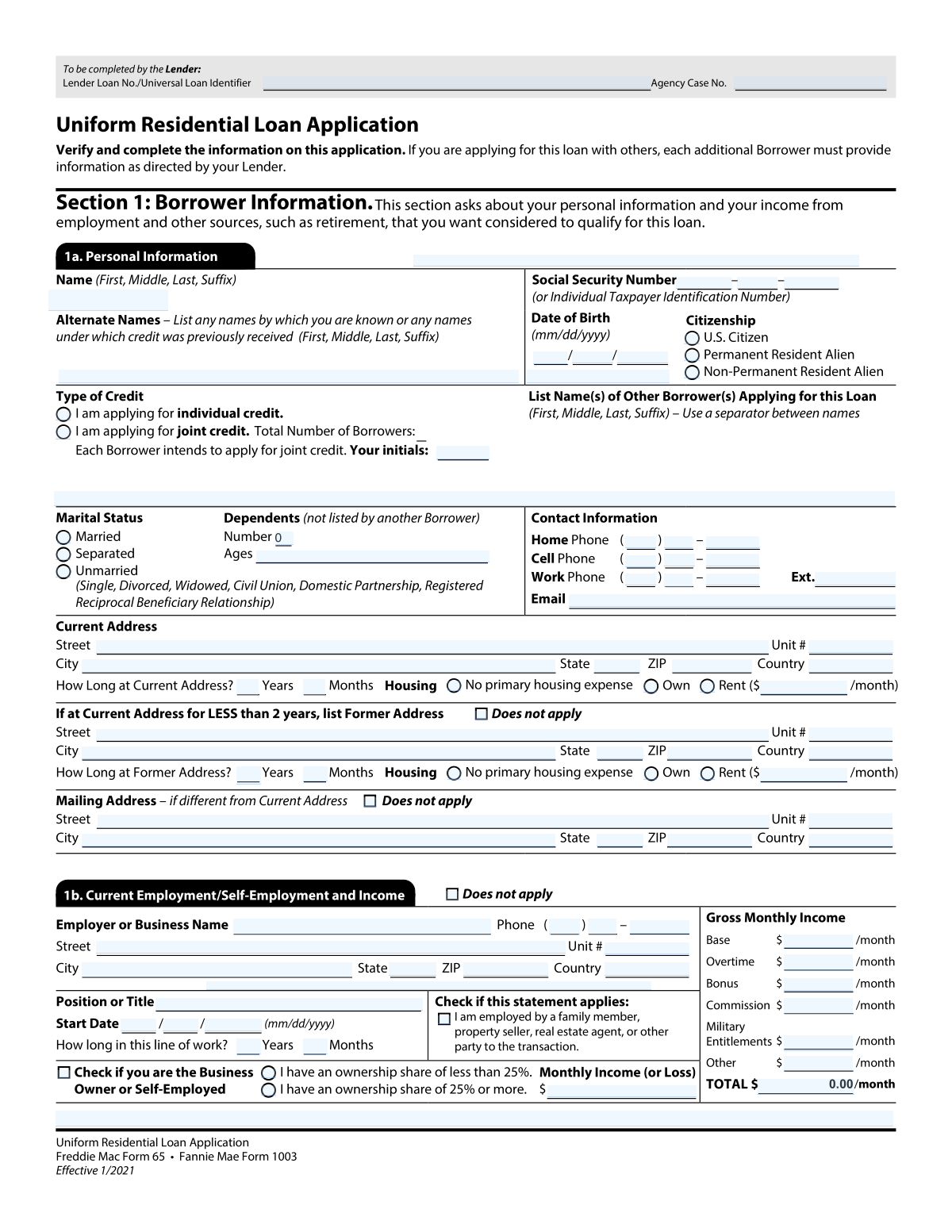
Preview of Form 1003, Uniform Residential Loan Application

Instafill Demo: How to fill out PDF forms in seconds with AI

How to Fill Out Form 1003 / URLA Online for Free in 2026

Are you looking to fill out a FORM 1003 / URLA form online quickly and accurately? Instafill.ai offers the #1 AI-powered PDF filling software of 2026, allowing you to complete your FORM 1003 / URLA form in just 37 seconds or less.
Follow these steps to fill out your FORM 1003 / URLA form online using Instafill.ai:
  1. 1 Navigate to Instafill.ai and upload your Form 1003, or select it from the template library.
  2. 2 Use the AI assistant to fill in Section 1: Borrower Information, including your personal details, contact information, and address history.
  3. 3 Complete Sections 2 and 3: Financial Information, by providing details about your assets, liabilities, and any real estate you currently own.
  4. 4 Detail your employment and income in Section 4. The AI can help calculate monthly income from various sources like salary, bonuses, and commissions.
  5. 5 Fill out Section 5: Declarations, by answering the series of questions about your financial history and intentions for the property.
  6. 6 Review the entire application, ensuring all AI-populated fields are correct, then securely e-sign and download your completed Form 1003.

Our AI-powered system ensures each field is filled out correctly, reducing errors and saving you time.

Why Choose Instafill.ai for Your Fillable Form 1003 / URLA Form?

Speed

Complete your Form 1003 / URLA in as little as 37 seconds.

Up-to-Date

Always use the latest 2026 Form 1003 / URLA form version.

Cost-effective

No need to hire expensive lawyers.

Accuracy

Our AI performs 10 compliance checks to ensure your form is error-free.

Security

Your personal information is protected with bank-level encryption.

Frequently Asked Questions About Form 1003 / URLA

Form 1003 / URLA has a Form Complexity Index of 98 out of 100, placing it in the very complex complexity tier. This score is calculated deterministically from the form’s own structure using Instafill’s published Form Complexity Index methodology, so it can be reproduced and independently verified — it is not a subjective estimate.

For Form 1003 / URLA specifically, the score reflects 526 fillable fields across 9 pages, grouped into 159 sections, and 316 conditional fields that only apply depending on earlier answers, 9 tables or repeating lists. The number of fields is the largest factor in the base score (weighted 36%), followed by how difficult those fields are to complete based on their type, where free-text and signature fields count for more than simple checkboxes (26%). The number of pages that actually contain fields (15%), the amount of conditional “fill-only-if” logic (16%), and how many sections the form is divided into (7%) account for the rest of the base. On top of that base, the index adds points for tables and repeating lists, bundled instruction pages, and dense page layouts — capturing difficulty the base alone can miss.

In practical terms, a very complex score means the form is exceptionally demanding — a very large number of fields, often combined with tables, dense pages or extensive conditional logic. Instafill removes that effort entirely: our AI reads your information, maps each value to the correct field — including the conditional ones — and completes Form 1003 / URLA accurately in under a minute, with every field available for you to review before you download. See exactly how the Form Complexity Index is calculated.

This is a Uniform Residential Loan Application, used to collect your personal, financial, and employment information when you apply for a mortgage. Lenders use this information to determine your eligibility for a loan.

Select 'individual credit' if you are the only person applying for the loan. Choose 'joint credit' if you are applying with another person, and be sure to provide their name and initial to confirm your intent.

Yes, if you have lived at your current address for less than two years, you must provide your former address details. If you've been at your current address for two years or more, you can skip that section.

In the employment section, list your business name, check the 'Business Owner / Self-Employed' box, and indicate your ownership percentage. You will then enter your net monthly income or loss from the business.

You should break down your income into the specific fields provided, such as 'Base', 'Overtime', 'Bonus', and 'Commission'. Provide the average monthly amount for each category you want considered for the loan.

For your current address, you should check the box labeled 'No primary housing expense'. This informs the lender that you do not have a regular monthly rent or mortgage payment.

You are not required to disclose income from alimony, child support, or separate maintenance. However, if you want this income to be considered for loan qualification, you must list it in the 'Other Income' section.

The ULI or Lender Loan Number is a unique code assigned to your mortgage application by the lender. You should copy this number exactly as it appears on the loan paperwork they provided to you.

This means your employer is a family member, the property seller, a real estate agent, or another person directly involved in this mortgage transaction. You must check the corresponding box if this applies to you.

You must list any previous names, such as a maiden name, in the 'Alternate Names' field. This is necessary for the lender to perform a complete credit and background check.

Yes, services like Instafill.ai use AI to accurately auto-fill form fields, which can save you significant time and help reduce errors on complex applications like this one.

Simply upload the form to the Instafill.ai platform. The AI will identify all the fields, allowing you to fill them in quickly and easily online, and can even pre-fill information for you.

You can use a tool like Instafill.ai, which is designed to convert non-fillable PDFs into interactive, fillable forms. This allows you to type your answers directly into the document online.

Compliance Form 1003 / URLA
Validation Checks by Instafill.ai

1
Validates Social Security Number Structure
This check ensures that the three separate fields for the Social Security Number ('Part 1', 'Part 2', 'Part 3') combine to form a valid 9-digit number. It verifies that each part contains only numeric digits and has the correct length (3, 2, and 4 digits respectively). This is critical for identity verification and credit reporting, and failure to provide a valid SSN will prevent the application from being processed.
2
Ensures Borrower is of Legal Age
This validation combines the 'Date of Birth — Month', 'Day', and 'Year' fields to form a complete date and calculates the borrower's age. It then verifies that the borrower is at least 18 years old, which is the minimum legal age to enter into a binding contract like a mortgage. If the calculated age is under 18, the application is invalid and cannot proceed.
3
Verifies Mutually Exclusive Citizenship Status
This check confirms that only one of the citizenship status checkboxes ('U.S. Citizen', 'Permanent Resident', 'Non-Permanent Resident') is selected. A borrower can only have one primary residency status, and selecting multiple options creates an ambiguity that must be resolved. If more than one or none are selected, the form submission should be rejected with an error prompting the user to select exactly one option.
4
Validates Joint Credit Application Dependencies
This is a conditional logic check that ensures if the 'I am applying for joint credit' box is checked, then the 'Applicant Initials' and 'Other Borrower(s) Names' fields are properly filled out. Conversely, if 'I am applying for individual credit' is selected, these joint-credit-specific fields should be empty. This maintains the integrity of the application type and prevents incomplete or contradictory submissions.
5
Enforces Mutually Exclusive Marital Status
This validation ensures that a borrower selects only one option from the available marital statuses: 'Married', 'Separated', or 'Unmarried'. These categories are mutually exclusive and providing a single, clear status is required for legal and underwriting purposes. An error will be triggered if the user selects more than one option, forcing them to clarify their legal marital status.
6
Validates Email Address Format
This check examines the 'Email Address' field to ensure the entry conforms to a standard email format (e.g., '[email protected]'). It looks for the presence of an '@' symbol and a domain with a period. A valid email is essential for communication regarding the loan application, and an invalid format would prevent the lender from contacting the borrower electronically.
7
Validates ZIP Code Format against Country
This check validates that the 'ZIP / Postal Code' for the current address is in the correct format for the specified 'Country'. For example, if the country is 'USA', it will expect a 5-digit or 9-digit (ZIP+4) numeric code. This ensures address accuracy for mailings, property location verification, and compliance, preventing processing delays due to an invalid address.
8
Verifies Gross Monthly Income Calculation
This check confirms that the value entered in 'Total Gross Monthly Income (Employer)' is the correct sum of the individual income components ('Base', 'Overtime', 'Bonus', 'Commission', etc.). This acts as a cross-check to prevent mathematical errors in the income section, which is a critical component of the debt-to-income ratio calculation. If the total does not match the sum of the parts, an error is flagged to prompt a correction.
9
Ensures Logical Employment Dates
This validation checks that the 'Employment Start Date' for any current or previous job is a valid date that occurs before the current date. For any 'Previous Employment' entry, it also verifies that the 'End Date' is after the 'Start Date'. This prevents illogical data entry, such as future employment dates or end dates that precede start dates, ensuring the employment history is chronologically correct.
10
Checks Consistency of Housing Status and Payment
This rule validates the relationship between the housing status ('Own', 'Rent', 'No primary housing expense') and the 'Monthly Rent / Housing Payment' field. If 'Rent' is checked, the payment amount must be a positive number. If 'No primary housing expense' is checked, the payment amount must be zero or blank. This ensures the housing expense data is logical and consistent.
11
Validates Conditional Former Address Fields
This check enforces the rule that the 'Former Address' section must be completed if the borrower has lived at their current address for less than two years. It verifies that if the 'Does not apply (Former Address...)' box is unchecked, then required fields like 'Former Street Address', 'Former City', and 'Former State' are filled in. This is crucial for establishing a sufficient two-year residency history for underwriting purposes.
12
Enforces Self-Employment Ownership Selection
This validation rule applies if the 'Business Owner / Self-Employed' box is checked. It ensures that the borrower then selects exactly one of the ownership share options: 'Ownership share less than 25%' or 'Ownership share 25% or more'. This information is critical for determining how business income is analyzed and documented, and failing to select one creates an incomplete profile.
13
Requires Full Name in Borrower Name Field
This validation ensures the 'Borrower Full Name' field is not empty and contains at least two distinct parts, representing a first and last name. A full legal name is a fundamental requirement for a loan application for identity verification, legal documentation, and credit checks. An incomplete name would render the application invalid and halt the process.
14
Validates Conditional Mailing Address Completion
This check ensures that if the 'Mailing Address — Does not apply' box is left unchecked, the subsequent mailing address fields ('Mailing Street Address', 'Mailing City', etc.) are required and must be filled out. This logic prevents a situation where the applicant indicates a different mailing address but fails to provide it. Accurate address information is essential for all official correspondence.

Common Mistakes in Completing Form 1003 / URLA

Incorrectly Reporting Monthly Income

Applicants often confuse gross monthly income (before taxes) with net (take-home) pay, or they enter annual salary instead of the monthly figure. The form also requires income to be broken down into categories like Base, Overtime, and Bonus, but users may lump everything into one field. These errors lead to incorrect debt-to-income calculations and can cause significant delays or denial of the loan application. Always calculate your gross monthly pay by dividing your annual salary by 12 and carefully itemize each income type in its respective field.

Incomplete or Missing Address History

The form requires a two-year address history. A common mistake is failing to provide a 'Former Address' when the applicant has lived at their 'Current Address' for less than two years. Conversely, some applicants fill out the former address section even when they've been at their current residence for more than two years. An incomplete history can halt the verification process, so be sure to check the 'Does not apply' box if you've lived at your current address for two years or more, or provide full details for your previous residence otherwise.

Mishandling Conditional 'Does Not Apply' Fields

Many sections, such as 'Previous Employment', 'Other Income', and 'Mailing Address', have a 'Does not apply' checkbox. Applicants frequently leave these sections blank without checking the box, making the form appear incomplete to the lender. This ambiguity forces processors to follow up for clarification, delaying the application. To avoid this, always check the 'Does not apply' box for any section that is not relevant to your situation.

Using Nicknames or Informal Names

The 'Borrower Full Name' field requires the applicant's full legal name as it appears on government-issued identification like a driver's license or passport. Using a nickname, an abbreviated name, or omitting a middle name or suffix can create a mismatch during identity verification and credit checks. This discrepancy can lead to application rejection or require additional documentation. Always enter your complete and official legal name to ensure a smooth verification process.

Incorrect Phone Number Formatting

This form uses a highly unusual format, splitting phone number fields into separate boxes for individual digits of the area code and then the remaining numbers. Applicants are very likely to enter the full number in one box or misplace the digits, leading to invalid contact information. This prevents the lender from being able to contact you, causing major communication breakdowns. Carefully follow the instructions for each box to ensure the number is entered correctly, or use a tool that can handle such complex formatting.

Contradictory Joint Credit Information

When applying for joint credit, applicants may check the 'I am applying for joint credit' box but then forget to enter their initials or the full name of the other borrower(s). This contradiction leaves the lender unsure of the applicant's true intent and who is party to the loan. To prevent delays, ensure that if you select 'joint credit', you also provide all required information for the co-borrower(s) in the designated fields.

Forgetting Alternate or Previous Names

The 'Alternate Names' field is often overlooked, but it is critical for applicants who have been known by other names, such as a maiden name. Failing to disclose these names can cause problems when the lender runs credit and background checks, as records may exist under a previous name. This can be flagged as a potential discrepancy or an attempt to hide information, so always list all prior legal names to ensure a comprehensive and accurate background review.

Confusing Self-Employment Details

For self-employed applicants, the form requires specifying an ownership share of either less than 25% or 25% or more, in addition to the monthly income or loss. People often check the 'Business Owner / Self-Employed' box but then fail to provide these crucial ownership and income details. This missing information is essential for underwriting to properly assess business income stability. Ensure you select your ownership percentage and accurately report the corresponding net monthly income from the business.

Incorrect Social Security Number Entry

The form splits the Social Security Number into three separate fields ('Part 1', 'Part 2', 'Part 3'), which can easily lead to data entry errors like transposing digits or entering the wrong segment in a box. An incorrect SSN will cause an immediate failure of the credit check and identity verification, bringing the entire application process to a halt. Double-check each of the three parts of your SSN carefully before submitting. AI-powered tools like Instafill.ai can help prevent this by validating the format and number of digits as you enter them.

Inconsistent Housing Status and Payment

Applicants sometimes create contradictions in the housing section, for example, by checking 'Rent' but leaving the 'Monthly Rent' amount blank, or checking 'Own' without clarifying the monthly housing payment. Another common error is failing to check the 'No primary housing expense' box when living rent-free, which leaves the lender to assume information is missing. These inconsistencies require follow-up and can delay the assessment of your current financial obligations. Ensure your housing status selection (Own, Rent, or No Expense) is consistent with the payment amount you provide.
Saved over 80 hours a year

“I was never sure if my IRS forms like W-9 were filled correctly. Now, I can complete the forms accurately without any external help.”

Kevin Martin Green

Your data stays secure with advanced protection from Instafill and our subprocessors

Robust compliance program

Transparent business model

You’re not the product. You always know where your data is and what it is processed for.

ISO 27001, HIPAA, and GDPR

Our subprocesses adhere to multiple compliance standards, including but not limited to ISO 27001, HIPAA, and GDPR.

Security & privacy by design

We consider security and privacy from the initial design phase of any new service or functionality. It’s not an afterthought, it’s built-in, including support for two-factor authentication (2FA) to further protect your account.

Fill out Form 1003 / URLA with Instafill.ai

Worried about filling PDFs wrong? Instafill securely fills form-1003-uniform-residential-loan-application forms, ensuring each field is accurate.