Yes! You can use AI to fill out HomePlus Loan Application (Individuals) – China Banking Corporation (CBC)
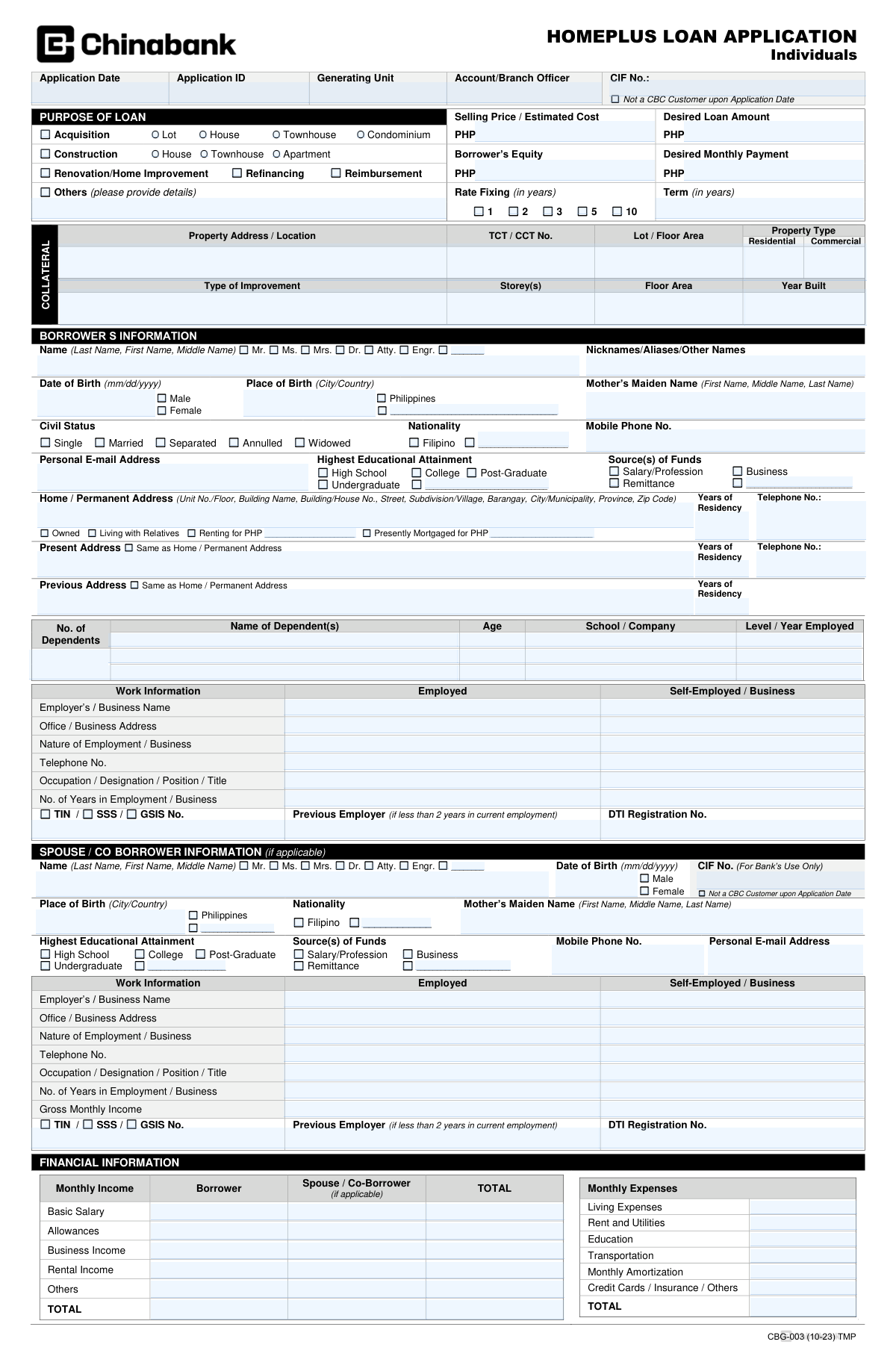
The HomePlus Loan Application (Individuals) is an official China Banking Corporation form used to request a HomePlus housing loan and to disclose the borrower’s personal information, employment/business details, income and expenses, assets and liabilities, and property/collateral information. It also includes required declarations and authorizations (e.g., bank secrecy waivers, credit investigation consent, CIC disclosure, and data privacy consent) that allow the bank to verify information and assess creditworthiness. The form captures spouse/co-borrower and attorney-in-fact details when applicable, and includes FATCA-related questions for U.S. indicia screening. Completing it accurately is important because misrepresentation or missing information may lead to disapproval or cancellation of an approved loan.
Our AI automatically handles information lookup, data retrieval, formatting, and form filling.
It takes less than a minute to fill out HomePlus Loan Application (CBG-003) using our AI form filling.
Securely upload your data. Information is encrypted in transit and deleted immediately after the form is filled out.
Form specifications
| Form name: | HomePlus Loan Application (Individuals) – China Banking Corporation (CBC) |
| Number of pages: | 2 |
| Filled form examples: | Form HomePlus Loan Application (CBG-003) Examples |
| Language: | English |
Instafill Demo: filling out a legal form in seconds
How to Fill Out HomePlus Loan Application (CBG-003) Online for Free in 2026
Are you looking to fill out a HOMEPLUS LOAN APPLICATION (CBG-003) form online quickly and accurately? Instafill.ai offers the #1 AI-powered PDF filling software of 2026, allowing you to complete your HOMEPLUS LOAN APPLICATION (CBG-003) form in just 37 seconds or less.
Follow these steps to fill out your HOMEPLUS LOAN APPLICATION (CBG-003) form online using Instafill.ai:
- 1 Enter application header details (application date, application ID if provided, generating unit/account/branch officer, and CIF number if you are an existing CBC customer).
- 2 Complete the Purpose of Loan section by selecting the loan purpose (acquisition, construction, renovation/home improvement, refinancing, reimbursement, or others) and filling in selling price/estimated cost, desired loan amount, borrower’s equity, desired monthly payment, rate fixing period, and loan term.
- 3 Provide collateral/property information, including full property address/location, TCT/CCT number, lot/floor area, property type (residential/commercial), improvement details (type, storeys, floor area), and year built.
- 4 Fill out Borrower’s Information: full legal name and title, aliases (if any), birth details, mother’s maiden name, sex, civil status, nationality, contact details, education, sources of funds, addresses and residency history, dependents, and work/employment or business information (including TIN/SSS/GSIS and registrations if applicable).
- 5 If applicable, complete Spouse/Co-Borrower and/or Attorney-in-Fact sections with the same identity, contact, education, source of funds, and work/income details, and indicate broker/agent referral information if you were referred.
- 6 Complete Financial Information and Assets & Liabilities: monthly income and expenses, real estate/auto/stocks/deposit accounts, credit cards, loans (last 3 years), and trade/business references; answer affiliation and FATCA questions and prepare any required supporting forms (e.g., W-8BEN if applicable).
- 7 Review the Agreement/consents carefully, then sign and date in the appropriate signature blocks (borrower, spouse/co-borrower, attorney-in-fact), and upload/submit the listed basic and collateral requirements along with the non-refundable filing fee.
Our AI-powered system ensures each field is filled out correctly, reducing errors and saving you time.
Why Choose Instafill.ai for Your Fillable HomePlus Loan Application (CBG-003) Form?
Speed
Complete your HomePlus Loan Application (CBG-003) in as little as 37 seconds.
Up-to-Date
Always use the latest 2026 HomePlus Loan Application (CBG-003) form version.
Cost-effective
No need to hire expensive lawyers.
Accuracy
Our AI performs 10 compliance checks to ensure your form is error-free.
Security
Your personal information is protected with bank-level encryption.
Frequently Asked Questions About Form HomePlus Loan Application (CBG-003)
This form is used to apply for China Banking Corporation (CBC) HomePlus loans for home-related financing such as acquisition (lot/house/townhouse/condominium), construction, renovation/home improvement, refinancing, or reimbursement.
The principal borrower must complete the form. If applicable, the spouse/co-borrower and an attorney-in-fact (authorized representative) must also provide their information and sign in the designated sections.
Yes. The form includes a checkbox indicating you are “Not a CBC Customer upon Application Date,” which allows non-customers to apply.
You may select acquisition, construction, renovation/home improvement, refinancing, reimbursement, or “Others.” If you choose “Others,” you must provide details in the space provided.
You should fill in the selling price/estimated cost, desired loan amount, borrower’s equity, and desired monthly payment. You also need to select your preferred rate fixing period (e.g., 1, 2, 3, 5, or 10 years) and the loan term in years.
You need to provide the property address/location, TCT/CCT number, lot/floor area, property type (residential or commercial), and improvement details such as storeys, floor area, and year built (if applicable).
The form asks for your full name, date and place of birth, mother’s maiden name, sex, civil status, nationality, contact details, addresses (home/present/previous), years of residency, dependents, and work/employment or business information.
No. The spouse/co-borrower section is “if applicable.” If you do not have a spouse or co-borrower, you can leave that section blank unless the bank requires a co-borrower based on credit evaluation.
You must list monthly income sources (e.g., basic salary, allowances, business/rental income, others) and monthly expenses (e.g., living expenses, rent/utilities, education, transportation, amortizations, credit cards/insurance/others). You also need to disclose assets and liabilities such as real estate, vehicles, stocks, deposit accounts, credit cards, and loans within the last 3 years.
You must submit a duly accomplished application form, one (1) photo-bearing valid ID, latest Income Tax Return/BIR Form 2316, proof of billing, marriage contract (if applicable), and the non-refundable filing fee.
Employed applicants need a Certificate of Employment with compensation and tenure. Professionals may need a Profession Information Sheet (CBC form), while sole proprietors may need DTI registration, audited financial statements (last 3 years), bank statements, company profile, and a customer/supplier list with contact details.
OFWs/non-residents typically need a Certificate of Employment/POEA contract, proof of remittance or payslips for the last 6 months, and a consularized Special Power of Attorney (CBC format, to be submitted upon loan approval if applicable).
For purchase/reimbursement, submit documents like Contract to Sell/Reservation Agreement/Conditional Deed of Sale, Statement of Account, and parking title/deed of assignment if applicable. For construction/renovation, provide floor/building plans and cost estimates/material specifications; for refinancing, provide Statement of Account and bank ledgers/official receipts of loan payments for 3 months, plus title and tax documents listed in the collateral requirements.
The filing fee is non-refundable: PHP 5,000 if within Metro Manila or within 50 km from any Consumer Loans Group (CLG) Center, and PHP 5,500 if outside those areas (subject to change at CBC’s option).
Submit one (1) complete set of documents (attach originals for verification) together with the filing fee to help ensure faster processing; CBC may request additional documents during evaluation. For inquiries, you may call 8-885-5555 locals 5289, 5330, 5371, 5381, 5382, 5383, 5456; 8-815-4749; 8-802-9307; 8-840-2745, or visit www.chinabank.ph.
Compliance HomePlus Loan Application (CBG-003)
Validation Checks by Instafill.ai
1
Application Date format and not in the future
Validate that Application Date is provided and follows mm/dd/yyyy. The date must not be later than the current system date to prevent future-dated applications that can break SLA tracking, pricing, and compliance reporting. If invalid or future-dated, block submission and prompt the user to correct the date.
2
Loan purpose selection completeness and exclusivity
Ensure at least one PURPOSE OF LOAN option is selected (e.g., Acquisition, Construction, Renovation/Home Improvement, Refinancing, Reimbursement, Others). If 'Others' is selected, require a non-empty details field with a minimum length to avoid vague purposes. If no purpose is selected or 'Others' lacks details, fail validation and require correction before proceeding.
3
Property category consistency with selected purpose
When Acquisition is selected, require exactly one property type among Lot/House/Townhouse/Condominium; when Construction is selected, require one among House/Townhouse/Apartment. This prevents mismatched collateral and appraisal workflows (e.g., Construction with Condominium). If inconsistent or missing, reject submission and request the correct property category.
4
Currency fields are numeric PHP amounts and within allowed ranges
Validate that all PHP amount fields (Selling Price/Estimated Cost, Desired Loan Amount, Borrower’s Equity, Desired Monthly Payment, rent amount, mortgage amount, income/expense lines, balances, credit limits) are numeric, non-negative, and use valid decimal precision (e.g., max 2 decimals). This prevents calculation errors and downstream underwriting failures. If any amount is non-numeric, negative, or unreasonably large (configurable caps), flag the field and block submission.
5
Loan amount vs selling price/estimated cost and equity logical check
If Selling Price/Estimated Cost and Borrower’s Equity are provided, validate that Desired Loan Amount does not exceed (Selling Price/Estimated Cost - Borrower’s Equity) and that Borrower’s Equity is not greater than the total cost. This ensures basic affordability and prevents impossible financing structures. If the relationship fails, show an error explaining the mismatch and require corrected figures.
6
Rate fixing and term values are valid and consistent
Validate that Rate Fixing (in years) is one of the allowed options (1, 2, 3, 5, 10) and that Term (in years) is a positive integer within product limits. Additionally, Rate Fixing must be less than or equal to the Term to avoid invalid pricing schedules. If invalid, block submission and require a valid selection/value.
7
Collateral property address and title identifiers completeness
Require Property Address/Location to be populated with sufficient granularity (e.g., street/barangay/city/province) and require TCT/CCT No. when collateral is declared. This is critical for title verification, appraisal ordering, and lien checks. If missing or too short/ambiguous, fail validation and request complete address/title details.
8
Collateral numeric fields validation (lot/floor area, storeys, year built)
Validate Lot/Floor Area and Floor Area are positive numbers (with reasonable upper bounds), Storey(s) is a positive integer, and Year Built is a 4-digit year not in the future and not unrealistically old (configurable, e.g., >= 1800). These checks prevent appraisal and insurance issues caused by malformed property data. If any value fails, block submission and highlight the specific field.
9
Borrower name fields completeness and character rules
Require Borrower Last Name, First Name, and (if the form mandates) Middle Name, and validate they contain only allowed characters (letters, spaces, hyphens, apostrophes) and are not placeholders (e.g., 'N/A', '---'). Also validate that a title selection is made if required by the UI, and that Nicknames/Aliases is optional but, if provided, follows the same character rules. If invalid, reject submission to avoid KYC/ID matching failures.
10
Borrower date of birth format, age eligibility, and place of birth completeness
Validate Date of Birth is in mm/dd/yyyy and represents a real calendar date; compute age and enforce product eligibility (e.g., minimum 18 and maximum per bank policy at maturity if term is provided). Require Place of Birth (City/Country) to be non-empty to support KYC and regulatory screening. If DOB is invalid or age is out of bounds, block submission and provide a clear eligibility/format message.
11
Gender, civil status, and spouse/co-borrower section dependency
Require selection of Gender and Civil Status for the borrower. If Civil Status is 'Married', require completion of the Spouse/Co-Borrower section (at minimum name and DOB) or an explicit indicator that spouse is not a co-borrower per bank rules (if supported). If dependency rules are not met, fail validation to prevent incomplete credit evaluation and document requirements (e.g., marriage contract).
12
Nationality and Philippines-specific fields consistency
Validate that Nationality is provided; if 'Filipino' is selected, ensure the Philippines indicator/address expectations align (e.g., Philippine address format with province/zip). If a non-Filipino nationality is provided, ensure required supporting fields are not left blank where applicable (e.g., country in place of birth, FATCA indicators). If inconsistent, block submission and request corrected nationality/location details.
13
Phone number and email format validation (borrower, spouse/co-borrower, attorney-in-fact, references)
Validate Mobile Phone No. and Telephone No. follow accepted formats (e.g., PH mobile 09XXXXXXXXX or +63XXXXXXXXXX; landline with area code) and are not all zeros or too short. Validate Personal E-mail Address uses standard email syntax and domain rules. If any contact field is malformed, fail validation because it impacts verification, disclosures, and servicing communications.
14
Address sections completeness and residency years validation
Require Home/Permanent Address to include key components (city/municipality, province, and zip code at minimum) and validate Years of Residency is a non-negative number within a reasonable range (e.g., 0–99). If 'Present Address Same as Home/Permanent Address' is checked, ensure present address fields are either auto-copied or left blank but not conflicting; similarly for Previous Address. If address/residency data is incomplete or contradictory, block submission to avoid KYC and credit investigation issues.
15
Employment/business information requiredness and conditional fields
Require the borrower to select Employed or Self-Employed/Business and enforce the corresponding required fields: for Employed, Employer Name, Office Address, Occupation/Title, Years in Employment, and employer Telephone; for Self-Employed, Business Name, Business Address, Nature of Business, Years in Business, and DTI Registration No. where applicable. If Years in Employment/Business is less than 2, require Previous Employer details as indicated on the form. If conditional requirements are not met, fail validation to ensure underwriting can verify income stability.
16
Government ID numbers format validation (TIN / SSS / GSIS) and at least one provided
Validate that at least one of TIN, SSS, or GSIS is provided for each required party (borrower; spouse/co-borrower if applicable; attorney-in-fact if applicable). Enforce format rules (e.g., TIN typically 9–12 digits depending on formatting policy; SSS/GSIS numeric with expected length) and reject obvious placeholders. If missing or malformed, block submission because these identifiers are needed for verification, reporting, and compliance checks.
17
Financial information arithmetic consistency (income, expenses, totals)
Validate that the TOTAL monthly income equals the sum of its components for borrower and spouse/co-borrower, and that the combined TOTAL matches the sum of both parties where applicable. Similarly, validate that TOTAL monthly expenses equals the sum of expense line items. If totals do not reconcile (allowing minor rounding tolerance), flag the discrepancy and require correction to prevent incorrect debt-to-income calculations.
18
FATCA responses completeness and document trigger rules
If the applicant answers YES to being a US Citizen/Green Card Holder or meeting the Substantial Presence Test, require completion/attachment indicator for the separate FATCA U.S. Persons form. If the applicant answers NO but indicates any U.S. indicia (born in U.S., U.S. address/phone, standing instructions, POA with U.S. address), require W-8BEN and valid non-U.S. passport (and additional renunciation documentation if born in the U.S.). If triggers are not satisfied, block submission to meet regulatory compliance.
19
Attorney-in-fact section requiredness and signature dependency
If an Attorney-in-Fact is indicated/used (section filled or signature line present), require complete Attorney-in-Fact identity fields (name, DOB, relationship, nationality, civil status, address, mobile, email, and TIN/SSS/GSIS). Also require the Attorney-in-Fact signature/date when applicable, and ensure borrower signature is still present unless policy allows otherwise. If incomplete, fail validation to prevent invalid authorization and legal enforceability issues.
20
Broker/Agent referral dependency and contact completeness
If 'REFERRED BY BROKER / AGENT' is YES, require Broker/Agent signature, printed name/date, and contact number in a valid phone format. This ensures traceability of referrals and commission/audit controls. If YES is selected but details are missing or invalid, block submission until completed.
21
Required signatures and dates presence (borrower, spouse/co-borrower, attorney-in-fact)
Require Borrower’s Signature Over Printed Name and Date for all submissions. If spouse/co-borrower section is applicable/filled, require spouse/co-borrower signature and date; if attorney-in-fact is applicable, require attorney-in-fact signature and date. If any required signature/date is missing, fail validation because the application and consents may be unenforceable.
Common Mistakes in Completing HomePlus Loan Application (CBG-003)
Applicants often try to complete every blank on the form, including fields intended “For Bank’s Use Only,” or they leave required customer identifiers empty when they actually have them. This can cause encoding errors, duplicate records, or delays while the branch verifies your profile. Only fill these fields if the form explicitly asks you to (or if the bank/branch officer provided the values); otherwise, leave them blank and let the bank complete them.
People frequently tick one purpose (e.g., Acquisition) but provide supporting details that match another (e.g., Renovation cost estimates or Refinancing statement of account). This mismatch leads to wrong document requirements being requested, rework, and longer processing time. Choose the single primary purpose that matches your transaction and ensure the amounts and required attachments align with that purpose (e.g., CTS for purchase, plans/cost estimates for construction, SOA/ledgers for refinancing).
A common mistake is entering amounts without “PHP,” mixing monthly vs. total figures, or providing numbers that don’t reconcile (e.g., equity + loan amount not matching selling price/estimated cost). This can trigger immediate clarification requests or make the application appear unaffordable during evaluation. Use consistent PHP amounts, double-check arithmetic, and ensure the monthly payment is realistic and supported by your income and expense declarations.
Applicants sometimes tick multiple rate-fixing choices (1/2/3/5/10 years) or leave rate fixing/term blank because they assume the bank will decide. Missing or conflicting selections can delay quoting, approval routing, and preparation of loan terms. Select only one rate-fixing period and clearly indicate the loan term in years based on what you intend and what you can afford.
Many submissions provide a vague address (missing barangay/city/province) or omit title details (TCT/CCT No.) and areas, especially for condos (CCT) or house-and-lot (TCT). Incomplete collateral data prevents title verification, appraisal scheduling, and correct collateral tagging (residential vs commercial). Provide the full property location, correct title number (TCT for land/house-and-lot, CCT for condominium), and accurate lot/floor areas as shown on the title/tax declaration.
Applicants often write a nickname in the main “Name” field, omit the middle name, or forget to list aliases/other names used in IDs, employment records, or prior bank accounts. This can cause KYC/AML mismatches, failed database hits, and repeated requests for clarification. Enter your full legal name exactly as it appears on your primary ID and list any nicknames/aliases/other names in the designated field.
A frequent error is using a different date format (dd/mm/yyyy), leaving out the country for place of birth, or writing the mother’s maiden name in the wrong order. These details are used for identity verification and record matching, so inconsistencies can slow approval or require resubmission. Follow the specified format (mm/dd/yyyy), provide City and Country, and write the mother’s maiden name as First/Middle/Last exactly as reflected in official records.
People commonly provide partial addresses (no unit/floor, barangay, or zip code) or forget to tick “Same as Home/Permanent Address,” then leave the Present/Previous Address sections incomplete. This creates issues for field verification, billing proof matching, and residency assessment. Write the complete address in the required components, use the “Same as” checkbox when applicable, and ensure years of residency are filled and consistent across home/present/previous addresses.
Applicants often list only the employer name without full office address/telephone number, omit position/title, or leave “No. of Years in Employment/Business” blank. If tenure is under 2 years, many forget to provide the previous employer, which is explicitly required. Provide complete employer/business details, accurate tenure, and previous employer information when applicable to avoid verification delays.
It’s common to enter the wrong identifier in the wrong field (e.g., SSS in the TIN slot), transpose digits, or leave all government numbers blank due to privacy concerns. These identifiers support credit checks and income validation, and missing/incorrect numbers can stall processing. Enter the correct number for your status (TIN and SSS/GSIS as applicable), double-check digit counts, and ensure the spouse/co-borrower section is also completed when required.
Applicants frequently leave some income lines blank (allowances, business, rental, others) but still put a total, or they omit recurring expenses and existing amortizations/credit card balances. Inconsistencies can lead to affordability miscalculation, higher perceived risk, or later findings during credit investigation that require reprocessing. Fill each applicable line item, compute totals accurately, and disclose all regular obligations (loans, credit cards, insurance, monthly amortizations) to match supporting documents.
A very common cause of delay is submitting only the basic requirements but not the additional documents required for your employment type (e.g., COE with compensation/tenure, POEA contract and remittance proofs, DTI and audited financials) or for the loan purpose (e.g., CTS/SOA for purchase, plans and cost estimates for construction, SOA/ledgers/ORs for refinancing). This results in repeated follow-ups and resets in evaluation timelines. Use the checklist: match your borrower type and loan purpose to the exact required documents, submit one complete set, and bring originals for verification as instructed.
Saved over 80 hours a year
“I was never sure if my IRS forms like W-9 were filled correctly. Now, I can complete the forms accurately without any external help.”
Kevin Martin Green
Your data stays secure with advanced protection from Instafill and our subprocessors

Robust compliance program
Transparent business model
You’re not the product. You always know where your data is and what it is processed for.
ISO 27001, HIPAA, and GDPR
Our subprocesses adhere to multiple compliance standards, including but not limited to ISO 27001, HIPAA, and GDPR.
Security & privacy by design
We consider security and privacy from the initial design phase of any new service or functionality. It’s not an afterthought, it’s built-in, including support for two-factor authentication (2FA) to further protect your account.
Fill out HomePlus Loan Application (CBG-003) with Instafill.ai
Worried about filling PDFs wrong? Instafill securely fills homeplus-loan-application-individuals-china-bankin forms, ensuring each field is accurate.



