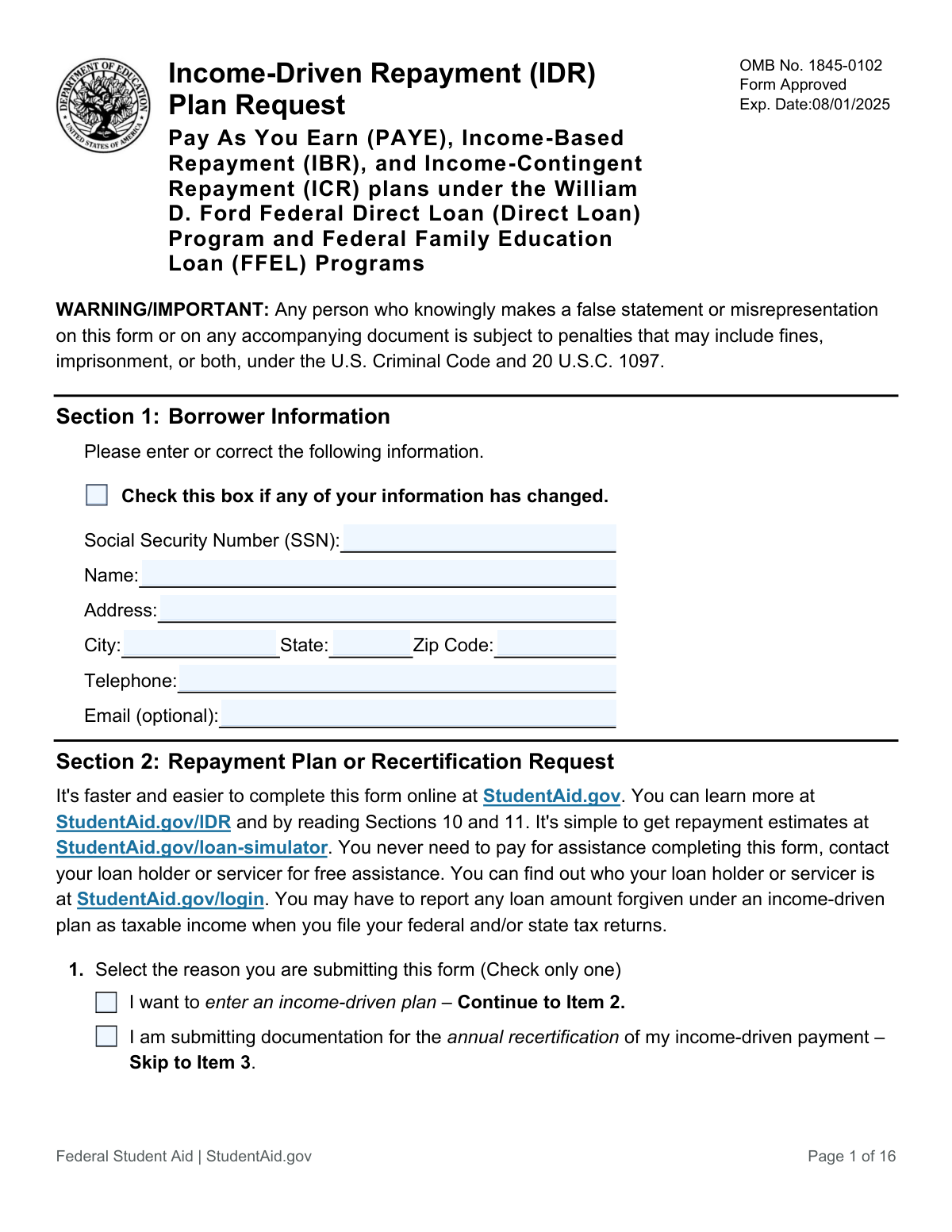
Yes! You can use AI to fill out Income-Driven Repayment (IDR) Plan Request (PAYE, IBR, and ICR) — William D. Ford Federal Direct Loan (Direct Loan) Program and Federal Family Education Loan (FFEL) Programs (OMB No. 1845-0102)

The Income-Driven Repayment (IDR) Plan Request is an official Federal Student Aid form that lets borrowers request entry into an IDR plan, switch between IDR plans, or submit annual recertification/recalculation information for PAYE, IBR, or ICR. It collects borrower identity details, family size, marital status, and income information, and may include authorization for the U.S. Department of Education to retrieve Federal Tax Information (FTI) from the IRS (Direct Loans only) or require alternative income documentation. Submitting it correctly is important because it determines your monthly payment amount, ongoing eligibility, and whether you must provide tax returns/transcripts or current income proof. Today, this form can be filled out quickly and accurately using AI-powered services like Instafill.ai, which can also convert non-fillable PDF versions into interactive fillable forms.
Our AI automatically handles information lookup, data retrieval, formatting, and form filling.
It takes less than a minute to fill out IDR Plan Request (OMB 1845-0102) using our AI form filling.
Securely upload your data. Information is encrypted in transit and deleted immediately after the form is filled out.

Form specifications

Form name: Income-Driven Repayment (IDR) Plan Request (PAYE, IBR, and ICR) — William D. Ford Federal Direct Loan (Direct Loan) Program and Federal Family Education Loan (FFEL) Programs (OMB No. 1845-0102)
Number of pages: 10
Filled form examples: Form IDR Plan Request (OMB 1845-0102) Examples
Language: English
Categories: education forms, federal forms, federal loan forms
main-image

Instafill Demo: filling out a legal form in seconds

How to Fill Out IDR Plan Request (OMB 1845-0102) Online for Free in 2026

Are you looking to fill out a IDR PLAN REQUEST (OMB 1845-0102) form online quickly and accurately? Instafill.ai offers the #1 AI-powered PDF filling software of 2026, allowing you to complete your IDR PLAN REQUEST (OMB 1845-0102) form in just 37 seconds or less.
Follow these steps to fill out your IDR PLAN REQUEST (OMB 1845-0102) form online using Instafill.ai:
  1. 1 Go to Instafill.ai and upload the IDR Plan Request form (or select it from the form library) and start a new fill session.
  2. 2 Enter borrower information (SSN, name, address, phone, and optional email) and indicate whether any borrower details have changed.
  3. 3 Choose the reason for submission (enter an IDR plan, change plans, annual recertification, or early recalculation) and select the desired plan (PAYE, IBR, or ICR) if applicable.
  4. 4 Answer loan status questions (multiple servicers/holders and deferment/forbearance preferences) and provide family size details (children and other dependents supported).
  5. 5 Complete marital status and spouse sections as applicable, including whether you filed jointly and whether your spouse has federal student loans, then provide spouse identifiers if required.
  6. 6 Provide income information by either authorizing IRS tax information retrieval (Direct Loans) or uploading the required tax return/transcript or current income documentation (pay stubs/employer letters) per the form’s instructions.
  7. 7 Review the borrower requests, authorizations, and certifications, e-sign and date the form, then download/share the completed packet for submission to each loan holder/servicer with any required attachments.

Our AI-powered system ensures each field is filled out correctly, reducing errors and saving you time.

Why Choose Instafill.ai for Your Fillable IDR Plan Request (OMB 1845-0102) Form?

Speed

Complete your IDR Plan Request (OMB 1845-0102) in as little as 37 seconds.

Up-to-Date

Always use the latest 2026 IDR Plan Request (OMB 1845-0102) form version.

Cost-effective

No need to hire expensive lawyers.

Accuracy

Our AI performs 10 compliance checks to ensure your form is error-free.

Security

Your personal information is protected with bank-level encryption.

Frequently Asked Questions About Form IDR Plan Request (OMB 1845-0102)

This form is used to request enrollment in an income-driven repayment plan (PAYE, IBR, or ICR), to change from one IDR plan to another, or to submit income documentation for annual recertification or an early payment recalculation.

You should complete this form if you have eligible federal student loans (Direct Loans and/or FFEL Program loans) and want an IDR payment based on your income, or if you’re already on an IDR plan and need to recertify or update your income information.

Yes. The form states it’s faster and easier to complete online at StudentAid.gov/IDR, and you can also use StudentAid.gov/loan-simulator to estimate payments before you apply.

Pick only one option: entering an IDR plan, annual recertification, early recalculation, or changing to a different IDR plan. Your selection determines whether you complete Item 2 (plan choice) or skip ahead to the income documentation steps.

You can request PAYE, IBR, or ICR, but eligibility depends on your loan type. FFEL Program loans are only eligible for IBR, and Direct Consolidation Loans that repaid Parent PLUS loans are only eligible for ICR.

If you check “Yes” for multiple loan holders/servicers in Item 3, you must submit a separate request to each loan holder/servicer so all eligible loans can be placed on (or updated under) the IDR plan.

Yes. In Item 4 you can choose to start making payments under the IDR plan immediately, or you can choose to wait until your deferment/forbearance ends before repayment begins.

Enter the number of children (including unborn children) who receive more than half their support from you, plus any other people (excluding spouse and children) who live with you and receive more than half their support from you. Do not add yourself or your spouse—those are included automatically when applicable.

It depends on your situation and how you filed taxes. If you’re married but separated or unable to reasonably access your spouse’s income information, you can be treated as single; otherwise, the form may require spouse details and possibly spouse income documentation, especially if you filed jointly.

If your income hasn’t significantly changed, you’ll generally provide your most recent federal tax return or tax transcript (and your spouse’s too if filing jointly). If income has significantly decreased, you haven’t filed taxes recently, or you don’t consent to IRS retrieval, you may need current income documentation such as pay stubs or employer letters as described in Section 5B.

Documents must be dated within 90 days of the date you sign the form, and you must provide at least one document for each source of taxable income (for you and your spouse if applicable). You should note how often you receive the income (e.g., biweekly), and you may attach a signed statement if documentation isn’t available.

If you have Direct Loans, checking “I APPROVE, CONSENT, and AGREE” allows the Department of Education to obtain and use your IRS Federal Tax Information annually to determine your IDR eligibility and payment, which can enable automatic annual recertification. If you do not consent, you must provide alternative income documentation (Section 5B) and may need to do so annually.

If you don’t qualify for the plan you requested (or didn’t select a plan when required), your loan holder may reject the application and keep you in your current plan or place you in the 10-year Standard plan if you’re not already in an IDR plan. If you don’t submit the completed form and required documentation, your request (including recertification/recalculation) won’t be processed.

Send the completed form and documentation to the address shown in Section 7 (or to your loan holder if no address is shown). The form instructs you to omit pages 10–16 when mailing or faxing back.

Yes—AI form-filling services like Instafill.ai can help auto-fill form fields accurately and save time by pulling your information into the right sections. If your PDF is flat/non-fillable, Instafill.ai can convert it into an interactive fillable form and then guide you through completing it online before you download and submit it to your loan servicer.

Compliance IDR Plan Request (OMB 1845-0102)
Validation Checks by Instafill.ai

1
Section 1 Change-Flag Controls Borrower Info Entry
Validates that Section 1 borrower information fields (SSN, name, address, city, state, ZIP, telephone, email) are only provided when the 'information has changed' checkbox is selected, per the form’s instructions. If the change flag is not selected, these fields should be blank to avoid unintended overwrites of existing servicing records. If validation fails, the submission should be flagged for review or the user prompted to either check the change box or clear the updated fields.
2
Borrower SSN Format and Basic Validity
Ensures the borrower SSN is exactly 9 digits (allowing optional dashes) and is not an obviously invalid value (e.g., all zeros, 000-xx-xxxx, 666-xx-xxxx, or 9xx-xx-xxxx). SSN is a primary identifier used for identity verification and matching to loan records and IRS tax data retrieval. If validation fails, the form should be rejected or returned for correction because downstream matching and authorization cannot be reliably performed.
3
Borrower Name Completeness and Character Validation
Checks that the borrower name is present (when Section 1 updates are provided) and appears to be a full legal name (at minimum first and last), using allowed characters (letters, spaces, hyphens, apostrophes) and reasonable length limits. This reduces identity mismatches and prevents ingestion issues caused by unsupported characters. If validation fails, prompt for correction and prevent submission until a valid name is provided.
4
US Mailing Address Completeness and State/ZIP Format
Validates that address, city, state, and ZIP are all present together when Section 1 updates are provided, and that state is a valid two-letter USPS abbreviation and ZIP is either 5 digits or ZIP+4. Accurate address data is required for servicing communications and legal notices. If validation fails, the submission should be blocked and the user asked to correct the address components.
5
Telephone Number Format and Extension Handling
Ensures the telephone number (when provided as an update) contains a valid US phone format with 10 digits, allowing common punctuation, and optionally captures an extension in a separate/recognized pattern. The form includes consent to contact the borrower at provided cellular numbers, so a reachable number is operationally important. If validation fails, prompt for a corrected phone number to avoid failed contact attempts and compliance issues.
6
Email Address Format (Optional Field)
If an email address is provided, validates it conforms to standard email syntax (local@domain) and does not contain spaces or invalid characters. While optional, an invalid email can cause delivery failures and missed servicing notifications. If validation fails, the system should either reject the email value and request correction or accept the submission while excluding the invalid email (based on business rules).
7
Item 1 Request Reason Must Be Exactly One Selection
Validates that exactly one reason is selected in Item 1 (enter IDR plan, annual recertification, early recalculation, or change to a different IDR plan). This selection drives the required path through the rest of the form and determines whether a plan choice is required. If validation fails (none or multiple selected), the submission should be blocked and the user required to choose a single reason.
8
Item 2 Plan Choice Required Only for New Enrollment or Plan Change
Checks that a plan (IBR, PAYE, or ICR) is selected in Item 2 when the borrower indicates they want to enter an IDR plan or change to a different IDR plan, and that no plan is selected when the borrower is only recertifying/recalculating (unless your process explicitly allows it). This prevents ambiguous servicing instructions and incorrect plan placement. If validation fails, prompt the borrower to select exactly one plan (or clear the plan selection if not applicable).
9
Item 2 Plan Choice Must Be Mutually Exclusive
Ensures only one of IBR, PAYE, or ICR is checked in Item 2. Multiple selections create conflicting repayment instructions and can lead to incorrect eligibility determinations. If validation fails, the system should require the borrower to select a single plan before submission can proceed.
10
Item 3 Multiple Loan Holders Selection Required and Exclusive
Validates that the borrower answers Item 3 with exactly one selection (Yes or No). This affects operational routing because borrowers with multiple servicers must submit requests to each holder/servicer. If validation fails, the submission should be blocked and the borrower prompted to select one option.
11
Item 4 Deferment/Forbearance Status Selection Required and Exclusive
Ensures exactly one deferment/forbearance option is selected (No; Yes and start immediately; Yes and wait until it ends). This selection impacts when payments begin and whether the servicer should bill immediately. If validation fails, the borrower must correct the selection to avoid improper billing or unintended payment delays.
12
Family Size Counts Must Be Non-Negative Integers and Reasonable
Validates that Item 5 (children) and Item 6 (other people) are provided as whole numbers (no decimals, no negatives) and fall within reasonable upper bounds to catch keying errors (e.g., 999). Family size directly affects poverty guideline calculations and monthly payment amounts under IDR. If validation fails, prompt for corrected numeric entries and do not calculate eligibility/payment until resolved.
13
Marital Status Selection Required and Drives Spouse Data Requirements
Checks that exactly one marital status option is selected in Item 7 and enforces the correct downstream requirements: 'Single' and 'Married but separated/unable to access' should not require spouse fields, while 'Married' may require additional spouse-related answers. This prevents collecting unnecessary spouse PII and ensures correct income treatment. If validation fails, block submission and require a single marital status selection.
14
Spouse Information Required When Married Filing Jointly and Spouse Has Loans
When Item 7 is 'Married', Item 8 indicates the last return was filed jointly, and Item 9 indicates the spouse has federal student loans, validates that spouse SSN, spouse name, and spouse date of birth are all present. These fields are needed to correctly account for combined income/loan debt and to coordinate repayment calculations. If validation fails, the submission should be rejected or routed to an exception workflow until spouse information is completed.
15
Spouse SSN and Date of Birth Format Validation
Validates spouse SSN is 9 digits (allowing dashes) and spouse date of birth is a valid calendar date in mm/dd/yyyy format and not in the future. Correct spouse identifiers reduce mismatches when considering spouse loans and income documentation requirements. If validation fails, prompt for correction and prevent submission when spouse data is required.
16
Signature and Signature Date Presence and Date Format
Ensures the borrower signature is present and the signature date is provided in mm/dd/yyyy format with a valid calendar date. The signature certifies the submission under penalty of perjury and is required to authorize processing and, where applicable, IRS-related consent language. If validation fails, the form should be considered incomplete and not processed until signed and dated correctly.

Common Mistakes in Completing IDR Plan Request (OMB 1845-0102)

Not checking the “information has changed” box but still updating Section 1

Many borrowers start filling in SSN, name, or address fields without checking the box that indicates their borrower information has changed. This can cause the servicer to treat the Section 1 updates as incomplete, inconsistent, or unnecessary, which may delay processing or leave outdated contact information on file. Only complete the Section 1 personal-info fields when you are correcting/updating them, and make sure the change box is checked first. AI-powered form filling tools like Instafill.ai can enforce these conditional rules so you don’t accidentally fill fields that should be left blank.

SSN entry errors (missing digits, transposed numbers, or inconsistent formatting)

A very common issue is entering fewer than 9 digits, swapping digits, or using an incorrect SSN (especially when copying from another document). An incorrect SSN can prevent identity verification and cause the application to be rejected or routed incorrectly, delaying enrollment/recertification. Double-check all 9 digits against your Social Security card or official records before submitting. Instafill.ai can validate SSN length/format and flag likely typos before you send the form.

Selecting more than one reason in Item 1 (or choosing the wrong reason)

Item 1 instructs borrowers to check only one reason, but people often check multiple boxes (e.g., “enter an IDR plan” and “annual recertification”) or pick the wrong one. This leads to incorrect skip logic, missing sections, and processing delays because the servicer can’t tell whether you’re applying, recertifying, or requesting an early recalculation. Carefully choose the single option that matches your goal and follow the “continue/skip” directions exactly. Instafill.ai can guide you through the correct path and prevent mutually exclusive selections.

Choosing an ineligible plan for the loan type (FFEL vs Direct vs Parent PLUS consolidation rules)

Borrowers frequently select PAYE or ICR without realizing certain loans are restricted (e.g., FFEL loans generally only qualify for IBR; Direct Consolidation loans that repaid Parent PLUS loans are generally only eligible for ICR). Picking an ineligible plan can result in rejection or being placed into a different plan than expected, which can affect payment amount and forgiveness timelines. Confirm your loan types in StudentAid.gov (or with your servicer) before selecting a plan. Instafill.ai can help by prompting for loan type and warning when a selected plan is commonly incompatible.

Answering “multiple loan holders/servicers” incorrectly and submitting to only one

People often assume they have one servicer, check “No,” and submit a single request even when they have multiple holders/servicers. The consequence is partial processing—some loans get placed on IDR while others remain on the prior plan, creating unexpected bills or delinquency risk. Verify all loan holders/servicers in your StudentAid.gov account and submit a request to each if you select “Yes.” Instafill.ai can remind you to confirm servicer count and generate consistent copies for each submission.

Misunderstanding deferment/forbearance choice in Item 4

Borrowers in deferment/forbearance often check the wrong option—either unintentionally starting payments immediately or unintentionally delaying IDR payments when they wanted them to begin. This can lead to surprise billing, continued interest accrual, or missed opportunities to start qualifying payments sooner. Confirm your current status and decide whether you want IDR payments to start now or after the deferment/forbearance ends. Instafill.ai can reduce errors by clarifying the practical effect of each selection and ensuring only one option is chosen.

Incorrect family size counts (including yourself/spouse or counting dependents who don’t qualify)

Items 5–6 are commonly miscounted because the form notes you should not enter a value for yourself or your spouse (they’re included automatically if appropriate), and because “support” rules differ from tax exemptions. Overstating or understating family size can change the calculated payment amount and may trigger follow-up questions or corrections later. Count only qualifying children (including unborn children) who receive more than half their support from you, and only “other people” who live with you and receive more than half their support from you. Instafill.ai can apply the definition logic and help prevent double-counting.

Marital status and tax filing status mismatch (wrong skip path in Sections 4A–4C)

Borrowers often mark “Married” but then follow the “Single” path, or they forget that filing jointly changes which income documentation is required. This leads to missing spouse information (Items 10/16) or missing tax returns/transcripts, which can stall processing. Match your marital status selection to your actual situation and follow the directed item numbers (skip/continue) carefully. Instafill.ai can automatically route you through the correct branch based on your answers and prevent contradictory selections.

Providing the wrong income proof (tax return vs current income documentation) based on Section 4 answers

A frequent mistake is submitting a tax return when the form requires current income documentation (e.g., after a significant income decrease), or submitting pay stubs when the form would accept a tax return/transcript. This can cause delays, requests for additional documents, or an incorrect payment calculation. Use the Section 4 prompts to determine whether you should provide your most recent federal tax return/transcript (Section 5A/5B) or current income documentation (Section 5B). Instafill.ai can help by checking your answers and generating a document checklist that matches the required path.

Submitting income documents that are too old or incomplete (Section 5B 90-day rule and “all sources” rule)

Borrowers often attach pay stubs older than 90 days, forget to document each taxable income source, or fail to note pay frequency on the documentation. The servicer may reject the documentation or request resubmission, delaying approval and potentially leaving the borrower in a higher payment plan temporarily. Ensure every taxable income source is covered with at least one document dated within 90 days of signing, and write the pay frequency (e.g., biweekly) on the documents. Instafill.ai can flag stale documents and prompt you to include all required sources and annotations.

Skipping the IRS tax information authorization decision (Section 5A) or completing the wrong section for FFEL loans

Some borrowers overlook Section 5A entirely, or they complete it even though the instructions say it’s intended for Direct Loans only (FFEL borrowers with a remaining balance must skip to 5B). If you don’t consent in 5A (or you’re not eligible to use it), you must provide alternative income documentation, and missing that documentation can stop the application. Confirm whether you have Direct Loans only or any FFEL loans, then either consent in 5A or prepare the required documents for 5B. Instafill.ai can help determine the correct route and ensure you don’t miss the required attachments.

Signature/date problems and wrong date format (mm/dd/yyyy)

Applications are commonly delayed because the borrower forgets to sign, uses an invalid date, or writes the date in a different format (e.g., dd/mm/yyyy). An unsigned or incorrectly dated form may be treated as incomplete and returned for correction. Sign exactly as required and enter the date in mm/dd/yyyy format (e.g., 03/14/2025). Instafill.ai can enforce required signatures/date fields and validate the date format before submission.
Saved over 80 hours a year

“I was never sure if my IRS forms like W-9 were filled correctly. Now, I can complete the forms accurately without any external help.”

Kevin Martin Green

Your data stays secure with advanced protection from Instafill and our subprocessors

Robust compliance program

Transparent business model

You’re not the product. You always know where your data is and what it is processed for.

ISO 27001, HIPAA, and GDPR

Our subprocesses adhere to multiple compliance standards, including but not limited to ISO 27001, HIPAA, and GDPR.

Security & privacy by design

We consider security and privacy from the initial design phase of any new service or functionality. It’s not an afterthought, it’s built-in, including support for two-factor authentication (2FA) to further protect your account.

Fill out IDR Plan Request (OMB 1845-0102) with Instafill.ai

Worried about filling PDFs wrong? Instafill securely fills income-driven-repayment-idr-plan-request-paye-ibr-and-icr-william-d-ford-federal-direct-loan-direct-loan-program-and forms, ensuring each field is accurate.