
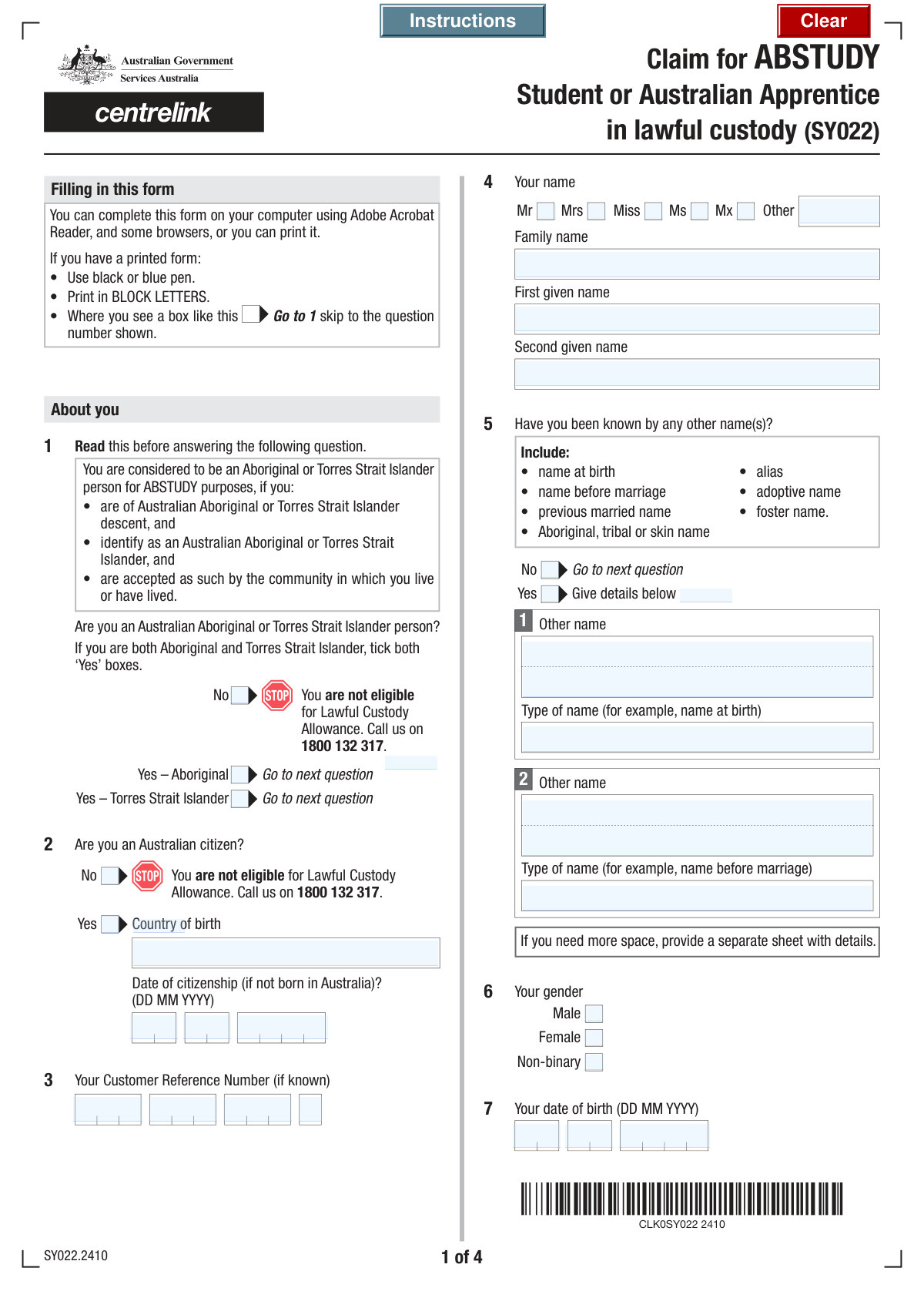
Yes! You can use AI to fill out Form SY022, Claim for ABSTUDY for students or Australian Apprentices in lawful custody
Don't type 103 fields by hand. Tell our AI about yourself, or upload a document you already have, and it fills every field in seconds. You check it, then download, print or sign.
The AI does the filling. You just check it.
No typing into boxes, nothing to install.
What this form asks for
The AI fills all of it, from your answers or your documents.
The AI checks your answers before you download
14 checks built for this form, so a wrong date or a missing answer is caught before anyone else sees it.
This validation ensures that a user selects only one option from 'No', 'Yes - Aboriginal', or 'Yes - Torres Strait Islander'. It is important for accurate demographic data collection and determining eligibility for specific programs like ABSTUDY. If more than one option is selected or no option is selected, the form should display an error and prevent submission until the user makes a single, valid choice.
This check verifies that both the 'Family Name' and 'First Given Name' fields are not empty. A person's full legal name is a fundamental identifier required for all official records and communications. Failure to provide this information would make the record incomplete and unusable, so the form submission will be blocked until these fields are filled.
This validation confirms that the 'Birth Day', 'Birth Month', and 'Birth Year' fields combine to form a valid calendar date that is in the past. It also checks if the calculated age is plausible, for example, under 120 years, to catch significant data entry errors. An invalid or future date of birth would invalidate eligibility calculations and personal identification, so an error message will prompt the user for correction.
This rule checks that if a user selects 'No' for 'Australian Citizenship Status', they must then provide their 'Country of Birth' and 'Date of Citizenship'. This information is critical for verifying identity and eligibility for services based on residency or citizenship status. If the user indicates they are not a citizen but fails to provide these subsequent details, the form will be considered incomplete and an error will be shown.
This logical check ensures that the provided 'Date of Citizenship' is not earlier than the user's 'Date of Birth'. A person cannot become a citizen of a country before they are born, so this check prevents a common logical error in data entry. If the citizenship date precedes the birth date, the system will flag the inconsistency and require the user to correct one or both dates.
This validation is triggered if the user selects 'Yes' for the 'Other Names Inquiry'. It ensures that at least the 'First Other Name' and 'Type of First Other Name' fields are filled out. This is crucial for comprehensive identity verification and background checks, linking all known aliases to the individual. If 'Yes' is checked but no other name is provided, the form will prompt the user to either enter the name or change their answer to 'No'.
And 8 more checks
- Apprenticeship Date Sequence Logic
- Study Date Sequence Logic
- Australian Tax File Number (TFN) Format
- Customer Reference Number (CRN) Structure
- Coordinator Phone Number Format
- Mandatory Declaration Agreement
- Declaration Date Validity
- Title and 'Other Title' Field Logic
Let AI fill out your SY022
No typing. Every field filled in seconds, checked, ready to sign.
How to Fill Out SY022 Online for Free in 2026
What the AI walks you through.
- Navigate to Instafill.ai and upload your SY022 form, or select it from their library of official documents.
- Enter the claimant's personal information, including their full name, date of birth, Customer Reference Number (CRN), and Aboriginal or Torres Strait Islander status.
- Provide details about the correctional or educational institution, including its name, address, and the coordinator's contact information.
- Fill in the information about the course of study or the Australian Apprenticeship, including the course name, institution, student ID, and start/end dates.
- Complete the section regarding the claimant's Tax File Number (TFN) or indicate if one needs to be obtained.
- Check off any required supporting documents you are providing, such as proof of enrolment. Read the declaration, sign (if required), and date the form to certify the information is correct.
- Use the AI-powered review tool to check for any errors or omissions before downloading the completed form for submission to Services Australia.
Common Mistakes in Completing SY022
The ones the AI is built to catch.
Incorrectly Segmenting Reference and Tax Numbers
Incomplete 'Other Names' Information
Ignoring Conditional Logic for Citizenship
Missing Signature or Declaration Date
Failing to Attach Required Supporting Documents
Confusing Study and Apprenticeship Sections
Incorrect Date of Birth or Citizenship Date Entry
Ambiguous Aboriginal or Torres Strait Islander Status Selection
Forgetting to Specify 'Other' Title
Frequently Asked Questions About SY022
Is it really free for 7 days?
Can I fill other forms too?
How do I cancel?
How does the AI fill out SY022?
What happens to my information?
How complex is SY022 to fill out?
What is the purpose of this form?
Who should fill out this form?
What is a Customer Reference Number (CRN) and where do I find it?
I was born outside of Australia but am now a citizen. What details do I need?
What do I do if I have been known by other names?
What information do I need to provide about my studies?
What if I am an Australian Apprentice instead of a student?
Do I have to provide my Tax File Number (TFN)?
What documents might I need to attach to this form?
Can I authorize someone else to manage my ABSTUDY claim?
How do I sign the form if I am filling it out on a computer?
Can AI tools help me fill out this form?
How can I use Instafill.ai to complete this form online?
The PDF version of this form I have isn't fillable. What can I do?
Get your SY022 filled out by AI
$0 today. Cancel before Nov 10 and you pay nothing.
Other forms like this one
VA claim forms: Form OWCP-915, Claim for Medical Reimbursement, Form 8862, Information To Claim Certain Credits, Form CA-7, Claim for Compensation, Form CA-5, Claim for Compensation, Form SC-100, Plaintiff's Claim and ORDER to Go to Small Claims Court, Form 20-0995, Decision Review Request: Supplemental Claim, Form 104, List of Creditors 20 Largest Unsecured Claims, Form 941-X (Rev. April 2023), Adjusted Employer’s QUARTERLY Federal Tax Return or Claim for Refund, Judicial Council of California Form SC-104, Proof of Service (Small Claims), Immigration and Refugee Board of Canada (IRB) – Refugee Protection Division (RPD) Basis of Claim Form (for persons claiming refugee protection in Canada) (RPD.02.01), SC-108, Request to Correct or Cancel Judgment and Answer (Small Claims), Judicial Council of California Form SC-105, Request for Court Order and Answer (Small Claims), SC-120, Defendant’s Claim and ORDER to Go to Small Claims Court (Small Claims), Judicial Council of California Form SC-104, Proof of Service (Small Claims), Continental American Insurance Company (CAIC) / Aflac Group Critical Illness Claim Form (with Attending Physician’s Statement, HIPAA Authorization to Obtain Information, and Electronic Funds Transaction Authorization), Judicial Council of California Form SC-108, Request to Correct or Cancel Judgment and Answer (Small Claims), SC-105, Request for Court Order and Answer (Small Claims), Judicial Council of California Form SC-120, Defendant’s Claim and ORDER to Go to Small Claims Court (Small Claims), Small Claim and Notice of Small Claim (ORS 46.425) (OJD Official) (Jan 2026), VA Form 21-4138, Statement in Support of Claim
student forms: Form 1098-E, Student Loan Interest Statement, NSFAS Consent Form (National Student Financial Aid Scheme) – APP2026, International Student Application for Financial Aid 2026-2027 (International Student Application for Financial Assistance 2026-2027), Barber & Hairdresser Student/Apprentice Quarterly Report Form (Alaska Board of Barbers and Hairdressers) – Form 08-4315, ROTC Cadet Academic Plan / Degree and Credit Hour Worksheet (Student Identification, Term-by-Term Courses, GPA Summary, and Completion Certification), DNA Kingston Training Enrolment and Genuine Student Form for International Students, South Sydney College International Student Application Form, Darwin Institute of Trade International Student Application Form, 2026–27 FAFSA® Form, Free Application for Federal Student Aid, Free Application for Federal Student Aid (FAFSA), Student Change of Circumstances Form, Student Claim for Essential Equipment Form, Form SY042, Details of income for student payments, Tertiary Student Enrolment Declaration, Education Course Costs and Student Details Claim Form
Let AI fill out your SY022
Your trial starts once a card is added. You pay nothing before Nov 10.
Our AI already knows this form, all 103 fields of it. Skip the typing: tell it about yourself, or upload what you have, and it fills the whole form in seconds.
- AI fills every field on all 6 pages, tables and checkboxes included
- No typing into boxes: answer a few questions, or upload a document you already have, an old copy of this form, a photo of a document
- The AI checks the answers; you review and change anything before you download
- Download the finished PDF, print it, or sign it online
- Encrypted, and never used to train AI
Cancel before Nov 10 and you pay nothing.
A card is needed to start the trial. Cancel in two clicks from your account.
Terms · Privacy