Yes! You can use AI to fill out TIAA-CREF Funds Beneficiary Designation Form (Retail Class Only)
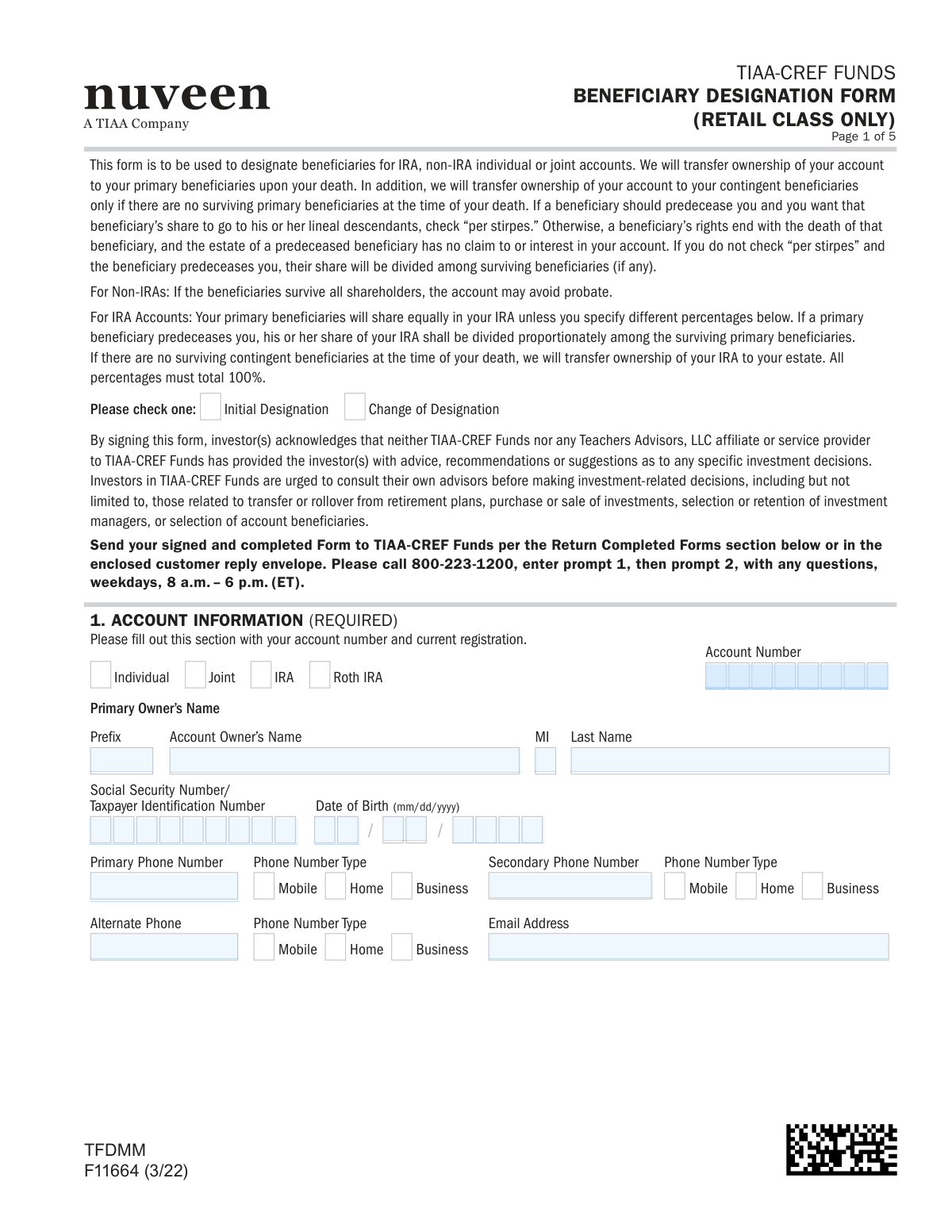
Form F11664, the TIAA-CREF Funds Beneficiary Designation Form, allows account holders to officially name the individuals or entities who will inherit their account assets upon their death. This form is crucial for ensuring a smooth transfer of ownership for IRA, non-IRA individual, or joint accounts, potentially avoiding probate. Today, this form can be filled out quickly and accurately using AI-powered services like Instafill.ai, which can also convert non-fillable PDF versions into interactive fillable forms.
F11664 is part of the
beneficiary forms, investment account forms, beneficiary designation forms, TIAA forms, retirement fund forms, TIAA-CREF forms, ETA forms and retail fund forms categories on Instafill.
Rather not fill this in by hand? Instafill is an online form filler that completes PDF forms automatically — upload the blank form, answer a few questions, and the AI fills every field.
Form specifications
| Form name: | TIAA-CREF Funds Beneficiary Designation Form (Retail Class Only) |
| Number of pages: | 1 |
| Language: | English |
Our AI automatically handles information lookup, data retrieval, formatting, and form filling.
It takes less than a minute to fill out F11664 using our AI form filling.
Securely upload your data. Information is encrypted in transit and deleted immediately after the form is filled out.
Instafill Demo: How to fill out PDF forms in seconds with AI
How to Fill Out F11664 Online for Free in 2026
Are you looking to fill out a F11664 form online quickly and accurately? Instafill.ai offers the #1 AI-powered PDF filling software of 2026, allowing you to complete your F11664 form in just 37 seconds or less.
Follow these steps to fill out your F11664 form online using Instafill.ai:
- 1 Navigate to Instafill.ai and upload or select the TIAA-CREF Beneficiary Designation Form F11664.
- 2 Use the AI assistant to accurately fill in your account information, including account number, registration type, and personal details for the primary and joint owners.
- 3 Provide the complete information for your primary beneficiaries, such as their names, Social Security numbers, dates of birth, and the percentage of assets each will receive.
- 4 Enter the details for any contingent beneficiaries who will inherit if the primary beneficiaries are deceased.
- 5 Indicate if you wish for the 'per stirpes' designation to apply, which directs a deceased beneficiary's share to their descendants.
- 6 Carefully review all the information entered for accuracy, then provide your digital signature and the date to certify the designation.
- 7 Download the completed form and submit all pages to TIAA-CREF using the standard or overnight mail addresses listed on the document.
Our AI-powered system ensures each field is filled out correctly, reducing errors and saving you time.
Why Choose Instafill.ai for Your Fillable F11664 Form?
Speed
Complete your F11664 in as little as 37 seconds.
Up-to-Date
Always use the latest 2026 F11664 form version.
Cost-effective
No need to hire expensive lawyers.
Accuracy
Our AI performs 10 compliance checks to ensure your form is error-free.
Security
Your personal information is protected with bank-level encryption.
Frequently Asked Questions About F11664
This form is used to designate or change the beneficiaries who will inherit your TIAA-CREF Funds IRA, non-IRA individual, or joint account upon your death.
Any TIAA-CREF Funds account holder (Retail Class only) who wants to name beneficiaries for the first time or update their existing beneficiary designations should complete this form.
Primary beneficiaries are the first in line to receive your account assets. Contingent beneficiaries will only inherit the account if all of your primary beneficiaries have passed away at the time of your death.
Checking 'per stirpes' means that if a beneficiary predeceases you, their share will be passed down to their direct descendants (e.g., their children). If not selected, that share is divided among the other surviving beneficiaries.
Yes, the percentages you assign to your primary beneficiaries must add up to 100%. The same rule applies to your contingent beneficiaries; their assigned percentages must also total 100%.
You will need to provide the beneficiary's full name, Social Security Number, date of birth, relationship to you, and current address. Providing complete information ensures a smooth transfer process.
If a beneficiary is a minor, you must designate a custodian for them on the form. The custodian will manage the inherited assets on the minor's behalf until they reach legal age.
Yes, for non-IRA joint accounts, both the primary and joint owners must sign the form in Section 4. A single signature is sufficient for IRA accounts.
You must mail all pages of the signed and completed form to TIAA-CREF Funds. The standard and overnight mailing addresses are provided in the 'Return Completed Form(s) To' section on the final page.
Yes, services like Instafill.ai use AI to help you accurately auto-fill form fields with your personal and beneficiary information, saving time and reducing potential errors.
You can upload the PDF of the TIAA-CREF Beneficiary Designation form to the Instafill.ai platform. The service will make the fields fillable, allowing you to type your information before downloading the completed form for signature.
If you have a non-fillable PDF, you can use a tool like Instafill.ai to convert it into an interactive, fillable form. This allows you to easily type your information into the correct fields on your computer.
To update your beneficiaries, you must submit a new Beneficiary Designation form. Be sure to check the 'Change of Designation' box in Section 1 to revoke all previous designations.
Yes, the instructions specify that you must return all numbered pages of the form, even if you did not use them to list additional beneficiaries.
Compliance F11664
Validation Checks by Instafill.ai
1
Primary Beneficiary Percentage Sum
This check verifies that the sum of the 'Percent' fields for all designated Primary Beneficiaries equals exactly 100%. This is critical for ensuring the account assets are fully and correctly allocated upon the owner's death, as specified by IRA and non-IRA rules on the form. If the total is not 100%, the form is considered incomplete and legally ambiguous, which would prevent processing.
2
Contingent Beneficiary Percentage Sum
This validation ensures that if any Contingent Beneficiaries are listed, the sum of their specified percentages equals exactly 100%. While listing contingent beneficiaries is optional, if the section is used, it must be complete to provide a clear line of succession. Failure to total 100% would create ambiguity if all primary beneficiaries predecease the account owner, leading to processing delays or legal complications.
3
SSN/TIN Format Validation
This check confirms that all Social Security Number (SSN) and Taxpayer Identification Number (TIN) fields for account owners and beneficiaries contain a valid 9-digit number. Correct identification is legally required for tax reporting and to uniquely identify individuals for asset transfer. An invalid or missing number will cause the form to be rejected, as proper identification cannot be confirmed.
4
Date of Birth and Signature Date Plausibility
This validation ensures all date fields (Date of Birth, Signature Date) are in a valid 'mm/dd/yyyy' format and are logically sound. Birthdates must be in the past and represent a reasonable age for an account holder or beneficiary, while signature dates cannot be in the future. This prevents data entry errors and ensures the legal validity and timeliness of the document.
5
Required Account Owner Information
This check verifies that the Primary Owner's full name, Social Security Number/TIN, and Date of Birth are all provided in Section 1. This information is the minimum required to uniquely identify the account holder and link the beneficiary designation to the correct account. Submissions lacking this core information cannot be processed and will be returned.
6
Joint Account Completeness
This validation is triggered if the 'Joint' account type is selected. It verifies that the Joint Owner's name, SSN/TIN, Date of Birth, and signature are all provided. For joint accounts, both owners typically must consent to beneficiary changes, so missing information or a missing signature from the joint owner invalidates the designation.
7
Minor Beneficiary Custodian Requirement
This check identifies if a beneficiary is a minor based on their date of birth (e.g., under 18 or 21, depending on state law). If a beneficiary is a minor, the system verifies that the 'Custodian' name field has been completed. This is crucial because financial institutions cannot legally transfer assets directly to a minor, and a custodian is required to manage the funds on their behalf until they reach the age of majority.
8
P.O. Box Physical Address Rule
This validation enforces the rule stated on the form: if a beneficiary's address is a P.O. Box, a physical street address must also be provided. Financial institutions often require a physical address for legal and identity verification purposes (e.g., KYC regulations). Failure to provide a physical address when a P.O. Box is used will result in an incomplete submission.
9
Owner Signature and Date Presence
This check confirms that the 'Your Signature (Account Owner)' field is signed and the 'Today’s Date' field is filled out in Section 4. A signature and date are fundamental legal requirements to execute the document and revoke any prior designations. A form without a valid signature is not legally binding and will be rejected immediately.
10
At Least One Primary Beneficiary Designated
This validation ensures that at least one Primary Beneficiary is listed in Section 2. The entire purpose of the form is to designate beneficiaries, so a submission without at least one primary beneficiary is incomplete and serves no function. Such a form would be rejected as it fails to provide instructions for asset distribution.
11
Unique Beneficiary Roles
This check verifies that an individual (identified by name and SSN/TIN) is not listed as both a Primary Beneficiary and a Contingent Beneficiary. The roles are mutually exclusive, as contingent beneficiaries only inherit if all primary beneficiaries are deceased. Listing the same person in both categories creates a logical conflict that makes the owner's intent unclear and the form invalid.
12
Designation Type Selection
This validation ensures that one of the two checkboxes, 'Initial Designation' or 'Change of Designation', has been selected. This information is important for record-keeping and auditing, as it clarifies whether this form is establishing beneficiaries for the first time or replacing a previous designation. A missing selection creates ambiguity in account history and may require clarification before processing.
Common Mistakes in Completing F11664
A frequent error is when the percentages assigned to either the primary or contingent beneficiaries do not add up to exactly 100%. This often happens due to simple miscalculation, especially when multiple beneficiaries are listed. An incorrect total will cause the form to be rejected, requiring correction and resubmission, which delays the update to your account. To avoid this, carefully check that the percentages in Section 2 and Section 3 each sum to 100% before signing.
People often leave the Social Security Number (SSN) or Date of Birth (DOB) fields for their beneficiaries blank, assuming just a name is sufficient. This information is critical for the financial institution to unambiguously identify and locate the correct individual upon the account owner's death. Missing data can lead to significant delays, legal hurdles, and potential disputes during the asset distribution process. Ensure you have the full legal name, SSN, and DOB for every listed beneficiary.
The 'per stirpes' option is a legal term that many people either ignore or check without fully understanding its meaning. If you check this box, the share of a beneficiary who predeceases you will automatically pass to their direct descendants (e.g., their children). If you don't check it, their share is divided among the other surviving beneficiaries in that same category. An incorrect choice here can drastically alter your intended distribution plan, so it's crucial to understand the implication or seek advice if you are unsure.
When naming a minor as a beneficiary, it is mandatory to also designate an adult custodian to manage the funds on their behalf until they reach legal age. Many filers list a minor's name but leave the 'Custodian' field blank. This oversight can force the matter into the court system to appoint a guardian for the assets, a process that is both time-consuming and costly. Always complete the custodian information if your beneficiary is a minor.
A form is legally invalid without the required signature(s). The account owner must sign, and for joint non-IRA accounts, the joint owner must also sign. Furthermore, the form explicitly states to 'sign exactly as your name(s) appears on your account confirmation statements.' A casual or different version of your signature can cause a mismatch and lead to rejection. This simple mistake is a common reason for processing delays.
The form clearly states that if a P.O. Box is used for a beneficiary's address, a physical street address must also be provided in the subsequent fields. Filers often provide only the P.O. Box and overlook this second requirement. Financial institutions need a physical address for compliance and identity verification purposes, and its absence will render the beneficiary information incomplete and cause the form to be returned.
The instructions on the final page specify that ALL numbered pages must be returned, including any that were not filled out. It's common for people to only send back the pages they completed, such as the signature page and the first beneficiary page. This results in an incomplete submission, forcing TIAA-CREF to request the full document and delaying the processing of your beneficiary designation.
The account number in Section 1 is the single most important piece of information linking the form to your assets. Transposing digits, entering the wrong account's number, or leaving the field blank are critical errors. Without the correct account number, the institution cannot process the designation, making the entire form useless until it is corrected and resubmitted. AI-powered tools like Instafill.ai can help prevent this by auto-filling saved account details accurately.
A note on the form warns that spousal consent may be necessary for designations in community property states, yet many people overlook this. If you live in such a state and name someone other than your spouse as a primary beneficiary, failing to obtain and document your spouse's consent can lead to serious legal challenges later. A surviving spouse could potentially claim a right to the assets, overriding your stated wishes. This is a complex legal area where professional advice is highly recommended.
In Section 1, the form requires you to check a box indicating if this is an 'Initial Designation' or a 'Change of Designation'. Leaving both boxes unchecked creates ambiguity for the processor, who won't know if this form is establishing beneficiaries for the first time or revoking a previous designation. This simple omission can halt the process while the firm seeks clarification from you. Since this form is a non-fillable PDF, a tool like Instafill.ai can convert it into a fillable version, making it easier to see and complete all required checkboxes.
Saved over 80 hours a year
“I was never sure if my IRS forms like W-9 were filled correctly. Now, I can complete the forms accurately without any external help.”
Kevin Martin Green
Your data stays secure with advanced protection from Instafill and our subprocessors




Robust compliance program
Transparent business model
You’re not the product. You always know where your data is and what it is processed for.
ISO 27001, HIPAA, and GDPR
Our subprocesses adhere to multiple compliance standards, including but not limited to ISO 27001, HIPAA, and GDPR.
Security & privacy by design
We consider security and privacy from the initial design phase of any new service or functionality. It’s not an afterthought, it’s built-in, including support for two-factor authentication (2FA) to further protect your account.
Fill out F11664 with Instafill.ai
Worried about filling PDFs wrong? Instafill securely fills tiaa-cref-funds-beneficiary-designation-form-retail-class-only forms, ensuring each field is accurate.
