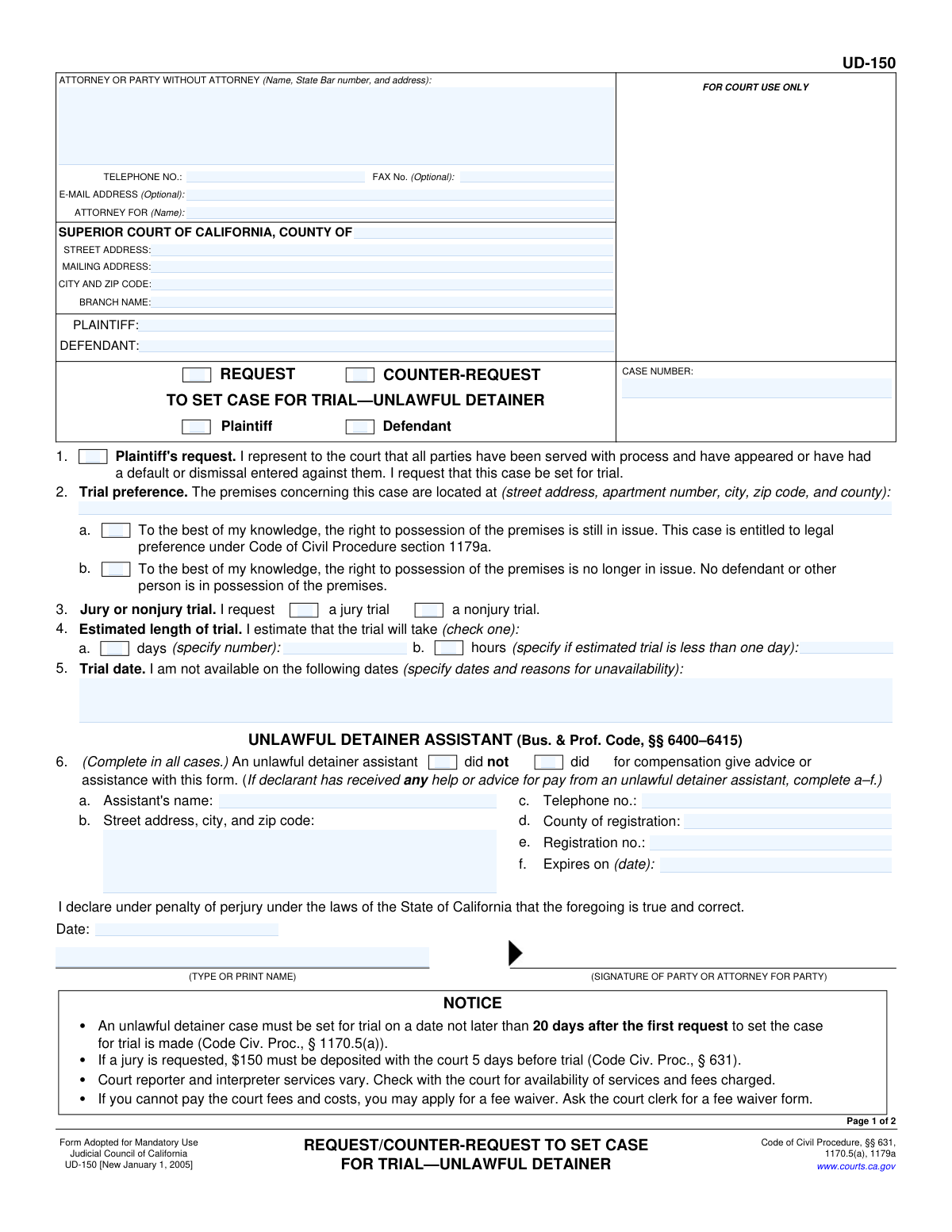
Yes! You can use AI to fill out Judicial Council of California Form UD-150, Request/Counter-Request to Set Case for Trial—Unlawful Detainer

UD-150 is a Judicial Council of California form used by a plaintiff or defendant in an unlawful detainer case to request (or counter-request) that the court set the case for trial after service/appearance requirements are met. It captures key scheduling information such as whether possession is still at issue, the premises address, whether a jury is requested, estimated trial length, and any dates of unavailability, and it includes a Proof of Service by Mail section to document that the request was mailed to the other parties. Filing it helps ensure the case is placed on the court’s trial calendar within the statutory timelines and supports proper notice to all parties. Today, this form can be filled out quickly and accurately using AI-powered services like Instafill.ai, which can also convert non-fillable PDF versions into interactive fillable forms.
Our AI automatically handles information lookup, data retrieval, formatting, and form filling.
It takes less than a minute to fill out UD-150 using our AI form filling.
Securely upload your data. Information is encrypted in transit and deleted immediately after the form is filled out.

Form specifications

Form name: Judicial Council of California Form UD-150, Request/Counter-Request to Set Case for Trial—Unlawful Detainer
Number of pages: 2
Language: English
Categories: California court forms, Judicial Council forms, California judicial forms, unlawful detainer forms, California legal forms
main-image

Instafill Demo: filling out a legal form in seconds

How to Fill Out UD-150 Online for Free in 2026

Are you looking to fill out a UD-150 form online quickly and accurately? Instafill.ai offers the #1 AI-powered PDF filling software of 2026, allowing you to complete your UD-150 form in just 37 seconds or less.
Follow these steps to fill out your UD-150 form online using Instafill.ai:
  1. 1 Go to Instafill.ai and upload the UD-150 PDF (or search/select “UD-150 Request/Counter-Request to Set Case for Trial—Unlawful Detainer”).
  2. 2 Enter case and court details: case number, county, courthouse/branch, and the plaintiff and defendant names exactly as they appear on the court file.
  3. 3 Complete attorney/party contact information (name, State Bar number if any, address, phone, and optional fax/email) and indicate who the attorney represents if applicable.
  4. 4 Choose the request type and requesting party (Request or Counter-Request; Plaintiff or Defendant) and complete trial preference items (possession still in issue vs. no longer in issue) and the premises address.
  5. 5 Select jury or nonjury trial, provide the estimated trial length (days or hours), and list any unavailable dates with reasons.
  6. 6 Complete the unlawful detainer assistant section (mark “did not” or, if “did,” provide the assistant’s registration details), then add the date, typed/printed name, and signature for the requesting party/attorney.
  7. 7 Finish the Proof of Service by Mail: have a non-party adult mail the form, enter the mailer’s address, mailing method, date/place mailed, list recipients and addresses (attach MC-025 if needed), then generate a final, court-ready PDF for printing/e-filing and filing with the clerk.

Our AI-powered system ensures each field is filled out correctly, reducing errors and saving you time.

Why Choose Instafill.ai for Your Fillable UD-150 Form?

Speed

Complete your UD-150 in as little as 37 seconds.

Up-to-Date

Always use the latest 2026 UD-150 form version.

Cost-effective

No need to hire expensive lawyers.

Accuracy

Our AI performs 10 compliance checks to ensure your form is error-free.

Security

Your personal information is protected with bank-level encryption.

Frequently Asked Questions About Form UD-150

UD-150 is used in a California unlawful detainer (eviction) case to ask the court to set the case for trial. It can be filed as a Request or a Counter-Request, depending on which side is asking for a trial date.

File a Request if you are the party making the first request to set the case for trial. File a Counter-Request if the other side already filed a request and you are responding with your own request to set the case for trial.

Yes—by signing UD-150 you are representing that all parties have been served and have appeared, or that a default or dismissal has been entered for them. If that is not true yet, you generally should not file this form.

The notice on the form states the case must be set for trial on a date not later than 20 days after the first request to set the case for trial is made (Code Civ. Proc., § 1170.5(a)). Actual scheduling can vary by court, so confirm with the clerk.

Check 1a if the right to possession is still disputed (for example, the tenant is still in possession or the parties still contest who has the right to occupy). Check 1b if possession is no longer disputed and no defendant or other person is in possession of the premises.

Enter the full address of the rental property involved in the unlawful detainer case, including unit/apartment number (if any), city, ZIP code, and county. This should match the address used in your unlawful detainer complaint and notices.

Check 'jury trial' if you want a jury to decide the case; check 'nonjury trial' if you want the judge to decide. If you request a jury, the form notice states a $150 deposit must be paid 5 days before trial (Code Civ. Proc., § 631).

If you believe the trial will take one full day or more, check 'days' and write the number of days. If it should take less than one day, check 'hours' and write the estimated number of hours.

List specific dates you cannot attend trial and briefly explain why (for example, pre-paid travel, medical procedure, or another court appearance). Keep it factual and as specific as possible.

Yes—this section says it must be completed in all cases. If you did not pay an unlawful detainer assistant for help, check 'did not' and leave the assistant details blank.

It proves that copies of UD-150 were mailed to the other parties. The person who mails the documents must be over 18 and not a party to the case, and that person signs the Proof of Service under penalty of perjury.

No—the instructions state that if you are representing yourself, someone else must mail the papers and sign the Proof of Service by Mail. Choose a non-party adult who lives or works in the county where the mailing occurs.

You can continue the list on a separate attachment or use form MC-025 (Attachment). Check the box indicating the list is continued and attach the additional page(s) when you file.

Yes—AI form-filling tools can help you enter information consistently and reduce errors. Services like Instafill.ai can auto-fill form fields accurately and save time, but you should still review everything before signing and filing.

Upload the UD-150 PDF to Instafill.ai, answer the guided questions (case number, parties, trial type, estimates, service details), and the system will populate the fields for you to download and file. If your copy is a flat/non-fillable PDF, Instafill.ai can convert it into an interactive fillable form before auto-filling.

Compliance UD-150
Validation Checks by Instafill.ai

1
Case Number presence and allowed character set
Validates that the Case Number field is not blank and contains only characters commonly used in California case numbers (letters, digits, dashes, and leading zeros). This is critical to ensure the filing is associated with the correct court case and can be docketed without manual intervention. If the case number is missing or contains invalid characters, the submission should be rejected or routed to manual review with an error indicating the expected format.
2
Request vs. Counter-Request selection is mutually exclusive and required
Checks that exactly one of the two boxes—Request or Counter-Request—is selected. This prevents ambiguity about whether the filer is making the initial request to set trial or responding with a counter-request. If neither or both are selected, validation fails and the user must correct the selection before filing.
3
Requesting party identification (Plaintiff vs. Defendant) is mutually exclusive and required
Ensures exactly one of the party boxes (Plaintiff or Defendant) is checked to identify who is making the request/counter-request. This is important for correct captioning, service expectations, and court processing. If both or neither are checked, the form should not be accepted because the requesting party cannot be determined.
4
Trial request attestation checkbox required
Validates that the 'Request to set case for trial' attestation checkbox is checked, confirming the filer represents that all parties have been served and have appeared or had default/dismissal entered. This attestation is a key prerequisite for setting an unlawful detainer matter for trial. If it is not checked, the system should block submission and prompt the filer to complete the attestation.
5
Trial preference selection (possession still in issue vs. no longer in issue) is mutually exclusive
Checks that exactly one of the two trial preference statements (1a or 1b) is selected. These options describe materially different case postures and affect how the court may prioritize and manage the trial setting. If both or neither are selected, the submission should fail because the court cannot determine the correct preference basis.
6
Premises address completeness and ZIP/county presence
Validates that the Premises Address includes, at minimum, street address, city, ZIP code, and county, and that the ZIP code is 5 digits (or ZIP+4 if allowed by the system). The premises location is central to unlawful detainer proceedings and is needed for venue and trial setting logistics. If any required components are missing or the ZIP is malformed, the form should be rejected with field-level guidance.
7
Jury vs. nonjury trial request is mutually exclusive and required
Ensures that exactly one of 'jury trial' or 'nonjury trial' is selected. This selection affects scheduling, courtroom resources, and statutory deposit requirements referenced in the notice. If both or neither are selected, validation fails because the court cannot schedule the matter appropriately.
8
Estimated trial length selection and numeric value consistency
Checks that exactly one time unit is selected (days or hours) and that the corresponding numeric field is provided while the other is blank. It also validates that the number is a positive value (e.g., days as a whole number; hours as a positive number within a reasonable range such as 0.5–8 or 1–8 depending on system rules). If the selection/value pairing is inconsistent or non-numeric/zero, the submission should be blocked to prevent scheduling errors.
9
Unavailable dates format and reason requirement
Validates that each unavailable date is a valid calendar date (e.g., MM/DD/YYYY) and that a reason is provided for each date listed. This is important for the court to set trial within statutory timelines while considering legitimate conflicts. If dates are malformed or reasons are missing, the system should require correction or treat the entry as incomplete and not usable for scheduling.
10
Attorney/Party contact block completeness (name and mailing address required)
Ensures the Attorney/Party section includes a full name and a complete mailing address (street or P.O. box, city, state, ZIP). This information is required for court communications and to identify the filer of record. If the name or address is missing, the submission should fail because the court cannot reliably contact or identify the submitting party.
11
Telephone number format validation (and optional fax format)
Validates that the Telephone Number is present and matches an acceptable format (e.g., 10 digits with optional punctuation and optional extension), and that Fax Number—if provided—also matches a valid phone format. Accurate phone numbers are necessary for time-sensitive unlawful detainer scheduling and issue resolution. If the phone number is missing or invalid, the system should reject the submission; if fax is invalid, it should prompt correction or clearing of the optional field.
12
Email address format validation when provided
Checks that the E-mail Address field, if not blank, conforms to a standard email format (local-part@domain with a valid domain). Email is often used for rapid communication and service-related coordination, so malformed addresses reduce reliability. If invalid, the system should require correction or allow the user to leave it blank since it is optional.
13
Attorney For field required when a State Bar number is provided
Validates that if a State Bar number is entered (indicating an attorney filer), the 'Attorney For' (client name) field is also completed. This ensures the court can identify the represented party and avoids confusion when the attorney’s name differs from the party caption. If a bar number is present but 'Attorney For' is blank, the submission should fail with an instruction to provide the represented party name.
14
Unlawful detainer assistant selection required and conditional subfields enforced
Ensures that exactly one box is checked for whether an unlawful detainer assistant did or did not provide compensated assistance. If 'did' is selected, the assistant’s name, address, telephone, county of registration, registration number, and expiration date must all be present and properly formatted. If the selection is missing or conditional fields are incomplete, the system should block submission because the declaration is statutorily required when paid assistance is used.
15
Signature declaration completeness (date, printed name, and signature present)
Validates that the declaration section includes a signing date, a typed/printed name, and a signature indicator (e.g., e-signature capture or signature field not blank). This is necessary because the form is signed under penalty of perjury and must be attributable to a specific declarant. If any element is missing, the submission should be rejected as an unsigned/undated declaration.
16
Proof of Service by Mail: server eligibility and mailing details completeness
Checks that the mailer affirms they are over 18 and not a party, and that the server residence/business address is complete. It also enforces that exactly one service method (3a or 3b) is selected and that Date Mailed and Place Mailed (city and state) are provided and properly formatted. If eligibility is not affirmed, service method is ambiguous, or mailing details are missing/invalid, the proof of service should be considered defective and the system should prevent filing or flag for correction.

Common Mistakes in Completing UD-150

Case number entered incorrectly or left blank

People often copy the case number from the wrong document, omit leading zeros, or drop letters/dashes that are part of the official identifier. This can cause the clerk to reject the filing or misfile it under a different case, delaying the trial-setting process. Always copy the case number exactly as it appears on the court’s notices (including all punctuation and zeros). AI-powered tools like Instafill.ai can help by validating the case-number format and ensuring it matches your saved matter details.

Checking the wrong combination of Request/Counter-Request and Plaintiff/Defendant

A frequent error is selecting “Request” when you are actually making a counter-request, or checking the wrong party box (Plaintiff vs. Defendant). This creates confusion about who is asking for the trial date and can lead to clerk questions, re-filing, or delays. Before filing, confirm your role in the case caption and whether you are initiating the request or responding with a counter-request. Instafill.ai can reduce this mistake by mapping your role (plaintiff/defendant) to the correct checkbox set.

Requesting trial without meeting the prerequisite representation (service/appearance/default/dismissal)

The form requires a representation that all parties have been served and have appeared or had a default or dismissal entered, but filers sometimes request a trial before those conditions are true. If the representation is inaccurate, the court may refuse to set trial, require corrections, or the opposing party may challenge the request. Verify service status and whether any defaults/dismissals have been entered before signing and filing. Using Instafill.ai can help by prompting you to confirm prerequisites and flagging inconsistencies with your case timeline.

Selecting the wrong possession-status preference (1a vs. 1b)

Many people misunderstand the difference between “possession still in issue” and “possession no longer in issue,” especially when tenants have partially moved out or keys were returned informally. Checking the wrong box can affect how the court treats urgency and scheduling, and may create credibility issues if later filings contradict it. Confirm whether any defendant or other person is still in possession and whether possession is still being litigated before selecting 1a or 1b. Instafill.ai can help by asking clarifying questions and ensuring your selection aligns with the facts you enter elsewhere.

Premises address entered incompletely or not matching the complaint

A common mistake is leaving out the unit/apartment number, using a mailing address instead of the rental premises, or listing the wrong county/ZIP. This can cause confusion about venue and the property at issue, and may lead to delays or the court requesting clarification. Copy the premises address exactly as stated in the unlawful detainer complaint and include unit number, city, ZIP, and county. Instafill.ai can auto-format addresses and help ensure consistency across your case documents.

Jury/nonjury selection made without understanding the deposit requirement

People sometimes check “jury trial” without realizing a $150 deposit is required (generally 5 days before trial) and that missing it can waive the jury right. Others forget to check either box, leaving the request ambiguous. Decide early whether you truly want a jury and calendar the deposit deadline if you do; otherwise select nonjury. Instafill.ai can help by adding validation reminders tied to the jury selection and prompting you to track the deposit deadline.

Estimated trial length left blank or filled inconsistently (days vs. hours)

Filers often check “days” but write hours, check both boxes, or forget to provide a number at all. An unclear estimate makes scheduling harder and can result in the clerk/court requesting corrections or setting an unrealistic time slot. Choose only one (days or hours) and provide a reasonable whole-number estimate consistent with your selection. Instafill.ai can prevent this by enforcing mutually exclusive choices and requiring the corresponding numeric field.

Unavailable dates listed without specific dates or without reasons

A typical entry is “not available next month” or listing date ranges without explaining why, which courts may disregard. If the court cannot evaluate the conflict, it may set trial on a date you cannot attend, forcing continuance requests and added cost. List exact dates and a brief reason for each (e.g., “previously scheduled surgery,” “out-of-state work travel”). Instafill.ai can guide structured entry (date + reason) and flag vague or incomplete unavailability statements.

Unlawful detainer assistant section completed incorrectly

People sometimes check both “did” and “did not,” or they check “did” but fail to complete the required assistant details (a–f). This can trigger clerk rejection or require an amended filing because the disclosure is mandatory “in all cases.” Check only one box, and if you paid an unlawful detainer assistant for help, complete every required field including registration number and expiration date. Instafill.ai can enforce the conditional logic so assistant details are required only when “did” is selected.

Missing signature, printed name, or date on the declaration

It’s very common to fill the form but forget to sign, forget to type/print the declarant’s name, or leave the date blank. Unsigned or undated declarations are typically rejected or treated as incomplete, delaying the trial-setting request. Before filing, confirm the signature block includes the date, your printed name, and your signature (party or attorney for party). Instafill.ai can add completion checks to ensure signature blocks aren’t left incomplete (though you still must sign according to the court’s filing method).

Proof of Service by Mail completed by an ineligible person or with missing mailing details

Self-represented parties often mail the papers themselves and sign the proof, but the form requires the mailer to be over 18 and not a party to the case. Another frequent issue is failing to check service method (3a or 3b) or omitting the date/place mailed, which makes service defective. Use a non-party adult to mail the documents, have them complete every required item (including 3a/3b, date mailed, and place mailed), and ensure the recipient list is complete. Instafill.ai can help by prompting eligibility requirements and ensuring all service fields are completed and properly formatted.
Saved over 80 hours a year

“I was never sure if my IRS forms like W-9 were filled correctly. Now, I can complete the forms accurately without any external help.”

Kevin Martin Green

Your data stays secure with advanced protection from Instafill and our subprocessors

Robust compliance program

Transparent business model

You’re not the product. You always know where your data is and what it is processed for.

ISO 27001, HIPAA, and GDPR

Our subprocesses adhere to multiple compliance standards, including but not limited to ISO 27001, HIPAA, and GDPR.

Security & privacy by design

We consider security and privacy from the initial design phase of any new service or functionality. It’s not an afterthought, it’s built-in, including support for two-factor authentication (2FA) to further protect your account.

Fill out UD-150 with Instafill.ai

Worried about filling PDFs wrong? Instafill securely fills judicial-council-of-california-form-ud-150-requestcounter-request-to-set-case-for-trialunlawful-detainer forms, ensuring each field is accurate.