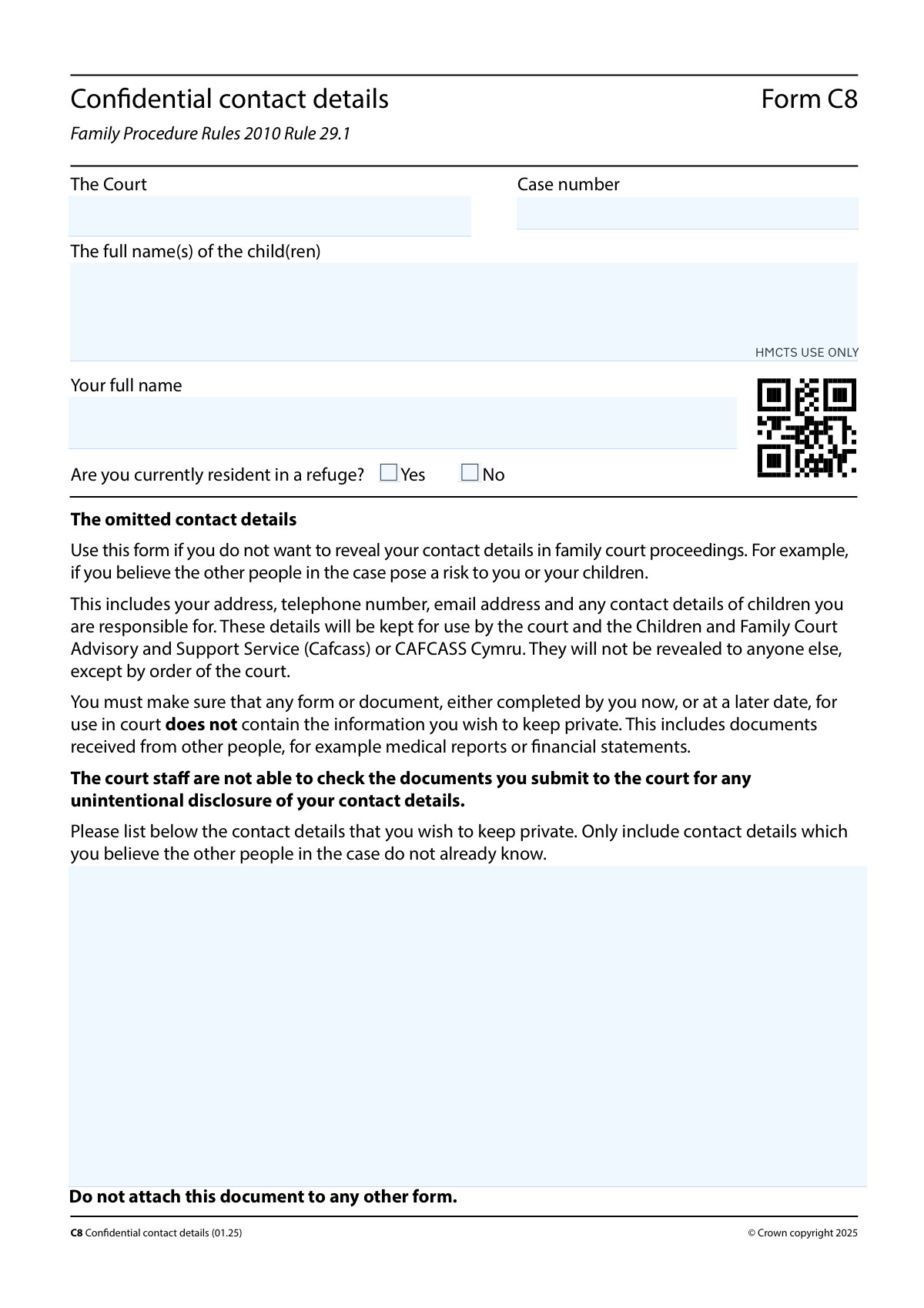
Yes! You can use AI to fill out Form C8, Confidential contact details
Form C8, Confidential contact details, is a crucial document used in UK family court proceedings to formally request that your personal contact information be kept confidential from other parties involved in the case. It is essential for individuals who believe revealing their details could pose a risk to themselves or their children, ensuring this sensitive information is only accessible to the court and Cafcass. Today, this form can be filled out quickly and accurately using AI-powered services like Instafill.ai, which can also convert non-fillable PDF versions into interactive fillable forms.
Our AI automatically handles information lookup, data retrieval, formatting, and form filling.
It takes less than a minute to fill out C8 using our AI form filling.
Securely upload your data. Information is encrypted in transit and deleted immediately after the form is filled out.
Form specifications
| Form name: | Form C8, Confidential contact details |
| Number of pages: | 2 |
| Language: | English |
Instafill Demo: How to fill out PDF forms in seconds with AI
How to Fill Out C8 Online for Free in 2026
Are you looking to fill out a C8 form online quickly and accurately? Instafill.ai offers the #1 AI-powered PDF filling software of 2026, allowing you to complete your C8 form in just 37 seconds or less.
Follow these steps to fill out your C8 form online using Instafill.ai:
- 1 Navigate to Instafill.ai and upload or select Form C8, Confidential contact details.
- 2 Use the AI assistant to accurately fill in the court name and the specific case number for your proceedings.
- 3 Enter the full legal names of the child or children involved, as well as your own full name.
- 4 Carefully list all the contact details you wish to keep private, such as your address, phone number, and email, ensuring this information is not already known to the other parties.
- 5 Indicate whether you are currently residing in a refuge by checking the 'Yes' or 'No' box.
- 6 Complete the 'Statement of truth' section by selecting the correct declaration, providing your signature, and entering the date.
- 7 Review all the information for accuracy, then download the completed form, remembering to keep it separate from all other court documents to maintain confidentiality.
Our AI-powered system ensures each field is filled out correctly, reducing errors and saving you time.
Why Choose Instafill.ai for Your Fillable C8 Form?
Speed
Complete your C8 in as little as 37 seconds.
Up-to-Date
Always use the latest 2026 C8 form version.
Cost-effective
No need to hire expensive lawyers.
Accuracy
Our AI performs 10 compliance checks to ensure your form is error-free.
Security
Your personal information is protected with bank-level encryption.
Frequently Asked Questions About Form C8
Form C8 is used in family court proceedings to keep your contact details confidential from other people in the case. This is important if you believe revealing your address, phone number, or email could pose a risk to you or your children.
Anyone involved in a family court case who wishes to keep their personal contact information private from the other parties should complete this form. It ensures your details are on file for the court but not shared with others in the proceedings.
You will need to provide the court and case number, the full name(s) of the child(ren), your full name, and the specific contact details you wish to keep confidential. You must also sign a statement of truth.
You must file Form C8 as a separate document. Do not attach it to any other form to ensure it is handled confidentially by court staff.
The contact details you provide on Form C8 will only be used by the court and the Children and Family Court Advisory and Support Service (Cafcass) or CAFCASS Cymru. They will not be revealed to anyone else without a specific court order.
In the 'Omitted contact details' section, you should only list the information that you believe the other people in the case do not already know. Do not include details that are already known to them.
You must ensure that any other forms or documents you submit to the court do not contain the information you wish to keep private. Court staff are not able to check your documents for accidental disclosures.
This is a declaration confirming that the information you have provided is true to the best of your belief. Knowingly providing false information in a document verified by a statement of truth can lead to proceedings for contempt of court.
The case number is the official reference number assigned to your family court proceedings. It can be found on any official documents or correspondence you have received from the court regarding your case.
Yes, the form includes a specific question asking if you are currently a resident in a refuge. You should check the 'Yes' box if this is your situation.
Yes, services like Instafill.ai use AI to accurately auto-fill form fields, which can save you time and help prevent errors when completing the form.
You can use a service like Instafill.ai to complete your form online. Simply upload the C8 form, and the platform will provide an interactive version for you to fill out and download.
If you have a non-fillable or 'flat' PDF, you can use a tool like Instafill.ai. It can convert the document into an interactive, fillable form that you can easily complete on your computer.
Compliance C8
Validation Checks by Instafill.ai
1
Ensures Case Number is Provided
This check verifies that the 'Case number' field is not empty. The case number is a critical identifier that links this confidential document to the correct legal proceedings in the court system. Failure to provide it would make it impossible for court staff to file the form correctly, potentially compromising the confidentiality it's meant to protect.
2
Validates Omitted Contact Details are Listed
This validation ensures that the 'Omitted contact details' text area is not left blank. The entire purpose of Form C8 is to list specific contact details that must be kept confidential from other parties. An empty submission serves no purpose and indicates a misunderstanding or error by the user, so the form should be rejected as incomplete.
3
Mandatory Selection for Refuge Status
This check confirms that the user has selected either 'Yes' or 'No' for the question 'Are you currently resident in a refuge?'. This information is mandatory for the court and support services to understand the applicant's current safety and housing situation. An unselected status leaves a critical piece of information ambiguous.
4
Exclusive Selection for Statement of Truth
This validation ensures that exactly one of the three 'Statement of truth' checkboxes is selected. The statement of truth is a formal legal declaration, and selecting none, or more than one, creates ambiguity about the basis on which the form is being submitted. The form is legally invalid without a single, clear declaration.
5
Exclusive Selection for Signer's Role
This check verifies that either 'Applicant/Respondent' or 'Applicant’s/Respondent’s legal representative' is selected, but not both. This selection clarifies the capacity in which the person is signing the document, which is a fundamental requirement for its legal validity. Failure to make a single, clear choice makes the signature's authority unclear.
6
Validates Date of Signature is Complete and Real
This validation ensures that the 'Day', 'Month', and 'Year' fields are all filled in and constitute a valid calendar date (e.g., not 31 April). The date of signature is legally significant as it records when the statement of truth was made. An incomplete or impossible date can render the document invalid and inadmissible.
7
Prohibits Future Dates for Signature
This check ensures the date entered in the 'Date' fields is not a date in the future. A legal document cannot be post-dated, as the declaration of truth is being made at the moment of signing. A future date would invalidate the statement and the form submission.
8
Ensures Signer's Full Name is Provided
This validation confirms that the 'Full name of signer' field has been completed. This name must correspond to the person signing the document to verify their identity and their attestation to the statement of truth. An anonymous or missing name makes the signature and the entire form unverifiable.
9
Conditional Requirement for Legal Representative's Firm Name
This check enforces that if the 'Applicant’s/Respondent’s legal representative' role is selected, the 'Name of legal representative's firm' field must be filled. When a legal representative signs, their firm must be identified for accountability and official record-keeping. Omitting the firm name when a representative is signing makes the submission incomplete and professionally improper.
10
Conditional Requirement for Position Held
This validation ensures that if the 'Name of legal representative's firm' field is filled, the 'Position or office held' field is also completed. This specifies the authority of the individual signing on behalf of the firm (e.g., 'Partner', 'Solicitor'). This detail is necessary for verifying that the signatory is authorized to make declarations for the firm.
11
Logical Consistency between Signer Role and Statement of Truth
This check verifies that the 'Statement of truth' selection aligns with the signer's role. For instance, if 'Applicant/Respondent' is checked, the 'I believe that the facts...' statement should be selected. If a legal representative is signing, one of the 'I am authorised by...' statements is expected, preventing a logical contradiction in the legal declaration.
12
Ensures Applicant's Full Name is Provided
This check verifies that the 'Your full name' field is completed. This identifies the party submitting the form for confidentiality, which is essential for the court to know who the request applies to. Without this name, the form lacks a clear subject and cannot be processed.
13
Ensures Child's Full Name is Provided
This validation ensures the 'Full name(s) of the child(ren)' field is not empty. The form is used in family court proceedings concerning children, so identifying the relevant child or children is a primary requirement. Failure to name the children makes the context of the confidentiality request unknown.
14
Ensures Court Name is Provided
This check verifies that the 'Court' field is filled with the name of the court hearing the case. This information is essential for routing and filing the document with the correct judicial body. A form without a court name is un-fileable and will be rejected.
Common Mistakes in Completing C8
This is the most critical mistake. A person correctly fills out Form C8 to keep their address private but then includes that same address on the main application (e.g., Form C100) or a financial statement. This action completely negates the protection of Form C8, as the sensitive information is then served to the other party. To avoid this, you must meticulously review every single document you submit to the court to ensure it does not contain any details listed on your C8.
Entering the case number with typos, or omitting parts of it, is a frequent data entry error. This often happens when copying the number from another document. An incorrect case number can lead to the C8 form being rejected or not linked to your case file, meaning your confidential details are not protected as intended. Always double-check the case number against official correspondence from the court before submitting.
The form explicitly states, "Do not attach this document to any other form." Despite this clear instruction, users sometimes staple or clip it to their main application, assuming it's part of a single submission package. This risks the confidential form being mishandled and accidentally served to the other parties, defeating its entire purpose. Form C8 must always be filed separately with the court clerk.
The form's instructions specify to only list contact details that you believe the other parties do not already know. A common error is to list a previous address or old phone number that the other person is aware of. This is unnecessary and clutters the form, distracting from the truly confidential information that needs protection. Focus only on new, private details the other party could not know.
The Statement of Truth has multiple, similar-looking checkboxes, and people often select the wrong one, for example, an individual applicant ticking the box meant for a legal representative. This can invalidate the statement and the form itself, leading to rejection by the court. Carefully read each option and select only the one that accurately describes who is signing the form (e.g., "I believe..." for a self-representing party).
It is surprisingly common for filers to complete all the details but forget to sign and date the form in the Statement of Truth section. An unsigned form is not legally valid and will be rejected by the court, causing significant delays in processing your request for confidentiality. Always perform a final check to ensure the signature and date fields are completed correctly before submission.
Applicants often use nicknames, shortened names, or omit middle names for themselves or their children. Court documents require full legal names for accurate identification and to ensure consistency across all case filings. Using an incorrect name can cause administrative delays and confusion when matching this form to the main case file. Always use the full legal names as they appear on birth certificates or other official documents.
The form warns that you are responsible for information on all documents you submit, even those from third parties like medical reports or bank statements. A common mistake is submitting a report that contains your confidential address, not realizing it needs to be redacted (blacked out) first. This accidental disclosure can put you at risk. Before submitting any third-party document, you must carefully review and redact any confidential information listed on your C8.
In the "Omitted contact details" section, a user might simply write "my address and phone" without providing the specific information. The court and Cafcass need the exact details to be able to contact you, even while keeping them confidential from others. Failing to provide the full, specific address, phone number, or email address makes the form ineffective. You must list the complete and precise details you wish to protect.
The signature section has separate fields for the applicant/respondent and their legal representative (firm name, position). Self-representing individuals sometimes mistakenly fill in the fields meant for a solicitor. This creates confusion and can cause the form to be questioned or returned for correction. AI-powered form filling tools like Instafill.ai can help prevent this by showing or hiding conditional fields based on your answers, ensuring you only complete what's necessary.
Users may enter a generic or abbreviated name for the court, such as "Family Court," without specifying the location (e.g., "Central Family Court" or "Family Court at Manchester"). This ambiguity can cause the document to be misrouted or delayed in reaching the correct administrative office. Always use the full, official name of the court hearing your case as it appears on other legal papers. If the form is a non-fillable PDF, a tool like Instafill.ai can convert it to a fillable version, making data entry clearer.
Saved over 80 hours a year
“I was never sure if my IRS forms like W-9 were filled correctly. Now, I can complete the forms accurately without any external help.”
Kevin Martin Green
Your data stays secure with advanced protection from Instafill and our subprocessors

Robust compliance program
Transparent business model
You’re not the product. You always know where your data is and what it is processed for.
ISO 27001, HIPAA, and GDPR
Our subprocesses adhere to multiple compliance standards, including but not limited to ISO 27001, HIPAA, and GDPR.
Security & privacy by design
We consider security and privacy from the initial design phase of any new service or functionality. It’s not an afterthought, it’s built-in, including support for two-factor authentication (2FA) to further protect your account.
Fill out C8 with Instafill.ai
Worried about filling PDFs wrong? Instafill securely fills form-c8-confidential-contact-details forms, ensuring each field is accurate.