Yes! You can use AI to fill out TIAA-CREF Funds IRA Distribution Form (Retail Class Only)
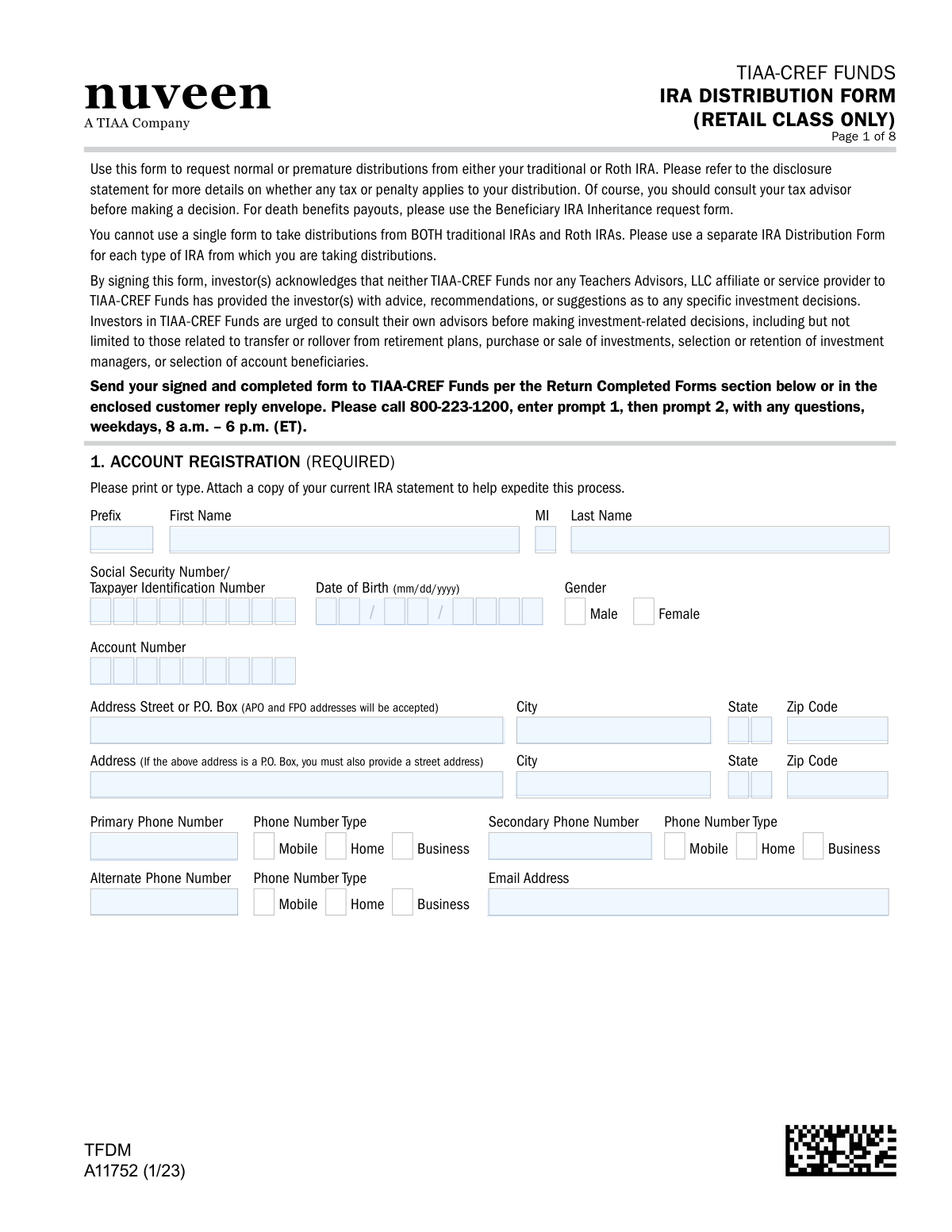
Form A11752, the TIAA-CREF Funds IRA Distribution Form, is a crucial document for account holders with Retail Class IRAs who wish to withdraw funds. It allows individuals to specify the type of distribution (e.g., normal, premature, RMD), the amount, and how they wish to receive the funds, while also addressing tax withholding elections. Completing this form accurately is essential for managing retirement assets and ensuring compliance. Today, this form can be filled out quickly and accurately using AI-powered services like Instafill.ai, which can also convert non-fillable PDF versions into interactive fillable forms.
A11752 is part of the
IRA forms, TIAA forms, TIAA-CREF forms, ETA forms, IRA distribution forms and retail fund forms categories on Instafill.
Rather not fill this in by hand? Instafill is an online form filler that completes PDF forms automatically — upload the blank form, answer a few questions, and the AI fills every field.
Form specifications
| Form name: | TIAA-CREF Funds IRA Distribution Form (Retail Class Only) |
| Number of pages: | 1 |
| Language: | English |
Our AI automatically handles information lookup, data retrieval, formatting, and form filling.
It takes less than a minute to fill out A11752 using our AI form filling.
Securely upload your data. Information is encrypted in transit and deleted immediately after the form is filled out.
Instafill Demo: How to fill out PDF forms in seconds with AI
How to Fill Out A11752 Online for Free in 2026
Are you looking to fill out a A11752 form online quickly and accurately? Instafill.ai offers the #1 AI-powered PDF filling software of 2026, allowing you to complete your A11752 form in just 37 seconds or less.
Follow these steps to fill out your A11752 form online using Instafill.ai:
- 1 Navigate to Instafill.ai and upload or select the TIAA-CREF IRA Distribution Form A11752.
- 2 Use the AI assistant to accurately fill in your personal details and account registration information in Section 1.
- 3 Specify the type of IRA (Traditional or Roth) and the reason for your distribution, such as normal, premature, or RMD, in Section 3.
- 4 Indicate the distribution amount and provide instructions on how the funds should be withdrawn from your accounts in Sections 4 and 5.
- 5 Complete the Federal and State Tax Withholding Election sections (Section 7) to ensure correct tax handling.
- 6 Choose your distribution schedule and method, such as a one-time payment or direct deposit, in Sections 8 and 9.
- 7 Carefully review all entered information, provide your digital signature in Section 10, and submit the completed form as directed.
Our AI-powered system ensures each field is filled out correctly, reducing errors and saving you time.
Why Choose Instafill.ai for Your Fillable A11752 Form?
Speed
Complete your A11752 in as little as 37 seconds.
Up-to-Date
Always use the latest 2026 A11752 form version.
Cost-effective
No need to hire expensive lawyers.
Accuracy
Our AI performs 10 compliance checks to ensure your form is error-free.
Security
Your personal information is protected with bank-level encryption.
Frequently Asked Questions About A11752
This form is used to request a distribution (withdrawal) from your TIAA-CREF Traditional or Roth IRA for Retail Class shares. This includes normal distributions, premature distributions, and Required Minimum Distributions (RMDs).
No, you cannot use a single form for both. You must complete a separate IRA Distribution Form for each type of IRA (Traditional and Roth) from which you are taking a distribution.
You will need your IRA account number, Social Security Number, and personal details. If you plan to set up direct deposit to a new account, you will also need a voided check or your bank's routing and account numbers.
While this form has a section for death benefit payouts, TIAA generally recommends using the 'Beneficiary IRA Inheritance request form' for this purpose. It is best to call TIAA at 800-223-1200 to confirm which form is appropriate for your situation.
In Section 4, select the 'Required Minimum Distribution (RMD)' option. You can then choose to have TIAA-CREF calculate it for you based on the appropriate life expectancy table or specify a custom amount if you have multiple IRAs.
Federal taxes are withheld at a default rate of 10% for nonperiodic payments unless you specify otherwise in Section 7. You can use the attached Substitute Form W-4R to elect a different percentage or choose no withholding.
Yes, in Section 8 (Distribution Schedule), you can select 'Systematic Distribution' and choose a monthly, quarterly, or annual frequency for your withdrawals.
In Section 9, you can choose to receive your funds via a check mailed to your address, direct deposit to your bank account, or a deposit into another TIAA-CREF non-IRA account.
A Medallion Signature Guarantee is a special signature verification from a financial institution that protects against fraud. You will need one if you request a direct deposit to a new bank account, mail a check to an address not on file, or make a Qualified Charitable Distribution.
You can send the signed and completed form via standard mail or overnight delivery to the TIAA-CREF Funds addresses listed in the 'Return Completed Forms' section. Be sure to include all pages of the form.
Yes, Section 6 and Section 9 (Option F) are specifically for requesting a Qualified Charitable Distribution to be sent directly to a nonprofit organization. Note that this option requires a Medallion Signature Guarantee.
Yes, services like Instafill.ai use AI to accurately auto-fill form fields with your information, which can save you time and help prevent errors.
You can use Instafill.ai to fill out this form online. Simply upload the PDF, and the service will make it fillable, allowing you to type your information directly into the fields and securely save your progress.
If you have a non-fillable or 'flat' PDF, you can upload it to a service like Instafill.ai. It will automatically convert the PDF into an interactive, fillable form that you can easily complete on your computer.
Compliance A11752
Validation Checks by Instafill.ai
1
Ensures Exclusive IRA Type Selection
This check verifies that the user has selected distribution reasons from either the 'TRADITIONAL IRA(S)' section or the 'ROTH IRA(S)' section, but not both. The form explicitly states that a separate form must be used for each IRA type. A failure in this validation would make the distribution request ambiguous and unprocessable, requiring rejection of the form.
2
Validates Age for Normal Distribution
This check cross-references the 'Date of Birth' from Section 1 with the distribution reason selected in Section 3 or 4. If 'Normal' (Traditional IRA) or 'Qualified' (Roth IRA) distribution is selected, the system must verify the account holder is age 59½ or older. This is critical for determining tax and penalty implications, and an invalid selection could lead to incorrect tax reporting.
3
Validates Age for Required Minimum Distribution (RMD)
If 'Required Minimum Distribution (RMD)' is selected in Section 4, this check validates that the account owner's age, calculated from the 'Date of Birth' in Section 1, meets the RMD age threshold (70½ or 72, as defined on the form). Requesting an RMD before reaching the required age is not permissible. This validation prevents incorrect distributions that would violate IRS regulations.
4
Verifies Social Security Number Format
This validation ensures that the Social Security Number / Taxpayer Identification Number entered in Section 1 is a valid 9-digit number, typically in XXX-XX-XXXX or XXXXXXXXX format. A valid TIN is mandatory for IRS reporting and account identification. If the format is incorrect, the form cannot be processed, and tax reporting will fail.
5
Confirms Completeness of Excess Contribution Details
This check is triggered if the user selects 'Remove excess contribution' in either the Traditional or Roth IRA sections. It verifies that both the dollar amount of the excess contribution and the corresponding tax year have been filled in. Missing this information makes it impossible to process the corrective distribution accurately, leading to form rejection.
6
Enforces Single Selection in Distribution Instructions
This validation ensures that the user has selected only one payment method from the available options (A, B, C, D, E, or F) in Section 9. The form header explicitly states 'CHOOSE ONE ONLY'. Selecting multiple options creates ambiguity and prevents the system from knowing how to disburse the funds, thus requiring manual intervention or rejection.
7
Validates Completeness of ACH Banking Information
If the user selects Option B in Section 9 for direct deposit (ACH), this check ensures that the Bank Name, Bank Account Number, Account Type, and a 9-digit ABA Routing Number are all provided. Missing or invalid information would cause the electronic funds transfer to fail. This check prevents payment delays and potential misdirection of funds.
8
Flags Requirement for Medallion Signature Guarantee
This check identifies when a Medallion Signature Guarantee is required in Section 11. It is triggered if the user selects Section 9 options B (with new banking info), D (mail to alternate address), or F (charitable distribution). The system should flag the submission as incomplete if the required guarantee is missing, as it is a necessary fraud prevention measure for these transaction types.
9
Enforces Physical Address for P.O. Box Users
In Section 1, if the primary address is identified as a P.O. Box, this validation confirms that the subsequent street address fields have also been completed. A physical address is often required for legal and compliance purposes (e.g., Patriot Act). Failure to provide it can halt account processing until the information is supplied.
10
Verifies Systematic Distribution Schedule Details
If 'Systematic Distribution' is selected in Section 8, this check confirms that the 'Beginning Month', 'Distribution Frequency', and 'Distribution Date' fields are all filled out. These details are essential for setting up the recurring payment schedule correctly. An incomplete schedule would make the request un-actionable and require clarification from the client.
11
Validates Fund Allocation Percentages Sum to 100%
When a user opts to withdraw from specific funds in Section 5, this check verifies that the percentages entered for each fund are numeric and that their sum is exactly 100%. A total other than 100% would create an ambiguous instruction on how to draw the funds. This validation ensures the user's intent is clear and the distribution can be executed as requested.
12
Ensures Signature and Date are Present
This is a fundamental check to verify that the applicant has signed and dated the form in Section 10. A missing signature or date invalidates the entire request, as it serves as legal authorization for the transaction. The form would be rejected immediately as 'not in good order' until a properly signed copy is received.
13
Cross-Validates Charitable Distribution Sections
This check ensures consistency between the charitable distribution sections. If any information is entered in Section 6 ('Qualified Charitable Distributions'), the system must verify that Option F in Section 9 is also selected and completed with the payee charity's details. This logical link is crucial for ensuring the payment is correctly designated and sent to the intended nonprofit organization.
14
Validates W-4R Withholding Rate Rules
If the user completes the substitute W-4R form, this check validates the entered withholding rate against IRS rules mentioned in the form. For an 'eligible rollover distribution,' the rate cannot be less than 20%. For 'nonperiodic payments,' the rate must be between 0% and 100%. This prevents the submission of non-compliant tax withholding instructions which would be rejected by the processing system.
Common Mistakes in Completing A11752
The form explicitly states on page 1 that a separate form must be used for each type of IRA (Traditional vs. Roth). Applicants often overlook this instruction and attempt to request distributions from both account types on a single form. This will result in an immediate rejection of the form, forcing the applicant to resubmit two separate, correct forms, causing significant delays in receiving their funds.
Sections 9B, 9D, and 9F require a Medallion Signature Guarantee, which is a special stamp from a financial institution that guarantees the signature's authenticity. People often miss this requirement or don't understand what it is, leading them to submit the form without it. The form will be rejected as 'not in good order,' and the applicant will have to get the guarantee and resubmit, delaying the distribution process by days or weeks.
The form clearly states in Section 11 that a Medallion Signature Guarantee is not the same as a notarized signature. However, many people are more familiar with notaries and obtain a notary stamp instead. A notary only verifies identity, while a Medallion Guarantee also insures the transaction against fraud. Submitting a form with a notary stamp instead of the required Medallion Guarantee will lead to rejection.
In Section 1, the form requires a physical street address if the primary address is a P.O. Box. Applicants frequently provide only the P.O. Box, which is insufficient for certain verification and delivery purposes. This omission will halt processing until the applicant provides the complete information. To avoid this, ensure all required address fields are filled correctly.
Section 7 and the attached Substitute Form W-4R are complex and often misunderstood. Applicants may not realize that doing nothing results in a default 10% federal withholding, or they may get confused about how to elect a different rate or no withholding. This can lead to unexpected tax consequences or a smaller-than-anticipated net distribution. Using a tool like Instafill.ai can help by providing clear guidance on tax election options based on user input.
When requesting a Qualified Charitable Distribution (QCD), applicants often make mistakes in Section 6, such as providing both a total dollar amount and specific fund percentages, creating a contradiction. A common error is also failing to complete the required charity information in Section 9, Option F, after indicating a QCD in Section 6. These errors will prevent the charitable distribution from being processed correctly and require clarification from the applicant.
In Section 4 ('Distribution Amounts'), an applicant might select both 'Fixed Amount' and 'Entire Balance.' Similarly, in Section 8 ('Distribution Schedule'), they might check both 'One-time Distribution' and 'Systematic Distribution.' These contradictory instructions make it impossible for the processor to know the applicant's intent, causing the form to be flagged for follow-up and delaying the payment.
When choosing to withdraw from specific funds in Section 5, the form requires the applicant to list the percentage to be taken from each. A frequent mistake is providing percentages that do not add up to exactly 100%. This mathematical error makes the instruction invalid, and the transaction cannot be processed until the applicant submits a correction.
The very top of the form states, 'For death benefits payouts, please use the Beneficiary IRA Inheritance request form.' Despite this, some beneficiaries mistakenly use this standard distribution form, likely confused by the 'Death Benefit Payout' section (Section 2) which is intended for specific RMD scenarios in the year of death. Using the incorrect primary form will result in rejection, requiring the beneficiary to start the entire process over with the correct paperwork.
The instructions in the 'Return Completed Form(s) To' section on pages 8 and beyond explicitly state to 'Please return ALL numbered pages, including any pages you did not need to complete.' Many individuals only mail back the pages they filled out, assuming the others are unnecessary. This can cause the submission to be deemed incomplete, leading to processing delays or rejection. Since this form is a non-fillable PDF, a tool like Instafill.ai can convert it into a fillable version and ensure the complete, properly formatted document is ready for submission.
Saved over 80 hours a year
“I was never sure if my IRS forms like W-9 were filled correctly. Now, I can complete the forms accurately without any external help.”
Kevin Martin Green
Your data stays secure with advanced protection from Instafill and our subprocessors




Robust compliance program
Transparent business model
You’re not the product. You always know where your data is and what it is processed for.
ISO 27001, HIPAA, and GDPR
Our subprocesses adhere to multiple compliance standards, including but not limited to ISO 27001, HIPAA, and GDPR.
Security & privacy by design
We consider security and privacy from the initial design phase of any new service or functionality. It’s not an afterthought, it’s built-in, including support for two-factor authentication (2FA) to further protect your account.
Fill out A11752 with Instafill.ai
Worried about filling PDFs wrong? Instafill securely fills tiaa-cref-funds-ira-distribution-form-retail-class-only forms, ensuring each field is accurate.
