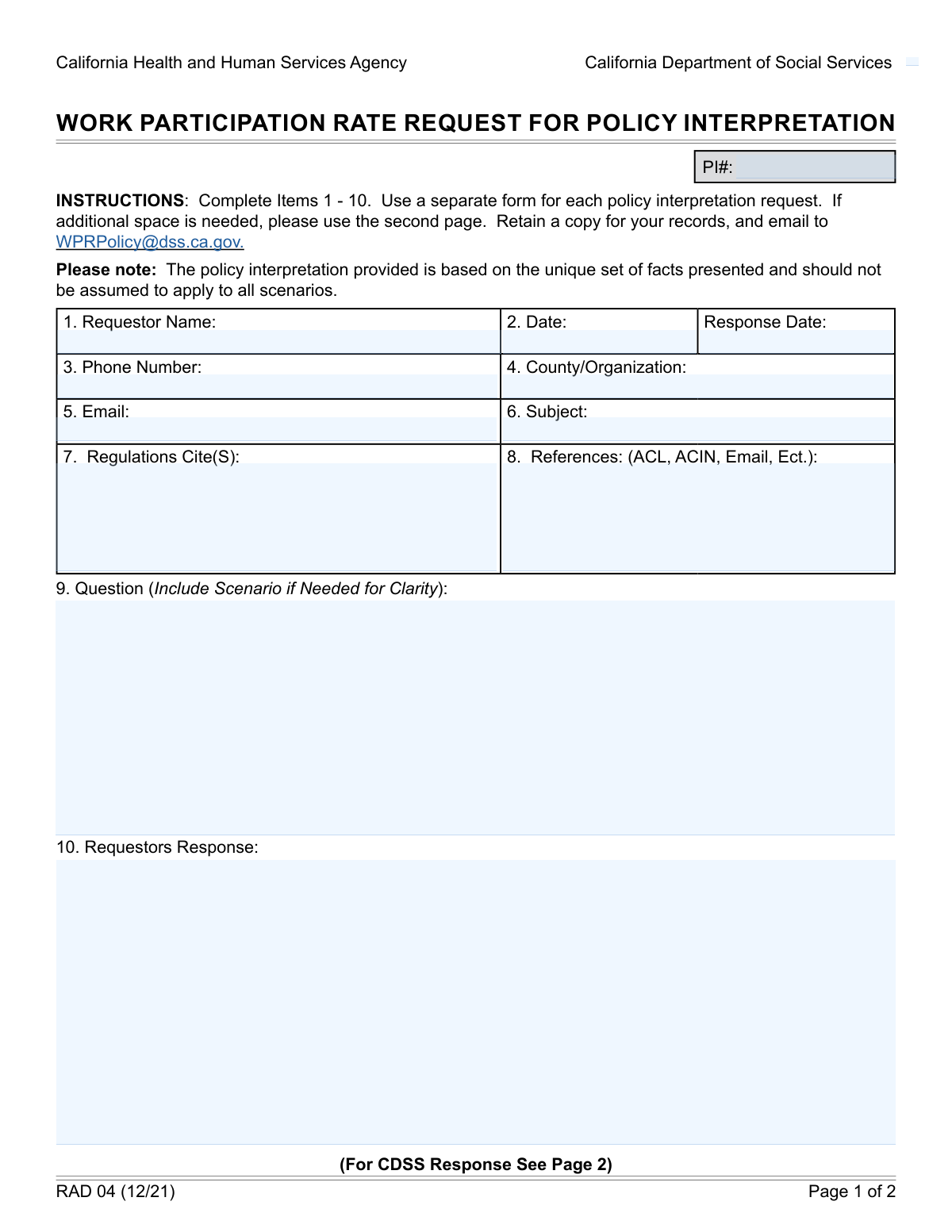
Yes! You can use AI to fill out GEN 1327, Policy Interpretation Request
The GEN 1327, Policy Interpretation Request, is a formal document used by counties and other organizations to seek official clarification from the California Department of Social Services (CDSS) regarding specific policies and regulations. This process is crucial for ensuring consistent policy application across the state and provides a documented, official response to complex questions. Today, this form can be filled out quickly and accurately using AI-powered services like Instafill.ai, which can also convert non-fillable PDF versions into interactive fillable forms.
Our AI automatically handles information lookup, data retrieval, formatting, and form filling.
It takes less than a minute to fill out GEN 1327 using our AI form filling.
Securely upload your data. Information is encrypted in transit and deleted immediately after the form is filled out.
Form specifications
| Form name: | GEN 1327, Policy Interpretation Request |
| Number of fields: | 17 |
| Number of pages: | 2 |
| Language: | English |
Instafill Demo: How to fill out PDF forms in seconds with AI
How to Fill Out GEN 1327 Online for Free in 2026
Are you looking to fill out a GEN 1327 form online quickly and accurately? Instafill.ai offers the #1 AI-powered PDF filling software of 2026, allowing you to complete your GEN 1327 form in just 37 seconds or less.
Follow these steps to fill out your GEN 1327 form online using Instafill.ai:
- 1 Navigate to Instafill.ai and upload or select the GEN 1327 form to begin.
- 2 Provide your contact details and organization information in the 'Requestor Information' section.
- 3 Enter the subject of your request and list all relevant regulations and other materials in the 'Citations and References' section.
- 4 Clearly write your specific question in the 'Question' field, including any necessary scenarios for context.
- 5 Optionally, detail your own interpretation or proposed response in the 'Requestor's Response' field.
- 6 Use the AI-powered assistant to review all entered information for accuracy and completeness.
- 7 Download the completed, ready-to-submit GEN 1327 form.
Our AI-powered system ensures each field is filled out correctly, reducing errors and saving you time.
Why Choose Instafill.ai for Your Fillable GEN 1327 Form?
Speed
Complete your GEN 1327 in as little as 37 seconds.
Up-to-Date
Always use the latest 2026 GEN 1327 form version.
Cost-effective
No need to hire expensive lawyers.
Accuracy
Our AI performs 10 compliance checks to ensure your form is error-free.
Security
Your personal information is protected with bank-level encryption.
Frequently Asked Questions About Form GEN 1327
This form is used to formally request an official interpretation of a specific policy or regulation from the California Department of Social Services (CDSS). It helps clarify how rules should be applied in certain situations.
This form is intended for individuals affiliated with a county or other organization who need official clarification on policies or regulations related to their work.
The 'P.I. Number' (Policy Interpretation Number) is a unique tracking number for your request. You should leave this field blank, as it will be assigned by the CDSS after they receive your form.
In the 'Question' section, you state the specific policy question you need answered, including a scenario for context. The 'Requestor's Response' section is where you can provide your own detailed analysis or proposed interpretation for the CDSS to consider.
You should enter the specific code, section, or number of the official regulation that your question is about. Providing the exact citation is crucial for getting a relevant response.
This section is for any additional supporting materials, such as All County Letters (ACLs), All County Information Notices (ACINs), previous email correspondence, or other relevant guidance documents.
This section is for official use only and will be completed by the California Department of Social Services (CDSS). They will provide their formal policy interpretation in this space.
Be as specific as possible in your question. Always include a detailed, real-world scenario to give context and help the policy analyst provide a clear and applicable answer.
The form itself does not list a submission address. You should consult your organization's internal procedures or contact the relevant CDSS department to find the correct submission email or mailing address.
Yes, services like Instafill.ai use AI to accurately auto-fill your personal and organizational information, saving you time. You will still need to personally write the specific policy question and your analysis.
You can use a service like Instafill.ai to easily complete this form online. Simply upload the PDF, and the platform will make the fields interactive for you to fill out on your computer.
If you have a non-fillable or 'flat' PDF, you can use a tool like Instafill.ai. It can convert the static document into an interactive, fillable form that you can complete and save digitally.
Compliance GEN 1327
Validation Checks by Instafill.ai
1
Required Requestor Name
This validation ensures the 'Requestor Name' field is not empty. The requestor's name is essential for identifying the individual who submitted the request for communication and record-keeping purposes. If this field is left blank, the form submission will be rejected with an error message prompting the user to provide their full name.
2
Valid Email Format
This check verifies that the text entered into the 'Email' field conforms to a standard email address format (e.g., [email protected]). A valid email is critical for sending automated confirmations, updates, and the final policy response to the requestor. An invalid format will prevent form submission and trigger an error message.
3
Valid Phone Number Format
This validation ensures the 'Phone Number' field contains a recognizable 10-digit phone number, allowing for formats like (XXX) XXX-XXXX or XXX-XXX-XXXX. Correctly formatted contact information is necessary in case direct verbal communication is needed to clarify the request. The system will reject submissions with improperly formatted phone numbers.
4
Required County or Organization
This check confirms that the 'County or Organization' field has been filled out. This information provides essential context for the request, helps in tracking requests by affiliation, and may influence how the request is routed or prioritized. A missing value will result in a validation error, blocking submission until the information is provided.
5
Required Subject Field
This validation verifies that the 'Subject' field is not left blank. The subject line provides a concise summary of the policy question, which is vital for internal routing, prioritization, and allowing staff to quickly understand the request's topic. Submissions without a subject will be blocked until one is provided.
6
Required Question Field
This check ensures the main 'Question' text area is not empty, as this field contains the core details and scenario for the policy interpretation request. A submission without a question is fundamentally incomplete and serves no purpose. The system must reject the form if this critical field is left blank.
7
Valid and Logical Request Date
This validation checks that the 'Request Date' is a valid calendar date in the correct format (e.g., MM/DD/YYYY) and is not set to a future date. This date establishes the official start of the request timeline for tracking service level agreements and reporting. An invalid or future date will cause a logical error and prevent submission.
8
Logical Date Sequence: Response Date vs. Request Date
This check verifies that the 'Response Date' (due date) is on or after the 'Request Date'. It is logically impossible for a response to be due before the request was even made. This validation prevents data entry errors and ensures the integrity of the timeline. If the check fails, an error will instruct the user to correct the dates.
9
Policy Interpretation Number Format
This validation ensures the 'Policy Interpretation Number' follows a predefined format, such as an alphanumeric pattern (e.g., 'PI-YYYY-NNNN'). This unique identifier is critical for tracking, retrieving, and referencing the request throughout its lifecycle. An incorrectly formatted number could lead to data retrieval issues and will cause the submission to fail.
10
Uniqueness of Policy Interpretation Number
This check performs a real-time lookup to ensure the provided 'Policy Interpretation Number' has not already been assigned to another request. Duplicate identifiers would corrupt the database's integrity and make it impossible to distinguish between records. If a duplicate is detected, the system will reject the entry and require a new, unique number.
11
Required Regulations Cited
This validation confirms that the 'Regulations Cited' field is not empty. Citing the specific regulations in question is fundamental to a policy interpretation request, as it provides the legal or procedural basis for the query. A submission lacking this information may be considered incomplete and rejected until the relevant citations are added.
12
Logical Date Check: CDSS Received vs. Request Date
This check ensures the 'Date CDSS Received' is on or after the initial 'Request Date'. The central department (CDSS) cannot logically receive a request before the requestor has submitted it. This validation prevents data entry errors and maintains a coherent timeline for the request's processing history.
13
Logical Date Sequence: CDSS Response vs. Received Date
This validation applies when the CDSS response is entered, ensuring the 'CDSS Response Date' is on or after the 'Date CDSS Received'. A response cannot be dated before the request was officially received by the responding entity. This check maintains the logical integrity of the workflow timeline and prevents inaccurate reporting.
14
Completeness Check for CDSS Response Field
When the form is being finalized by CDSS, this check validates that the 'CDSS Policy Response' field is not empty. The primary purpose of the workflow is to generate this official response. This validation ensures that a record cannot be marked as complete without the final policy determination being recorded.
Common Mistakes in Completing GEN 1327
The form has two fields for 'Policy Interpretation Number,' one at the top and one on Page 2. Requestors often mistakenly fill in the top field, which is typically reserved for the receiving agency's internal tracking number. This can cause processing errors and require manual correction by staff, delaying the request. To avoid this, requestors should leave any 'P.I. Number' or 'Policy Interpretation Number' fields blank unless they have been explicitly assigned a number beforehand.
The field labeled 'Requestor's Response' is highly confusing and frequently left blank because users assume it's for the agency's reply. This field is actually intended for the requestor to provide their own analysis or proposed interpretation of the policy in question. Filling this out provides crucial context that helps the policy analyst understand the specific point of confusion, leading to a faster and more relevant official response.
Users often cite regulations in a vague or improper format, such as 'the welfare code' or using an incorrect section number. This is a critical error, as it forces the policy analyst to guess or search for the correct regulation, significantly delaying or even halting the interpretation process. Always provide the full, formal citation, including the code name, section, and subsection (e.g., 'Welfare and Institutions Code § 12345(a)(1)'), to ensure accuracy.
Many submissions contain questions that are too general, like 'What are the rules for eligibility?' The form specifically asks for a 'relevant scenario' to prevent this. Vague questions lead to equally vague, unhelpful answers or a follow-up request for more information. To get a useful interpretation, provide a concise, specific question grounded in a real-world (but anonymized) scenario.
Requestors sometimes fill out fields on the second page, such as 'CDSS Policy Response' or 'Date CDSS Received.' These sections are clearly marked for the responding agency (CDSS) and should be left blank by the applicant. Filling them in creates confusion, makes the submission look unprofessional, and may require the form to be returned for correction. Focus only on the requestor-related fields.
The 'Response Date' field is ambiguously labeled 'Please enter the date the response is due or received.' A requestor cannot know the 'received' date upon submission, leading to confusion. People may leave it blank or enter a desired 'due date' without clarification, creating mismatched expectations. It is best to leave this field blank unless you are formally requesting a response by a specific deadline, which should also be noted in the body of your question.
People often use unofficial abbreviations (e.g., 'LA County') or internal acronyms for their organization instead of the full, official name. This can cause confusion for the agency, requiring them to seek clarification and delaying the routing of your request. Always write out the complete and official name of the county or organization (e.g., 'County of Los Angeles') to ensure clarity.
Simple typos in an email address or an incorrectly formatted phone number are very common but have serious consequences. If the agency cannot contact you for clarification or to send the final response, your entire request may be stalled indefinitely. Always double-check your email and phone number for accuracy. AI-powered tools like Instafill.ai can help prevent this by automatically validating data formats as you type.
Requestors often mention other materials, such as 'per our previous email' or 'see the attached ACIN,' without providing specific identifiers or attaching the document. This forces the reviewer to hunt for the information or request it from you, which delays the entire process. When citing other references, always provide specific details (e.g., 'ACIN I-88-22, dated Nov 1, 2022') and ensure all mentioned documents are included with your submission.
Since this form may only be available as a non-fillable PDF, users often print, handwrite, and scan it back in. Poor handwriting, smudges, or low-resolution scans can make critical information illegible, leading to data entry errors or rejection. To avoid this, use a digital tool to fill out the form. Services like Instafill.ai can convert flat PDFs into fillable forms, ensuring your submission is clean, legible, and professional.
Saved over 80 hours a year
“I was never sure if my IRS forms like W-9 were filled correctly. Now, I can complete the forms accurately without any external help.”
Kevin Martin Green
Your data stays secure with advanced protection from Instafill and our subprocessors

Robust compliance program
Transparent business model
You’re not the product. You always know where your data is and what it is processed for.
ISO 27001, HIPAA, and GDPR
Our subprocesses adhere to multiple compliance standards, including but not limited to ISO 27001, HIPAA, and GDPR.
Security & privacy by design
We consider security and privacy from the initial design phase of any new service or functionality. It’s not an afterthought, it’s built-in, including support for two-factor authentication (2FA) to further protect your account.
Fill out GEN 1327 with Instafill.ai
Worried about filling PDFs wrong? Instafill securely fills gen-1327-policy-interpretation-request forms, ensuring each field is accurate.