
Instafill.ai
7 days free
AI form filling · 54 fields · 4 pages · done in seconds

Yes! You can use AI to fill out Form 1099-Q, Payments From Qualified Education Programs

Don't type 54 fields by hand. Tell our AI about yourself, or upload your W-2 or last year's return, and it fills every field in seconds. You check it, then download, print or sign.
7 days free, then $19.99/month · Cancel anytime
AI fills it, no typingEncrypted, never used to train AICancel in two clicks
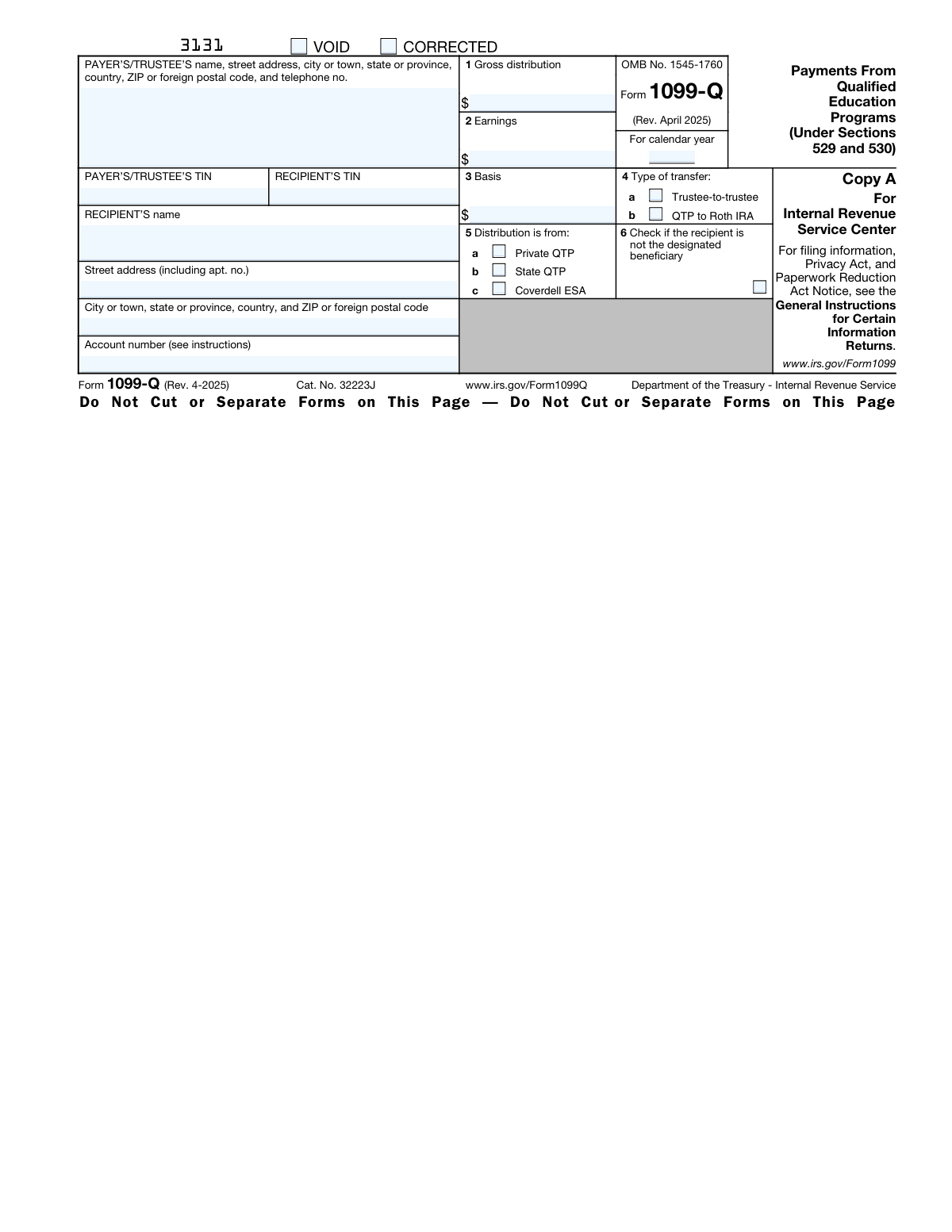
Form 1099-Q, Payments From Qualified Education Programs, page 1
Moderate · 46/100Form Complexity Index

The AI does the filling. You just check it.

No typing into boxes, nothing to install.

Tell the AI about youAnswer a few questions in plain words, or upload your W-2 or last year's return. That is all the typing there is.
AI fills every field in secondsIt puts each answer in the right box on every page, checkboxes included.
Check it and downloadReview every field, change anything, then download, print or sign the PDF.

What this form asks for

The AI fills all of it, from your answers or your documents.

Form 1099-Q is a tax form used to report payments from qualified education programs under Sections 529 and 530, such as 529 plans and Coverdell Education Savings Accounts (ESAs). It is important for tracking distributions for tax purposes and ensuring compliance with IRS rules.
Fillable fields54
Pages4
Sections18
Form Complexity IndexModerate, 46/100

The AI checks your answers before you download

15 checks built for this form, so a wrong date or a missing answer is caught before anyone else sees it.

Ensures that the payer's or trustee's name is entered correctly as per the instructions.

This validation check ensures that the name of the payer or trustee on Form 1099-Q is entered accurately and matches the name on record. It involves cross-referencing the provided name with official documents or databases to confirm its correctness. The check also includes verifying the proper formatting and spelling of the name, as well as ensuring that it aligns with the instructions specified for the form.

Verifies that the payer's or trustee's address is complete, including street address, city or town, state or province, country, and ZIP or foreign postal code.

This validation check verifies that the address of the payer or trustee is fully and correctly entered on Form 1099-Q. It includes checking each component of the address, such as the street address, city or town, state or province, country, and ZIP or foreign postal code. The check ensures that no part of the address is missing and that the format adheres to postal standards. Additionally, it may involve comparing the address against a database to confirm its validity.

Confirms that the payer's or trustee's telephone number is entered and formatted correctly.

This validation check confirms that the telephone number for the payer or trustee provided on Form 1099-Q is both present and correctly formatted. It involves ensuring that the number includes the correct country code, area code, and local number as applicable. The check also verifies that the telephone number follows the standard formatting conventions and is potentially reachable, enhancing the reliability of contact information.

Checks that the payer's or trustee's Taxpayer Identification Number (TIN) is provided and valid.

This validation check scrutinizes the Taxpayer Identification Number (TIN) of the payer or trustee on Form 1099-Q to ensure it is both supplied and valid. The check involves confirming that the TIN is in the correct format, typically consisting of nine digits for a Social Security Number (SSN) or Employer Identification Number (EIN). It also includes a verification process against government records to ascertain the authenticity and current validity of the TIN.

Ensures that the recipient's Taxpayer Identification Number (TIN) is entered and valid.

This validation check ensures that the recipient's Taxpayer Identification Number (TIN) on Form 1099-Q is correctly entered and is a valid number. It includes verifying the format of the TIN, which should conform to the standard nine-digit structure. The check also involves cross-referencing the TIN with official records to confirm its legitimacy and to ensure that it corresponds to the individual named as the recipient on the form.

Verifies that the recipient's full name is entered accurately.

The AI ensures that the recipient's full name is captured correctly on Form 1099-Q. It checks for any typographical errors, misspellings, or discrepancies in the name when compared to official documents or previously provided information. The validation includes checking for the correct sequence of first name, middle initial, and last name, and it flags any missing or additional characters that do not align with the standard naming conventions.

And 9 more checks
  • Confirms that the recipient's address is complete.
  • Checks if the account number is entered when applicable.
  • Validates that the gross distribution amount in Box 1 is entered and numeric.
  • Ensures that the earnings part of the gross distribution in Box 2 is entered and numeric.
  • Verifies that the basis in the gross distribution in Box 3 is entered and numeric.
  • Confirms that Box 4 is checked if a trustee-to-trustee transfer was made.
  • Determines if Box 5 correctly indicates whether the distribution is from a Qualified tuition program (Private or State) or a Coverdell ESA.
  • Checks if Box 6 is marked when the recipient is not the designated beneficiary.
  • Validates that all instructions for the recipient and payer/trustee are followed, including reviewing the information for accuracy, reporting taxable distributions, and understanding the taxability of distributions.

Let AI fill out your Form 1099-Q

No typing. Every field filled in seconds, checked, ready to sign.

7 days free, then $19.99/month · Cancel anytime

How to Fill Out Form 1099-Q Online for Free in 2026

What the AI walks you through.

  1. Visit instafill.ai site and select Form 1099-Q
  2. Enter payer/trustee's information
  3. Input recipient's TIN and name
  4. Fill in recipient's address details
  5. Report gross distribution amount
  6. Specify earnings and basis if applicable
  7. Indicate trustee-to-trustee transfers
  8. Select distribution type (private or state)
  9. Sign and date the form electronically
  10. Check for accuracy and submit form

Common Mistakes in Completing Form 1099-Q

The ones the AI is built to catch.

Not entering payer's or trustee's full name
Failing to enter the payer's or trustee's full name can lead to processing delays and potential misclassification of the form. It is crucial to double-check that the full legal name of the payer or trustee is accurately entered in the designated field. To avoid this mistake, always cross-reference the name with official documents or previous tax forms to ensure consistency and accuracy. If the payer or trustee is an entity, make sure to include the complete legal name of the entity as registered.
Omitting payer's or trustee's address details
Leaving out the address details of the payer or trustee can result in the inability of the IRS to correspond regarding the form, which may lead to unnecessary complications. It is important to provide the complete address, including street name, number, city, state, and ZIP code. Before submitting the form, verify the address against official documents or contact the payer or trustee to confirm the details. This ensures that all correspondence related to the form reaches the appropriate party without delay.
Failing to provide payer's or trustee's telephone number
Neglecting to include the payer's or trustee's telephone number can hinder communication between the IRS and the payer or trustee, especially if there are questions or issues with the form. To prevent this, always provide a current telephone number where the payer or trustee can be reached during business hours. It is advisable to double-check the number for accuracy and update it if there have been any recent changes to ensure open lines of communication.
Incorrectly entering payer's or trustee's TIN
Inputting an incorrect Taxpayer Identification Number (TIN) for the payer or trustee can lead to the form being rejected or the information being incorrectly attributed. To avoid this error, carefully enter the TIN as it appears on the payer's or trustee's Social Security card, Employer Identification Number documentation, or other official IRS correspondence. It is also recommended to review the number for transposition errors or typos before submitting the form.
Incorrectly entering recipient's TIN
Entering the recipient's Taxpayer Identification Number (TIN) incorrectly can cause significant issues, such as misdirected funds or tax liabilities. Ensure that the recipient's TIN is entered correctly by cross-referencing it with their Social Security card or other official documents. If the recipient is not an individual, verify the correct Employer Identification Number (EIN) or other TIN associated with the entity. Always double-check the numbers for accuracy to prevent any errors in reporting.
Not providing recipient's full name
Failing to provide the recipient's full name on Form 1099-Q can lead to processing delays and issues with the recipient's tax records. It is crucial to double-check the recipient's full legal name and ensure it matches their Social Security Number or other taxpayer identification number. Cross-reference this information with official documents to prevent any discrepancies. Accurate and complete information is essential for proper tax reporting and compliance.
Omitting recipient's street address or apartment number
Neglecting to include the recipient's street address or apartment number on Form 1099-Q can result in the form not reaching the intended recipient, which may cause confusion and delays in their tax preparation. Always ensure that the street address is complete and includes any apartment, suite, or unit number. Review the address for accuracy before submitting the form, and if possible, confirm the address with the recipient directly to avoid any errors.
Leaving out city, state, or ZIP code in recipient's address
Excluding the city, state, or ZIP code in the recipient's address on Form 1099-Q is a common oversight that can prevent the form from being delivered correctly. It is important to provide a complete address to ensure the recipient receives the form in a timely manner. Verify the city, state, and ZIP code with reliable sources or by confirming with the recipient. A complete and accurate address facilitates efficient processing and helps the recipient meet their tax obligations.
Forgetting to enter the account number if applicable
Omitting the account number on Form 1099-Q, when applicable, can make it difficult to match the form with the correct account, especially if the recipient has multiple accounts. Always check if an account number is required and, if so, enter it accurately. This detail is particularly important for financial institutions and individuals managing multiple accounts. Proper identification of the account ensures that the information is reported for the correct tax year and assists the recipient in their tax filing process.
Entering incorrect gross distribution amount in Box 1
Inputting an incorrect gross distribution amount in Box 1 of Form 1099-Q can lead to inaccurate tax reporting and potential issues with the IRS for the recipient. It is essential to carefully calculate and verify the gross distribution amount before entering it on the form. Cross-check this figure with account statements and financial records. Accurate reporting of the gross distribution amount is critical for the recipient to determine the taxable portion of the distribution and to claim any applicable tax benefits.
Miscalculating the earnings part of the gross distribution in Box 2
Accurate calculation of the earnings part of the gross distribution in Box 2 is crucial, as it determines the taxable amount of the distribution. To avoid this mistake, double-check the calculation against the account statements or consult with the financial institution managing the education program. Ensure that any interest, dividends, or capital gains are correctly identified and reported. Using tax preparation software or a professional tax advisor can also help prevent errors in this calculation.
Entering incorrect basis in the gross distribution in Box 3
The basis in the gross distribution reported in Box 3 must reflect the total contributions made to the qualified education program. To avoid reporting an incorrect basis, maintain accurate records of all contributions to the education program over the years. Before filling out Form 1099-Q, reconcile your records with the financial institution's statements to confirm the correct basis amount. If there is any confusion, contact the institution for clarification to ensure the accuracy of the reported basis.
Failing to check Box 4 for trustee-to-trustee transfer
Box 4 should be checked if the distribution was transferred directly from one trustee to another, which is a non-taxable event. To avoid this oversight, review the nature of the distribution before completing the form. If the funds were transferred between trustees, ensure that Box 4 is marked accordingly. This helps to prevent unnecessary taxation and confusion for the recipient. It is also advisable to keep documentation of the trustee-to-trustee transfer for record-keeping purposes.
Not indicating the correct distribution type in Box 5
Correctly indicating the distribution type in Box 5 is essential, as it informs the IRS about the nature of the distribution. To prevent this error, familiarize yourself with the different distribution types and their tax implications. Verify the purpose of the distribution and consult IRS guidelines or a tax professional if you are uncertain about which type applies. Accurate reporting in Box 5 ensures that the recipient is taxed appropriately and avoids potential disputes with the IRS.
Forgetting to check Box 6 if the recipient is not the designated beneficiary
Box 6 must be checked if the recipient of the distribution is not the designated beneficiary of the qualified education program. To avoid this mistake, confirm the identity of the recipient before completing the form. If the recipient is not the designated beneficiary, remember to check Box 6 to indicate this. This is important for the IRS to determine the correct tax treatment of the distribution. Keeping detailed records of the beneficiaries and recipients can help prevent this error.
Not reviewing the information for accuracy on Copy B
Failing to review the information on Copy B of Form 1099-Q can lead to discrepancies and potential issues with the IRS. It is crucial for recipients to verify their personal information, the amount of the distribution, and the basis of the reported earnings. To avoid this mistake, recipients should double-check all entries against their own records before filing taxes. If any inaccuracies are found, they should contact the payer immediately for a corrected form.
Recipient not reporting taxable distributions on their tax return
Recipients sometimes overlook the need to report taxable distributions from Form 1099-Q on their tax returns. This oversight can result in underreported income and possible penalties. To prevent this error, recipients should carefully read the instructions for Form 1099-Q and consult with a tax professional if necessary. They should also ensure that they understand which portions of the distribution are taxable and report them accordingly on their tax return.
Payer not using the correct instructions for Form 1099-Q
Payers may mistakenly use outdated or incorrect instructions when completing Form 1099-Q, leading to errors in reporting. It is essential for payers to use the most current instructions provided by the IRS to ensure accurate and compliant reporting. Payers should regularly check the IRS website for the latest guidelines and updates related to Form 1099-Q. Additionally, attending IRS webinars or seeking guidance from tax professionals can help payers stay informed about the correct filing procedures.
Payer not using software compliant with Pub. 1220 for electronic filing
When electronically filing Form 1099-Q, payers must use software that complies with IRS Publication 1220. Using non-compliant software can result in filing errors and rejection of the electronic submission. To avoid this, payers should verify that their software meets the IRS's requirements before filing. They should also test the software's compatibility with the IRS FIRE system and ensure that it can accurately format and transmit the data as specified in Pub. 1220.
Payer not adhering to filing and furnishing deadlines
Missing the filing and furnishing deadlines for Form 1099-Q can lead to penalties and interest charges. Payers must be aware of the specific deadlines for submitting the form to the IRS and providing copies to recipients. To prevent late submissions, payers should establish a timeline that accounts for these deadlines well in advance. They should also consider setting reminders or using tax calendar software to track important dates and ensure timely compliance.

Frequently Asked Questions About Form 1099-Q


Is it really free for 7 days?
Yes. You pay $0 today. Cancel before Nov 1 and you are never charged. Keep it, and it is $19.99 a month for 5 fills of your Form 1099-Q.
Can I fill other forms too?
This plan is for your Form 1099-Q: your own AI agent fills it as often as 5 times a month. To fill other forms and upload your own, choose a Professional plan from your account.
How do I cancel?
From your account, in two clicks, any time. No email, no call.
How does the AI fill out Form 1099-Q?
You answer a few questions in plain words, or upload your W-2 or last year's return. The AI reads what you give it and puts each answer into the right field of Form 1099-Q, on every page, in seconds. It checks the answers against the form's own rules, and you review and change anything before you download, print or sign.
What happens to my information?
It is encrypted in transit and at rest, and it is never used to train AI.
How complex is Form 1099-Q to fill out?
Form 1099-Q has a Form Complexity Index of 46 out of 100, in the moderate tier: 54 fillable fields across 4 pages. Instafill.ai's AI fills it in under a minute, with every field there for you to review before you download.
What is Form 1099-Q?
Form 1099-Q, Payments From Qualified Education Programs, is a tax form sent to individuals who receive distributions from a qualified education program. The form reports the total amount of distributions made during the year from Coverdell Education Savings Accounts (ESAs) under Section 530 or from Qualified Tuition Programs (QTPs) under Section 529. The IRS uses this information to determine whether the distribution is taxable and if the individual must report it on their income tax return.
What are qualified education programs under Sections 529 and 530?
Qualified education programs under Sections 529 and 530 refer to two types of savings plans that offer tax advantages when saving for education expenses. Section 529 plans, also known as Qualified Tuition Programs (QTPs), are sponsored by states and educational institutions and allow individuals to save for college and K-12 education expenses. Section 530 plans refer to Coverdell Education Savings Accounts (ESAs), which are tax-advantaged savings accounts designed to pay for the beneficiary's education expenses, including primary, secondary, and post-secondary education.
What information is reported on Form 1099-Q?
Form 1099-Q reports the total amount of distributions made to the beneficiary or the account owner from a qualified education program during the tax year. It includes the gross distribution amount, the portion of the distribution that represents earnings on the investments, and the portion that represents the return of the principal. The form also indicates the name of the beneficiary and the account number, and whether the distribution was made directly to the educational institution or to the beneficiary/account owner.
What should I do with Copy B of Form 1099-Q?
Copy B of Form 1099-Q is intended for the recipient of the distribution. You should keep this copy for your records and use the information to determine if any portion of the distribution is taxable. If the distribution is used for qualified education expenses, it may not be taxable. However, if it is used for other purposes, it may be subject to tax. You should consult with a tax professional or refer to IRS guidelines to understand how to report any taxable amount on your income tax return.
Are distributions from qualified education programs always taxable?
Distributions from qualified education programs are not always taxable. Generally, if the total distribution is less than or equal to the beneficiary's adjusted qualified education expenses for the year, then the distribution is not taxable. However, if the distribution exceeds the beneficiary's qualified education expenses, the excess amount is taxable. The taxable portion typically includes the earnings part of the distribution. It is important to maintain records of education expenses to determine the taxable portion of a distribution, if any.
How do I determine the taxability of a distribution reported on Form 1099-Q?
The taxability of a distribution reported on Form 1099-Q, Payments From Qualified Education Programs, depends on whether the total distribution is used for qualified education expenses. If the distribution is equal to or less than the beneficiary's adjusted qualified education expenses, it is generally not taxable. However, if the distribution exceeds the qualified expenses, the excess amount must be included in taxable income. To determine the taxable portion, you will need to calculate the adjusted qualified education expenses and compare them with the total distribution amount reported on Form 1099-Q. It's important to keep receipts and records of the education expenses paid during the year to substantiate the non-taxable portion of the distribution.
What is the significance of the payer's/trustee's TIN on Form 1099-Q?
The payer's or trustee's Taxpayer Identification Number (TIN) on Form 1099-Q is significant because it identifies the entity responsible for reporting the distribution from the qualified education program to both the IRS and the recipient. The TIN is used by the IRS to ensure proper reporting and to match the distribution with the payer/trustee's tax records. It is also useful for the recipient when they need to contact the payer/trustee for any questions or clarifications regarding the Form 1099-Q or the distribution reported.
What does box 1 on Form 1099-Q indicate?
Box 1 on Form 1099-Q indicates the total amount of distributions made to the beneficiary during the year from a qualified education program. This amount includes both the earnings and the basis (contributions) that were distributed. It is important to note that not all of the amount in box 1 may be taxable, as it depends on whether the funds were used for qualified education expenses.
What does box 2 on Form 1099-Q show?
Box 2 on Form 1099-Q shows the portion of the total distribution (reported in box 1) that represents the earnings on the contributions to the qualified education program. This is the amount of growth or interest that the contributions have earned while in the program. The earnings are potentially taxable if they are not used for qualified education expenses.
What does box 3 on Form 1099-Q represent?
Box 3 on Form 1099-Q represents the basis of the distribution, which is the portion of the distribution that comes from the original contributions to the qualified education program. The basis amount is not taxable when distributed, as these contributions were made with after-tax dollars. Only the earnings portion of the distribution, reported in box 2, may be subject to tax if not used for qualified education expenses.
What does it mean if box 4 on Form 1099-Q is checked?
If box 4 on Form 1099-Q is checked, it indicates that the distribution is from a Coverdell Education Savings Account (ESA). Coverdell ESAs are tax-advantaged savings accounts specifically for educational expenses. When box 4 is checked, it means that the distribution should be reported differently than distributions from other types of qualified education programs, as it may have different tax implications.
What is the difference between a private and state qualified tuition program as indicated in box 5?
Box 5 on Form 1099-Q indicates whether the qualified tuition program is a private or state program. A private qualified tuition program is typically a program offered by private educational institutions, while a state qualified tuition program is sponsored by a state or state agency. The main difference lies in who administers the program and potentially the tax benefits or rules that apply to contributions and distributions, which can vary by state.
What should I do if box 6 on Form 1099-Q is checked?
If box 6 on Form 1099-Q is checked, it signifies that the recipient of the distribution is not the designated beneficiary of the account but rather the account owner or another individual. In such cases, the recipient should determine the tax implications of the distribution, as it may be taxable if not used for qualified education expenses. It is advisable to consult with a tax professional to understand the specific tax treatment for this distribution.
How do I figure out earnings and basis for distributions from a Coverdell ESA?
To figure out the earnings and basis for distributions from a Coverdell ESA, you need to calculate the total amount of contributions made to the ESA (the basis) and compare it to the total distribution amount. The earnings are the difference between the distribution amount and the basis. The IRS provides specific formulas and guidance on how to calculate these amounts, and it is important to keep accurate records of all contributions and earnings over the life of the ESA to determine the correct amounts.
What are the potential tax implications of a trustee-to-trustee transfer?
A trustee-to-trustee transfer, also known as a direct transfer, between qualified education programs is typically not a taxable event. This type of transfer allows funds to be moved from one account to another without the account owner taking possession of the funds, which helps avoid potential taxes and penalties. However, it is important to ensure that the transfer is done correctly and to maintain records of the transfer, as any deviation from the rules could result in taxes and penalties. It is recommended to consult with a tax professional or financial advisor to ensure compliance with IRS rules.
Who is considered the designated beneficiary in the context of Form 1099-Q?
In the context of Form 1099-Q, the designated beneficiary is the individual who is named as the beneficiary of the 529 plan or Coverdell Education Savings Account (ESA). This person is the one for whom the funds are intended to be used for qualified education expenses. The designated beneficiary is usually a student who is attending a college, university, or vocational school, and the funds are distributed to pay for their education-related expenses.
What are the distribution codes that may be reported on Form 1099-Q?
Form 1099-Q may report different distribution codes in Box 7 to indicate the type of distribution made from the qualified education program. These codes help to identify whether the distribution is a qualified education expense, a rollover, or another type of distribution. The specific codes and their meanings can be found in the instructions for Form 1099-Q or in the IRS Publication 970, 'Tax Benefits for Education.' It is important for both the payer and the recipient to understand these codes as they have implications for tax reporting and potential tax liability.
Where can I find the latest information and developments related to Form 1099-Q?
The latest information and developments related to Form 1099-Q can be found on the official website of the Internal Revenue Service (IRS) at www.irs.gov. You can search for Form 1099-Q to access the form itself, instructions, and any recent updates or changes. Additionally, IRS Publication 970, 'Tax Benefits for Education,' provides detailed information about the tax implications of distributions from qualified education programs. It is advisable to check the IRS website regularly for the most current information, especially before preparing or filing the form.
What are the instructions for a payer/trustee when completing Form 1099-Q?
When completing Form 1099-Q, the payer or trustee of the qualified education program must provide accurate information about the distributions made during the tax year. This includes the total amount of distributions, the earnings portion of the distributions, the basis (contributions) portion of the distributions, and the appropriate distribution code in Box 7. The payer/trustee must also include the name, address, and taxpayer identification number (TIN) of both the designated beneficiary and the account owner, if different. Detailed instructions for completing the form can be found in the IRS instructions for Form 1099-Q or by consulting with a tax professional.
How can I get help if I have questions about reporting on Form 1099-Q?
If you have questions about reporting on Form 1099-Q, you can get help by contacting the IRS directly through their toll-free telephone number or by visiting the IRS website for resources and guidance. Additionally, you may consult IRS Publication 970, 'Tax Benefits for Education,' for information related to distributions from qualified education programs. For personalized assistance, consider reaching out to a tax professional or accountant who is knowledgeable about education savings accounts and tax reporting requirements.
Encrypted in transit and at restNever used to train AIDelete your forms any time

Get your Form 1099-Q filled out by AI

$0 today. Cancel before Nov 1 and you pay nothing.

Other forms like this one

education forms: Illinois State Board of Education (ISBE) Application for Employment (ISBE 61-08), Prudential Group Disability Insurance – Education and Employment History Form (GL.2009.009, Ed. 06/2017), Income-Driven Repayment (IDR) Plan Request (PAYE, IBR, and ICR) — William D. Ford Federal Direct Loan (Direct Loan) Program and Federal Family Education Loan (FFEL) Programs (OMB No. 1845-0102), The Prudential Insurance Company of America Group Disability Insurance – Education and Employment History Form (GL.2009.009, Ed. 06/2017), Prudential Group Disability Insurance – Education and Employment History Form (GL.2009.009, Ed. 06/2017), Melbourne City College Australia Education Agent Application Form, Leaders Institute of Training and Education (LITE) Application for Enrolment, Loan Rehabilitation: Income and Expense Information, William D. Ford Federal Direct Loan (Direct Loan) Program/Federal Family Education Loan (FFEL) Program, Confirmation of Teaching Evidence, Form K-908-2085-E, Designation of Education Decision-Maker, Blue Shield of California Promise Health Plan Health Education Referral Form, Form 2, Certification of Professional Education, Form SY029 - Claim for Pensioner Education Supplement, Claim for Pensioner Education Supplement, Education Course Costs and Student Details Claim Form, CFS 431-1, Summary of the Child's Educational and Developmental Status, CFS 912, Referral Form for Life Skills/Financial Literacy Education

1099 forms: Form 1099-NEC, Nonemployee Compensation, Form 4852, Substitute for Form W-2 or 1099-R, Form 1099-MISC, Miscellaneous Information, Form 1099-INT, Interest Income, Form 1099-DIV, Dividends and Distributions, Form 1099-R, Distributions From Pensions etc., Form 1099-S, Proceeds From Real Estate Transactions, Form 1099-G, Certain Government Payments, Form 1099-C, Cancellation of Debt, Form 1099-K, Payment Card and Third Party Network Transactions, Form 1099-OID, Original Issue Discount, Form 1099-PATR, Taxable Distributions from Cooperatives, Form 1099-SA, Distributions from HSA/MSA, Form 1099-B, Proceeds From Broker Transactions, Form 1099-NEC, Nonemployee Compensation, Form 1099-NEC, Nonemployee Compensation, Form 1099-NEC, Nonemployee Compensation, Form 1099-NEC, Nonemployee Compensation, Instructions for Forms 1099-R and 5498, Form 1099-MISC, Miscellaneous Information

payment forms: Form 5405, Repayment of First-Time Homebuyer Credit, Form 1127, Application for Extension of Time for Payment of Tax Due to Undue Hardship, Form 1099-G, Certain Government Payments, Form 1099-K, Payment Card and Third Party Network Transactions, Form SSA-8, Application for Lump-Sum Death Payment, Form 1845-0163, Borrower Defense to Repayment Application, application-and-contract-for-electric-facilities-w, Carer Payment and Carer Allowance – Medical Report (SA431) for a child under 16 years, Income-Driven Repayment (IDR) Plan Request (PAYE, IBR, and ICR) — William D. Ford Federal Direct Loan (Direct Loan) Program and Federal Family Education Loan (FFEL) Programs (OMB No. 1845-0102), Fidelity NetBenefits Distribution - Recurring Payments, Electronic Dividend and Interest Payment Authorization Form, Vanguard Super Apply for a financial hardship payment, Special Tax Notice Regarding Plan Payments, Empower Loan Payment Change Request Form, Empower Retirement Payment Request Form, Empower 401(k) Loan Prepayment Request Form, Special Tax Notice Regarding Plan Payments, Transamerica Automatic Payment Authorization, Excess Withdrawal Request and Form W-4R, Withholding Certificate for Nonperiodic Payments and Eligible Rollover Distributions, Form F6776, Authorization of Interest-Only Payments (ERISA)

7 days free, then $19.99/month · Cancel anytime