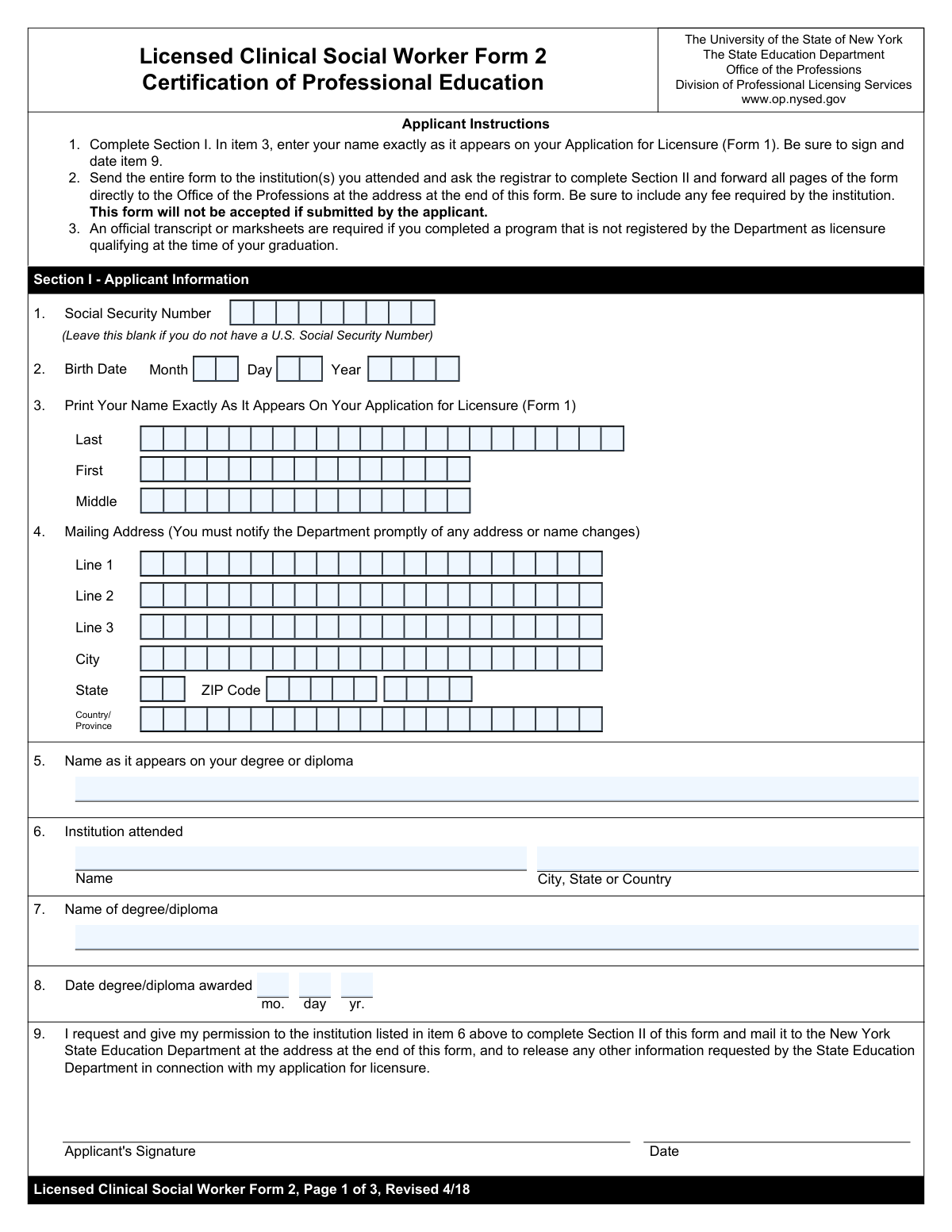
Yes! You can use AI to fill out Form 2, Certification of Professional Education

Form 2, Certification of Professional Education, is a required document for individuals applying for licensure as a Licensed Master Social Worker (LMSW) or Licensed Clinical Social Worker (LCSW) in New York State. The form is completed by the applicant and then sent to their educational institution's registrar to certify the applicant's degree, coursework, and field practicum hours. This verification is a critical step in the licensure process, confirming that the applicant meets the state's educational requirements. Today, this form can be filled out quickly and accurately using AI-powered services like Instafill.ai, which can also convert non-fillable PDF versions into interactive fillable forms.
Our AI automatically handles information lookup, data retrieval, formatting, and form filling.
It takes less than a minute to fill out Form 2 using our AI form filling.
Securely upload your data. Information is encrypted in transit and deleted immediately after the form is filled out.

Form specifications

Form name: Form 2, Certification of Professional Education
Number of fields: 65
Number of pages: 3
Language: English
Categories: certification forms, education forms
main-image

Instafill Demo: How to fill out PDF forms in seconds with AI

How to Fill Out Form 2 Online for Free in 2026

Are you looking to fill out a FORM 2 form online quickly and accurately? Instafill.ai offers the #1 AI-powered PDF filling software of 2026, allowing you to complete your FORM 2 form in just 37 seconds or less.
Follow these steps to fill out your FORM 2 form online using Instafill.ai:
  1. 1 Navigate to Instafill.ai and upload or select the NYS Form 2, Certification of Professional Education.
  2. 2 As the applicant, complete all fields in Section I, providing your personal details, social security number, and information about your degree.
  3. 3 Use the AI-powered assistant to ensure all information is entered correctly and matches your Application for Licensure (Form 1).
  4. 4 Forward the partially completed form to the registrar or an authorized official at your educational institution.
  5. 5 The registrar will then complete Section II, certifying your program completion, degree details, coursework, and field practicum hours.
  6. 6 The registrar signs, dates, and provides their contact information in the designated certification section.
  7. 7 Once fully completed by the registrar, the form is submitted directly to the New York State Education Department as per the form's instructions.

Our AI-powered system ensures each field is filled out correctly, reducing errors and saving you time.

Why Choose Instafill.ai for Your Fillable Form 2 Form?

Speed

Complete your Form 2 in as little as 37 seconds.

Up-to-Date

Always use the latest 2026 Form 2 form version.

Cost-effective

No need to hire expensive lawyers.

Accuracy

Our AI performs 10 compliance checks to ensure your form is error-free.

Security

Your personal information is protected with bank-level encryption.

Frequently Asked Questions About Form Form 2

This form is used to officially certify your professional education. It must be completed by your educational institution as a required part of your application for licensure.

The applicant must complete Section I with their personal information. Section II must be completed and certified by an official at the applicant's educational institution, such as the Registrar.

You must enter your name exactly as it appears on your main Application for Licensure (Form 1). There is a separate field to enter the name that appears on your degree or diploma if it is different.

The form instructions specify that you should leave the Social Security Number field blank if you do not have one.

This is a unique code assigned to your academic program by the New York State Education Department. Your school's registrar or program administrator will have this information and must enter it in Section II.

The 'Program Completion Date' is the date you fulfilled all academic requirements. The 'Degree Awarded Date' is the official date the institution formally granted your degree, which may be later.

Your school official should check the 'No' box for this question and then enter the total number of field practicum clock hours you did complete in the designated field.

After you complete Section I, you must send the form to your school. The school official completes Section II and then typically mails the certified form directly to the licensing authority.

For Part B, your institution must list the course numbers, titles, and semester hours for the specific MSW courses that fulfill the clinical coursework requirements for diagnosis, treatment, and practice with diverse populations.

In Section II, the school official should check the box for 'Withdrawal Date' and enter the month, day, and year you officially withdrew from the program.

Yes, services like Instafill.ai use AI to accurately auto-fill form fields with your saved information, which can save you time and help prevent errors on your portion of the form.

Simply upload the form to Instafill.ai, and its AI will make the fields interactive. You can then use the service to automatically populate your personal information before sending the form to your institution for their section.

You can use a service like Instafill.ai, which is designed to convert flat, non-fillable PDFs into interactive forms that you can easily complete and sign online.

Compliance Form 2
Validation Checks by Instafill.ai

1
Social Security Number Format Validation
This check ensures that if a Social Security Number is provided, it adheres to the standard 9-digit format, optionally allowing for hyphens (XXX-XX-XXXX). It is crucial for correct identification and processing with government agencies. If an invalid format is entered, the system should reject the submission and prompt the user to correct the number or leave the field blank if they do not have one.
2
Valid and Plausible Applicant Birth Date
This validation verifies that the combined Birth Date Month, Day, and Year form a valid calendar date (e.g., not April 31). It also checks that the date is in the past and results in a plausible age for a professional license applicant, such as being over 18 years old. This prevents data entry errors and ensures the applicant meets minimum age requirements, failing which will require the user to correct the date.
3
Logical Date Sequence: Birth Date vs. Degree Award Date
This check ensures the 'Date Degree/Diploma Awarded' is chronologically after the applicant's 'Birth Date'. It also validates that there is a reasonable time span between the two dates, typically at least 16-18 years, to reflect a realistic educational timeline. This prevents logical impossibilities in the data, and a failure would indicate a significant data entry error in one or both dates.
4
Required Mailing Address Fields
This validation confirms that essential fields for the mailing address are completed, including 'Mailing Address Line 1', 'City', and 'State' (for U.S. addresses) or 'Country' (for international addresses). Complete and accurate address information is critical for sending physical correspondence, including the official license. If these fields are missing, the form cannot be submitted, preventing communication failures.
5
ZIP Code Format Validation
This check validates that the 'ZIP Code' field contains exactly 5 digits and the optional 'ZIP Code Extension' contains exactly 4 digits. Correctly formatted ZIP codes are essential for the mail service to deliver correspondence efficiently and accurately. An invalid format will trigger an error, asking the user to provide a valid U.S. Postal Service ZIP code.
6
Logical Date Sequence: Program Entrance vs. Completion/Withdrawal
This validation ensures that the 'Program Completion Date' or 'Program Withdrawal Date' is chronologically after the 'Applicant Entrance Date'. A program cannot be completed or left before it was started. This check maintains the logical integrity of the educational timeline, and a failure would require the user to correct the dates to reflect a valid sequence of events.
7
Mutually Exclusive Program Status
This check verifies that an applicant has indicated either program completion or program withdrawal, but not both. The form provides separate sections and dates for these two mutually exclusive outcomes. Allowing both to be selected would create a logical conflict in the applicant's record, so the system must enforce that only one status can be reported.
8
Conditional Field Practicum Hours Validation
This validation enforces that the 'Field Practicum Clock Hours Completed' field is only filled out if the applicant checks 'No' to completing the 900-hour practicum. Furthermore, it checks that the entered value is a positive number less than 900. This ensures data is only collected when relevant and prevents contradictory information, such as stating the 900-hour requirement was met while also providing a lower number.
9
Education Dates Consistency Check
This validation compares the 'Date Degree/Diploma Awarded', 'Program Completion Date', and 'Degree/Diploma Conferral Date' fields. These three dates should logically be identical or very close together. A significant discrepancy between them could indicate a data entry error or misunderstanding of the fields, so the system should flag this for user review to ensure accuracy.
10
State Program Code Requirement
This check ensures that the 'State Education Department Program Code' field is not empty if the 'Completed the program' box is checked. This code is a key identifier for verifying that the applicant's program is approved by the state. Failure to provide this code when required would halt the verification process, so the form submission should be blocked until it is entered.
11
Registrar Contact Information Format
This validation checks that the 'Email Address' and 'Telephone Number' provided for the registrar are in a standard, valid format. A correctly formatted email (e.g., [email protected]) and phone number are essential for the licensing board to contact the registrar for verification purposes. An invalid format would prevent communication, so the system must reject improperly formatted entries.
12
Applicant Name Consistency Across Sections
This check verifies that the applicant's name entered in the initial section ('Applicant Name (as on Licensure Application)') matches the name entered in 'Section II - Certification of Professional Education'. Consistent naming is crucial for ensuring the certification is correctly associated with the applicant throughout the form. A mismatch could cause processing delays or errors and should be flagged for correction.
13
Institution Name Consistency
This validation ensures the 'Institution Name' provided by the applicant in the 'Institution Attended' section matches the 'Institution Name' in the 'Registrar Certification Contact Information' section. This consistency check confirms that the registrar information corresponds to the claimed educational institution. A mismatch would suggest a significant error and must be corrected before submission.
14
Conditional Coursework Details for Part B
This validation ensures that if an applicant indicates they are using 'Part B' to document their education, the corresponding course listing text areas are not empty. These fields are required to provide evidence of meeting specific clinical coursework requirements. The form submission should be blocked if Part B is the chosen path but the required course details are missing.

Common Mistakes in Completing Form 2

Inconsistent Applicant Name Across Documents

The form requires the applicant's name as it appears on the licensure application and separately as it appears on the degree/diploma. Applicants often use their current legal name for both, even if their name was different on their diploma (e.g., due to marriage). This mismatch causes record-matching failures and significant processing delays. To avoid this, carefully check your Form 1 and your physical diploma, entering the names exactly as they appear on each document.

Confusing Program Completion and Degree Conferral Dates

The form distinguishes between the 'Program Completion Date' (when coursework ended) and the 'Date Degree/Diploma Awarded'. These dates are often different, but applicants frequently enter the same date for both. This discrepancy can flag the application for manual review and require clarification from the university, delaying the licensure process. Always refer to your official transcript for the program completion date and your diploma for the conferral date.

Omitting the State Education Department Program Code

Applicants are required to enter a specific 'State Education Department Program Code' to verify their program's eligibility. Many applicants do not know this code and either leave the field blank or guess, which leads to an incomplete application and rejection. This code is essential for the licensing board to confirm the program meets state requirements. You must find this code on your school's website or by contacting your university's registrar before filling out the form.

Improperly Filling Out Address Lines

The form provides separate lines for the street address, apartment/suite number, and additional information. A common error is to enter the entire address, including the apartment number, into 'Mailing Address Line 1'. This can lead to failed mail delivery of critical documents like your license. To prevent this, use Line 1 for the street address only and Line 2 or 3 for any apartment, suite, or unit number.

Providing Incomplete Clinical Coursework Details

The form requires a detailed list of courses, including course numbers, full titles, and semester hours, to meet a clinical requirement. Applicants often provide only course titles or forget to include the semester hours for each course. This forces the reviewer to mark the application as incomplete, requiring the applicant to resubmit the information and causing significant delays. To avoid this, have your transcript ready and meticulously copy all required details for each relevant course.

Using Abbreviations for Institution Names

The field asks for the 'full name of the institution,' but applicants often use common abbreviations (e.g., 'UCLA' instead of 'University of California, Los Angeles'). This ambiguity can slow down the verification process as the reviewer may need to confirm the official name. Always write out the full, official name of the institution as it appears on your transcripts to ensure clarity and faster processing.

Applicant Completing the Registrar's Certification Section

The form contains sections, such as 'Registrar Certification Contact Information,' that are meant to be completed and certified by a school official. An applicant mistakenly filling out this section themselves will invalidate the form, as it requires official verification. This error requires the form to be sent back to the university for proper completion, causing major delays. Applicants should only fill out their designated sections and then forward the form to their registrar.

Misinterpreting Conditional Field Logic for Practicum Hours

The form asks for 'Field Practicum Clock Hours Completed' with the instruction 'Fill only if 'No' is 'Yes''. This confusing phrasing means the field should only be filled if the applicant checked 'No' to completing 900 hours. Applicants may get confused and either fill it out incorrectly or leave it blank when required, leading to incorrect data. If the form is a non-fillable PDF, tools like Instafill.ai can convert it to an interactive version with validated fields to prevent such errors.

Incorrect Date Formatting in Separated Fields

The form separates dates into distinct Month, Day, and Year fields. Applicants accustomed to typing 'MM/DD/YYYY' may enter the full date in the 'Month' field or mix up the order. This creates invalid data that must be manually corrected, slowing down processing. To avoid this, enter only the requested component (e.g., '05' for May) in each corresponding box. AI form-filling tools like Instafill.ai can automatically parse and place date components into the correct fields.
Saved over 80 hours a year

“I was never sure if my IRS forms like W-9 were filled correctly. Now, I can complete the forms accurately without any external help.”

Kevin Martin Green

Your data stays secure with advanced protection from Instafill and our subprocessors

Robust compliance program

Transparent business model

You’re not the product. You always know where your data is and what it is processed for.

ISO 27001, HIPAA, and GDPR

Our subprocesses adhere to multiple compliance standards, including but not limited to ISO 27001, HIPAA, and GDPR.

Security & privacy by design

We consider security and privacy from the initial design phase of any new service or functionality. It’s not an afterthought, it’s built-in, including support for two-factor authentication (2FA) to further protect your account.

Fill out Form 2 with Instafill.ai

Worried about filling PDFs wrong? Instafill securely fills form-2-certification-of-professional-education forms, ensuring each field is accurate.