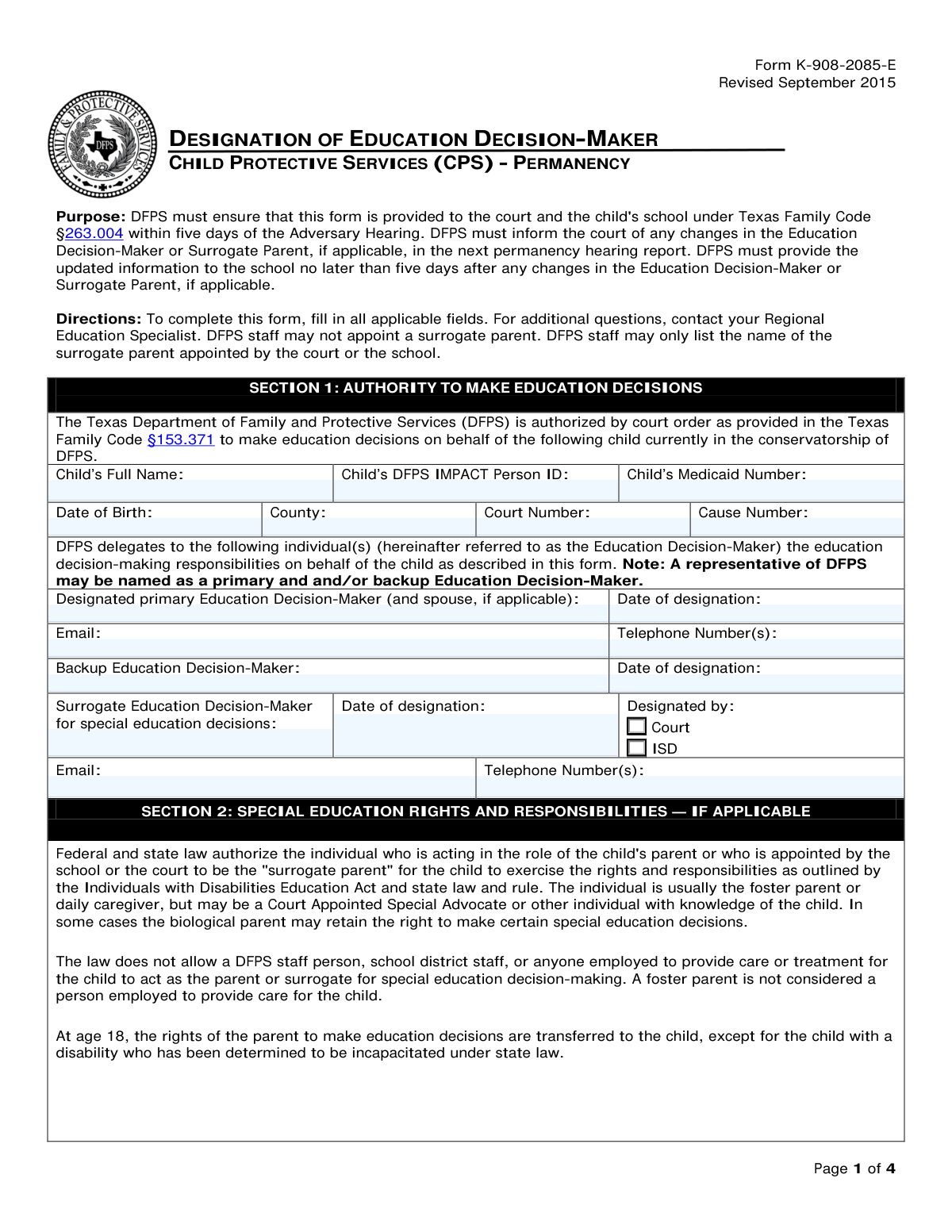
Yes! You can use AI to fill out Form K-908-2085-E, Designation of Education Decision-Maker

This form, officially titled Designation of Education Decision-Maker, is a legal document used within Texas Child Protective Services (CPS) to delegate authority for a child's educational matters. It ensures that a specific individual, the Education Decision-Maker, has the right and responsibility to enroll the child, make course selections, and handle other school-related decisions when a child is in the conservatorship of DFPS. Today, this form can be filled out quickly and accurately using AI-powered services like Instafill.ai, which can also convert non-fillable PDF versions into interactive fillable forms.
Our AI automatically handles information lookup, data retrieval, formatting, and form filling.
It takes less than a minute to fill out K-908-2085-E using our AI form filling.
Securely upload your data. Information is encrypted in transit and deleted immediately after the form is filled out.

Form specifications

Form name: Form K-908-2085-E, Designation of Education Decision-Maker
Number of pages: 4
Language: English
Categories: education forms
main-image

Instafill Demo: How to fill out PDF forms in seconds with AI

How to Fill Out K-908-2085-E Online for Free in 2026

Are you looking to fill out a K-908-2085-E form online quickly and accurately? Instafill.ai offers the #1 AI-powered PDF filling software of 2026, allowing you to complete your K-908-2085-E form in just 37 seconds or less.
Follow these steps to fill out your K-908-2085-E form online using Instafill.ai:
  1. 1 Navigate to Instafill.ai and upload or select Form K-908-2085-E.
  2. 2 Use the AI assistant to automatically fill in the child's information, including their full name, DFPS IMPACT Person ID, and court details in Section 1.
  3. 3 Enter the names and contact information for the designated primary, backup, and surrogate Education Decision-Makers.
  4. 4 Review the rights and responsibilities for the Education Decision-Maker, caseworker, and school as outlined in Sections 3, 5, and 6.
  5. 5 Complete Section 4 if any educational rights are retained by the biological parents.
  6. 6 Carefully review all entered information for accuracy before proceeding to the signature section.
  7. 7 Electronically sign the form in the designated fields for the Education Decision-Maker, DFPS Caseworker, and other required parties to finalize the designation.

Our AI-powered system ensures each field is filled out correctly, reducing errors and saving you time.

Why Choose Instafill.ai for Your Fillable K-908-2085-E Form?

Speed

Complete your K-908-2085-E in as little as 37 seconds.

Up-to-Date

Always use the latest 2026 K-908-2085-E form version.

Cost-effective

No need to hire expensive lawyers.

Accuracy

Our AI performs 10 compliance checks to ensure your form is error-free.

Security

Your personal information is protected with bank-level encryption.

Frequently Asked Questions About Form K-908-2085-E

This form officially designates an individual to make educational decisions for a child in the legal conservatorship of the Texas Department of Family and Protective Services (DFPS). It clarifies who has the authority to enroll the child, attend school meetings, and handle other education-related matters.

A DFPS caseworker completes the form to document the appointment of an Education Decision-Maker. The caseworker must then provide the signed form to the court and the child's school within five days of the Adversary Hearing.

You will need the child's full name, DFPS IMPACT Person ID, Medicaid number, date of birth, and court case information. You must also provide the names and contact details for the primary, backup, and (if applicable) surrogate education decision-makers.

The Primary Education Decision-Maker handles general education decisions, while a Surrogate Education Decision-Maker is specifically appointed by the court or school district to make decisions related to special education services for a child with disabilities.

Yes, a DFPS representative can be named as a primary or backup Education Decision-Maker for general education. However, DFPS staff are not permitted to act as a surrogate parent for special education decisions.

Your key responsibilities include enrolling the child in school, attending parent-teacher conferences, approving participation in school activities, and accessing educational records. You must also provide regular updates about the child's education to the DFPS caseworker.

A biological parent only retains educational decision-making rights that are expressly ordered by the court. Any such rights must be documented in Section 4 of this form.

Yes, a foster parent or daily caregiver is often appointed as the Education Decision-Maker. The law allows foster parents to serve in this role, including as a surrogate parent for special education, as they are not considered employees providing care for the child.

If school personnel have concerns, they are instructed to contact the DFPS caseworker or supervisor listed on page 4 of the form to discuss the matter.

The designation is valid as long as the child is in DFPS conservatorship, unless it is revoked by DFPS or changed by a court order. Educational rights transfer to the child when they turn 18, unless they are legally determined to be incapacitated.

The form requires signatures from the designated primary Education Decision-Maker, the backup decision-maker, the DFPS caseworker, and the DFPS supervisor. The child's daily caregiver should also sign if they are not the designated decision-maker.

Yes, services like Instafill.ai use AI to help you accurately auto-fill form fields with your saved information, which can save time and reduce errors. This is useful for entering recurring details like names, case numbers, and contact information.

You can use a service like Instafill.ai to complete the form digitally. Simply upload the PDF, and the platform will make it fillable, allowing you to type your answers directly into the fields and sign it electronically.

If you have a non-fillable or 'flat' PDF, you can use a tool like Instafill.ai to convert it into an interactive, fillable form. This allows you to easily type in the required information without needing to print and fill it out by hand.

Compliance K-908-2085-E
Validation Checks by Instafill.ai

1
Child's Date of Birth Validity
This check verifies that the 'Date of Birth' is a valid date formatted correctly and occurs in the past. It also ensures the date corresponds to a child under the age of 18, as educational rights typically transfer to the child at 18. An invalid or future date would make the form legally void and prevent proper age-based service determination.
2
Completeness of Required Child Identifiers
Ensures that the 'Child's Full Name', 'DFPS IMPACT Person ID', and 'Child's Medicaid Number' fields are all populated. These identifiers are critical for uniquely identifying the child within the DFPS and healthcare systems, preventing misidentification and ensuring the designation is applied to the correct case file. A failure would halt processing until the information is provided.
3
Primary Decision-Maker Designation Completeness
Validates that the 'Designated primary Education Decision-Maker' name, 'Date of designation', and at least one contact method ('Email' or 'Telephone Number(s)') are all provided. The form's purpose is to designate this person, so their identity, contact information, and the date of their appointment are the most fundamental data points. Missing information would render the designation unenforceable.
4
Logical Date Chronology
This validation confirms that all 'Date of designation' fields (for Primary, Backup, and Surrogate) are on or before the corresponding 'Date Signed' fields. A designation cannot be signed before it is made. This check ensures the legal and logical sequence of events is correctly documented, preventing challenges to the designation's validity.
5
Signature and Date Congruence
Verifies that for each signature field (Education Decision-Maker, Backup), the corresponding 'Date Signed' field is also filled. A signature without a date is legally incomplete and can be challenged. This check ensures that all executed agreements are properly dated to establish a clear timeline of when the acknowledgment took effect.
6
Surrogate Decision-Maker Conditional Requirement
This check enforces the rule that if a 'Surrogate Education Decision-Maker Name' is entered, then either the 'Court' or 'ISD' checkbox must be selected to indicate the designating authority. This is crucial because a surrogate can only be appointed by these specific entities. A failure indicates an incomplete or invalid surrogate designation, which could jeopardize special education decisions.
7
Surrogate Contact Information Dependency
Ensures that if a 'Surrogate Education Decision-Maker' is named, their contact information ('Surrogate Email' or 'Surrogate Telephone Number(s)') is also provided. Without contact details, the school and DFPS cannot communicate with the surrogate about critical special education matters, defeating the purpose of the designation. The form would be rejected for incompleteness.
8
DFPS Caseworker Information Completeness
Validates that if the 'DFPS Caseworker (print name)' field is filled, the 'DFPS Caseworker Email Address' and 'DFPS Caseworker Phone Number' fields are also populated. The caseworker is the primary point of contact for the school and other parties. Missing contact information creates a communication bottleneck and violates the form's requirement for caseworker details.
9
DFPS Supervisor Information Completeness
Checks that if the 'DFPS Supervisor (print name)' is provided, the corresponding 'Supervisor Phone Number' and 'DFPS Supervisor Email Address' are also entered. The supervisor serves as an escalation point and is essential for oversight. Incomplete supervisor contact details can delay problem resolution and hinder accountability.
10
Caregiver Contact Information Dependency
Verifies that if a 'Caregiver/Facility Staff Name' is entered, the 'Caregiver Phone Number' and 'Caregiver Email Address' fields are also filled. The form specifies this section is for a caregiver 'if different from the Education Decision-Maker'. If this person is named, their contact details are vital for daily coordination with the school, and missing them would impede communication.
11
Standard Email Address Format
This check inspects all email address fields on the form to ensure they conform to a standard format (e.g., '[email protected]'). This is important for ensuring that automated systems can parse the email and that communications sent to the address will be delivered. An invalid format would lead to communication failures and require manual correction.
12
Valid Phone Number Format
Ensures all telephone number fields contain a valid 10-digit number, including the area code, as specified in the field descriptions. This validation prevents data entry errors like missing digits or area codes, which would make it impossible to contact key personnel. A failure would require the user to correct the number to a standard format.
13
Backup Decision-Maker Data Consistency
This validation ensures that if a 'Backup Education Decision-Maker Name' is provided, the 'Date of Backup Designation' field is also completed. The designation is not valid without a date specifying when it became effective. This check prevents incomplete entries for this optional but important role, ensuring the backup designation is legally sound if needed.
14
Presence of Required Signatures
Verifies that the digital signature for the 'Education Decision-Maker' and the 'DFPS Caseworker' are present. These signatures are essential to indicate agreement and official processing of the designation. The form is not legally binding or officially filed without the acknowledgment of the decision-maker and the verification by the caseworker.

Common Mistakes in Completing K-908-2085-E

Inaccurate or Missing Case Identification Numbers

Users often confuse or omit the child's DFPS IMPACT Person ID, Medicaid Number, Court Number, and Cause Number. This happens when the information is not readily available during form completion. The consequence is a significant delay in processing, as DFPS, courts, and schools cannot link the form to the correct legal case, hindering the official designation. To avoid this, gather all official documents beforehand and carefully cross-reference each number before entry.

Confusing Primary and Surrogate Decision-Maker Roles

A frequent error is misunderstanding the distinction between the general 'Education Decision-Maker' and the 'Surrogate Education Decision-Maker' for special education. People may incorrectly list the same person for both roles or fail to appoint a surrogate when the child receives special education services. This causes confusion at the school, especially during ARD meetings, and can delay critical decisions. It is vital to understand that the surrogate has specific legal authority for special education and must be appointed by the court or school district.

Improperly Designating a Surrogate Parent

The form explicitly states that DFPS staff cannot appoint a surrogate parent; the appointment must come from a court or the school district (ISD). A common mistake is for a caseworker to fill in this section based on an informal agreement rather than an official appointment, which invalidates the designation. Before completing this section, ensure you have official documentation of the appointment and check the corresponding 'Court' or 'ISD' box.

Incomplete Signatures and Dates Section

Section 8 requires signatures and corresponding dates from multiple parties, including the decision-maker, backup, caseworker, and supervisor. It is very common for one or more signature lines to be left blank as the form is routed between individuals. An incompletely signed form is not legally binding and will be rejected by the court or school, delaying the establishment of educational authority for the child.

Using an Informal Name for the Child

The form requires the child's 'Full Name' as it appears on legal and school records, but filers sometimes use a nickname or an incomplete name. This creates record-matching problems for administrative systems at the court and school, which can delay enrollment or the recognition of the decision-maker's authority. Always use the child's full legal name as it appears on their birth certificate or official court documents to ensure accuracy.

Entering Outdated or Incorrect Contact Information

Contact information for caseworkers, supervisors, and decision-makers is often entered with typos, or outdated phone numbers and email addresses are used. Since the purpose of the form is to establish a clear communication channel for the school, incorrect contact details can prevent timely notifications about illness, disciplinary actions, or parent-teacher conferences. All contact information should be double-checked for accuracy before submission.

Omitting a Backup Education Decision-Maker

Filers often leave the 'Backup Education Decision-Maker' section blank, viewing it as optional. However, failing to designate a backup can create a significant gap in authority if the primary decision-maker becomes unreachable, ill, or is otherwise unable to serve. This can delay urgent educational decisions for the child, so it is a critical best practice to always designate a responsible backup to ensure continuity.

Incorrectly Documenting Biological Parent Rights

Section 4, which details educational rights retained by the biological parents, is often filled out incorrectly or left blank. This happens because it requires specific knowledge of the current court order, which the filer may not have. An inaccurate entry can lead to legal conflicts if a parent's court-ordered rights are not honored by the school. It is crucial to consult the latest court order and accurately transcribe any retained rights into this section.

Failure to Distribute the Completed Form on Time

A critical procedural mistake is completing the form correctly but failing to follow the distribution instructions. The form explicitly states it must be provided to the court and the child's school within five days. Failure to do so means these entities are not officially aware of the designated decision-maker, defeating the purpose of the document and leaving the child without a recognized educational advocate at school.

Ignoring Conditional Field Requirements

The form contains fields that are only required if another field is completed, such as providing surrogate contact information only after a surrogate is named. A common mistake is designating a surrogate but then forgetting to provide their email and phone number. This leaves the school without a way to contact the designated person, making the appointment ineffective. AI-powered form-filling tools like Instafill.ai can prevent this by automatically prompting for required information based on previous selections.

Printing a Name Instead of Signing

In the signature fields marked with an 'X', users sometimes type or print their name instead of providing a legal signature (handwritten or a valid e-signature). A printed name does not carry the legal weight of a signature and will invalidate the acknowledgment section of the form. This can lead to the document being rejected by the court or school, requiring the entire signing process to be repeated. If the form is a non-fillable PDF, tools like Instafill.ai can convert it to a fillable version that accepts valid digital signatures.
Saved over 80 hours a year

“I was never sure if my IRS forms like W-9 were filled correctly. Now, I can complete the forms accurately without any external help.”

Kevin Martin Green

Your data stays secure with advanced protection from Instafill and our subprocessors

Robust compliance program

Transparent business model

You’re not the product. You always know where your data is and what it is processed for.

ISO 27001, HIPAA, and GDPR

Our subprocesses adhere to multiple compliance standards, including but not limited to ISO 27001, HIPAA, and GDPR.

Security & privacy by design

We consider security and privacy from the initial design phase of any new service or functionality. It’s not an afterthought, it’s built-in, including support for two-factor authentication (2FA) to further protect your account.

Fill out K-908-2085-E with Instafill.ai

Worried about filling PDFs wrong? Instafill securely fills form-k-908-2085-e-designation-of-education-decision-maker forms, ensuring each field is accurate.