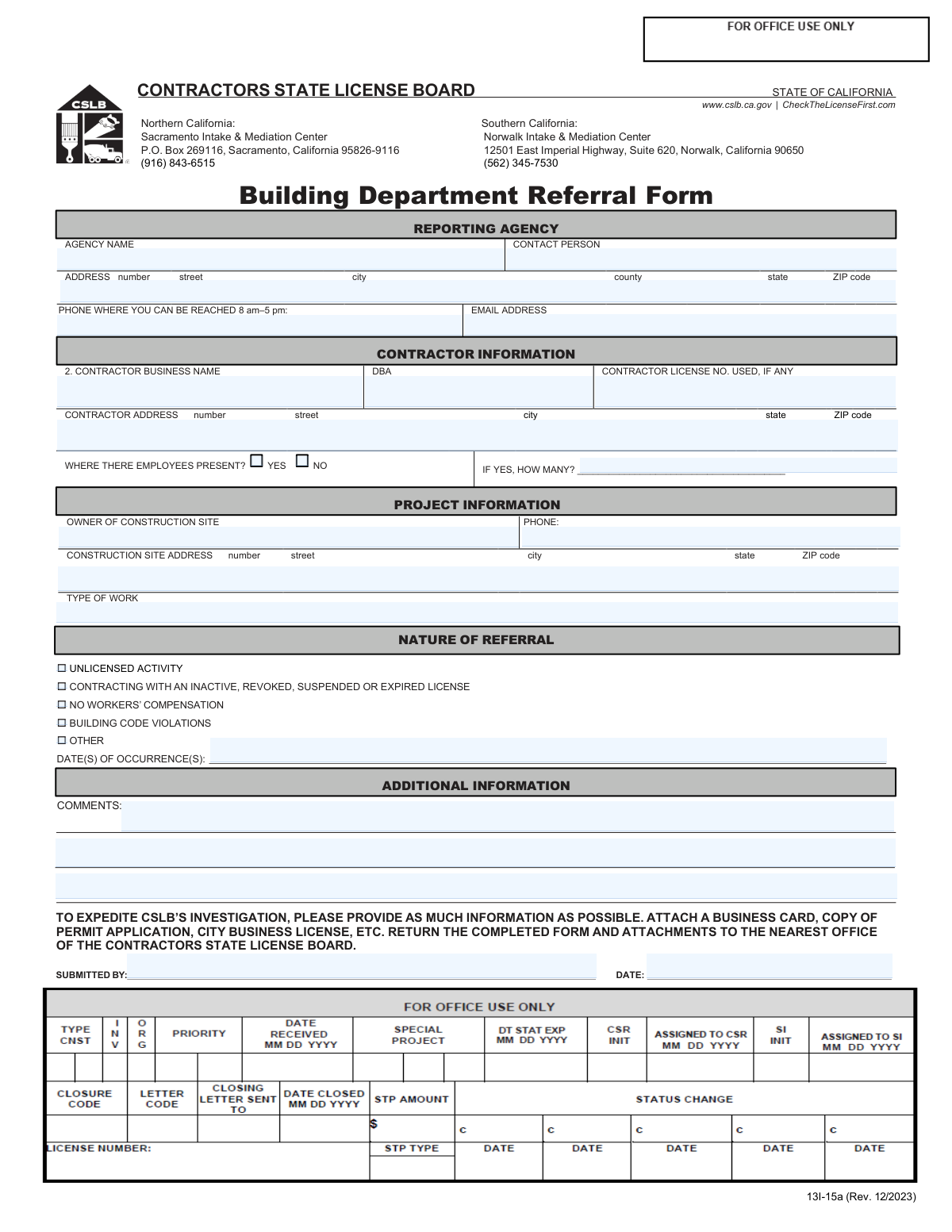
Yes! You can use AI to fill out Form 13I-15a, Building Department Referral Form
The California Building Department Referral Form (13I-15a) is a crucial document used by local building departments to report suspected contractor violations to the Contractors State License Board (CSLB). This referral helps the CSLB investigate issues like unlicensed activity, expired licenses, or lack of workers' compensation, ensuring public safety and fair competition. Today, this form can be filled out quickly and accurately using AI-powered services like Instafill.ai, which can also convert non-fillable PDF versions into interactive fillable forms.
13I-15a is part of the
referral forms category on Instafill.
Our AI automatically handles information lookup, data retrieval, formatting, and form filling.
It takes less than a minute to fill out 13I-15a using our AI form filling.
Securely upload your data. Information is encrypted in transit and deleted immediately after the form is filled out.
Form specifications
| Form name: | Form 13I-15a, Building Department Referral Form |
| Number of fields: | 28 |
| Number of pages: | 1 |
| Language: | English |
More forms in Referral forms
Instafill Demo: How to fill out PDF forms in seconds with AI
How to Fill Out 13I-15a Online for Free in 2026
Are you looking to fill out a 13I-15A form online quickly and accurately? Instafill.ai offers the #1 AI-powered PDF filling software of 2026, allowing you to complete your 13I-15A form in just 37 seconds or less.
Follow these steps to fill out your 13I-15A form online using Instafill.ai:
- 1 Navigate to Instafill.ai and upload or select the CSLB Building Department Referral Form (13I-15a).
- 2 Enter the complete details for the reporting agency, including the agency name, contact person, address, and phone number.
- 3 Provide all known information about the contractor, such as their business name, DBA, license number, and address.
- 4 Fill in the project information, including the construction site owner's name, phone number, and the full address of the project.
- 5 Specify the nature of the referral by checking the relevant boxes, such as 'UNLICENSED ACTIVITY' or 'BUILDING CODE VIOLATIONS', and provide the date(s) of occurrence.
- 6 Add any additional comments or details in the provided space to support the referral and attach any supporting documents if available.
- 7 Review all the information you have entered for accuracy, then provide the submitter's name and date before sending the form to the designated CSLB office.
Our AI-powered system ensures each field is filled out correctly, reducing errors and saving you time.
Why Choose Instafill.ai for Your Fillable 13I-15a Form?
Speed
Complete your 13I-15a in as little as 37 seconds.
Up-to-Date
Always use the latest 2026 13I-15a form version.
Cost-effective
No need to hire expensive lawyers.
Accuracy
Our AI performs 10 compliance checks to ensure your form is error-free.
Security
Your personal information is protected with bank-level encryption.
Frequently Asked Questions About Form 13I-15a
This form is used by official agencies, like city or county building departments, to report potential contractor license law violations to the California Contractors State License Board (CSLB) for investigation.
This form is specifically designed for use by reporting agencies, not the general public. Homeowners wishing to file a complaint against a contractor should use the CSLB's standard complaint form available on their website.
To ensure a prompt investigation, provide as much detail as possible about the contractor, the project location, and the specific violation. Attaching supporting documents like permit applications or business cards is also highly recommended.
Helpful attachments include copies of business cards, building permit applications, city business licenses, or photos of the contractor's vehicle signage. Any evidence that supports the referral will expedite the CSLB's investigation.
'Unlicensed Activity' refers to a contractor who does not have a CSLB license. The other category is for contractors who have a license number, but it is currently suspended, revoked, expired, or inactive.
You should still fill out the form with as much information as you have. Details like the business name, individual names, and project address are valuable even if you don't know the contractor's license number.
You can submit the completed form and any attachments to the CSLB Intake & Mediation Center for your region. The form provides addresses for both the Northern California office in Sacramento and the Southern California office in Norwalk.
The CSLB may need to contact the property owner to verify project details or to schedule a site visit as part of their investigation. This information helps them gather necessary facts about the case.
Yes, services like Instafill.ai use AI to accurately auto-fill form fields, which saves time and helps reduce errors. This can be particularly efficient for agencies that handle these referrals frequently.
Simply upload the Building Department Referral Form to the Instafill.ai platform. The AI will identify all the fields, allowing you to type in the information, save your progress, and download the completed PDF.
You can use a service like Instafill.ai, which is designed to convert flat, non-fillable PDFs into interactive, fillable forms. This allows you to easily type your information directly into the fields before printing or submitting.
The timeframe for an investigation varies based on the CSLB's current caseload and the severity of the alleged violation. Submitting a complete and well-documented referral form is the best way to help expedite the process.
Check the 'Other' box if the violation doesn't fit the listed categories, such as illegal advertising or misuse of a license number. Always provide a clear explanation in the 'Comments' section when you select 'Other'.
Compliance 13I-15a
Validation Checks by Instafill.ai
1
Reporting Agency Phone Number Format
This validation ensures that the phone number entered for the reporting agency follows a standard 10-digit US format (e.g., XXX-XXX-XXXX or (XXX) XXX-XXXX). It is important for ensuring CSLB staff can successfully contact the reporting person for follow-up questions. If the format is invalid, the user will be prompted to correct the number before submission.
2
Reporting Agency Email Address Format
This check verifies that the email address provided for the reporting agency is in a valid format, containing an '@' symbol and a domain (e.g., [email protected]). A valid email is crucial for sending confirmations, updates, and official correspondence regarding the referral. An invalid format will trigger an error message asking the user to provide a correctly formatted email address.
3
ZIP Code Format Validation
This validation applies to all ZIP code fields on the form (Reporting Agency, Contractor, and Construction Site) and ensures they contain exactly five digits. Correct ZIP codes are essential for mail delivery and for accurately locating addresses for investigation purposes. If a ZIP code is not in the 5-digit format, the form will not be accepted until it is corrected.
4
State Field Validation for California
This check verifies that the 'state' field in all address blocks is entered as 'CA' or 'California'. Since this is a California State License Board form, referrals are expected to be for projects within the state. This prevents submissions for out-of-jurisdiction locations and ensures data consistency.
5
Conditional Employee Count Requirement
This validation creates a logical link between the 'Were there employees present?' question and the 'how many?' field. If the user selects 'YES', the 'how many?' field becomes mandatory and must contain a positive integer. This ensures that when the presence of employees is indicated, the specific number is also captured, which is vital for investigations related to workers' compensation.
6
Mandatory Nature of Referral Selection
This check ensures that at least one checkbox under the 'Nature of Referral' section is selected. The type of referral is the primary reason for the form and dictates the investigative path CSLB will take. If no box is checked, the submission will be blocked, and the user will be instructed to select the most appropriate reason for the referral.
7
Date of Occurrence Chronological Validity
This validation ensures that the 'Date(s) of Occurrence(s)' is a valid past or present date, and not a date in the future. An event being referred cannot have happened in the future, so this check prevents data entry errors and ensures the timeline of events is logical. A future date will result in a validation error.
8
Submission Date Validity
This check verifies that the 'Submission Date' is the current date or a date in the recent past, and not a future date. This maintains the integrity of the submission record and establishes an accurate timestamp for when the referral was officially made. The system should default to the current date and prevent users from post-dating a submission.
9
Required Contractor Information
This validation ensures that the 'Contractor Business Name' field is not left empty. Identifying the contractor is fundamental to the purpose of the form and the subsequent investigation. A submission without a contractor name is incomplete and lacks the key information needed to proceed.
10
Logical Consistency for Unlicensed Activity
This check cross-references the 'Nature of Referral' with the 'Contractor License No.' field. If 'UNLICENSED ACTIVITY' is checked, the license number field should ideally be empty or flagged for review, as an unlicensed contractor would not have a valid number. Conversely, if 'CONTRACTING WITH AN INACTIVE... LICENSE' is checked, the license number field becomes mandatory, as the license in question must be identified.
11
Contractor License Number Format
This validation checks that if a 'Contractor License No.' is entered, it conforms to the standard CSLB format (typically a numeric string up to 8 digits). This helps prevent typos and ensures that any subsequent automated license lookups will not fail due to an invalid format. An incorrectly formatted number would prompt the user for correction.
12
Required Project Information Fields
This check ensures that the 'Owner of Construction Site' and 'Construction Site Address' fields are filled out. The location of the alleged violation is critical for CSLB investigators to conduct a site visit and verify the details of the referral. A submission will be considered incomplete without this essential location information.
13
Justification for 'Other' Referral Type
This validation rule requires that if the 'OTHER' checkbox is selected under 'Nature of Referral', the 'Comments' field must not be empty. This ensures that when a non-standard referral type is chosen, a clear explanation is provided for investigators. Without this context, the 'Other' selection is not actionable and would require a follow-up call that could be avoided.
14
Presence of Submitter's Name
This validation ensures the 'Submitted By' field is completed before the form can be submitted. This field provides accountability and a clear point of contact for the referral, distinguishing it from an anonymous tip. An empty 'Submitted By' field would halt submission and prompt the user to provide their name or the name of their agency.
Common Mistakes in Completing 13I-15a
Users often list only the name on the side of a truck (the DBA) and omit the contractor's legal business name, or vice-versa. This ambiguity makes it difficult for the CSLB to accurately identify the contractor in their database, especially if the license is under a different legal entity. This can delay or halt the investigation. To avoid this, provide both the official business name and any 'Doing Business As' (DBA) name used; if they are the same, fill in the legal name and leave the DBA blank.
Entrants might write 'construction' or 'remodel' in the 'Type of Work' field, which is too general and doesn't give investigators enough information about the specific trade involved. This lack of detail can slow down the investigation by requiring follow-up to determine the scope and nature of the potential violation. Always be specific, using terms like 'unpermitted residential kitchen remodel,' 'new roof installation,' or 'HVAC system replacement' to provide clear context.
People may guess the license number, transpose digits, or leave it blank even when it's available on a business card or contract. An incorrect license number can lead to investigating the wrong contractor or mistakenly concluding the contractor is unlicensed, derailing the entire referral. Always double-check the license number from an official source and enter it exactly as it appears. AI-powered form fillers like Instafill.ai can help validate license number formats to prevent such errors.
The 'Date(s) of Occurrence(s)' field is critical for establishing a timeline for the alleged violation, but it is frequently left blank. Without this information, it's difficult for the CSLB to determine if the activity falls within the statute of limitations or to corroborate events, potentially leading to the case being dismissed. Always provide the specific date or a date range (e.g., '05/10/2024 - 05/15/2024') when the violation was observed.
The 'Comments' section is the primary place to provide context that the checkboxes cannot, but submitters often leave it empty. This is especially problematic when 'OTHER' is checked, which makes the referral impossible to act upon without further detail. This section should be used to narrate the situation, list witnesses, and explain why you believe a violation occurred to help expedite the investigation.
This mistake happens when a user confuses a mailing address with a physical location. The CSLB needs the physical address of the job site to conduct inspections and verify the location of the alleged violation, and a P.O. Box is useless for this purpose. This error will halt the investigation until a physical address can be obtained. Always enter the full street address where the work is actually being performed.
The form explicitly requests attachments like business cards or permit applications to expedite the investigation, but many submitters overlook this. Sending the form without evidence weakens the referral and forces the CSLB to rely solely on the information provided, which may not be enough to proceed. Always gather and attach copies of any relevant documents or photos that support the referral to build a stronger case from the start.
Submitters from a building department or other agency sometimes mistakenly enter their own agency's name or the contractor's name in the 'Owner of Construction Site' field. This creates confusion and requires CSLB staff to make corrective follow-up calls, delaying the process. It is essential to accurately identify and provide the name and phone number of the legal owner of the property where the construction is taking place.
A common error is checking 'YES' for 'WERE THERE EMPLOYEES PRESENT?' but then leaving the 'HOW MANY?' field blank, or vice-versa. This information is crucial for investigating potential workers' compensation violations, and the lack of a specific number can weaken the referral. Be precise: if employees were present, check 'YES' and provide your best estimate of the number observed to give investigators actionable data.
Since this form is often a PDF, users may print it, fill it out by hand, and then scan it, resulting in illegible handwriting that hinders processing. A messy form can be misinterpreted or rejected, wasting time. To avoid this, use a fillable PDF version if available. If the form is a non-fillable PDF, tools like Instafill.ai can convert it into an interactive, fillable version to ensure all entries are typed, clear, and legible.
Saved over 80 hours a year
“I was never sure if my IRS forms like W-9 were filled correctly. Now, I can complete the forms accurately without any external help.”
Kevin Martin Green
Your data stays secure with advanced protection from Instafill and our subprocessors

Robust compliance program
Transparent business model
You’re not the product. You always know where your data is and what it is processed for.
ISO 27001, HIPAA, and GDPR
Our subprocesses adhere to multiple compliance standards, including but not limited to ISO 27001, HIPAA, and GDPR.
Security & privacy by design
We consider security and privacy from the initial design phase of any new service or functionality. It’s not an afterthought, it’s built-in, including support for two-factor authentication (2FA) to further protect your account.
Fill out 13I-15a with Instafill.ai
Worried about filling PDFs wrong? Instafill securely fills form-13i-15a-building-department-referral-form forms, ensuring each field is accurate.