Yes! You can use AI to fill out Community-Based Adult Services (CBAS) Referral/Request for CDET Assessment
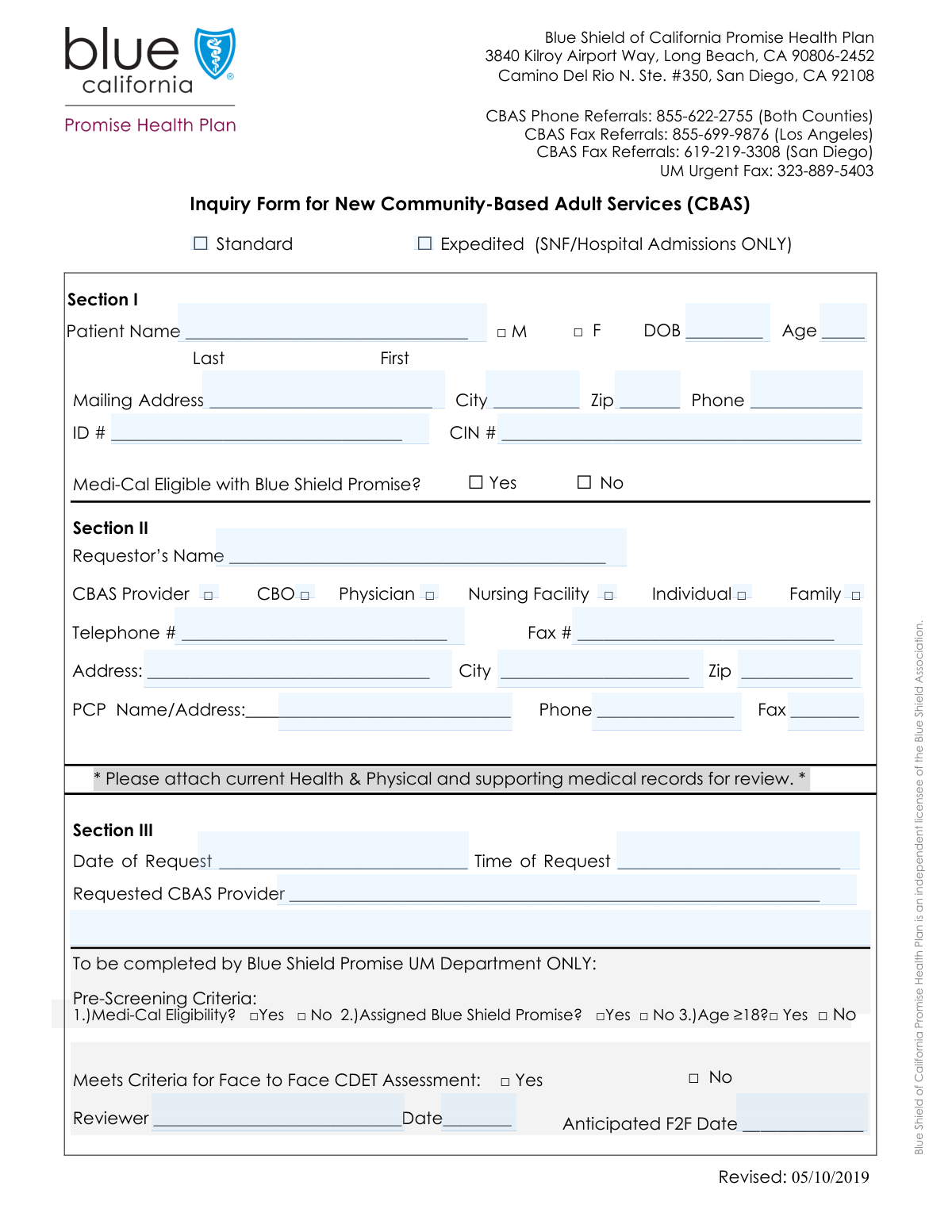
This form, the CBAS Referral/Request for CDET Assessment, is a crucial document for initiating the process to determine if a patient is eligible for Community-Based Adult Services. It gathers essential patient information, requestor details, and pre-screening criteria to facilitate a face-to-face CDET assessment, which is necessary for accessing these vital community support services. Today, this form can be filled out quickly and accurately using AI-powered services like Instafill.ai, which can also convert non-fillable PDF versions into interactive fillable forms.
Our AI automatically handles information lookup, data retrieval, formatting, and form filling.
It takes less than a minute to fill out CBAS Referral Form using our AI form filling.
Securely upload your data. Information is encrypted in transit and deleted immediately after the form is filled out.
Form specifications
| Form name: | Community-Based Adult Services (CBAS) Referral/Request for CDET Assessment |
| Number of fields: | 45 |
| Number of pages: | 1 |
| Language: | English |
Instafill Demo: How to fill out PDF forms in seconds with AI
How to Fill Out CBAS Referral Form Online for Free in 2026
Are you looking to fill out a CBAS REFERRAL FORM form online quickly and accurately? Instafill.ai offers the #1 AI-powered PDF filling software of 2026, allowing you to complete your CBAS REFERRAL FORM form in just 37 seconds or less.
Follow these steps to fill out your CBAS REFERRAL FORM form online using Instafill.ai:
- 1 Navigate to Instafill.ai and upload or select the CBAS Referral/Request for CDET Assessment form.
- 2 Use the AI assistant to accurately fill in the patient's demographic information, including name, date of birth, and contact details.
- 3 Provide the patient's ID numbers and confirm their Medi-Cal eligibility status with Blue Shield Promise.
- 4 Enter the details of the requestor, whether it's a provider, organization, or family member, including their contact information.
- 5 Input the Primary Care Provider's (PCP) information and the name of the requested CBAS provider.
- 6 Complete the pre-screening and CDET assessment criteria sections by checking the appropriate 'Yes' or 'No' boxes based on the patient's status.
- 7 Review all the entered information for accuracy with the AI's help, then sign and submit the form as directed.
Our AI-powered system ensures each field is filled out correctly, reducing errors and saving you time.
Why Choose Instafill.ai for Your Fillable CBAS Referral Form Form?
Speed
Complete your CBAS Referral Form in as little as 37 seconds.
Up-to-Date
Always use the latest 2026 CBAS Referral Form form version.
Cost-effective
No need to hire expensive lawyers.
Accuracy
Our AI performs 10 compliance checks to ensure your form is error-free.
Security
Your personal information is protected with bank-level encryption.
Frequently Asked Questions About Form CBAS Referral Form
This form is used to submit an inquiry or referral for a patient to receive Community-Based Adult Services (CBAS). It gathers the necessary patient, requestor, and pre-screening information to determine eligibility for an assessment.
A requestor, such as a physician, family member, nursing facility, or community organization, completes this form on behalf of a patient who may be eligible for CBAS.
You should only check the 'Expedited' box if the inquiry is for a patient requiring admission to a Skilled Nursing Facility (SNF) or Hospital. All other requests should be marked as 'Standard'.
You will need the patient's full name, date of birth, address, phone number, and their Patient ID or Client Identification Number. You also need to confirm their Medi-Cal eligibility status with Blue Shield Promise.
A CBAS Provider is a licensed Community-Based Adult Services center that provides health, social, and therapeutic services to eligible adults in a community setting, as an alternative to institutional care.
The Patient ID Number is often assigned by a health plan like Blue Shield Promise, while the Client Identification Number may be a state-specific identifier for programs like Medi-Cal. Provide any numbers you have to ensure the patient is identified correctly.
The pre-screening criteria are a quick checklist to determine if the patient meets the basic requirements for CBAS. This includes being at least 18 years old and having Medi-Cal with Blue Shield Promise.
A CDET (Comprehensive Data Elements and Triggers) assessment is a required face-to-face evaluation to determine an individual's specific needs and official eligibility for services like CBAS.
After submission, the information is reviewed to see if the patient meets the criteria for a face-to-face CDET assessment. If they do, an anticipated date for this assessment will be determined and communicated.
Yes, providing the PCP's name, address, and contact information is required. This is essential for coordinating the patient's care between the PCP and the CBAS provider.
Yes, services like Instafill.ai use AI to accurately auto-fill form fields from your saved profiles, which can save you significant time and help prevent errors.
Simply upload the form to the Instafill.ai platform. Its AI will make the document interactive, allowing you to click and fill fields using your saved information or by typing directly.
If you have a non-fillable or 'flat' PDF, you can upload it to Instafill.ai. The service can convert it into an interactive, fillable form that you can complete, sign, and save online.
Compliance CBAS Referral Form
Validation Checks by Instafill.ai
1
Exclusive Inquiry Type Selection
This check ensures that the user selects either 'Standard' or 'Expedited' for the Inquiry Type, but not both. Selecting one is mandatory for routing the request correctly, and selecting both creates ambiguity. If validation fails, the user should be prompted to choose only one inquiry type before submission.
2
Date of Birth and Age Consistency
This validation cross-references the 'Date of Birth' field with the 'Age' field to ensure they are logically consistent. The system will calculate the age based on the date of birth provided and compare it to the entered age. This check prevents data entry errors that could impact eligibility assessments. If the values do not match, an error message will require the user to correct one or both fields.
3
Pre-Screening Age vs. Patient Demographics Consistency
This check verifies that the selection for the 'Age ≥18' pre-screening criterion matches the patient's actual age derived from the 'Date of Birth' field. For example, if the patient's age is calculated as 25, the 'Yes' box for 'Age ≥18' must be checked. This ensures logical consistency across different sections of the form and prevents incorrect pre-screening outcomes. A mismatch will trigger an error requiring correction.
4
Conditional Anticipated F2F Date Requirement
This validation enforces the rule that the 'Anticipated F2F Date' field must be completed if, and only if, the 'Yes' box is checked for 'CDET Assessment Criteria'. This prevents unnecessary data entry and ensures that a follow-up date is scheduled when required. If 'Yes' is checked and the date is missing, or if 'No' is checked and a date is present, the form will return an error.
5
Logical Date Sequencing
This check ensures that the dates on the form follow a logical chronological order: 'Request Date' must be on or before the 'Review Date', and the 'Review Date' must be on or before the 'Anticipated F2F Date'. This maintains the integrity of the process timeline and prevents illogical data like a review happening before a request. If the dates are out of sequence, the user will be prompted to correct them.
6
Valid ZIP Code Format
This validation ensures that both the 'Patient Zip Code' and 'Requestor Zip Code' fields adhere to a standard US ZIP code format. The system should accept either a 5-digit (e.g., 90210) or a 9-digit ZIP+4 format (e.g., 90210-1234). This is crucial for accurate mail delivery and location-based services. An invalid format will prevent submission until corrected.
7
Valid Phone Number Format
This check verifies that all phone number fields ('Phone Number', 'Requestor Telephone Number', 'PCP Phone Number') are entered in a recognizable format, such as (XXX) XXX-XXXX or XXX-XXX-XXXX. Consistent formatting is essential for system integration and reliable communication. If a number does not match the expected pattern, the user will receive an error message.
8
Exclusive Gender Selection
This validation ensures that for the patient's gender, either 'Male' or 'Female' is selected, but not both. A single, unambiguous selection is required for accurate demographic records and reporting. If neither or both options are selected, the form submission will be blocked until a single choice is made.
9
Completeness of Pre-Screening Criteria
This check verifies that for each of the three pre-screening criteria (Medi-Cal Eligibility, Assigned Blue Shield Promise, Age ≥18), a 'Yes' or 'No' response is provided. These criteria are fundamental to determining the next steps in the process. An incomplete pre-screening section will halt submission and prompt the user to answer all required questions.
10
Exclusive Requestor Type Selection
This validation ensures that exactly one 'Requestor Type' (e.g., CBAS Provider, Physician, Individual) is selected. Identifying the single source of the request is critical for context, communication protocols, and reporting. The system will display an error if zero or more than one requestor type is checked.
11
Patient Identification Completeness
This check ensures that both the 'Patient ID Number' and 'Client Identification Number' fields are filled out. These identifiers are critical for accurately locating the patient's record within the system and avoiding duplication or misidentification. If either of these required fields is left blank, the form cannot be submitted.
12
Expedited Inquiry Justification Check
This validation enforces the business rule that an 'Expedited' inquiry is only for 'Skilled Nursing Facility (SNF) or Hospital Admissions'. If 'Expedited' is checked as the Inquiry Type, the system will verify that the 'Requestor Type' is 'Nursing Facility' or another appropriate type. This prevents misuse of the expedited queue and ensures urgent cases are prioritized correctly. A mismatch would result in an error.
Common Mistakes in Completing CBAS Referral Form
Users often check the 'Expedited' box hoping for faster service, without noticing it is strictly for Skilled Nursing Facility (SNF) or Hospital Admissions. This mistake leads to the request being re-categorized as 'Standard' or rejected, causing unnecessary processing delays. To avoid this, carefully read the criteria for each inquiry type and only select 'Expedited' if the patient's situation explicitly matches the stated requirements.
A frequent error is entering a Date of Birth and an Age that do not align, often due to a simple calculation mistake or typo. This discrepancy can halt the verification process as it raises questions about the accuracy of the patient's identity data. Always double-check the entered age against the date of birth before submitting the form. AI-powered tools like Instafill.ai can prevent this by auto-calculating the age based on the birth date.
The form asks for two distinct identifiers: 'Patient ID Number' and 'Client Identification Number'. Applicants may get these confused, enter the same number in both fields, or leave one blank if they are unsure. This can lead to failed database lookups and delays in accessing the patient's records. It is crucial to locate both correct numbers from the patient's documentation and enter them into their respective fields.
The form specifically asks if the patient is 'Medi-Cal eligible with Blue Shield Promise'. A common mistake is checking 'Yes' based on general Medi-Cal eligibility, without confirming their enrollment in the specific Blue Shield Promise plan. Answering this incorrectly can result in an immediate rejection of the referral. Before filling out the form, verify the patient's exact health plan coverage details.
Forgetting to check a box under 'Requestor Type' (e.g., Physician, Family, CBO) is a common oversight. This information is critical as it provides context for the request and may determine the processing workflow and required follow-up actions. Leaving it blank forces the processor to guess or make an unnecessary follow-up call, delaying the entire process. Always select the box that accurately describes who is submitting the form.
When asked for the 'PCP Name and Address', users sometimes only provide a name (e.g., 'Dr. Smith') without the full street address, city, and zip code. This makes it impossible for the organization to contact the Primary Care Provider for coordination of care or to verify information. To prevent delays, always provide the PCP's full name and complete practice address as requested.
Applicants may accidentally provide conflicting information between different sections of the form. For example, stating the patient is under 18 in the 'Pre-Screening Criteria' while their Date of Birth indicates they are an adult. Such contradictions immediately flag the form for manual review and clarification, causing significant delays. Review all answers for consistency before submission to ensure a smooth process.
The 'Reviewer Information' section, including fields like 'Review Date' and 'Reviewer Name', is intended for internal use only. However, requestors sometimes fill it out by mistake, causing confusion and potentially invalidating the submission. This requires the form to be corrected or resubmitted. Avoid this by only filling out sections clearly designated for the patient or requestor.
Simple data entry errors, such as omitting an area code from a phone number or entering a 4-digit ZIP code, are very common. These mistakes can prevent successful mail delivery or make it impossible to contact the patient or requestor for follow-up questions. Using an AI form-filler like Instafill.ai can help prevent these errors by automatically validating and formatting data to meet the form's requirements.
In the 'Requested CBAS Provider' section, providing ambiguous information like 'the center on Main Street' instead of the full, official provider name and address is a frequent mistake. This ambiguity forces staff to spend time researching the correct provider, delaying the referral. To ensure the request is routed correctly and promptly, always provide the complete and specific name and address of the requested facility.
Saved over 80 hours a year
“I was never sure if my IRS forms like W-9 were filled correctly. Now, I can complete the forms accurately without any external help.”
Kevin Martin Green
Your data stays secure with advanced protection from Instafill and our subprocessors

Robust compliance program
Transparent business model
You’re not the product. You always know where your data is and what it is processed for.
ISO 27001, HIPAA, and GDPR
Our subprocesses adhere to multiple compliance standards, including but not limited to ISO 27001, HIPAA, and GDPR.
Security & privacy by design
We consider security and privacy from the initial design phase of any new service or functionality. It’s not an afterthought, it’s built-in, including support for two-factor authentication (2FA) to further protect your account.
Fill out CBAS Referral Form with Instafill.ai
Worried about filling PDFs wrong? Instafill securely fills community-based-adult-services-cbas-referralrequest-for-cdet-assessment forms, ensuring each field is accurate.