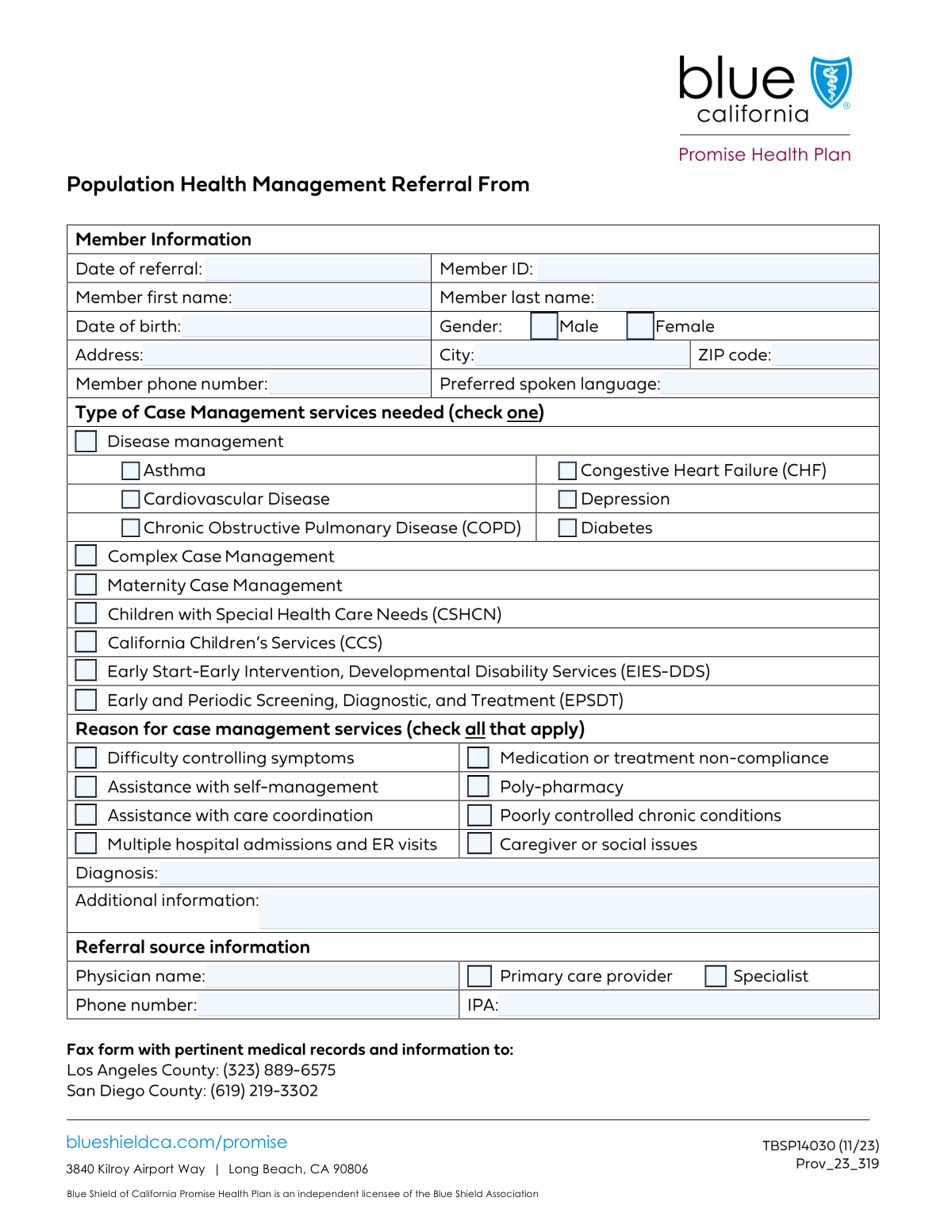
Yes! You can use AI to fill out Case Management Referral Form

A Case Management Referral Form is a crucial document in healthcare used by physicians and other providers to enroll a patient (member) into a case management program. It details the patient's demographic information, medical conditions, and the specific reasons they would benefit from coordinated care, such as managing a chronic disease or needing maternity support. This ensures the patient receives targeted support to improve health outcomes. Today, this form can be filled out quickly and accurately using AI-powered services like Instafill.ai, which can also convert non-fillable PDF versions into interactive fillable forms.
Our AI automatically handles information lookup, data retrieval, formatting, and form filling.
It takes less than a minute to fill out Case Management Referral using our AI form filling.
Securely upload your data. Information is encrypted in transit and deleted immediately after the form is filled out.

Form specifications

Form name: Case Management Referral Form
Number of fields: 40
Number of pages: 1
Language: English
main-image

Instafill Demo: How to fill out PDF forms in seconds with AI

How to Fill Out Case Management Referral Online for Free in 2026

Are you looking to fill out a CASE MANAGEMENT REFERRAL form online quickly and accurately? Instafill.ai offers the #1 AI-powered PDF filling software of 2026, allowing you to complete your CASE MANAGEMENT REFERRAL form in just 37 seconds or less.
Follow these steps to fill out your CASE MANAGEMENT REFERRAL form online using Instafill.ai:
  1. 1 Navigate to Instafill.ai and upload your Case Management Referral Form or select it from a template library.
  2. 2 Enter the patient's complete details in the 'Member Information' section, including their name, Member ID, date of birth, and contact information.
  3. 3 Select the appropriate case management program needed, such as 'Disease management,' 'Complex Case Management,' or 'Maternity Case Management.'
  4. 4 Indicate the 'Reason for Case Management' by checking the relevant boxes, like 'Difficulty controlling symptoms' or 'Medication or treatment non-compliance.'
  5. 5 Provide the patient's diagnosis and any other pertinent clinical details in the 'Additional Information' field to support the referral.
  6. 6 Complete the 'Referral Source Information' section with the referring physician's name, contact number, and IPA affiliation.
  7. 7 Review all entered information for accuracy and completeness before submitting the form to the health plan or relevant entity.

Our AI-powered system ensures each field is filled out correctly, reducing errors and saving you time.

Why Choose Instafill.ai for Your Fillable Case Management Referral Form?

Speed

Complete your Case Management Referral in as little as 37 seconds.

Up-to-Date

Always use the latest 2026 Case Management Referral form version.

Cost-effective

No need to hire expensive lawyers.

Accuracy

Our AI performs 10 compliance checks to ensure your form is error-free.

Security

Your personal information is protected with bank-level encryption.

Frequently Asked Questions About Form Case Management Referral

This form is used by healthcare providers to refer a member to specific case management programs for conditions like asthma, diabetes, or for complex health needs.

A healthcare provider, such as a primary care physician or a specialist, or their office staff, should complete this form to refer a patient for case management services.

The Member ID is the unique identification number for the patient, which can typically be found on their health insurance card.

Select 'Disease management' for members with specific chronic conditions like COPD or diabetes. Choose 'Complex Case Management' for members with multiple, complicated health issues or significant care coordination needs.

Yes, the form indicates that you should only select specific conditions like 'Asthma' or 'Diabetes' if the main 'Disease management' box is also checked.

You can check all applicable condition boxes under the 'Disease management' section. If the case is particularly complicated, you may also consider checking 'Complex Case Management'.

If the listed reasons don't fit, use the 'Additional Information' field to provide a detailed explanation for the referral. Be sure to also include the relevant 'Diagnosis'.

IPA stands for Independent Practice Association. You should enter the name or ID of the referring physician's IPA in this field.

Submission instructions and processing times are determined by the receiving health plan or organization. Please refer to your provider manual or contact them directly for this information.

Yes, services like Instafill.ai use AI to accurately auto-fill form fields from your existing records, which can save you time and help prevent errors.

Simply upload the form to the Instafill.ai platform. Its AI will make the fields interactive, allowing you to quickly type in the information, save, and download the completed document.

Services like Instafill.ai can convert non-fillable PDFs into interactive forms. Just upload your file, and the platform will allow you to type directly into the fields.

Use this space to provide important context not captured elsewhere, such as specific social barriers, caregiver issues, or other clinical details that justify the need for case management.

Compliance Case Management Referral
Validation Checks by Instafill.ai

1
Date of Referral is a Valid, Non-Future Date
This check validates that the 'Date of Referral' is in a proper date format (e.g., MM/DD/YYYY) and is not a date in the future. This is crucial for maintaining an accurate timeline of member care and preventing data entry errors. If the date is invalid or set in the future, the form submission will be rejected with a request to correct the entry.
2
Member Date of Birth is Logically Sound
This validation ensures the 'Date of Birth' is a valid date that occurs before the 'Date of Referral'. It also checks that the calculated age is reasonable (e.g., less than 120 years) to catch significant typos. This is important for verifying member identity and eligibility for age-specific services. A failure would prompt the user to review and correct the date.
3
Exclusive Gender Selection
This check ensures that only one of the gender checkboxes ('Male' or 'Female') is selected. Selecting both or neither can lead to data ambiguity and processing errors in the patient's record. If this rule is violated, the system will require the user to select exactly one option before proceeding.
4
ZIP Code Format Validation
This validation verifies that the 'ZIP Code' field contains either a 5-digit or 9-digit (ZIP+4) numeric value. Correct postal codes are essential for mailings, location-based service assignments, and demographic analysis. An incorrectly formatted ZIP code will trigger an error message asking the user to enter a valid US postal code.
5
Standard Phone Number Format
This check ensures that both the 'Member Phone Number' and the referral source 'Phone Number' fields adhere to a standard 10-digit format, ignoring common characters like parentheses or hyphens. A valid phone number is critical for communication with the member and the referring physician. If the format is incorrect, the user will be prompted to re-enter a valid 10-digit phone number.
6
Disease Management Prerequisite Check
This rule validates that if any specific condition (e.g., 'Asthma', 'Diabetes', 'COPD') is checked, the parent 'Disease management' checkbox must also be checked. This enforces the intended form hierarchy and ensures data is categorized correctly. A failure would result in an error message explaining that a specific disease selection requires the general 'Disease management' option to be selected as well.
7
Maternity Service Gender Consistency
This validation checks that if 'Maternity Case Management' is selected, the member's gender is marked as 'Female'. This logical cross-check prevents obvious data entry errors and ensures services are appropriately assigned. If a conflict is detected, the system will flag the inconsistency and require correction.
8
Age-Appropriateness for Pediatric Services
This rule verifies that if a child-specific service like 'CSHCN', 'CCS', or 'EPSDT' is selected, the member's age calculated from their 'Date of Birth' falls within the eligible age range (e.g., under 21). This prevents misallocation of resources and ensures members are referred to the correct programs. An age mismatch would block the submission until the service selection or date of birth is corrected.
9
Completeness of Referral Reason
This validation ensures that a reason for the referral is provided by checking that at least one of the 'Reason for Case Management' checkboxes is selected OR the 'Diagnosis' text field is filled. A referral without a clear reason is incomplete and cannot be acted upon. If no reason is provided, the form will be rejected with a message indicating that a diagnosis or reason for referral is required.
10
Exclusive Referral Source Type
This check ensures that only one of the referral source type checkboxes ('Primary care provider' or 'Specialist') is selected. This information is used to correctly categorize the origin of the referral for reporting and follow-up. If both or neither are selected, the user will be prompted to choose exactly one option.
11
Required Member Demographics Completeness
This validation confirms that essential member identification fields, including 'Member First Name', 'Member Last Name', and 'Member ID', are not empty. These fields are fundamental for identifying the correct member in the system and creating the case file. A missing value in any of these fields will prevent form submission and prompt the user to complete the required information.
12
Referral Source Contact Information Check
This check verifies that the 'Physician Name' and 'Phone Number' fields within the 'Referral Source Information' section are both completed. This contact information is vital for the case management team to coordinate care and follow up on the referral. If either field is empty, the submission will be flagged as incomplete.

Common Mistakes in Completing Case Management Referral

Entering an Incorrect or Incomplete Member ID

The Member ID is the primary unique identifier used to locate the patient's record. People often make typos, transpose digits, or omit characters, which leads to a 'record not found' error and immediate rejection of the referral. To avoid this, carefully double-check the Member ID against the member's insurance card before submission. AI-powered tools like Instafill.ai can help by validating the format and length of the ID number as you type.

Ignoring Conditional Checkbox Logic

The form requires the 'Disease management' box to be checked before selecting specific conditions like 'Asthma' or 'Diabetes'. A common mistake is checking a specific condition without its parent category, which makes the submission logically inconsistent and can cause processing errors. Always read field dependencies carefully to ensure you are providing a complete and valid set of information.

Using Vague or Abbreviated Medical Diagnoses

In the 'Diagnosis' field, referrers may use non-standard abbreviations or list symptoms instead of a formal diagnosis. This ambiguity can lead to the case being misclassified, delayed, or assigned to the wrong clinical team. To prevent this, always write out the full, formal medical diagnosis to ensure clarity and proper routing of the referral.

Omitting Critical Referral Source Information

Forgetting to include the referring physician's name, phone number, or IPA is a frequent oversight. This missing information makes it impossible for the case management team to verify the referral's origin or follow up with questions, often resulting in processing delays or outright rejection. Ensure all fields in the 'Referral Source Information' section are completed accurately.

Providing an Incomplete Mailing Address

Submitters often forget to include essential details like an apartment, suite, or unit number in the 'Address' field. This oversight can lead to returned mail, missed appointments, or delays in services that require a home visit. Always provide the complete, unabbreviated address to ensure successful communication and service delivery.

Using Inconsistent or Ambiguous Date Formats

For fields like 'Date of Referral' and 'Date of Birth', people may use different formats (e.g., DD/MM/YYYY vs. MM/DD/YYYY), causing confusion and data entry errors. This can lead to incorrect age calculations or timeline tracking, potentially affecting eligibility for certain services. Always use the standard MM/DD/YYYY format to ensure consistency and accuracy. If the form is a non-fillable PDF, a tool like Instafill.ai can convert it to a fillable version with formatted date fields to prevent such errors.

Transposing Member's First and Last Names

It is a simple but surprisingly common error to enter the member's last name in the 'First Name' field and vice versa. This mistake will almost certainly cause a failure when searching for the member's record in the system, halting the referral process. Carefully review the labels for each name field before entering the information to prevent a data mismatch.

Failing to Select a Reason for Case Management

The form provides a list of checkboxes to specify why the member needs case management, such as 'Medication or treatment non-compliance' or 'Multiple hospital admissions'. Leaving this section blank forces the reviewer to guess the primary issue, which can lead to an inappropriate or delayed response. To ensure the member receives the right support, check all boxes that accurately describe their situation.

Incorrectly Selecting the Case Management Program

The form lists several distinct programs like 'Maternity Case Management' and 'Complex Case Management'. Users who are unfamiliar with the programs may select the wrong one or check multiple conflicting options, causing the referral to be sent to the incorrect department. It is crucial to understand the member's primary need and select the single most appropriate program to avoid administrative delays.

Entering an Invalid Phone Number Format

When entering the 'Member Phone Number' or the referrer's phone number, people often omit the area code or include unnecessary characters like parentheses or dashes. This can render the phone number unusable in automated dialing or contact systems, creating a barrier to communication. Always enter a 10-digit phone number without any special characters to ensure it is correctly processed. Smart form-filling tools like Instafill.ai can automatically format phone numbers correctly, preventing this issue.
Saved over 80 hours a year

“I was never sure if my IRS forms like W-9 were filled correctly. Now, I can complete the forms accurately without any external help.”

Kevin Martin Green

Your data stays secure with advanced protection from Instafill and our subprocessors

Robust compliance program

Transparent business model

You’re not the product. You always know where your data is and what it is processed for.

ISO 27001, HIPAA, and GDPR

Our subprocesses adhere to multiple compliance standards, including but not limited to ISO 27001, HIPAA, and GDPR.

Security & privacy by design

We consider security and privacy from the initial design phase of any new service or functionality. It’s not an afterthought, it’s built-in, including support for two-factor authentication (2FA) to further protect your account.

Fill out Case Management Referral with Instafill.ai

Worried about filling PDFs wrong? Instafill securely fills case-management-referral-form forms, ensuring each field is accurate.