Yes! You can use AI to fill out Generation Health Clinic Virtual English Program Referral Form
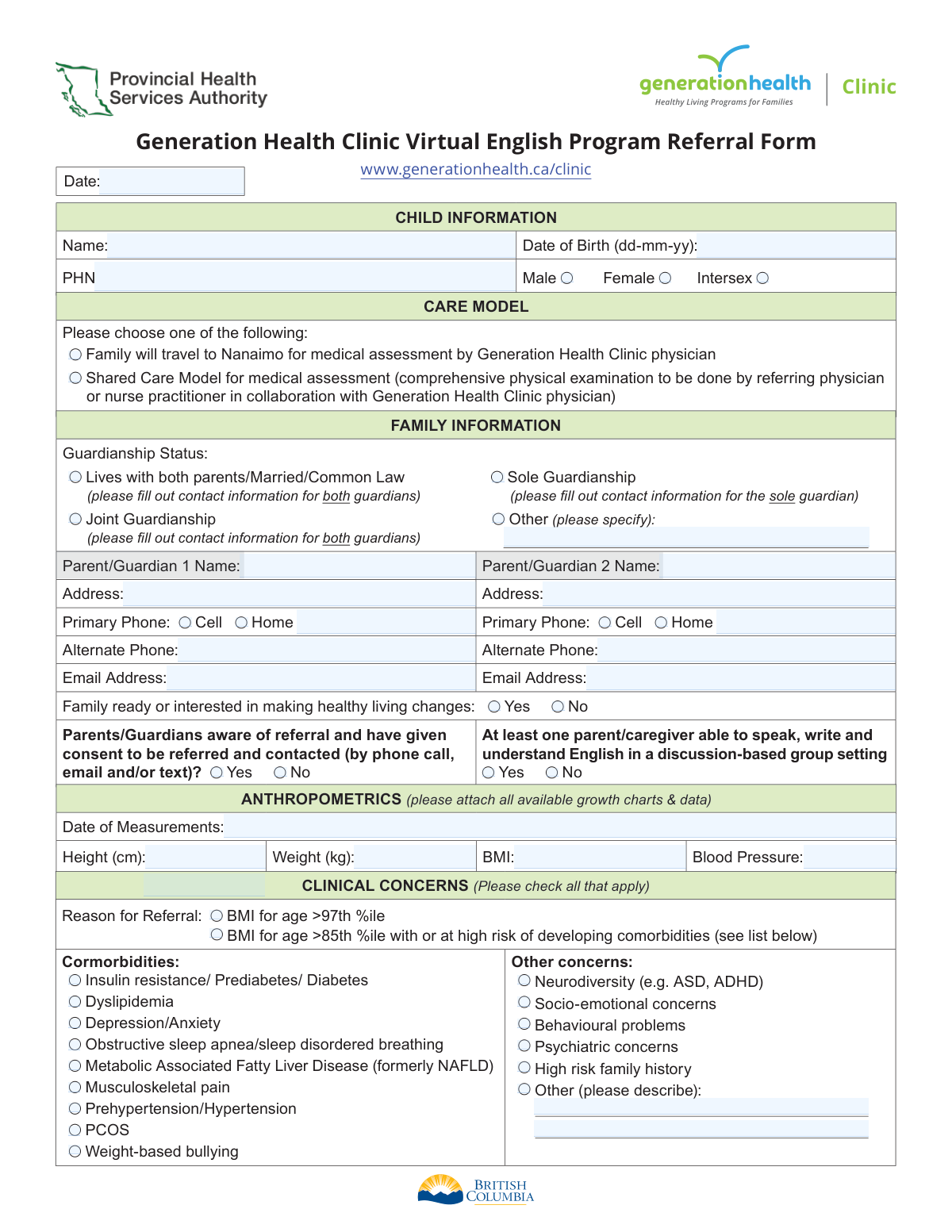
The Generation Health Clinic Virtual English Program Referral Form is a medical document used by physicians and nurse practitioners to refer children to a virtual health program focused on healthy living. It gathers essential patient information, medical history, and clinical concerns to determine eligibility and create a care plan, making its accurate completion vital for patient care. Today, this form can be filled out quickly and accurately using AI-powered services like Instafill.ai, which can also convert non-fillable PDF versions into interactive fillable forms.
Generation Health Clinic Referral Form is part of the
health forms and referral forms categories on Instafill.
Our AI automatically handles information lookup, data retrieval, formatting, and form filling.
It takes less than a minute to fill out Generation Health Clinic Referral Form using our AI form filling.
Securely upload your data. Information is encrypted in transit and deleted immediately after the form is filled out.
Form specifications
| Form name: | Generation Health Clinic Virtual English Program Referral Form |
| Number of fields: | 83 |
| Number of pages: | 2 |
| Filled form examples: | Form Generation Health Clinic Referral Form Examples |
| Language: | English |
More forms in Health forms
Instafill Demo: How to fill out PDF forms in seconds with AI
How to Fill Out Generation Health Clinic Referral Form Online for Free in 2026
Are you looking to fill out a GENERATION HEALTH CLINIC REFERRAL FORM form online quickly and accurately? Instafill.ai offers the #1 AI-powered PDF filling software of 2026, allowing you to complete your GENERATION HEALTH CLINIC REFERRAL FORM form in just 37 seconds or less.
Follow these steps to fill out your GENERATION HEALTH CLINIC REFERRAL FORM form online using Instafill.ai:
- 1 Navigate to Instafill.ai and upload or select the Generation Health Clinic Referral Form.
- 2 Use the AI assistant to automatically populate child, parent/guardian, and referring practitioner information from your records.
- 3 Review and confirm the child's personal details, including name, date of birth, and Personal Health Number (PHN).
- 4 Select the appropriate care model, guardianship status, and provide consent for the referral.
- 5 Input the child's recent anthropometric data (height, weight, BMI) and check off all relevant clinical concerns and comorbidities.
- 6 Attach all required supporting documents, such as growth charts, lab results, and medical history consults, as prompted by the system.
- 7 Once all sections are complete and verified, securely sign and submit the form electronically to the designated fax number or portal.
Our AI-powered system ensures each field is filled out correctly, reducing errors and saving you time.
Why Choose Instafill.ai for Your Fillable Generation Health Clinic Referral Form Form?
Speed
Complete your Generation Health Clinic Referral Form in as little as 37 seconds.
Up-to-Date
Always use the latest 2026 Generation Health Clinic Referral Form form version.
Cost-effective
No need to hire expensive lawyers.
Accuracy
Our AI performs 10 compliance checks to ensure your form is error-free.
Security
Your personal information is protected with bank-level encryption.
Frequently Asked Questions About Form Generation Health Clinic Referral Form
This form is used by physicians or nurse practitioners to refer a child to the Generation Health Clinic's Virtual English Program, which is designed to help children and families make healthy living changes.
A referring physician or nurse practitioner must complete this form. It is not intended to be filled out by parents or guardians directly.
A child is eligible if their BMI for age is above the 97th percentile, or if it's above the 85th percentile and they have or are at high risk for comorbidities like prediabetes, hypertension, or dyslipidemia.
Yes, children with an active eating disorder, acute mental health concerns (like active self-harm), or uncontrolled behavioural problems are not appropriate for this group program.
You must attach all available growth charts, recent bloodwork, imaging, diagnostic results, and relevant consultation notes to provide a complete medical history.
The completed form and all necessary attachments must be faxed to BC Children’s Hospital at 236-429-3635.
The 'Shared Care Model' allows the referring practitioner to perform the comprehensive physical exam in their local office, in collaboration with the Generation Health Clinic physician, instead of the family traveling to Nanaimo.
Yes, the referring practitioner must confirm that parents/guardians are aware of the referral and have given consent to be contacted by the clinic.
This is a virtual English program, so at least one parent or caregiver must be able to speak, write, and understand English to participate effectively in the discussion-based group setting.
For any questions about the referral process or the program itself, you can call the Generation Health Clinic at 236-833-9673.
Yes, services like Instafill.ai use AI to help healthcare professionals auto-fill form fields accurately and efficiently, saving valuable time on administrative tasks.
You can upload the PDF of the referral form to the Instafill.ai platform. The service will make the form interactive, allowing you to type in the information easily before printing for submission.
If you have a flat, non-fillable PDF, you can use a tool like Instafill.ai to convert it into an interactive, fillable form. This allows you to complete it digitally instead of printing and handwriting.
Compliance Generation Health Clinic Referral Form
Validation Checks by Instafill.ai
1
Mandatory Referral Consent
This check verifies that the 'Parents/Guardians aware of referral and have given consent' field is marked 'Yes'. Processing a referral without explicit consent is a violation of privacy and ethical guidelines. If this field is 'No' or left blank, the submission must be rejected and the referring practitioner notified that consent is required to proceed.
2
English Language Program Eligibility
This validation ensures the 'At least one parent/caregiver able to speak, write and understand English' field is marked 'Yes'. The program is a discussion-based group setting conducted in English, making this a critical eligibility requirement. If 'No' is selected, the referral should be flagged as ineligible for this specific program, and the family may need to be directed to other resources.
3
Child's Date of Birth Validity and Format
This check validates that the 'Child Date of Birth' is provided in the 'dd-mm-yy' format and represents a logical date in the past. An accurate date of birth is essential for calculating the child's age, determining BMI-for-age percentiles, and for correct patient identification. A failure would prevent form submission and prompt the user to enter a valid date in the correct format.
4
Guardianship Information Consistency
This check ensures the provided guardian contact information aligns with the selected 'Guardianship Status'. For instance, if 'Sole Guardianship' is chosen, information for 'Parent/Guardian 1' must be complete, while 'Parent/Guardian 2' should be empty. This logic prevents confusion and ensures the clinic contacts the correct legal guardians, avoiding communication errors and privacy breaches.
5
Comorbidity Justification for Referral
This validation checks that if 'BMI for age >85th %ile with or at high risk of developing comorbidities' is selected as the 'Reason for Referral', at least one condition from the 'Comorbidities' list is also checked. This ensures the referral reason is fully justified according to the clinic's criteria. A failure would trigger a warning, indicating that a comorbidity must be specified to support this reason for referral.
6
BMI Calculation Verification
This check performs a calculation to verify that the entered 'BMI' value is mathematically consistent with the provided 'Height (cm)' and 'Weight (kg)'. This is important for catching data entry errors that could lead to an incorrect clinical assessment. If the values do not align, the system should flag the fields for review, as the discrepancy could impact the assessment of the referral's urgency and appropriateness.
7
Date of Measurements Chronology
This validation ensures the 'Date of Measurements' is a valid date that occurs on or before the 'Form Date'. Anthropometric data from the future is impossible, and old data may not be clinically relevant. This check prevents logical errors and ensures the clinical data is timely. If the date is in the future, the form should not be submittable.
8
Exclusive Care Model Selection
This check ensures that exactly one of the two 'Care Model' options is selected. The family must choose either to travel to Nanaimo or to use the Shared Care Model, but not both or neither. An invalid selection makes the referral incomplete, as the clinic cannot determine the required assessment pathway. The form should return an error if zero or two options are selected.
9
Referring Practitioner Information Completeness
This validation confirms that all essential fields for the 'Referring Practitioner' (Name, Practitioner Number, Address, Phone) are filled out. This information is critical for verifying the source of the referral and for any necessary follow-up communication with the practitioner. An incomplete section would cause the submission to be rejected until all required practitioner details are provided.
10
Child Identity Completeness
This check verifies that the 'Child’s Full Name', 'Date of Birth', and 'Personal Health Number (PHN)' are all provided. These three fields are the absolute minimum required for unique patient identification and to create a medical record. A submission lacking any of this core information must be blocked until it is completed.
11
Blood Pressure Format
This validation ensures the 'Blood Pressure' field is entered in a standard systolic/diastolic format, such as '120/80'. This structured format is necessary for correct clinical interpretation and data processing. An entry that does not match this pattern (e.g., a single number or text) should be flagged with an error message prompting the user to correct the format.
12
Conditional 'Other' Field Requirement
This check ensures that if an 'Other (please specify)' checkbox is selected (e.g., for Guardianship Status or Home Environment Stressors), the corresponding text description field is not empty. This prevents incomplete data where a category is selected but not explained. If the 'Other' box is checked but the text field is blank, a validation error should prompt the user to provide the required details.
13
Flag for Potential Exclusion Criteria
This check flags referrals where 'Behavioural problems' or 'Psychiatric concerns' are checked under 'Other concerns'. While not definitive, these selections may overlap with the program's exclusion criteria (e.g., uncontrolled behaviour, acute mental health concerns). The validation does not block submission but flags the referral for mandatory manual review by clinical staff to determine program appropriateness before scheduling.
Common Mistakes in Completing Generation Health Clinic Referral Form
The form explicitly requests that all available growth charts, consults, recent bloodwork, and imaging results be attached. Referring offices often forget to gather and fax these supplementary documents with the form, assuming the referral itself is sufficient. Without this clinical data, the Generation Health Clinic cannot properly assess the child's case, leading to significant processing delays or outright rejection of the referral until the information is provided. To avoid this, create a checklist of all required documents before faxing the referral.
The form requires specific contact information based on the selected guardianship status (e.g., one guardian for 'Sole', two for 'Joint' or 'Lives with both parents'). A common error is selecting a status like 'Joint Guardianship' but only providing contact details for one parent. This creates confusion and requires follow-up to determine who has the authority to consent for care and who should be contacted. Double-check that the number of guardians provided matches the selected status.
A critical error is failing to check 'Yes' for the question 'Parents/Guardians aware of referral and have given consent to be referred and contacted'. This is a legal and ethical requirement; without confirmed consent, the clinic cannot contact the family. This mistake, often a simple oversight, renders the entire referral invalid until consent is confirmed, halting the process before it even begins. Always verify consent with the family and ensure this box is checked before submission.
The form specifies the date of birth format as dd-mm-yy, but many people are accustomed to the mm-dd-yy format. Entering the date incorrectly can lead to errors in calculating the child's age and BMI-for-age percentile, which are critical for determining eligibility. This can cause the referral to be miscategorized or delayed while the correct date is clarified. Carefully follow the specified dd-mm-yy format to ensure accuracy.
Several sections, including 'Guardianship Status', 'Other concerns', and 'Significant stressors', have an 'Other (please specify)' option. Referrers frequently check the 'Other' box but neglect to provide the written explanation in the corresponding field. This leaves the clinical team with incomplete information, forcing them to make assumptions or follow up for clarification. If you select 'Other', always provide a concise but complete description in the space provided.
The 'ANTHROPOMETRICS' section requires height, weight, BMI, blood pressure, and the date of measurements. Mistakes include using incorrect units (e.g., lbs/in instead of kg/cm), omitting the BMI calculation, or forgetting the measurement date. The date is crucial for tracking growth velocity, and its absence makes the data less useful, potentially delaying the clinical review. Ensure all fields in this section are complete and use the specified metric units.
The form has separate sections for the 'Referring Practitioner' and the 'Primary Care Provider (PCP)'. If the referrer is a specialist, they may forget to fill out the PCP's details. This information is vital for coordinated care, as the PCP is a key partner in the child's long-term health management. Leaving this section blank can create communication gaps, so always include the PCP's information, even if it's the same as the referring practitioner.
Practitioners sometimes miss the 'EXCLUSION CRITERIA' section and refer a child who is not appropriate for the program (e.g., a child with an active eating disorder or acute mental health concerns). This results in an automatic rejection of the referral, wasting time for the referring office, the family, and the clinic. Carefully review the exclusion criteria before completing the form to ensure the child is a suitable candidate for this specific group program.
The form's layout implies that the list of comorbidities should be checked if the reason for referral is 'BMI for age >85th %ile with or at high risk of developing comorbidities'. A common mistake is to check the primary reason as '>97th %ile' but then also check off comorbidities without context, or to check the '>85th %ile' box but forget to check any of the relevant comorbidities. This can create an inaccurate or incomplete clinical picture for the reviewing physician. Ensure your selections logically follow the form's structure.
This form is likely distributed as a flat, non-fillable PDF, forcing staff to print it and fill it out by hand, which can lead to illegible handwriting and data entry errors. This manual process is inefficient and prone to mistakes that delay patient care. To avoid this, use a service like Instafill.ai, which can convert any non-fillable PDF into an interactive, fillable form, ensuring all entries are clear, legible, and correctly formatted, and can even help validate data to prevent common errors.
Saved over 80 hours a year
“I was never sure if my IRS forms like W-9 were filled correctly. Now, I can complete the forms accurately without any external help.”
Kevin Martin Green
Your data stays secure with advanced protection from Instafill and our subprocessors
Robust compliance program
Transparent business model
You’re not the product. You always know where your data is and what it is processed for.
ISO 27001, HIPAA, and GDPR
Our subprocesses adhere to multiple compliance standards, including but not limited to ISO 27001, HIPAA, and GDPR.
Security & privacy by design
We consider security and privacy from the initial design phase of any new service or functionality. It’s not an afterthought, it’s built-in, including support for two-factor authentication (2FA) to further protect your account.
Fill out Generation Health Clinic Referral Form with Instafill.ai
Worried about filling PDFs wrong? Instafill securely fills generation-health-clinic-virtual-english-program-referral-form forms, ensuring each field is accurate.