Yes! You can use AI to fill out Potential Quality Issue (PQI) Referral Form

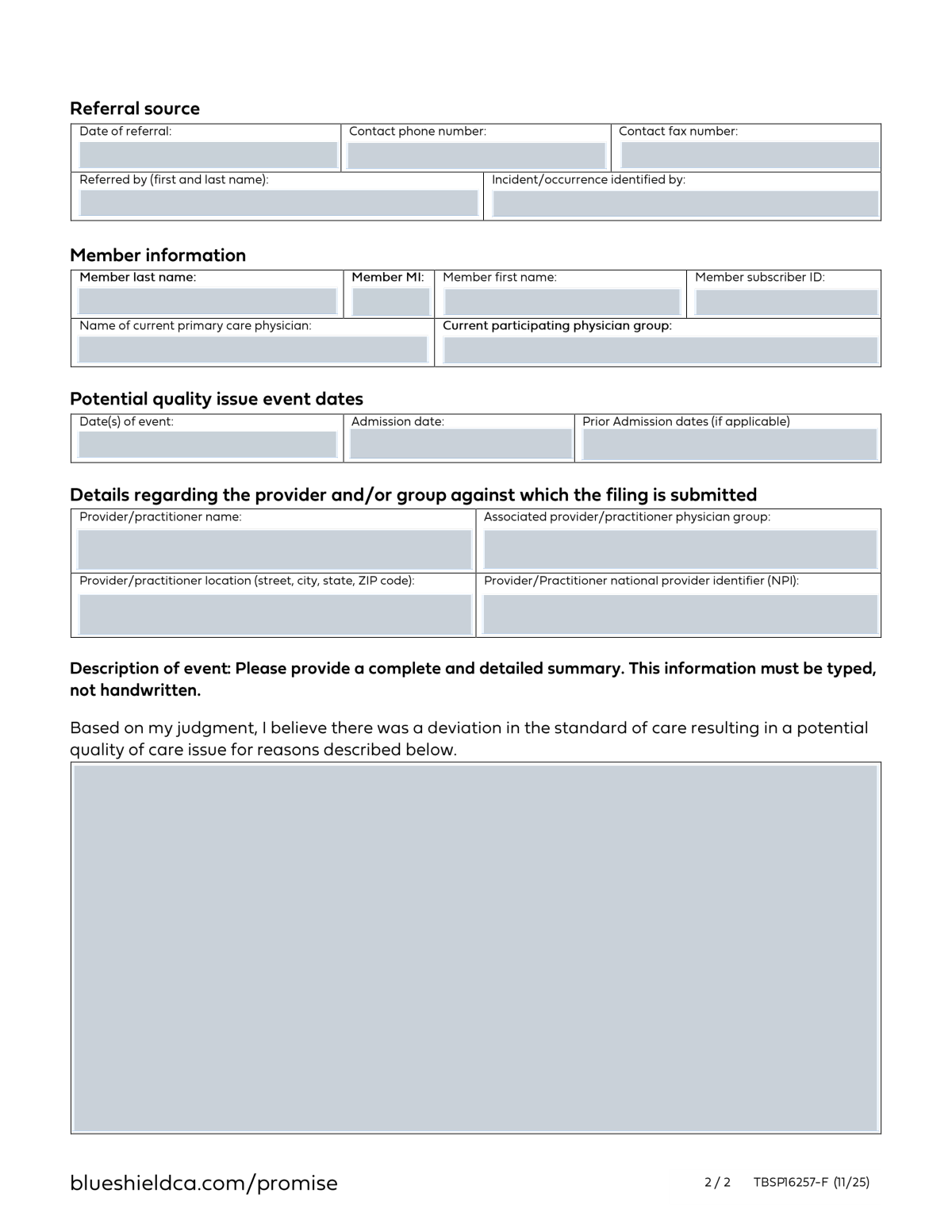
A Potential Quality Issue (PQI) Referral Form is a critical document in the healthcare industry used to formally report and document any event or concern regarding a patient's quality of care. It allows healthcare providers or staff to flag incidents that may deviate from the accepted standard of care, initiating a review process to ensure patient safety and improve services. Today, this form can be filled out quickly and accurately using AI-powered services like Instafill.ai, which can also convert non-fillable PDF versions into interactive fillable forms.
Our AI automatically handles information lookup, data retrieval, formatting, and form filling.
It takes less than a minute to fill out PQI Referral Form using our AI form filling.
Securely upload your data. Information is encrypted in transit and deleted immediately after the form is filled out.

Form specifications

Form name: Potential Quality Issue (PQI) Referral Form
Number of fields: 19
Number of pages: 2
Language: English
main-image

Instafill Demo: How to fill out PDF forms in seconds with AI

How to Fill Out PQI Referral Form Online for Free in 2026

Are you looking to fill out a PQI REFERRAL FORM form online quickly and accurately? Instafill.ai offers the #1 AI-powered PDF filling software of 2026, allowing you to complete your PQI REFERRAL FORM form in just 37 seconds or less.
Follow these steps to fill out your PQI REFERRAL FORM form online using Instafill.ai:
  1. 1 Navigate to Instafill.ai and upload your PQI Referral Form or select it from a template library.
  2. 2 Enter the referral source details, including the date, contact information, and the name of the person making the referral.
  3. 3 Provide the patient's (member's) complete identification information, such as their full name and subscriber ID.
  4. 4 Input the member's physician information, including their Primary Care Physician and participating physician group.
  5. 5 Detail the specifics of the event, including the date(s) of the incident and any relevant admission dates.
  6. 6 Identify the provider or practitioner involved by entering their name, group affiliation, location, and NPI number.
  7. 7 Write a comprehensive description of the event, explaining the deviation from the standard of care, and review the entire form for accuracy before finalizing.

Our AI-powered system ensures each field is filled out correctly, reducing errors and saving you time.

Why Choose Instafill.ai for Your Fillable PQI Referral Form Form?

Speed

Complete your PQI Referral Form in as little as 37 seconds.

Up-to-Date

Always use the latest 2026 PQI Referral Form form version.

Cost-effective

No need to hire expensive lawyers.

Accuracy

Our AI performs 10 compliance checks to ensure your form is error-free.

Security

Your personal information is protected with bank-level encryption.

Frequently Asked Questions About Form PQI Referral Form

This form is used to officially report a potential quality of care issue or an incident involving a member's medical treatment. It initiates a formal review of the event to ensure standards of care are being met.

This form is typically completed by a healthcare professional, such as a physician, case manager, or another provider, who identifies a potential quality concern in a member's care and needs to refer it for investigation.

You must provide a complete and detailed summary of the event. Clearly explain how the care provided deviated from the accepted standard and led to the potential quality issue.

The 'Primary Care Physician' is the member's main doctor for general health. The 'Provider/Practitioner' is the specific individual or facility directly involved in the incident you are reporting.

The NPI is a unique 10-digit ID for healthcare providers. If you don't know it, you can search for the provider's name on the public NPI Registry online to find it.

In the 'Date(s) of Event' field, enter the full date range from the start of the event to the end. For example, you can write 'MM/DD/YYYY - MM/DD/YYYY'.

You only need to complete this field if there were previous hospital admissions that are relevant to the current incident being reported. If not, you can leave it blank or write 'N/A'.

The Subscriber ID is critical for accurate record-keeping, so try to locate it on the member's insurance card or in their file. If it's truly unavailable, complete all other fields and make a note that the ID was missing.

Submission instructions are typically provided separately by the organization that requires the form. Check their website or contact the relevant department for the correct mailing address, fax number, or secure portal link.

Yes, services like Instafill.ai use AI to accurately auto-fill form fields from your existing records. This can save you significant time and help prevent data entry errors.

Upload the form to the Instafill.ai platform. The service will make the fields interactive, allowing you to type directly into them or use the AI-powered auto-fill feature to populate information quickly.

You can use a service like Instafill.ai to solve this problem. It can convert flat, non-fillable PDFs into interactive forms that you can easily complete and save online.

Compliance PQI Referral Form
Validation Checks by Instafill.ai

1
Validates Date of Referral is a valid date and not in the future
This check ensures the 'Date of Referral' is in a valid format (e.g., MM/DD/YYYY) and is not a future date. It is important for maintaining an accurate timeline of events and preventing data entry errors. A failed validation would prompt the user to correct the date before submission.
2
Ensures Contact Phone Number follows a standard format
This validation verifies that the 'Contact Phone Number' is entered in a recognizable US format, such as (XXX) XXX-XXXX or XXX-XXX-XXXX. Proper formatting is crucial for system integrations and ensures that the contact person can be reached without issue. If the format is incorrect, the system will reject the entry and request a valid phone number.
3
Verifies Member First and Last Name are provided
This check confirms that both the 'Member First Name' and 'Member Last Name' fields are filled out. These fields are fundamental for correctly identifying the member in the system and linking the referral to the correct patient record. A submission will be blocked if either of these required fields is left empty.
4
Validates Member Subscriber ID format
This check ensures the 'Member Subscriber ID' conforms to the expected format, which might be a specific combination of letters and numbers (e.g., 9 alphanumeric characters). Correctly formatted IDs are essential for database lookups and preventing record mismatches. An invalid format will trigger an error message asking the user to re-enter the ID.
5
Ensures Date of Event is not after the Date of Referral
This is a logical consistency check that verifies the 'Date(s) of Event' occurred on or before the 'Date of Referral'. An event cannot logically happen after it has been referred, so this check prevents chronological errors in the record. If the event date is after the referral date, the user will be required to correct one or both dates.
6
Validates Admission Date is on or after the Event Date
This check ensures a logical timeline by verifying that the 'Admission Date' is not before the 'Date(s) of Event'. A member cannot be admitted for an event that has not yet occurred. This validation maintains data integrity and provides an accurate sequence of events for the quality review.
7
Verifies Prior Admission Dates are before the current Admission Date
This validation checks that all dates listed in 'Prior Admission Dates' are chronologically earlier than the date entered for the current 'Admission Date'. This is important for accurately capturing the member's medical history and avoiding logical impossibilities in the data. If any prior date is not before the current admission date, an error will be displayed.
8
Validates Provider NPI is a 10-digit number
This check confirms that the 'Provider/Practitioner NPI' is exactly 10 digits and contains only numbers. The National Provider Identifier has a standard, fixed-length format, and this validation is the first step in ensuring the identifier is valid. Submissions with an incorrectly formatted NPI will be rejected to ensure data accuracy for provider identification.
9
Ensures Provider/Practitioner Location is a complete address
This validation checks that the 'Provider/Practitioner Location' field contains values for street address, city, state, and ZIP code. A complete address is necessary for locating the provider and for potential geo-spatial analysis. The system will flag an incomplete address and require the user to provide the missing components.
10
Requires Event Description to meet a minimum length
This check ensures the 'Event Description' field contains a minimum number of characters (e.g., 50 characters) to encourage a detailed summary. A thorough description is critical for the quality review team to understand the nature of the incident. If the description is too short, the user will be prompted to provide more detail about the event.
11
Validates 'Referred By' contains a full name
This check verifies that the 'Referred By' field contains at least two words, assuming a first and last name are required. This ensures a complete name is captured for the referral source, which is important for record-keeping and potential follow-up communication. A single-word entry would trigger a prompt for the user to enter a full name.
12
Cross-validates Member Subscriber ID against member database
This validation performs a real-time check to confirm that the entered 'Member Subscriber ID' exists and is active in the member database. This is a critical step to ensure the referral is associated with a valid member, preventing orphaned records and processing delays. If the ID is not found, the user will be notified that the member is not recognized by the system.
13
Checks for completeness of key required fields
This validation ensures that several critical fields such as 'Incident Identified By', 'Primary Care Physician Name', and 'Provider/Practitioner Name' are not empty. These fields are essential for a comprehensive understanding of the referral and the incident context. The form cannot be submitted until all of these mandatory fields are completed.
14
Validates Provider NPI checksum
Beyond checking the length, this validation applies the Luhn algorithm to the 10-digit 'Provider/Practitioner NPI' to verify its checksum. This is a more robust method for catching typos and invalid NPI numbers, ensuring a higher degree of accuracy for provider identification. An NPI that fails the checksum validation is invalid and must be corrected.

Common Mistakes in Completing PQI Referral Form

Entering an Incorrect Member Subscriber ID

Users often transpose numbers or letters in the Member Subscriber ID, or confuse it with a group number. This is the most critical error, as it prevents the system from identifying the correct member, leading to immediate rejection or significant processing delays. To avoid this, carefully double-check the ID against the member's insurance card. AI-powered tools like Instafill.ai can help by accurately capturing this information from a source document.

Providing a Vague or Subjective Event Description

Many people write overly brief or emotional descriptions like 'bad care' instead of providing a factual, detailed summary of the event. This lack of specific information makes it impossible for reviewers to investigate the potential quality issue, often requiring lengthy follow-ups or dismissal of the case. To prevent this, describe the specific actions, dates, and outcomes that deviated from the standard of care in a clear, chronological order.

Omitting or Guessing the Provider NPI Number

The National Provider Identifier (NPI) is a unique 10-digit number that is essential for identifying the exact practitioner involved. People often leave this field blank because they don't know where to find it, or they enter an incorrect number. This mistake halts the investigation, as the correct provider cannot be confirmed. Always look up the provider on the official NPI Registry online to find the correct number; advanced form fillers like Instafill.ai can often auto-populate this information.

Confusing the Primary Care Physician with the Incident Provider

A common point of confusion is entering the member's Primary Care Physician (PCP) in the 'Provider/Practitioner Name' field, or vice-versa. This misdirects the investigation towards the wrong party, wasting time and resources. To avoid this, carefully distinguish between the member's regular PCP and the specific provider associated with the event being reported.

Using Inconsistent or Incorrect Date Formats

When filling out multiple date fields like 'Date of Referral' and 'Date(s) of Event', users often use inconsistent formats (e.g., MM/DD/YY, Month D, YYYY). This creates ambiguity and can lead to data entry errors in the backend system, potentially confusing the timeline of the incident. Always use a consistent, unambiguous format like MM/DD/YYYY to ensure clarity. If the form is a non-fillable PDF, tools like Instafill.ai can convert it and help enforce correct formatting.

Entering an Incomplete Provider/Practitioner Location

People frequently provide a partial address for the provider, omitting crucial details like a suite number, building name, or correct ZIP code. For large medical centers with multiple offices, an incomplete address makes it difficult to pinpoint the exact location of the incident. This can delay the review process significantly. Always provide the full, specific street address, and use online maps to verify its accuracy.

Using Informal Names or Nicknames

For fields like 'Referred By' or 'Primary Care Physician Name', users may enter a nickname (e.g., 'Dr. Mike') or an abbreviated name. These informal names cannot be matched with records in official databases, leading to identification failures. Always use the full, legal first and last name as it would appear on official documents to ensure the system can find the correct person.

Leaving 'Optional' Fields Blank

Fields like 'Member Middle Initial' or 'Prior Admission Dates' may seem optional, but they provide critical context. A middle initial can be the only way to distinguish between two members with the same name, while prior admissions may be directly relevant to the current quality issue. Leaving these blank can slow down identification and weaken the case. It is best practice to fill in all fields completely; if information is unknown or not applicable, note that accordingly.

Incorrectly Populating Phone and Fax Numbers

Users often forget to include the area code or add special characters like parentheses and dashes when they are not required, leading to invalid numbers. An incorrect contact number for the referral source prevents the review team from asking for clarification, which can cause the referral to be stalled or denied. Always enter the full 10-digit number and adhere to the specified format. AI form-filling tools like Instafill.ai can automatically validate and format phone numbers to prevent these errors.

Confusing 'Date(s) of Event' with 'Admission Date'

People sometimes enter the hospital admission date into the 'Date(s) of Event' field, even if the quality issue occurred on a different day during the stay. This creates a confusing and inaccurate timeline for investigators trying to reconstruct the incident. The 'Date(s) of Event' should pinpoint the specific moment the issue occurred, whereas the 'Admission Date' marks the beginning of the facility stay.
Saved over 80 hours a year

“I was never sure if my IRS forms like W-9 were filled correctly. Now, I can complete the forms accurately without any external help.”

Kevin Martin Green

Your data stays secure with advanced protection from Instafill and our subprocessors

Robust compliance program

Transparent business model

You’re not the product. You always know where your data is and what it is processed for.

ISO 27001, HIPAA, and GDPR

Our subprocesses adhere to multiple compliance standards, including but not limited to ISO 27001, HIPAA, and GDPR.

Security & privacy by design

We consider security and privacy from the initial design phase of any new service or functionality. It’s not an afterthought, it’s built-in, including support for two-factor authentication (2FA) to further protect your account.

Fill out PQI Referral Form with Instafill.ai

Worried about filling PDFs wrong? Instafill securely fills potential-quality-issue-pqi-referral-form forms, ensuring each field is accurate.