Yes! You can use AI to fill out Applied Behavioral Analysis (ABA) Referral Form

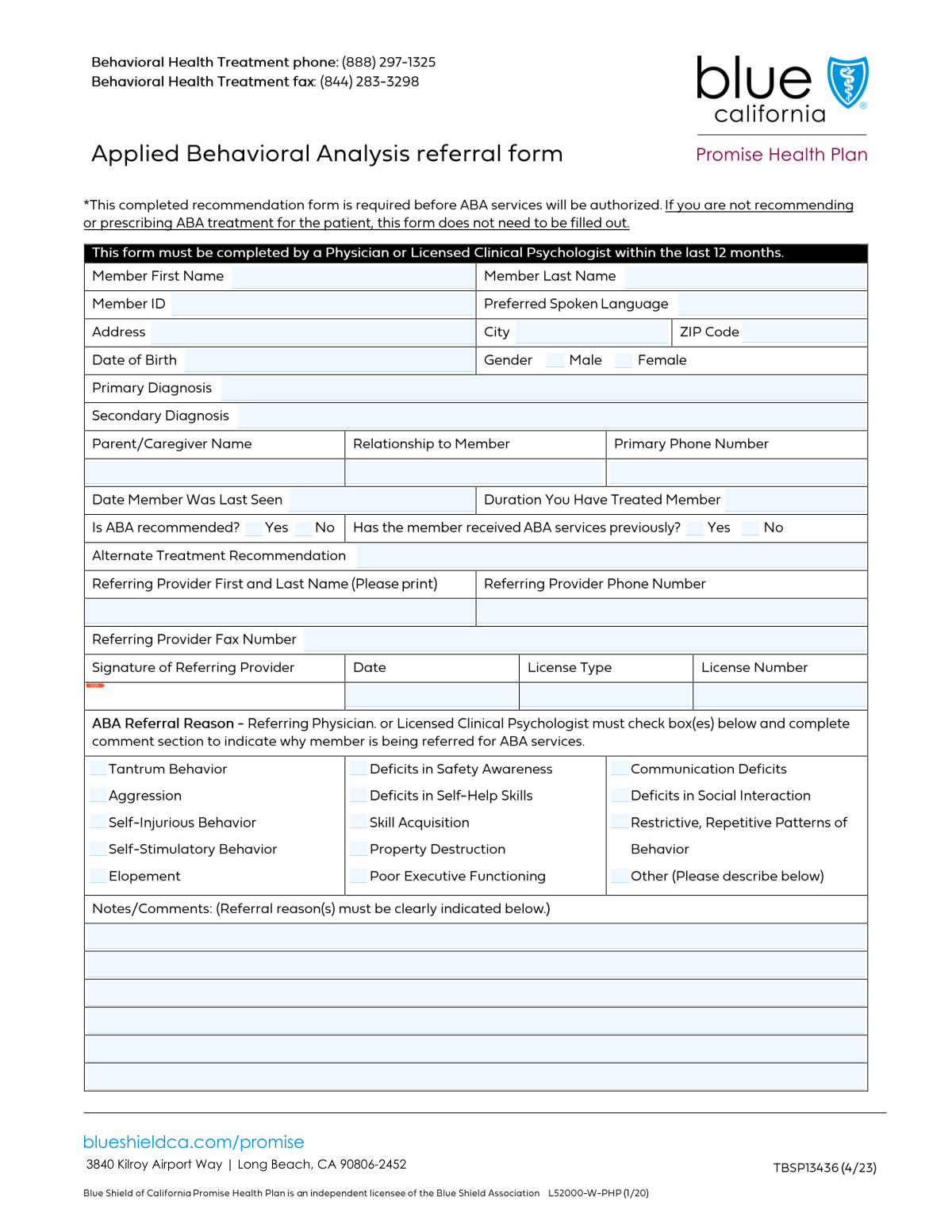
The Applied Behavioral Analysis (ABA) Referral Form is a medical document completed by a referring provider, such as a physician or psychologist, to recommend a patient for ABA therapy. It provides the receiving ABA provider with essential patient information, including diagnoses, treatment history, and the specific reasons for the referral, ensuring continuity of care. Today, this form can be filled out quickly and accurately using AI-powered services like Instafill.ai, which can also convert non-fillable PDF versions into interactive fillable forms.
Our AI automatically handles information lookup, data retrieval, formatting, and form filling.
It takes less than a minute to fill out ABA Referral Form using our AI form filling.
Securely upload your data. Information is encrypted in transit and deleted immediately after the form is filled out.

Form specifications

Form name: Applied Behavioral Analysis (ABA) Referral Form
Number of fields: 50
Number of pages: 2
Language: English
Categories: ABA forms, ABA referral forms
main-image

Instafill Demo: How to fill out PDF forms in seconds with AI

How to Fill Out ABA Referral Form Online for Free in 2026

Are you looking to fill out a ABA REFERRAL FORM form online quickly and accurately? Instafill.ai offers the #1 AI-powered PDF filling software of 2026, allowing you to complete your ABA REFERRAL FORM form in just 37 seconds or less.
Follow these steps to fill out your ABA REFERRAL FORM form online using Instafill.ai:
  1. 1 Navigate to Instafill.ai and upload your ABA Referral Form or select it from our template library.
  2. 2 Use the AI assistant to automatically fill in the member's personal details, including name, ID number, date of birth, and address.
  3. 3 Provide the member's primary and secondary diagnoses, along with their treatment history, such as the last seen date and treatment duration.
  4. 4 Indicate whether ABA is recommended, if the member has received prior ABA services, and check the boxes corresponding to the reasons for the referral.
  5. 5 Enter the referring provider's information, including name, contact details, license type, and license number.
  6. 6 Carefully review all the entered information for accuracy, then add your digital signature and the date to finalize the referral.

Our AI-powered system ensures each field is filled out correctly, reducing errors and saving you time.

Why Choose Instafill.ai for Your Fillable ABA Referral Form Form?

Speed

Complete your ABA Referral Form in as little as 37 seconds.

Up-to-Date

Always use the latest 2026 ABA Referral Form form version.

Cost-effective

No need to hire expensive lawyers.

Accuracy

Our AI performs 10 compliance checks to ensure your form is error-free.

Security

Your personal information is protected with bank-level encryption.

Frequently Asked Questions About Form ABA Referral Form

This form is used by a healthcare provider to document a member's information and provide a recommendation for or against Applied Behavioral Analysis (ABA) therapy.

The referring healthcare provider is responsible for completing this form, providing their license information, and signing it.

You will need the member's full name, Member ID, date of birth, address, and their primary and secondary diagnoses.

Yes, you must provide the full name of the parent or caregiver, their relationship to the member, and a primary phone number.

If you are not recommending ABA, check the 'ABA Recommended No' box. You must then fill in the 'Alternate Treatment Recommendation' field with your suggestion.

Use the series of checkboxes under the 'ABA Referral Reason' section to indicate why you are recommending ABA services for the member.

You should use the 'Notes and Comments' section to provide additional details, particularly if you check the final checkbox (Check Box23) to clarify the referral reason.

This section requires the referring provider's signature, the date of signing, your professional license type, and your license number.

Yes, you must check either 'Yes' or 'No' in the 'Previous ABA Services Status' section to confirm if the member has a history of receiving ABA.

Submission instructions are not provided on the form itself. Please refer to the guidelines from the requesting organization or health plan, or use the provided fax number if applicable.

Yes, services like Instafill.ai use AI to accurately auto-fill form fields from your records, which can save you time and help prevent errors.

To fill this form online, upload it to Instafill.ai. The platform's AI will automatically identify the fields, allowing you to complete and sign the document digitally.

If you have a non-fillable or scanned PDF, you can upload it to a service like Instafill.ai. It can convert flat PDFs into interactive, fillable forms that you can complete on your computer.

Compliance ABA Referral Form
Validation Checks by Instafill.ai

1
Date of Birth Validity
This check ensures the 'Date of Birth' field contains a valid date in a recognized format (e.g., MM/DD/YYYY) and that the date is in the past, not the current day or a future date. This is critical for verifying member eligibility and age-related treatment protocols. A failure would prevent form submission until a valid, past date is entered.
2
Phone and Fax Number Formatting
Validates that the 'Primary Phone Number', 'Referring Provider Phone Number', and 'Referring Provider Fax Number' fields adhere to a standard 10-digit phone number format (e.g., (XXX) XXX-XXXX or XXXXXXXXXX). Correct formatting is essential for ensuring successful communication with caregivers and providers. If the format is incorrect, the user will be prompted to correct the entry before proceeding.
3
ZIP Code Format Validation
This check verifies that the 'ZIP Code' field contains a valid 5-digit or 9-digit (ZIP+4) numeric code. Accurate ZIP codes are necessary for demographic analysis, service area verification, and mailing correspondence. An invalid entry will trigger an error message requiring the user to input a standard US ZIP code.
4
Mutually Exclusive Gender Selection
Ensures that only one of the gender checkboxes ('Male' or 'Female') is selected at a time. This prevents data ambiguity and ensures the integrity of member demographic information. If both or neither are selected, the form will display an error and require the user to select exactly one option.
5
Mutually Exclusive ABA Recommendation Status
This validation confirms that only one of the 'ABA Recommended Yes' or 'ABA Recommended No' checkboxes is selected. A member cannot be both recommended and not recommended for ABA treatment simultaneously. This check prevents contradictory data entry and ensures a clear treatment path is recorded.
6
Conditional 'Alternate Treatment Recommendation' Requirement
This rule checks that the 'Alternate Treatment Recommendation' field is filled out if, and only if, the 'ABA Recommended No' checkbox is selected. It is important to understand the alternative plan when ABA is not recommended. If 'ABA Recommended No' is checked and this field is empty, the submission will be blocked until a recommendation is provided.
7
Signature Date and Last Seen Date Consistency
This logical check verifies that the 'Signature Date' is on or after the 'Last Seen Date' and that neither date is in the future. A provider cannot sign a form recommending treatment before they have last seen the member. This validation maintains the chronological integrity of the treatment and referral timeline.
8
Primary Diagnosis Completeness
Verifies that the 'Primary Diagnosis' field is not empty. The primary diagnosis is a critical piece of information for determining medical necessity and the appropriateness of the requested services. Without this information, the referral cannot be properly evaluated, so the form cannot be submitted until it is provided.
9
Conditional 'Notes and Comments' for 'Other' Referral Reason
This check ensures that the 'Notes and Comments' field is filled in if 'Check Box23' (presumably an 'Other' reason for referral) is checked. When a user selects 'Other', a specific explanation is required for the referral to be understood and processed correctly. The form will prompt the user to provide details in the notes if this condition is not met.
10
Referring Provider License Information Completeness
Ensures that if either 'License Type' or 'License Number' is filled, the other is also required. A license is defined by both its type and number, and providing only one is incomplete for credentialing purposes. This check guarantees that complete and verifiable license information for the referring provider is captured.
11
ABA Referral Reason Requirement
This validation ensures that if 'ABA Recommended Yes' is checked, at least one of the 'ABA Referral Reason' checkboxes (Check Box10-Check Box23) is also checked. A recommendation for ABA must be justified by a specific clinical reason. If no reason is selected, the form will be considered incomplete and will prompt the user for a selection.
12
Member ID Presence and Format
This check confirms that the 'Member ID' field is not empty and optionally checks it against a specific format (e.g., alphanumeric, specific length). The Member ID is the primary key for identifying the patient in the system and linking the form to the correct record. A missing or malformed ID would cause a data mismatch, so the form is invalid without it.

Common Mistakes in Completing ABA Referral Form

Incorrect or Incomplete Member ID

Users often mistype the Member ID, transpose numbers, or omit leading zeros. This is a critical error as the ID is the primary identifier for linking the form to the member's health record. An incorrect ID can lead to significant processing delays, outright rejection of the form, or misapplication of the information to another member's file. To avoid this, carefully double-check the ID against the member's insurance card or official documentation before submission.

Using Inconsistent Date Formats

The form contains multiple date fields, such as 'Date of Birth' and 'Last Seen Date'. A common mistake is entering dates in various non-standard formats (e.g., DD-MM-YY, Month Day, YYYY). This inconsistency can cause data import errors and lead to incorrect age calculations or confusion about the timeline of care. Always use the standard MM/DD/YYYY format to ensure clarity and prevent processing issues. AI-powered form filling tools like Instafill.ai can automatically standardize date formats.

Ignoring Conditional Field Instructions

The form includes fields with conditional logic, such as filling the 'Alternate Treatment Recommendation' only if 'ABA Recommended No' is selected. Users frequently overlook these instructions, either leaving a required field blank or filling in an unnecessary one. This results in incomplete information or confusion for the reviewer, requiring follow-up and delaying approval. Carefully read all instructions, especially those containing phrases like 'Fill only if', to ensure accuracy.

Selecting Contradictory Checkboxes

This form has several pairs of mutually exclusive checkboxes, like 'ABA Recommended Yes'/'No' and 'Previous ABA Services Yes'/'No'. A frequent error is checking both options in a pair or leaving both blank. This creates ambiguity that must be clarified, halting the review process. Always review checkbox sections to ensure that only one, definitive option is selected for each question.

Omitting Provider License Details

The 'License Type' and 'License Number' fields for the referring provider are crucial for verifying credentials, but are often left blank. This is a critical omission that can lead to the immediate rejection of the referral, as its validity cannot be confirmed without this information. The referring provider must always include their full, current license information to ensure the form is processed. AI tools like Instafill.ai can help by storing and auto-populating this recurring information for providers.

Providing Vague or Non-Specific Diagnoses

In the 'Primary Diagnosis' and 'Secondary Diagnosis' fields, providers sometimes enter general terms like 'behavioral issues' instead of a specific diagnostic code (e.g., an ICD-10 code) and its description. This lack of specificity makes it difficult for reviewers to determine medical necessity for the requested services. To prevent delays or denials, providers should always use standardized, precise clinical terminology and codes as required by the health plan.

Forgetting the Signature or Signature Date

The signature and its corresponding date are often the last items to be completed and are easily forgotten. An unsigned or undated form is legally invalid and will be rejected, forcing the entire submission process to start over. Always perform a final check to ensure the 'Signature1' field is properly signed and the 'Signature Date' is filled in correctly before submitting. If the form is a flat PDF, Instafill.ai can convert it into a fillable version with a dedicated signature field.

Inconsistent Phone Number Formatting

Phone number fields are often filled with inconsistent formats, such as with or without parentheses, dashes, or country codes. This can cause problems for automated dialing systems and database entry, potentially leading to communication failures when trying to contact the caregiver or provider. To ensure clarity, always use a standard 10-digit format like (XXX) XXX-XXXX. AI form-filling tools can automatically format phone numbers correctly to prevent this issue.

Using Ambiguous Terms for 'Relationship to Member'

When filling out the 'Relationship to Member' field, users may enter vague terms like 'guardian' or 'caregiver' without specifying the exact relationship. This can be problematic for establishing legal consent and defining communication protocols. It is essential to be specific (e.g., 'Mother,' 'Father,' 'Legal Guardian,' 'Grandparent') to ensure the correct individual is contacted for important matters.

Incomplete Address Information

The form separates the street address from the 'City' and 'ZIP Code' fields. It is common for users to fill in the main 'Address' line but forget to complete the separate city and ZIP code boxes. An incomplete address can delay important mail, prevent the verification of service eligibility, or cause the form to be returned for correction. Always review the entire address section to ensure all components are filled out.
Saved over 80 hours a year

“I was never sure if my IRS forms like W-9 were filled correctly. Now, I can complete the forms accurately without any external help.”

Kevin Martin Green

Your data stays secure with advanced protection from Instafill and our subprocessors

Robust compliance program

Transparent business model

You’re not the product. You always know where your data is and what it is processed for.

ISO 27001, HIPAA, and GDPR

Our subprocesses adhere to multiple compliance standards, including but not limited to ISO 27001, HIPAA, and GDPR.

Security & privacy by design

We consider security and privacy from the initial design phase of any new service or functionality. It’s not an afterthought, it’s built-in, including support for two-factor authentication (2FA) to further protect your account.

Fill out ABA Referral Form with Instafill.ai

Worried about filling PDFs wrong? Instafill securely fills applied-behavioral-analysis-aba-referral-form forms, ensuring each field is accurate.