Yes! You can use AI to fill out MetroPlusHealth Applied Behavior Analysis (ABA) Universal ABA Request Form
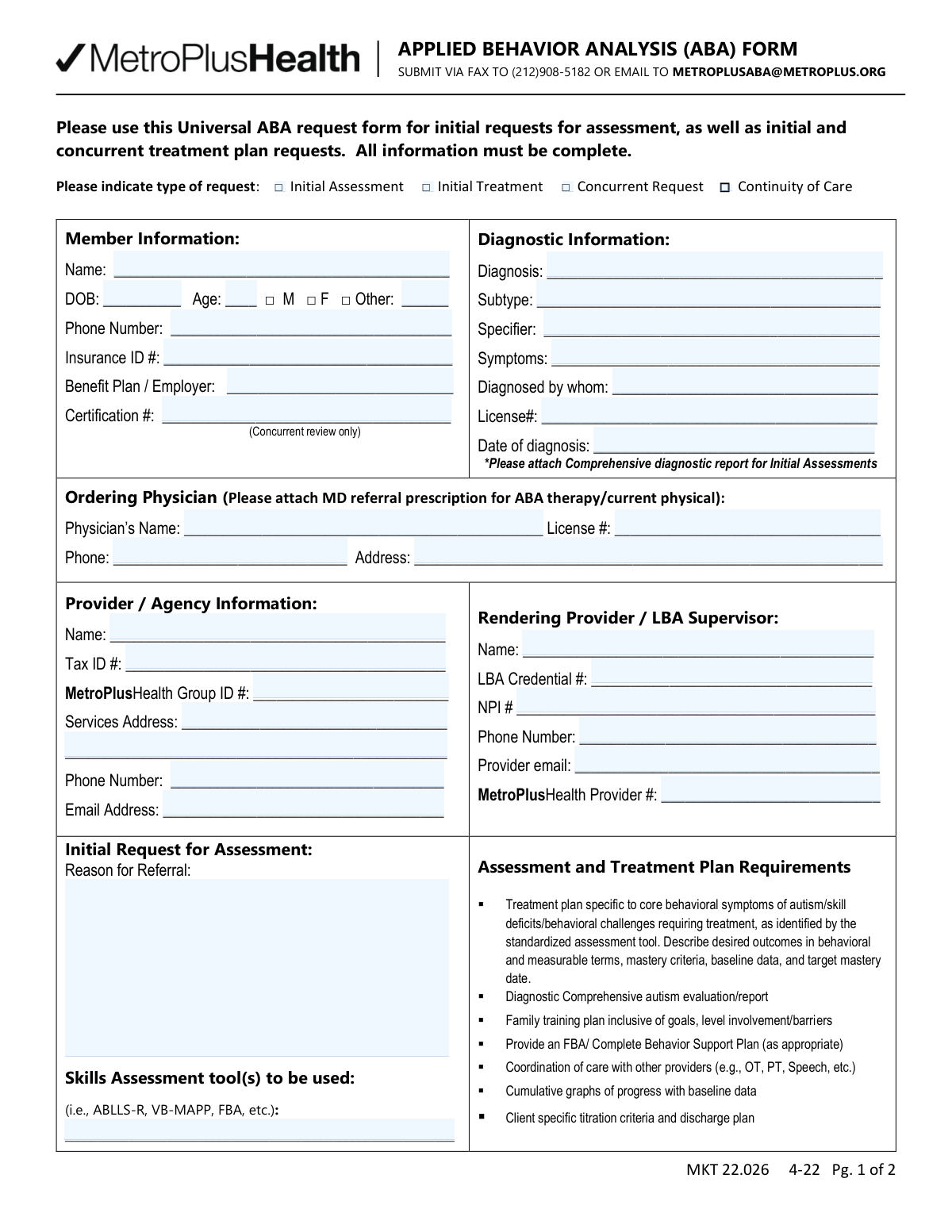
The MetroPlusHealth Applied Behavior Analysis (ABA) Universal ABA Request Form is a payer authorization request document used by providers/agencies to submit member details, diagnostic information, ordering physician information, and ABA service requests (including CPT codes, units per week, and place of service). It supports initial assessment requests, initial treatment plan requests, concurrent/continued stay reviews, and continuity of care, and it specifies required attachments such as comprehensive diagnostic reports and treatment plan elements. Accurate completion is important to avoid delays or denials and to ensure requested ABA services align with plan requirements and medical necessity criteria. Today, this form can be filled out quickly and accurately using AI-powered services like Instafill.ai, which can also convert non-fillable PDF versions into interactive fillable forms.
Our AI automatically handles information lookup, data retrieval, formatting, and form filling.
It takes less than a minute to fill out MetroPlusHealth ABA Universal Request Form (MKT 22.026) using our AI form filling.
Securely upload your data. Information is encrypted in transit and deleted immediately after the form is filled out.
Form specifications
| Form name: | MetroPlusHealth Applied Behavior Analysis (ABA) Universal ABA Request Form |
| Number of pages: | 2 |
| Language: | English |
| Categories: | healthcare forms, ABA forms, MetroPlusHealth forms, medical request forms |
Instafill Demo: filling out a legal form in seconds
How to Fill Out MetroPlusHealth ABA Universal Request Form (MKT 22.026) Online for Free in 2026
Are you looking to fill out a METROPLUSHEALTH ABA UNIVERSAL REQUEST FORM (MKT 22.026) form online quickly and accurately? Instafill.ai offers the #1 AI-powered PDF filling software of 2026, allowing you to complete your METROPLUSHEALTH ABA UNIVERSAL REQUEST FORM (MKT 22.026) form in just 37 seconds or less.
Follow these steps to fill out your METROPLUSHEALTH ABA UNIVERSAL REQUEST FORM (MKT 22.026) form online using Instafill.ai:
- 1 Go to Instafill.ai and upload the MetroPlusHealth ABA Universal ABA Request Form (or select it from the form library).
- 2 Choose the request type (Initial Assessment, Initial Treatment, Concurrent Request, or Continuity of Care) and enter the authorization start date if applicable.
- 3 Enter Member Information (name, DOB, age, gender, phone, insurance ID, benefit plan/employer, and certification number for concurrent review).
- 4 Complete Diagnostic Information (diagnosis, subtype/specifier, symptoms, diagnosing professional, license number, and date of diagnosis) and note/attach the comprehensive diagnostic report when required.
- 5 Fill in Ordering Physician details (name, license number, phone, address) and attach the MD referral/prescription and current physical if required.
- 6 Provide Provider/Agency and Rendering Provider/LBA Supervisor information (tax ID, MetroPlusHealth group/provider IDs, NPI, credentials, service address, phone, and emails).
- 7 Enter requested ABA services by CPT code (e.g., 97151, 97152, 97153, etc.) with units per week and place of service, add any required clinical justification, then e-sign/date and export for submission via fax or email as instructed.
Our AI-powered system ensures each field is filled out correctly, reducing errors and saving you time.
Why Choose Instafill.ai for Your Fillable MetroPlusHealth ABA Universal Request Form (MKT 22.026) Form?
Speed
Complete your MetroPlusHealth ABA Universal Request Form (MKT 22.026) in as little as 37 seconds.
Up-to-Date
Always use the latest 2026 MetroPlusHealth ABA Universal Request Form (MKT 22.026) form version.
Cost-effective
No need to hire expensive lawyers.
Accuracy
Our AI performs 10 compliance checks to ensure your form is error-free.
Security
Your personal information is protected with bank-level encryption.
Frequently Asked Questions About Form MetroPlusHealth ABA Universal Request Form (MKT 22.026)
This form is used to request MetroPlusHealth authorization for ABA services, including an initial assessment, initial treatment plan, concurrent (continued) treatment, or continuity of care. It helps the plan review medical necessity and approve the requested CPT-coded services and units.
The ABA provider/agency completes the form, and the supervising qualified professional (e.g., LBA/QHP) signs it. The signature also confirms that any paraprofessionals under supervision have appropriate credentials, education, and training.
Check âInitial Assessmentâ for a first-time assessment request, âInitial Treatmentâ for a first-time treatment plan request, âConcurrent Requestâ for ongoing/continued services, and âContinuity of Careâ when transitioning care while maintaining services. Only select the option(s) that match the request you are submitting.
You must provide the memberâs name, date of birth, age, gender, phone number, insurance ID number, and benefit plan/employer. For concurrent review only, include the certification number as well.
Include the diagnosis, subtype/specifier (if applicable), symptoms, who diagnosed the member, the diagnoserâs license number, and the date of diagnosis. For initial assessments, you must attach a comprehensive diagnostic report.
Yesâattach the MD referral/prescription for ABA therapy and/or current physical as indicated on the form. Also complete the ordering physicianâs name, license number, phone, and address.
The form requests the provider/agency name, Tax ID, MetroPlusHealth Group ID, service address, phone, and email. It also requires the rendering provider/LBA supervisorâs name, LBA credential number, NPI, phone, email, and MetroPlusHealth provider number.
In âReason for Referral,â briefly describe why ABA assessment/treatment is being requested (e.g., skill deficits, behavioral challenges). In âSkills Assessment tool(s),â list the standardized tools you will use (e.g., ABLLS-R, VB-MAPP, FBA) and any others relevant to the case.
The plan should target core behavioral symptoms/skill deficits with measurable goals, baseline data, mastery criteria, and target dates. It also calls for items such as a family training plan, FBA/behavior support plan when appropriate, coordination of care, progress graphs, and titration/discharge criteria.
For each CPT code you are requesting, enter the number of units per week and the place of service (POS). The form notes that all units are 15 minutes (4 units = 1 hour), so convert requested hours into units accordingly.
YesâCPT 97151 is limited to up to 32 units maximum for initial assessments and up to 12 units maximum for reassessments, per the guidance on the form. Requests above these limits may be denied or require additional justification.
The form indicates clinical justification is required for certain services such as 97152 and the severe-behavior supporting assessment/treatment codes (0362T and 0373T). Include documentation explaining why these services and staffing levels are medically necessary.
For concurrent/continued stay reviews, supporting documentation must be currentâolder than 30 days may be rejected. Submit recent progress data, updated plans, and current clinical information to avoid delays.
Submit the form by fax to (212) 908-5182 or email it to [email protected], as listed on the form. Include all required attachments (e.g., diagnostic report, MD referral/prescription) to prevent processing delays.
YesâAI tools can help organize your information and auto-fill fields accurately; services like Instafill.ai can save time by mapping your data to the correct form fields. If the PDF is flat/non-fillable, Instafill.ai can convert it into an interactive fillable form and then help you complete it online.
Compliance MetroPlusHealth ABA Universal Request Form (MKT 22.026)
Validation Checks by Instafill.ai
1
Ensures exactly one Type of Request is selected (Initial Assessment / Initial Treatment / Concurrent Request / Continuity of Care)
Validate that one and only one request type checkbox is selected to avoid ambiguous routing and review criteria. If multiple boxes are checked or none are checked, the submission should be rejected and returned for correction because different request types have different documentation and field requirements. This prevents incorrect application of concurrent-review rules to an initial request (or vice versa).
2
Requires Certification Number only for Concurrent Request submissions
If the Type of Request is "Concurrent Request," require the Certification # field to be present and non-empty, since the form indicates it is for concurrent review only. If the request is not concurrent, the system should either allow the field to be blank or ignore it for completeness scoring. If missing for concurrent requests, fail validation and prompt for the certification number to ensure the request can be matched to an existing authorization.
3
Validates Member Name completeness and format (full legal name)
Check that Member Name is provided and contains at least two alphabetic tokens (e.g., first and last name), not just initials or a single word. This is important for member matching, eligibility verification, and avoiding duplicate records. If the name is missing or appears incomplete (e.g., only one character or only initials), fail validation and request the full name.
4
Validates Date of Birth format and plausibility; cross-checks Age consistency
Ensure DOB is a valid date (e.g., MM/DD/YYYY) and is not in the future. Then compute age from DOB and compare to the entered Age, allowing a small tolerance (e.g., ±1 year depending on whether birthday has occurred this year). If DOB is invalid or Age does not match DOB, fail validation to prevent eligibility and clinical guideline errors.
5
Validates Gender selection logic, including required 'Other Gender' text when 'Other' is checked
Require that exactly one of Male/Female/Other is selected, unless the business rules explicitly allow multiple selections. If "Other" is selected, require the Other Gender text field to be populated with a non-placeholder value. If "Other" is not selected, ensure Other Gender is blank (or ignore it) to prevent conflicting demographic data.
6
Validates Member Phone Number format
Check that the Member Phone Number is present and matches an acceptable phone format (e.g., 10 digits for US numbers, allowing punctuation like ( ) - and spaces). This is necessary for outreach, scheduling, and resolving missing documentation. If the phone number is missing or malformed (too short/long or contains invalid characters), fail validation and request a corrected number.
7
Validates Insurance ID format and presence
Require Insurance ID to be present and conform to plan-acceptable character rules (commonly alphanumeric with a minimum length, and no illegal symbols). This is critical for eligibility checks and claim/authorization linkage. If missing or containing invalid characters/length, fail validation and prompt for a corrected Insurance ID.
8
Requires Benefit Plan / Employer field and checks for non-placeholder content
Ensure Benefit Plan / Employer is completed and is not a placeholder (e.g., "N/A" or blank) when the plan requires employer/plan identification for benefit determination. This helps route the request to the correct benefit configuration and prevents delays due to manual follow-up. If missing, fail validation and request the plan/employer information.
9
Validates Diagnostic Information completeness (Diagnosis, Symptoms, Diagnosed By, License #, Date of Diagnosis)
Require core diagnostic fields to be present: Diagnosis, Symptoms, Diagnosed By, Diagnoser License Number, and Date of Diagnosis. These elements support medical necessity review and confirm that the diagnosis was made by a qualified professional. If any are missing, fail validation and request completion because the request cannot be clinically reviewed without them.
10
Validates Date of Diagnosis format and logical relationship to DOB and current date
Ensure Date of Diagnosis is a valid date and is not in the future. Also validate it occurs after the memberâs DOB and is clinically plausible (e.g., not before birth). If the date is invalid or illogical, fail validation to prevent incorrect clinical timelines and review decisions.
11
Ordering Physician section required for treatment requests; validates physician contact fields
If the request type is Initial Treatment, Concurrent Request, or Continuity of Care, require Ordering Physician Name, License Number, Phone, and Address to be completed (as the form requests MD referral/current physical attachment). Validate physician phone format similarly to member phone. If missing or malformed, fail validation because treatment authorization typically requires an ordering/referring provider and contact details.
12
Provider/Agency identifiers validation (Tax ID, MetroPlusHealth Group ID, MetroPlusHealth Provider #)
Validate Tax ID is present and matches EIN format (9 digits, optionally with a hyphen) and contains only digits where expected. Require MetroPlusHealth Group ID and MetroPlusHealth Provider # to be present and conform to expected alphanumeric/length rules to ensure correct contracting and billing linkage. If any identifier is missing or invalid, fail validation to prevent misattribution of services and authorization issuance to the wrong entity.
13
Rendering Provider / LBA Supervisor credential validation (LBA Credential # and NPI format)
Require Rendering Provider/LBA Supervisor Name, LBA Credential #, and NPI Number to be present. Validate NPI as a 10-digit numeric identifier (and optionally apply the NPI Luhn check-digit algorithm) to reduce entry errors. If credentials are missing or NPI is invalid, fail validation because supervision and billing require a qualified, identifiable clinician.
14
Validates email address formats for Provider and Rendering Provider
If Provider Email Address and/or Rendering Provider Email are provided, validate they match a standard email format (local@domain) and do not contain spaces or invalid characters. Email is often used for follow-up and document requests, so malformed addresses cause delays. If an email is present but invalid, fail validation and request correction (or require at least one valid email if business rules mandate electronic communication).
15
Initial Assessment-specific requirements: Reason for Referral and Skills Assessment Tools must be completed
If Type of Request is Initial Assessment, require Reason for Referral and Skills Assessment Tools to be populated with meaningful content (not blank or generic placeholders). This supports appropriate selection of standardized tools and ensures the assessment request is clinically justified. If missing, fail validation because the assessment scope and medical necessity cannot be evaluated.
16
CPT Units and Place of Service (POS) validation, including max units and clinical justification triggers
For each CPT line where Units are entered, validate Units are numeric integers, non-negative, and within allowed limits (e.g., 97151 up to 32 units for initial assessments and up to 12 for reassessment, per the form guidance). Validate POS is present when Units are requested and matches an allowed POS code format (typically 2-digit numeric). Additionally, if CPT 97152, 0362T, or 0373T is requested, require the corresponding guidance/clinical justification text to be present; if any of these checks fail, reject the submission to prevent unauthorized or non-compliant service requests.
Common Mistakes in Completing MetroPlusHealth ABA Universal Request Form (MKT 22.026)
People often forget to check a request type (Initial Assessment, Initial Treatment, Concurrent Request, or Continuity of Care) or check more than one because the form is used for multiple scenarios. This can cause the request to be routed incorrectly, delayed, or rejected for clarification. To avoid this, confirm the request scenario before filling anything else and select exactly one box that matches the submission. AI-powered tools like Instafill.ai can prompt for the correct request type and prevent submitting with conflicting selections.
A very common issue is missing or partial member demographicsâe.g., nickname instead of legal name, missing DOB, incomplete phone number, or an Insurance ID with missing digits. This leads to eligibility/benefit verification failures and delays because the payer cannot match the member record. Use the memberâs insurance card to copy the name and ID exactly, and enter a full 10-digit phone number with area code. Instafill.ai can reduce these errors by extracting and formatting member data consistently and validating required fields before submission.
Many submissions include an age that doesnât match the DOB (often due to manual calculation errors or using an outdated age from a prior authorization). Payers may flag the request for inconsistency, which can trigger rework or denial pending correction. Always calculate age as of the date you sign/submit the form and ensure it aligns with the DOB entered. Instafill.ai can automatically compute age from DOB to keep these fields consistent.
Itâs common to see both M and F checked, or 'Other' checked with the free-text field left blank. This creates demographic inconsistencies that can cause system edits or require follow-up, especially when matching payer enrollment records. Check only one option and, if 'Other' is selected, complete the 'Other' text field exactly as intended. Instafill.ai can enforce single-select logic and require the 'Other' value when that option is chosen.
Submissions often list only a broad diagnosis (e.g., âAutismâ) without subtype/specifier details or without symptom/functional impact, even though the form requests them. This can weaken medical necessity and lead to requests for additional documentation or denial. Provide the full diagnostic label as documented, include relevant specifiers/subtype when applicable, and summarize key symptoms/impairments tied to ABA needs. Using Instafill.ai can help by prompting for missing diagnostic components and standardizing how theyâre entered.
People frequently omit who diagnosed the member, the clinicianâs license number, or the date of diagnosisâespecially when copying from older notes. Missing credentials or dates can invalidate the diagnostic section and trigger a request for the comprehensive report or credential verification. Always enter the diagnosing professionalâs full name, license number, and the exact diagnosis date from the report. Instafill.ai can flag missing credential/date fields and help ensure the diagnostic section is complete.
A top cause of delays is submitting the form without the required supporting documentsâparticularly the comprehensive diagnostic report for initial assessments and the MD referral/prescription for ABA therapy/current physical. Without these, the payer may pend or deny due to insufficient documentation. Before fax/email submission, use a checklist to confirm all required attachments are included and legible. If the form is only available as a flat non-fillable PDF in your workflow, Instafill.ai can convert it into a fillable version and help ensure attachments are not missed via submission checks.
Itâs common to mix up organizational Tax ID vs. individual NPI, omit the MetroPlusHealth Group ID/Provider #, or enter outdated identifiers from a different location. These errors can cause claims/authorization matching issues and may result in rejection or authorization issued to the wrong entity. Verify each identifier against enrollment records and ensure the rendering provider and agency fields are not swapped. Instafill.ai can help by validating identifier formats (e.g., NPI length) and reusing the correct stored provider profile data.
Many requests leave POS blank or enter a narrative location instead of a POS code/value expected by the plan. Incorrect POS can lead to authorization errors, mismatched billing, or the need for corrected authorizations. Confirm the correct POS for where services will be rendered and use the same POS consistently across CPT lines when appropriate. Instafill.ai can standardize POS entry and reduce omissions by requiring POS when units are entered.
Because the form states all units are 15 minutes (4 units = 1 hour), people often enter hours instead of units, forget to convert, or request units that exceed stated limits (e.g., 97151 up to 32 units initial, 12 units reassessment). This can cause denials, pends for correction, or reduced authorizations. Always convert hours to units and double-check code-specific limits and clinical rationale for the requested intensity. Instafill.ai can automatically convert hours-to-units, validate against max thresholds, and flag missing units when a CPT line is selected.
Certain codes on the form explicitly state âClinical justification required,â but submissions often leave the rationale out or provide a generic statement that doesnât support the codeâs criteria (e.g., severe/destructive behaviors requiring additional staff). This can lead to denial for those codes or a request for more documentation. Provide a brief, specific justification tied to the memberâs behaviors, safety needs, staffing requirements, and assessment/treatment context. Instafill.ai can prompt for justification text when these CPT codes are selected and prevent submission if itâs missing.
Forms are frequently submitted without the provider signature, printed name, license number, or date, or with an authorization start date that conflicts with the submission date or clinical timeline. Missing signatures/dates can invalidate the request, and incorrect start dates can cause coverage gaps or retroactive authorization problems. Ensure the provider signs, prints name, includes license #, dates the form, and selects an authorization start date aligned with plan rules and documentation. Instafill.ai can enforce completion of signature/date fields (where e-sign is permitted) and flag inconsistent or missing dates before sending.
Saved over 80 hours a year
âI was never sure if my IRS forms like W-9 were filled correctly. Now, I can complete the forms accurately without any external help.â
Kevin Martin Green
Your data stays secure with advanced protection from Instafill and our subprocessors

Robust compliance program
Transparent business model
Youâre not the product. You always know where your data is and what it is processed for.
ISO 27001, HIPAA, and GDPR
Our subprocesses adhere to multiple compliance standards, including but not limited to ISO 27001, HIPAA, and GDPR.
Security & privacy by design
We consider security and privacy from the initial design phase of any new service or functionality. Itâs not an afterthought, itâs built-in, including support for two-factor authentication (2FA) to further protect your account.
Fill out MetroPlusHealth ABA Universal Request Form (MKT 22.026) with Instafill.ai
Worried about filling PDFs wrong? Instafill securely fills metroplushealth-applied-behavior-analysis-aba-universal-aba-request-form forms, ensuring each field is accurate.