Yes! You can use AI to fill out Applied Behavioral Analysis (ABA) Prior Authorization Request Form (Coordinated Care)

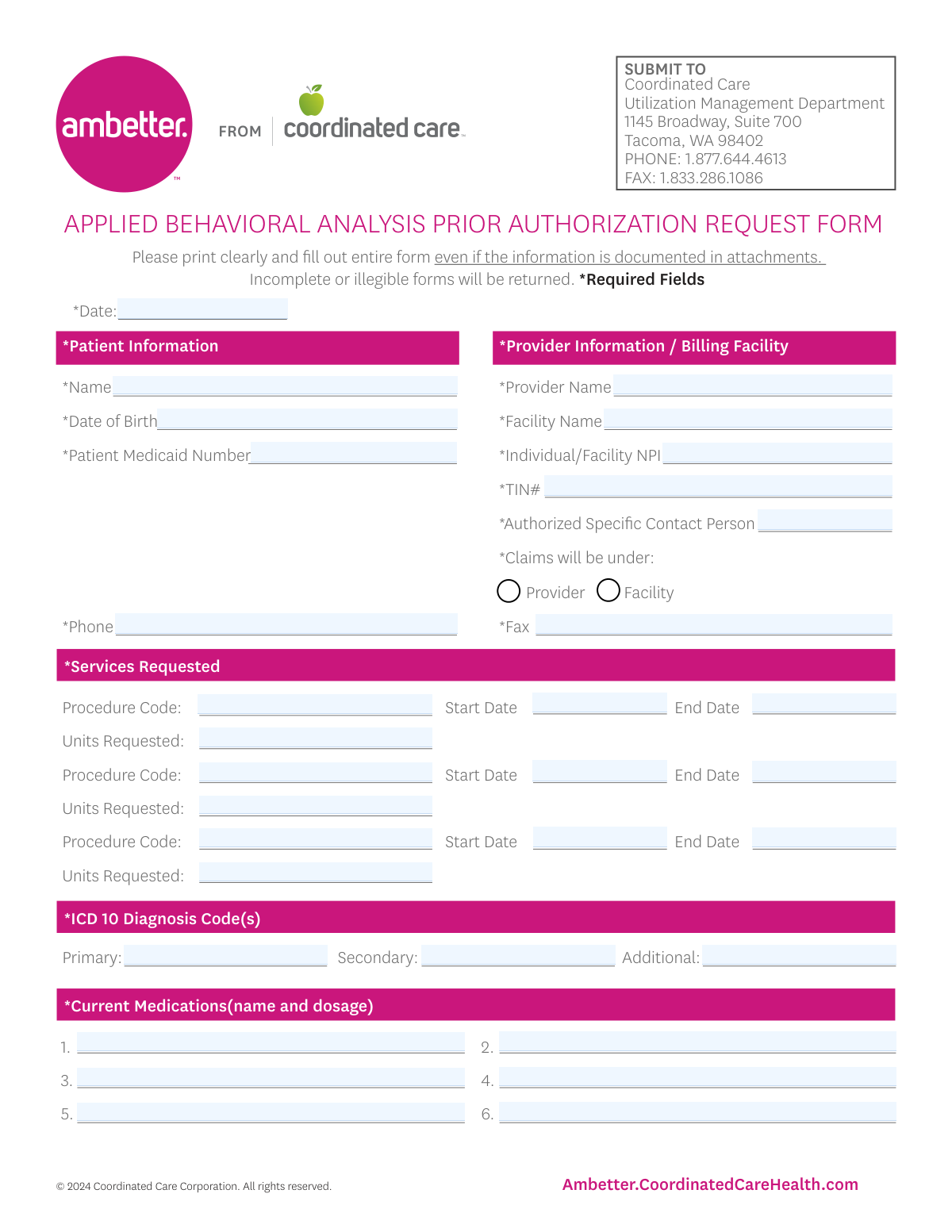
The Coordinated Care ABA Prior Authorization Request Form is an official utilization management form submitted to Coordinated Care to obtain approval for Applied Behavioral Analysis services before treatment begins or continues. It captures patient identifiers (including Medicaid number), provider/billing details (NPI, TIN), requested services (procedure codes, dates, units), ICD-10 diagnoses, medications, and care-coordination information, and it requires specific attachments for initial requests or recertifications. Submitting a complete and legible form with the required documentation helps prevent delays, denials, or returned requests. Today, this form can be filled out quickly and accurately using AI-powered services like Instafill.ai, which can also convert non-fillable PDF versions into interactive fillable forms.
Our AI automatically handles information lookup, data retrieval, formatting, and form filling.
It takes less than a minute to fill out ABA Prior Authorization Request Form (Coordinated Care) using our AI form filling.
Securely upload your data. Information is encrypted in transit and deleted immediately after the form is filled out.

Form specifications

Form name: Applied Behavioral Analysis (ABA) Prior Authorization Request Form (Coordinated Care)
Number of pages: 2
Language: English
Categories: prior authorization forms, healthcare forms, ABA forms, medical insurance forms, Coordinated Care forms, authorization forms
main-image

Instafill Demo: filling out a legal form in seconds

How to Fill Out ABA Prior Authorization Request Form (Coordinated Care) Online for Free in 2026

Are you looking to fill out a ABA PRIOR AUTHORIZATION REQUEST FORM (COORDINATED CARE) form online quickly and accurately? Instafill.ai offers the #1 AI-powered PDF filling software of 2026, allowing you to complete your ABA PRIOR AUTHORIZATION REQUEST FORM (COORDINATED CARE) form in just 37 seconds or less.
Follow these steps to fill out your ABA PRIOR AUTHORIZATION REQUEST FORM (COORDINATED CARE) form online using Instafill.ai:
  1. 1 Go to Instafill.ai and upload the Coordinated Care “Applied Behavioral Analysis Prior Authorization Request Form” (or select it from the form library).
  2. 2 Enter patient information: date, patient name, date of birth, Medicaid number, and phone number.
  3. 3 Complete provider/billing facility details: provider name, facility name, NPI, TIN, authorized contact person, claims under (provider vs facility), and fax number.
  4. 4 Add the services requested: for each line item, input procedure code, start date, end date, and units requested.
  5. 5 Provide clinical details: ICD-10 diagnosis codes (primary/secondary/additional), current medications with dosages, and medical conditions reported by the parent/guardian.
  6. 6 Fill out coordination-of-care and behavioral health sections (PCP/psychiatrist coordination, BH treatment history, BH provider name, ABA review with BH provider, and parent/guardian agreement with goals).
  7. 7 Indicate whether the request is Initial/1st ABA or Recertification, check the required attachment boxes, upload supporting documents, then review for completeness and generate the final submission-ready PDF for fax/mail per the form instructions.

Our AI-powered system ensures each field is filled out correctly, reducing errors and saving you time.

Why Choose Instafill.ai for Your Fillable ABA Prior Authorization Request Form (Coordinated Care) Form?

Speed

Complete your ABA Prior Authorization Request Form (Coordinated Care) in as little as 37 seconds.

Up-to-Date

Always use the latest 2026 ABA Prior Authorization Request Form (Coordinated Care) form version.

Cost-effective

No need to hire expensive lawyers.

Accuracy

Our AI performs 10 compliance checks to ensure your form is error-free.

Security

Your personal information is protected with bank-level encryption.

Frequently Asked Questions About Form ABA Prior Authorization Request Form (Coordinated Care)

This form is used to request prior authorization from Coordinated Care for ABA services. It helps Utilization Management review the requested procedure codes, dates of service, units, diagnoses, and required clinical documentation.

The requesting ABA provider or billing facility typically completes and submits the form. The form includes provider/facility identifiers (NPI, TIN) and an authorized contact person for follow-up.

Submit the form to Coordinated Care Utilization Management at 1145 Broadway, Suite 700, Tacoma, WA 98402. You can also fax it to 1.833.286.1086 or call 1.877.644.4613 for questions.

The form states that incomplete or illegible forms will be returned. Be sure to print clearly and fill out the entire form even if the information is included in attachments.

Required patient fields include the patient’s name, date of birth, Medicaid number, and phone number. Make sure the Medicaid ID is accurate to avoid delays.

You must provide the provider name, facility name, individual/facility NPI, TIN, fax number, and an authorized specific contact person. You also need to indicate whether claims will be submitted under the provider or the facility.

Enter each requested procedure code along with the start date, end date, and the number of units requested for that code. The form provides space for up to three separate service lines.

You must list ICD-10 diagnosis code(s), including a primary code and, if applicable, secondary and additional codes. Use the most accurate codes that support the ABA request.

Yes—this form instructs you to fill out the entire form even if the information is documented in attachments. List the medication name and dosage for up to six current medications.

This section asks whether coordination has occurred with the PCP and/or a psychiatrist, and requests their names. It also asks about current or historical behavioral health treatment, the treating BH provider’s name, whether ABA was reviewed with the BH provider, and whether the parent/guardian agrees with ABA goals.

For an initial request, the form indicates you must attach: Initial Evaluation, Treatment Plan with SMART goals, a signed prescription for ABA therapy services, the DSM-5 checklist, and the ABA Level of Support Requirements form (HCA 12-411). The request must be received 5 days before the requested start date.

For recertification, attach a current evaluation/assessment, a current treatment plan with SMART goals, and current level of support documentation. The form notes that information older than 30 days will not be accepted for recertification, and you should request at least three weeks before the current authorization expires.

Initial ABA requests must be received at least 5 days before the requested start date. Recertification requests should be submitted at least three weeks before the current authorization expires.

Yes—AI tools can help reduce errors and save time by auto-filling fields from your existing information. Services like Instafill.ai use AI to auto-fill form fields accurately and help ensure required sections aren’t missed.

With Instafill.ai, you can upload the PDF, let the AI map your information to the form fields, and then review and export the completed form for fax or submission. If the PDF is flat/non-fillable, Instafill.ai can convert non-fillable PDFs into interactive fillable forms before auto-filling.

Compliance ABA Prior Authorization Request Form (Coordinated Care)
Validation Checks by Instafill.ai

1
Required fields completeness for all starred (*) fields
Validates that every field marked as required on the form is present and non-empty (e.g., Date, Patient Name, DOB, Medicaid Number, Phone, Provider Name, Facility Name, NPI, TIN, Authorized Contact Person, Fax, ICD-10 codes, and Current Medications). This is critical because the form explicitly states incomplete forms will be returned and required fields drive downstream eligibility and authorization workflows. If any required field is missing or blank, the submission should be rejected with a clear list of missing fields.
2
Submission Date format and plausibility
Checks that the Date field is a valid date in an accepted format (e.g., MM/DD/YYYY) and is not unreasonably in the future. The submission date is used for timeliness rules and audit trails, so invalid dates can cause incorrect processing or compliance issues. If the date is invalid or implausible, the system should block submission and request correction.
3
Patient Date of Birth format and age plausibility
Ensures the Patient Date of Birth is a valid date and that the patient’s age is within a plausible range (e.g., not negative, not over a configured maximum such as 120 years). DOB is essential for member matching and clinical appropriateness checks. If DOB is invalid or implausible, the request should be flagged for correction before authorization review.
4
Patient Medicaid Number format validation
Validates that the Patient Medicaid Number matches the expected state/program format (e.g., numeric length, alphanumeric pattern, no illegal characters, no placeholder values like 000000000). Correct member identifiers are required to locate eligibility and benefits and to prevent misrouting to the wrong member record. If the Medicaid number fails validation, the submission should be rejected or routed to manual review depending on business rules.
5
Patient phone number format validation
Checks that the Patient Phone Number contains a valid 10-digit US phone number (allowing common punctuation) and is not obviously invalid (e.g., too short, all same digits). Phone contact is often required for care coordination and follow-up. If invalid, the system should require correction or an alternate contact method per policy.
6
Provider/Facility NPI format and check-digit validation
Ensures the Individual/Facility NPI is exactly 10 digits and passes the NPI Luhn check-digit algorithm. NPI accuracy is critical for billing, provider identification, and network validation. If the NPI fails length or check-digit validation, the request should be blocked and the user prompted to correct the NPI.
7
TIN format validation (EIN/SSN pattern and length)
Validates that the TIN Number is 9 digits (optionally allowing a hyphen) and is not a known invalid placeholder (e.g., 000000000). TIN is required for billing and tax reporting alignment and helps prevent claim submission errors. If the TIN is invalid, the submission should be rejected or flagged for manual verification.
8
Fax number format validation
Checks that the Fax Number is a valid US fax/phone format (10 digits with optional punctuation) and not empty when required. Fax is a primary channel for UM communications and missing/invalid fax numbers can delay determinations and document requests. If invalid, the system should require correction before submission.
9
Claims submission selection must be exactly one (Provider vs Facility)
Validates that exactly one of the 'Claims will be under: Provider' or 'Facility' checkboxes is selected (not both, not neither). This selection determines billing entity and impacts claim routing and authorization linkage. If the selection is ambiguous, the system should block submission and require the user to choose one.
10
Provider/Facility identity consistency based on claims selection
Checks logical consistency between the claims selection and the identity fields (e.g., if 'Provider' is selected, Provider Name and Individual NPI should be present and coherent; if 'Facility' is selected, Facility Name and facility NPI should be present). This reduces mismatches that cause downstream claim denials or authorization mis-association. If inconsistent, the system should prompt the submitter to correct the billing entity details.
11
Service line completeness per requested procedure (code, dates, units)
For each of the up to three service request lines, validates that if any field in a line is provided, then Procedure Code, Start Date, End Date, and Units Requested are all provided. Partial service lines create ambiguity about what is being authorized and can lead to incorrect unit approvals. If a line is incomplete, the system should reject the submission or require the line to be completed/cleared.
12
Procedure code format validation (CPT/HCPCS pattern)
Validates that each Procedure Code matches expected CPT/HCPCS formatting (e.g., 5 digits for CPT or 1 letter + 4 digits for HCPCS) and contains no invalid characters. Correct coding is essential for benefit determination, medical policy application, and unit calculations. If a code fails format validation, the system should block submission and request correction.
13
Service date range logic (Start Date <= End Date) and valid date formats
Ensures each service line Start Date and End Date are valid dates and that the Start Date is on or before the End Date. Date range errors can cause authorizations to be issued for the wrong period or fail system edits. If the range is invalid, the system should prevent submission and highlight the affected service line.
14
Units requested numeric validation and reasonable bounds
Checks that Units Requested is a positive integer (no decimals, no negative values, no text) and optionally enforces configurable upper limits to catch data entry errors (e.g., extra zeros). Units drive the authorized quantity and financial exposure, so incorrect units can cause over/under authorization. If units are invalid or exceed thresholds, the system should block submission or require attestation/override with justification.
15
ICD-10 diagnosis code format and primary code requirement
Validates that the Primary ICD-10 Diagnosis Code is present and that all provided ICD-10 codes match ICD-10-CM formatting rules (e.g., 3–7 characters, first character letter, valid placement of decimal if used). Diagnosis codes are required to establish medical necessity and apply clinical criteria. If the primary code is missing or any code is malformed, the submission should be rejected and the invalid codes identified.
16
Coordination of care yes/no fields must be mutually exclusive and conditionally require provider names
Ensures that for PCP coordination and Psychiatrist coordination, exactly one of Yes/No is selected for each category. If Yes is selected, the corresponding provider name (PCP Name or Psychiatrist Name) must be provided; if No is selected, the name should be blank or optional per policy to avoid contradictory data. If these rules fail, the system should block submission and request correction.

Common Mistakes in Completing ABA Prior Authorization Request Form (Coordinated Care)

Leaving required fields blank because they’re “in the attachments”

This form explicitly says to fill out the entire form even if the information is documented in attachments, but many submitters still omit key fields like patient demographics, diagnosis codes, or service dates. Utilization Management often returns these as incomplete, delaying the start of ABA services. To avoid this, treat attachments as supporting evidence only and ensure every required field on the form is completed. AI-powered tools like Instafill.ai can help by flagging missing required fields before submission.

Illegible handwriting or unclear printing

Because the form requests “Please print clearly,” handwritten entries that are cramped, faint, or messy commonly lead to misread names, Medicaid IDs, NPIs, and codes. The consequence is frequently a returned request or incorrect data entry that can cause authorization or claims issues later. Use typed entries whenever possible and double-check that scanned/faxed copies are high-contrast and readable. Instafill.ai can reduce this risk by producing clean, consistently formatted typed fields (and can convert flat PDFs into fillable versions if needed).

Using inconsistent or invalid date formats (and missing the 5-day/3-week timing rules)

People often mix date formats (MM/DD/YY vs. DD/MM/YY), omit the year, or enter start/end dates that don’t align with the submission timing requirements (5 days before start for initial requests; at least 3 weeks before expiration for recerts). These mistakes can trigger processing delays, denials, or requests for correction. Always use a single clear format (e.g., MM/DD/YYYY) and confirm the request is submitted within the required lead time. Instafill.ai can standardize date formatting and help validate that timelines make sense before you send.

Entering the wrong patient identifier (Medicaid number) or formatting it incorrectly

A common error is entering an insurance member ID, SSN, or a parent’s ID instead of the patient’s Medicaid number, or transposing digits. This can prevent the plan from locating the member record, causing the request to be returned or significantly delayed. Verify the patient’s Medicaid ID directly from eligibility systems or the member card and re-check every digit. Instafill.ai can help by validating expected ID patterns and reducing manual re-typing errors.

Provider vs. facility billing selection left blank or checked incorrectly

The “Claims will be under: Provider / Facility” choice is frequently missed or selected incorrectly, especially when both a rendering provider and a billing facility are involved. This can lead to authorizations being issued under the wrong billing entity, which later causes claim denials or rework to correct the authorization. Confirm who will bill (individual vs. organization) and ensure the NPI/TIN match that selection. Instafill.ai can prompt for this dependency and help ensure the billing selection aligns with the entered identifiers.

NPI/TIN mismatches or incomplete provider/facility identifiers

Submitters often enter an individual NPI when the facility is billing (or vice versa), omit the TIN, or provide an NPI that doesn’t correspond to the named provider/facility. These inconsistencies can delay authorization and create downstream claims rejections. Cross-check the NPI and TIN against the billing entity’s official records and ensure the provider/facility names match exactly. Instafill.ai can help by formatting identifiers correctly and flagging missing or inconsistent fields.

Procedure codes, units, and date ranges entered incompletely or inconsistently

Common issues include leaving procedure codes blank for one of the service lines, entering units without clarifying the correct quantity, or using end dates that precede start dates. UM reviewers may be unable to determine what is being requested, resulting in pended requests or returns for clarification. For each requested line, complete procedure code, start date, end date, and units, and ensure the date range matches the intended authorization period. Instafill.ai can validate that each service line is complete and that dates/units are logically consistent.

ICD-10 diagnosis errors (non-ICD codes, missing primary, or vague entries)

People sometimes enter DSM-5 terms instead of ICD-10 codes, omit the primary diagnosis, or use incomplete/invalid ICD-10 formatting. This can cause medical necessity review delays or denials because the request lacks a valid diagnosis basis. Always provide a valid ICD-10 code in the correct format and clearly identify the primary diagnosis, adding secondary/additional codes as appropriate. Instafill.ai can help by enforcing ICD-10 formatting rules and prompting when the primary diagnosis is missing.

Medication list missing dosages or listing “none” without clarity

The form asks for “Current Medications (name and dosage),” but many submissions list only medication names, use unclear abbreviations, or leave the section blank without stating “none.” Missing dosage details can trigger follow-up requests because it affects clinical context and safety considerations. Include medication name, strength, and dosing schedule when applicable, or explicitly write “None” if the patient is not taking medications. Instafill.ai can standardize medication entries and ensure dosage fields aren’t accidentally omitted.

Coordination-of-care checkboxes completed without required provider names

A frequent mistake is checking “yes” for coordination with PCP/psychiatrist/BH provider but leaving the corresponding name fields blank, or checking both yes and no. This creates contradictions that slow review and may prompt UM to request clarification or additional documentation. Only select one option (yes or no) per item, and if “yes” is selected, provide the provider’s full name (and ensure it matches any attached documentation). Instafill.ai can prevent contradictory checkbox selections and require the related name field when “yes” is chosen.

Missing required attachments or failing to check the correct attachment boxes (Initial vs. Recertification)

Many requests are submitted without all required documents (e.g., initial evaluation, treatment plan with SMART goals, signed prescription, DSM-5 checklist, HCA 12-411) or the submitter forgets to check the boxes indicating what is attached. The form states authorizations require all documents attached, so missing items commonly result in returns or pended requests, delaying care. Use a checklist approach: confirm whether the request is Initial/1st ABA or Recertification and include every required document for that category, checking the corresponding boxes. Instafill.ai can help by generating a completeness checklist and warning when required attachments/checkboxes for the selected request type are missing.
Saved over 80 hours a year

“I was never sure if my IRS forms like W-9 were filled correctly. Now, I can complete the forms accurately without any external help.”

Kevin Martin Green

Your data stays secure with advanced protection from Instafill and our subprocessors

Robust compliance program

Transparent business model

You’re not the product. You always know where your data is and what it is processed for.

ISO 27001, HIPAA, and GDPR

Our subprocesses adhere to multiple compliance standards, including but not limited to ISO 27001, HIPAA, and GDPR.

Security & privacy by design

We consider security and privacy from the initial design phase of any new service or functionality. It’s not an afterthought, it’s built-in, including support for two-factor authentication (2FA) to further protect your account.

Fill out ABA Prior Authorization Request Form (Coordinated Care) with Instafill.ai

Worried about filling PDFs wrong? Instafill securely fills applied-behavioral-analysis-aba-prior-authorization-request-form-coordinated-care forms, ensuring each field is accurate.