Yes! You can use AI to fill out Applied Behavior Analysis (ABA) Therapy Request Form

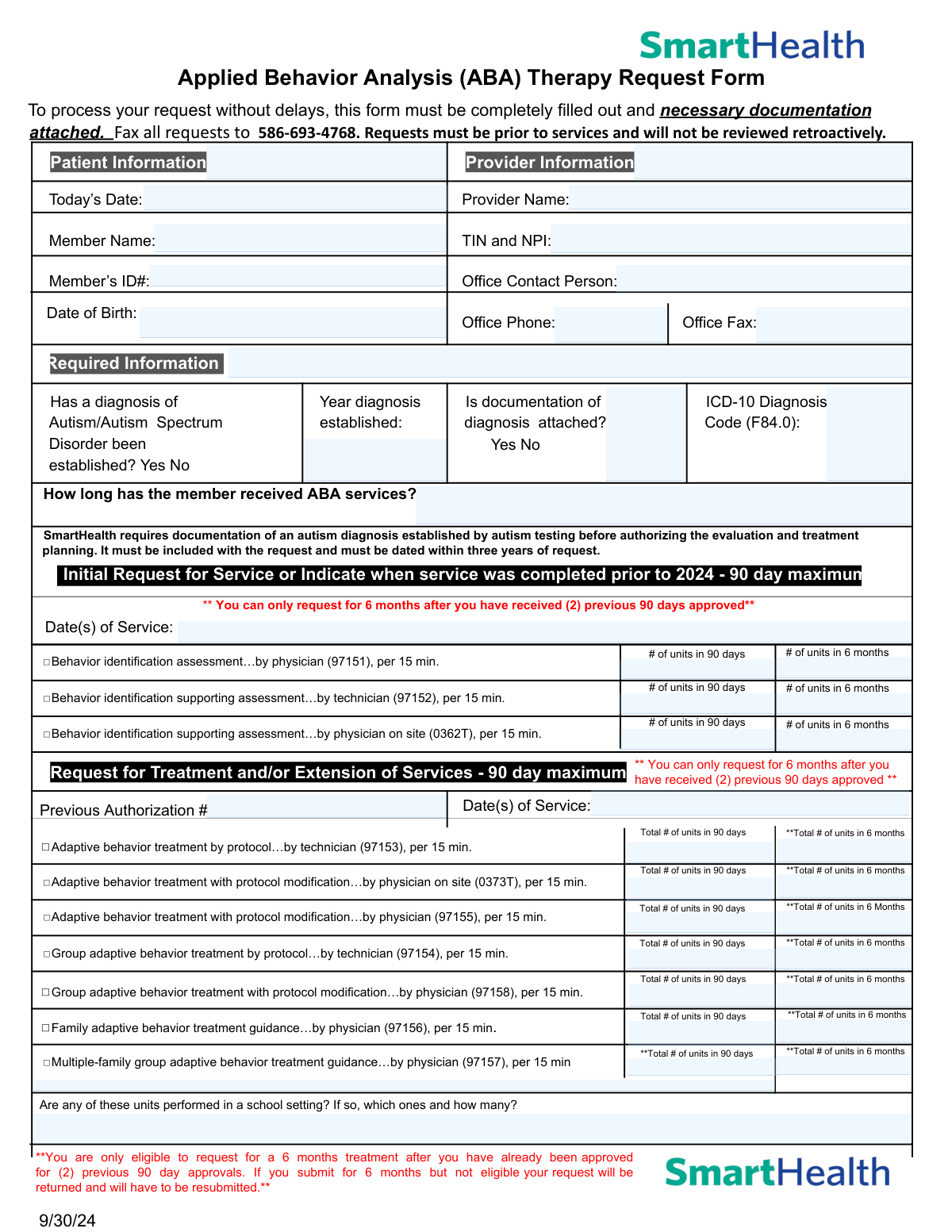
The Applied Behavior Analysis (ABA) Therapy Request Form is an official prior authorization document required by SmartHealth before ABA therapy services can be rendered to members diagnosed with Autism or Autism Spectrum Disorder (ICD-10: F84.0). It captures patient and provider information, diagnosis documentation, requested service codes, unit counts, treatment plans, and supporting clinical data to ensure medical necessity is established before services begin. The form must be submitted with supporting documentation—including a standardized assessment, individualized treatment plan, and functional behavior assessment—and faxed to the designated number prior to services being rendered. Today, this form can be filled out quickly and accurately using AI-powered services like Instafill.ai, which can also convert non-fillable PDF versions into interactive fillable forms.
Our AI automatically handles information lookup, data retrieval, formatting, and form filling.
It takes less than a minute to fill out ABA Therapy Request Form using our AI form filling.
Securely upload your data. Information is encrypted in transit and deleted immediately after the form is filled out.

Form specifications

Form name: Applied Behavior Analysis (ABA) Therapy Request Form
Number of pages: 2
Language: English
main-image

Instafill Demo: filling out a legal form in seconds

How to Fill Out ABA Therapy Request Form Online for Free in 2026

Are you looking to fill out a ABA THERAPY REQUEST FORM form online quickly and accurately? Instafill.ai offers the #1 AI-powered PDF filling software of 2026, allowing you to complete your ABA THERAPY REQUEST FORM form in just 37 seconds or less.
Follow these steps to fill out your ABA THERAPY REQUEST FORM form online using Instafill.ai:
  1. 1 Navigate to Instafill.ai and upload the ABA Therapy Request Form PDF or select it from the available form library to begin filling it out online.
  2. 2 Enter all required patient information, including the member's full name, Member ID, and date of birth, as well as complete provider details such as the provider name, TIN, NPI, office contact person, phone, and fax number.
  3. 3 Complete the Required Information section by indicating whether an Autism/Autism Spectrum Disorder diagnosis has been established, the year it was established, whether documentation is attached, and the applicable ICD-10 diagnosis code (F84.0).
  4. 4 Select the appropriate service type—Initial Request or Request for Treatment/Extension of Services—and enter the relevant CPT codes, dates of service, previous authorization numbers, and the number of units requested for both 90-day and 6-month periods.
  5. 5 Fill in the clinical details section, including the supervising provider's name and credentials, any additional services the member is receiving, medications, and whether collaboration with other providers is occurring.
  6. 6 Check all applicable boxes in the Essential Elements Checklist and Member Impairment Areas sections, and confirm that all required supporting documentation (standardized assessments, treatment plan, functional behavior assessment, and progress data) is attached.
  7. 7 Enter the name and title of the person completing the form, review all entries for accuracy and completeness, then submit or fax the completed form along with all required documentation to 586-693-4768.

Our AI-powered system ensures each field is filled out correctly, reducing errors and saving you time.

Why Choose Instafill.ai for Your Fillable ABA Therapy Request Form Form?

Speed

Complete your ABA Therapy Request Form in as little as 37 seconds.

Up-to-Date

Always use the latest 2026 ABA Therapy Request Form form version.

Cost-effective

No need to hire expensive lawyers.

Accuracy

Our AI performs 10 compliance checks to ensure your form is error-free.

Security

Your personal information is protected with bank-level encryption.

Frequently Asked Questions About Form ABA Therapy Request Form

This form is used to request prior authorization for Applied Behavior Analysis (ABA) therapy services for members diagnosed with Autism or Autism Spectrum Disorder. It must be completed by the provider and submitted before services begin, as retroactive requests will not be reviewed.

The treating provider or their authorized office staff must complete this form on behalf of the patient. The form requires both patient information (name, member ID, date of birth) and provider information (name, TIN, NPI, contact details).

Completed forms along with all required documentation must be faxed to 586-693-4768. Requests must be submitted prior to services being rendered, as SmartHealth will not review retroactive requests.

You must attach documentation of the autism diagnosis (established by autism testing and dated within three years of the request), results of a standardized assessment (e.g., Vineland, ABAS, VB-MAPP) completed within the past 12 months, a time-limited individualized treatment plan with measurable target behaviors, and supporting data justifying the number of hours requested.

Each authorization is valid for a maximum of 90 days. However, after receiving two consecutive 90-day approvals, you become eligible to request a 6-month authorization period. If you submit for 6 months without meeting this eligibility requirement, your request will be returned for resubmission.

An Initial Request covers the first assessment and evaluation services (CPT codes 97151, 97152, 0362T) and applies when services are new or were completed prior to 2024. A Request for Treatment and/or Extension of Services covers ongoing treatment codes (e.g., 97153, 97155, 97154) and requires a previous authorization number.

The form specifies ICD-10 Diagnosis Code F84.0, which corresponds to Autistic Disorder. This code must be included in the Required Information section of the form.

The form requires confirmation of six essential elements: a confirmed diagnosis of Autism Disorder, coordination with supplemental resources, a time-limited and measurable treatment plan, parent/guardian participation in treatment, identifiable target behaviors that impact functioning, and appropriately licensed/certified service providers.

Yes, the form specifically asks whether any of the requested units are performed in a school setting. If so, you must indicate which service codes apply and how many units are being delivered in that setting.

If the requested hours differ from what was approved at the last review, you must provide a specific clinical rationale for the change in the designated section of the form. This explanation helps SmartHealth evaluate the medical necessity of the adjusted hours.

Yes. The form includes a fraud warning stating that any person who knowingly files a request with intent to injure, defraud, or deceive by providing materially false information commits a fraudulent insurance act, which is a crime subject to criminal and civil penalties.

Yes, AI-powered services like Instafill.ai can help auto-fill form fields accurately, saving time and reducing errors. These tools are especially useful for complex forms like this one that require detailed clinical and administrative information.

You can upload the ABA Therapy Request Form PDF to Instafill.ai, and the AI will guide you through filling out each field accurately. Once completed, you can download the filled form and fax it to 586-693-4768 with all required supporting documentation.

If the PDF is a flat, non-fillable document, Instafill.ai can convert it into an interactive fillable form, allowing you to type directly into the fields digitally rather than printing and handwriting the information.

The form asks providers to select all applicable impairment areas, including self-injurious behavior, ability to recognize danger/risk, social/emotional reciprocity, restrictive/repetitive behaviors, destructive behavior, ability to advocate for self, ability to seek/develop shared social activities, expressive/receptive language, aggressive behavior, and self-care skills impeded by autism symptoms. Supporting data demonstrating the current severity of each selected impairment must also be attached.

Compliance ABA Therapy Request Form
Validation Checks by Instafill.ai

1
Ensures Today's Date is a Valid and Current Date
This check verifies that the 'Today's Date' field contains a properly formatted date (MM/DD/YYYY) and that the date is not in the future or unreasonably far in the past. Since ABA therapy requests must be submitted prior to services and will not be reviewed retroactively, an invalid or backdated submission date could result in automatic denial. If this field is missing or contains an invalid date, the form should be flagged for correction before processing.
2
Ensures TIN and NPI Are Present and Correctly Formatted
This check validates that both the Taxpayer Identification Number (TIN) and National Provider Identifier (NPI) are provided and follow their respective formats — TIN as a 9-digit number (XX-XXXXXXX) and NPI as a 10-digit numeric identifier. These identifiers are essential for verifying the legitimacy of the provider and processing reimbursement claims. If either value is missing, incorrectly formatted, or contains non-numeric characters, the request cannot be properly attributed to a valid provider and must be returned.
3
Ensures Member Date of Birth is Valid and Consistent with Member Age
This check confirms that the member's date of birth is a valid calendar date in MM/DD/YYYY format and that it reflects a plausible age for an ABA therapy recipient (typically under 21 years of age for most insurance plans). An invalid or implausible date of birth may indicate a data entry error that could cause a mismatch with insurance records. If the date of birth is missing, malformed, or results in an age inconsistent with ABA eligibility criteria, the form should be flagged for review.
4
Ensures Autism Diagnosis Is Confirmed and Documentation Is Attached
This check verifies that the 'Has a diagnosis of Autism/Autism Spectrum Disorder been established?' field is marked 'Yes' and that the 'Is documentation of diagnosis attached?' field is also marked 'Yes.' SmartHealth explicitly requires documentation of an autism diagnosis established by autism testing before authorizing evaluation and treatment planning. If either field is marked 'No' or left blank, the request is incomplete and cannot be processed.
5
Ensures Diagnosis Documentation Is Dated Within Three Years of the Request
This check validates that the year entered in the 'Year Diagnosis Established' field falls within three years of the form's submission date, as required by SmartHealth's policy. Diagnosis documentation older than three years does not meet the recency requirement and will result in the request being denied or returned. If the year is missing, non-numeric, or results in a diagnosis age exceeding three years, the form must be flagged and the submitter notified to provide updated documentation.
6
Ensures ICD-10 Diagnosis Code Matches Required Code F84.0
This check confirms that the ICD-10 Diagnosis Code field contains the value 'F84.0,' which is the specific code for Childhood Autism and the only code accepted for ABA therapy authorization on this form. Entering an incorrect or unrelated ICD-10 code would indicate a mismatch between the stated diagnosis and the requested services. If the field is blank or contains any code other than F84.0, the form should be rejected and returned for correction.
7
Ensures At Least One Service Code Is Selected for the Applicable Request Type
This check verifies that at least one CPT/HCPCS service code checkbox is selected under either the 'Initial Request for Service' section or the 'Request for Treatment and/or Extension of Services' section. Submitting a form without any service codes selected provides no actionable information for the authorization reviewer. If no service code is checked in either section, the form is incomplete and must be returned to the submitter.
8
Ensures 6-Month Unit Requests Are Only Submitted After Two Prior 90-Day Approvals
This check validates that if any 6-month unit totals are entered for treatment extension service codes, the 'Previous Authorization Number' field contains at least two prior authorization numbers corresponding to previously approved 90-day periods. Per the form's policy, members are only eligible to request 6-month treatment after receiving two previous 90-day approvals. If 6-month units are requested without evidence of two prior approvals, the request must be flagged and returned to avoid processing delays.
9
Ensures Unit Counts Are Numeric and Greater Than Zero
This check confirms that all unit count fields — whether for 90-day or 6-month periods — contain positive whole numbers and are not left blank, set to zero, or populated with non-numeric characters. Unit counts directly determine the scope and cost of authorized services, and invalid entries could result in incorrect authorizations or processing errors. Any unit field associated with a selected service code checkbox must contain a valid numeric value greater than zero.
10
Ensures Previous Authorization Number Is Provided for Extension Requests
This check verifies that the 'Previous Authorization Number' field is completed whenever the 'Request for Treatment and/or Extension of Services' section is used. A previous authorization number is required to link the extension request to an existing approved service period and confirm continuity of care. If this field is blank while extension service codes are selected, the form is incomplete and the request cannot be validated against prior approvals.
11
Ensures Supervising Provider Name, Credentials, and Phone Number Are All Provided
This check validates that the supervisor/director field contains all three required components: the individual's full name, their credential or certification designation, and a valid phone number. Supervision by a qualified professional is a core requirement for ABA service authorization, and incomplete supervisor information prevents verification of provider qualifications. If any of the three components are missing or the phone number is not in a recognizable format, the form should be flagged for correction.
12
Ensures Office Phone and Fax Numbers Are Validly Formatted
This check confirms that both the 'Office Phone' and 'Office Fax' fields contain valid 10-digit U.S. telephone numbers, formatted consistently (e.g., XXX-XXX-XXXX or (XXX) XXX-XXXX). Accurate contact information is critical for follow-up communication and for faxing authorization decisions back to the provider. If either field is blank, contains fewer than 10 digits, or includes non-numeric characters beyond standard formatting, the form should be returned for correction.
13
Ensures At Least One Member Impairment Area Is Selected
This check verifies that at least one checkbox is selected in the 'Member Impairment Areas' section, confirming that the member displays a documented area of functional impairment related to their autism diagnosis. The selection of impairment areas is required to justify the medical necessity of ABA services and must be supported by attached data demonstrating current severity. If no impairment area is checked, the form lacks the clinical justification needed for authorization and must be returned.
14
Ensures All Essential Elements Checkboxes Are Confirmed
This check validates that all six essential elements in Section 3 are checked, including: Diagnosis of Autism Disorder, Coordination with supplemental resources, Time-limited/individualized/measurable treatment plan, Parents/Guardians participation in treatment, Identifiable target behaviors, and Service providers are appropriately licensed/certified. These elements represent the minimum clinical standards required for ABA authorization approval. If any essential element is left unchecked, the request is clinically incomplete and should be flagged before submission.
15
Ensures Form Completion Fields Include Preparer Name and Title
This check confirms that both the 'Form Completed By' and 'Title' fields are filled in with non-blank text, identifying the individual responsible for the submission. These fields establish accountability for the accuracy of the information provided and are relevant in the context of the fraud warning included on the form. If either field is blank, the form lacks a responsible party attestation and should be returned prior to processing.
16
Ensures Clinical Rationale Is Provided When Requested Hours Differ from Previously Approved Hours
This check verifies that the clinical rationale field is completed whenever the number of requested units differs from the units approved in the most recent prior authorization. A change in service hours without documented clinical justification does not meet the medical necessity standard required for authorization. If the unit counts have changed from the prior approval but the rationale field is left blank, the form is incomplete and must be returned to the provider for explanation.

Common Mistakes in Completing ABA Therapy Request Form

Submitting the form retroactively instead of prior to services

Many providers fill out and submit this form after services have already been rendered, not realizing that SmartHealth explicitly states requests will not be reviewed retroactively. This mistake often happens due to administrative oversight or assuming approval can be obtained after the fact. The consequence is an automatic denial with no recourse for reimbursement. Always submit the authorization request before any ABA services begin, and establish an internal workflow to ensure prior authorization is obtained first. Tools like Instafill.ai can help flag this requirement during form completion.

Omitting or incorrectly entering the TIN and NPI together

Providers frequently enter only one of the two required identifiers — either the Taxpayer Identification Number (TIN) or the National Provider Identifier (NPI) — or transpose digits in one of them. Both numbers are required on the same field, and missing or incorrect entries can cause the request to be rejected or delayed. Double-check both numbers against official records before submission. AI-powered tools like Instafill.ai can automatically validate the format of TIN and NPI entries to prevent transcription errors.

Attaching an outdated autism diagnosis documentation

SmartHealth requires that the autism diagnosis documentation be dated within three years of the request date, yet providers often attach older evaluations without checking the date. This is a common oversight when a patient has been receiving services for many years and the original diagnosis report is simply reused. Submitting an out-of-date document will result in the request being returned or denied. Always verify the date on the attached diagnostic report before faxing, and obtain a new evaluation if the existing one is more than three years old.

Requesting 6-month authorization without meeting the two prior 90-day approval requirement

Providers frequently request a 6-month treatment period without realizing the member must have already received two consecutive 90-day approvals before becoming eligible for a 6-month authorization. This misunderstanding leads to the request being returned and requiring resubmission, causing significant delays in care. The form explicitly warns that ineligible 6-month requests will be returned. Carefully review the member's authorization history before selecting the 6-month option, and use Instafill.ai to help track eligibility criteria automatically.

Failing to include a standardized assessment completed within the past 12 months

A common documentation error is omitting or attaching an expired standardized assessment (e.g., Vineland, ABAS, VB-MAPP) that was completed more than 12 months prior to the request. Providers sometimes use the most recent assessment on file without checking its date, which does not meet SmartHealth's requirements. Without a current assessment, the request lacks the clinical evidence needed for approval. Ensure the standardized assessment is dated within 12 months of submission and is included with every request.

Entering units incorrectly by confusing 90-day and 6-month unit fields

The form contains parallel fields for both 90-day and 6-month unit totals for each CPT code, and providers frequently enter the same number in both fields or fill in the wrong column. Since each 15-minute unit must be calculated differently for a 90-day versus a 6-month period, entering incorrect totals can result in over- or under-authorization. Carefully calculate the appropriate number of units for each time period and enter them in the correct corresponding fields. Instafill.ai can help by automatically validating that unit counts are entered in the correct fields.

Leaving the supervising provider's credentials or phone number incomplete

The form requires the name, credential/certification, and phone number of the individual supervising or directing ABA services, but providers often enter only the name or omit the phone number. Incomplete supervisor information can delay processing because the payer cannot verify that services are being directed by a qualified professional. Ensure all three components — name, credential, and phone number — are fully and accurately entered. This is especially important for demonstrating that service providers are appropriately licensed or certified, as required by the essential elements checklist.

Failing to document clinical rationale when requesting a change in hours from the previous approval

When the number of requested hours differs from what was approved at the last review, the form requires a specific clinical rationale for the change, but this field is frequently left blank. Providers may assume the supporting documentation speaks for itself, but the payer requires an explicit written explanation. Omitting this rationale is a common reason for requests being returned or denied. Always provide a clear, concise clinical justification whenever the requested hours increase or decrease from the previously approved amount.

Not specifying which units are performed in a school setting

The form asks providers to identify which service codes include units performed in a school setting and how many, but this question is often skipped or answered vaguely. School-based services may be subject to different coverage rules, and failing to disclose this information can result in authorization issues or post-service audits. Review each CPT code being requested and clearly indicate whether any units are delivered in a school environment, specifying the code and exact number of school-based units.

Submitting without checking all applicable impairment areas and attaching supporting data

Providers often check only one or two impairment areas in Section 4 even when the member displays multiple impairments, or they check the boxes without attaching supporting data that demonstrates the current severity level of each selected impairment. The form explicitly requires supporting data for each checked impairment area. Incomplete impairment documentation weakens the clinical justification for the requested hours and can lead to denial. Review all impairment areas carefully, select all that apply, and ensure corresponding data is attached for each one.

Entering an incorrect or missing ICD-10 diagnosis code

Although the form specifies the ICD-10 code F84.0 for Autism Disorder, providers sometimes leave this field blank, enter a different or broader autism spectrum code, or make typographical errors. An incorrect diagnosis code can cause the claim to be rejected by the payer's system or flagged for clinical review. Always confirm that F84.0 is the appropriate code for the specific diagnosis and enter it exactly as required. Instafill.ai can automatically populate and validate ICD-10 codes to prevent this type of error.

Faxing an incomplete form without verifying all required documentation is attached

Providers frequently fax the authorization request form without confirming that all required supporting documents are included, such as the autism diagnosis documentation, standardized assessment, individualized treatment plan, functional behavior assessment, and baseline/interim/current data for all goals. The form states it must be completely filled out with necessary documentation attached, and missing attachments are one of the most common reasons for delays or denials. Before faxing to 586-693-4768, use the form's checklist in Section 3 and the supporting documentation section to verify every required item is included.
Saved over 80 hours a year

“I was never sure if my IRS forms like W-9 were filled correctly. Now, I can complete the forms accurately without any external help.”

Kevin Martin Green

Your data stays secure with advanced protection from Instafill and our subprocessors

Robust compliance program

Transparent business model

You’re not the product. You always know where your data is and what it is processed for.

ISO 27001, HIPAA, and GDPR

Our subprocesses adhere to multiple compliance standards, including but not limited to ISO 27001, HIPAA, and GDPR.

Security & privacy by design

We consider security and privacy from the initial design phase of any new service or functionality. It’s not an afterthought, it’s built-in, including support for two-factor authentication (2FA) to further protect your account.

Fill out ABA Therapy Request Form with Instafill.ai

Worried about filling PDFs wrong? Instafill securely fills applied-behavior-analysis-aba-therapy-request-form forms, ensuring each field is accurate.