Yes! You can use AI to fill out CareSource PASSE Applied Behavior Analysis (ABA) Prior Authorization Request Form
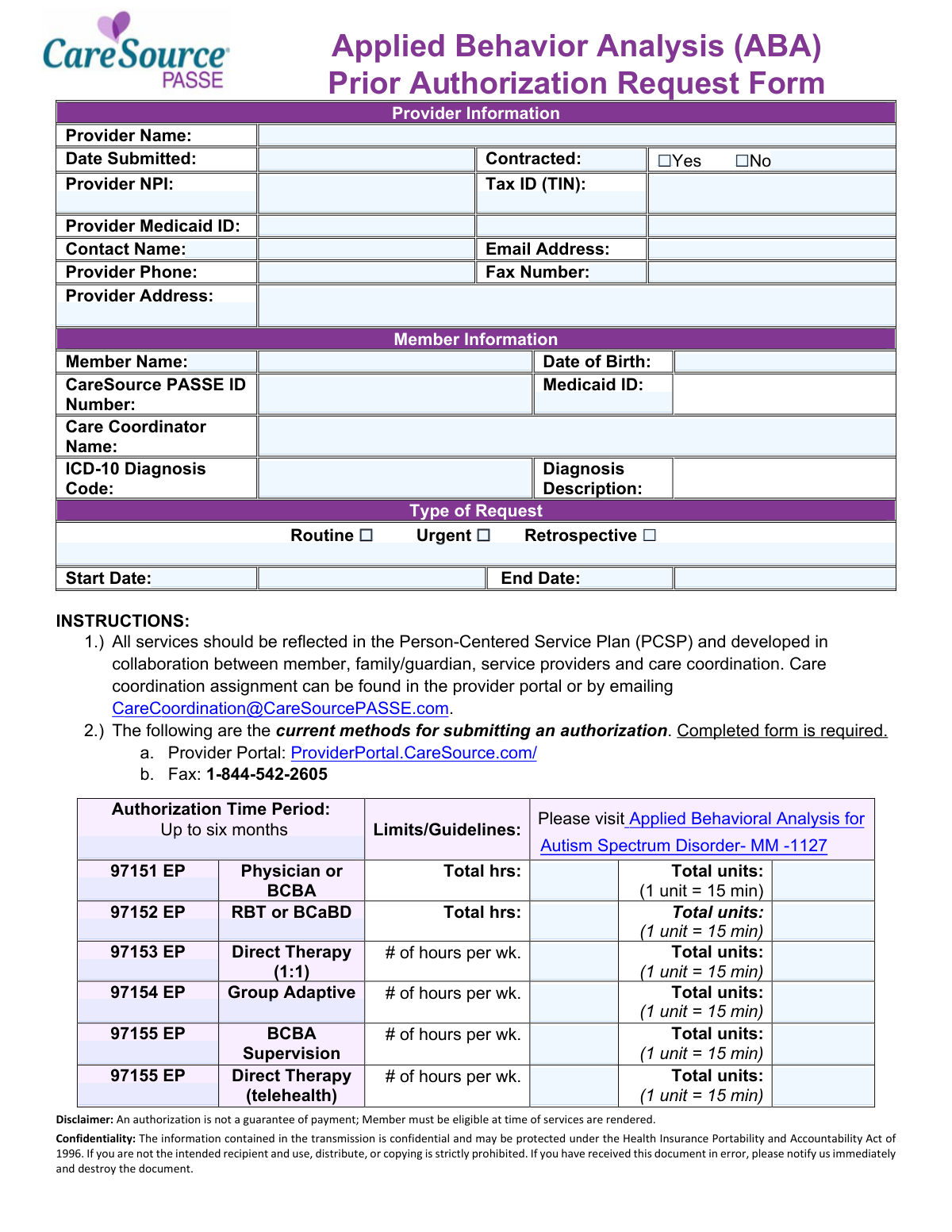
The CareSource PASSE Applied Behavior Analysis (ABA) Prior Authorization Request Form (AR-PAS-P-2417200a) is an official document required by CareSource PASSE for providers seeking pre-approval to deliver ABA therapy services—such as direct therapy, BCBA supervision, parent/family training, and group adaptive behavior sessions—to members with an Autism Spectrum Disorder diagnosis. The form captures essential provider and member information, diagnosis codes, service codes (97151–97158 EP), requested hours and units, and supporting documentation to ensure services align with the member's Person-Centered Service Plan (PCSP). Proper completion and timely submission are critical, as authorization is not a guarantee of payment and members must be eligible at the time services are rendered. Today, providers can fill out this form quickly and accurately using AI-powered services like Instafill.ai, which can also convert non-fillable PDF versions into interactive fillable forms.
Our AI automatically handles information lookup, data retrieval, formatting, and form filling.
It takes less than a minute to fill out ABA Prior Authorization Request Form (AR-PAS-P-2417200a) using our AI form filling.
Securely upload your data. Information is encrypted in transit and deleted immediately after the form is filled out.
Form specifications
| Form name: | CareSource PASSE Applied Behavior Analysis (ABA) Prior Authorization Request Form |
| Number of pages: | 2 |
| Language: | English |
Instafill Demo: filling out a legal form in seconds
How to Fill Out ABA Prior Authorization Request Form (AR-PAS-P-2417200a) Online for Free in 2026
Are you looking to fill out a ABA PRIOR AUTHORIZATION REQUEST FORM (AR-PAS-P-2417200A) form online quickly and accurately? Instafill.ai offers the #1 AI-powered PDF filling software of 2026, allowing you to complete your ABA PRIOR AUTHORIZATION REQUEST FORM (AR-PAS-P-2417200A) form in just 37 seconds or less.
Follow these steps to fill out your ABA PRIOR AUTHORIZATION REQUEST FORM (AR-PAS-P-2417200A) form online using Instafill.ai:
- 1 Navigate to Instafill.ai and upload the CareSource PASSE ABA Prior Authorization Request Form PDF or select it from the available form library to begin filling it out online.
- 2 Enter all required Provider Information, including the provider name, NPI, Tax ID (TIN), Medicaid ID, contact name, email address, phone number, fax number, and provider address.
- 3 Complete the Member Information section by providing the member's full name, date of birth, CareSource PASSE ID number, Medicaid ID, care coordinator name, and ICD-10 diagnosis code with description.
- 4 Select the Type of Request (Routine, Urgent, or Retrospective) and enter the authorization start and end dates for the requested service period.
- 5 Fill in the ABA service details for each applicable CPT code (97151–97158 EP), specifying the number of hours per week and total units requested for each service type.
- 6 Review the Recommended Documentation checklist and ensure all required supporting documents (e.g., autism diagnosis, behavioral assessment, treatment plan, ABA order) are gathered and attached to the submission.
- 7 Submit the completed form through the CareSource Provider Portal at ProviderPortal.CareSource.com or via fax to 1-844-542-2605, and retain a copy for your records.
Our AI-powered system ensures each field is filled out correctly, reducing errors and saving you time.
Why Choose Instafill.ai for Your Fillable ABA Prior Authorization Request Form (AR-PAS-P-2417200a) Form?
Speed
Complete your ABA Prior Authorization Request Form (AR-PAS-P-2417200a) in as little as 37 seconds.
Up-to-Date
Always use the latest 2026 ABA Prior Authorization Request Form (AR-PAS-P-2417200a) form version.
Cost-effective
No need to hire expensive lawyers.
Accuracy
Our AI performs 10 compliance checks to ensure your form is error-free.
Security
Your personal information is protected with bank-level encryption.
Frequently Asked Questions About Form ABA Prior Authorization Request Form (AR-PAS-P-2417200a)
This form is used by healthcare providers to request prior authorization from CareSource PASSE for Applied Behavior Analysis (ABA) services for members diagnosed with Autism Spectrum Disorder. It ensures that the requested ABA services are reviewed and approved before or during treatment to facilitate potential reimbursement.
Healthcare providers, including BCBAs (Board Certified Behavior Analysts) and ABA therapy organizations, must complete this form when requesting prior authorization for ABA services on behalf of a CareSource PASSE member. The form requires both provider and member information, so coordination between the provider and the member's care team is essential.
You will need to provide the provider's full name, National Provider Identifier (NPI), Tax Identification Number (TIN), Medicaid ID, contact name, email address, phone number, fax number, and mailing address. You must also indicate whether the provider is contracted with CareSource PASSE by checking Yes or No.
You must provide the member's full name, date of birth, CareSource PASSE ID number, Medicaid ID, care coordinator name, and the ICD-10 diagnosis code along with the diagnosis description. This information helps verify member eligibility and match the request to the correct individual.
The three types are Routine (standard, non-urgent requests submitted before services begin), Urgent (requests requiring expedited processing due to the member's medical condition), and Retrospective (requests for services that have already been rendered). Select the type that best reflects the timing and urgency of the authorization needed.
The authorization time period can be up to six months. You must specify a start date and end date within that range when completing the form. Be sure to request only the timeframe needed for the planned ABA services.
The form covers CPT codes 97151 EP (Physician or BCBA assessment), 97152 EP (RBT or BCaBD), 97153 EP (Direct Therapy 1:1), 97154 EP (Group Adaptive), 97155 EP (BCBA Supervision and Direct Therapy via telehealth), 97156 EP (Parent/Family Training), 97157 EP (Multi-family Adaptive Behavior), and 97158 EP (Multi-family Group). Each service requires you to enter the number of hours per week and total units, where 1 unit equals 15 minutes.
Each unit equals 15 minutes of service. To calculate total units, multiply the total number of hours by 4 (since there are four 15-minute segments in one hour). For example, 10 hours of service equals 40 units. Make sure to enter both the hours per week and the total units for each applicable service code.
Recommended documentation includes a screening or evaluation confirming an Autism diagnosis (e.g., ADOS, ADI-R), a behavior assessment and treatment plan by an independent practitioner, an ABA order from a provider, a comprehensive assessment covering behavioral, psychological, developmental, and medical history, and a treatment plan with SMART goals. For school-based services, include an Individualized Education Plan (IEP), and for continued care requests, include updated progress reports.
You can submit the completed form through two methods: via the CareSource Provider Portal at ProviderPortal.CareSource.com, or by fax to 1-844-542-2605. A fully completed form is required regardless of the submission method chosen.
No, an authorization is not a guarantee of payment. The member must be eligible at the time services are rendered for payment to be processed. Always verify member eligibility before providing services, even if a prior authorization has been issued.
Care coordinator assignment information can be found in the CareSource Provider Portal or by emailing [email protected]. Including the correct care coordinator name on the form is important, as all ABA services should be reflected in the member's Person-Centered Service Plan (PCSP).
Yes, AI-powered services like Instafill.ai can help you accurately auto-fill form fields, saving time and reducing errors when completing the ABA Prior Authorization Request Form. These tools are especially helpful for repetitive data entry such as provider details, member information, and service codes.
You can upload the ABA Prior Authorization Request Form PDF to Instafill.ai, and the AI will automatically identify and fill in the form fields based on the information you provide. Once completed, you can review, edit, and download the filled form ready for submission via the provider portal or fax.
If you have a flat, non-fillable PDF version of the ABA Prior Authorization Request Form, Instafill.ai can convert it into an interactive fillable form. This allows you to type directly into the fields digitally, rather than printing and filling it out by hand, making the process faster and more accurate.
Compliance ABA Prior Authorization Request Form (AR-PAS-P-2417200a)
Validation Checks by Instafill.ai
1
Provider NPI Format and Length Validation
Validates that the Provider National Provider Identifier (NPI) is exactly 10 numeric digits across both segments, conforming to the CMS NPI standard format. NPIs are federally assigned identifiers and must be precisely 10 digits with no letters or special characters. An invalid or malformed NPI will prevent the authorization request from being matched to a recognized provider in the system, resulting in denial or delay of the prior authorization.
2
Tax Identification Number (TIN) Format Validation
Ensures the Tax ID (TIN) follows the standard IRS format of 9 numeric digits, typically formatted as XX-XXXXXXX across its two segments. The TIN is required for billing and reimbursement purposes and must match the provider's IRS-registered tax information. An incorrectly formatted or missing TIN can result in payment processing failures and may flag the submission for compliance review.
3
Member Date of Birth Format and Logical Range Validation
Validates that the Member Date of Birth is entered in a valid date format (MM/DD/YYYY) and represents a logically plausible date — specifically, that the member is not listed as born in the future and is within a reasonable age range for ABA services (typically under 21 years of age for Medicaid-covered ABA). Since ABA services under this form are tied to an Autism Spectrum Disorder diagnosis, the member's age is a critical eligibility factor. A missing or invalid date of birth will prevent eligibility verification and may result in automatic denial.
4
Date Submitted Cannot Be a Future Date
Checks that the Date Submitted field contains a valid calendar date that is not in the future, ensuring the form reflects an actual submission event. Submitting a form with a future date could indicate data entry error or an attempt to manipulate authorization timelines. If the submitted date is in the future, the form should be flagged for correction before processing.
5
Service Start Date and End Date Logical Consistency
Validates that the Start Date is earlier than the End Date and that the total span between the two dates does not exceed six months, as specified by the authorization time period guidelines on the form. The form explicitly states that authorizations are valid for up to six months, so any requested period exceeding this limit must be flagged. If the end date precedes the start date or the range exceeds six months, the request must be returned to the provider for correction.
6
Retrospective Request Start Date Must Not Be in the Future
When the 'Retrospective' request type is selected, validates that the Start Date and End Date both fall in the past, since retrospective authorizations are for services already rendered. A retrospective request with future dates is logically inconsistent and indicates a data entry error. If this inconsistency is detected, the form should be flagged and returned to the submitter with an explanation of the retrospective request requirements.
7
Exactly One Request Type Must Be Selected
Ensures that one and only one of the three request type checkboxes — Routine, Urgent, or Retrospective — is selected on the form. Selecting multiple request types simultaneously creates ambiguity in processing priority and workflow routing, while selecting none leaves the request type undefined. If zero or more than one option is checked, the form must be rejected and the provider notified to clarify the intended request type.
8
ICD-10 Diagnosis Code Format and ASD Relevance Validation
Validates that the ICD-10 Diagnosis Code is entered in the correct alphanumeric format (e.g., F84.0 for Autism Spectrum Disorder) and that the code corresponds to an Autism Spectrum Disorder diagnosis, as ABA services under this form are specifically designated for ASD. The form references the Autism Spectrum Disorder medical policy (MM-1127), making a valid ASD-related ICD-10 code a prerequisite for authorization. A missing, malformed, or non-ASD diagnosis code should trigger a rejection with guidance to provide the appropriate code.
9
Email Address Format Validation
Checks that the Email Address field for the provider contact contains a properly formatted email address, including a local part, an '@' symbol, a domain name, and a valid top-level domain (e.g., [email protected]). An improperly formatted email address will prevent the system or care coordination team from sending authorization status updates or requesting additional documentation. If the email format is invalid, the form should be flagged and the provider asked to supply a corrected contact email.
10
Provider Phone and Fax Number Format Validation
Validates that both the Provider Phone Number and Fax Number fields contain exactly 10 numeric digits, consistent with the North American Numbering Plan (NANP) format, and do not contain placeholder values such as all zeros or repeated digits. Valid contact numbers are essential for care coordinators to reach the provider for follow-up questions or to transmit authorization decisions. Invalid or missing phone/fax numbers should result in the form being flagged as incomplete.
11
Contracted Status Checkbox Mutual Exclusivity
Ensures that exactly one of the two Contracted Status checkboxes — 'Yes' or 'No' — is selected, and that both are not simultaneously checked or left blank. The contracted status of the provider affects the authorization workflow, reimbursement rates, and network compliance requirements. If neither or both boxes are checked, the form must be returned to the provider for clarification before processing can continue.
12
Service Unit and Hours Mathematical Consistency Validation
For each ABA service code (97151 through 97158 EP), validates that the total units entered are mathematically consistent with the hours entered, given that 1 unit equals 15 minutes (4 units per hour). For weekly services, total units should equal hours per week multiplied by 4, and for the full authorization period, total units should reflect the weekly units multiplied by the number of authorized weeks. Discrepancies between hours and units suggest data entry errors that could result in over- or under-authorization of services.
13
At Least One ABA Service Code Must Be Requested
Validates that at least one of the ABA service codes (97151 EP through 97158 EP) has hours and units populated, ensuring the form is not submitted without any actual service authorization being requested. A prior authorization request with no services specified is incomplete and cannot be processed or approved. If no service lines contain data, the form must be returned to the provider with instructions to specify the services being requested.
14
CareSource PASSE ID and Medicaid ID Presence and Format Validation
Checks that both the CareSource PASSE ID Number and the Medicaid ID fields are populated and conform to their expected formats — the PASSE ID should follow CareSource's internal identifier structure, and the Medicaid ID should match Arkansas Medicaid's standard format. Both identifiers are required to verify member eligibility and link the authorization to the correct member record. If either identifier is missing or improperly formatted, the system cannot confirm eligibility, and the authorization request must be placed on hold.
15
Authorization Period Does Not Exceed Six-Month Maximum
Validates that the value entered in the Authorized Period (Months) field does not exceed 6, as the form explicitly states that authorizations are valid for up to six months per the program guidelines. Requesting an authorization period beyond six months is outside the allowable policy limits and would require a new or renewed authorization request. If a value greater than 6 is entered, the form should be flagged and the provider notified of the maximum allowable authorization period.
16
Provider Address Completeness Validation
Ensures that at minimum the Provider Address Line 1 field is populated with a physical street address, as a valid provider address is required for credentialing verification, correspondence, and audit purposes. A P.O. Box alone is generally insufficient as a primary provider address for healthcare authorization forms. If the address field is blank or contains only a P.O. Box without a physical address, the form should be flagged as incomplete and returned to the provider for correction.
Common Mistakes in Completing ABA Prior Authorization Request Form (AR-PAS-P-2417200a)
The National Provider Identifier (NPI) is a 10-digit number, and providers often transpose digits, omit segments, or enter an outdated NPI. An incorrect NPI will result in the authorization request being rejected or delayed, potentially disrupting patient care. Always verify the NPI against the NPPES registry before submission. AI-powered tools like Instafill.ai can automatically validate NPI formats and flag errors before the form is submitted.
Providers frequently overlook the simple Yes/No contracted status checkbox, leaving it blank or checking both boxes. This omission can cause processing delays because the payer cannot determine the provider's network status, which affects reimbursement rates and authorization pathways. Always confirm your contracted status with CareSource PASSE before submitting and ensure exactly one box is checked.
Each service code requires both hours and units, where 1 unit equals 15 minutes. A common mistake is failing to convert hours to units correctly — for example, entering 10 hours as 10 units instead of 40 units. This discrepancy can lead to underpayment or denial of services. Always multiply the total hours by 4 to get the correct number of units, and double-check weekly hour calculations before entering totals.
Providers sometimes enter a general or outdated ICD-10 code rather than the most specific code applicable to the member's autism spectrum disorder diagnosis. An imprecise code can trigger a denial or a request for additional documentation, delaying care. Verify the correct ICD-10 code (e.g., F84.0 for Autistic Disorder) with the diagnosing clinician and ensure it matches the supporting documentation. Instafill.ai can help cross-reference diagnosis codes to ensure accuracy.
Providers often select 'Routine' when the request actually qualifies as 'Urgent,' or they submit a 'Retrospective' request without understanding that services have already been rendered without prior authorization. Selecting the wrong type can result in the request being processed under the wrong timeline, leading to delayed approvals or outright denials. Carefully review the definitions of each request type and ensure the selection accurately reflects the clinical situation and timing of services.
A frequent error is entering a date range that exceeds the six-month authorization limit, leaving the end date blank, or entering dates that do not align with the member's treatment plan. Authorizations exceeding six months will be rejected, and missing dates will cause the form to be returned as incomplete. Ensure the start and end dates span no more than six months and correspond directly to the dates outlined in the Person-Centered Service Plan (PCSP).
Providers sometimes confuse the CareSource PASSE ID with the member's Medicaid ID, entering the same number in both fields or leaving one blank. These are distinct identifiers, and an error in either field will prevent the payer from locating the member's record, resulting in a denial or delay. Verify both IDs directly from the member's insurance card or the provider portal before completing the form. Instafill.ai can help auto-populate and validate member ID fields to prevent this error.
Many providers leave the Care Coordinator Name field blank because they are unaware of who is assigned to the member or do not know how to find this information. This omission can delay processing since care coordination is integral to the PCSP-based authorization process. The form instructions specify that care coordination assignment can be found in the provider portal or by emailing [email protected] — always look up this information before submitting.
Providers frequently submit the authorization form without attaching all recommended documentation, such as the autism diagnosis from an independent practitioner, behavioral assessments (e.g., ADOS, ADI-R), the ABA treatment plan with SMART goals, or updated progress reports for continued care requests. Missing documentation is one of the most common reasons for authorization denials or requests for additional information. Review the Recommended Documentation checklist on the form thoroughly before submission and attach all applicable documents.
Providers sometimes populate hours and units for all service codes (97151–97158) regardless of whether those services are actually part of the member's treatment plan, which can raise red flags during review. Conversely, they may forget to include a service code that is part of the plan. Only enter hours and units for services that are explicitly included in the member's PCSP and supported by the treatment plan documentation.
The Tax Identification Number is split into two segments on this form, and providers often enter the number in the wrong segment, omit the hyphen, or use an individual SSN instead of the business EIN. An incorrect TIN can cause payment to be issued to the wrong entity or trigger compliance issues. Always use the TIN associated with the billing entity, verify it against your W-9 on file, and ensure it is entered correctly across both segments of the field.
Some providers fax the form to the wrong number or attempt to submit it via email rather than through the designated channels (Provider Portal at ProviderPortal.CareSource.com or fax to 1-844-542-2605). Submissions sent through incorrect channels may not be received or processed, causing significant delays in authorization. Always use one of the two approved submission methods listed in the form instructions, and retain confirmation of submission (e.g., fax confirmation or portal submission receipt).
Saved over 80 hours a year
“I was never sure if my IRS forms like W-9 were filled correctly. Now, I can complete the forms accurately without any external help.”
Kevin Martin Green
Your data stays secure with advanced protection from Instafill and our subprocessors

Robust compliance program
Transparent business model
You’re not the product. You always know where your data is and what it is processed for.
ISO 27001, HIPAA, and GDPR
Our subprocesses adhere to multiple compliance standards, including but not limited to ISO 27001, HIPAA, and GDPR.
Security & privacy by design
We consider security and privacy from the initial design phase of any new service or functionality. It’s not an afterthought, it’s built-in, including support for two-factor authentication (2FA) to further protect your account.
Fill out ABA Prior Authorization Request Form (AR-PAS-P-2417200a) with Instafill.ai
Worried about filling PDFs wrong? Instafill securely fills caresource-passe-applied-behavior-analysis-aba-prior-authorization-request-form forms, ensuring each field is accurate.