Yes! You can use AI to fill out Evernorth Applied Behavior Analysis (ABA) Prior Authorization Form
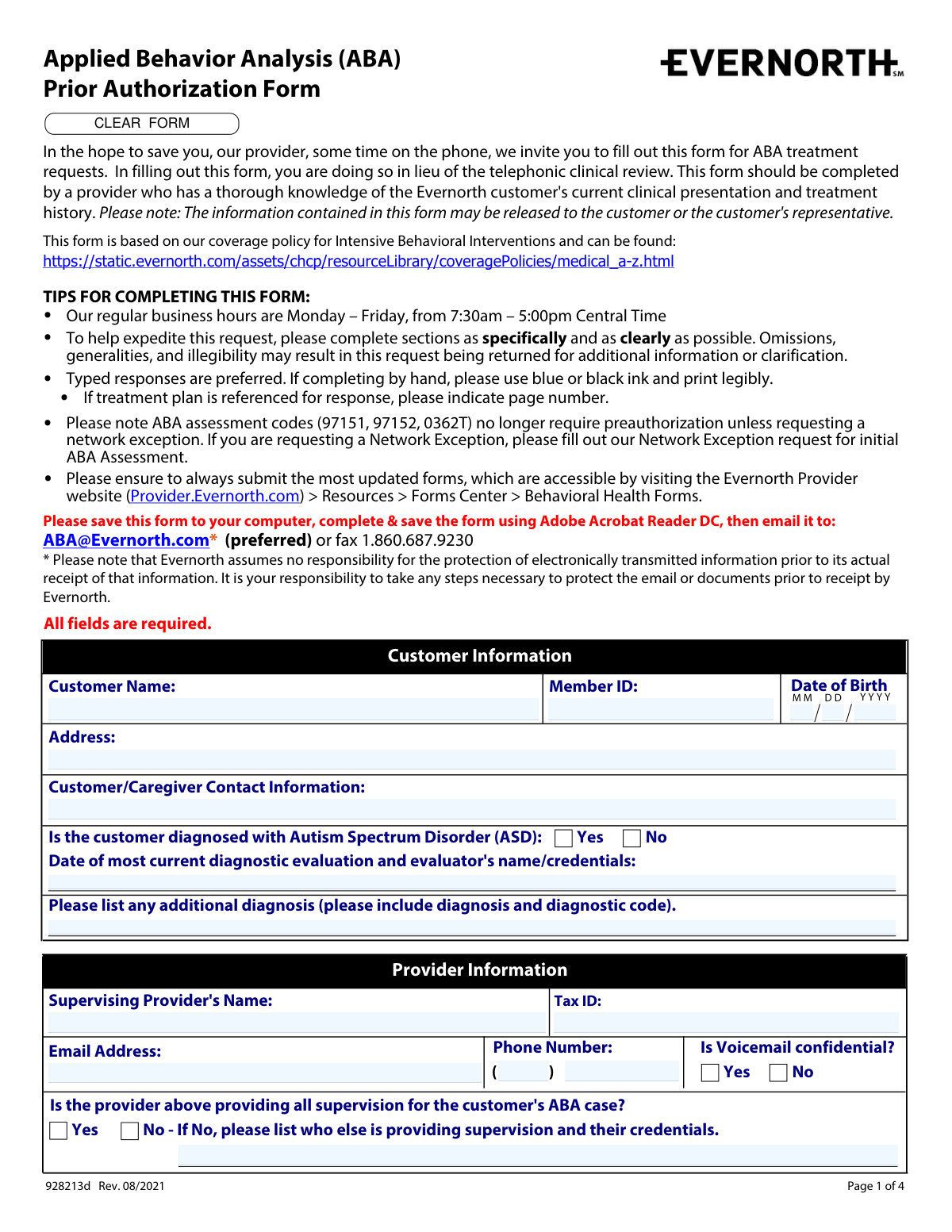
The Evernorth Applied Behavior Analysis (ABA) Prior Authorization Form (928213d) is an official document submitted by supervising providers to Evernorth to request authorization for ABA treatment services for customers diagnosed with Autism Spectrum Disorder (ASD). The form captures comprehensive clinical information including patient demographics, treatment history, standardized assessment scores, requested service codes and hours, and coordination of care details, replacing the traditional telephonic clinical review process. It is a critical document that ensures appropriate coverage and continuity of care for ABA services under Evernorth's behavioral health policies. Today, providers can fill out this multi-page form quickly and accurately using AI-powered services like Instafill.ai, which can also convert non-fillable PDF versions into interactive fillable forms.
Our AI automatically handles information lookup, data retrieval, formatting, and form filling.
It takes less than a minute to fill out Evernorth ABA Prior Authorization Form using our AI form filling.
Securely upload your data. Information is encrypted in transit and deleted immediately after the form is filled out.
Form specifications
| Form name: | Evernorth Applied Behavior Analysis (ABA) Prior Authorization Form |
| Number of pages: | 4 |
| Language: | English |
Instafill Demo: filling out a legal form in seconds
How to Fill Out Evernorth ABA Prior Authorization Form Online for Free in 2026
Are you looking to fill out a EVERNORTH ABA PRIOR AUTHORIZATION FORM form online quickly and accurately? Instafill.ai offers the #1 AI-powered PDF filling software of 2026, allowing you to complete your EVERNORTH ABA PRIOR AUTHORIZATION FORM form in just 37 seconds or less.
Follow these steps to fill out your EVERNORTH ABA PRIOR AUTHORIZATION FORM form online using Instafill.ai:
- 1 Navigate to Instafill.ai and upload the Evernorth ABA Prior Authorization Form (928213d) or select it from the available form library to begin filling it out online.
- 2 Complete the Customer Information section by entering the customer's full name, Member ID, date of birth, address, ASD diagnosis status, and the date and credentials of the most recent diagnostic evaluation.
- 3 Fill in the Provider and Clinic Information sections, including the supervising provider's name, Tax ID, email address, phone number, voicemail confidentiality preference, credentials (e.g., BCBA, BCBA-D, LBA), and clinic details.
- 4 Indicate the level of benefit requested (in-network, out-of-network, or in-network exception), complete the ABA treatment history section including duration of treatment, additional services received, any gaps in care, and collaboration with other providers.
- 5 Enter standardized assessment information, including the names of assessments administered and their baseline, previous, and current scores with corresponding dates.
- 6 Complete the Current ABA Treatment Information section by checking all applicable clinical information checklist items, specifying places of service, and attaching the required pages of clinical documentation.
- 7 Enter the requested treatment codes, hours, and units for both BCBA/Supervisor and Technician/RBT services, provide the authorization start date, indicate direct care usage for code 97155, add any clinical rationale for changes, and submit the completed form to [email protected] or via fax.
Our AI-powered system ensures each field is filled out correctly, reducing errors and saving you time.
Why Choose Instafill.ai for Your Fillable Evernorth ABA Prior Authorization Form Form?
Speed
Complete your Evernorth ABA Prior Authorization Form in as little as 37 seconds.
Up-to-Date
Always use the latest 2026 Evernorth ABA Prior Authorization Form form version.
Cost-effective
No need to hire expensive lawyers.
Accuracy
Our AI performs 10 compliance checks to ensure your form is error-free.
Security
Your personal information is protected with bank-level encryption.
Frequently Asked Questions About Form Evernorth ABA Prior Authorization Form
This form is used to request prior authorization for Applied Behavior Analysis (ABA) treatment through Evernorth. It replaces the telephonic clinical review process, saving providers time by allowing them to submit treatment requests in writing instead of over the phone.
This form must be completed by a provider who has thorough knowledge of the Evernorth customer's current clinical presentation and treatment history, typically the supervising BCBA or licensed psychologist overseeing the ABA case. The supervising provider must also sign or e-sign the completed form before submission.
The preferred method is to save the form to your computer, complete and save it using Adobe Acrobat Reader DC, and then email it to [email protected]. Alternatively, you can fax it to 1-860-687-9230. Please note that Evernorth assumes no responsibility for protecting electronically transmitted information prior to its receipt.
No, ABA assessment codes 97151, 97152, and 0362T no longer require preauthorization unless you are requesting a network exception. If you are requesting a Network Exception, you must fill out the separate Network Exception request form for initial ABA Assessment.
You must attach an individualized treatment plan that includes specific targeted behaviors and skills for improvement, clearly defined measurable and realistic goals, baseline and current data for all goals, parent/caregiver training goals, a maintenance and generalization plan, and individualized discharge criteria. You should indicate the number of attached pages on the form.
If you are an out-of-network provider requesting an in-network exception, you must select that option in the Level of Benefit section and complete sections A and B. Section A asks for the number of assessment units requested, and Section B requires you to describe your specialized experience, training, or certification that supports the need for an in-network exception.
You must indicate which standardized assessments were administered by providing the assessment name along with the baseline, previous, and current scores and their corresponding dates. At least two assessments can be listed directly on the form, and any additional assessments should be included with their names, dates of administration, and scores.
Evernorth encourages providers to submit authorization requests no earlier than 2 to 4 weeks prior to the requested start date. This ensures that the most up-to-date clinical information is available when the determination is made.
The supervising provider must be credentialed or licensed as a BCBA, BCBA-D, LBA, Licensed Psychologist, or another specified licensed professional. The appropriate credential must be checked on the form, and if 'Other Licensed' is selected, the specific license type must be provided.
Omissions, generalities, or illegible responses may result in the request being returned for additional information or clarification, which can delay the authorization process. To expedite your request, complete all sections as specifically and clearly as possible, and use typed responses whenever possible.
Yes, AI-powered services like Instafill.ai can help you accurately auto-fill form fields, saving time and reducing errors. If the PDF version of this form is not interactive or fillable, Instafill.ai can also convert flat non-fillable PDFs into interactive fillable forms so you can complete them digitally.
You can visit Instafill.ai, upload the ABA Prior Authorization Form PDF, and use the AI-powered tool to auto-fill the required fields with accurate information. Once completed, you can save the form and submit it to Evernorth via email at [email protected] or by fax at 1-860-687-9230.
BCBA/Supervisor hours use codes 97155, 97156, 97157, 97158, and 0373T, while Technician/RBT hours use codes 97153 and 97154. You must enter the number of hours and units per month for each applicable code, and note whether any 97155 units are used for 1-to-1 direct care with the customer.
Always use the most current version of the form, which is available on the Evernorth Provider website at Provider.Evernorth.com by navigating to Resources > Forms Center > Behavioral Health Forms. Using outdated forms may cause delays in processing your authorization request.
The information contained in this form may be released to the customer or the customer's representative, so providers should be aware of this when completing the form. Additionally, Evernorth assumes no responsibility for protecting electronically transmitted information prior to its receipt, so providers should take necessary steps to secure emails or documents before sending.
Compliance Evernorth ABA Prior Authorization Form
Validation Checks by Instafill.ai
1
Ensures Customer Date of Birth is in Valid MM/DD/YYYY Format
This check verifies that the birth month is a two-digit value between 01 and 12, the birth day is a two-digit value between 01 and 31, and the birth year is a four-digit value representing a plausible birth year (e.g., not in the future and not more than 120 years in the past). The date of birth is critical for accurately identifying the correct member record and preventing authorization errors. If the format is invalid or the date is implausible, the form should be returned for correction before processing.
2
Ensures ASD Diagnosis Selection is Made and Consistent with Form Completion
This check confirms that exactly one of the 'Yes' or 'No' options is selected for the Autism Spectrum Disorder diagnosis question, and that if 'Yes' is selected, the diagnostic evaluation date and evaluator name/credentials field is also populated. ABA prior authorization through Evernorth is specifically tied to an ASD diagnosis, making this field foundational to the clinical review. If 'Yes' is selected but no diagnostic evaluation details are provided, or if neither option is selected, the form is incomplete and cannot be processed.
3
Ensures Supervising Provider Tax ID is in Valid Format
This check validates that the Supervising Provider's Tax ID follows the standard Employer Identification Number (EIN) format of nine digits, typically formatted as XX-XXXXXXX. The Tax ID is required for billing, credentialing verification, and proper routing of the authorization to the correct provider account. An incorrectly formatted or missing Tax ID will prevent the authorization from being linked to the appropriate provider and may delay or invalidate the request.
4
Ensures Provider Email Address is in Valid Format
This check verifies that the provider's email address contains a local part, an '@' symbol, a domain name, and a valid top-level domain (e.g., [email protected]). Since email is the preferred submission method for this form, an invalid or malformed email address could result in failed communication of the determination or follow-up questions. If the email format is invalid, the form should flag the field and prompt the provider to re-enter a correctly formatted address.
5
Ensures Provider Phone Number is Complete and Properly Formatted
This check validates that the area code field contains exactly three digits and the main phone number field contains exactly seven digits, together forming a valid 10-digit North American phone number. A complete and accurate phone number is necessary for Evernorth's team to contact the provider within the five business day window for questions or determination information. If either portion of the phone number is missing or contains non-numeric characters, the form should be flagged as incomplete.
6
Ensures Voicemail Confidentiality Selection is Made
This check confirms that exactly one of the 'Yes' or 'No' options is selected for the voicemail confidentiality question associated with the provider's phone number. This selection determines whether Evernorth's team can leave detailed messages regarding the authorization, which has direct implications for patient privacy and HIPAA compliance. If neither option is selected, the form is incomplete and the provider's communication preferences cannot be honored.
7
Ensures Level of Benefit Request Has Exactly One Option Selected
This check verifies that exactly one of the three benefit level options is selected: in-network provider requesting in-network authorization, out-of-network provider requesting out-of-network authorization, or out-of-network provider requesting an in-network exception. Selecting multiple options or no option creates an ambiguous request that cannot be properly adjudicated. If the in-network exception option is selected, this check also confirms that sections A and B (assessment units and specialized experience description) are completed.
8
Ensures In-Network Exception Requires Specialized Experience Description
This check confirms that when the out-of-network provider requesting an in-network exception option is selected, the Specialized Experience/Training Description field (Section B) is populated with a substantive response. The specialized experience justification is a required component of the exception request and is used by Evernorth reviewers to evaluate whether the exception is clinically warranted. If this field is left blank while the exception option is selected, the request is incomplete and will be returned for additional information.
9
Ensures Supervising Provider Credential Selection is Made
This check verifies that at least one credential type is selected from the list (BCBA, BCBA-D, LBA, Licensed Psychologist, or Other Licensed), and that if 'Other Licensed' is selected, the corresponding specification field is populated. Provider credentials are a key factor in determining eligibility to supervise ABA treatment and in validating the authorization request. If no credential is selected, or if 'Other Licensed' is checked without a specification, the form cannot be properly reviewed.
10
Ensures Gaps in Care or Supervising Provider Changes are Explained When Applicable
This check confirms that if 'Yes' is selected for the question about gaps in care or changes in supervising provider since the last request, the corresponding explanation field is populated with relevant details. Gaps in care and provider changes are clinically significant events that reviewers must evaluate in the context of the authorization request. If 'Yes' is selected but no explanation is provided, the form is incomplete and will be returned for clarification.
11
Ensures At Least One Standardized Assessment Name and Score Set is Provided
This check verifies that the first standardized assessment section contains at minimum the assessment name and at least one score (current, previous, or baseline) along with its corresponding date. Standardized assessments are a core component of demonstrating clinical necessity for ABA treatment and tracking the customer's progress over time. If the assessment name is provided without any scores and dates, or if all assessment fields are left blank, the clinical information is insufficient for review.
12
Ensures Assessment Score Dates Follow a Logical Chronological Order
This check validates that for each standardized assessment, the baseline score date is earlier than or equal to the previous score date, and the previous score date is earlier than or equal to the current score date. Chronological consistency in assessment dates is essential for demonstrating meaningful clinical progress and ensuring the data accurately reflects the customer's treatment trajectory. If dates are out of order, it suggests a data entry error that could misrepresent the customer's clinical status and lead to an incorrect authorization decision.
13
Ensures Authorization Request Start Date is Within the Recommended Submission Window
This check verifies that the start date for the current authorization request is a valid date in MM/DD/YYYY format and is no more than approximately 4 weeks in the future from the date of submission. The form explicitly advises providers to submit requests no earlier than 2–4 weeks prior to the requested start date to ensure the most up-to-date clinical information is used. If the start date is in the past or more than 4 weeks in the future, a warning should be generated to prompt the provider to confirm the date is correct.
14
Ensures Treatment Hours and Units are Numeric and Positive Values
This check validates that all hours and units fields in the BCBA/Supervisor and Technician/RBT sections contain only positive numeric values and are not left blank when a corresponding service code row is being used. Hours and units are the official request values that will be used in making the authorization determination, making accuracy in these fields critical. Non-numeric entries, negative values, or zeros in active service rows should be flagged as invalid to prevent processing errors.
15
Ensures Direct Care Usage for Code 97155 is Fully Specified When Applicable
This check confirms that if 'Yes' is selected for the question about whether any 97155 units are used for 1-to-1 direct care, the Direct Care Hours and Direct Care Units fields are both populated with valid positive numeric values. Code 97155 is specifically for BCBA supervision, and its use for direct care is a notable clinical distinction that affects how the authorization is reviewed. If 'Yes' is selected but the quantity fields are empty or contain invalid values, the request is incomplete.
16
Ensures Supervisor Signature and Signature Date are Both Present
This check verifies that the Supervisor's Signature/E-Signature field is populated and that the Signature Date field contains a valid date that is not in the future. The supervisor's signature certifies the accuracy and completeness of the clinical information submitted and is a required attestation for the prior authorization request to be considered valid. If either the signature or the date is missing, the form lacks the necessary authorization from a qualified clinical professional and cannot be processed.
Common Mistakes in Completing Evernorth ABA Prior Authorization Form
Providers often use saved copies of the ABA Prior Authorization Form from previous submissions without checking for updates, resulting in outdated form versions being submitted. Evernorth explicitly instructs providers to always use the most current form available at Provider.Evernorth.com > Resources > Forms Center > Behavioral Health Forms. Submitting an outdated form can cause delays or outright rejection of the authorization request. Always download a fresh copy of the form before each submission to ensure compliance with the latest requirements.
A very common mistake is submitting prior authorization requests for ABA assessment codes 97151, 97152, and 0362T, which no longer require preauthorization unless a network exception is being requested. Providers who are unaware of this policy change waste time completing unnecessary sections and may cause processing delays. The only exception is when requesting a Network Exception, which requires a separate Network Exception request form. Always review current Evernorth coverage policies before submitting to avoid unnecessary requests.
Many providers attempt to fill out and save the form using web browsers or other PDF viewers, which can result in data not being saved properly or fields appearing blank when received by Evernorth. The form explicitly requires providers to save it to their computer, complete it using Adobe Acrobat Reader DC, and then save again before emailing to [email protected]. Submitting a form with missing or corrupted data leads to processing delays and return requests for additional information. AI-powered tools like Instafill.ai can help ensure all fields are properly completed and saved before submission.
Providers frequently enter the Member ID incorrectly or leave it blank, and often fail to use the required two-digit format for the birth month and day (e.g., entering '3' instead of '03'). The form explicitly requires a two-digit month and two-digit date, along with a four-digit year. Incorrect member identification can cause the request to be matched to the wrong patient or returned entirely. Double-check the member's insurance card for the exact Member ID and use leading zeros where required for date fields.
Providers often enter only the date of the most current diagnostic evaluation without including the evaluator's full name and credentials, or vice versa. This field requires both the date and the evaluator's name with credentials to be complete. Incomplete information here can result in the request being returned for clarification, delaying authorization. Ensure both the evaluation date and the evaluator's full name and professional credentials (e.g., PhD, BCBA-D) are entered in the designated field.
Out-of-network providers requesting an in-network exception frequently check the correct box but then fail to complete the required sections A (assessment units) and B (specialized experience/training description), which are mandatory for exception requests. Without this information, the exception request cannot be evaluated and will be returned. Additionally, providers sometimes select the wrong network status (in-network vs. out-of-network), which can result in incorrect benefit processing. Carefully read each option and ensure all conditionally required fields are completed based on your selection.
Providers commonly fill in the assessment name and current score but omit the previous score, baseline score, or their corresponding dates, all of which are required to demonstrate treatment progress. Without baseline and previous scores, Evernorth cannot evaluate whether the customer is making meaningful progress with ABA treatment. This omission often results in the request being returned for additional clinical information. Ensure all three score fields (current, previous, and baseline) and their respective dates are completed for each standardized assessment listed.
Providers often leave one or more of the five clinical information checklist items unchecked without providing an explanation in the designated field for why the item does not apply. Evernorth uses these checklist items to verify that the treatment plan meets coverage policy requirements, and unchecked boxes without explanation raise red flags that can delay or deny authorization. If a checklist item genuinely does not apply, a clear clinical rationale must be provided in the explanation field. Review each checklist item carefully against the attached clinical documentation before submitting.
A frequent error is entering hours and units that are inconsistent with each other or with what was approved at the last authorization review without providing a clinical rationale for the change. The form explicitly states that the hours/units listed will be considered the official request, and any changes from the previously approved amounts require a specific explanation of the change and its clinical justification. Providers also sometimes confuse which codes belong under BCBA/Supervisor Hours versus Technician/RBT Hours. Carefully verify that hours and units are mathematically consistent and that any deviations from prior approvals are clearly explained.
Providers frequently overlook the question asking whether any of the 97155 units are used for 1-to-1 direct care with the customer, leaving both the Yes/No checkboxes blank and failing to specify the number of hours and units if the answer is Yes. This is a required field that affects how the authorization is processed and reviewed. Leaving it blank can result in the form being returned for clarification. Always answer this question and, if Yes is selected, provide the specific number of direct care hours and units in the corresponding fields.
Providers sometimes submit authorization requests many weeks or even months before the requested start date, or conversely, submit them after the desired start date has already passed. Evernorth specifically recommends submitting requests no earlier than 2-4 weeks prior to the requested start date to ensure the most up-to-date clinical information is used in the determination. Submitting too early may mean the clinical data is outdated by the time a decision is made, while submitting too late can result in gaps in authorized care. Plan submissions carefully to fall within the recommended 2-4 week window before the start date.
Providers often list additional diagnoses in plain language without including the corresponding diagnostic (ICD-10) codes, or they omit co-occurring diagnoses entirely. The form requires both the diagnosis name and its diagnostic code for any additional diagnoses beyond ASD. Missing or incomplete diagnostic codes can affect coverage determinations and may result in the request being returned. Always include the full ICD-10 code alongside each additional diagnosis listed, and consult the patient's medical records to ensure all relevant co-occurring conditions are documented. Tools like Instafill.ai can help validate that diagnostic codes are properly formatted and complete.
Saved over 80 hours a year
“I was never sure if my IRS forms like W-9 were filled correctly. Now, I can complete the forms accurately without any external help.”
Kevin Martin Green
Your data stays secure with advanced protection from Instafill and our subprocessors

Robust compliance program
Transparent business model
You’re not the product. You always know where your data is and what it is processed for.
ISO 27001, HIPAA, and GDPR
Our subprocesses adhere to multiple compliance standards, including but not limited to ISO 27001, HIPAA, and GDPR.
Security & privacy by design
We consider security and privacy from the initial design phase of any new service or functionality. It’s not an afterthought, it’s built-in, including support for two-factor authentication (2FA) to further protect your account.
Fill out Evernorth ABA Prior Authorization Form with Instafill.ai
Worried about filling PDFs wrong? Instafill securely fills evernorth-applied-behavior-analysis-aba-prior-authorization-form forms, ensuring each field is accurate.