Yes! You can use AI to fill out Applied Behavioral Analysis (ABA) Prior Authorization Request Form (Health Net Behavioral Health Autism Center)
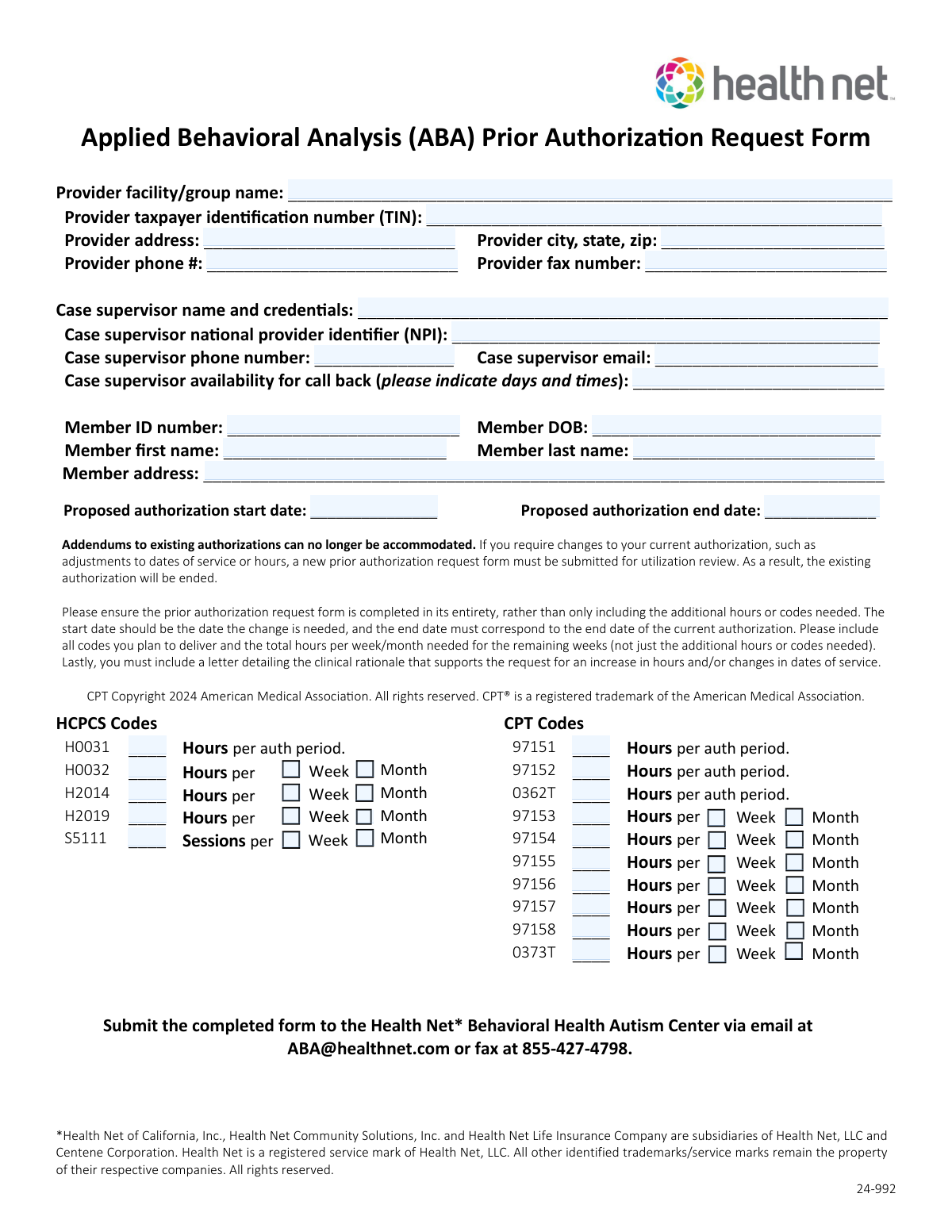
The Applied Behavioral Analysis (ABA) Prior Authorization Request Form is a Health Net Behavioral Health Autism Center document used by providers to request utilization review approval for ABA services for a specific member, including requested dates of service and HCPCS/CPT codes with hours or sessions. It captures provider and case supervisor identifiers (TIN, NPI), contact details, member demographics, and the requested service units (per authorization period, per week, or per month). It is important because incomplete or incorrect submissions can delay authorization decisions, and changes to existing authorizations require submitting a new request with clinical rationale. Today, this form can be filled out quickly and accurately using AI-powered services like Instafill.ai, which can also convert non-fillable PDF versions into interactive fillable forms.
Our AI automatically handles information lookup, data retrieval, formatting, and form filling.
It takes less than a minute to fill out ABA Prior Authorization Request (Health Net) / 24-992 using our AI form filling.
Securely upload your data. Information is encrypted in transit and deleted immediately after the form is filled out.
Form specifications
| Form name: | Applied Behavioral Analysis (ABA) Prior Authorization Request Form (Health Net Behavioral Health Autism Center) |
| Number of pages: | 1 |
| Language: | English |
| Categories: | prior authorization forms, medical authorization forms, ABA forms, behavioral health forms, autism forms, Health Net forms, authorization forms |
Instafill Demo: filling out a legal form in seconds
How to Fill Out ABA Prior Authorization Request (Health Net) / 24-992 Online for Free in 2026
Are you looking to fill out a ABA PRIOR AUTHORIZATION REQUEST (HEALTH NET) / 24-992 form online quickly and accurately? Instafill.ai offers the #1 AI-powered PDF filling software of 2026, allowing you to complete your ABA PRIOR AUTHORIZATION REQUEST (HEALTH NET) / 24-992 form in just 37 seconds or less.
Follow these steps to fill out your ABA PRIOR AUTHORIZATION REQUEST (HEALTH NET) / 24-992 form online using Instafill.ai:
- 1 Go to Instafill.ai and upload the ABA Prior Authorization Request Form (or select it from the form library) to start an AI-guided fill session.
- 2 Enter provider information: facility/group name, TIN, address, city/state/zip, phone number, and fax number.
- 3 Complete case supervisor details: name/credentials, NPI, phone, email, and callback availability (days/times).
- 4 Fill in member information: member ID, date of birth, first and last name, and full address.
- 5 Set the proposed authorization start and end dates, ensuring they align with the requested change and current authorization end date (as applicable).
- 6 Add requested services by selecting/confirming the relevant HCPCS and CPT codes (e.g., H0031, H0032, H2014, H2019, S5111, 97151–97158, 0362T, 0373T) and entering the correct units (hours/sessions) and frequency basis (per auth period, per week, or per month).
- 7 Use Instafill.ai to validate completeness, attach or reference the required clinical rationale letter, then export and submit the completed form to Health Net Behavioral Health Autism Center via email ([email protected]) or fax (855-427-4798).
Our AI-powered system ensures each field is filled out correctly, reducing errors and saving you time.
Why Choose Instafill.ai for Your Fillable ABA Prior Authorization Request (Health Net) / 24-992 Form?
Speed
Complete your ABA Prior Authorization Request (Health Net) / 24-992 in as little as 37 seconds.
Up-to-Date
Always use the latest 2026 ABA Prior Authorization Request (Health Net) / 24-992 form version.
Cost-effective
No need to hire expensive lawyers.
Accuracy
Our AI performs 10 compliance checks to ensure your form is error-free.
Security
Your personal information is protected with bank-level encryption.
Frequently Asked Questions About Form ABA Prior Authorization Request (Health Net) / 24-992
This form is used to request prior authorization for Applied Behavioral Analysis (ABA) services for a Health Net member. It tells Health Net which provider will deliver services, the requested dates, and the HCPCS/CPT codes and hours/sessions being requested.
The ABA provider (facility/group) typically completes and submits the form, including the case supervisorâs information. Make sure the case supervisor details (name, credentials, NPI, and contact info) are included so Health Net can follow up if needed.
You must provide the memberâs ID number, date of birth, first and last name, and full address. Enter these exactly as they appear in the memberâs Health Net records to avoid delays.
The form requires the provider facility/group name, TIN, address (including city/state/zip), phone number, and fax number. Incomplete provider details can delay utilization review or prevent Health Net from contacting you.
Include the case supervisorâs name and credentials, NPI, phone number, email, and callback availability (days/times). This helps Health Net reach the correct clinical contact quickly if clarification is needed.
Enter the start date as the date you want the requested services/changes to begin. The end date should match the end date of the current authorization when you are requesting changes, as the form instructs.
Noâthis form states that addendums to existing authorizations can no longer be accommodated. If you need changes (dates of service or hours), you must submit a new prior authorization request, and the existing authorization will be ended.
NoâHealth Net instructs you to complete the form in its entirety and include all codes you plan to deliver. You should list the total hours per week/month needed for the remaining weeks, not just the incremental increase.
For codes labeled âHours per auth periodâ (e.g., 97151, 97152, 0362T, H0031), enter the total hours requested for the entire authorization period. For codes that allow âper Week/Monthâ (e.g., 97153â97158, 0373T, H0032, H2014, H2019, S5111), enter the hours/sessions and select whether the amount is per week or per month.
S5111 is listed as âSessions per Week/Month,â so you should enter the number of sessions requested and indicate whether that number is per week or per month. Be consistent with your treatment plan and the rest of the requested services.
Yesâif you are requesting an increase in hours and/or changes in dates of service, the form requires a letter detailing the clinical rationale supporting the request. Submitting the rationale letter with the form can help prevent follow-up delays.
Submit the completed form to the Health Net Behavioral Health Autism Center by email at [email protected] or by fax at 855-427-4798. Keep a copy of what you send for your records.
The form itself does not list a specific processing timeframe. Processing time can vary based on completeness and whether Health Net needs additional clinical information, so submitting all required fields and the clinical rationale letter helps avoid delays.
YesâAI tools can help reduce manual data entry and improve consistency across fields. Services like Instafill.ai use AI to auto-fill form fields accurately and save time, especially when you already have the provider, supervisor, and member details available.
You can upload the PDF to Instafill.ai, then provide or import the provider/member/supervisor details so the AI can map them into the correct fields and generate a completed form for review. If the PDF is flat or not fillable, Instafill.ai can convert non-fillable PDFs into interactive fillable forms before auto-filling.
Compliance ABA Prior Authorization Request (Health Net) / 24-992
Validation Checks by Instafill.ai
1
Required Provider Identity Fields Completed
Validates that Provider Facility/Group Name, TIN, Address, City/State/ZIP, Phone, and Fax are not blank. These fields are necessary to identify the billing/rendering entity and to contact the provider for utilization review questions. If any are missing, the submission should be rejected or pended as incomplete and routed back for correction.
2
Provider TIN Format and Length Validation
Checks that the Provider TIN is exactly 9 digits (allowing optional hyphen formatting like XX-XXXXXXX) and contains only numeric characters besides the hyphen. Correct TIN formatting is required for claims/payment alignment and provider identification. If invalid, the form should fail validation and prompt the submitter to correct the TIN.
3
Provider Phone Number Format Validation
Ensures the Provider Phone Number contains a valid 10-digit US phone number (optionally with country code +1, parentheses, spaces, or hyphens). A valid phone number is critical for time-sensitive clinical and administrative follow-up. If the phone number is malformed or too short/long, the submission should be flagged and returned for correction.
4
Provider Fax Number Format Validation
Ensures the Provider Fax Number is a valid 10-digit US fax number (same formatting allowances as phone). Fax is an accepted submission/communication channel for this form and must be usable for document exchange. If invalid, the record should be flagged because outbound requests for additional information may fail.
5
Case Supervisor Name and Credentials Completeness
Validates that the Case Supervisor Name and Credentials field includes at least a first and last name and contains some credential indicator (e.g., BCBA, LCSW, PhD) when required by policy. This supports clinical accountability and ensures the supervising clinician is identifiable. If missing or clearly incomplete (e.g., initials only), the request should be pended for clarification.
6
Case Supervisor NPI Must Be 10 Digits and Pass NPI Check Digit
Checks that the Case Supervisor NPI is exactly 10 digits and passes the standard Luhn check-digit algorithm used for NPIs. This prevents miskeyed identifiers that can misroute authorizations or cause downstream claim denials. If the NPI fails length or check-digit validation, the submission should be rejected or pended until corrected.
7
Case Supervisor Contact Information Valid (Phone + Email)
Validates that the Case Supervisor Phone Number is a valid US phone format and that the Case Supervisor Email matches a standard email pattern ([email protected]) without illegal characters. Accurate contact details are essential for clinical peer-to-peer or clarification calls. If either is invalid, the form should be flagged and returned because follow-up may be impossible.
8
Case Supervisor Callback Availability Provided and Parseable
Ensures the availability field is not blank and contains recognizable days and time ranges (e.g., 'Mon/Wed 9am-12pm PT'). This reduces delays by enabling scheduling of utilization review callbacks. If the entry is empty or unparseable (e.g., 'anytime' without timezone when required), the submission should be pended for a clearer schedule.
9
Member Demographics Required Fields Completed
Validates that Member ID, DOB, First Name, Last Name, and Member Address are all present. These fields are required to match the request to the correct covered member and avoid authorization being applied to the wrong person. If any are missing, the request should be rejected/pended as incomplete.
10
Member Date of Birth Valid Date and Not in the Future
Checks that Member DOB is a valid calendar date in an accepted format (e.g., MM/DD/YYYY) and is not a future date. DOB is used for eligibility, clinical appropriateness, and correct member matching. If invalid or future-dated, the submission should fail validation and require correction.
11
Member ID Format and Character Set Validation
Validates that the Member ID matches expected plan formatting rules (e.g., alphanumeric length constraints) and does not contain disallowed characters (spaces, special symbols) unless explicitly permitted. Correct Member ID formatting is critical for eligibility lookup and authorization attachment. If it does not conform, the request should be pended and the submitter prompted to verify the ID from the memberâs card/eligibility system.
12
Authorization Start/End Dates Valid and Chronologically Consistent
Ensures Proposed Authorization Start Date and End Date are valid dates and that the end date is on or after the start date. Date consistency is required to define the authorized service window and prevent impossible coverage periods. If the end date precedes the start date or either date is invalid, the submission should be rejected for correction.
13
At Least One Service Code Has a Non-Zero Quantity
Checks that at least one HCPCS/CPT line (e.g., H0031, 97151, 97153, etc.) has a numeric quantity greater than zero. A prior authorization request without any requested services cannot be reviewed or approved. If all quantities are blank/zero, the form should be rejected as incomplete.
14
Numeric Quantity Validation for Hours/Sessions Fields
Validates that all entered hours/sessions are numeric, non-negative, and within reasonable bounds (e.g., not exceeding a configured maximum per week/month/auth period). This prevents data entry errors such as letters, negative values, or implausible quantities that could distort utilization review. If invalid, the system should flag the specific code line(s) and require correction before submission.
15
Per Week vs Per Month Selection Required When Applicable
For codes that specify 'Hours per Week/Month' or 'Sessions per Week/Month' (e.g., H0032, H2014, H2019, S5111, 97153-97158, 0373T where shown), validates that exactly one frequency option is selected when a quantity is provided. Frequency is necessary to interpret the requested amount and calculate total utilization. If neither or both are selected, the submission should be pended and the user required to choose one.
16
Frequency Selection Must Be Blank When Quantity Is Blank
Ensures that if a codeâs quantity field is empty/zero, the associated Week/Month checkbox(es) are not selected. This prevents contradictory entries that imply services are requested without a quantity. If frequency is selected without a quantity, the system should flag the inconsistency and require either a quantity entry or clearing the frequency selection.
Common Mistakes in Completing ABA Prior Authorization Request (Health Net) / 24-992
People often enter a DBA name instead of the contracted legal facility/group name, transpose digits in the TIN, or provide the wrong NPI (e.g., billing NPI instead of the case supervisorâs individual NPI). This can cause the request to be pended or denied because the payer cannot match the request to the contracted entity/credentialed supervisor. Always copy these identifiers directly from credentialing/contracting records and double-check digit counts (TIN is 9 digits; NPI is 10 digits). AI-powered tools like Instafill.ai can help by validating identifier formats and reducing copy/paste and transposition errors.
A common issue is entering a partial address (missing suite/unit), mixing up city/state/ZIP, or providing a phone/fax that doesnât reach the utilization review contact. This leads to delays when Health Net cannot reach the provider for clarifications or when correspondence is sent to the wrong location. Use the same address and contact details on file with the payer and include suite numbers and correct ZIP+4 if applicable. Instafill.ai can standardize address formatting and ensure phone/fax numbers are captured in a consistent format.
Submitters frequently list only a name without credentials (e.g., BCBA/BCaBA/LMFT) or use internal titles that donât reflect licensure/certification. Missing or unclear credentials can trigger requests for additional information because supervision requirements are credential-dependent. Enter the full name exactly as credentialed and include recognized credentials (and licensure where applicable). Instafill.ai can prompt for missing credential fields and keep formatting consistent across submissions.
Itâs common to enter a generic inbox with typos, omit the email entirely, or leave callback availability blank (or too vague like âanytimeâ). This slows utilization review when the plan needs clinical clarification and cannot schedule a timely call. Use a monitored email address, verify spelling, and specify days/times with a time zone (e.g., âMonâThu 9amâ12pm PTâ). Instafill.ai can validate email formatting and ensure availability is captured in a structured, readable way.
People often swap digits in the Member ID, use the subscriberâs information instead of the member receiving ABA, or enter DOB in an inconsistent format. These mistakes can prevent the plan from locating the correct member record, causing delays or denials. Copy the Member ID and DOB directly from the insurance card/eligibility system and use a consistent date format (e.g., MM/DD/YYYY) while matching the memberâs legal name. Instafill.ai can help by formatting dates consistently and flagging missing or malformed IDs.
The form explicitly states addendums are not accommodated, yet many submitters request âadditional hours onlyâ without aligning dates to the current authorization end date. This can result in the existing authorization being ended and the new request being pended because the date logic doesnât match the planâs instructions. For changes, submit a full new request with a start date equal to when the change is needed and an end date that matches the current authorizationâs end date. Instafill.ai can help by checking date ranges for logical consistency and prompting when the end date appears inconsistent with the stated intent.
A frequent misunderstanding is to list only the extra codes or additional hours being requested rather than all codes planned for delivery and the total hours needed for the remaining weeks. This can cause under-authorization, incorrect utilization review, or a request for resubmission because the plan needs the full service picture. Always include every CPT/HCPCS code you intend to deliver and the total hours/sessions required, not just the delta. Instafill.ai can reduce omissions by guiding users through all required sections and ensuring totals are entered for each selected code.
This form uses different units depending on the code (some are âhours per auth period,â others are âhours per week/month,â and S5111 is âsessions per week/monthâ). People often enter weekly hours in an âauth periodâ field or forget to indicate whether the number is weekly or monthly, leading to incorrect requested quantities and potential denial or mis-authorization. Carefully read each line item and only enter quantities in the unit requested, checking the Week/Month selection where applicable. Instafill.ai can help by enforcing unit-specific entry rules and preventing mismatched unit selections.
For codes like H0032/H2014/H2019 and several 9715x codes, the form expects a Week or Month basis selection, but submitters often leave it blank or mark both. This creates ambiguity and can cause the request to be pended for clarification. Select exactly one basis (Week or Month) that matches how services will be delivered and billed, and ensure the numeric quantity aligns with that basis. Instafill.ai can prevent this by requiring a single selection and warning when both or neither are chosen.
Another common error is requesting overlapping services that sum to implausible totals (e.g., weekly direct hours plus supervision/parent training that exceed feasible weekly limits) or leaving some code quantities blank while selecting a time basis. This can trigger medical necessity questions, pends, or denials because the requested service mix doesnât reconcile. Reconcile totals across all requested codes, confirm they reflect the treatment plan, and ensure every selected code has a quantity and correct unit basis. Instafill.ai can help by calculating totals, flagging outliers, and highlighting missing quantities.
The instructions state a letter detailing clinical rationale must be included for increases in hours and/or changes in dates of service, but many submissions omit it or provide a generic note without linking to clinical need. Without this documentation, utilization review may pend or deny due to insufficient justification. Attach a clear letter that explains the clinical drivers, goals, progress/barriers, and why the requested hours/dates are medically necessary. Instafill.ai can help by reminding users to attach required supporting documents and ensuring the submission package is complete before sending.
Saved over 80 hours a year
âI was never sure if my IRS forms like W-9 were filled correctly. Now, I can complete the forms accurately without any external help.â
Kevin Martin Green
Your data stays secure with advanced protection from Instafill and our subprocessors

Robust compliance program
Transparent business model
Youâre not the product. You always know where your data is and what it is processed for.
ISO 27001, HIPAA, and GDPR
Our subprocesses adhere to multiple compliance standards, including but not limited to ISO 27001, HIPAA, and GDPR.
Security & privacy by design
We consider security and privacy from the initial design phase of any new service or functionality. Itâs not an afterthought, itâs built-in, including support for two-factor authentication (2FA) to further protect your account.
Fill out ABA Prior Authorization Request (Health Net) / 24-992 with Instafill.ai
Worried about filling PDFs wrong? Instafill securely fills applied-behavioral-analysis-aba-prior-authorization-request-form-health-net-behavioral-health-autism-center forms, ensuring each field is accurate.