Yes! You can use AI to fill out Applied Behavior Analysis (ABA) Initial Assessment Request

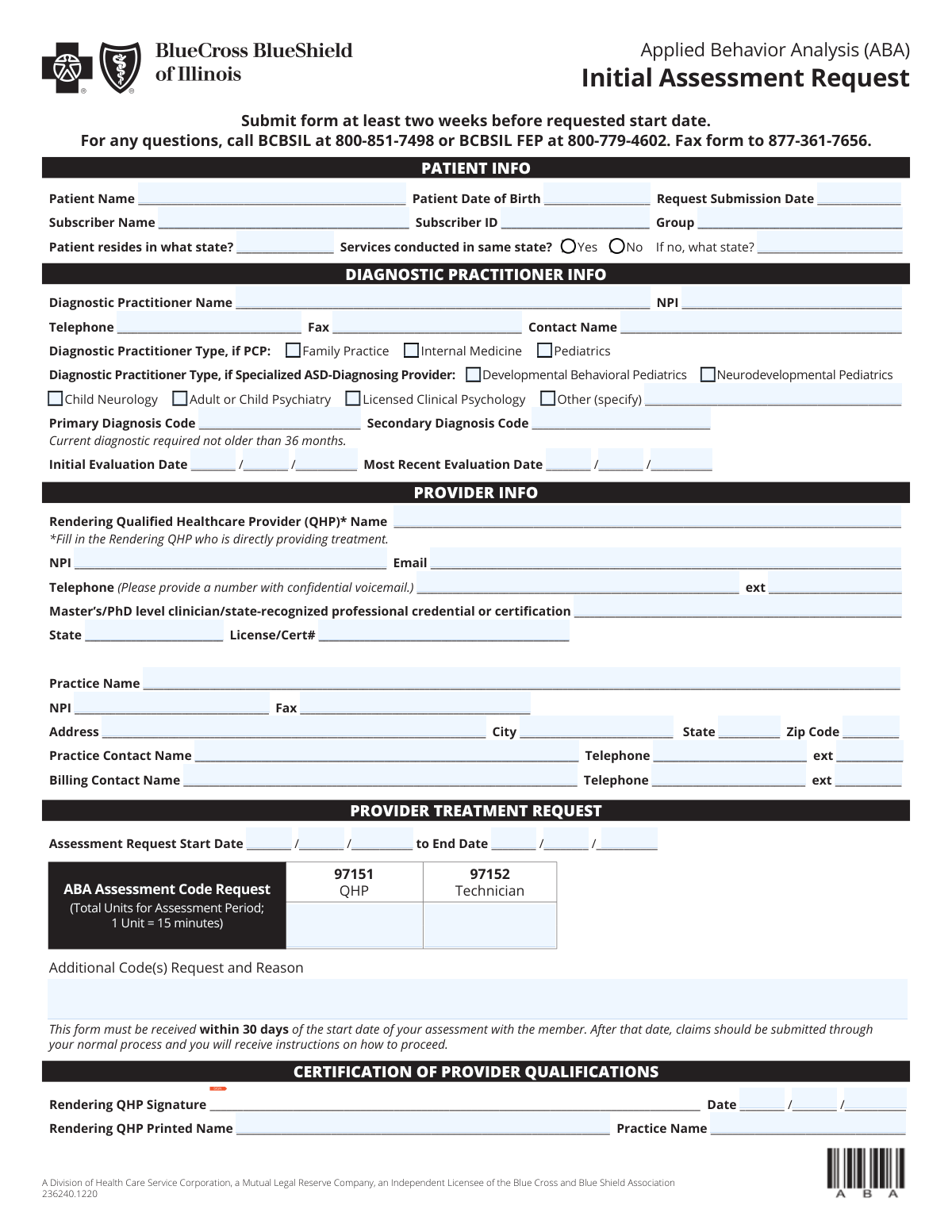
The Applied Behavior Analysis (ABA) Initial Assessment Request is a Blue Cross and Blue Shield of Illinois (BCBSIL) form used by providers to request approval for an initial ABA assessment period, including requested dates of service and CPT assessment codes/units (e.g., 97151 and 97152). It captures key member information, diagnostic practitioner details (including diagnosis codes and evaluation dates), and rendering qualified healthcare provider (QHP) credentials and attestations. Submitting it on time (noted as at least two weeks before the requested start date and within 30 days of the assessment start date) helps avoid delays and ensures the plan has the information needed to process the request. Today, this form can be filled out quickly and accurately using AI-powered services like Instafill.ai, which can also convert non-fillable PDF versions into interactive fillable forms.
Our AI automatically handles information lookup, data retrieval, formatting, and form filling.
It takes less than a minute to fill out ABA Initial Assessment Request (BCBSIL) using our AI form filling.
Securely upload your data. Information is encrypted in transit and deleted immediately after the form is filled out.

Form specifications

Form name: Applied Behavior Analysis (ABA) Initial Assessment Request
Number of pages: 1
Language: English
Categories: ABA forms, behavioral health forms, therapy forms, healthcare assessment forms
main-image

Instafill Demo: filling out a legal form in seconds

How to Fill Out ABA Initial Assessment Request (BCBSIL) Online for Free in 2026

Are you looking to fill out a ABA INITIAL ASSESSMENT REQUEST (BCBSIL) form online quickly and accurately? Instafill.ai offers the #1 AI-powered PDF filling software of 2026, allowing you to complete your ABA INITIAL ASSESSMENT REQUEST (BCBSIL) form in just 37 seconds or less.
Follow these steps to fill out your ABA INITIAL ASSESSMENT REQUEST (BCBSIL) form online using Instafill.ai:
  1. 1 Go to Instafill.ai and upload the ABA Initial Assessment Request form (or select it from the form library).
  2. 2 Enter patient and subscriber details: patient name, date of birth, submission date, subscriber name/ID, group number, and the patient residence state (and whether services are in the same state).
  3. 3 Complete diagnostic practitioner information: practitioner name, NPI, phone/fax, contact name, practitioner type (PCP or specialized ASD-diagnosing provider), diagnosis codes, and evaluation dates.
  4. 4 Fill in provider and rendering QHP details: rendering QHP name, NPI, email, confidential voicemail phone/extension, credentials, license/certification state and number, and practice identifiers and address.
  5. 5 Specify the assessment request period (start and end dates) and enter requested ABA assessment code units (e.g., 97151 QHP units and 97152 technician units), plus any additional codes and reasons.
  6. 6 Review the completed form for accuracy (dates, NPIs, diagnosis codes, units, and contact information), then have the rendering QHP sign and date the certification and add printed name and practice name.
  7. 7 Download the finalized form and submit it per the form instructions (e.g., fax to the listed number) and retain a copy for your records.

Our AI-powered system ensures each field is filled out correctly, reducing errors and saving you time.

Why Choose Instafill.ai for Your Fillable ABA Initial Assessment Request (BCBSIL) Form?

Speed

Complete your ABA Initial Assessment Request (BCBSIL) in as little as 37 seconds.

Up-to-Date

Always use the latest 2026 ABA Initial Assessment Request (BCBSIL) form version.

Cost-effective

No need to hire expensive lawyers.

Accuracy

Our AI performs 10 compliance checks to ensure your form is error-free.

Security

Your personal information is protected with bank-level encryption.

Frequently Asked Questions About Form ABA Initial Assessment Request (BCBSIL)

This form is used to request authorization/approval for an initial Applied Behavior Analysis (ABA) assessment for a BCBSIL member. It captures patient, subscriber, diagnosing practitioner, and rendering provider details plus the assessment codes/units being requested.

Typically, the ABA provider/practice requesting the assessment completes and submits the form. The form also requires information about the diagnostic practitioner and the rendering Qualified Healthcare Provider (QHP) who will provide the assessment.

The form instructs you to submit it at least two weeks before the requested start date. Planning ahead helps avoid delays in starting the assessment.

Fax the completed form to 877-361-7656. If you have questions, call BCBSIL at 800-851-7498 or BCBSIL FEP at 800-779-4602.

Yes. The form states it must be received within 30 days of the start date of the assessment with the member; after that, claims should be submitted through the normal process and you will receive instructions on how to proceed.

You’ll need the patient’s name and date of birth, the request submission date, and the subscriber’s name, subscriber ID, and group number. You must also indicate the patient’s state of residence and whether services are conducted in the same state.

Enter the state where the patient resides, then check “Yes” if services are conducted in that same state. If “No,” you must provide the state where services will be conducted.

You must provide the diagnostic practitioner’s details, the primary (and any secondary) diagnosis code(s), and the initial and most recent evaluation dates. The form notes the current diagnostic is required and must not be older than 36 months.

You can select a PCP type (Family Practice, Internal Medicine, Pediatrics) or a specialized ASD-diagnosing provider type (e.g., Developmental Behavioral Pediatrics, Neurodevelopmental Pediatrics, Child Neurology, Adult/Child Psychiatry, Licensed Clinical Psychology). If none apply, select “Other” and specify the type.

The form allows you to request units for 97151 (QHP) and 97152 (Technician). Enter the total units for the assessment period, noting that 1 unit equals 15 minutes.

Yes. Use the “Additional Code(s) Request and Reason” area to list any additional code(s) and explain why they are needed.

The Rendering QHP is the Qualified Healthcare Provider directly providing the treatment/assessment. You must provide their name, NPI, email, phone (with confidential voicemail if possible), credentials, license/certification details, and sign/date the certification section.

The rendering QHP NPI identifies the individual clinician providing the service, while the practice NPI identifies the organization/practice. The form requests both, so be sure each NPI is entered in the correct field.

Yes. AI form-filling tools (including services like Instafill.ai) can help auto-fill fields accurately from your source information, reducing manual entry and saving time—especially for repeated provider/practice details.

You can upload the PDF to Instafill.ai, map or confirm the requested fields (patient, subscriber, provider, codes/units), and let the AI populate the form for review before exporting. If the PDF is flat/non-fillable, Instafill.ai can convert it into an interactive fillable form so you can complete and sign it more easily.

Compliance ABA Initial Assessment Request (BCBSIL)
Validation Checks by Instafill.ai

1
Validates required patient and subscriber identity fields are complete
Checks that Patient Name, Patient Date of Birth, Subscriber Name, Subscriber ID, and Group Number are present and not left blank. These fields are essential to match the request to the correct member and benefits plan. If any are missing, the submission should be rejected or routed to manual review because eligibility and authorization cannot be reliably determined.
2
Validates all date fields use a real calendar date and consistent format
Ensures all dates (DOB, Request Submission Date, Initial Evaluation Date, Most Recent Evaluation Date, Assessment Start/End Date, Certification Date) are valid calendar dates (e.g., no 02/30) and follow the expected MM/DD/YYYY structure. This prevents downstream processing errors and incorrect timeliness determinations. If invalid, the system should flag the specific field and block submission until corrected.
3
Ensures patient date of birth is not in the future and indicates plausible age
Validates that the Patient Date of Birth is earlier than the Request Submission Date and earlier than today, and that the resulting age is within a plausible range (e.g., 0–120 years). This reduces data entry mistakes that can cause eligibility mismatches or inappropriate clinical routing. If the DOB fails these checks, the submission should be rejected or require confirmation/correction.
4
Enforces submission lead-time: request submitted at least two weeks before requested start date
Compares Request Submission Date to the Assessment Request Start Date and verifies the submission is at least 14 calendar days prior, per the form instruction. This is important for operational scheduling and timely review. If the lead-time is not met, the system should flag as late and either prevent submission or require an override reason/workflow for expedited handling.
5
Enforces 30-day receipt rule relative to assessment start date
Validates that the Request Submission Date is not more than 30 days after the Assessment Request Start Date, reflecting the form statement that the form must be received within 30 days of the start date. This ensures requests are processed under the correct administrative pathway. If outside the window, the submission should be flagged and routed to the claims/alternate process instructions rather than standard authorization.
6
Validates assessment request date range logic (start date before end date)
Checks that the Assessment Request End Date is on or after the Assessment Request Start Date and that the range is not unreasonably long for an assessment period (configurable business rule). This prevents inverted or nonsensical service periods that can break unit calculations and authorization periods. If invalid, the system should block submission and prompt for corrected dates.
7
Validates state fields and conditional 'services conducted in same state' logic
Ensures Patient Residence State is provided and is a valid US state/territory abbreviation or allowed value list. If 'Services conducted in same state' is marked Yes, Services State (if different) must be blank; if marked No, Services State must be completed and must differ from the residence state. If the conditional logic fails, the submission should be rejected because service location affects network rules and coverage.
8
Validates diagnostic practitioner type selection and 'Other' specification requirement
Checks that at least one Diagnostic Practitioner Type is selected (PCP type or specialized ASD-diagnosing provider type). If 'Other (specify)' is checked, the free-text specification must be present and non-trivial (e.g., not 'N/A'). If no type is selected or 'Other' is not specified, the submission should be flagged because practitioner qualification cannot be confirmed.
9
Validates NPI format for diagnostic practitioner, rendering QHP, and practice
Ensures each NPI field contains exactly 10 numeric digits and passes the NPI Luhn check-digit algorithm. Correct NPIs are critical for provider identification, credential verification, and claims alignment. If an NPI fails validation, the system should block submission or route to manual verification with a clear error message indicating which NPI is invalid.
10
Validates phone and fax number formats and minimum digit requirements
Checks that telephone and fax numbers (diagnostic practitioner, rendering QHP, practice, practice contact, billing contact) contain valid digits with an acceptable length (typically 10 digits for US numbers) and allow standard punctuation. Extensions, if provided, must be numeric and within a reasonable length (e.g., 1–6 digits). If invalid, the system should flag the field because incorrect contact information delays clinical review and coordination.
11
Validates rendering QHP email address format
Ensures the Rendering QHP Email is syntactically valid (e.g., [email protected]) and does not contain spaces or clearly invalid domains. Email is often used for follow-up and documentation requests, so accuracy affects turnaround time. If invalid, the system should require correction or an alternate contact method before submission is accepted.
12
Validates diagnosis code format and prevents duplicate primary/secondary codes
Checks that Primary Diagnosis Code (and Secondary, if provided) matches an allowed diagnosis code pattern (e.g., ICD-10-CM format: 1 letter + 2 digits, optional decimal and additional characters). Also verifies the secondary code is not identical to the primary code. If codes are missing/invalid, the request should be rejected or routed to manual review because medical necessity and benefit rules depend on accurate coding.
13
Enforces diagnostic recency requirement (not older than 36 months)
Validates that the Most Recent Evaluation Date is within 36 months of the Request Submission Date (or within 36 months of the Assessment Start Date, depending on business policy) and is not in the future. This aligns with the form requirement that the current diagnostic is not older than 36 months. If the evaluation is too old or invalid, the system should flag the submission as non-compliant and request updated documentation.
14
Validates evaluation date sequence (initial evaluation not after most recent evaluation)
Checks that the Initial Evaluation Date is on or before the Most Recent Evaluation Date. This prevents timeline inconsistencies that can indicate data entry errors or misfiled documentation. If the sequence is illogical, the system should require correction before proceeding.
15
Validates ABA assessment code units are numeric, non-negative, and reasonable
Ensures 97151 (QHP) Units and 97152 (Technician) Units, if provided, are whole numbers (or allowed increments) and not negative, and optionally enforces upper bounds to catch obvious typos (e.g., 9999 units). Because 1 unit equals 15 minutes, unit accuracy directly impacts authorized time and cost. If units are missing when required or out of range, the submission should be blocked or flagged for review.
16
Requires additional code details when additional codes are requested
If any 'Additional Code(s) Request' is indicated or text is entered, validates that the request includes both the code(s) and a clear reason/justification (minimum length and not placeholder text). This ensures reviewers have enough information to evaluate non-standard requests. If insufficient, the system should flag the entry and require completion before acceptance.
17
Validates provider qualification certification completeness (signature, printed name, date, and practice name)
Checks that Rendering QHP Signature, Certification Date, Rendering QHP Printed Name, and Certification Practice Name are all present and that the certification date is not in the future. This attestation is required to confirm provider qualifications and accountability. If any element is missing or inconsistent, the submission should be rejected or routed to manual follow-up because the certification is incomplete.

Common Mistakes in Completing ABA Initial Assessment Request (BCBSIL)

Missing or inconsistent patient vs. subscriber information

People often enter the patient’s name/DOB correctly but leave the subscriber name, subscriber ID, or group number blank, or they accidentally swap patient and subscriber details. This happens because families assume the patient is always the subscriber, which is often untrue for dependents. Missing or mismatched member data can delay eligibility verification and cause the request to be pended or denied. To avoid this, copy the subscriber information exactly as it appears on the insurance card; AI-powered tools like Instafill.ai can auto-map patient vs. subscriber fields and validate formats.

Incorrect date formats or impossible dates across the form

A frequent error is using inconsistent date formats (MM/DD/YYYY vs. DD/MM/YYYY), leaving out the year, or entering impossible dates (e.g., 02/30). This is common when multiple date fields appear close together (submission date, evaluation dates, start/end dates, certification date). Incorrect dates can trigger processing delays, make the request appear out of compliance, or require resubmission. Use MM/DD/YYYY consistently and double-check each date; Instafill.ai can standardize date formatting and flag invalid dates automatically.

Not meeting the timing rules (two-week lead time and 30-day receipt rule)

Many submitters overlook the instruction to submit at least two weeks before the requested start date, or they choose a start date that makes the form arrive outside the stated 30-day window from the assessment start. This happens because the form contains multiple timing statements and the difference between “requested start date” and “assessment start date” can be confusing. Noncompliance can lead to delays, retroactive issues, or instructions to submit claims through a different process. Avoid this by selecting realistic start/end dates and submitting early; Instafill.ai can prompt warnings when dates violate lead-time rules.

State-of-residence vs. service-location mismatch (and missing ‘if no’ state)

Users often check “Services conducted in same state?” incorrectly or forget to fill in the service state when “No” is selected. This happens because the question is easy to skim and the conditional field (“If no, what state?”) is frequently missed. Missing or inconsistent state information can cause routing errors, network/benefit mismatches, or additional outreach from the payer. To avoid this, confirm where services will actually be delivered (including telehealth rules if applicable) and complete the conditional state field; Instafill.ai can enforce conditional logic so the “if different” state can’t be left blank.

Diagnostic practitioner type boxes left blank or multiple conflicting types selected

A common mistake is not selecting any diagnostic practitioner type, or selecting both PCP and specialized ASD-diagnosing provider categories without clarity. This happens because the form presents two separate type sections and users may not know which applies to the diagnosing clinician. Missing/unclear practitioner type can slow medical necessity review or trigger requests for clarification. Choose the single best-fitting category and use “Other (specify)” when needed; Instafill.ai can guide selection and reduce conflicting checkbox entries.

Diagnosis codes entered incorrectly (non-ICD-10, truncated, or missing specificity)

Submitters sometimes enter narrative diagnoses (e.g., “Autism”) instead of ICD-10 codes, omit required characters, or use outdated/unspecified codes. This happens because clinical documentation may list descriptions while the form requires coded data. Incorrect codes can lead to denials, pended requests, or misalignment with the diagnostic evaluation on file. To avoid this, pull the ICD-10 code directly from the diagnostic report and ensure it matches the current evaluation; Instafill.ai can validate code-like formatting and reduce transcription errors.

Evaluation dates not compliant with the ‘not older than 36 months’ requirement

People frequently enter an initial or most recent evaluation date that is older than 36 months, or they leave one of the evaluation dates blank. This happens when older diagnostic reports are reused or when the “most recent” date is confused with the “initial” date. Noncompliant evaluation timing can result in the request being rejected or additional documentation being required. Confirm the diagnostic evaluation date in the report and ensure it falls within 36 months; Instafill.ai can flag dates that exceed the allowed window.

Confusing Rendering QHP vs. practice/provider identifiers (wrong NPI in the wrong field)

A very common error is entering the organization/practice NPI where the Rendering QHP’s individual NPI is required, or vice versa. This happens because the form asks for multiple NPIs (diagnostic practitioner, rendering QHP, practice) and users may copy the same number into all fields. Incorrect NPI placement can cause credentialing mismatches, claim/payment issues, and delays in authorization processing. To avoid this, verify whether each NPI is individual (rendering clinician) or organizational (practice) and enter them in the correct sections; Instafill.ai can detect NPI length/structure and help map the right identifier to the right field.

ABA assessment units entered as minutes/hours instead of 15-minute units

Users often enter total minutes or hours requested rather than converting to units, even though the form states “1 Unit = 15 minutes.” This happens because clinicians think in time (hours) while the payer requires billing units for codes like 97151 and 97152. Incorrect units can lead to under-authorization, over-authorization requests being questioned, or rework to correct totals. Convert time to units (minutes Ă· 15) and ensure totals match the assessment period; Instafill.ai can auto-calculate and format units correctly.

Missing required contact details or confidential voicemail requirement ignored

Submitters frequently omit phone extensions, provide a general office line without confidential voicemail, or leave contact names blank (practice contact vs. billing contact). This happens because the form requests multiple contact points and the “confidential voicemail” note is easy to miss. Incomplete contact info can delay clarifications, lead to missed outreach, and slow down the review. Provide direct lines, extensions, and named contacts for both clinical and billing follow-up; Instafill.ai can ensure required contact fields are complete and consistently formatted.

Provider qualification certification incomplete (missing signature, printed name, date, or credentials)

A frequent issue is forgetting the Rendering QHP signature, leaving the printed name blank, or not completing credential/license fields (state, license/cert number). This happens because the certification block is separated from the main request fields and can be overlooked when rushing to submit. Missing certification elements can cause the request to be pended or rejected until corrected. Always complete signature, printed name, date, and credential/license details; if the form is a flat non-fillable PDF, Instafill.ai can convert it into a fillable version and help prevent missed required fields with validation prompts.
Saved over 80 hours a year

“I was never sure if my IRS forms like W-9 were filled correctly. Now, I can complete the forms accurately without any external help.”

Kevin Martin Green

Your data stays secure with advanced protection from Instafill and our subprocessors

Robust compliance program

Transparent business model

You’re not the product. You always know where your data is and what it is processed for.

ISO 27001, HIPAA, and GDPR

Our subprocesses adhere to multiple compliance standards, including but not limited to ISO 27001, HIPAA, and GDPR.

Security & privacy by design

We consider security and privacy from the initial design phase of any new service or functionality. It’s not an afterthought, it’s built-in, including support for two-factor authentication (2FA) to further protect your account.

Fill out ABA Initial Assessment Request (BCBSIL) with Instafill.ai

Worried about filling PDFs wrong? Instafill securely fills applied-behavior-analysis-aba-initial-assessment-request forms, ensuring each field is accurate.