Yes! You can use AI to fill out Community Resource Referral Form
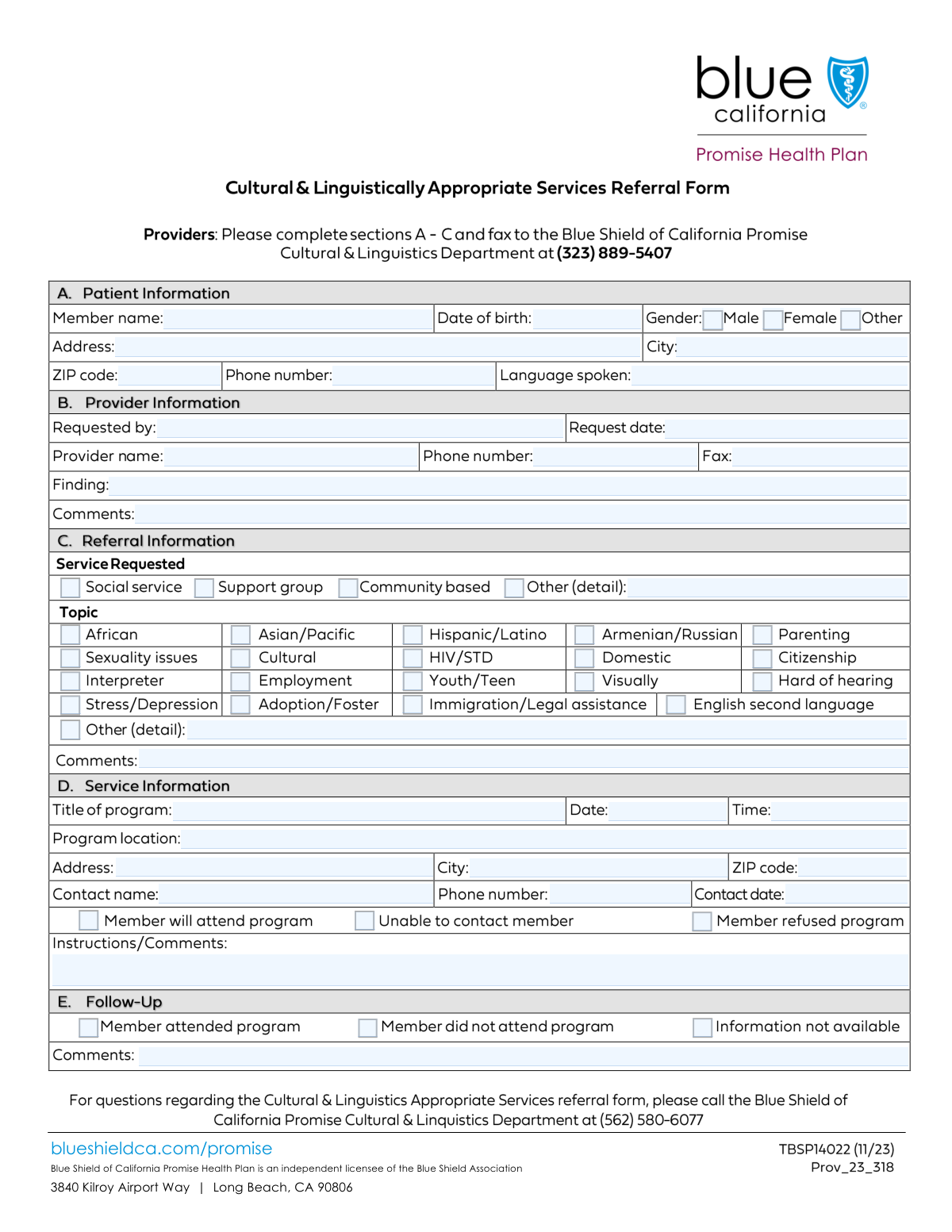
The Community Resource Referral Form is a crucial document for healthcare and social service providers to formally request services for a patient or member from other community-based organizations. It standardizes the referral process, ensuring all necessary patient information, the reason for the referral, and program details are clearly communicated to the receiving agency. Today, this form can be filled out quickly and accurately using AI-powered services like Instafill.ai, which can also convert non-fillable PDF versions into interactive fillable forms.
Our AI automatically handles information lookup, data retrieval, formatting, and form filling.
It takes less than a minute to fill out Community Referral Form using our AI form filling.
Securely upload your data. Information is encrypted in transit and deleted immediately after the form is filled out.
Form specifications
| Form name: | Community Resource Referral Form |
| Number of fields: | 62 |
| Number of pages: | 1 |
| Language: | English |
Instafill Demo: How to fill out PDF forms in seconds with AI
How to Fill Out Community Referral Form Online for Free in 2026
Are you looking to fill out a COMMUNITY REFERRAL FORM form online quickly and accurately? Instafill.ai offers the #1 AI-powered PDF filling software of 2026, allowing you to complete your COMMUNITY REFERRAL FORM form in just 37 seconds or less.
Follow these steps to fill out your COMMUNITY REFERRAL FORM form online using Instafill.ai:
- 1 Navigate to Instafill.ai and upload the Community Resource Referral Form, or select it from our template library.
- 2 Use the AI assistant to accurately fill in the 'Patient Information' section, including name, date of birth, and contact details.
- 3 Complete the 'Provider Information' section, detailing who is making the referral and their contact information.
- 4 In the 'Referral Details' section, check the boxes for all applicable services requested, such as social services, legal assistance, or support groups, and provide any necessary comments.
- 5 If referring to a specific event, fill out the 'Program Title, Date, and Time' and 'Program Location' sections.
- 6 Review all entered information for accuracy. Instafill.ai's AI can help flag any incomplete or inconsistent fields before finalization.
- 7 Securely download, print, or share the completed referral form directly with the relevant agency or for your records.
Our AI-powered system ensures each field is filled out correctly, reducing errors and saving you time.
Why Choose Instafill.ai for Your Fillable Community Referral Form Form?
Speed
Complete your Community Referral Form in as little as 37 seconds.
Up-to-Date
Always use the latest 2026 Community Referral Form form version.
Cost-effective
No need to hire expensive lawyers.
Accuracy
Our AI performs 10 compliance checks to ensure your form is error-free.
Security
Your personal information is protected with bank-level encryption.
Frequently Asked Questions About Form Community Referral Form
This form is used by providers to refer a patient to a specific community program, social service, or support group. It documents the patient's needs, the provider's recommendation, and the details of the referred service.
A healthcare provider, social worker, or case manager who is referring a patient for additional services typically completes this form. The initial sections are filled out by the referring provider, while the follow-up sections are completed after the referral is processed.
The 'Requested By' field is for the name of the specific individual making the referral, such as a case manager. The 'Provider Name' field is for the name of the larger clinic, hospital, or organization they represent.
The 'Finding' section is for specific clinical or social findings that justify the referral. The 'Comments' section can be used for any other relevant context or supplementary information that might be helpful for the receiving agency.
Check the 'Other Service' or 'Other Topic' box and provide a clear, concise description of the requested service in the corresponding details field. This ensures the referral is directed to the appropriate resource.
The follow-up section, including fields like 'Member attended program' and 'Follow-Up Comments,' should be completed after the referral has been made and the outcome is known. This is crucial for tracking the effectiveness of the referral and closing the loop.
If you cannot reach the member, you should check the 'Unable to contact member' box in the referral details section. It is also helpful to add a note in the 'Follow-Up Comments' field about the attempts made.
If program details are not finalized, you can leave those fields blank or write 'TBD' (To Be Determined). However, you should provide as much information as possible, such as the program title and location, to initiate the referral.
The form does not specify required attachments, but it is good practice to include supporting documents like clinical notes or assessments that justify the referral. Always check with the receiving agency for their specific requirements.
Yes, services like Instafill.ai use AI to accurately auto-fill form fields from your records, which can save significant time and reduce errors. This is especially useful for providers who complete many referral forms.
You can use a service like Instafill.ai to fill out this form online. Simply upload the form, and the platform will make it fillable, allowing you to type directly into the fields and save or print the completed document.
If you have a non-fillable PDF, you can use a tool like Instafill.ai to convert it into an interactive, fillable form. This allows you to easily type your information instead of printing and filling it out by hand.
Compliance Community Referral Form
Validation Checks by Instafill.ai
1
Patient Date of Birth Validity
This check ensures the 'Date of Birth' field contains a valid date in a recognized format (e.g., MM/DD/YYYY) and that the date is in the past. This is crucial for verifying patient identity and eligibility for age-specific services. If the date is invalid or in the future, the form submission will be rejected with an error message prompting the user to enter a valid past date.
2
Request Date Chronology
This validation verifies that the 'Request Date' is a valid date and is not set in the future. This maintains the integrity of the referral timeline and prevents data entry errors. A future date would be illogical, so the system will block the submission and require the user to correct the date to today or a past date.
3
Phone Number Format Standardization
This check validates that all phone number fields ('Phone Number', 'Provider Phone Number', 'Provider Fax Number', 'Contact Phone Number') adhere to a standard format, such as (XXX) XXX-XXXX or a 10-digit number. Consistent formatting is essential for successful communication and integration with other systems. An invalid format will trigger an error, asking the user to re-enter the number correctly.
4
ZIP Code Format Validation
This validation ensures that both the patient's 'ZIP Code' and the program's 'ZIP code' are in a valid 5-digit or 9-digit (ZIP+4) format. Correct ZIP codes are critical for mailings, location-based service matching, and demographic analysis. If the format is incorrect, the submission will fail until a valid ZIP code is provided.
5
Conditional Requirement for 'Other Service Requested Details'
This rule checks that if the 'Other Service' checkbox is selected, the corresponding 'Other Service Requested Details' text field is not empty. This ensures that when a non-standard service is requested, the necessary details are captured for proper processing. Failure to provide details when 'Other Service' is checked will prevent form submission and prompt the user to describe the service.
6
Conditional Requirement for 'Other Topic Details'
This validation ensures that if the 'Other' checkbox under 'Referral Details' is selected, the 'Other Topic Details' text field must be filled out. This is important for capturing the specifics of a referral topic that does not fit into the predefined categories. If the details are missing, the form cannot be submitted, ensuring complete information is always provided for 'Other' topics.
7
Logical Date Sequence for Program
This check verifies that the 'Program Date' is on or after the 'Request Date'. A program cannot be scheduled before a request for it is made, so this rule prevents logical inconsistencies in the data. If the 'Program Date' precedes the 'Request Date', the system will display an error and require the user to correct one of the dates.
8
Mutually Exclusive Contact Status
This validation ensures that only one of the following checkboxes can be selected: 'Member will attend program', 'Unable to contact member', or 'Member refused service'. These options represent mutually exclusive outcomes of the referral contact attempt. Allowing multiple selections would create conflicting data, so the system will enforce a single choice for this status.
9
Mutually Exclusive Attendance Status
This rule ensures that a member's attendance status is unambiguous by allowing only one of 'Member attended program' or 'Member did not attend program' to be selected. These are binary, mutually exclusive outcomes that are critical for reporting and follow-up. The system will prevent the user from selecting both options simultaneously.
10
Completeness of Core Patient Information
This check confirms that essential patient fields, including 'Member Name', 'Date of Birth', 'Address', 'City', and 'ZIP Code', are all filled out. This information is fundamental for identifying the patient and providing services, making it mandatory for a valid referral. If any of these fields are empty, the form submission will be blocked until the required information is provided.
11
Completeness of Core Provider Information
This validation ensures that key provider fields such as 'Requested By', 'Request Date', and 'Provider Name' are not empty. This information is vital for tracking the origin of the referral and for any necessary communication with the requester. An incomplete provider section will result in a submission error, prompting the user to fill in the missing fields.
12
Required Program Details for Attendance Confirmation
This rule validates that if 'Member will attend program' is checked, then the 'Program Title', 'Program Date', and 'Program Location' fields must be filled. It is illogical to confirm attendance for a program that has not been specified. If attendance is confirmed without program details, the form will be rejected with a message requiring the user to provide the necessary program information.
13
Exclusive Gender Selection
This validation ensures that only one gender option ('Male', 'Female', or 'Gender other') is selected for the patient. This is a standard requirement for demographic data collection to avoid ambiguity and ensure data integrity. The user interface should use radio buttons to enforce this, but a backend validation provides a secondary layer of protection against invalid submissions.
Common Mistakes in Completing Community Referral Form
Users frequently check an 'Other' box, such as for 'Other Service' or 'Other Topic', but forget to provide details in the corresponding text field. This makes the selection meaningless and requires a follow-up call to clarify the patient's needs, delaying service delivery. To avoid this, always ensure that if you select an 'Other' option, you provide a clear and concise explanation in the specified details field.
The form asks for both 'Requested By' (the individual) and 'Provider Name' (the organization). A common error is entering the same name in both fields or putting the organization name in the individual's field. This ambiguity can lead to communication being sent to the wrong person or department. To prevent this, 'Requested By' should be the full name of the specific person making the referral, while 'Provider Name' should be the official name of the clinic or agency.
The 'Finding' and 'Comments' fields are often filled with generic phrases like 'needs help' or 'follow-up'. This lack of specific information forces the receiving provider to guess the patient's situation or initiate contact just to understand the referral reason, causing significant delays. To ensure a successful referral, provide concrete details about the diagnosis, observed behaviors, and the specific service being requested.
The form includes mutually exclusive checkboxes like 'Member attended program' and 'Member did not attend program'. Users sometimes check both, or none at all, leaving the outcome of the referral unknown. This prevents accurate tracking and case closure. Always select one, and only one, status box that accurately reflects the final outcome of the referral.
A user might correctly enter a non-English language in the 'Language Spoken' field but then forget to check the 'Interpreter' box in the Referral Details section. This oversight can lead to a scheduled appointment where no interpreter is present, resulting in a wasted visit and a poor patient experience. If a patient's primary language is not English, always confirm if an interpreter is needed and check the corresponding box.
With multiple date fields ('Date of Birth', 'Request Date', 'Program Date'), users often enter dates in various formats (e.g., 01-02-23, 2/1/2023, Jan 2, 23). This inconsistency, especially for 'Date of Birth', can lead to data entry errors and failed patient identification. To ensure accuracy, always use the standard MM/DD/YYYY format for all dates. AI-powered tools like Instafill.ai can help by automatically standardizing date formats.
The 'Member Name' field is sometimes filled with a nickname, initials, or a partial name instead of the full legal name. This can cause a mismatch with insurance records or other official documents, leading to billing rejections and delays in care. Always enter the patient's full name as it appears on their ID or insurance card to ensure proper identification.
If the referral is for a specific workshop or class, users sometimes leave the 'Program Title', 'Date', 'Time', and 'Location' fields blank. This makes it impossible for the patient or staff to know which event the referral pertains to, causing confusion and missed opportunities. When referring to a scheduled program, it is critical to fill out all program-specific details completely.
Users often submit the form with a partial address, missing an apartment or suite number, or with an incorrect ZIP code. This can prevent important mail from reaching the patient and may cause issues with verifying eligibility for location-based services. Always double-check that the street address is complete and the ZIP code is correct. If the form is a non-fillable PDF, a tool like Instafill.ai can convert it to a fillable version and help validate addresses.
The form has checkboxes for cultural background (e.g., 'Topic Hispanic/Latino') and separate ones for service needs (e.g., 'Immigration/Legal assistance'). A common mistake is to check a demographic box assuming it implies a service need. This leads to an inaccurate picture of the patient's request. Be sure to select checkboxes in both categories to reflect the patient's identity and their specific needs separately.
Saved over 80 hours a year
“I was never sure if my IRS forms like W-9 were filled correctly. Now, I can complete the forms accurately without any external help.”
Kevin Martin Green
Your data stays secure with advanced protection from Instafill and our subprocessors

Robust compliance program
Transparent business model
You’re not the product. You always know where your data is and what it is processed for.
ISO 27001, HIPAA, and GDPR
Our subprocesses adhere to multiple compliance standards, including but not limited to ISO 27001, HIPAA, and GDPR.
Security & privacy by design
We consider security and privacy from the initial design phase of any new service or functionality. It’s not an afterthought, it’s built-in, including support for two-factor authentication (2FA) to further protect your account.
Fill out Community Referral Form with Instafill.ai
Worried about filling PDFs wrong? Instafill securely fills community-resource-referral-form forms, ensuring each field is accurate.