Yes! You can use AI to fill out DCFS Suspected Child Abuse/Neglect Referral Information Request

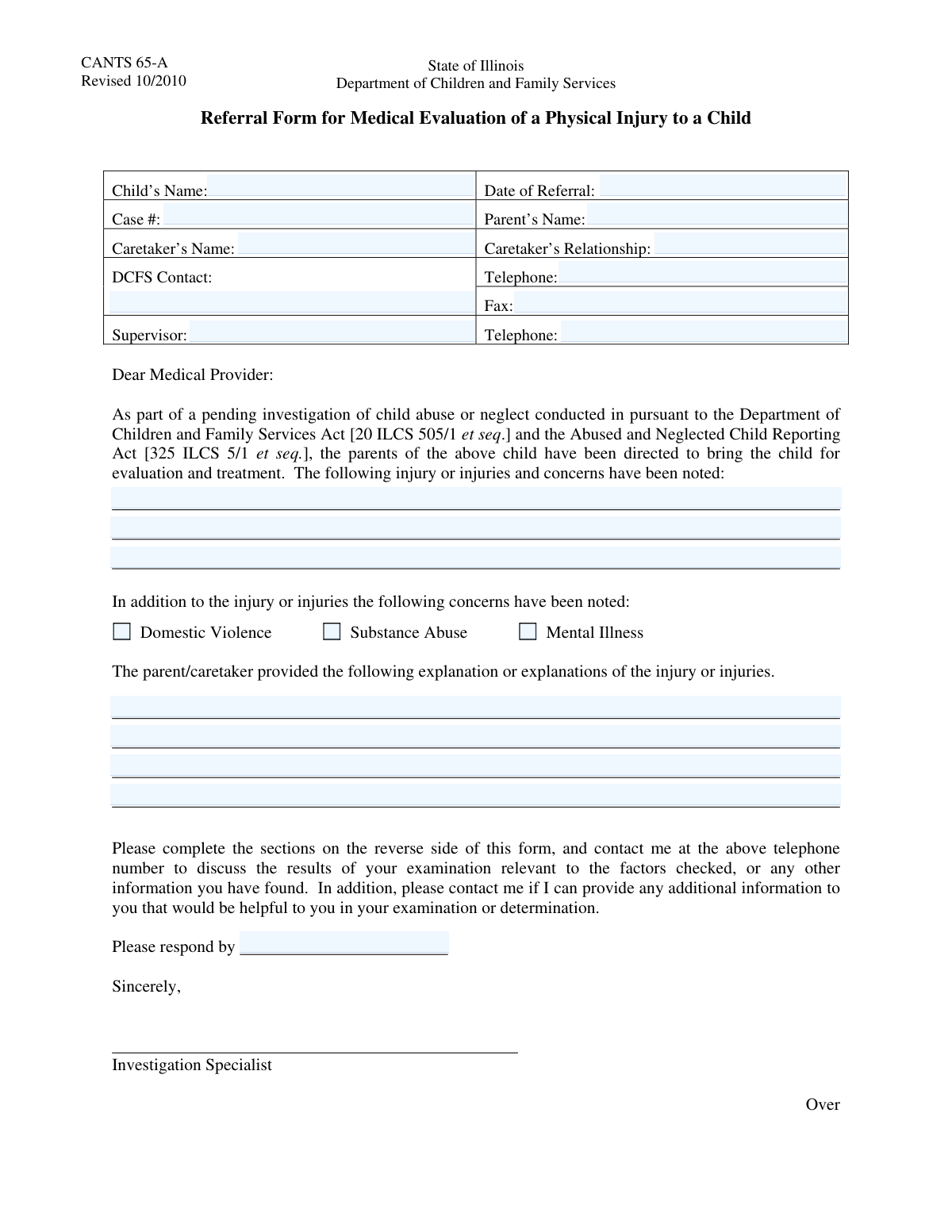
This form is a critical document used by the Department of Children and Family Services (DCFS) to gather detailed information following a referral for suspected child abuse or neglect. It serves to formally document observed injuries, environmental concerns like domestic violence or substance abuse, and the parent/caretaker's explanation, providing a basis for investigation and intervention. Today, this form can be filled out quickly and accurately using AI-powered services like Instafill.ai, which can also convert non-fillable PDF versions into interactive fillable forms.
DCFS Referral Form is part of the referral forms category on Instafill.
Our AI automatically handles information lookup, data retrieval, formatting, and form filling.
It takes less than a minute to fill out DCFS Referral Form using our AI form filling.
Securely upload your data. Information is encrypted in transit and deleted immediately after the form is filled out.

Form specifications

Form name: DCFS Suspected Child Abuse/Neglect Referral Information Request
Number of fields: 23
Number of pages: 2
Filled form examples: Form DCFS Referral Form Examples
Language: English
main-image

Instafill Demo: How to fill out PDF forms in seconds with AI

How to Fill Out DCFS Referral Form Online for Free in 2026

Are you looking to fill out a DCFS REFERRAL FORM form online quickly and accurately? Instafill.ai offers the #1 AI-powered PDF filling software of 2026, allowing you to complete your DCFS REFERRAL FORM form in just 37 seconds or less.
Follow these steps to fill out your DCFS REFERRAL FORM form online using Instafill.ai:
  1. 1 Navigate to Instafill.ai and upload or select the DCFS Referral Information Request form.
  2. 2 Provide the child's name, date of referral, and assigned case number in the initial section.
  3. 3 Enter the names and contact information for the parent, caretaker, DCFS contact, and supervisor as prompted by the AI assistant.
  4. 4 Detail all noted injuries or concerns in the designated fields, providing clear and concise descriptions for each.
  5. 5 Check the boxes for any additional concerns such as domestic violence, substance abuse, or mental illness if applicable.
  6. 6 Accurately transcribe the parent or caretaker's explanation for the child's injuries into the provided text area.
  7. 7 Review all entered information for accuracy, enter the required response date, and then securely finalize and submit the document as directed.

Our AI-powered system ensures each field is filled out correctly, reducing errors and saving you time.

Why Choose Instafill.ai for Your Fillable DCFS Referral Form Form?

Speed

Complete your DCFS Referral Form in as little as 37 seconds.

Up-to-Date

Always use the latest 2026 DCFS Referral Form form version.

Cost-effective

No need to hire expensive lawyers.

Accuracy

Our AI performs 10 compliance checks to ensure your form is error-free.

Security

Your personal information is protected with bank-level encryption.

Frequently Asked Questions About Form DCFS Referral Form

This form is used to document a referral to the Department of Children and Family Services (DCFS) regarding concerns or injuries to a child. It gathers initial information about the child, the concerns, and the individuals involved for case management.

This form is typically completed by professionals such as social workers, medical staff, or school personnel who are making a formal referral to DCFS. It serves as an official record of the reported concerns.

The 'Parent's Name' field is for the child's legal parent, while 'Caretaker's Name' is for the person currently responsible for the child's care, who may be a relative or foster parent. If the parent is also the current caretaker, you can enter their name in both fields.

If a case number has not yet been assigned, you can leave the field blank or write 'Pending'. You should follow up with the DCFS office to obtain the number once it is assigned for future correspondence.

Provide specific, objective descriptions of any physical injuries, behavioral changes, or environmental concerns. Include details such as the location and appearance of injuries, dates of observation, and any direct statements made by the child.

Document the three most significant concerns in the spaces provided. For additional concerns, attach a separate sheet of paper, making sure to reference the child's name and case number on the attachment.

In this section, you should accurately record the explanation provided by the parent or caretaker regarding the child's injury or the situation. It is important to quote their words as closely as possible without adding your own interpretation.

The 'Response Date' is the deadline by which a response or follow-up action is expected regarding this referral. This date helps ensure that the case receives timely attention from the relevant parties.

These appear to be generic fields that may be used for additional notes, signatures, or other information specific to your agency's process. If you are unsure of their purpose, please consult your supervisor or the DCFS contact for clarification.

Yes, providing both sets of contact information is recommended. The DCFS Contact is the primary person handling the case, while the Supervisor information provides an alternative contact for escalation or if the primary contact is unavailable.

Yes, services like Instafill.ai use AI to accurately auto-fill form fields from your records, which can save significant time and reduce data entry errors. This is especially helpful for professionals who handle many similar forms.

Simply upload the form to the Instafill.ai platform. The AI will identify the fields, allowing you to connect your data source or enter the information once to have it automatically and accurately populate the entire document.

You can use a service like Instafill.ai, which is designed to convert flat, non-fillable PDFs into interactive, fillable forms. This enables you to type directly into the fields online instead of having to print and fill the form by hand.

Compliance DCFS Referral Form
Validation Checks by Instafill.ai

1
Validates Referral Date Format and Logic
This check ensures the 'Date of Referral' is entered in a valid date format (e.g., MM/DD/YYYY) and is not a date in the future. This is crucial for maintaining an accurate timeline of events for the case. If the date is invalid or in the future, the form submission will be rejected, and the user will be prompted to correct the entry.
2
Ensures Response Date is After Referral Date
This validation confirms that the 'Response Date' occurs on or after the 'Date of Referral'. A response cannot be requested before a referral is made, so this check maintains logical consistency in the case timeline. An invalid entry would trigger an error, requiring the user to adjust one or both dates to reflect a logical sequence.
3
Validates Case Number Format
This check verifies that the 'Case Number' follows the agency's specific format, which might include a combination of letters, numbers, and hyphens. Correct formatting is essential for linking the form to the correct case file in the system and preventing data entry errors. A non-compliant case number will prevent submission and prompt the user for correction.
4
Ensures All Key Name Fields are Populated
This validation ensures that the 'Child's Name', 'Parent's Name', 'Caretaker's Name', 'DCFS Contact Name', and 'Supervisor Name' fields are not left blank. These names are fundamental for identifying all parties involved in the referral and are critical for case management and follow-up. The form cannot be submitted until all these required name fields are completed.
5
Validates Telephone Number Format
This check confirms that the 'DCFS Contact Telephone' and 'Supervisor Telephone' fields are entered in a recognizable 10-digit format, with or without common separators. Proper formatting ensures the numbers are usable for communication and can be integrated into contact management systems. An invalid format will result in an error message asking the user to re-enter the number correctly.
6
Validates Fax Number Format if Provided
This validation checks the 'DCFS Contact Fax' field only if a value has been entered. If populated, it must conform to a valid 10-digit phone number format. This ensures that any provided fax number is syntactically correct and usable, preventing communication errors. The check is skipped if the field is empty, as it is not mandatory.
7
Requires at Least One Noted Injury or Concern
This validation mandates that the 'Noted Injury/Concern 1' field must be filled out, as the primary purpose of the form is to document concerns. This ensures that every submitted form has a clear, stated reason for the referral. If this field is empty, the submission will be blocked until a primary concern is detailed.
8
Requires Parent/Caretaker Explanation if Injury is Noted
This check creates a logical dependency, requiring the 'Parent/Caretaker Explanation of Injury' field to be completed if any of the 'Noted Injury or Concerns' fields are filled out. This is crucial for capturing the full context of the situation from all perspectives. If an injury is noted but no explanation is provided, the user will be prompted to enter the explanation before the form can be submitted.
9
Ensures Completeness of DCFS Contact Information
This validation verifies that both the 'DCFS Contact Name' and 'DCFS Contact Telephone' fields are completed. Having a named contact person without a phone number, or vice versa, is ineffective for communication. This check guarantees that a complete and actionable point of contact is provided for any necessary follow-up.
10
Ensures Completeness of Supervisor Information
This check ensures that both the 'Supervisor Name' and 'Supervisor Telephone' fields are populated. This information is vital for escalation, oversight, and verification purposes within the agency's workflow. The form submission will fail if either piece of supervisor contact information is missing, ensuring a complete chain of command is documented.
11
Verifies Full Name Entry for Key Individuals
This validation checks that the 'Child's Name', 'Parent's Name', and 'Caretaker's Name' fields likely contain a full name by verifying the presence of at least two words separated by a space. This helps prevent incomplete or single-name entries, which can cause ambiguity in record-keeping. If only one word is detected, a warning may be displayed to prompt the user to enter the full name.
12
Requires Caretaker Relationship when Caretaker is Named
This validation ensures that if a 'Caretaker's Name' is provided, the 'Caretaker's Relationship' to the child must also be specified. This context is essential for understanding the child's living situation and the caretaker's role. The form will be considered incomplete and will prompt the user if a caretaker is listed without defining their relationship.
13
Enforces Sequential Entry of Injuries/Concerns
This check ensures that injuries or concerns are entered sequentially, starting with 'Noted Injury/Concern 1'. It prevents a user from entering a concern in the second or third field while leaving the first one blank. This maintains data organization and prevents sparse, hard-to-read records. If 'Noted Injury/Concern 1' is empty but 'Noted Injury/Concern 2' is not, an error will require the user to move the entry to the first field.

Common Mistakes in Completing DCFS Referral Form

Entering an Incorrect or Incomplete Case Number

Users often transpose digits or omit characters when entering the case number. This happens due to the complexity of the number and simple human error during manual transcription. An incorrect case number is a critical failure, as it prevents the form from being linked to the correct file, leading to major processing delays or the document being lost in the system. To avoid this, meticulously double-check the case number against the source document before submission. AI-powered tools like Instafill.ai can help by validating formats or auto-populating information from a central record to ensure accuracy.

Providing Vague Descriptions of Injuries or Concerns

Instead of objective facts, users may write subjective or emotional descriptions like 'a really bad cut' in the 'Noted Injury/Concern' fields. This often occurs when the filer is distressed or lacks specific terminology. Vague descriptions can be dismissed as opinion and make it difficult for medical or legal staff to assess the situation's severity, weakening the referral's impact. Always describe injuries with factual, observable details: location, size, color, and shape (e.g., 'a 2-inch circular, purple bruise on the right shin').

Paraphrasing the Parent/Caretaker Explanation

Filers may summarize or rephrase the explanation provided by a parent or caretaker, rather than recording it verbatim. This is often done to be concise or because the importance of the exact wording is not understood. This is a serious mistake, as the precise language used by the parent/caretaker is critical evidence for investigators and can have significant legal implications. Always record the explanation exactly as it was given, using quotation marks to indicate that it is a direct quote.

Using Inconsistent or Ambiguous Date Formats

For fields like 'Date of Referral' and 'Response Date', users may enter dates in various formats (e.g., 05-10-2023, Oct 5, 2023, 10/05/23), which can cause confusion, especially with international formats (DD/MM vs. MM/DD). This leads to data entry errors, missed deadlines, and incorrect record sorting. To prevent this, always use the standard MM/DD/YYYY format unless specified otherwise. Using a form-filling tool like Instafill.ai can automatically standardize dates into the required format, eliminating ambiguity.

Forgetting Area Codes or Extensions in Phone Numbers

When entering telephone numbers for the 'DCFS Contact' or 'Supervisor', people frequently omit the area code or a necessary extension. This happens when they assume the recipient is local or simply forget the extension information. This oversight can make it impossible for staff to make contact, delaying urgent communication and slowing down the entire case process. Always enter the complete 10-digit phone number and double-check if an extension is required for a direct line.

Confusing 'Parent's Name' with 'Caretaker's Name'

Users sometimes enter the same name in both the 'Parent's Name' and 'Caretaker's Name' fields, even when the primary caretaker is a different person (e.g., a grandparent or foster parent). This mistake stems from not carefully reading the field labels or misunderstanding the distinction. This can cause confusion regarding legal guardianship versus the person responsible for daily care, potentially leading to contacting the wrong individual. Carefully identify and provide the full names for both the legal parent and the current primary caretaker in their respective fields.

Overlooking Summary Checkboxes

After providing detailed narratives about issues like domestic violence or substance abuse in the main text areas, filers often forget to mark the corresponding summary checkboxes under 'Additional Concerns'. This happens because the checkboxes are in a separate section and are easily missed after completing the detailed writing. Triage systems often rely on these checkboxes for quick risk assessment, so failing to mark them can lead to a case being improperly prioritized. Always review the entire form after filling it out to ensure all relevant checkboxes are ticked.

Using an Incomplete or Informal Child's Name

People may enter a nickname or a shortened version of the child's name instead of their full legal name. This is a common habit and may occur if the filer doesn't have official documents on hand. Using an incomplete name can cause significant problems with record matching in databases, potentially delaying the association of the form with the child's existing case file. Always use the child's full legal name as it appears on official documents like a birth certificate or social security card.

Providing a Vague Caretaker Relationship

In the 'Caretaker's Relationship' field, users might enter a generic term like 'Relative' or 'Family Friend'. This lack of specificity happens when the user is in a hurry or doesn't think to provide a more detailed answer. This ambiguity creates extra work for case workers who then need to follow up to clarify the exact relationship, which is crucial for understanding the child's living situation and legal status. Be as specific as possible, using terms like 'Maternal Grandmother,' 'Legal Guardian,' or 'Foster Parent'.

Entering a Phone Number in the Fax Number Field

It is common for users to mistakenly enter a standard voice telephone number into the 'DCFS Contact Fax' field. As fax machines become less common, people may not have a fax number readily available or may misread the field label in haste. This error results in failed document transmissions and wasted time trying to send sensitive information. Always verify that the number is a dedicated fax line. If the form is a non-fillable PDF, a tool like Instafill.ai can convert it into a smart, fillable version where such fields can be validated to prevent incorrect entries.
Saved over 80 hours a year

“I was never sure if my IRS forms like W-9 were filled correctly. Now, I can complete the forms accurately without any external help.”

Kevin Martin Green

Your data stays secure with advanced protection from Instafill and our subprocessors

Robust compliance program

Transparent business model

You’re not the product. You always know where your data is and what it is processed for.

ISO 27001, HIPAA, and GDPR

Our subprocesses adhere to multiple compliance standards, including but not limited to ISO 27001, HIPAA, and GDPR.

Security & privacy by design

We consider security and privacy from the initial design phase of any new service or functionality. It’s not an afterthought, it’s built-in, including support for two-factor authentication (2FA) to further protect your account.

Fill out DCFS Referral Form with Instafill.ai

Worried about filling PDFs wrong? Instafill securely fills dcfs-suspected-child-abuseneglect-referral-information-request forms, ensuring each field is accurate.