Yes! You can use AI to fill out Applied Behavioral Analysis (ABA) Prior Authorization Form (New Hampshire)
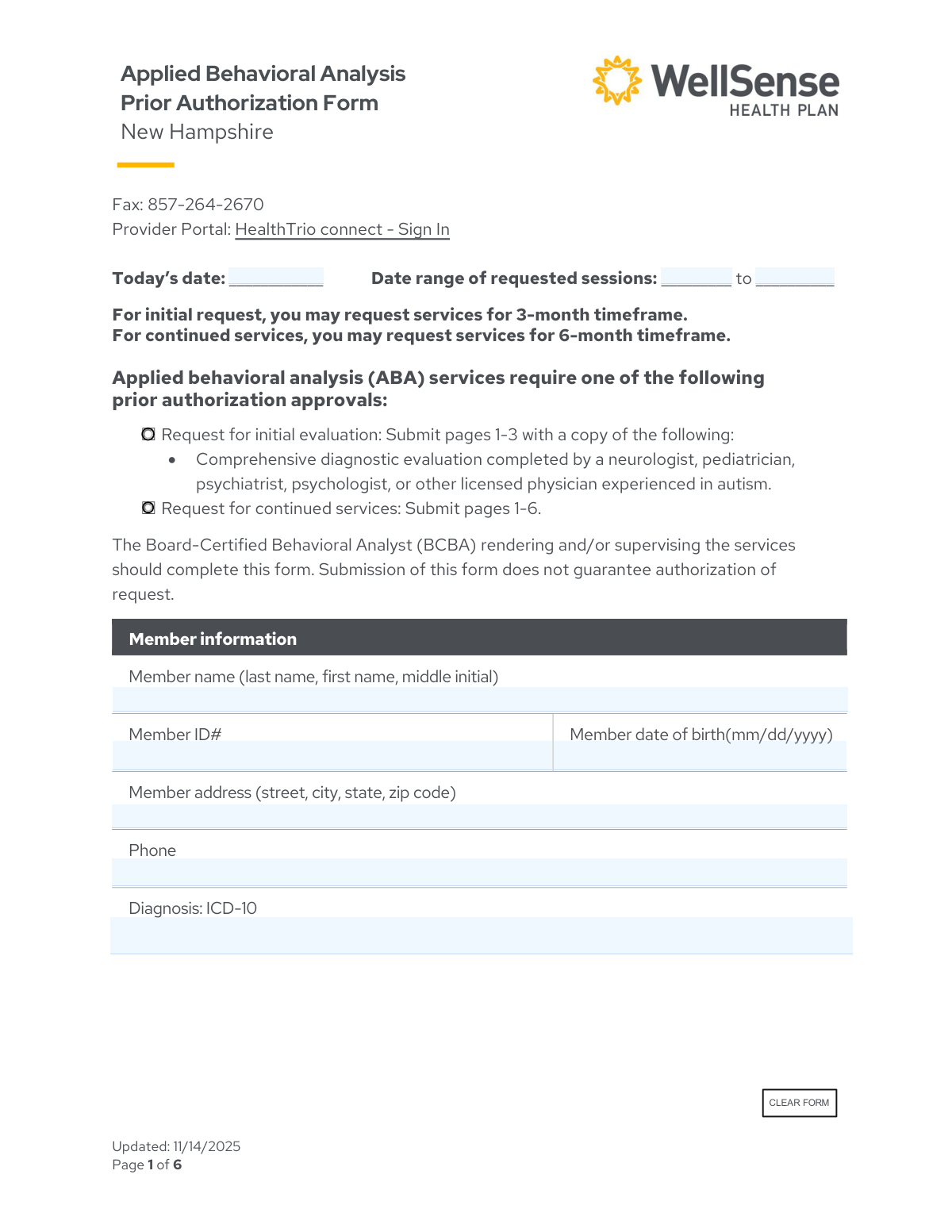
The Applied Behavioral Analysis (ABA) Prior Authorization Form (New Hampshire) is a multi-page authorization request used to obtain payer approval for ABA services, either for an initial evaluation (submit pages 1â3 with a qualifying diagnostic evaluation) or for continued services (submit pages 1â6). It captures member demographics, provider/BCBA credentials, requested ABA service codes and units for the authorization period, care coordination details, medication information, and measurable treatment goals. Accurate completion is important because incomplete or inconsistent information may delay or prevent authorization. Today, this form can be filled out quickly and accurately using AI-powered services like Instafill.ai, which can also convert non-fillable PDF versions into interactive fillable forms.
Our AI automatically handles information lookup, data retrieval, formatting, and form filling.
It takes less than a minute to fill out NH ABA Prior Authorization Form using our AI form filling.
Securely upload your data. Information is encrypted in transit and deleted immediately after the form is filled out.
Form specifications
| Form name: | Applied Behavioral Analysis (ABA) Prior Authorization Form (New Hampshire) |
| Number of pages: | 6 |
| Language: | English |
| Categories: | insurance forms, healthcare forms, medical authorization forms, ABA forms, New Hampshire forms, authorization forms |
Instafill Demo: filling out a legal form in seconds
How to Fill Out NH ABA Prior Authorization Form Online for Free in 2026
Are you looking to fill out a NH ABA PRIOR AUTHORIZATION FORM form online quickly and accurately? Instafill.ai offers the #1 AI-powered PDF filling software of 2026, allowing you to complete your NH ABA PRIOR AUTHORIZATION FORM form in just 37 seconds or less.
Follow these steps to fill out your NH ABA PRIOR AUTHORIZATION FORM form online using Instafill.ai:
- 1 Go to Instafill.ai and upload the PDF (or search/select the “Applied Behavioral Analysis (ABA) Prior Authorization Form (New Hampshire)” template).
- 2 Choose the request type (initial evaluation vs. continued services) and enter the request date plus the requested session date range (3 months for initial requests, up to 6 months for continued services).
- 3 Enter member information: name, member ID, date of birth, address, phone number, and ICD-10 diagnosis code.
- 4 Enter provider and BCBA details: agency name, NPI, BCBA NPI, BCBA license number, provider address, tax ID, fax number, patient encounter history, and the authorization contact person’s name/phone.
- 5 Add requested ABA services by selecting the applicable CPT codes (e.g., 97151–97158 as applicable to product type) and input total 15-minute units for the authorization period (not per week).
- 6 If requesting continued services, complete the clinical sections: prior ABA providers and dates, school/community special services, parent/guardian participation, care coordination with other providers, and medication consultation/medication list.
- 7 Review for completeness, attach required supporting documentation (e.g., comprehensive diagnostic evaluation for initial requests or treatment plan/goal details for continued services), then e-sign the BCBA signature/date and submit via the provider portal or fax as instructed.
Our AI-powered system ensures each field is filled out correctly, reducing errors and saving you time.
Why Choose Instafill.ai for Your Fillable NH ABA Prior Authorization Form Form?
Speed
Complete your NH ABA Prior Authorization Form in as little as 37 seconds.
Up-to-Date
Always use the latest 2026 NH ABA Prior Authorization Form form version.
Cost-effective
No need to hire expensive lawyers.
Accuracy
Our AI performs 10 compliance checks to ensure your form is error-free.
Security
Your personal information is protected with bank-level encryption.
Frequently Asked Questions About Form NH ABA Prior Authorization Form
This form is used to request prior authorization for ABA services for a member in New Hampshire. It helps the health plan determine medical necessity and approve specific ABA service codes and units for a defined time period.
The Board-Certified Behavior Analyst (BCBA) rendering and/or supervising the ABA services should complete the form. The treating BCBA professional must sign and date the form on page 6.
An initial evaluation request requires submitting pages 1â3 plus a comprehensive diagnostic evaluation. A continued services request requires submitting pages 1â6 and includes treatment goals, care coordination, and medication information.
For an initial request, you may request services for a 3-month timeframe. For continued services, you may request services for a 6-month timeframe, and you should enter the start and end dates in the âDate range of requested sessionsâ field.
You must include a copy of a comprehensive diagnostic evaluation completed by a qualified clinician (e.g., neurologist, pediatrician, psychiatrist, psychologist, or other licensed physician experienced in autism). Submit that evaluation along with pages 1â3 of the form.
The form lists a fax submission option at 857-264-2670. It also references a Provider Portal submission option via âHealthTrio connect - Sign In,â if your organization submits authorizations through the portal.
Do not request units per week. The form instructs you to request total units for the entire authorization period (typically up to 6 months), and each unit equals 15 minutes (4 units = 1 hour).
The form includes codes such as 97151, 97153, 97154, 97155, and 97156, and for Clarity/Medicare it also includes 97152, 97157, and 97158. Use the section that matches the memberâs coverage (New Hampshire Medicaid vs. Clarity/Medicare products).
You must provide the memberâs full name, Member ID, date of birth, address, phone number, and the diagnosis ICD-10 code. Missing member identifiers can delay review and processing.
Youâll need the agency name, agency NPI, BCBA NPI, BCBA license number, provider address, Tax ID, fax number, and a contact personâs name and phone number for authorization questions/decisions. The form also asks how many times the patient has been seen and the date of most recent contact.
Continued services requests ask for prior ABA providers and dates, whether the member receives school/community services, parent/guardian participation, care coordination with other providers, current medications/medication consultation, and treatment goals with baseline functioning and target completion dates.
You may attach additional pages if needed, and you can submit a treatment plan in lieu of page 6 as long as it contains all required elements (behaviors targeted for increase/reduction, date identified, goals, current level of functioning, and target completion dates).
No. The form explicitly states that submission does not guarantee authorization of the request; approval depends on the planâs review and medical necessity criteria.
YesâAI form-filling tools (such as Instafill.ai) can help auto-fill fields from your source information, reduce manual typing, and improve consistency. You should still review the final entries for accuracy and compliance before submitting.
You can upload the PDF to Instafill.ai, map or import the member/provider details, and have the system auto-populate the form fields (including codes and units) for review. If the PDF is flat/non-fillable, Instafill.ai can convert it into an interactive fillable form so you can complete and export it for fax or portal submission.
Compliance NH ABA Prior Authorization Form
Validation Checks by Instafill.ai
1
Validates Prior Authorization Type Selection (Initial vs Continued) is Exclusive and Present
Checks that exactly one of the two prior authorization approval types is selected: âRequest for initial evaluationâ or âRequest for continued services.â This is critical because the required pages and supporting documentation differ by request type, and processing rules (e.g., timeframe expectations) depend on it. If neither or both are selected, the submission should be rejected or routed to manual review with a request for correction.
2
Ensures Required Page Set and Attachments Match the Selected Request Type
For an initial evaluation request, validates that only pages 1â3 are submitted and that a comprehensive diagnostic evaluation attachment is included (as required by the form). For continued services, validates that pages 1â6 are present and that continued-service sections (e.g., treatment goals) are not missing. If the page set or required attachment is missing, the request should be marked incomplete and not processed until corrected.
3
Validates All Date Fields Use MM/DD/YYYY and Are Real Calendar Dates
Checks that all date entries (Todayâs date, requested session start/end, DOB, most recent contact, provider communication dates, behavior identified dates, target completion dates, signature date) follow MM/DD/YYYY and represent valid dates (e.g., not 02/30/2026). Consistent date formatting prevents downstream parsing errors and incorrect authorization windows. If invalid, the system should block submission and highlight the specific field(s) needing correction.
4
Validates Requested Session Date Range is Chronologically Correct and Non-Empty
Ensures the requested sessions start date is on or before the end date and that both dates are provided. This prevents authorizations with negative or ambiguous service windows and supports accurate unit calculations over the authorization period. If the end date precedes the start date or either is missing, the request should fail validation.
5
Validates Requested Session Date Range Duration Matches Policy (Initial ≈ 3 Months, Continued ≈ 6 Months)
If the request is initial, checks that the requested date range is approximately a 3-month timeframe; if continued, checks for approximately a 6-month timeframe (allowing a configurable tolerance, e.g., ± a few days). This aligns the submission with stated program rules and reduces rework caused by overlong or underlong authorization periods. If the duration is outside allowed bounds, the system should flag it and require adjustment or justification via manual review.
6
Validates Member Identity Fields are Complete and Plausible (Name, ID, DOB)
Ensures Member Name, Member ID, and Member Date of Birth are present and meet basic plausibility checks (e.g., DOB not in the future, member name contains at least last and first name). Accurate member identity is essential to match eligibility and avoid misattribution of services. If any are missing or implausible, the submission should be rejected as incomplete.
7
Validates Member Address Completeness and New Hampshire Location Consistency
Checks that the member address includes street, city, state, and ZIP code, and validates state is a valid US state abbreviation (with expectation of NH for this New Hampshire form, unless business rules allow out-of-state addresses). Also validates ZIP code format (5 digits or ZIP+4). Address completeness supports eligibility, correspondence, and jurisdictional routing. If invalid or incomplete, the system should require correction before submission.
8
Validates Phone and Fax Number Formats (Member Phone, Provider Fax, Authorization Contact Phone)
Ensures phone/fax numbers contain valid US digits and length (typically 10 digits, allowing punctuation and optional country code +1). This is important because authorization decisions and clarifications often require timely contact, and invalid numbers cause delays. If formatting fails, the system should prompt for correction and prevent submission if the field is required.
9
Validates ICD-10 Diagnosis Code Format and Presence
Checks that the diagnosis field is populated and matches ICD-10 formatting rules (e.g., starts with a letter followed by 2 digits, optional decimal and additional characters such as F84.0). Correct ICD-10 coding is required for medical necessity review and claims alignment. If the code is missing or malformed, the request should be blocked or routed for correction.
10
Validates Provider Identifiers: NPI (Agency and BCBA) Are 10 Digits and Pass Luhn Check
Ensures both the agency NPI and BCBA NPI are exactly 10 numeric digits and pass the NPI Luhn checksum validation. This prevents misidentification of rendering/supervising providers and reduces claim/authorization mismatches. If either NPI fails validation, the submission should be rejected and the user prompted to correct the identifier.
11
Validates BCBA License Number Presence and Basic Format Constraints
Checks that the BCBA license number is provided and meets configured format rules (e.g., alphanumeric length bounds, no illegal characters), and that the BCBA professional name is present. Licensing information supports compliance and ensures the supervising clinician is properly credentialed. If missing or clearly invalid, the request should be flagged as non-compliant and prevented from submission.
12
Validates Patient Contact History Fields (Encounter Count and Most Recent Contact Date)
Ensures the number of patient encounters is a non-negative integer and that the most recent contact date is not in the future. For continued services, optionally enforces that encounter count is greater than zero and that a recent contact date is present to support continuity of care. If values are invalid (e.g., negative encounters, future contact date), the system should block submission or require manual review depending on policy.
13
Validates Requested ABA Service Codes Are Allowed and Units Are Non-Negative Integers
Checks that only the listed ABA CPT codes on the form (e.g., 97151â97158 as applicable) are requested and that each units field is a whole number of 15-minute units (no decimals, no negative values). This prevents invalid billing constructs and ensures consistent interpretation of requested quantities. If an unrecognized code is used or units are not valid integers, the submission should fail validation.
14
Prevents “Units per Week” Entry and Enforces Authorization-Period Units
Validates that units entered represent totals for the authorization period (as instructed) and not weekly quantities, using configurable heuristics (e.g., detecting â/weekâ, âper weekâ, or suspiciously low values paired with long date ranges). This is important because weekly units would understate or misstate the total request and lead to incorrect authorizations. If detected, the system should flag the entry and require correction or confirmation.
15
Validates Conditional Fields for Yes/No Questions (Special Services and Medication Sections)
Ensures that for each Yes/No pair (Special Services, Medication Consultation, Medication Status), exactly one option is selected. If âYesâ is selected, requires the corresponding detail fields (e.g., special services descriptions; âby whomâ for consultation; medication list if receiving medications) to be populated; if âNo,â ensures those detail fields are empty or ignored. If the conditional logic is violated, the submission should be blocked and the missing/extra fields identified.
16
Validates Treatment Goals Structure and Date Logic for Continued Services
For continued services requests, checks that at least one treatment goal row is completed with behavior (including increase/reduction indicator), date behavior identified, goal statement, current level of functioning, and target completion date. Also validates that the target completion date is on/after the behavior identified date and not unreasonably far in the past. If goals are missing or dates are inconsistent, the request should be rejected as insufficient for medical necessity review.
17
Validates BCBA Signature and Signature Date Are Present and Consistent
Ensures the treating BCBA professional signature is provided and the signature date is present, properly formatted, and not in the future. Signature attests to the accuracy of the clinical request and is often required for compliance and auditability. If missing or invalid, the system should prevent final submission and request completion.
Common Mistakes in Completing NH ABA Prior Authorization Form
People often check the wrong box because âinitial evaluationâ and âcontinued servicesâ sound similar, or they reuse an old form without updating the selection. This can lead to an incomplete submission (wrong page range) and delays or denials because the payer reviews different criteria for initial vs. continued requests. Avoid this by confirming whether the member is new to ABA authorization or renewing ongoing services, then checking only the correct box and submitting the required pages (1â3 for initial eval; 1â6 for continued). AI-powered tools like Instafill.ai can prompt for the correct request type and ensure the right page set is included before submission.
For initial evaluation requests, submitters frequently forget to include the comprehensive diagnostic evaluation or attach an evaluation from a provider type that doesnât meet the listed requirements. The consequence is a pended request or denial because the clinical documentation is mandatory for review. Avoid this by verifying the evaluation is comprehensive, autism-experienced, and completed by an allowed licensed professional (e.g., neurologist, pediatrician, psychiatrist, psychologist, or other licensed physician experienced in autism), and attach it with pages 1â3. Instafill.ai can help by flagging missing attachments and creating a checklist tied to the selected request type.
A very common error is using the wrong date format (not mm/dd/yyyy), leaving dates blank, or entering a service range that conflicts with the â3-month initial / 6-month continuedâ guidance. These issues can cause processing delays, requests for clarification, or an authorization period that doesnât match what was intended. Avoid this by using mm/dd/yyyy everywhere, double-checking that the start date is before the end date, and aligning the requested range to the allowed timeframe for the request type. Instafill.ai can automatically format dates and validate that the requested range length matches the formâs rules.
Despite the formâs warning, many providers still enter weekly units (or hours) rather than total 15-minute units for the full authorization period. This can result in incorrect totals, under-authorization, or the request being pended for recalculation. Avoid this by converting hours to units (1 unit = 15 minutes; 4 units = 1 hour) and entering the total units for the entire 3- or 6-month period as instructed. Instafill.ai can prevent this by converting hours-to-units and enforcing âper authorization periodâ totals.
The form lists separate code tables, and people often select codes from the wrong section or combine codes across product types without confirming the memberâs plan. This can lead to denials because the billed/requested codes donât match the memberâs benefits or the payerâs allowed code set. Avoid this by confirming the memberâs product (NH Medicaid vs. Clarity/Medicare) and using only the corresponding code list and unit column. Instafill.ai can help by routing users to the correct code table based on plan type and validating code eligibility.
Submitters frequently transpose digits, enter a BCBA NPI in the agency NPI field (or vice versa), omit the BCBA license number, or provide a Tax ID that doesnât match the billing entity. These errors can cause the request to be pended, misrouted, or rejected due to provider credentialing/billing mismatches. Avoid this by copying identifiers directly from credentialing records, confirming which NPI belongs to the agency vs. the individual BCBA, and ensuring the Tax ID matches the billing provider. Instafill.ai can validate identifier lengths/formats and cross-check consistency across provider fields.
Common issues include missing middle initial when requested, typos in the Member ID, incomplete addresses (missing ZIP), or using an outdated phone number. These mistakes can prevent the payer from matching the request to the correct member record, delaying review or causing a denial for âmember not found.â Avoid this by pulling demographics from the memberâs eligibility file and verifying the Member ID and DOB match exactly. Instafill.ai can auto-populate member demographics from source systems and flag mismatches before fax/portal submission.
People often enter a narrative diagnosis (âautismâ) instead of an ICD-10 code, use an outdated code, or provide a code that is too vague for authorization review. This can trigger requests for additional information or denial if medical necessity criteria canât be evaluated. Avoid this by entering the correct ICD-10 code(s) exactly as documented in the diagnostic evaluation and ensuring it aligns with the attached clinical documentation. Instafill.ai can format ICD-10 entries and validate that the field contains a code-like value rather than free text.
For continued services, submitters often forget to complete pages 4â5 details such as prior ABA providers, special services at school/community, and care coordination notes. Missing these sections can make the clinical picture incomplete and lead to pended requests or reduced authorized units due to insufficient documentation of coordination and ongoing need. Avoid this by listing all ABA providers with start/end dates, answering the school/community services Yes/No with details if Yes, and documenting coordination with PCP/behavioral health/school/OT as applicable. Instafill.ai can guide completion with conditional prompts (e.g., requiring details when âYesâ is checked) and ensure no required continued-service fields are skipped.
A frequent mistake is checking âNo medicationsâ but still listing medications, or checking âYesâ without providing dosage, prescribing provider, or treatment response. Inconsistent medication information can raise clinical review questions and delay authorization decisions. Avoid this by ensuring the Yes/No boxes match what is listed, and if medications are used, include medication name, dosage, treatment length/response, and prescriber. Instafill.ai can detect contradictions between checkboxes and medication rows and prompt for missing required details.
Treatment goals are often written broadly (e.g., âimprove behaviorâ) without specifying increase vs. reduction, baseline/current level of functioning, measurable goal criteria, or target completion dates. This can lead to pended requests or denials because medical necessity and progress canât be evaluated. Avoid this by writing measurable, behavior-specific goals, including the date identified, baseline/current performance, and a realistic target completion date for each behavior. Instafill.ai can help by enforcing structured goal fields and reminding users to include measurable elements and required dates.
Because the form states the BCBA rendering and/or supervising services should complete it, submissions are often delayed when the signature is missing, undated, or signed by someone other than the treating/supervising BCBA. This can invalidate the request or require resubmission. Avoid this by ensuring the treating/supervising BCBA signs and dates the form on page 6 before sending. If the form is a flat non-fillable PDF, Instafill.ai can convert it into a fillable version and help ensure signature/date fields are completed before submission.
Saved over 80 hours a year
âI was never sure if my IRS forms like W-9 were filled correctly. Now, I can complete the forms accurately without any external help.â
Kevin Martin Green
Your data stays secure with advanced protection from Instafill and our subprocessors

Robust compliance program
Transparent business model
Youâre not the product. You always know where your data is and what it is processed for.
ISO 27001, HIPAA, and GDPR
Our subprocesses adhere to multiple compliance standards, including but not limited to ISO 27001, HIPAA, and GDPR.
Security & privacy by design
We consider security and privacy from the initial design phase of any new service or functionality. Itâs not an afterthought, itâs built-in, including support for two-factor authentication (2FA) to further protect your account.
Fill out NH ABA Prior Authorization Form with Instafill.ai
Worried about filling PDFs wrong? Instafill securely fills applied-behavioral-analysis-aba-prior-authorization-form-new-hampshire forms, ensuring each field is accurate.