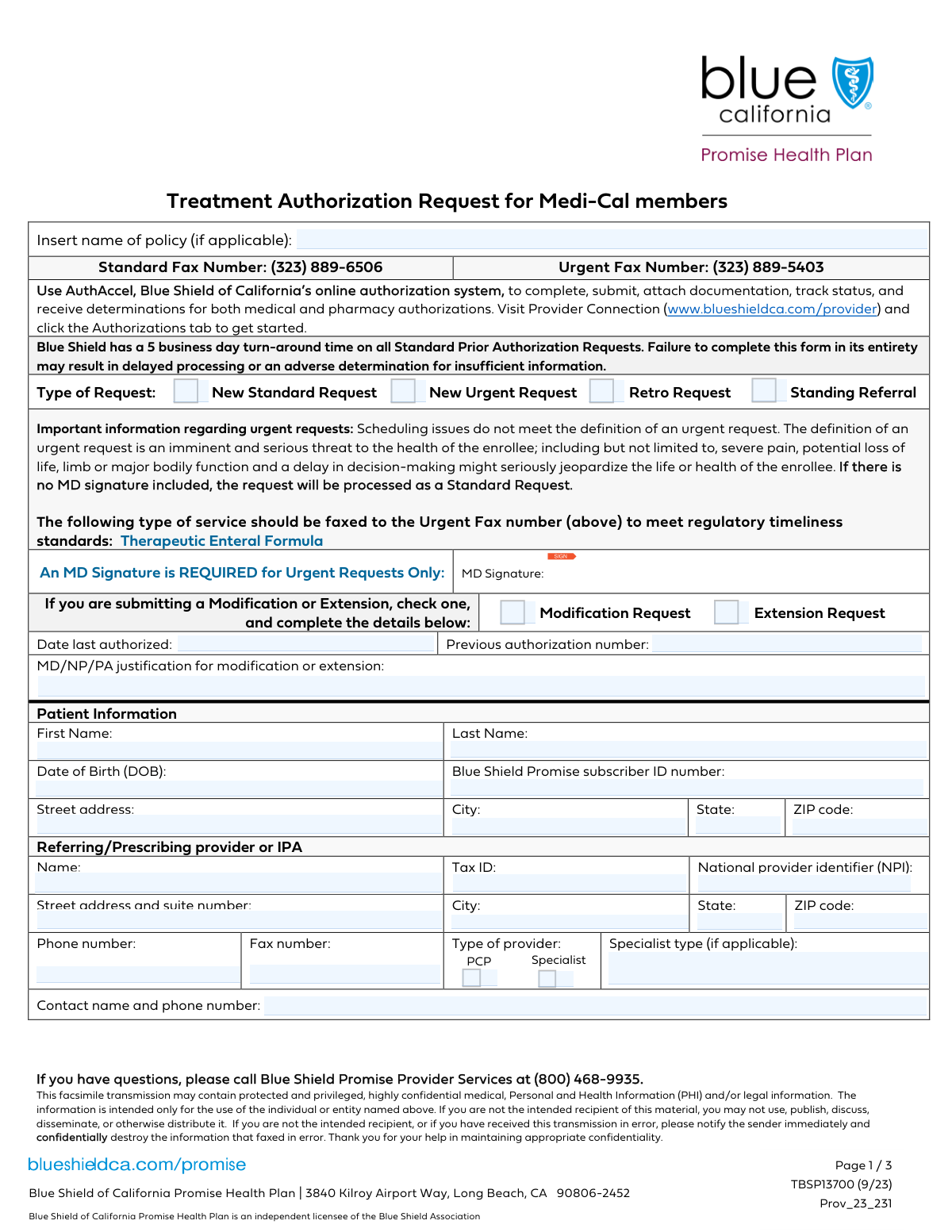
Yes! You can use AI to fill out Blue Shield Promise Treatment Authorization Request Form

The Blue Shield Promise Treatment Authorization Request Form is a critical document for healthcare providers to obtain prior authorization for patient services. Submitting this form is necessary to confirm medical necessity and coverage for treatments, procedures, or medications, thereby preventing claim denials and unexpected patient expenses. Today this form can be filled out quickly and accurately using AI-powered services like Instafill.ai, which can also convert non-fillable PDF versions into interactive fillable forms.
Our AI automatically handles information lookup, data retrieval, formatting, and form filling.
It takes less than a minute to fill out Treatment Authorization Request Form using our AI form filling.
Securely upload your data. Information is encrypted in transit and deleted immediately after the form is filled out.

Form specifications

Form name: Blue Shield Promise Treatment Authorization Request Form
Number of fields: 87
Number of pages: 3
Language: English
Categories: authorization forms
main-image

Instafill Demo: How to fill out PDF forms in seconds with AI

How to Fill Out Treatment Authorization Request Form Online for Free in 2026

Are you looking to fill out a TREATMENT AUTHORIZATION REQUEST FORM form online quickly and accurately? Instafill.ai offers the #1 AI-powered PDF filling software of 2026, allowing you to complete your TREATMENT AUTHORIZATION REQUEST FORM form in just 37 seconds or less.
Follow these steps to fill out your TREATMENT AUTHORIZATION REQUEST FORM form online using Instafill.ai:
  1. 1 Navigate to Instafill.ai and upload your Blue Shield Promise Treatment Authorization Request Form or select it from the template library.
  2. 2 Use the AI assistant to automatically populate patient details such as name, date of birth, and Blue Shield Promise subscriber ID number.
  3. 3 Enter the referring/prescribing provider's information, including their name, NPI, Tax ID, and contact details. Instafill.ai can save this information for future use.
  4. 4 Specify the type of request (e.g., New, Urgent, Modification) and provide the relevant medical codes (ICD-10, CPT/HCPC) and anticipated date of service.
  5. 5 Provide any required medical justification, especially for modification requests, and select the correct place of service from the provided list.
  6. 6 Carefully review all entered information for accuracy. The AI can help flag potential errors or omissions before you electronically sign the document.
  7. 7 Download the completed, signed form and submit it to Blue Shield Promise according to their submission guidelines.

Our AI-powered system ensures each field is filled out correctly, reducing errors and saving you time.

Why Choose Instafill.ai for Your Fillable Treatment Authorization Request Form Form?

Speed

Complete your Treatment Authorization Request Form in as little as 37 seconds.

Up-to-Date

Always use the latest 2026 Treatment Authorization Request Form form version.

Cost-effective

No need to hire expensive lawyers.

Accuracy

Our AI performs 10 compliance checks to ensure your form is error-free.

Security

Your personal information is protected with bank-level encryption.

Frequently Asked Questions About Form Treatment Authorization Request Form

This form is a Treatment Authorization Request used by healthcare providers to request pre-approval from an insurance plan, like Blue Shield Promise, for medical treatments, services, or referrals for a patient.

This form should be completed by the referring, prescribing, or servicing healthcare provider's office on behalf of the patient who is the enrollee.

A 'New Standard Request' is for routine treatment authorization. A 'New Urgent Request' should only be selected if a delay in treatment poses an imminent and serious threat to the patient's health.

Select 'Modification Request' if you need to change or extend a previously approved authorization. You must provide the previous authorization number and a medical justification for the modification.

A 'Standing Referral' is a request for an ongoing authorization to see a specialist for a specific condition over a period of time, which avoids the need for repeated referrals for each visit.

You will need the patient's full name, date of birth, full address, and their Subscriber ID Number to complete the form.

The 'Referring Provider' is the individual doctor ordering the service, the 'Group' is their practice, and the 'Facility' is where the service will be performed or billed from, such as a hospital or lab.

ICD-10 codes represent the patient's diagnosis, while CPT/HCPC codes identify the specific medical services or procedures being requested. Both are required for processing the authorization.

The Tax ID is used for billing and tax purposes, while the National Provider Identifier (NPI) is a unique ID for healthcare providers used for administrative tracking. Both are necessary for correct identification and processing.

Check the box that best describes where the service will be provided, such as 'Office', 'Inpatient hospital', or 'Telehealth'. If none of the options fit, check 'Other' and specify the location.

The form includes fields for fax numbers, which is a common submission method. However, you should always confirm the correct submission process (fax, mail, or online portal) with the health plan to avoid delays.

Yes, services like Instafill.ai use AI to accurately auto-fill form fields from your records, which can save significant time and help reduce data entry errors.

You can use a service like Instafill.ai to upload the form, fill it out interactively on your computer, and securely save or print the completed document.

If you have a non-fillable or 'flat' PDF, you can use a tool like Instafill.ai. It can convert the document into an interactive, fillable form for easy online completion.

Compliance Treatment Authorization Request Form
Validation Checks by Instafill.ai

1
Exclusive Request Type Selection
This check ensures that exactly one 'Type of Request' (e.g., New Standard, New Urgent, Retro, Modification) is selected. It is critical for routing the request to the correct processing queue and applying the appropriate review timelines. If more than one or zero types are selected, the form submission will be rejected as ambiguous.
2
Modification Request Conditional Fields
Validates that if 'Modification Request' is selected, the 'Date Last Authorized', 'Previous Authorization Number', and 'MD/NP/PA Justification' fields are all populated. These fields are essential for locating and evaluating the original authorization. An incomplete modification request cannot be processed and will be returned to the submitter.
3
Patient Date of Birth Validity
Ensures the 'Date of Birth' is a valid date in MM/DD/YYYY format and is not a date in the future. This check prevents data entry errors and confirms the patient's identity. An invalid or future date would cause a record-matching failure and immediate rejection of the form.
4
Subscriber ID Number Presence
This check verifies that the 'Subscriber ID Number' field is not empty. This ID is the primary key for identifying the patient within the insurance system and verifying their eligibility and benefits. Without a valid Subscriber ID, the request cannot be linked to a member and will be rejected.
5
National Provider Identifier (NPI) Format
Validates that the 'National Provider Identifier (NPI)' is a 10-digit number. The NPI is a standard, unique identifier for health care providers, and an incorrect format will prevent the system from identifying the provider for communication and payment purposes. Submissions with invalid NPIs will fail processing.
6
Tax ID Format Validation
Ensures the provider's 'Tax ID' is a 9-digit number. This is crucial for financial reporting and regulatory compliance for both the provider and the payer. An incorrectly formatted Tax ID can cause significant downstream issues in billing and payment systems.
7
Specialist Type Conditional Requirement
This check confirms that if the 'Specialist' checkbox is selected, the 'Specialist Type' text field is filled out. This information is vital for clinical review to ensure the request is being handled by a provider with the appropriate specialty. A missing specialist type will result in a request for more information, delaying the authorization.
8
Date Last Authorized Logical Check
Verifies that the 'Date Last Authorized' provided for a modification request is a valid date that occurs in the past. A modification must apply to a pre-existing authorization, so the date cannot be in the future. A future date indicates a logical error and will cause the submission to be flagged for manual review or rejection.
9
Anticipated Date of Service Timeliness
Ensures the 'Anticipated Date of Service' is a valid date that is not in the distant past. This check confirms the request is for a current or upcoming service, which is the primary purpose of pre-authorization. A date far in the past may indicate the wrong request type (e.g., should be a Retro Request) and will require clarification.
10
Place of Service Completeness
Validates that at least one 'Place of Service' checkbox is selected or the 'Other Place of Service Specify' field is filled. This information is critical for determining coverage rules, network status, and reimbursement rates. Failure to specify the place of service will result in an incomplete submission and delay processing.
11
ICD-10 Code Format Validation
This check verifies that the 'ICD-10 Code(s)' provided adhere to the standard format (e.g., a letter followed by two digits, with optional decimals and additional characters). These diagnosis codes are fundamental to establishing medical necessity. Invalid codes will cause the request to fail automated processing and require manual correction.
12
CPT/HCPC Code Format Validation
Ensures that the 'CPT/HCPC Code(s)' entered are in the correct 5-character alphanumeric format. These procedure codes define the specific service being requested and are essential for the authorization and billing process. An incorrectly formatted code will lead to an immediate rejection of the request.
13
Patient Full Name Completeness
This validation ensures that both the patient's 'First Name' and 'Last Name' fields are populated. A complete name is a fundamental requirement for patient identification and matching records across systems. Missing either name will result in a failed submission due to incomplete patient data.
14
Laboratory Draw Date Conditional Logic
Verifies that if 'Independent laboratory' is selected as the Place of Service, the 'Laboratory Draw Date' field is populated. This date is clinically relevant for lab services, as it indicates when the specimen was collected. A missing date for a lab request will render the submission incomplete and require follow-up.
15
Provider Phone Number Format
Checks that the 'Provider Phone Number' follows a standard 10-digit format (e.g., XXX-XXX-XXXX). A valid contact number is essential for the health plan to communicate with the provider's office for clarifications or to request additional clinical information. An invalid number can significantly delay the review process.

Common Mistakes in Completing Treatment Authorization Request Form

Incorrect or Conflicting Request Type Selection

Users often select multiple, contradictory request types, such as checking both 'New Standard Request' and 'Retro Request'. This confusion leads to processing delays as the reviewer must contact the provider for clarification. To avoid this, carefully select only one request type that accurately reflects the submission's purpose and ensure all corresponding conditional fields are completed.

Missing Previous Authorization Details for Modifications

When submitting a 'Modification Request', filers frequently forget to include the 'Previous Authorization Number' and 'Date Last Authorized'. This information is critical for linking the new request to the existing authorization, and its absence will cause an automatic rejection or significant delay. Always double-check that these fields are populated when requesting a modification or extension.

Transposed Digits in Patient Subscriber ID

A simple typo or transposition of numbers in the 'Subscriber ID Number' is a very common data entry error. This mistake leads to a patient-not-found error, causing the entire request to be rejected and requiring a complete resubmission. Using an AI-powered tool like Instafill.ai can help prevent this by validating identifier formats and cross-referencing data to ensure accuracy.

Confusing Referring and Servicing Provider Information

The form has separate sections for the 'Referring/Prescribing Provider' and the rendering provider/facility. A frequent mistake is entering the information for the specialist or facility performing the service into the referring provider's section. This misroutes communications and can delay the review; ensure the referring provider's details are in their designated section and the servicing provider's details are listed with the service codes.

Mismatched Provider NPI and Tax ID

Providers often mistakenly enter their individual (Type 1) NPI in the 'Group NPI' field, or confuse the Tax ID (EIN) with the NPI. These are distinct identifiers used for different purposes in billing and credentialing, and mixing them up will cause claim processing failures. It is crucial to enter the correct Type 2 NPI for groups/facilities and the correct Tax ID in their respective fields.

Incomplete Specialist Information

Users may check the 'Specialist' box to indicate the provider's role but then fail to fill out the mandatory 'Specialist Type' field. This omission leaves the reviewer without key information needed to assess medical necessity or apply the correct clinical guidelines, often resulting in a request for more information. Always specify the exact specialty (e.g., Cardiology, Orthopedics) when the 'Specialist' box is checked.

Using Invalid or Non-Specific Medical Codes

Submitting requests with outdated (e.g., ICD-9), truncated, or non-specific ICD-10 and CPT codes is a primary reason for denial. Medical coding requires precision, and failure to use the most current and specific code available can lead to rejection or incorrect authorization. To prevent this, always verify codes against the latest official code sets before submission.

Forgetting the Physician's Signature

On paper or flat PDF versions of this form, the most common and easily avoidable mistake is forgetting the physician's signature. An unsigned authorization request is legally invalid and will be rejected immediately, forcing the entire process to start over. If the form is a non-fillable PDF, a tool like Instafill.ai can convert it into a fillable version that supports digital signatures to prevent this oversight.

Incorrect 'Place of Service' Selection

Filers sometimes select an incorrect 'Place of Service', such as 'Office' for a procedure scheduled at an 'Ambulatory surgical center'. This detail directly impacts reimbursement rates and which clinical policies apply, so a mistake can lead to denial or payment issues. Carefully review the planned service location and select the corresponding checkbox, using 'Other' and specifying if no other option fits.

Insufficient Justification for Urgent Requests

Marking a request as 'Urgent' requires clear clinical documentation proving an 'imminent and serious threat to the enrollee's health.' Many requests are marked urgent for convenience, but without sufficient justification, they are downgraded to a 'Standard' review timeline, negating the purpose and delaying care. Always attach detailed clinical notes that explicitly support the medical necessity for an expedited review.
Saved over 80 hours a year

“I was never sure if my IRS forms like W-9 were filled correctly. Now, I can complete the forms accurately without any external help.”

Kevin Martin Green

Your data stays secure with advanced protection from Instafill and our subprocessors

Robust compliance program

Transparent business model

You’re not the product. You always know where your data is and what it is processed for.

ISO 27001, HIPAA, and GDPR

Our subprocesses adhere to multiple compliance standards, including but not limited to ISO 27001, HIPAA, and GDPR.

Security & privacy by design

We consider security and privacy from the initial design phase of any new service or functionality. It’s not an afterthought, it’s built-in, including support for two-factor authentication (2FA) to further protect your account.

Fill out Treatment Authorization Request Form with Instafill.ai

Worried about filling PDFs wrong? Instafill securely fills blue-shield-promise-treatment-authorization-request-form forms, ensuring each field is accurate.