
Yes! You can use AI to fill out Form CARE-101, Mental Health Declaration—CARE Act Proceedings
Don't type 76 fields by hand. Tell our AI about yourself, or upload your insurance card, and it fills every field in seconds. You check it, then download, print or sign.
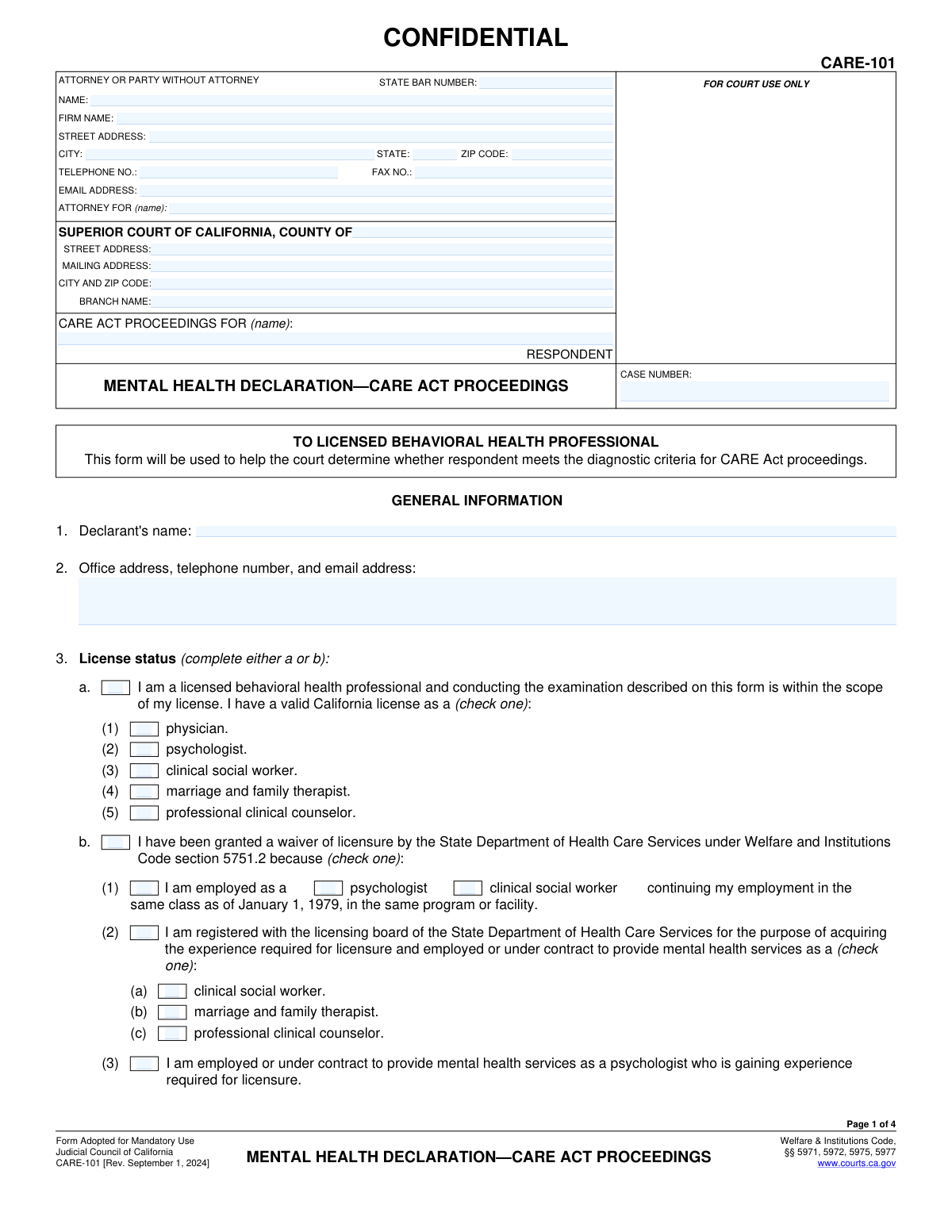
The AI does the filling. You just check it.
No typing into boxes, nothing to install.
What this form asks for
The AI fills all of it, from your answers or your documents.
The AI checks your answers before you download
14 checks built for this form, so a wrong date or a missing answer is caught before anyone else sees it.
Ensures that either section 3a (Licensed Professional) or 3b (Waiver of Licensure) is selected, but not both. This is a critical choice that establishes the declarant's legal authority to make the declaration. An invalid selection would make the declarant's qualifications ambiguous and could invalidate the form.
Validates that if a primary license status (3a or 3b) is chosen, a corresponding sub-type is also selected. For example, if 3a is checked, one of the professions (physician, psychologist, etc.) must be indicated. This ensures the declarant's qualification is specified with the required level of detail for the court.
Verifies that either checkbox 5a ('I examined the respondent') or 5b ('I attempted to examine respondent') is selected, but not both. This choice dictates which subsequent fields are required and provides a clear, unambiguous record of the declarant's interaction with the respondent. An invalid selection would make the basis of the declaration unclear.
Verifies that if checkbox 5b is selected, indicating unsuccessful attempts to examine the respondent, the corresponding explanation field in section 6 is filled out. This explanation is legally necessary to justify why a direct examination was not performed. Failure to provide this detail can invalidate the declaration.
Checks that the examination date in 5a or the attempt dates in 5b are within 60 days prior to the CARE Act petition's filing date. This is a strict legal requirement mentioned on the form to ensure the information is current and relevant to the proceedings. A date outside this window would render the declaration inadmissible.
Confirms that all required explanation fields within section 7 (specifically 7a, 7b(1), 7b(2), 7b(3), 7c, 7e, and 7f) contain text. These detailed explanations form the core evidence for the declaration and are essential for the court to determine if the respondent meets the CARE Act criteria. Empty fields would result in an incomplete and insufficient filing.
And 8 more checks
- Logical Condition for Section 7d
- Signature Date Validation
- Declarant Name Consistency
- Patient Status Declaration
- Specific Disorder Diagnosis Requirement
- Respondent Name Consistency Across Pages
- Declarant Contact Information Format
- State Bar Number Format
Let AI fill out your CARE-101
No typing. Every field filled in seconds, checked, ready to sign.
How to Fill Out CARE-101 Online for Free in 2026
What the AI walks you through.
- Navigate to Instafill.ai and upload or select the CARE-101 form to begin.
- Use the AI assistant to automatically populate the header with court, attorney/party, and case information.
- Complete the 'General Information' section by providing the declarant's name, contact details, and verifying their license status.
- In the 'Examination' section, specify the date of the examination or detail the attempts made if an examination was unsuccessful.
- Carefully fill out section 7, providing detailed explanations for each criterion to establish that the respondent meets the diagnostic requirements for CARE Act proceedings.
- Add any additional relevant information in section 8, or indicate that an attachment is included.
- Review all entered information for accuracy, then date and e-sign the declaration before downloading, printing, or submitting the completed form.
Common Mistakes in Completing CARE-101
The ones the AI is built to catch.
Inconsistent Respondent Name and Case Number
Incorrect or Ambiguous License Status Selection
Using an Outdated Examination Date
Providing Vague or Conclusory Explanations
Misunderstanding the Specific Diagnostic Criteria
Insufficient Detail for Unsuccessful Examinations
Forgetting to Sign or Date the Declaration
Conflicting Selections in Required Fields
Incomplete Checkbox Logic in Section 7d
Improper Use of Attachments
Filling Out a Non-Fillable PDF by Hand
Frequently Asked Questions About CARE-101
Is it really free for 7 days?
Can I fill other forms too?
How do I cancel?
How does the AI fill out CARE-101?
What happens to my information?
How complex is CARE-101 to fill out?
What is the purpose of the CARE-101 form?
Who is authorized to complete and sign the Mental Health Declaration (CARE-101)?
What if I was unable to examine the respondent? Can I still fill out this form?
Is there a time limit for when the examination must take place?
What specific mental health conditions qualify for CARE Act proceedings?
What does 'not clinically stabilized in ongoing voluntary treatment' mean in Section 7c?
The respondent has a substance use disorder. Does this qualify them for the CARE Act?
How do I determine if a CARE plan is the 'least restrictive alternative' as required in Section 7e?
Where do I submit the completed CARE-101 form?
What is 'Attachment 8' for?
Can I use AI to help me fill out the CARE-101 form?
How can I use Instafill.ai to fill out this form online?
The CARE-101 PDF I have is not fillable. What can I do?
Get your CARE-101 filled out by AI
$0 today. Cancel before Nov 1 and you pay nothing.
Other forms like this one
health care forms: Form WH-380-E, Certification of Health Care Provider, Form WH-380-F, Certification of Health Care Provider, Form I-905, Application for Authorization to Issue Certification for Health Care Workers, DHS-6696-ENG, Minnesota Health Care Programs Application (MNsure/DHS), Form CH-006: PA-BH-Res-PCS, Oregon Behavioral Health Support Program Plan of Care Authorization (Plan of Care Request for Behavioral Health Residential or Personal Care Services), Prior Authorization (PA) Request Form – Adult Palliative Care (Alameda Alliance for Health), Medicare Enrolment Application (Australia) – Enrol in Medicare, Re-enrol/Extend Eligibility, Enrol a Newborn, and Register for My Health Record, Alameda Alliance for Health Prior Authorization (PA) Request Form – Adult Palliative Care, Health Assessment – Ontario Health atHome (Fixing Long-Term Care Act, 2021) (Form 4768-69E), Health Assessment - Ontario Health atHome (Fixing Long-Term Care Act, 2021) — Form 4768-69E, Request for Transfer of Records (Adelaide Health Care) – AHC-0013-05-PS (Version 2), Application for Access to Health Care Records (Nepean Blue Mountains Local Health District) – NBMA-431, L.A. Care Behavioral Health Treatment Applied Behavioral Analysis Authorization Request Form, Medicaid Managed Care Applied Behavior Analysis — Authorization Request (Healthy Blue Louisiana, BLAPEC-1989-20), Iowa Advance Directive: Durable Power of Attorney for Health Care and Declaration (Living Will), Direct Rollover Request for Appalachian Regional Healthcare, Inc. Voluntary Plan, Molina Healthcare Prior Authorization Request Form, UnitedHealthcare Prior Authorization Request Form, Optum Rx / UnitedHealthcare Prior Authorization Request Form, Texas Standard Prior Authorization Request Form for Health Care Services
California court forms: Judicial Council of California Form SC-105, Request for Court Order and Answer (Small Claims), Judicial Council of California Form SC-120, Defendant’s Claim and ORDER to Go to Small Claims Court (Small Claims), Judicial Council of California Form SER-001, Request for Sheriff to Serve Court Papers, Judicial Council of California Form SER-001, Request for Sheriff to Serve Court Papers, Affidavit for Collection of Personal Property California Probate Code Section 13100, Form POS-040, Proof of Service—Civil, Declaration of Facts of Death (California Superior Court), declaration-of-marriage-for-court-proceeding-california-family-law, ADOPT-200, Adoption Request, ADOPT-200, Stepparent Adoption Request, ADOPT-210, Adoption Agreement, ADOPT-310, Contact After Adoption Agreement, Judicial Council of California Form ADOPT-200, Adoption Request, Form ADR-107, Mediation Attendance Sheet, Form ADR-110, Order Appointing Referee, Form ADR-109, Stipulation or Motion for Order Appointing Referee, Form ADR-102, Request for Trial De Novo After Judicial Arbitration, Form ADR-108, Referee's Report (Code Civ. Proc., §§ 638, 639), Form ADR-106, Petition to Confirm, Correct, or Vacate Contractual Arbitration Award, Form ADR-104, Rejection of Award and Request for Trial After Attorney-Client Fee Arbitration
mental health forms: VA Form 21-0781, Statement in Support of Claimed Mental Health Disorder(s) Due to an In-Service Traumatic Event(s), Contra Costa Environmental Health Division Body Arts Practitioner Application, VA Form 21-0781, Statement in Support of Claimed Mental Health Disorder(s) Due to an In-Service Traumatic Event(s), Rule 12.36—Form 4: Physician or Mental Health Professional’s Report of Examination, Form HC-002, Petition for Writ of Habeas Corpus—LPS Act (Mental Health), Form HC-003, Petition for Writ Of Habeas Corpus—Penal Commitment (Mental Health)
ACT Health forms: Health Assessment – Ontario Health atHome (Fixing Long-Term Care Act, 2021) (Form 4768-69E), Health Assessment - Ontario Health atHome (Fixing Long-Term Care Act, 2021) — Form 4768-69E, Discovery Health Practice Registration Form 2026 (DHHPR2001), Contra Costa Environmental Health Division Body Arts Practitioner Application, Form CARE-102, Petition to Begin CARE Act Proceedings By Licensed Behavioral Health Professional Only, Form HC-002, Petition for Writ of Habeas Corpus—LPS Act (Mental Health), Form WH-380-E, Certification of Health Care Provider, Form CMS-1561, Health Insurance Benefit Agreement
California health forms: California HIPAA Authorization Form, Authorization for the Release of Protected Health Information, California Department of Social Services Form RFA 07 (2/18), Resource Family Approval (RFA) Health Questionnaire (Mandatory), Blue Shield of California Promise Health Plan Long Term Care Treatment Authorization Request Form, Blue Shield of California Promise Health Plan Referral Form, Blue Shield of California Promise Health Plan Health Education Referral Form, Blue Shield of California Promise Health Plan Medi-Cal Group Doula Provider Quality Check Form, Partnership HealthPlan of California Doula Application, Form CR-400, Petition/Application Under Health and Safety Code Section 11361.8—Adult Crimes, Form CR-403, Order After Petition/Application Under Health and Safety Code Section 11361.8—Adult Crimes, Form CR-401, Proof of Service for Petition/Application Under Health and Safety Code Section 11361.8—Adult Crimes, Form CR-402, Prosecuting Agency's Response to Petition/Application Under Health and Safety Code Section 11361.8—Adult Crimes, Form CR-412/MIL-412, Petition for Resentencing Based on Health Conditions due to Military Service Listed in Penal Code Section 1170.91(b), Form CARE-102, Petition to Begin CARE Act Proceedings By Licensed Behavioral Health Professional Only, Form HC-002, Petition for Writ of Habeas Corpus—LPS Act (Mental Health), Form HC-003, Petition for Writ Of Habeas Corpus—Penal Commitment (Mental Health), Advance Health Care Directive (California Probate Code Section 4701), Health & Human Services Agency California Department of Social Services APPLICATION FOR A FAMILY CHILD HOME LICENSE LIC 279
Let AI fill out your CARE-101
Your trial starts once a card is added. You pay nothing before Nov 1.
Our AI already knows this form, all 76 fields of it. Skip the typing: tell it about yourself, or upload what you have, and it fills the whole form in seconds.
- AI fills every field on all 4 pages, checkboxes included
- No typing into boxes: answer a few questions, or upload your insurance card, an old copy of this form, a photo of a document
- The AI checks the answers; you review and change anything before you download
- Download the finished PDF, print it, or sign it online
- Encrypted, and never used to train AI
Cancel before Nov 1 and you pay nothing.
A card is needed to start the trial. Cancel in two clicks from your account.
Terms · Privacy