Yes! You can use AI to fill out Application for Access to Health Care Records (Nepean Blue Mountains Local Health District) – NBMA-431

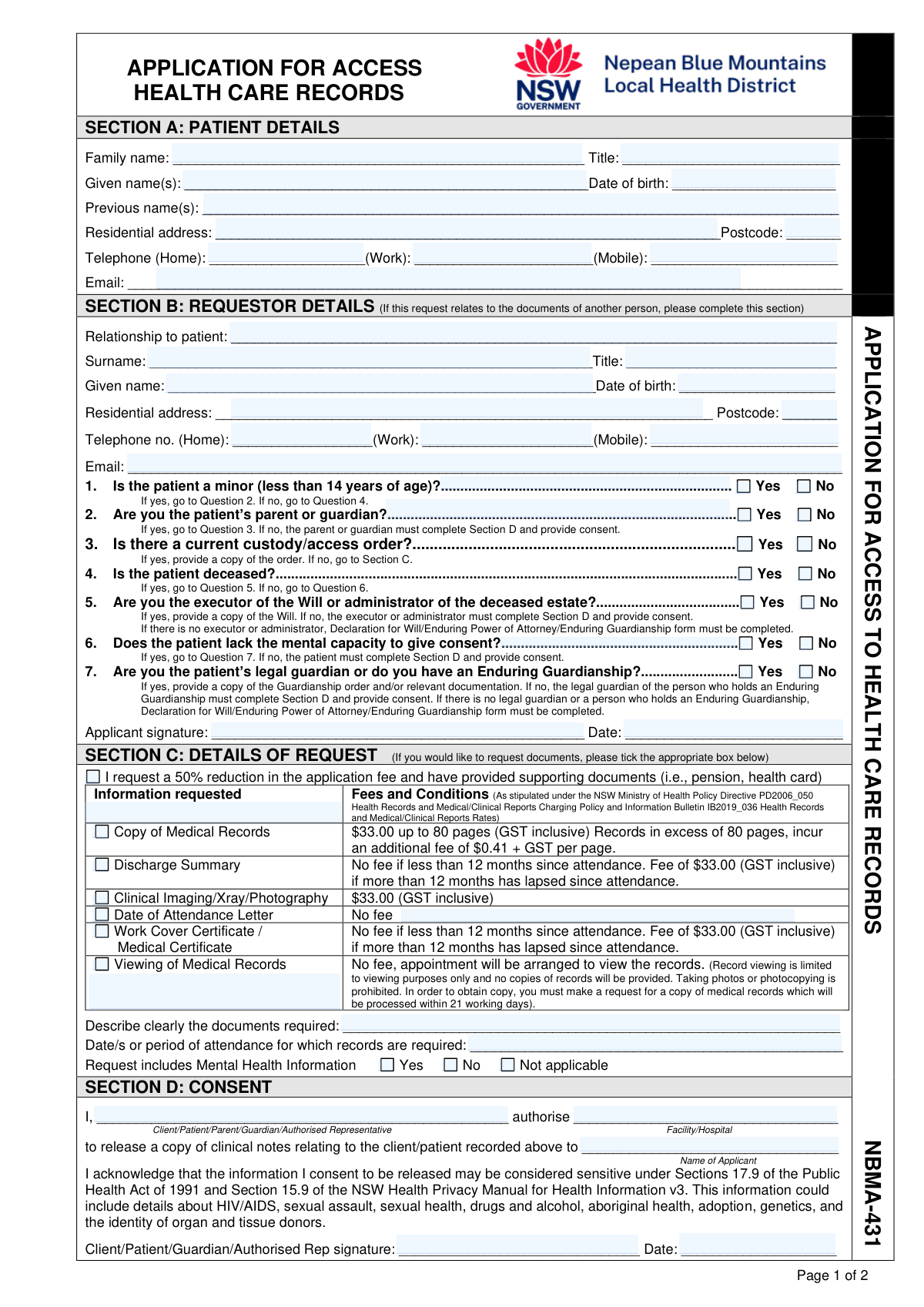
NBMA-431 is an official request form for accessing health care records held by a specific Nepean Blue Mountains Local Health District (NSW) facility, whether the request is made by the patient or an authorised representative (e.g., parent/guardian, executor, or legal guardian). It captures patient and requestor details, eligibility questions (minor/deceased/capacity), the specific records requested (e.g., medical records, discharge summary, imaging), consent to release sensitive information, and the preferred delivery method, along with fee and ID requirements. It is important because it provides the legal and administrative basis for the facility to verify identity/authority and release records in line with NSW Health policies and privacy rules. Today, this form can be filled out quickly and accurately using AI-powered services like Instafill.ai, which can also convert non-fillable PDF versions into interactive fillable forms.
Our AI automatically handles information lookup, data retrieval, formatting, and form filling.
It takes less than a minute to fill out NBMA-431 using our AI form filling.
Securely upload your data. Information is encrypted in transit and deleted immediately after the form is filled out.

Form specifications

Form name: Application for Access to Health Care Records (Nepean Blue Mountains Local Health District) – NBMA-431
Number of pages: 2
Language: English
Categories: health record forms, medical record forms, NSW health forms, patient access forms
main-image

Instafill Demo: filling out a legal form in seconds

How to Fill Out NBMA-431 Online for Free in 2026

Are you looking to fill out a NBMA-431 form online quickly and accurately? Instafill.ai offers the #1 AI-powered PDF filling software of 2026, allowing you to complete your NBMA-431 form in just 37 seconds or less.
Follow these steps to fill out your NBMA-431 form online using Instafill.ai:
  1. 1 Go to Instafill.ai and upload the NBMA-431 “Application for Access to Health Care Records” PDF (or select it from the form library if available).
  2. 2 Use AI extraction to auto-fill Section A (Patient Details) from your provided information, then review and correct any fields (name, DOB, address, contact details, previous names).
  3. 3 If requesting on someone else’s behalf, complete Section B (Requestor Details) and answer the eligibility questions (minor, custody order, deceased/executor, capacity/guardianship) and attach/prepare supporting documents as required.
  4. 4 Complete Section C (Details of Request) by selecting the record types needed, describing the documents, entering the date range/period of attendance, and indicating whether mental health information is included; select the fee reduction checkbox if applicable and supported.
  5. 5 Complete Section D (Consent) by entering the consent giver, the facility/hospital name, the recipient/applicant name, and adding the required signatures and dates (patient/guardian/authorised representative as applicable).
  6. 6 Choose Section E (Mode of Delivery) (mail, secure encrypted email, USB, or pick up) and confirm you have the required identification (typically 2 forms: one from Column A and one from Column B).
  7. 7 Have Instafill.ai run a final validation check for missing fields/signatures, then download the completed form and submit it to the relevant facility with payment and supporting ID/documents.

Our AI-powered system ensures each field is filled out correctly, reducing errors and saving you time.

Why Choose Instafill.ai for Your Fillable NBMA-431 Form?

Speed

Complete your NBMA-431 in as little as 37 seconds.

Up-to-Date

Always use the latest 2026 NBMA-431 form version.

Cost-effective

No need to hire expensive lawyers.

Accuracy

Our AI performs 10 compliance checks to ensure your form is error-free.

Security

Your personal information is protected with bank-level encryption.

Frequently Asked Questions About Form NBMA-431

This form is used to request access to health care records held by a specific Nepean Blue Mountains Local Health District (NBMLHD) facility. You can request copies (e.g., medical records, discharge summary, imaging) or request an appointment to view records in person.

Section A should be completed with the patient’s details (name, date of birth, address, and contact information). If you are requesting records for yourself, you still complete Section A with your own patient details.

Complete Section B only if you are requesting records for another person (e.g., your child, a deceased relative, or someone you represent). It captures your relationship to the patient and determines what authority/consent documents are required.

Answer “Yes” to the minor question in Section B and continue through the parent/guardian and custody/access order questions. If there is a custody/access order, you must provide a copy, and additional identification (such as a birth certificate) may be required.

Yes, but you must indicate the patient is deceased and show you are the executor/administrator by providing a copy of the Will (or relevant estate documentation). If you are not the executor/administrator, the executor/administrator must provide consent, or you may be directed to complete a separate declaration form.

If the patient lacks capacity, you must indicate this in Section B and provide documentation showing you are the legal guardian or hold Enduring Guardianship. If you do not have that authority, the appropriate guardian/representative must complete Section D consent, or a declaration form may be required.

Section D must be signed by the patient or the person legally authorised to consent (parent/guardian/authorised representative), depending on the situation in Section B. If the patient is able to consent, they must sign Section D to authorise release to the named applicant/recipient.

You can request items like a copy of medical records, discharge summary, clinical imaging/X-ray/photography, a date of attendance letter, or certificates. In the description box, clearly list the document types and include the date(s) or period of attendance to help staff locate the correct records.

A copy of medical records is $33.00 up to 80 pages, with additional per-page charges for pages beyond 80. Clinical imaging/X-ray/photography is listed as $33.00, and some items (like date of attendance letters) have no fee.

The form states there is no fee if it has been less than 12 months since attendance. If more than 12 months has passed, a $33.00 fee applies for those items.

Yes—tick the 50% fee reduction checkbox in Section C and include supporting documents (such as a pension card or health care card). Your request may not be processed at the reduced rate without proof.

You must provide two forms of ID: one from Column A (photo/primary ID like passport or driver’s licence) and one from Column B (supporting ID like Medicare card, utility bill, or birth certificate). If you are requesting records for someone else, you must provide identification for the requestor and may also need patient-related documents.

The facility aims to process requests within 21 working days after receiving the completed application, required identification, and full payment (including any additional fees). Records are not processed or released until payment and required documents are received.

In Section E you can choose mail, secure encrypted email (SFT-Kiteworks), USB, or pickup. If sent by post, the facility notes it is not liable for lost documents, so consider secure email or pickup if you are concerned.

Yes—select “Viewing of Medical Records” in Section C and an appointment will be arranged. Viewing is supervised and for viewing only: no copies are provided and taking photos or photocopying is prohibited.

Mental health information may require additional review by a mental health professional, which can add processing time. If records contain sensitive information (e.g., HIV/AIDS, sexual assault, drugs and alcohol), you may be asked to nominate a treating health professional to review the record with you.

Yes—this application is for documents at the nominated facility only. If you need records from multiple NBMLHD facilities, you must lodge a separate application (and fee) with each facility.

Yes—AI tools can help by extracting your details and placing them into the correct fields, reducing errors and saving time. Services like Instafill.ai can auto-fill form fields accurately based on the information you provide.

Upload the PDF to Instafill.ai, then provide your patient/requestor details, the records you’re requesting (Section C), and your delivery preference (Section E). Instafill.ai can map your information into the correct fields, after which you review, download, and sign where required before submitting to the relevant facility.

If the PDF is flat/non-fillable, you can still complete it using a tool that converts it into an interactive form. Instafill.ai can convert non-fillable PDFs into fillable forms and then help you auto-fill the fields for printing/signing and submission.

Compliance NBMA-431
Validation Checks by Instafill.ai

1
Patient identity fields completeness (Section A)
Validates that the patient’s Family name, Given name(s), Date of birth, and Residential address (including Postcode) are provided. These are the minimum identifiers needed to locate the correct medical record and avoid releasing information for the wrong person. If any are missing, the submission should be rejected or placed in an “incomplete—request clarification” state before processing.
2
Date of birth format and plausibility (Patient and Requestor)
Checks that both patient and requestor dates of birth (when present) follow an accepted date format (e.g., DD/MM/YYYY) and represent a real calendar date. Also validates plausibility (not in the future, and within a reasonable age range such as 0–120 years). If invalid, the form should fail validation because DOB is a key identifier and drives eligibility logic (e.g., minor status).
3
Australian postcode format validation (Patient and Requestor)
Ensures postcodes entered in Section A and Section B are exactly 4 digits (Australian postcode format) and not blank when an address is provided. Correct postcodes support accurate correspondence and identity verification. If the postcode is missing or malformed, the system should prompt for correction before allowing submission.
4
Phone number format validation (Home/Work/Mobile)
Validates that any provided phone numbers contain only permitted characters (digits, spaces, parentheses, plus) and meet minimum length rules (e.g., 8–15 digits after stripping formatting). This reduces failed contact attempts and supports timely clarification of requests. If all phone fields are blank, the system should require at least one contact number or a valid email as an alternative.
5
Email address format validation (Patient and Requestor)
Checks that any entered email address matches a standard email pattern (local-part@domain) and does not contain obvious invalid characters or missing domain components. Email is used for secure delivery and communication, so invalid addresses can cause privacy incidents or delivery failures. If the selected delivery mode is Email, a valid email must be present or the submission must fail.
6
Requestor section required only when requesting for another person
Validates that Section B (Relationship to patient, requestor name, and requestor contact/address) is completed when the request is not made by the patient themself. This ensures the facility can assess authority to access and contact the correct party. If Section B is incomplete while the request indicates a third-party request, the submission should be rejected pending completion.
7
Eligibility question exclusivity and branching consistency (Section B Q1–Q7)
Ensures each Yes/No question (minor, parent/guardian, custody order, deceased, executor/administrator, lacks capacity, legal guardian/enduring guardianship) has exactly one selection and that the path is logically consistent. For example, if 'Patient is a minor = No', then Q2 and Q3 should not be required; if 'Patient deceased = Yes', then Q5 must be answered. If conflicting answers are selected (e.g., both Yes and No, or incompatible combinations), the form must fail validation and request correction.
8
Minor (under 14) authority requirements and custody order attachment trigger
If 'Patient is a minor = Yes', validates that 'Applicant is parent/guardian' is answered and, if 'Custody/access order exists = Yes', that a copy of the order is provided/recorded as received. This is critical to ensure lawful release of a child’s records and to respect custody/access restrictions. If required authority details or the custody order copy are missing, the request must be held and not processed.
9
Deceased patient authority requirements and will/executor documentation trigger
If 'Patient deceased = Yes', validates that Q5 is answered and, when 'Executor/administrator = Yes', that a copy of the Will (or relevant estate administration documentation) is provided/recorded. This prevents unauthorized access to a deceased person’s health information and ensures the correct legal representative is acting. If documentation is required but not provided, the submission should be marked incomplete and blocked from release.
10
Lack of capacity authority requirements and guardianship documentation trigger
If 'Patient lacks mental capacity = Yes', validates that Q7 is answered and, when 'Legal guardian/Enduring Guardianship = Yes', that supporting guardianship documentation is provided/recorded. This ensures consent is obtained from a legally authorized decision-maker and reduces privacy/legal risk. If the authority is not established or documents are missing, the request must not proceed.
11
Applicant signature and signature date presence and date validity (Section B)
Checks that the applicant signature field and the signature date are present, and that the signature date is a valid date not in the future. A signed request is required to evidence the requestor’s declaration and to support auditability. If missing or invalid, the submission should fail validation and be returned for completion.
12
Consent section completion based on consent requirement (Section D)
Validates that Section D is completed when consent is required (e.g., patient has capacity and is not deceased, or when the appropriate representative must consent). Specifically checks presence of Consent giver name, Authorised facility/hospital, Recipient/applicant name, consent signature, and consent date. If consent is required but any of these are missing, the request must be blocked because release without valid consent can breach privacy law.
13
Information requested selection and supporting details (Section C)
Ensures at least one request type is selected (Copy of Medical Records, Discharge Summary, Imaging, Date of Attendance Letter, Work Cover/Medical Certificate, or Viewing). Also validates that 'Describe clearly the documents required' and 'Date/s or period of attendance' are provided to enable record retrieval, especially when requesting copies. If no items are selected or the description/date range is missing, the request should be rejected as non-actionable.
14
Attendance date/range format and logical order (Section C)
Validates that the attendance period is expressed as a valid single date or a start/end range, and that the start date is not after the end date. This prevents searching the wrong timeframe and reduces processing delays. If the range is invalid or ambiguous (e.g., end before start, impossible dates), the system should require correction before submission.
15
Mental Health Information flag required and consistent with request scope
Checks that exactly one option is selected for 'Request includes Mental Health Information' (Yes/No/Not applicable). This is important because mental health records may require additional review and processing steps, and incorrect selection can cause delays or inappropriate handling. If multiple options are selected or none are selected, the submission should fail validation and prompt the user to choose one.
16
Mode of delivery selection and dependent field requirements (Section E)
Validates that exactly one delivery mode is selected (Mail, Email encrypted, USB, or Pick up) and that dependent contact fields are present (e.g., mailing address for Mail, valid email for Email). This ensures the facility can deliver records securely and to the correct destination. If delivery mode is missing or required dependent fields are absent, the request should be held until corrected.

Common Mistakes in Completing NBMA-431

Leaving Section B blank when requesting records for someone else

People often assume Section A (patient details) is enough and forget that Section B must be completed when the applicant is not the patient. This can cause the facility to reject or pause the request because they cannot confirm who is requesting the records and on what authority. Always complete Section B with the requestor’s relationship, full identity details, and contact information whenever you are acting for another person. AI-powered form filling tools like Instafill.ai can prompt you to complete Section B when the relationship is not “self” and ensure required fields aren’t missed.

Incorrectly answering the eligibility pathway questions (minor/deceased/capacity/guardian)

The Yes/No questions in Section B (Q1–Q7) form a decision tree, but applicants frequently tick boxes inconsistently (e.g., “patient is a minor = No” while also providing parent/guardian details, or “patient deceased = Yes” without executor authority). Inconsistent answers create legal/consent uncertainty and typically lead to delays while staff request clarification. Follow the form’s instructions exactly (e.g., if Q1 is Yes, proceed to Q2; if Q4 is Yes, proceed to Q5) and ensure your answers match the patient’s situation. Instafill.ai can reduce these logic errors by validating conditional flows and flagging contradictory selections before submission.

Missing required supporting documents for authority (custody order, will/executor proof, guardianship paperwork)

Applicants often tick “Yes” to custody/access orders, executor/administrator status, or guardianship/enduring guardianship but forget to attach the required copies. Without documentary proof, the facility may be unable to lawfully release records and will place the request on hold. Attach the relevant court order, will/executor documentation, or guardianship/enduring guardianship documents at the time of application. Instafill.ai can help by generating a checklist based on your answers and reminding you which attachments are mandatory.

Consent section (Section D) completed by the wrong person or left incomplete

A very common issue is the applicant signing Section B but failing to obtain the correct consent signature in Section D (e.g., the patient must sign when they have capacity, or the authorised representative must sign when the patient cannot). This results in non-release because the facility cannot rely on the consent authority. Ensure Section D includes: the consent giver’s name, the facility/hospital name, the recipient/applicant name, and the consent giver’s signature and date—signed by the legally appropriate person. Instafill.ai can guide who must sign based on the Section B pathway and prevent submission if the consent block is incomplete.

Not specifying the documents and date range clearly in Section C

Applicants often tick a box (e.g., “Copy of Medical Records”) but leave the “Describe clearly the documents required” and “Date/s or period of attendance” lines vague or blank. This forces staff to guess which episode of care you mean, increasing processing time and the risk of receiving incomplete or overly broad records (and potentially higher fees). Provide a specific date range (start/end dates) and list the exact items needed (e.g., discharge summary, ED notes, imaging reports) and the relevant department or admission. Instafill.ai can standardize date ranges and prompt for missing specificity so the request is actionable.

Misunderstanding the 'Viewing of Medical Records' option

Some applicants select “Viewing of Medical Records” expecting to receive copies, not realizing it is view-only, supervised, and prohibits photos/photocopying. This leads to frustration and a second application when they later need copies, extending timelines. Choose “Viewing” only if you truly want an appointment to read the file without taking copies; otherwise tick “Copy of Medical Records” (or other copy options) for documents to be provided. Instafill.ai can display a clear warning when “Viewing” is selected and suggest the correct option based on your goal.

Selecting mental health information incorrectly (Yes/No/Not applicable)

Applicants frequently tick “Not applicable” when they actually want mental health records, or tick “No” without realizing the requested admission/clinic involved mental health content. Incorrect selection can trigger additional review later or result in partial release that excludes the mental health component. If you want mental health-related records included, select “Yes” and be prepared for additional review time; if you are certain none is involved, select “No.” Instafill.ai can help by prompting you to confirm when you request services commonly associated with mental health records and ensuring the selection matches your intent.

Requesting a 50% fee reduction without attaching evidence

People often tick the fee reduction checkbox but forget to include supporting documents (e.g., pension/healthcare card evidence). The facility may then charge the full fee or pause processing until proof is provided, delaying release. Only tick the reduction box if you are including valid supporting documentation with the application. Instafill.ai can remind you to attach proof when the discount is selected and prevent accidental selection without evidence.

Providing insufficient or incorrect identification (not 1 from Column A and 1 from Column B)

Applicants commonly submit only one ID, provide two IDs from the same column, or provide an ID type that isn’t acceptable under the form’s A/B rules. Without the required 2 forms (1 from Column A and 1 from Column B), the facility cannot release records and will request additional ID, extending processing time. Double-check you have exactly one acceptable ID from Column A (photo/primary ID) and one from Column B (supporting ID) before lodging. Instafill.ai can validate the A/B combination and flag invalid or incomplete ID selections.

Choosing a delivery method that doesn’t match the provided contact/address details

Applicants sometimes select “Email (SFT-Kiteworks/Encrypted)” but leave the email field blank or mistyped, or select “Mail” without a complete postal address, causing delivery failures and rework. This can lead to sensitive documents being delayed or returned, and may require identity re-verification. Ensure the selected mode of delivery in Section E matches accurate, complete contact details (email spelled correctly; address includes unit/street/suburb/postcode). Instafill.ai can format addresses/emails, validate them, and warn you if the delivery method conflicts with missing contact information.

Using inconsistent names (previous names not provided, mismatch with ID, or swapped given/family names)

Health records are often filed under legal names used at the time of treatment, but applicants frequently omit “Previous name(s)” (e.g., maiden name) or enter names in the wrong fields. This can prevent staff from locating the correct file or cause identity verification issues if the name doesn’t match the provided ID. Enter the patient’s family name and given names exactly as on official documents, and include any previous names used during the period of attendance. Instafill.ai can help by keeping name formatting consistent across sections and prompting for previous names when a mismatch is likely.
Saved over 80 hours a year

“I was never sure if my IRS forms like W-9 were filled correctly. Now, I can complete the forms accurately without any external help.”

Kevin Martin Green

Your data stays secure with advanced protection from Instafill and our subprocessors

Robust compliance program

Transparent business model

You’re not the product. You always know where your data is and what it is processed for.

ISO 27001, HIPAA, and GDPR

Our subprocesses adhere to multiple compliance standards, including but not limited to ISO 27001, HIPAA, and GDPR.

Security & privacy by design

We consider security and privacy from the initial design phase of any new service or functionality. It’s not an afterthought, it’s built-in, including support for two-factor authentication (2FA) to further protect your account.

Fill out NBMA-431 with Instafill.ai

Worried about filling PDFs wrong? Instafill securely fills application-for-access-to-health-care-records-nepean-blue-mountains-local-health-district-nbma-431 forms, ensuring each field is accurate.