Yes! You can use AI to fill out Medicaid Managed Care Applied Behavior Analysis — Authorization Request (Healthy Blue Louisiana, BLAPEC-1989-20)
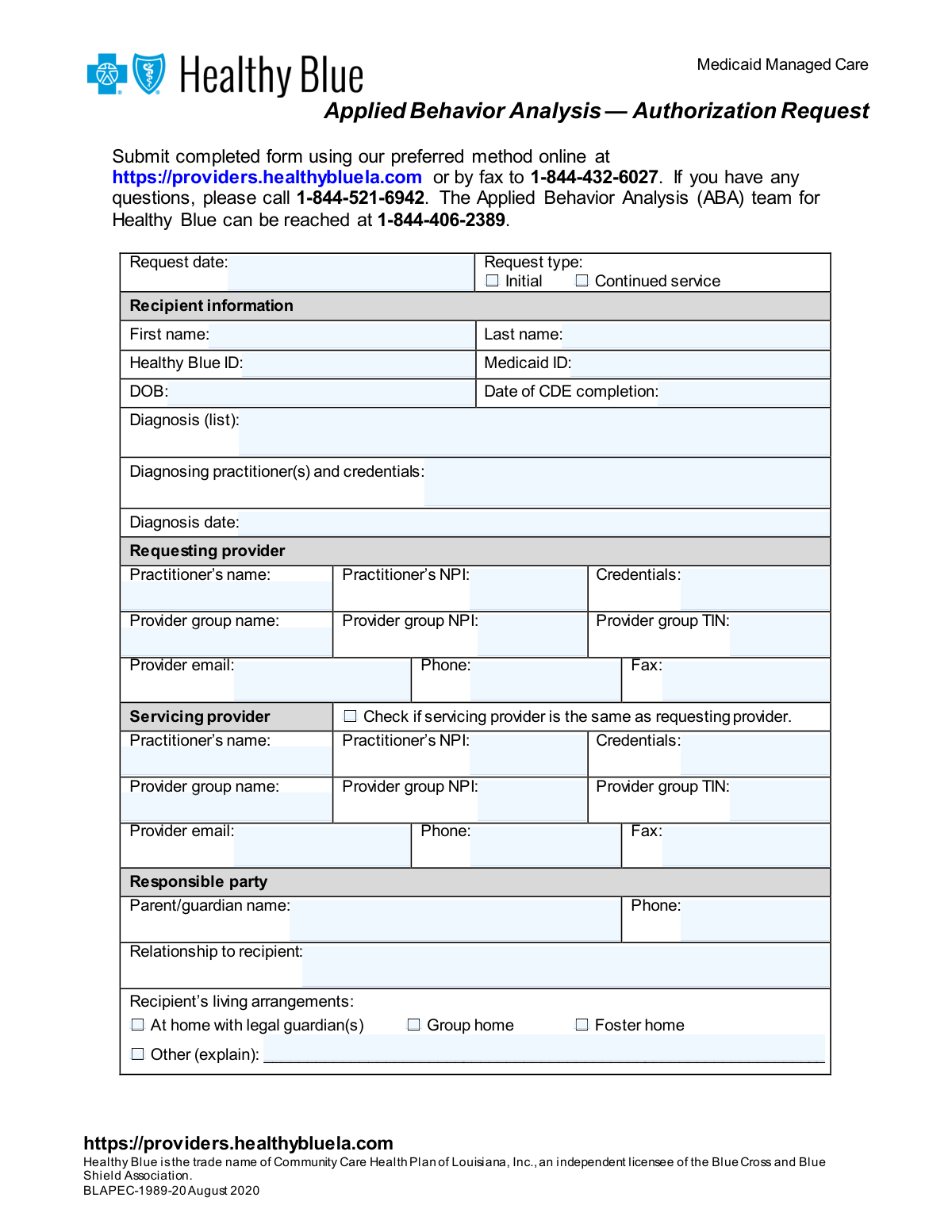
The Healthy Blue Louisiana ABA Authorization Request form (BLAPEC-1989-20) is an official Medicaid Managed Care document used by licensed psychologists, board-certified behavior analysts (BCBAs), and other qualified health care professionals to request prior authorization for Applied Behavior Analysis services, including functional assessments and ABA-based therapy, for eligible Medicaid recipients in Louisiana. The form captures recipient demographics, provider information, diagnosis details, treatment plan attestations, living arrangements, and specific CPT service codes (97151–97158) with requested hours and units. Proper completion ensures that ABA services are medically necessary, non-duplicative of IFSP or IEP services, and compliant with Healthy Blue's coverage requirements. Today, providers can fill out this form quickly and accurately using AI-powered services like Instafill.ai, which can also convert non-fillable PDF versions into interactive fillable forms.
Our AI automatically handles information lookup, data retrieval, formatting, and form filling.
It takes less than a minute to fill out BLAPEC-1989-20 using our AI form filling.
Securely upload your data. Information is encrypted in transit and deleted immediately after the form is filled out.
Form specifications
| Form name: | Medicaid Managed Care Applied Behavior Analysis — Authorization Request (Healthy Blue Louisiana, BLAPEC-1989-20) |
| Number of pages: | 4 |
| Language: | English |
Instafill Demo: filling out a legal form in seconds
How to Fill Out BLAPEC-1989-20 Online for Free in 2026
Are you looking to fill out a BLAPEC-1989-20 form online quickly and accurately? Instafill.ai offers the #1 AI-powered PDF filling software of 2026, allowing you to complete your BLAPEC-1989-20 form in just 37 seconds or less.
Follow these steps to fill out your BLAPEC-1989-20 form online using Instafill.ai:
- 1 Navigate to Instafill.ai and upload the BLAPEC-1989-20 ABA Authorization Request form or select it from the available form library to begin filling it out online.
- 2 Enter the request date and select the request type (Initial or Continued Service), then complete all recipient information including name, Healthy Blue ID, Medicaid ID, date of birth, CDE completion date, diagnosis list, diagnosing practitioner credentials, and diagnosis date.
- 3 Fill in the requesting provider section with the practitioner's name, NPI, credentials, provider group name, group NPI, group TIN, email, phone, and fax number, then complete the servicing provider section or check the box if the servicing provider is the same as the requesting provider.
- 4 Complete the responsible party section with the parent or guardian's name, phone number, relationship to the recipient, and select the appropriate living arrangement option (at home with legal guardian, group home, foster home, or other with explanation).
- 5 Review and check all applicable treatment plan and care coordination attestation boxes, indicate whether the recipient's IFSP or IEP has been reviewed for duplication of services, and provide the required provider signature and date.
- 6 Enter the requested ABA service codes (97151–97158) along with any applicable modifiers, start and end dates, hours requested per week, units requested per week, and total units requested for each service.
- 7 Review the completed form for accuracy and completeness, then submit it online at https://providers.healthybluela.com or by fax to 1-844-432-6027 as directed by Healthy Blue.
Our AI-powered system ensures each field is filled out correctly, reducing errors and saving you time.
Why Choose Instafill.ai for Your Fillable BLAPEC-1989-20 Form?
Speed
Complete your BLAPEC-1989-20 in as little as 37 seconds.
Up-to-Date
Always use the latest 2026 BLAPEC-1989-20 form version.
Cost-effective
No need to hire expensive lawyers.
Accuracy
Our AI performs 10 compliance checks to ensure your form is error-free.
Security
Your personal information is protected with bank-level encryption.
Frequently Asked Questions About Form BLAPEC-1989-20
This form is used by healthcare providers to request prior authorization from Healthy Blue (Medicaid Managed Care) to provide Applied Behavior Analysis services to eligible recipients. It covers both the initial functional assessment phase and the ongoing ABA-based therapy services.
Licensed healthcare providers, licensed psychologists, or board-certified behavior analysts (BCBAs) who are requesting authorization to provide ABA services to Healthy Blue Medicaid members must complete this form. The requesting provider must include their NPI, credentials, and provider group information.
The preferred method is to submit the form online at https://providers.healthybluela.com. Alternatively, you can fax the completed form to 1-844-432-6027. For questions, call 1-844-521-6942 or reach the ABA team directly at 1-844-406-2389.
First, a prior authorization must be requested and approved to perform a functional assessment and develop a behavior treatment plan. A second, separate prior authorization is then required to provide the actual ABA-based derived therapy services. Both steps must be completed before services can be rendered.
Providers may request a review for up to 180 days, which represents an authorization span of six months. You will need to specify start and end dates, as well as the hours and units requested per week for each service code.
An 'Initial' request is for a recipient who has never received ABA services under this plan before, while a 'Continued Service' request is for a recipient who is already receiving ABA services and needs ongoing authorization. You must check the appropriate box at the top of the form.
You must provide the recipient's first and last name, Healthy Blue ID, Medicaid ID, date of birth, date of CDE (Comprehensive Diagnostic Evaluation) completion, diagnosis list, diagnosing practitioner(s) and their credentials, and the diagnosis date.
No, ABA services may not be duplicative of services provided under an Individualized Family Service Plan (IFSP) or an Individualized Educational Program (IEP). The provider must review the recipient's IFSP or IEP and confirm on the form that the proposed treatment is not duplicative by checking Yes, No, or N/A.
The implementation plan must include the member's name, address, date of birth, Medicaid state identification number, the behavioral health intervention services provider's name, and the date the plan was developed and revised. It must also include the diagnosis and treatment order specifying the scope, amount, and duration of services.
The form covers CPT codes 97151 through 97158, which include behavior identification assessment (97151), supporting assessment (97152), adaptive behavior treatment by protocol (97153), group adaptive behavior treatment (97154), treatment with protocol modification (97155), family guidance (97156), multiple-family group guidance (97157), and group treatment with protocol modification (97158).
No, this authorization request is not a guarantee of payment. Payment is contingent upon the recipient's eligibility, available benefits at the time services are rendered, contractual terms, limitations, exclusions, coordination of benefits, and other conditions set forth by the benefit program.
By signing, the provider certifies that treatment interventions are consistent with ABA techniques, that care coordination involving appropriate entities is occurring, that a licensed psychologist or BCBA is responsible for all aspects of clinical direction and supervision, and that the treatment plan is based upon a functional assessment.
Yes, AI-powered services like Instafill.ai can help you accurately auto-fill form fields, saving time and reducing errors. If you have a flat, non-fillable PDF version of this form, Instafill.ai can also convert it into an interactive fillable form so you can complete it digitally.
Visit Instafill.ai and upload the ABA Authorization Request form. The AI will guide you through each field—such as recipient information, provider details, service codes, and dates—auto-filling where possible and flagging any missing information before you submit.
If the provider requesting the authorization is the same as the provider who will be delivering the services, simply check the box labeled 'Check if servicing provider is the same as requesting provider' in the Servicing Provider section, and you will not need to re-enter the provider's information.
Compliance BLAPEC-1989-20
Validation Checks by Instafill.ai
1
Request Type Selection is Mutually Exclusive and Required
Validates that exactly one of the two request type checkboxes — 'Initial' or 'Continued service' — is selected, and that at least one is checked. These options are mutually exclusive, meaning both cannot be selected simultaneously, as a request cannot be both an initial and a continued service authorization at the same time. If neither or both boxes are checked, the form must be rejected and the submitter prompted to select exactly one option, as this distinction drives downstream clinical review workflows.
2
Recipient Date of Birth is a Valid Past Date
Validates that the Recipient's Date of Birth (DOB) is entered in a recognized date format (MM/DD/YYYY) and represents a date that is strictly in the past relative to the request date. ABA services under Medicaid Managed Care are intended for individuals, typically minors, so the DOB must be logically consistent with eligibility criteria. If the DOB is missing, formatted incorrectly, or falls on or after the request date, the form should be flagged as invalid.
3
NPI Format Validation for All Provider Fields
Validates that all National Provider Identifier (NPI) fields — including the Requesting Practitioner's NPI, Requesting Provider Group NPI, Servicing Practitioner's NPI, and Servicing Provider Group NPI — conform to the standard 10-digit numeric NPI format as defined by CMS. NPIs must contain exactly 10 digits with no letters, spaces, or special characters. Invalid NPI formats will prevent proper provider identification and claims processing, so any non-conforming entry must trigger a validation error.
4
Provider Group TIN Format Validation
Validates that the Taxpayer Identification Number (TIN) for both the Requesting Provider Group and the Servicing Provider Group is entered in the standard 9-digit format (XX-XXXXXXX or XXXXXXXXX), containing only numeric characters. The TIN is required for billing and tax reporting purposes, and an incorrectly formatted TIN will cause claim rejections and payment delays. If the TIN field is blank or does not match the expected format, a validation error must be raised.
5
Provider Email Address Format Validation
Validates that the email addresses provided for both the Requesting Provider and the Servicing Provider (when different) conform to a standard email format, including a local part, an '@' symbol, a domain name, and a valid top-level domain (e.g., [email protected]). An improperly formatted email address will prevent Healthy Blue from communicating authorization decisions to the provider. Any email field that does not match the expected pattern should be flagged with a descriptive error message.
6
Phone and Fax Number Format Validation
Validates that all phone and fax number fields — for the Requesting Provider, Servicing Provider, and Responsible Party — are entered in a standard 10-digit North American format (e.g., (XXX) XXX-XXXX or XXX-XXX-XXXX), excluding country codes. These contact fields are critical for follow-up communication and fax-based document exchange. Any field containing fewer than 10 digits, non-numeric characters (other than standard formatting symbols), or an obviously invalid number pattern must be flagged as invalid.
7
Servicing Provider Fields Required When 'Same as Requesting' is Not Checked
Validates that if the checkbox 'Check if servicing provider is the same as requesting provider' is NOT selected, all required Servicing Provider fields — including Practitioner's Name, NPI, Credentials, Provider Group Name, Provider Group NPI, Provider Group TIN, Email, Phone, and Fax — must be completed. Leaving these fields blank when the servicing provider differs from the requesting provider creates an incomplete authorization request that cannot be processed. If the checkbox is checked, the servicing provider fields should be treated as optional or auto-populated.
8
Service Date Range Validity and Authorization Span Limit
Validates that for each requested service code, the End Date is chronologically after the Start Date, and that the total span between the Start Date and End Date does not exceed 180 days (six months), as specified by the form's authorization policy. Both Start Date and End Date must be in a valid date format (MM/DD/YYYY). If any service's date range is inverted, exceeds the 180-day maximum, or contains improperly formatted dates, the corresponding service row must be flagged for correction.
9
Units Per Week and Total Units Arithmetic Consistency
Validates that the Total Units Requested for each service row is mathematically consistent with the Units Requested Per Week multiplied by the number of weeks in the service date range (derived from Start Date and End Date). Since ABA service codes are billed in 15-minute units, this cross-field check ensures that the totals are internally coherent and not arbitrarily entered. A significant discrepancy between the calculated total and the entered total units should trigger a warning or error requiring the submitter to reconcile the values.
10
Hours Per Week and Units Per Week Consistency
Validates that the Hours Requested Per Week and Units Requested Per Week are logically consistent for each service row, given that each ABA service code is billed in 15-minute increments (i.e., 4 units = 1 hour). The Units Per Week should equal the Hours Per Week multiplied by 4. If the entered values are inconsistent with this conversion ratio, the form should flag the discrepancy, as mismatched hours and units can lead to incorrect authorization amounts and billing errors.
11
Diagnosis Date is Not Later Than Date of CDE Completion or Request Date
Validates that the Diagnosis Date is a valid past date and is not later than either the Date of CDE (Comprehensive Diagnostic Evaluation) Completion or the Request Date. Logically, a diagnosis must precede or coincide with the completion of a CDE and must certainly precede the authorization request. If the Diagnosis Date is after the CDE Completion Date or the Request Date, this represents a logical inconsistency that must be flagged and resolved before the form can be submitted.
12
Living Arrangements Selection is Required and 'Other' Requires Explanation
Validates that exactly one of the four Recipient's Living Arrangements checkboxes is selected — 'At home with legal guardian(s)', 'Group home', 'Foster home', or 'Other' — and that if 'Other' is selected, the accompanying explanation text field is not left blank. Living arrangement information is clinically relevant to ABA service planning and care coordination. If no option is selected, or if 'Other' is checked without an explanation, the form must be returned as incomplete.
13
IFSP/IEP Duplication Review Response is Required
Validates that exactly one of the three options — 'Yes', 'No', or 'N/A' — is selected for the IFSP/IEP duplication review question. Per the form's policy, ABA services may not duplicate services already covered under an Individualized Family Service Plan or Individualized Educational Program. If 'No' is selected (indicating duplication exists), the form should trigger an additional warning, as duplicative services are not eligible for authorization. Leaving this question unanswered renders the form incomplete.
14
All Three Treatment Plan Attestation Checkboxes Must Be Checked
Validates that all three required attestation checkboxes in the 'Treatment plan and care coordination' section are checked: (1) treatment interventions are consistent with ABA techniques, (2) the treatment plan is based on functional assessment/reassessment with care coordination, and (3) a licensed psychologist or BCBA is responsible for all clinical direction, supervision, and case management. These attestations are mandatory compliance requirements for ABA authorization under Medicaid Managed Care. If any of the three boxes is left unchecked, the form must be flagged as incomplete.
15
Provider Signature and Signature Date Are Both Required and Consistent
Validates that both the Provider Signature field and the Provider Signature Date field are completed, and that the signature date is not a future date relative to the system's current date. A signature without a date, or a date without a corresponding signature, renders the authorization request legally and administratively invalid. Additionally, the signature date should not predate the Request Date, as a provider cannot sign an authorization before the request is initiated.
16
At Least One Service Code Row Must Have Complete Information
Validates that at least one of the ABA service code rows (97151 through 97158) contains complete information, including a Start Date, End Date, Hours Requested Per Week, Units Requested Per Week, and Total Units Requested. An authorization request with no service details cannot be reviewed or approved, as the clinical team requires specific service codes and quantities to evaluate medical necessity. If all service rows are left entirely blank, the form must be rejected with a prompt to enter at least one requested service.
Common Mistakes in Completing BLAPEC-1989-20
Many providers mistakenly enter the same number in both the Healthy Blue ID and Medicaid ID fields, or swap the two entirely. These are distinct identifiers — the Healthy Blue ID is issued by the managed care plan, while the Medicaid ID is the state-issued identifier. Entering incorrect or mismatched IDs can cause the authorization request to be rejected or delayed. Always verify both numbers from the recipient's insurance card and Medicaid records before submitting. AI-powered tools like Instafill.ai can help by automatically validating these fields against known formats.
Providers sometimes leave both checkboxes blank or check the wrong one, not distinguishing between an initial authorization request and a continued service request. This distinction is critical because each type may require different supporting documentation and triggers different review processes. Submitting a continued service request as an initial one (or vice versa) can result in delays, denials, or requests for additional information. Always confirm whether the recipient has previously received ABA services under this plan before selecting the appropriate box.
The Comprehensive Diagnostic Evaluation (CDE) completion date is a required field that providers frequently leave blank or confuse with the diagnosis date. These are two separate dates — the CDE is a specific evaluation process, and its completion date must be documented to support the authorization. Missing this field can result in an incomplete submission and subsequent denial. Ensure the CDE date is pulled directly from the evaluation report and entered accurately in MM/DD/YYYY format.
A very common oversight is leaving the entire servicing provider section empty without checking the box indicating the servicing provider is the same as the requesting provider. Reviewers cannot assume these are the same entity, and a blank section may be treated as missing required information, causing the request to be returned or denied. If the servicing provider differs from the requesting provider, all fields — including NPI, TIN, credentials, and contact information — must be completed in full. Tools like Instafill.ai can flag incomplete sections and prompt users to either fill in the fields or check the appropriate box.
National Provider Identifier (NPI) numbers are exactly 10 digits, and providers frequently enter incorrect numbers, transpose digits, or confuse the individual practitioner NPI with the provider group NPI. Both the practitioner NPI and the group NPI are required separately for both the requesting and servicing provider sections. An incorrect NPI will cause the authorization to fail verification checks. Always cross-reference NPIs against the NPPES NPI Registry before submission, and note that AI-powered form tools like Instafill.ai can automatically validate NPI format and length.
Since ABA service codes are billed in 15-minute increments, providers must convert hours into units (1 hour = 4 units) and then calculate total units over the authorization period. A common mistake is entering hours directly in the units field, or failing to multiply weekly units by the number of weeks in the requested authorization span (up to 26 weeks for a 180-day period). Incorrect unit calculations can result in under- or over-authorization, affecting care delivery and reimbursement. Double-check all arithmetic and ensure the total units field reflects weekly units multiplied by the number of weeks requested.
Providers sometimes check 'Yes' on the IFSP/IEP duplication review without actually reviewing those documents, or they skip the question entirely. ABA services cannot duplicate services already covered under an Individualized Family Service Plan or Individualized Educational Program, and failing to properly address this requirement is a common cause of authorization denial. The provider must genuinely review the recipient's IFSP or IEP and accurately indicate whether duplication exists. If the recipient does not have an IFSP or IEP, the N/A box should be selected — leaving this section blank is not acceptable.
The form requires a provider signature in two places — once in the Treatment Plan and Care Coordination section and again in the Coverage of ABA Services section — and both must be accompanied by a date. Providers frequently sign only one location or forget to enter the corresponding date. An unsigned or undated form is considered incomplete and will be returned without review. Ensure that both signature fields and their associated date fields are completed before submission, and that the signer is the authorized licensed psychologist or BCBA responsible for the case.
The form instructions explicitly state that the provider must indicate whether the requested services are based on a focused or comprehensive service delivery model, yet many providers overlook this requirement entirely. This distinction affects the scope and intensity of services that can be authorized. Omitting this information can delay processing or result in a request for additional documentation. Review the clinical guidelines for focused versus comprehensive ABA service models and clearly document the chosen model in the supporting clinical information submitted with the form.
Providers often submit the authorization request form alone without attaching the required supporting documents, such as the functional behavior assessment, the behavior treatment plan, and the implementation plan containing all required demographic and clinical details. The form explicitly states that all appropriate clinical information and required documents must accompany the submission. Missing attachments are one of the most common reasons for authorization delays or denials. Create a checklist of required documents before submission and verify each item is included, whether submitting online or by fax.
Providers sometimes enter start and end dates that exceed the allowable 180-day authorization span, or they enter dates that overlap with a previous authorization period for continued service requests. The form allows providers to request review for up to 180 days, and dates outside this window will not be approved. Additionally, for continued service requests, the start date should follow immediately after the expiration of the prior authorization. Always verify that the requested date range falls within the 180-day limit and aligns correctly with any prior authorization periods.
Providers frequently list only a general diagnosis description without including the specific ICD-10 code, or they omit the diagnosing practitioner's credentials and the diagnosis date. All three elements — the diagnosis (with code), the diagnosing practitioner's name and credentials, and the diagnosis date — are required fields. Incomplete diagnosis information can prevent reviewers from verifying medical necessity and will likely result in a request for additional information or an outright denial. Ensure the full ICD-10 code is listed alongside the diagnosis description, and that the diagnosing practitioner's credentials (e.g., PhD, BCBA) are clearly stated.
Saved over 80 hours a year
“I was never sure if my IRS forms like W-9 were filled correctly. Now, I can complete the forms accurately without any external help.”
Kevin Martin Green
Your data stays secure with advanced protection from Instafill and our subprocessors

Robust compliance program
Transparent business model
You’re not the product. You always know where your data is and what it is processed for.
ISO 27001, HIPAA, and GDPR
Our subprocesses adhere to multiple compliance standards, including but not limited to ISO 27001, HIPAA, and GDPR.
Security & privacy by design
We consider security and privacy from the initial design phase of any new service or functionality. It’s not an afterthought, it’s built-in, including support for two-factor authentication (2FA) to further protect your account.
Fill out BLAPEC-1989-20 with Instafill.ai
Worried about filling PDFs wrong? Instafill securely fills medicaid-managed-care-applied-behavior-analysis-authorization-request-healthy-blue-louisiana-blapec-1989-20 forms, ensuring each field is accurate.