Yes! You can use AI to fill out Treatment Plan Request Form for Autism Spectrum Disorders
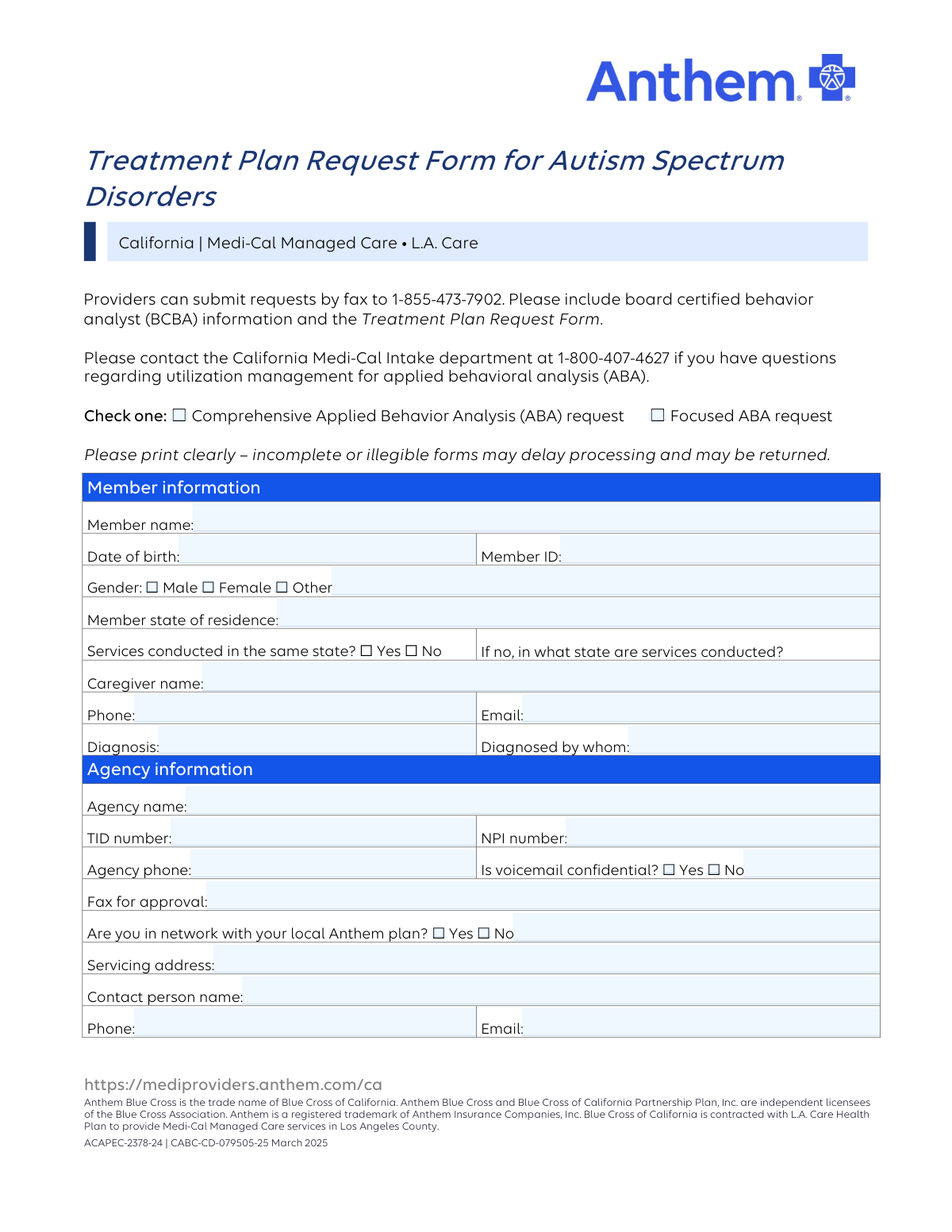
This form is a formal request submitted by healthcare providers, such as board-certified behavior analysts (BCBAs), to Anthem Blue Cross of California to obtain pre-authorization for Applied Behavioral Analysis (ABA) treatment for patients with Autism Spectrum Disorders. It is essential for detailing the patient's diagnosis, the proposed treatment plan, and the specific services required, ensuring that the care is medically necessary and covered by the patient's Medi-Cal plan. Today, this form can be filled out quickly and accurately using AI-powered services like Instafill.ai, which can also convert non-fillable PDF versions into interactive fillable forms.
Our AI automatically handles information lookup, data retrieval, formatting, and form filling.
It takes less than a minute to fill out ACAPEC-2378-24 using our AI form filling.
Securely upload your data. Information is encrypted in transit and deleted immediately after the form is filled out.
Form specifications
| Form name: | Treatment Plan Request Form for Autism Spectrum Disorders |
| Number of pages: | 3 |
| Language: | English |
| Categories: | autism forms, treatment plan forms |
Instafill Demo: How to fill out PDF forms in seconds with AI
How to Fill Out ACAPEC-2378-24 Online for Free in 2026
Are you looking to fill out a ACAPEC-2378-24 form online quickly and accurately? Instafill.ai offers the #1 AI-powered PDF filling software of 2026, allowing you to complete your ACAPEC-2378-24 form in just 37 seconds or less.
Follow these steps to fill out your ACAPEC-2378-24 form online using Instafill.ai:
- 1 Navigate to Instafill.ai and upload the Treatment Plan Request Form for Autism Spectrum Disorders or select it from the template library.
- 2 Use the AI assistant to automatically populate member information, including name, date of birth, member ID, and diagnosis details.
- 3 Enter the information for the requesting agency and the rendering BCBA or provider, such as names, NPI/TID numbers, and contact details.
- 4 Indicate whether the request is for Comprehensive or Focused ABA and attach all required supporting documents like diagnostic evaluations or physician recommendations.
- 5 Complete the 'Adaptive Behavior Treatment' section by specifying the CPT codes, units, and timeframes for each requested service.
- 6 The rendering provider must digitally sign and date the form to confirm the accuracy of the information and their supervision responsibilities.
- 7 Review the entire form for completeness and accuracy before downloading and submitting it via fax to the number provided.
Our AI-powered system ensures each field is filled out correctly, reducing errors and saving you time.
Why Choose Instafill.ai for Your Fillable ACAPEC-2378-24 Form?
Speed
Complete your ACAPEC-2378-24 in as little as 37 seconds.
Up-to-Date
Always use the latest 2026 ACAPEC-2378-24 form version.
Cost-effective
No need to hire expensive lawyers.
Accuracy
Our AI performs 10 compliance checks to ensure your form is error-free.
Security
Your personal information is protected with bank-level encryption.
Frequently Asked Questions About Form ACAPEC-2378-24
This form is used by healthcare providers to request prior authorization from Anthem Blue Cross for Applied Behavior Analysis (ABA) services for a Medi-Cal member diagnosed with an Autism Spectrum Disorder.
The ABA provider or agency should complete this form. It requires detailed information from the board certified behavior analyst (BCBA) or rendering provider who is responsible for the member's treatment plan.
You can submit the completed form, along with the required BCBA information and the full treatment plan, by faxing it to 1-855-473-7902.
A Comprehensive ABA request is for treatment targeting a broad range of functional deficits, while a Focused ABA request is for treatment targeting a limited number of specific behaviors. Select the option that best describes the submitted treatment plan.
For an initial request, you must include a diagnostic evaluation from a qualified clinician, a signed recommendation form, an MD progress note, or a letter on letterhead confirming the diagnosis and recommending ABA.
Your request should include the treatment plan, baseline data and progress graphs, yearly assessments (e.g., Vineland, VB Mapp), and details on parent training, generalization, and discharge plans.
Each unit represents a 15-minute increment of service. To calculate the units, multiply the number of hours requested by four (e.g., 10 hours of service equals 40 units).
Processing delays are often caused by incomplete or illegible forms, or missing required documents like the treatment plan or diagnostic report. Ensure all fields are printed clearly and all necessary attachments are included before submission.
If you have questions about utilization management for ABA services, you can contact the California Medi-Cal Intake department at 1-800-407-4627.
On the form, check 'No' for the question 'Services conducted in the same state?' and then write in the name of the state where services are actually provided.
Yes, you can use AI-powered services like Instafill.ai to help fill out this form. These tools can auto-fill fields accurately from your records, saving time and reducing manual entry errors.
Simply upload the form to the Instafill.ai platform, and its AI will make the document interactive. You can then connect your data sources to instantly auto-fill member, provider, and agency information.
If you have a non-fillable or 'flat' PDF, you can use a service like Instafill.ai to convert it into an interactive, fillable form that is easy to complete, save, and manage online.
Compliance ACAPEC-2378-24
Validation Checks by Instafill.ai
1
Exclusive ABA Request Type Selection
This check verifies that the user has selected either 'Comprehensive Applied Behavior Analysis (ABA) request' or 'Focused ABA request,' but not both. Selecting one is mandatory to define the scope of the request. If neither or both are selected, the form is ambiguous and cannot be processed correctly, leading to delays or rejection.
2
Validates Member Date of Birth Format and Age
This validation ensures the 'Date of birth' field is in a valid format (e.g., MM/DD/YYYY) and represents a logical date. It also checks that the calculated age is reasonable for a recipient of ABA services, preventing clear data entry errors like a birth year in the future or from the 19th century. An invalid date would prevent proper member identification and eligibility verification.
3
Ensures Member ID Format Compliance
This check validates that the 'Member ID' field is not empty and conforms to the expected format for California Medi-Cal or Anthem. This ID is the primary key for identifying the patient in the system. An incorrect or missing ID will result in a complete failure to locate the member's records, halting the entire request process.
4
Conditional Validation for Out-of-State Service Location
This validation rule is triggered if the user selects 'No' for 'Services conducted in the same state?'. It then ensures that the subsequent field, 'If no, in what state are services conducted?', is filled out with a valid state. This is crucial for determining correct provider network status, billing, and compliance with interstate healthcare regulations.
5
Verifies National Provider Identifier (NPI) Format
This check ensures that the 'NPI number' for both the agency and the rendering provider is a valid 10-digit number. It can also include a Luhn algorithm check for numerical validity. The NPI is a standard, unique identifier for health care providers, and an invalid NPI will cause claim rejections and payment issues.
6
Validates Agency and Provider Tax ID (TID) Number Format
This validation checks that the 'TID number' for the agency and rendering provider follows the standard format for a Taxpayer Identification Number (e.g., XX-XXXXXXX for an EIN). This number is essential for financial and tax purposes. An incorrectly formatted TID can lead to significant delays in provider verification and payment processing.
7
Standardizes Phone and Fax Number Formats
This check applies to all phone and fax number fields on the form. It ensures the number is in a recognizable format, such as (XXX) XXX-XXXX or XXXXXXXXXX, and contains the correct number of digits. Consistent formatting is important for reliable communication and prevents errors when contacting the caregiver or provider.
8
Validates Email Address Structure
This validation applies to the email fields for the Caregiver, Contact Person, and BCBA. It checks that the entry contains an '@' symbol and a domain, following the standard local-part@domain structure. A valid email is critical for sending electronic notifications, approvals, or requests for more information.
9
Ensures Start Date of Request is Not in the Past
This validation checks that the 'Start date of current request' is not a date in the past. Authorization requests are for future or ongoing services, so a past date is a logical error. Submitting a request with a past start date would likely result in automatic rejection by the utilization management system.
10
Enforces Timeframe for Requested CPT Units
This rule validates the table of CPT codes. If a number of 'Units' is entered for any CPT code, the corresponding 'Timeframe' field (weekly/monthly) must also be filled out. Without a timeframe, the requested quantity of units is meaningless and cannot be evaluated for medical necessity, leading to the request being returned as incomplete.
11
Validates Provider Signature Date
This check ensures the 'Date' next to the provider signature is a valid date and is not in the future. It also confirms the date is recent and logical in relation to the 'Start date of current request'. An invalid or illogical signature date can call the authenticity and timeliness of the entire treatment plan into question.
12
Ensures Completeness of Core Member Information
This validation confirms that the core member identification fields—'Member name,' 'Date of birth,' and 'Member ID'—are all completed. These three pieces of information are the minimum required to uniquely and accurately identify the patient. Missing any of this data makes it impossible to process the request.
13
Ensures Completeness of BCBA/Rendering Provider Information
This check verifies that the 'Provider name,' 'NPI number,' and 'Phone' fields in the 'BCBA or rendering provider information' section are all filled out. This information is essential for verifying the credentials of the professional responsible for the treatment plan. Missing provider details can delay or prevent authorization as the payer cannot confirm the provider is qualified.
14
Requires Justification for Specific CPT Codes
This validation checks if units are requested for CPT codes 0362T or 0373T. If so, it flags the need for an accompanying 'Clinical justification' as stated on the form. The system should verify that a justification document or text field is attached or filled, as these codes are for high-intensity situations and require explicit reasoning for approval.
Common Mistakes in Completing ACAPEC-2378-24
Providers often fail to include the required diagnostic documentation listed on page 2, such as the diagnostic evaluation or a physician's recommendation letter. This happens when staff are rushed and overlook the checklist of required attachments. A submission without these documents is considered incomplete and will be rejected or significantly delayed until all necessary paperwork is received.
A frequent error is entering the number of hours instead of the number of 15-minute units in the 'Adaptive Behavior Treatment' table. For example, a provider might enter '2' for a two-hour session instead of the correct value of '8'. This leads to a request for only a fraction of the intended service time, causing significant authorization and billing problems. AI-powered tools like Instafill.ai can help prevent this by allowing users to enter hours and automatically converting them to the correct unit count.
In the treatment table, providers often enter the number of units but leave the adjacent 'Timeframe' column blank. Without knowing if the units are requested 'weekly' or 'monthly', the reviewer cannot determine the total scope of the request. This ambiguity forces the processor to return the form or contact the provider for clarification, delaying the authorization process.
At the very top of the form, the provider must check either 'Comprehensive' or 'Focused' ABA request. Forgetting to select one of these options is a common oversight that brings the review process to an immediate halt. The entire review pathway depends on this initial selection, and a form missing this information will be returned.
The form requires both a Tax ID (TID) and a National Provider Identifier (NPI) for both the agency and the rendering provider. These distinct numbers are often confused or entered in the wrong fields. This data entry error can cause claim rejections and payment delays, as the identifiers will not match the payer's records. Using a form-filling tool like Instafill.ai can help by saving and correctly populating these unique identifiers for each provider.
The form specifies that the 'Treatment plan should be dated within 30 days of start date.' Providers sometimes attach a plan that is older than this 30-day window, especially for ongoing cases. This will result in the request being flagged or denied, as the clinical justification is not considered current.
Since the form is submitted via fax, poor or rushed handwriting can make critical data like Member IDs, phone numbers, or CPT units unreadable. The form itself warns that illegible submissions will be delayed or returned. This entirely preventable issue is a frequent source of processing delays. Tools like Instafill.ai can convert flat PDFs into digitally fillable forms, ensuring all entries are perfectly legible.
Forgetting to sign, date, or print the provider's name at the bottom of the form is a critical error that invalidates the entire submission. A missing signature or date means the request is not legally attested, and it will be immediately sent back. This simple oversight forces the provider to resubmit the entire package, restarting the review clock.
The form requires 'Clinical justification' for specific CPT codes like 0362T and 0373T, which are used for severe behaviors. Providers may request units for these codes without attaching the separate, detailed narrative explaining the medical necessity. This omission will lead to the denial of those specific service lines, even if the rest of the request is approved.
The form asks whether the agency and BCBA voicemails are confidential, which is a HIPAA-related compliance check. Providers sometimes skip this simple 'Yes/No' question. This prevents the health plan from leaving messages containing Protected Health Information (PHI), which can severely slow down communication and delay clarification on any issues with the request.
Saved over 80 hours a year
“I was never sure if my IRS forms like W-9 were filled correctly. Now, I can complete the forms accurately without any external help.”
Kevin Martin Green
Your data stays secure with advanced protection from Instafill and our subprocessors

Robust compliance program
Transparent business model
You’re not the product. You always know where your data is and what it is processed for.
ISO 27001, HIPAA, and GDPR
Our subprocesses adhere to multiple compliance standards, including but not limited to ISO 27001, HIPAA, and GDPR.
Security & privacy by design
We consider security and privacy from the initial design phase of any new service or functionality. It’s not an afterthought, it’s built-in, including support for two-factor authentication (2FA) to further protect your account.
Fill out ACAPEC-2378-24 with Instafill.ai
Worried about filling PDFs wrong? Instafill securely fills treatment-plan-request-form-for-autism-spectrum-disorders forms, ensuring each field is accurate.