Yes! You can use AI to fill out Anthem Blue Cross Request for Authorization: Autism Spectrum Disorder Testing
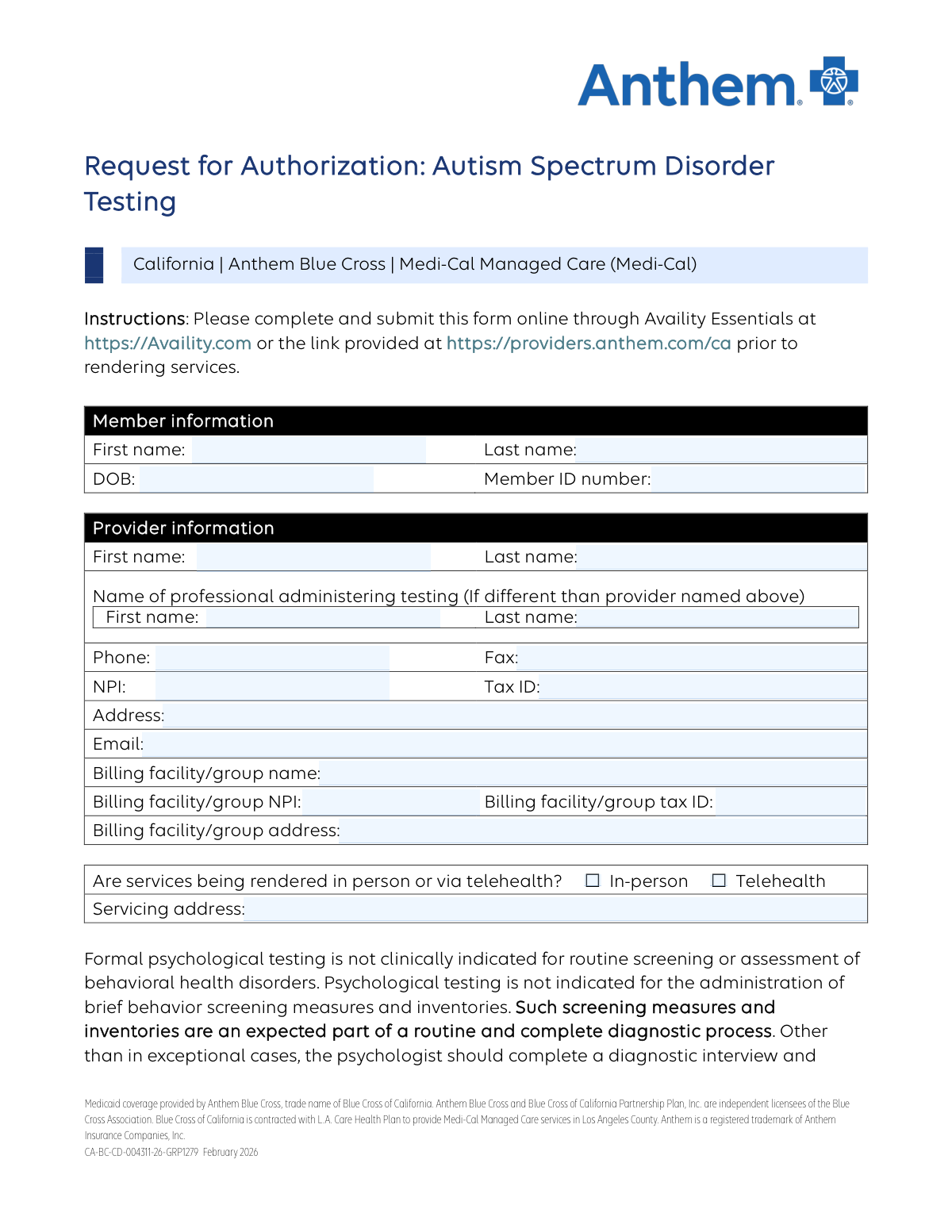
This form is a prior authorization request used by healthcare providers to seek approval from Anthem Blue Cross for conducting Autism Spectrum Disorder (ASD) testing on a patient covered by Medi-Cal Managed Care. It requires detailed information about the patient, the provider, clinical assessments, treatment history, and a clear rationale for why the testing is medically necessary. Today, this form can be filled out quickly and accurately using AI-powered services like Instafill.ai, which can also convert non-fillable PDF versions into interactive fillable forms.
Our AI automatically handles information lookup, data retrieval, formatting, and form filling.
It takes less than a minute to fill out CA-BC-CD-004311-26-GRP1279 using our AI form filling.
Securely upload your data. Information is encrypted in transit and deleted immediately after the form is filled out.
Form specifications
| Form name: | Anthem Blue Cross Request for Authorization: Autism Spectrum Disorder Testing |
| Number of pages: | 5 |
| Language: | English |
| Categories: | autism forms, authorization forms |
Instafill Demo: How to fill out PDF forms in seconds with AI
How to Fill Out CA-BC-CD-004311-26-GRP1279 Online for Free in 2026
Are you looking to fill out a CA-BC-CD-004311-26-GRP1279 form online quickly and accurately? Instafill.ai offers the #1 AI-powered PDF filling software of 2026, allowing you to complete your CA-BC-CD-004311-26-GRP1279 form in just 37 seconds or less.
Follow these steps to fill out your CA-BC-CD-004311-26-GRP1279 form online using Instafill.ai:
- 1 Navigate to Instafill.ai and upload or select the 'Request for Authorization: Autism Spectrum Disorder Testing' form.
- 2 Provide the patient's member information, including their name, date of birth, and member ID number.
- 3 Enter the provider, billing facility, and servicing professional's information, such as names, NPIs, Tax IDs, and addresses.
- 4 Complete the clinical assessment section by checking off completed evaluations, listing administered screeners and their results, and detailing the patient's treatment history.
- 5 Fill out the rationale for testing, including unanswered clinical questions, the potential impact on treatment, and the DSM-5/ICD-10 diagnosis codes under evaluation.
- 6 Specify the psychological tests and services being requested by selecting the appropriate CPT codes and entering the number of units for each.
- 7 Review all the information populated by the AI for accuracy, then provide a digital signature and the date before submitting the form to Anthem Blue Cross via their online portal or fax.
Our AI-powered system ensures each field is filled out correctly, reducing errors and saving you time.
Why Choose Instafill.ai for Your Fillable CA-BC-CD-004311-26-GRP1279 Form?
Speed
Complete your CA-BC-CD-004311-26-GRP1279 in as little as 37 seconds.
Up-to-Date
Always use the latest 2026 CA-BC-CD-004311-26-GRP1279 form version.
Cost-effective
No need to hire expensive lawyers.
Accuracy
Our AI performs 10 compliance checks to ensure your form is error-free.
Security
Your personal information is protected with bank-level encryption.
Frequently Asked Questions About Form CA-BC-CD-004311-26-GRP1279
This form is used by healthcare providers to request prior authorization from Anthem Blue Cross to conduct formal Autism Spectrum Disorder (ASD) testing for a Medi-Cal Managed Care member.
A qualified healthcare provider, such as a physician or psychologist, who intends to perform the ASD testing must complete and submit this form before rendering services.
You can submit the form online via Availity Essentials, which is the recommended method, or you can fax it to 855-473-7902.
No, this form is not for routine screening or the administration of brief screening measures. It is for requesting authorization for comprehensive, formal psychological testing for ASD after initial assessments have been completed.
You must attach all relevant clinical or medical records that support the request for testing, such as results from prior screenings, clinical interview notes, and developmental history.
No, requests for educational testing, assessment of learning disabilities, or for school placement purposes are not covered and should be referred to the patient's public school system.
If the member has had prior ASD testing, you must provide the date of the test, the type of test administered, the results, and a clear clinical rationale for why retesting is necessary.
No, this form only authorizes the diagnostic testing. While you must indicate if the testing is needed to access ABA services, obtaining authorization for ABA therapy is a separate process.
In this section, you must select the appropriate CPT codes, specify the number of units requested for each, and list the specific names of the tests you plan to administer.
Yes, the form allows you to request authorization for services rendered either in-person or via telehealth. You must check the appropriate box to indicate the service delivery method.
Yes, services like Instafill.ai use AI to accurately auto-fill form fields from your existing data, which can save you time and help prevent errors.
Simply upload the 'Request for Authorization' PDF to the Instafill.ai platform. Its AI will make the form fillable online, and you can use its features to complete the fields quickly.
If you have a non-fillable PDF, you can use a service like Instafill.ai. It can convert flat PDFs into interactive, fillable forms that you can easily complete and save on your computer.
Before submitting, the provider must have completed a diagnostic interview and administered relevant screening measures (like MCHAT, CARS, etc.). The results of these preliminary steps should be included with your request.
Compliance CA-BC-CD-004311-26-GRP1279
Validation Checks by Instafill.ai
1
Ensures Member's Date of Birth is a valid past date
This validation confirms that the entered Date of Birth (DOB) is in a correct format (e.g., MM/DD/YYYY) and represents a date that has already passed. It is crucial for verifying member eligibility and applying age-specific clinical criteria. A failed validation would prevent form submission and prompt the user to enter a logical and correctly formatted date.
2
Validates the format of the National Provider Identifier (NPI)
This check ensures that both the provider's NPI and the billing facility's NPI are exactly 10 digits long and contain only numbers. A valid NPI is essential for unique provider identification, claims processing, and regulatory compliance. If the format is incorrect, the system will reject the entry and require a valid 10-digit NPI to proceed.
3
Requires Servicing Address for In-Person Services
This rule validates that if the 'In-person' checkbox is selected for service delivery, the 'Servicing address' field must not be empty. This is important for confirming the location of service for network verification and logistical purposes. If 'In-person' is checked and the address is missing, an error will be displayed, requiring the user to provide the address.
4
Ensures Diagnostic Interview Date is not in the future
This validation checks that the 'Date of diagnostic interview' is not a future date relative to the form submission date. An interview must have already occurred to be documented on this request. This maintains the logical and chronological integrity of the clinical information provided, and a future date would be rejected.
5
Validates completeness of screening measure information
If the 'Brief inventories and/or screening measures' box is checked, this validation ensures that at least one specific screener (e.g., ASRS, MCHAT) is also checked and that the 'Screener results' text field is not empty. This confirms that the claim of using screeners is substantiated with specific details and outcomes. Failure to provide these details will result in a validation error prompting for completion.
6
Ensures complete Treatment History entries
This check verifies that for each row in the 'Treatment history' table, if a frequency is selected, then the corresponding 'How long' and 'Is member still in treatment?' fields are also completed. This prevents incomplete data entries and ensures a full picture of the member's treatment history is provided for review. An incomplete row will trigger an error.
7
Requires justification for retesting if previous tests are documented
This validation ensures that if any details about a 'Previous ASD testing' record are entered (date, type, or results), the corresponding 'Reason for retest request' field must also be completed. This is critical for the authorization process, as retesting often requires strong clinical justification. An entry for a previous test without a reason for retest will be flagged as incomplete.
8
Links Diagnosis Code to a required Status
This rule validates that for every 'DSM-5/ICD-10 diagnosis' code entered, one of the corresponding status radio buttons ('Current' or 'Provisional') must be selected. This provides essential context for the diagnosis being evaluated. Submitting a code without a status will result in an error, forcing the user to clarify the diagnostic status.
9
Enforces one-unit maximum for specific CPT codes
This validation enforces the rule stated on the form that CPT codes 96130, 96136, and 96138 have a 'one unit maximum'. The system will check if the units entered for these specific codes are greater than 1. This prevents billing errors and ensures compliance with the payer's specific authorization rules, rejecting any request that exceeds the limit.
10
Requires test names for requested CPT services
This check ensures that if a provider requests units for a specific CPT code, they must also describe the specific test or service in the 'Evaluation services/test names' field. This detail is necessary for the clinical reviewer to understand what is being requested and determine medical necessity. A request with units but no description will be considered incomplete.
11
Verifies consistency of Total Units Requested
This validation automatically calculates the sum of units from all requested CPT codes and compares it to the value entered in the 'Total units requested' field. This serves as a cross-check to prevent clerical errors and ensure the summary matches the detailed request. A mismatch would trigger an alert for the user to correct the discrepancy.
12
Confirms completion of at least one clinical assessment
This validation requires that the provider select at least one checkbox from the 'Clinical assessment' list (e.g., 'Clinical interview with patient'). This is a fundamental requirement to show that a basic diagnostic workup has been performed prior to requesting advanced testing. The form cannot be submitted if no assessments are indicated.
13
Requires completion of Rationale for Testing fields
This validation checks that the text fields for 'What diagnostic or clinical questions remain unanswered...' and 'How will the results of testing impact the course of treatment?' are not left blank. These justifications are the core of the authorization request and are critical for the reviewer's decision-making process. The form submission will fail if this crucial information is missing.
14
Validates Tax ID Format
This check ensures the Provider Tax ID and Billing Facility Tax ID are entered in a valid format, such as a 9-digit Employer Identification Number (EIN) (XX-XXXXXXX). Correctly formatted tax information is essential for accurate billing and financial processing. An invalid format will trigger an error and require correction before submission.
Common Mistakes in Completing CA-BC-CD-004311-26-GRP1279
Providers often confuse or omit the individual provider's NPI/Tax ID versus the billing facility/group's NPI/Tax ID. This happens due to oversight or confusion about which identifier applies to which entity. This error leads to processing delays and claim rejections, as the payer cannot verify the rendering and billing providers correctly. To avoid this, carefully differentiate between the individual practitioner's details and the group's details, ensuring all four fields (Provider NPI/Tax ID, Billing NPI/Tax ID) are accurately filled.
The sections asking 'What diagnostic or clinical questions remain unanswered' and 'How will the results of testing impact the course of treatment' are frequently left blank or filled with generic phrases like 'for diagnosis'. This is insufficient for authorization, as payers need to understand the specific clinical necessity of the testing. To prevent denial, provide a detailed, patient-specific narrative explaining the diagnostic uncertainty and outlining how the test results will directly influence treatment planning, medication changes, or therapy approaches.
Providers often check the boxes for CPT codes but fail to list the specific names of the tests to be administered, including versions or subtests as required. This lack of detail prevents the reviewer from assessing the appropriateness of the requested services, leading to requests for more information or outright denial. Always specify the full test name (e.g., 'ADOS-2, Module 3' instead of just 'testing') next to the corresponding CPT code to ensure clarity and justify the units requested.
The form explicitly requests that relevant clinical or medical records be attached, but this step is commonly missed. Without the supporting documentation, such as the diagnostic interview notes or reports from other specialists, the reviewer cannot validate the information on the form. This omission is a primary cause of authorization delays. Always compile and attach all relevant records before submission to provide a complete clinical picture.
The treatment history table is complex and often submitted with missing data points. For example, a provider might indicate a type of therapy but leave the 'duration', 'frequency', or 'symptom improvement' fields blank. This incomplete data makes it impossible to assess treatment history and the need for further testing. Ensure every row and column for each relevant therapy is filled out completely to demonstrate a thorough evaluation has occurred.
Checking the boxes for administered screeners (e.g., M-CHAT, SRS, CARS) without providing a summary in the 'Screener results' field is a frequent error. The payer needs to see the outcome of these preliminary measures to understand the justification for comprehensive testing. Simply indicating a screener was used is not enough; always include the scores and a brief interpretation of the results to support the request.
When a patient has had previous ASD testing, providers must provide a compelling reason for a retest, but this field is often left blank or contains a weak rationale. Payers are hesitant to approve retesting without clear justification, such as significant changes in clinical presentation, questions about the validity of prior results, or the need for an updated assessment for a new developmental stage. Clearly articulate why the previous results are no longer sufficient to avoid denial.
A common data entry error is selecting 'In-person' as the service delivery method but failing to enter a physical address in the 'Servicing address' field. This discrepancy creates ambiguity and halts the authorization process, as the location of service is a required data point for verification and network compliance. Always ensure that if 'In-person' is checked, the corresponding 'Servicing address' field is completed accurately.
The form specifies unit maximums for certain CPT codes (e.g., 96130, 96136, 96138), but providers may accidentally request more units than are allowed. Additionally, the 'Total units requested' may not equal the sum of the individual units listed. These mathematical errors can lead to partial denials or require clarification, delaying the authorization. Double-checking the unit limits for each code and verifying the total sum is crucial for a smooth approval process.
Forgetting to sign and date the form is a simple yet surprisingly common mistake, especially when dealing with multi-page paper or PDF forms. An unsigned or undated request is legally invalid and will be immediately rejected, forcing the provider's office to resubmit the entire form. To prevent this, make the signature and date the final check before faxing or uploading. Since this form is a flat PDF, using a tool like Instafill.ai can convert it to a fillable version and help ensure all required fields, including the signature, are completed before submission.
Saved over 80 hours a year
“I was never sure if my IRS forms like W-9 were filled correctly. Now, I can complete the forms accurately without any external help.”
Kevin Martin Green
Your data stays secure with advanced protection from Instafill and our subprocessors

Robust compliance program
Transparent business model
You’re not the product. You always know where your data is and what it is processed for.
ISO 27001, HIPAA, and GDPR
Our subprocesses adhere to multiple compliance standards, including but not limited to ISO 27001, HIPAA, and GDPR.
Security & privacy by design
We consider security and privacy from the initial design phase of any new service or functionality. It’s not an afterthought, it’s built-in, including support for two-factor authentication (2FA) to further protect your account.
Fill out CA-BC-CD-004311-26-GRP1279 with Instafill.ai
Worried about filling PDFs wrong? Instafill securely fills anthem-blue-cross-request-for-authorization-autism-spectrum-disorder-testing forms, ensuring each field is accurate.