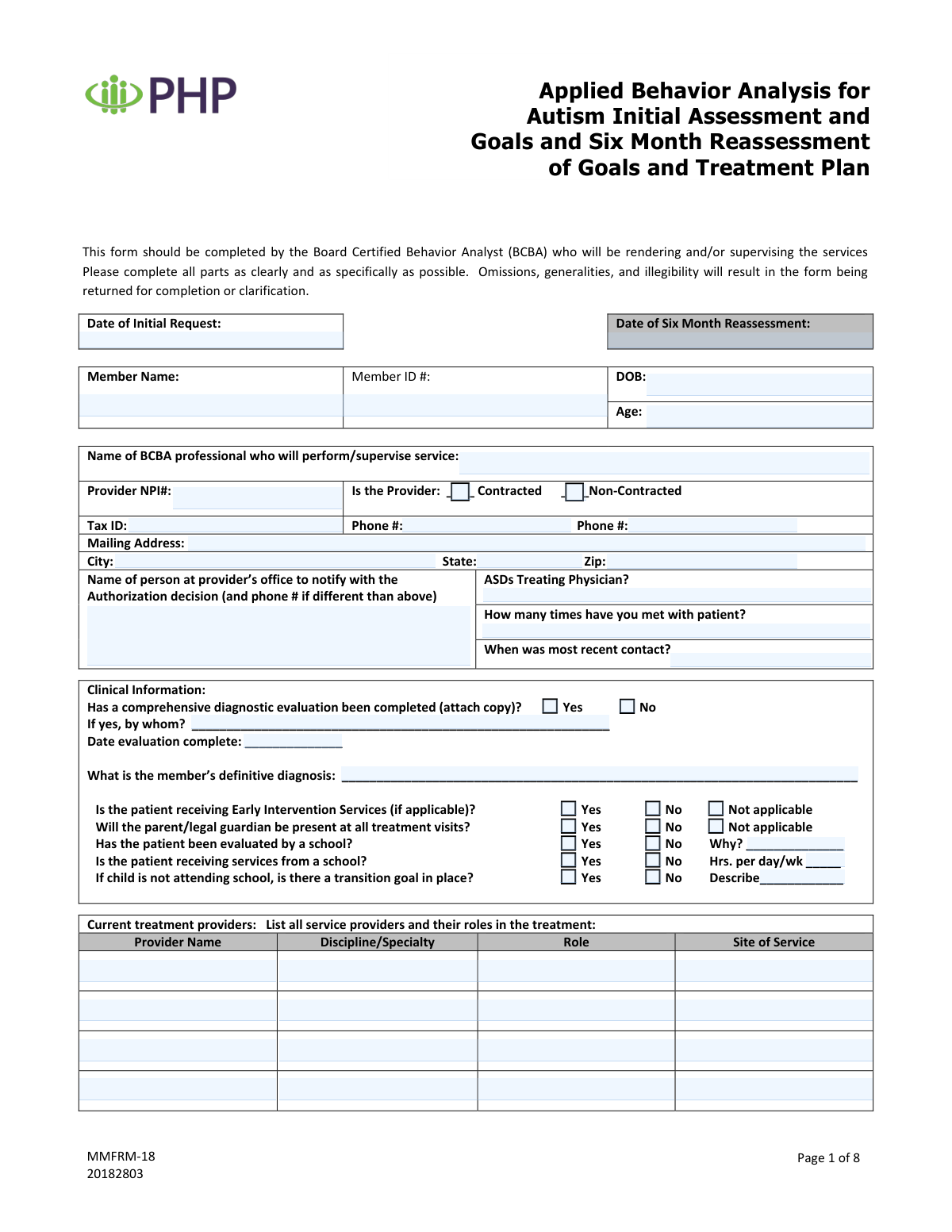
Yes! You can use AI to fill out Applied Behavior Analysis for Autism Initial Assessment and Goals and Six Month Reassessment of Goals and Treatment Plan (MMFRM-18)

The Applied Behavior Analysis for Autism Initial Assessment and Goals and Six Month Reassessment of Goals and Treatment Plan (MMFRM-18) is a multi-page clinical and authorization support form completed by the treating/supervising BCBA. It captures member demographics, diagnostic evaluation details, current services and medications, coordination with other providers, measurable behavior goals (reduction/increase) with progress updates, and the requested treatment authorization (hours/days/months) with service codes. It is important because payers commonly require this level of documentation to evaluate medical necessity, track progress over time, and approve or continue ABA services. Today, this form can be filled out quickly and accurately using AI-powered services like Instafill.ai, which can also convert non-fillable PDF versions into interactive fillable forms.
Our AI automatically handles information lookup, data retrieval, formatting, and form filling.
It takes less than a minute to fill out MMFRM-18 using our AI form filling.
Securely upload your data. Information is encrypted in transit and deleted immediately after the form is filled out.

Form specifications

Form name: Applied Behavior Analysis for Autism Initial Assessment and Goals and Six Month Reassessment of Goals and Treatment Plan (MMFRM-18)
Number of pages: 8
Language: English
Categories: autism forms, mental health forms
main-image

Instafill Demo: filling out a legal form in seconds

How to Fill Out MMFRM-18 Online for Free in 2026

Are you looking to fill out a MMFRM-18 form online quickly and accurately? Instafill.ai offers the #1 AI-powered PDF filling software of 2026, allowing you to complete your MMFRM-18 form in just 37 seconds or less.
Follow these steps to fill out your MMFRM-18 form online using Instafill.ai:
  1. 1 Go to Instafill.ai and upload the MMFRM-18 PDF (or select it from the form library) to start an AI-guided fill session.
  2. 2 Enter member and request details (initial request date, six-month reassessment date, member name/ID, DOB, age) and confirm accuracy against the patient record.
  3. 3 Provide BCBA/provider information (BCBA name, NPI, contracted status, tax ID, phone numbers, mailing address) and the office contact for authorization notifications.
  4. 4 Complete clinical background sections by attaching/entering diagnostic evaluation information, definitive diagnosis, early intervention/school service details, transition goals, and listing current treatment providers and coordination/communications.
  5. 5 Fill in medication history (consultations, current medications, dosages, start/stop dates, response, and any changes at the six-month re-evaluation) and document special services in school/community.
  6. 6 Use Instafill.ai to populate the behavior goal tables (targets for reduction/increase, baseline/current functioning, measurable goals, target dates, and six-month status/progress) for both the prior and upcoming six-month periods.
  7. 7 Complete the request for authorization of treatment (hours per day, days per week, months, required service codes/descriptions/frequency/units), then review for omissions/legibility, generate the final PDF, and obtain BCBA and physician signatures before submission.

Our AI-powered system ensures each field is filled out correctly, reducing errors and saving you time.

Why Choose Instafill.ai for Your Fillable MMFRM-18 Form?

Speed

Complete your MMFRM-18 in as little as 37 seconds.

Up-to-Date

Always use the latest 2026 MMFRM-18 form version.

Cost-effective

No need to hire expensive lawyers.

Accuracy

Our AI performs 10 compliance checks to ensure your form is error-free.

Security

Your personal information is protected with bank-level encryption.

Frequently Asked Questions About Form MMFRM-18

This form is used to document an ABA initial assessment and treatment goals, and to complete a required six-month reassessment/update of goals and the treatment plan. It also supports a request for authorization of ABA services (hours/days/months and service codes).

The form must be completed by the Board Certified Behavior Analyst (BCBA) who will be rendering and/or supervising the services. The BCBA signs the authorization request section, and a physician signature is also required where indicated.

The instructions state that omissions, generalities, and illegibility will result in the form being returned for completion or clarification. Use specific, measurable details (especially for goals, current functioning, and progress).

If a comprehensive diagnostic evaluation has been completed, you must attach a copy. The form also asks for details about who completed the evaluation and the date it was completed.

Enter the date the initial authorization request is being made, and the date the six-month reassessment is being completed. If you are only doing an initial request (or only a reassessment), complete the applicable date and ensure the rest of the form matches that request type.

You must provide the member’s name, member ID number, date of birth, and age. These identifiers should match the health plan’s records to avoid processing delays.

You must list the BCBA/provider name, NPI number, Tax ID, phone number(s), and full mailing address. You also need to check whether the provider is contracted or non-contracted and provide an office contact person for the authorization decision.

Check Yes/No/Not Applicable as appropriate and add details when requested (for example, hours per day/week for school services). If the child is not attending school, indicate whether a transition goal is in place and describe it.

The form notes that services related to autism spectrum disorder provided by school or school personnel are not subject to reimbursement. You should still list school/community services for coordination of care, but do not treat them as reimbursable ABA services on this request.

Indicate whether a medication consultation occurred and whether the patient is receiving medication (Yes/No/Unknown). If medications are used, list each medication with the ordering provider, dosage, start/stop dates, response, and any changes noted at the six-month re-evaluation.

Document whether you contacted each provider type (OT, PT, speech, PCP, mental health, other) and summarize the discussion. For the six-month update, include the discussion date and any key coordination points or changes in care.

List the date identified, the specific target behavior, a measurable goal, the current level of functioning (baseline), and a target completion date. For the six-month re-evaluation status, include objective progress (e.g., percent achieved) and the plan (continue, modify, new target date).

Enter the number of hours per day, days per week, and total months requested to work on the listed goals. You must also supply the service codes with descriptions, frequency, and units, then sign and date as the treating BCBA; the physician must also sign and print their name.

Yes—AI tools can help organize information and reduce manual data entry. Services like Instafill.ai use AI to auto-fill form fields accurately and save time, while you still review for clinical accuracy and compliance.

Upload the PDF to Instafill.ai, then provide the member/provider details and clinical information so the AI can map and auto-fill the correct fields. If the PDF is flat or non-fillable, Instafill.ai can convert it into an interactive fillable form before you review, finalize, and export for submission.

Compliance MMFRM-18
Validation Checks by Instafill.ai

1
Validates all required member identifiers are present (Member Name, Member ID, DOB, Age)
Checks that Member Name, Member ID number, Date of Birth, and Age are all populated and not left blank. These fields are essential to correctly match the request to the correct member and avoid misrouting authorizations. If any are missing, the submission should be rejected/returned as incomplete and routed back to the provider for correction.
2
Validates date fields use an acceptable format and are real calendar dates
Ensures all date fields (e.g., Date of Initial Request, Six Month Reassessment, Initial Eval date, Six Month Re-eval date, Diagnostic Evaluation Completion Date, Most Recent Contact, medication start/stop dates) follow a consistent allowed format (e.g., MM/DD/YYYY) and represent valid dates. This prevents downstream parsing errors and incorrect timelines. If validation fails, the system should flag the specific field(s) and require correction before submission can proceed.
3
Ensures chronological consistency across key clinical timeline dates
Verifies that DOB is earlier than all service/evaluation/contact dates, that the Initial Request date is not after the Six Month Reassessment date, and that Initial Eval date is not after the Six Month Re-eval/Update date. It also checks that the Most Recent Patient Contact date is not in the future relative to the submission date. If any timeline is illogical, the request should be pended/returned because it can indicate data entry errors that affect medical necessity review.
4
Validates Member Age matches DOB within an acceptable tolerance
Computes the member’s age from DOB and compares it to the entered Age (in years), allowing a small tolerance (e.g., ±1 year depending on whether birthday has occurred this year). This reduces errors that can affect eligibility rules (e.g., Early Intervention applicability) and clinical interpretation. If mismatched, the system should prompt for correction of either DOB or Age before acceptance.
5
Validates provider identity fields (BCBA name present, NPI format, Tax ID format)
Checks that the BCBA Professional Name is provided and appears to be a full name (not a single initial), that the Provider NPI is exactly 10 digits, and that the Tax ID is a valid length/format (commonly 9 digits, allowing EIN formatting with or without hyphen). These identifiers are required for credentialing, claims routing, and auditability. If any fail, the submission should be rejected or pended until corrected.
6
Enforces Provider Type selection is mutually exclusive (Contracted vs Non-Contracted)
Ensures exactly one of the Provider Type boxes is selected: Contracted or Non-Contracted. Selecting both or neither creates ambiguity for network rules and authorization workflows. If the selection is invalid, the form should be returned for correction and not routed for clinical review.
7
Validates provider contact information completeness and phone number format
Requires at least one provider phone number and validates phone numbers contain a valid count of digits (e.g., 10 digits for US numbers) and allowable punctuation. If a second phone number is provided, it must also meet formatting rules. If invalid or missing, the request should be pended because the plan may be unable to contact the provider for clarifications or decisions.
8
Validates provider mailing address completeness (Address, City, State, ZIP) and state/ZIP formats
Checks that Mailing Address, City, State, and ZIP are all present and that State is a valid 2-letter abbreviation while ZIP is 5 digits (or ZIP+4 in an allowed format). Complete address data is needed for correspondence, contracting, and compliance. If any component is missing or malformed, the submission should be returned for completion.
9
Validates authorization decision contact person details when provided/required
Ensures the Authorization Contact Person name is present and, if a different phone number is included, that it meets phone formatting rules. This is important because authorization decisions often require timely communication to a specific office contact. If the contact name is missing or the alternate phone is invalid, the system should flag the field and require correction to avoid delays.
10
Validates diagnostic evaluation completion logic and attachment requirement
Requires exactly one selection for 'Has a comprehensive diagnostic evaluation been completed' (Yes/No). If 'Yes' is selected, the 'by whom' and 'date evaluation complete' fields must be completed and an attachment indicator (or uploaded document) must be present; if 'No' is selected, those fields should be blank or explicitly not required. If the logic fails (e.g., Yes but no evaluator/date/attachment), the request should be returned because the diagnostic basis for ABA is incomplete.
11
Validates definitive diagnosis field is populated and clinically specific
Checks that the member’s definitive diagnosis is not blank and is not a vague placeholder (e.g., 'autism' only) when the form expects specificity (e.g., ASD diagnosis wording, relevant specifiers if applicable). A clear diagnosis is required for medical necessity review and correct benefit application. If too general or missing, the submission should be pended/returned for clarification.
12
Validates school evaluation/services questions and conditional 'Why/Hours' fields
Ensures Yes/No selections are made for 'evaluated by a school' and 'receiving services from a school' and enforces conditional fields: if 'evaluated by a school' is 'No', the 'Reason Not Evaluated by School' must be completed; if 'receiving services from a school' is 'Yes', the 'Hours per day/wk' must be numeric and > 0. This prevents incomplete educational context that can affect coordination of care and duplication of services. If conditions are not met, the form should be returned for completion.
13
Validates transition goal requirement when child is not attending school
If the form indicates the child is not attending school (implied by not receiving school services or narrative), then the 'transition goal in place' must be answered and, if 'Yes', a transition goal description must be provided. This ensures the treatment plan addresses functional transitions and continuity of care. If missing, the system should flag the inconsistency and require completion before review.
14
Validates medication section internal consistency (consultation, current meds, and medication table)
Checks that medication consultation Yes/No fields are selected and that if 'Yes' is selected, the 'by whom' field is completed. If 'Is the patient receiving medication' is 'YES', at least one medication row must include medication name, ordering provider, dosage, start date, and response; if 'NO', medication rows should be empty (or explicitly marked none). If inconsistent, the request should be pended because medication context can affect treatment planning and safety.
15
Validates ABA service history rows for date order and completeness when a provider is listed
For each ABA Provider history entry, if a provider name is entered then a Start Date must be present and valid; if an End Date is entered it must be on/after the Start Date. This supports continuity-of-care review and prevents overlapping/incorrect service timelines. If invalid, the system should flag the specific row and require correction.
16
Validates authorization request dosing (Hours/Day, Days/Week, Months) are numeric and within reasonable bounds
Ensures requested Hours per Day, Days per Week, and Months are present, numeric, and within configured limits (e.g., hours/day > 0 and <= 24; days/week > 0 and <= 7; months > 0 and within plan policy). It should also optionally compute total weekly hours (hours/day * days/week) and flag extreme values for manual review. If values are missing or out of range, the submission should be rejected or pended for correction.
17
Validates service code lines are complete and internally consistent (Code, Description, Frequency, Units)
For each service row, if any of Code/Description/Frequency/Units is provided, then all required components must be present. Codes should match an allowed pattern (e.g., CPT/HCPCS format) and Units should be numeric and > 0; Frequency should be from an allowed set (e.g., per day/week/month) or a validated free-text pattern. If incomplete or invalid, the request should be returned because authorization cannot be issued without billable codes and quantities.

Common Mistakes in Completing MMFRM-18

Missing or inconsistent request and evaluation dates

People often leave the Date of Initial Request, Initial Eval date, and Six Month Reassessment/Re-eval dates blank or enter them in different formats (e.g., 1/2/24 vs. 2024-01-02). This creates timeline ambiguity and can trigger a return for clarification or delay authorization because the payer can’t confirm the assessment window. Use one consistent date format across the entire form (typically MM/DD/YYYY unless your payer specifies otherwise) and ensure the six-month dates logically follow the initial dates. AI-powered tools like Instafill.ai can help by standardizing date formats and flagging impossible timelines before submission.

Member identifiers entered incorrectly (Name/ID/DOB/Age mismatch)

A very common error is transposing digits in the Member ID, using nicknames instead of the legal name, or entering an age that doesn’t match the DOB. Even small mismatches can cause the request to be rejected or misrouted because the member cannot be reliably matched in the insurer’s system. Always copy the Member Name, ID, and DOB directly from the insurance card/eligibility record and calculate age from DOB as of the request date. Instafill.ai can reduce these errors by auto-populating demographics and validating that DOB and age align.

Provider credentialing details incomplete or invalid (NPI/Tax ID/contracted status)

Submissions frequently include an incorrect NPI (individual vs. organization), a missing/partial Tax ID, or neither contracted nor non-contracted is checked (or both are checked). These mistakes delay processing because payer systems rely on exact identifiers to confirm network status and billing eligibility. Verify the rendering/supervising BCBA’s correct NPI type, enter the full Tax ID, and select exactly one provider status option. Instafill.ai can validate NPI length/format and prevent mutually exclusive checkbox errors.

Contact information errors (duplicate phone fields, missing authorization contact, incomplete address)

This form has multiple phone fields and a separate “person to notify” section, which people often skip or fill with the same generic office line without a direct contact. Missing suite/unit numbers, wrong ZIP codes, or leaving the notification contact blank can lead to missed authorization calls/faxes and slower turnaround. Provide a primary phone, an alternate/direct line if available, and a specific authorization contact name with a reachable number; confirm the full mailing address (street, city, state, ZIP). Instafill.ai can format phone numbers consistently and prompt for missing address components.

Diagnostic evaluation section completed without the required attachment or details

A frequent issue is checking “Yes” for comprehensive diagnostic evaluation but not attaching the report, or leaving “by whom” and “date completed” blank. This happens because the clinician assumes the diagnosis in the chart is sufficient, but the payer often requires the actual evaluation document to support medical necessity. If “Yes,” attach the evaluation and complete the evaluator name/credentials and completion date; if “No,” be prepared for the request to be deferred/denied until documentation is provided. Instafill.ai can help by reminding you to include required attachments and ensuring dependent fields are completed when “Yes” is selected.

Definitive diagnosis entered too generally or without specificity

Clinicians sometimes write broad terms like “Autism” or “ASD” without specifying the definitive diagnosis as documented (and, when applicable, associated specifiers or comorbidities). Vague diagnoses can lead to requests for clarification and may not align with the diagnostic evaluation attached. Use the exact diagnosis wording from the diagnostic report and include relevant comorbid diagnoses if they impact treatment planning. Instafill.ai can help standardize diagnosis entries and reduce omissions by pulling from structured clinical data.

School/Early Intervention questions answered inconsistently or missing required explanations

It’s common to check “No” for school evaluation or school services but leave the “Why?” or hours fields blank, or to forget the transition goal description when the child is not attending school. These inconsistencies raise red flags because the payer expects a coherent picture of the member’s current supports and coordination of care. If “No,” always complete the reason; if receiving school services, include hours per day/week; if not attending school, document whether a transition goal exists and describe it. Instafill.ai can enforce conditional logic so required explanation fields can’t be skipped.

Current treatment providers and inter-provider communication left incomplete

Many submissions list only ABA providers and omit OT/PT/ST, PCP, mental health, or “other” providers, and the communication table is often left blank or filled with “N/A” without explanation. This can delay approval because payers want evidence of coordination and avoidance of duplicated services. List all active providers with discipline, role, and site of service, and document whether you contacted them and what was discussed (including dates for the 6-month update). Instafill.ai can prompt for missing provider roles/sites and help keep communication documentation consistent.

Medication history recorded as 'Yes' without complete medication details

A common mistake is checking that the patient receives medication but not listing medication name, dosage, start/stop dates, ordering provider, and response, or leaving the “changes in last six months” column blank at re-eval. Incomplete medication history can trigger follow-up requests because it affects clinical context, safety considerations, and interpretation of progress. If medication is “Yes,” complete every column for each medication and explicitly note additions/deletions/changes during the last six months; if “Unknown,” document why it’s unknown and attempt to verify. Instafill.ai can help by structuring medication entries and ensuring all required columns are completed.

Behavior goals not measurable or missing baseline/current level and target dates

People often write goals that are not operationalized (e.g., “improve compliance”), omit baseline/current level of functioning, or forget target completion dates and 6-month status updates. This leads to denials or returns because the payer cannot evaluate medical necessity, progress, or whether goals are appropriate and time-bound. Use observable, measurable targets (frequency/duration/percentage), include baseline/current performance, set realistic target dates, and at re-eval report progress (e.g., % achieved) and next steps. Instafill.ai can help by prompting for measurable fields and consistent goal formatting across rows.

Authorization request details and service codes incomplete or mathematically inconsistent

A frequent processing blocker is leaving requested hours/day, days/week, or months blank, or entering service codes without frequency/units (or units that don’t align with the requested schedule). Because the form explicitly states providers must supply codes, missing codes/units often results in immediate return or delay. Ensure the requested schedule is complete and that each code has a clear description, frequency, and units that reconcile with the total requested hours. Instafill.ai can cross-check totals (hours/day × days/week × weeks/month) against units and flag inconsistencies before submission.

Missing signatures, dates, or printed physician name at the end of the form

Even when the clinical sections are strong, forms are commonly returned because the Treating BCBA signature/date, physician signature/date, or printed physician name is missing. This happens when pages are completed out of order or the final page is overlooked in multi-page packets. Before submitting, verify all required signatures and dates are present and legible, and that the physician’s printed name matches the signer. If the form is only available as a flat non-fillable PDF, Instafill.ai can convert it into a fillable version and help ensure signature/date fields aren’t missed.
Saved over 80 hours a year

“I was never sure if my IRS forms like W-9 were filled correctly. Now, I can complete the forms accurately without any external help.”

Kevin Martin Green

Your data stays secure with advanced protection from Instafill and our subprocessors

Robust compliance program

Transparent business model

You’re not the product. You always know where your data is and what it is processed for.

ISO 27001, HIPAA, and GDPR

Our subprocesses adhere to multiple compliance standards, including but not limited to ISO 27001, HIPAA, and GDPR.

Security & privacy by design

We consider security and privacy from the initial design phase of any new service or functionality. It’s not an afterthought, it’s built-in, including support for two-factor authentication (2FA) to further protect your account.

Fill out MMFRM-18 with Instafill.ai

Worried about filling PDFs wrong? Instafill securely fills applied-behavior-analysis-for-autism-initial-assessment-and-goals-and-six-month-reassessment-of-goals-and-treatment forms, ensuring each field is accurate.