Yes! You can use AI to fill out Authorization for Use or Disclosure of Protected Health Information
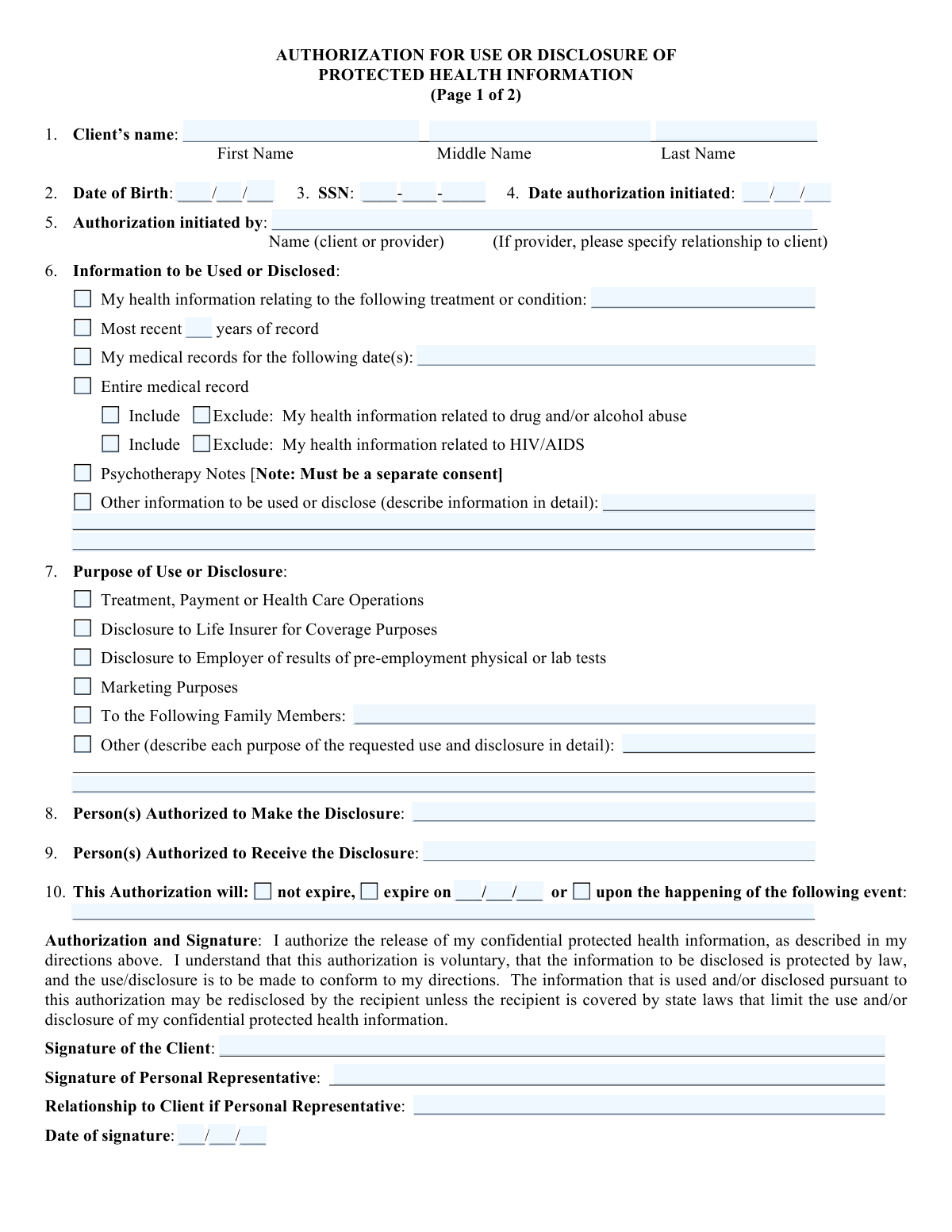
This document is an Authorization for Use or Disclosure of Protected Health Information, commonly known as a HIPAA Authorization form. It allows individuals to grant permission for their health information to be shared with specific parties for defined reasons, ensuring compliance with privacy regulations. Today, this form can be filled out quickly and accurately using AI-powered services like Instafill.ai, which can also convert non-fillable PDF versions into interactive fillable forms.
HIPAA Authorization is part of the
health information forms category on Instafill.
Form specifications
| Form name: | Authorization for Use or Disclosure of Protected Health Information |
| Number of fields: | 54 |
| Number of pages: | 2 |
| Language: | English |
Our AI automatically handles information lookup, data retrieval, formatting, and form filling.
It takes less than a minute to fill out HIPAA Authorization using our AI form filling.
Securely upload your data. Information is encrypted in transit and deleted immediately after the form is filled out.
Instafill Demo: How to fill out PDF forms in seconds with AI
How to Fill Out HIPAA Authorization Online for Free in 2026
Are you looking to fill out a HIPAA AUTHORIZATION form online quickly and accurately? Instafill.ai offers the #1 AI-powered PDF filling software of 2026, allowing you to complete your HIPAA AUTHORIZATION form in just 37 seconds or less.
Follow these steps to fill out your HIPAA AUTHORIZATION form online using Instafill.ai:
- 1 Navigate to Instafill.ai and upload or select the Authorization for Use or Disclosure of Protected Health Information form.
- 2 The AI will automatically identify and extract all fields requiring your input, such as client name, date of birth, and the purpose of disclosure.
- 3 Review the extracted information and provide any necessary details or make selections as prompted by the AI.
- 4 Specify the information to be used or disclosed, the purpose, and the authorized recipients.
- 5 Electronically sign the authorization form using the provided tools.
- 6 Review the completed form for accuracy and download or submit it as required.
Our AI-powered system ensures each field is filled out correctly, reducing errors and saving you time.
Why Choose Instafill.ai for Your Fillable HIPAA Authorization Form?
Speed
Complete your HIPAA Authorization in as little as 37 seconds.
Up-to-Date
Always use the latest 2026 HIPAA Authorization form version.
Cost-effective
No need to hire expensive lawyers.
Accuracy
Our AI performs 10 compliance checks to ensure your form is error-free.
Security
Your personal information is protected with bank-level encryption.
Frequently Asked Questions About HIPAA Authorization
This form, 'Authorization for Use or Disclosure of Protected Health Information,' is used to grant permission for your health information to be shared with specific individuals or entities. It ensures that your medical data is released according to your wishes and legal requirements like HIPAA.
Any individual whose protected health information (PHI) is to be used or disclosed needs to fill out this form. This is typically the client or patient whose medical records are involved.
You will need to provide your full name, date of birth, and Social Security Number (SSN). You'll also need to specify the date the authorization is initiated and by whom.
Section 6 allows you to detail the specific health information. You can choose to disclose records related to a particular treatment or condition, a specific date range (like the most recent X years or entire record), or exclude sensitive information like drug/alcohol abuse or HIV/AIDS related data.
Section 7 outlines various purposes, including treatment, payment, healthcare operations, disclosure to life insurers, employers, for marketing, to family members, or other specified reasons. You must describe the purpose in detail if it's not a standard option.
Generally, you, the client, must authorize the release of your health information. If you have a personal representative (like a legal guardian), they can also sign on your behalf, provided their relationship to you is clearly stated.
Section 9 is where you list the specific person(s) or entity(ies) authorized to receive your protected health information. It's crucial to be precise to ensure your information goes to the correct recipient.
You can choose whether the authorization 'will not expire,' 'expire on a specific date,' or 'expire upon the happening of a specific event.' This is detailed in Section 10.
Yes, you have the right to revoke or cancel this authorization at any time. However, this does not apply to information already shared based on the authorization or if it was a condition for insurance coverage. Revocation must be in writing.
Psychotherapy Notes are special protected health information that requires a separate consent for disclosure. They are notes recorded by a mental health professional documenting counseling sessions and are kept separate from your main medical records.
Once your information leaves the originating office, this office has no control over how the recipient uses it. The information may no longer be protected by HIPAA if the recipient is not a covered entity.
Yes, you can refuse to sign. Refusing to sign will not affect your ability to obtain treatment, payment, enrollment, or benefits. However, if you refuse and have authorized disclosure to a third party, your provider may decide not to treat you.
AI tools like Instafill.ai can help you fill out this form by automatically populating fields with your information, saving you time and reducing errors. They can also help convert non-fillable PDFs into interactive forms.
You can use services like Instafill.ai to fill out this form online. These tools can convert the PDF into a fillable format and guide you through completing each section accurately.
If the PDF is not fillable, you can use a service like Instafill.ai to convert it into an interactive, fillable form. This allows you to type directly into the fields and complete the document digitally.
Compliance HIPAA Authorization
Validation Checks by Instafill.ai
1
Client's Full Name Provided
Ensures that all three fields for the client's name (First Name, Middle Name, Last Name) are completed. This is crucial for accurate identification and to prevent ambiguity in medical record access. Failure to provide a full name may result in the form being rejected or requiring manual clarification.
2
Valid Date of Birth Format
Validates that the Date of Birth is entered in the correct MM/DD/YYYY format. This ensures data consistency and allows for automated age verification or record matching. Incorrect formats can lead to data entry errors and difficulties in retrieving the correct client information.
3
Valid SSN Format
Checks that the Social Security Number (SSN) is entered in the XXX-XX-XXXX format. This is a standard format for SSNs and is important for unique client identification and security. Incorrectly formatted SSNs may be rejected or flagged for manual review.
4
Valid Authorization Initiated Date Format
Ensures the 'Date authorization initiated' is entered in the MM/DD/YYYY format. This date is important for tracking the lifecycle of the authorization and for compliance purposes. An invalid format could lead to misinterpretation of the authorization's effective period.
5
Authorization Initiated By Field Completeness
Verifies that the 'Authorization initiated by' field is completed, indicating whether it was the client or a provider. If initiated by a provider, it also requires specifying the relationship to the client. This ensures clarity on who is authorizing the disclosure and their standing. Incomplete information may lead to the authorization being invalid.
6
Specific Information to be Disclosed Defined
Confirms that the section 'Information to be Used or Disclosed' is adequately filled out. This includes specifying the treatment/condition, date range, or if the entire record is to be disclosed. Vague or incomplete descriptions can lead to unauthorized disclosures or denial of necessary information.
7
Inclusion/Exclusion of Sensitive Information
Validates that the 'Include' or 'Exclude' options for drug/alcohol abuse and HIV/AIDS information are clearly selected. These are highly sensitive data types requiring explicit consent for disclosure. Failure to specify can lead to improper disclosure or violation of privacy rights.
8
Psychotherapy Notes Consent Specificity
Checks if the 'Psychotherapy Notes' checkbox is selected only when the intent is to disclose these specific notes, and that a separate consent is implied or provided as per HIPAA regulations. Disclosing psychotherapy notes without explicit, separate authorization is a significant privacy violation. The form should enforce this separation.
9
Purpose of Use or Disclosure Clearly Stated
Ensures that the 'Purpose of Use or Disclosure' section is completed, detailing the reason for the information release. This is critical for ensuring the disclosure is for a legitimate and authorized purpose. If 'Other' is selected, a detailed description must be provided.
10
Authorized Person(s) to Make Disclosure Identified
Verifies that the field 'Person(s) Authorized to Make the Disclosure' is filled. This identifies the entity or individual responsible for releasing the protected health information. Without this, it's unclear who has the authority to act on the authorization.
11
Authorized Person(s) to Receive Disclosure Identified
Confirms that the field 'Person(s) Authorized to Receive the Disclosure' is completed. This specifies the recipient of the protected health information. An unspecified recipient means the disclosure is not properly defined and could be sent to an unauthorized party.
12
Expiration Date or Event Defined
Ensures that either the authorization will 'not expire' or an 'expire on' date or a specific 'event' is clearly defined. An indefinite or undefined expiration can lead to ongoing unauthorized access to information. The system should validate that one of these conditions is met.
13
Valid Expiration Date Format
If an expiration date is provided, this check validates that it is entered in the MM/DD/YYYY format. This ensures clarity and consistency in the authorization's end date. An invalid format could lead to misinterpretation of when the authorization ceases to be valid.
14
Client Signature Present
Verifies that the 'Signature of the Client' field is completed. This is a fundamental requirement for the authorization to be legally valid, indicating the client's explicit consent. A missing signature renders the authorization void.
15
Personal Representative Signature and Relationship
If a 'Personal Representative' signs, this check ensures both their signature and their 'Relationship to Client' are provided. This is necessary to confirm the representative's authority to act on behalf of the client. Lack of this information may invalidate the signature.
16
Valid Client Signature Date Format
Ensures the 'Date of signature' by the client or personal representative is in the MM/DD/YYYY format. This date is critical for establishing the timeline of the authorization's validity and for audit purposes. An incorrect format can cause issues with record keeping.
Common Mistakes in Completing HIPAA Authorization
Forgetting to fill in all parts of the client's name (First, Middle, Last). This can lead to difficulties in identifying the correct individual, especially in large databases or when names are similar. Always ensure all name fields are completed accurately.
Entering dates (Date of Birth, Date Authorization Initiated, Expiration Date) in an incorrect format (e.g., MM/DD/YYYY instead of DD/MM/YYYY or vice versa). This can cause misinterpretation of the timeline and may lead to the authorization being processed incorrectly or rejected. Always verify the expected date format and adhere to it strictly.
Failing to provide the SSN when required. The SSN is a critical piece of personal identification for healthcare providers and insurers. Its omission can delay or prevent the processing of the authorization, as it's often used to uniquely identify the client. Ensure the SSN is entered accurately and completely.
Not clearly specifying the exact health information to be disclosed. Phrases like 'all medical records' without further clarification can be problematic. Be specific about the treatment, condition, or date range to ensure only the intended information is released and to avoid potential privacy breaches. AI tools can help by standardizing descriptions.
Providing a vague or incomplete description for the purpose of the disclosure. The form requires a clear understanding of why the information is being shared. Ambiguity can lead to the information being used for unintended purposes, violating privacy. Clearly state the specific reason, such as 'for treatment coordination with Dr. Smith' or 'for life insurance application review'.
Leaving the fields for 'Person(s) Authorized to Make the Disclosure' or 'Person(s) Authorized to Receive the Disclosure' blank or incomplete. This is a critical security measure. Without knowing who is authorized to release and who can receive the information, the authorization is invalid and poses a significant risk of unauthorized access. Always list the full names and relevant details of all parties involved.
Not properly defining when the authorization expires. Leaving the expiration date blank or not specifying a clear event can lead to the authorization remaining active indefinitely, which is a privacy concern. Ensure either a specific date or a clear, definable event is stated for the expiration.
Forgetting to sign the authorization or date the signature. The signature and date confirm the client's consent and the time of consent. Without them, the authorization is legally invalid. Always sign and date the form in the designated areas.
Attempting to include psychotherapy notes within a general medical record release without a separate, specific authorization. HIPAA has special protections for psychotherapy notes, requiring a distinct consent. Failure to do so can result in a violation. Ensure a separate authorization is used specifically for psychotherapy notes if needed.
Making unclear selections for including or excluding sensitive information like drug/alcohol abuse or HIV/AIDS records. Ambiguity can lead to the accidental disclosure of highly sensitive data. Clearly mark 'Include' or 'Exclude' for each category to ensure precise control over what is shared.
Failing to insert the provider's address where revocation requests should be sent. This makes it difficult for the client to formally revoke their authorization, potentially leading to continued disclosures against their wishes. Always ensure the correct address for revocation is clearly written.
Saved over 80 hours a year
“I was never sure if my IRS forms like W-9 were filled correctly. Now, I can complete the forms accurately without any external help.”
Kevin Martin Green
Your data stays secure with advanced protection from Instafill and our subprocessors
Robust compliance program
Transparent business model
You’re not the product. You always know where your data is and what it is processed for.
ISO 27001, HIPAA, and GDPR
Our subprocesses adhere to multiple compliance standards, including but not limited to ISO 27001, HIPAA, and GDPR.
Security & privacy by design
We consider security and privacy from the initial design phase of any new service or functionality. It’s not an afterthought, it’s built-in, including support for two-factor authentication (2FA) to further protect your account.
Fill out HIPAA Authorization with Instafill.ai
Worried about filling PDFs wrong? Instafill securely fills authorization-for-use-or-disclosure-of-protected-health-information forms, ensuring each field is accurate.