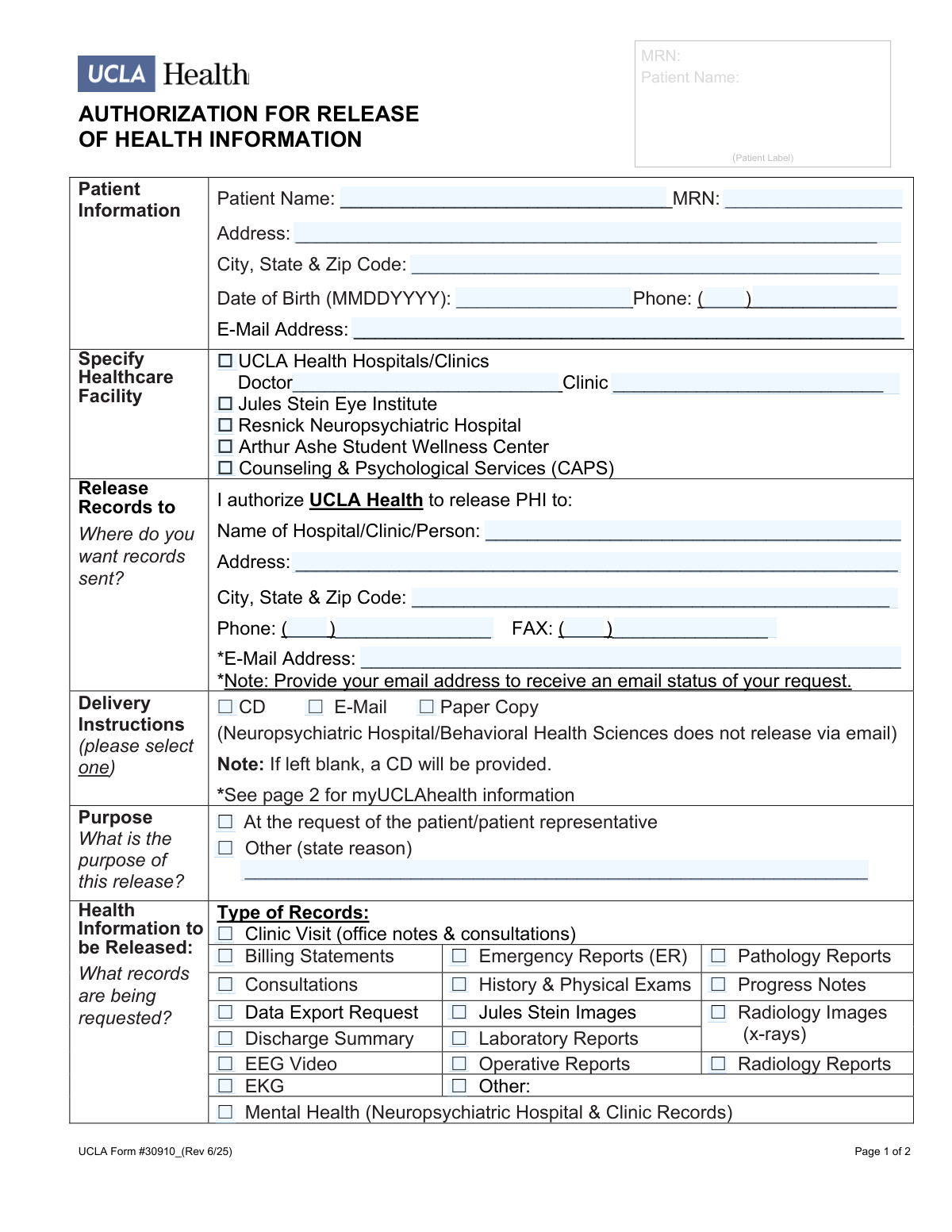
Yes! You can use AI to fill out UCLA Form #30910, Authorization for Release of Health Information

This form is a legal document used by patients of UCLA Health to grant permission for the release of their confidential medical records to another person, clinic, or organization. It is essential for ensuring compliance with HIPAA privacy rules while allowing for the transfer of information for purposes like continuing care, legal requirements, or personal use. Today, this form can be filled out quickly and accurately using AI-powered services like Instafill.ai, which can also convert non-fillable PDF versions into interactive fillable forms.
Our AI automatically handles information lookup, data retrieval, formatting, and form filling.
It takes less than a minute to fill out UCLA Form #30910 using our AI form filling.
Securely upload your data. Information is encrypted in transit and deleted immediately after the form is filled out.

Form specifications

Form name: UCLA Form #30910, Authorization for Release of Health Information
Number of pages: 4
Language: English
Categories: authorization forms, health forms
main-image

Instafill Demo: How to fill out PDF forms in seconds with AI

How to Fill Out UCLA Form #30910 Online for Free in 2026

Are you looking to fill out a UCLA FORM #30910 form online quickly and accurately? Instafill.ai offers the #1 AI-powered PDF filling software of 2026, allowing you to complete your UCLA FORM #30910 form in just 37 seconds or less.
Follow these steps to fill out your UCLA FORM #30910 form online using Instafill.ai:
  1. 1 Navigate to Instafill.ai and upload or select the UCLA Authorization for Release of Health Information form.
  2. 2 Provide your personal information, including your full name, address, date of birth, and Medical Record Number (MRN).
  3. 3 Specify the UCLA Health facility holding your records and enter the complete details of the person or entity who will receive the information.
  4. 4 Select the exact type of health information to be released (e.g., clinic notes, lab reports, radiology images) and specify the date range for the records.
  5. 5 Carefully review and check the boxes for any sensitive information you authorize for release, such as mental health records or HIV test results.
  6. 6 Indicate the expiration date for the authorization, or leave it blank for the default 12-month period.
  7. 7 Review all the information populated by the AI for accuracy, then electronically sign and date the form to finalize your request.

Our AI-powered system ensures each field is filled out correctly, reducing errors and saving you time.

Why Choose Instafill.ai for Your Fillable UCLA Form #30910 Form?

Speed

Complete your UCLA Form #30910 in as little as 37 seconds.

Up-to-Date

Always use the latest 2026 UCLA Form #30910 form version.

Cost-effective

No need to hire expensive lawyers.

Accuracy

Our AI performs 10 compliance checks to ensure your form is error-free.

Security

Your personal information is protected with bank-level encryption.

Frequently Asked Questions About Form UCLA Form #30910

This form is used to authorize UCLA Health to release your protected health information (PHI) to a third party, such as another doctor, a hospital, or for personal use. You must complete this form to give your consent for your medical records to be shared.

The patient whose records are being requested must complete and sign the form. If the patient is a minor or is unable to sign, their legal representative (e.g., parent, legal guardian, or person with power of attorney) can sign on their behalf.

You must provide the patient's full name, date of birth, and MRN, as well as the specific UCLA facility holding the records. You also need to detail what information to release, the date range of the records, and where they should be sent.

You must specifically authorize the release of sensitive information by checking the appropriate boxes in the 'Sensitive Information' section. For mental health records, check the 'Mental Health' box and submit the form to the specific RNPH/BHS HIMS address listed on page 2.

Submit the form to the correct department based on the records you need. Page 2 lists separate mailing addresses, fax numbers, and emails for general medical records (HIMS), imaging records, and mental health records.

If you leave the 'Delivery Instructions' section blank, your medical records will be provided on a CD by default. Note that records from the Neuropsychiatric Hospital cannot be sent via email.

Yes, you must fill in the 'FROM' and 'TO' dates in the 'Specify Date/Time Period' section. This is required to ensure the Health Information Management department releases only the specific records you need.

The authorization is valid until the expiration date you write on the form. If you do not specify a date, the authorization will automatically expire 12 months after the date you signed it.

Yes, you can revoke your authorization at any time by sending a written request to the UCLA Health Information Management Services (HIMS) address provided on the form. The revocation will be effective once it is received.

Yes, patients can request their medical records directly through the myUCLAhealth patient portal. The form provides a website and a phone number for assistance with your myUCLAhealth account.

Yes, services like Instafill.ai use AI to help you accurately auto-fill form fields, which can save you time and reduce errors. This is especially helpful for entering your personal information.

You can upload the PDF of the form to the Instafill.ai platform. The service will make the fields interactive, allowing you to type your information directly onto the form, then save or print it for submission.

If you have a non-fillable or 'flat' PDF, you can use a service like Instafill.ai. It can convert the document into an interactive, fillable form so you can easily type in your information before printing.

Compliance UCLA Form #30910
Validation Checks by Instafill.ai

1
Patient Identification Completeness
This check ensures that the Patient Name and either the Medical Record Number (MRN) or Date of Birth are provided. These fields are critical for uniquely identifying the correct patient and retrieving their records. If this information is missing or incomplete, the request cannot be processed as it would be impossible to locate the right patient file, leading to rejection of the form.
2
Date of Birth Format Validation
Validates that the 'Date of Birth' field strictly follows the MMDDYYYY format without separators. This specific format is required for system compatibility and accurate patient matching. An incorrectly formatted date could lead to data entry errors, failure to find the patient, or processing delays, requiring manual correction.
3
Record Recipient Completeness
This validation verifies that the recipient's full name and mailing address (including city, state, and zip code) are provided in the 'Release Records to' section. This information is essential for the successful delivery of the requested health information. Failure to provide a complete recipient address will result in the inability to fulfill the request, as the destination is unknown.
4
Record Type Selection Requirement
Ensures that at least one checkbox is selected in the 'Health Information to be Released' section. A request is meaningless if it does not specify which records are needed. If no record types are selected, the form is considered incomplete and will be returned to the sender for clarification.
5
Date Range Logical Consistency
This check confirms that the 'FROM' date in the 'Specify Date/Time Period' section is on or before the 'TO' date. An inverted or illogical date range makes the request impossible to fulfill accurately. If the 'FROM' date is after the 'TO' date, the form will be flagged as invalid and require correction.
6
Signature and Date Presence
Verifies that the 'Signature of Patient / Legal Representative' field is signed and the corresponding 'Date' field is filled out. A dated signature is a legal requirement for authorizing the release of protected health information (PHI). An unsigned or undated form is legally invalid and cannot be processed.
7
Legal Representative Relationship Specification
This check is triggered if the form is signed by someone other than the patient. It ensures that the 'indicate relationship to the patient' field is completed, specifying the signatory's authority (e.g., parent, legal guardian, power of attorney). This is crucial for HIPAA compliance and verifying the legal right to access the patient's records.
8
Conditional Requirement for 'Other' Text Fields
Validates that if the 'Other' checkbox is selected under 'Purpose' or 'Health Information to be Released', the adjacent text field is not empty. This ensures that the specific, non-standard reason or record type is clearly defined. An empty text field for a selected 'Other' option makes the request ambiguous and incomplete.
9
Mental Health Email Delivery Restriction
This rule checks for a specific restricted combination based on a note on the form. It flags an error if 'Resnick Neuropsychiatric Hospital' or 'Counseling & Psychological Services (CAPS)' is selected as the source facility and 'E-Mail' is chosen as the delivery method. Since the form explicitly forbids this, the validation prevents an invalid request from being submitted.
10
Record Request Date Range Validity
Ensures that both the 'FROM' and 'TO' dates for the record request are not in the future. Health records can only be requested for time periods that have already occurred. A request for future dates is invalid and will be rejected, as the information does not yet exist.
11
Healthcare Facility Selection
This validation confirms that at least one checkbox is selected in the 'Specify Healthcare Facility' section. It is essential to know which facility or clinic holds the records being requested. Without this information, the processing staff would not know where to direct the request, rendering it unfulfillable.
12
Authorization Expiration Date Logic
Verifies that if a date is entered in the 'Expiration of Authorization' field, it is a date in the future and occurs after the signature date. An authorization cannot expire before it is signed or on the same day. This ensures the authorization is valid for a meaningful period as intended by the signatory.
13
Phone Number Format
Checks that all phone and fax number fields follow a standard format, such as (XXX) XXX-XXXX. Consistent formatting ensures data integrity and usability for contact purposes if questions arise about the request. An improperly formatted number may be unusable and could delay processing.
14
Email Address Syntax Validation
This check validates that any email address provided (for the patient or the recipient) follows the standard '[email protected]' syntax. A valid email is necessary to receive status updates or, if selected, the electronic records themselves. An invalid email address will result in failed communication and delivery.

Common Mistakes in Completing UCLA Form #30910

Missing or Vague Date Range for Records

Patients often leave the 'Specify Date/Time Period' section blank or provide a vague estimate. This happens because they may not remember the exact dates of service. This is a critical error that will almost always lead to the request being rejected or delayed, as the records department cannot guess which documents to retrieve. To avoid this, consult your personal calendar or patient portal for appointment dates, and be as specific as possible, even if it's just the month and year of a hospital stay.

Forgetting to Authorize Sensitive Information Release

The form explicitly states that sensitive information regarding drug/alcohol abuse, HIV/AIDS, and genetic testing will not be released unless the corresponding box is checked. Patients frequently overlook this section, assuming all records are included by default. This results in the recipient (e.g., a new doctor) receiving an incomplete medical history, which can impact future care. Always carefully review this section and check any boxes relevant to the records you need released.

Incomplete or Illegible Recipient Information

Mistakes in the 'Release Records to' section, such as an incorrect address, a typo in the recipient's name, or an unreadable fax number, are very common. This can cause records to be sent to the wrong entity, returned as undeliverable, or result in a potential privacy breach. To prevent this, double-check every detail of the recipient's contact information for accuracy and write clearly. Using an AI tool like Instafill.ai ensures the information is typed and legible, eliminating handwriting errors.

Failing to Sign and Date the Authorization

An authorization form for releasing health information is a legal document that is invalid without a signature and date. In a rush to complete the paperwork, people often forget to sign or date the form in the 'Signature(s)' section. This simple oversight is a frequent reason for immediate rejection, forcing the patient to restart the entire process. Always perform a final check to ensure you have signed and dated the form before submitting it.

Legal Representative Forgets to Specify Relationship

When a parent, guardian, or legal representative signs on behalf of a patient, they must also state their relationship to the patient in the designated field. This step is often missed, but it is legally required to validate the signer's authority to act for the patient. Failure to provide this information will render the authorization invalid and lead to its rejection. The representative must always print their name, sign, and clearly write their relationship (e.g., 'Parent', 'Power of Attorney').

Ambiguous Selection of Health Information

In the 'Health Information to be Released' section, patients may be unsure which records to select and either check too many boxes or not enough. For example, a patient might check 'Clinic Visit' but forget to also check 'Radiology Reports' and 'Laboratory Reports' that are essential for the new provider. This leads to incomplete information being transferred. To avoid this, be as specific as possible; if you are unsure, it is better to select all potentially relevant categories related to your condition or treatment period.

Selecting an Invalid Delivery Method

The form includes a note that 'Neuropsychiatric Hospital/Behavioral Health Sciences does not release via email.' Patients requesting these specific records often miss this detail and select 'E-Mail' as their delivery preference. This causes a processing delay as the records department must contact the patient to clarify a new delivery method or will default to sending a CD, which may not be what the patient wanted. Always read the fine print associated with your selections.

Incorrect Date of Birth Format

The form explicitly requests the Date of Birth in 'MMDDYYYY' format without slashes or dashes. People often revert to their habitual format, such as 'MM/DD/YYYY', which can cause data entry errors or issues with automated systems that parse the form. This can slow down the process of matching the request to the correct patient file. Paying close attention to formatting instructions is key, and AI-powered form fillers like Instafill.ai can automatically format dates correctly.

Failing to Specify the Correct Healthcare Facility

A patient may have received care at multiple UCLA locations (e.g., a specialty clinic and a hospital) but only checks one box under 'Specify Healthcare Facility.' If the wrong facility is selected, the request is sent to a department that does not have the records, leading to significant delays while the request is rerouted or returned to the patient. Before filling, confirm which UCLA entity holds the specific records you are requesting.

Leaving the Medical Record Number (MRN) Blank

The MRN is the most accurate way for the health system to identify a patient and their complete record. While patients may not always know their MRN, leaving it blank when it is available on other documents (like a previous bill or patient portal) slows down the request. Staff must then manually search by name and date of birth, which increases the chance of error, especially with common names. If you have access to your MRN, always include it for faster processing.
Saved over 80 hours a year

“I was never sure if my IRS forms like W-9 were filled correctly. Now, I can complete the forms accurately without any external help.”

Kevin Martin Green

Your data stays secure with advanced protection from Instafill and our subprocessors

Robust compliance program

Transparent business model

You’re not the product. You always know where your data is and what it is processed for.

ISO 27001, HIPAA, and GDPR

Our subprocesses adhere to multiple compliance standards, including but not limited to ISO 27001, HIPAA, and GDPR.

Security & privacy by design

We consider security and privacy from the initial design phase of any new service or functionality. It’s not an afterthought, it’s built-in, including support for two-factor authentication (2FA) to further protect your account.

Fill out UCLA Form #30910 with Instafill.ai

Worried about filling PDFs wrong? Instafill securely fills ucla-form-30910-authorization-for-release-of-health-information forms, ensuring each field is accurate.