Yes! You can use AI to fill out Patient Encounter and Authorization Tracking Form

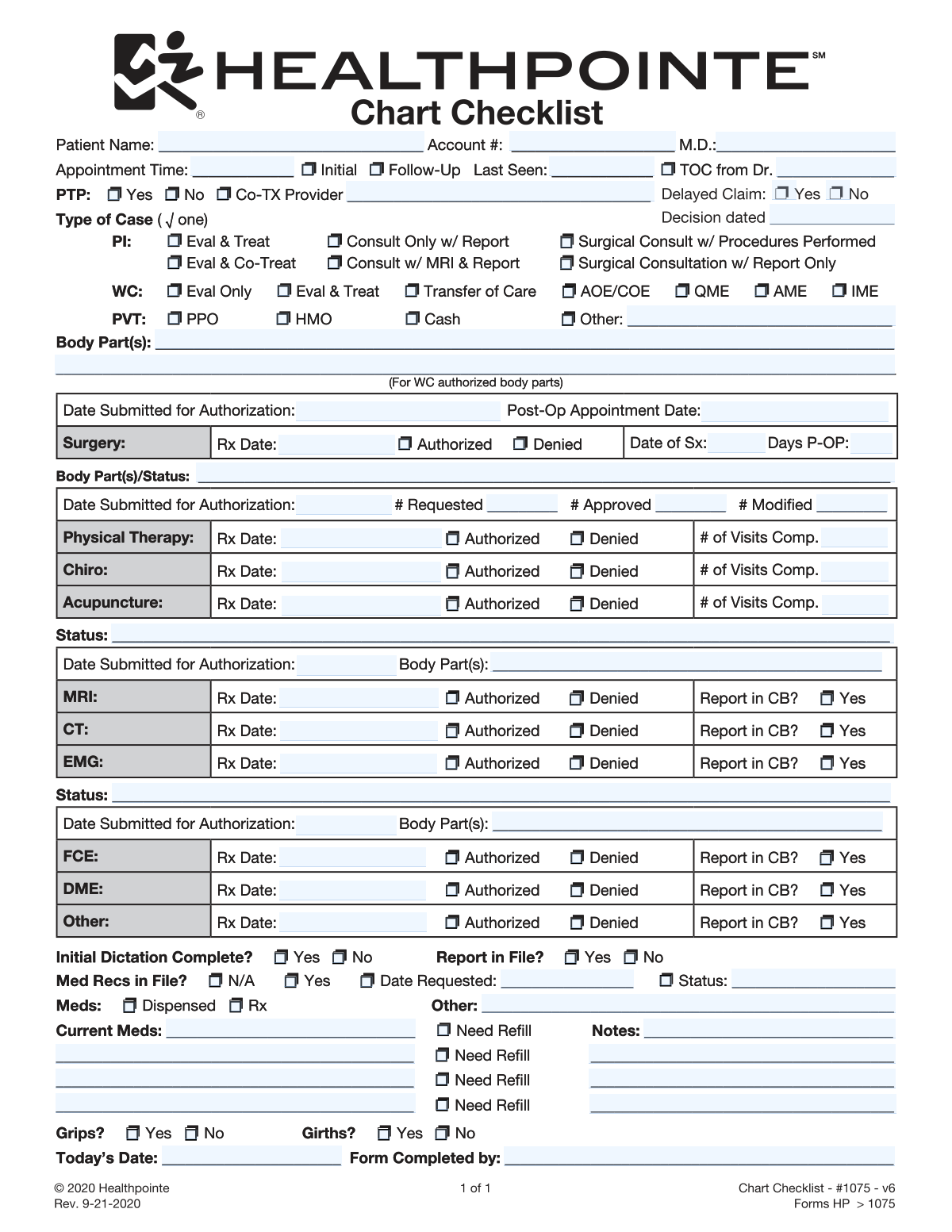
This is a comprehensive internal form for healthcare providers to manage a patient's visit and associated administrative tasks. It captures everything from basic patient and appointment information to the specific case type (e.g., Personal Injury, Worker's Comp) and tracks the authorization status for surgeries, therapies, and diagnostic imaging. Today, this form can be filled out quickly and accurately using AI-powered services like Instafill.ai, which can also convert non-fillable PDF versions into interactive fillable forms.
Our AI automatically handles information lookup, data retrieval, formatting, and form filling.
It takes less than a minute to fill out Patient Encounter Form using our AI form filling.
Securely upload your data. Information is encrypted in transit and deleted immediately after the form is filled out.

Form specifications

Form name: Patient Encounter and Authorization Tracking Form
Number of pages: 1
Filled form examples: Form Patient Encounter Form Examples
Language: English
main-image

Instafill Demo: How to fill out PDF forms in seconds with AI

How to Fill Out Patient Encounter Form Online for Free in 2026

Are you looking to fill out a PATIENT ENCOUNTER FORM form online quickly and accurately? Instafill.ai offers the #1 AI-powered PDF filling software of 2026, allowing you to complete your PATIENT ENCOUNTER FORM form in just 37 seconds or less.
Follow these steps to fill out your PATIENT ENCOUNTER FORM form online using Instafill.ai:
  1. 1 Navigate to Instafill.ai and upload or select the Patient Encounter and Authorization Tracking Form.
  2. 2 Use the AI assistant to input the patient's name, account number, and appointment details in the top section.
  3. 3 Select the correct case type (PI, WC, or PVT) and specify the body parts being evaluated or treated.
  4. 4 Enter the details for any requested services, such as surgery, physical therapy, or imaging, including submission dates and authorization status (Authorized/Denied).
  5. 5 Update the status for other evaluations (FCE, DME), dictations, and medical records requests.
  6. 6 List the patient's current medications, note if refills are needed, and add any relevant notes.
  7. 7 Complete the final sections with exam findings (Grips/Girths), today's date, and your name, then review all entries for accuracy before saving or printing.

Our AI-powered system ensures each field is filled out correctly, reducing errors and saving you time.

Why Choose Instafill.ai for Your Fillable Patient Encounter Form Form?

Speed

Complete your Patient Encounter Form in as little as 37 seconds.

Up-to-Date

Always use the latest 2026 Patient Encounter Form form version.

Cost-effective

No need to hire expensive lawyers.

Accuracy

Our AI performs 10 compliance checks to ensure your form is error-free.

Security

Your personal information is protected with bank-level encryption.

Frequently Asked Questions About Form Patient Encounter Form

This is an internal clinical form used to summarize a patient's visit, track their case type, and manage the authorization status for various treatments. It is typically completed by medical staff, such as a medical assistant, nurse, or physician, before or during the patient's appointment.

These acronyms indicate the payment source: 'PI' is for Personal Injury cases, 'WC' is for Worker's Compensation claims, and 'PVT' is for private insurance (PPO, HMO), cash payments, or other private pay arrangements.

PTP stands for Primary Treating Physician. This is the main doctor responsible for managing the patient's overall care, a designation that is especially important in Worker's Compensation cases.

Each section (Surgery, Physical Therapy, MRI, etc.) allows the clinic to meticulously track the approval status for every service requested. This ensures that patient care proceeds correctly and that all rendered services have been authorized for payment by the insurer.

'CB' likely stands for 'Chart Binder' or a similar term for the patient's official file. Checking 'Yes' confirms that the corresponding medical report, such as an MRI or FCE report, has been received and filed in the patient's chart.

These are specific types of evaluations in Worker's Compensation cases. AOE/COE is 'Arising Out of Employment/Course of Employment,' QME is a 'Qualified Medical Evaluator,' and AME is an 'Agreed Medical Evaluator.'

Select 'Initial' if it is the patient's first visit to the practice for this specific medical issue. Select 'Follow-Up' for all subsequent appointments related to the same condition.

List each medication the patient is currently taking on a separate line, and check the 'Need Refill' box if a new prescription is required. You can use the 'Notes' field for dosage, frequency, or other relevant details.

TOC stands for 'Transfer of Care.' You should check this box and write in the doctor's name when the patient has been referred to your clinic by another physician for continued treatment.

Yes, services like Instafill.ai use AI to auto-fill form fields accurately and save time. This is especially helpful for quickly populating patient demographic and appointment information from your records.

Simply upload the form's PDF to the Instafill.ai platform. It will make the document interactive, allowing you to click and type in each field or use AI to auto-fill the information for you.

You can use a service like Instafill.ai to solve this problem. Upload the non-fillable PDF, and the tool will automatically convert it into an interactive, fillable form that you can complete and save online.

List the primary body parts for the visit in the 'Body Part(s)' field near the top of the form. You should also specify the relevant body part in the authorization sections for Surgery, Imaging, and other services.

Compliance Patient Encounter Form
Validation Checks by Instafill.ai

1
Ensures Appointment Type is Mutually Exclusive and Logically Complete
This check verifies that only one of 'Initial' or 'Follow-Up' is selected for the appointment type. If 'Follow-Up' is selected, it also ensures that the 'Last Seen' date field is populated. This prevents contradictory data and ensures a complete history for follow-up visits, which is critical for continuity of care. A failure would flag the form for manual correction to clarify the visit type.
2
Validates Exclusive Selection of Case Type
This validation ensures that options are selected within only one of the three main 'Type of Case' categories: PI, WC, or PVT. A single visit cannot belong to multiple primary billing categories. This is crucial for correct billing, insurance processing, and legal reporting. If multiple case types are selected, the submission will be rejected pending clarification.
3
Requires Referring Physician for Transfer of Care (TOC)
This check confirms that if the 'TOC from Dr.' checkbox is marked, the corresponding 'TOC From Physician' text field is filled with the name of the referring doctor. This information is essential for maintaining a clear chain of care, ensuring proper communication between providers, and for referral tracking. An incomplete entry would trigger an error requiring the user to provide the referring physician's name.
4
Enforces Specification for 'Other' Private Insurance
This validation ensures that if the 'PVT: Other' checkbox is selected under the private insurance section, the adjacent text field must be filled out. This prevents ambiguity in patient billing and insurance records by requiring the user to specify the exact type of coverage. A blank field would result in a validation error, prompting the user to provide the necessary detail.
5
Verifies Mutually Exclusive Authorization Status
For each service line (e.g., Surgery, Physical Therapy, MRI), this check ensures that 'Authorized' and 'Denied' are mutually exclusive options. A service cannot be simultaneously approved and denied, as this represents a logical impossibility. This validation is critical for accurate tracking of treatment authorizations and preventing administrative errors in patient care coordination.
6
Validates Chronological Order of Surgery and Post-Op Dates
This check verifies that the 'Post-Op Appointment Date' is on or after the 'Date of Sx' (Date of Surgery). A post-operative appointment cannot logically occur before the surgery itself. This rule prevents data entry errors that could disrupt scheduling and patient follow-up planning. A failure would require the user to correct one or both of the dates.
7
Validates 'Days Post-Op' is a Non-Negative Integer
This validation ensures that the 'Days P-OP' field contains a valid, non-negative integer. This field is important for clinical assessment at a specific point in recovery. The check prevents invalid entries like text or negative numbers, ensuring data quality for clinical notes and reporting. It could also cross-reference the value against the 'Date of Sx' and 'Today's Date' for logical consistency.
8
Ensures Authorization Counts are Logical
This check validates that the 'Number Approved' and 'Number Modified' for a service do not exceed the 'Number Requested'. The number of approved visits cannot be more than what was initially requested. This maintains the integrity of authorization tracking and prevents billing for unrequested services. A discrepancy would flag the entry for review and correction.
9
Requires Mandatory Form Completion Information
This validation ensures that the 'Today's Date' and 'Form Completed By' fields are not empty. These fields are essential for audit trails, establishing when the form was filled out and by whom. This information is critical for accountability and record-keeping compliance. A missing value in either field would prevent form submission.
10
Standardizes Date Field Formats
This check is applied to all date fields on the form, such as 'Rx Date', 'Date of Sx', and 'Today's Date', to ensure they are entered in a valid and consistent format (e.g., MM/DD/YYYY). Standardized dates are essential for accurate calculations, sorting, and integration with other systems. An invalid format would trigger an error message guiding the user to correct the entry.
11
Validates Co-Treatment Provider Name is Present
This rule checks that if the 'PTP - Co-TX Provider' checkbox is selected, the corresponding provider name field is filled out. Identifying the co-treating provider is necessary for inter-provider communication, coordinated billing, and a complete medical record. If the box is checked but the name is missing, the form will be flagged as incomplete.
12
Ensures Medical Record Request Date is Captured
This validation confirms that if the 'Med Recs in File - Date Requested' option is selected, the 'Date Requested (Med Records)' field must contain a valid date. This creates a clear record of when external documents were sought, which is important for tracking the progress of record collection. An empty date field would result in an error, prompting the user to enter the request date.

Common Mistakes in Completing Patient Encounter Form

Selecting Conflicting Case Types

Users sometimes check boxes in multiple case type sections, such as both 'WC' (Worker's Compensation) and 'PI' (Personal Injury), for a single visit. This is a critical error as billing, authorization, and legal requirements are completely different for each case type, leading to claim rejections and significant payment delays. To avoid this, always verify the primary case type from the patient's chart and ensure only one category is selected.

Leaving Authorization Status Ambiguous

A common mistake is entering a date for a service request (e.g., 'Rx Date' for Surgery or MRI) but failing to check either the 'Authorized' or 'Denied' box. This leaves the status of the request unclear, forcing staff to waste time investigating and potentially delaying patient care or leading to non-reimbursable services being performed. Always complete the row by marking the final authorization status as soon as it is known.

Using Vague Body Part Descriptions

Staff may enter generic terms like 'back' or 'arm' in the 'Body Part(s)' fields instead of the specific, authorized terminology like 'Lumbar Spine' or 'Left Shoulder'. Since authorizations, especially in WC cases, are tied to exact body parts, this vagueness can cause immediate claim denials for any related treatment or diagnostic test. Always use the precise language found in the official authorization documents.

Omitting Conditionally Required Information

The form contains several fields that depend on a previous selection, such as entering a 'Last Seen' date only if 'Follow-Up' is checked. Users often make the initial selection but forget to provide the associated detail, leaving the record incomplete and lacking important context. AI-powered form filling tools like Instafill.ai can prevent this by automatically prompting for dependent information based on checkbox selections.

Failing to Update Therapy Visits Completed

For Physical Therapy, Chiro, or Acupuncture, the '# of Visits Comp.' field is frequently left blank or not updated after each session. This makes it impossible to accurately track remaining authorized visits, risking the provision of unapproved services that will not be reimbursed. This field must be diligently updated at every relevant appointment to maintain accurate utilization records.

Incomplete Medical Records Status

When medical records are requested, users may check the 'Status' box next to 'Med Recs in File' but forget to write what the actual status is (e.g., 'Pending', 'Received 10/26', 'Faxed request'). This makes the checkbox useless and requires the next person to re-investigate the status of the request, causing redundant work. The text field should always be filled with a concise, dated update to ensure clarity.

Forgetting to Specify 'Other' Insurance

In the 'PVT' (Private) insurance section, a user might check the 'Other' box but leave the corresponding line blank. This fails to identify the actual payer, making the entry useless for billing and eligibility verification staff who then have to look up the information elsewhere. To prevent this, the specification line must be treated as a mandatory field whenever 'Other' is selected.

Omitting the 'Form Completed By' Name

The 'Form Completed by' field is crucial for accountability but is often left blank in a busy office environment. Without this information, it becomes difficult or impossible to ask clarifying questions about entries or correct errors, especially during an audit. A strict office policy should require every user to enter their name or initials upon completing the form.

Entering Illogical or Inconsistent Dates

Users may accidentally enter dates in a non-chronological order, such as a 'Date of Sx' (surgery) that occurs before the 'Date Submitted for Authorization'. Such logical errors undermine the integrity of the entire record and can cause significant problems during legal reviews or claim audits. Always double-check that dates follow a logical progression of events. Since this form is a non-fillable PDF, a tool like Instafill.ai can convert it to a smart, fillable version that can validate date sequences to prevent these errors.

Contradictory Dictation and Report Status

A user might check 'Initial Dictation Complete: Yes' but also 'Report in File: No' without providing any context in the notes. This creates confusion as to whether the report is pending transcription, has been lost, or is simply delayed, which is critical information for both medical and legal continuity. If a report is not in the file after dictation is complete, a brief note explaining the status (e.g., 'At transcription') is essential.
Saved over 80 hours a year

“I was never sure if my IRS forms like W-9 were filled correctly. Now, I can complete the forms accurately without any external help.”

Kevin Martin Green

Your data stays secure with advanced protection from Instafill and our subprocessors

Robust compliance program

Transparent business model

You’re not the product. You always know where your data is and what it is processed for.

ISO 27001, HIPAA, and GDPR

Our subprocesses adhere to multiple compliance standards, including but not limited to ISO 27001, HIPAA, and GDPR.

Security & privacy by design

We consider security and privacy from the initial design phase of any new service or functionality. It’s not an afterthought, it’s built-in, including support for two-factor authentication (2FA) to further protect your account.

Fill out Patient Encounter Form with Instafill.ai

Worried about filling PDFs wrong? Instafill securely fills patient-encounter-and-authorization-tracking-form forms, ensuring each field is accurate.