Yes! You can use AI to fill out CenCal Health Provider Information Form
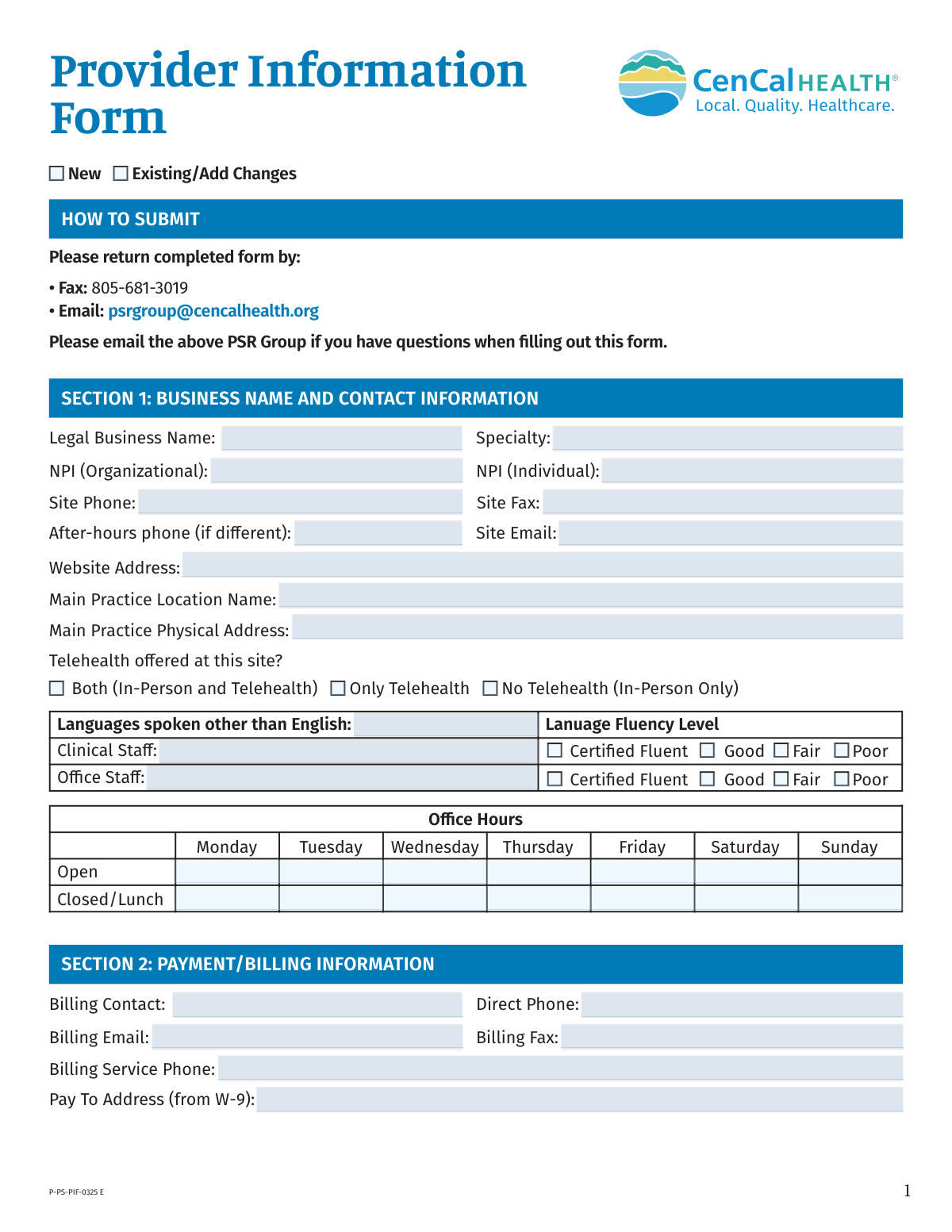
The CenCal Health Provider Information Form is a critical document for healthcare providers to establish or maintain their profile within the CenCal Health network. It gathers comprehensive details about a provider's practice, including business information, locations, staff, billing contacts, and service capabilities, which is essential for credentialing, contracting, and accurate directory listings. Today, this form can be filled out quickly and accurately using AI-powered services like Instafill.ai, which can also convert non-fillable PDF versions into interactive fillable forms.
Our AI automatically handles information lookup, data retrieval, formatting, and form filling.
It takes less than a minute to fill out P-PS-PIF-0325 E using our AI form filling.
Securely upload your data. Information is encrypted in transit and deleted immediately after the form is filled out.
Form specifications
| Form name: | CenCal Health Provider Information Form |
| Number of fields: | 231 |
| Number of pages: | 5 |
| Language: | English |
More forms in Health forms
Instafill Demo: How to fill out PDF forms in seconds with AI
How to Fill Out P-PS-PIF-0325 E Online for Free in 2026
Are you looking to fill out a P-PS-PIF-0325 E form online quickly and accurately? Instafill.ai offers the #1 AI-powered PDF filling software of 2026, allowing you to complete your P-PS-PIF-0325 E form in just 37 seconds or less.
Follow these steps to fill out your P-PS-PIF-0325 E form online using Instafill.ai:
- 1 Navigate to Instafill.ai and upload the CenCal Health Provider Information Form, or select it from their library of templates.
- 2 Use the AI assistant to automatically fill in your practice's legal business name, NPI numbers, and main contact information in Section 1.
- 3 Provide payment, billing, and provider portal contact details in Sections 2 and 3, letting the AI guide you through the required fields.
- 4 Complete the credentialing, office staff, and additional location information in Sections 4 through 7, attaching a roster if necessary.
- 5 Detail each rendering provider's information in Section 8, including NPI, license, and service availability.
- 6 Specify patient acceptance status, PCP details, and after-hours coverage arrangements in Sections 9 through 13.
- 7 Review all the auto-filled information for accuracy, add your digital signature and date, and then download the completed form to submit via fax or email as instructed.
Our AI-powered system ensures each field is filled out correctly, reducing errors and saving you time.
Why Choose Instafill.ai for Your Fillable P-PS-PIF-0325 E Form?
Speed
Complete your P-PS-PIF-0325 E in as little as 37 seconds.
Up-to-Date
Always use the latest 2026 P-PS-PIF-0325 E form version.
Cost-effective
No need to hire expensive lawyers.
Accuracy
Our AI performs 10 compliance checks to ensure your form is error-free.
Security
Your personal information is protected with bank-level encryption.
Frequently Asked Questions About Form P-PS-PIF-0325 E
This form is used to collect or update essential business, contact, billing, and service information for healthcare providers and practices within the CenCal Health network.
This form should be completed by new providers joining the CenCal Health network or by existing providers who need to report changes to their practice information. Be sure to check the 'New' or 'Existing/Add Changes' box at the top.
You can submit the completed form via fax to 805-681-3019 or by emailing it to [email protected]. This email address can also be used if you have questions while filling out the form.
The Organizational NPI is the unique ID for your entire business or practice group. The Individual NPI is the unique ID assigned to a specific healthcare provider within the practice.
You must attach a CenCal Health roster if you are adding more than three practice locations (Section 7) or listing more than two individual rendering providers (Section 8). The form provides space for a limited number, so the roster is for additional entries.
These sections ensure that specific inquiries are directed to the correct person or department in your office. Providing distinct contacts helps CenCal Health streamline communication and resolve issues more efficiently.
No, Sections 10 (Primary Care Physicians Only) and 11 (PCP After Hours) are specifically for PCP practices. If you are a specialist or other provider type, you can leave these sections blank.
Section 13 should only be filled out by Behavioral Health providers who offer Applied Behavior Analysis (ABA) services. All other provider types can skip this section.
The 'Pay To Address' must be the exact mailing address where payments should be sent, as it appears on your practice's official W-9 form.
The form recommends using a general, non-personal email address (e.g., [email protected]) for authorization contacts. This prevents communication failures if a specific staff member leaves the practice.
Yes, AI-powered services like Instafill.ai can help you complete this form more quickly and accurately. These tools can auto-fill fields with your saved information, reducing manual data entry and saving time.
Simply upload the Provider Information Form to the Instafill.ai platform. The AI will identify the fields, allowing you to click and fill them with your securely stored practice information before downloading the completed document.
If you have a non-fillable or 'flat' PDF, you can use a service like Instafill.ai to convert it into an interactive, fillable form. This allows you to type your information directly into the fields instead of printing and filling it out by hand.
Compliance P-PS-PIF-0325 E
Validation Checks by Instafill.ai
1
NPI Number Format and Validity
This check ensures that all National Provider Identifier (NPI) fields contain a valid, 10-digit number. The validation confirms the field is not empty, contains only numerals, and is exactly 10 digits long. This is critical for uniquely identifying health care providers in standard transactions and prevents claim rejections or misidentification of providers.
2
DEA Number Format Validation
This validation verifies that the DEA number entered in Section 8 follows the standard format, which typically consists of two letters followed by seven numbers. The first letter identifies the registrant type and the second is the first initial of the registrant's last name. This check is essential for compliance and to ensure the provider has the authority to prescribe controlled substances.
3
Conditional EMR System Name Requirement
This check validates that the 'What is the name of the EMR system?' field in Section 6 is filled out if, and only if, the 'Yes' option is selected for 'Do you use electronic medical records (EMR)?'. If 'No' is selected, this field should be empty or disabled. This prevents incomplete data when an EMR is used and avoids extraneous information when one is not.
4
Mutually Exclusive Provider Hours Entry
This validation ensures that for each provider in Section 8, either the '40 hours/week' checkbox is checked or a number is entered into the 'hours/week' text field, but not both. It prevents contradictory or ambiguous data regarding a provider's work hours. If validation fails, the user should be prompted to choose only one method for reporting hours.
5
Logical Office Hours Consistency
This check verifies that for each day in the Office Hours grid, the 'Closed/Lunch' time range falls within the 'Open' time range. For example, an office cannot be on lunch from 12-1 PM if it is only open from 9 AM to 11 AM. This ensures the provided hours are logical and accurately reflect practice availability, preventing confusion for scheduling and patient inquiries.
6
Standard Phone and Fax Number Formatting
This validation confirms that all phone and fax number fields across the form adhere to a standard format, such as (XXX) XXX-XXXX or XXXXXXXXXX. It ensures the data is clean, consistent, and usable for communication systems. Failure to provide a valid format would prevent automated dialing or faxing and could lead to communication breakdowns.
7
Email Address Format Validation
This check ensures that all email address fields (e.g., Site Email, Billing Email, Contact Email) contain a value in a valid email format (e.g., [email protected]). This is crucial for ensuring that electronic communications, such as portal notifications, billing inquiries, and authorization updates, are successfully delivered. An invalid email format would result in bounced emails and significant communication delays.
8
Conditional Call Group Information
This validation rule enforces that if the 'Call group' checkbox is selected in Section 11, at least one provider's name and NPI must be entered in the corresponding fields below. Conversely, if the 'Call group' box is not checked, these fields should be empty. This ensures that when a call group arrangement is indicated, the necessary details for that arrangement are provided.
9
Patient Acceptance Age Range Logic
This check validates the age range in Section 9, ensuring that if 'Accepting New Patients' is selected, both 'Min' and 'Max' age fields are filled and that the 'Max' age is greater than or equal to the 'Min' age. This prevents illogical data entry, such as a minimum age of 30 and a maximum of 18. Correct age ranges are vital for accurate patient panel management and referral systems.
10
PCP Plan Access Level Exclusivity
For each plan (SBHI and SLOHI) in Section 10, this validation ensures that only one access level ('Auto Assign', 'Open Access', or 'EPO') is selected. A provider cannot have multiple access statuses for the same plan simultaneously. This check prevents ambiguity in how a provider's panel is managed and displayed in directories.
11
Language Fluency Completeness
This check ensures that if a language is listed for either Clinical Staff or Office Staff in Section 1, a corresponding fluency level (Certified Fluent, Good, Fair, or Poor) must be selected. It prevents submissions where a language is claimed but the proficiency is not specified. This is important for accurately representing the language services available to patients.
12
Provider Date of Birth Plausibility
This validation verifies that the 'Date of Birth' for each provider in Section 8 is a valid date that occurs in the past. It also checks that the calculated age is within a plausible range for a practicing medical professional (e.g., over 21 years old). This serves as a basic data quality check to catch typos or nonsensical entries.
13
ABA Service Area City Selection Logic
In Section 13, this check ensures that for each county, the 'All' cities checkbox and the specific 'City' text field are used exclusively. If 'All' is checked, the 'City' field must be empty; if the 'City' field is filled, the 'All' checkbox must be unchecked. This prevents conflicting information about the provider's service area coverage.
14
Signature and Date Presence
This validation confirms that the 'Signature' and 'Date' fields at the end of the form are not empty. The signature serves as a legal attestation to the accuracy of the provided information, and the date establishes when the attestation was made. A missing signature or date would render the form submission invalid for processing.
Common Mistakes in Completing P-PS-PIF-0325 E
This form requests both an Organizational NPI (Type 2) for the business and an Individual NPI (Type 1) for practitioners. Users often enter the individual NPI in the organization field or vice-versa, or omit one entirely. This error leads to claim rejections and credentialing delays as the NPI must match the entity type being billed. To avoid this, verify the NPI type in the official NPPES NPI Registry and ensure the correct 10-digit number is entered in the corresponding field.
Sections 7 and 8 explicitly state to 'attach CenCal Health roster' for adding more locations or providers than the form allows. This is a frequent processing stopper, as the form is considered incomplete without these attachments. The application cannot be processed, leading to significant delays in adding new providers or locations to the network. Before submission, create a checklist to ensure all required documents, including the practice and provider rosters, are attached to the email or fax.
Section 1 asks for the 'Main Practice Physical Address,' while Section 2 requires the 'Pay To Address (from W-9).' Practices sometimes copy the physical address into the payment field, even if their W-9 specifies a different corporate or P.O. Box address for receiving payments. This mistake can cause payments to be delayed, misdirected, or returned as undeliverable, disrupting cash flow. Always reference the practice's official, signed W-9 form to ensure the 'Pay To Address' is entered exactly as it appears there.
Section 6 specifically recommends using a permanent, group email account for the 'Authorization Email' (e.g., [email protected]). Despite this note, offices often list an individual employee's email. When that staff member leaves the practice, the email account is often deactivated, causing critical authorization requests and communications to be missed, which can delay patient care. To prevent this, create a generic, role-based email address that multiple staff members can access.
The Office Hours grid has separate rows for 'Open' and 'Closed/Lunch,' which can be confusing. Users may write '9am-5pm' in the 'Open' field and leave 'Closed/Lunch' blank, or just write '12-1' in the lunch field without the full closing time. This ambiguity results in incorrect data in provider directories, leading to patient frustration. To avoid this, clearly state the single opening time (e.g., '9:00 AM') in the 'Open' field and the closing time range (e.g., '12:00 PM - 1:00 PM, 5:00 PM') in the 'Closed/Lunch' field.
Section 8 requires extensive and precise information for each rendering provider, including NPI, DOB, Medical License, and DEA numbers. Typos or omissions in this section are extremely common due to the volume of data entry. An incorrect license number or a missing NPI will halt the credentialing process for that provider, preventing them from being reimbursed. It is critical to double-check every entry in this section against official source documents for each provider.
The form contains separate contact sections for Billing, Provider Portal, Contracting, Credentialing, and Office Management. Busy office staff may leave some of these sections blank, assuming one contact person is sufficient for everything. This leads to communications being sent to the wrong person or department, causing delays in resolving billing issues, contract renewals, or credentialing requests. Ensure a specific and appropriate contact is designated for each section to guarantee information is routed correctly.
The form requires a signature and date to be considered a valid legal attestation. Since this is a non-fillable PDF, it's often printed, manually signed, and then scanned, which can result in a missing or illegible signature. An unsigned or undated form is invalid and will be immediately rejected, requiring the entire submission process to be repeated. To avoid this, ensure a clear, legible signature and the current date are present before submitting. AI-powered tools like Instafill.ai can convert such PDFs into fillable forms, allowing for clean, typed text and facilitating digital signatures.
The form provides space for a main practice and two additional locations, with instructions to attach a roster for more. It is common for large practices to only fill out their main administrative site and forget to list all satellite clinics where providers render services. This omission results in satellite locations not being properly credentialed or listed in the provider directory, leading to claim denials for services performed at those sites. It is crucial to list every single physical location where patients will be seen to ensure proper network setup and payment.
Sections 9 through 12 are explicitly marked for 'Primary Care Physicians Only' or have PCP-specific fields. Specialists or other provider types often fill out these sections by mistake, or PCPs misunderstand nuanced fields like 'Capacity' vs. 'Access Level'. This creates unnecessary data noise and can lead to a provider being incorrectly categorized in the system. Non-PCPs should leave these sections blank, and PCPs should carefully read each field's instructions.
Saved over 80 hours a year
“I was never sure if my IRS forms like W-9 were filled correctly. Now, I can complete the forms accurately without any external help.”
Kevin Martin Green
Your data stays secure with advanced protection from Instafill and our subprocessors

Robust compliance program
Transparent business model
You’re not the product. You always know where your data is and what it is processed for.
ISO 27001, HIPAA, and GDPR
Our subprocesses adhere to multiple compliance standards, including but not limited to ISO 27001, HIPAA, and GDPR.
Security & privacy by design
We consider security and privacy from the initial design phase of any new service or functionality. It’s not an afterthought, it’s built-in, including support for two-factor authentication (2FA) to further protect your account.
Fill out P-PS-PIF-0325 E with Instafill.ai
Worried about filling PDFs wrong? Instafill securely fills cencal-health-provider-information-form forms, ensuring each field is accurate.