
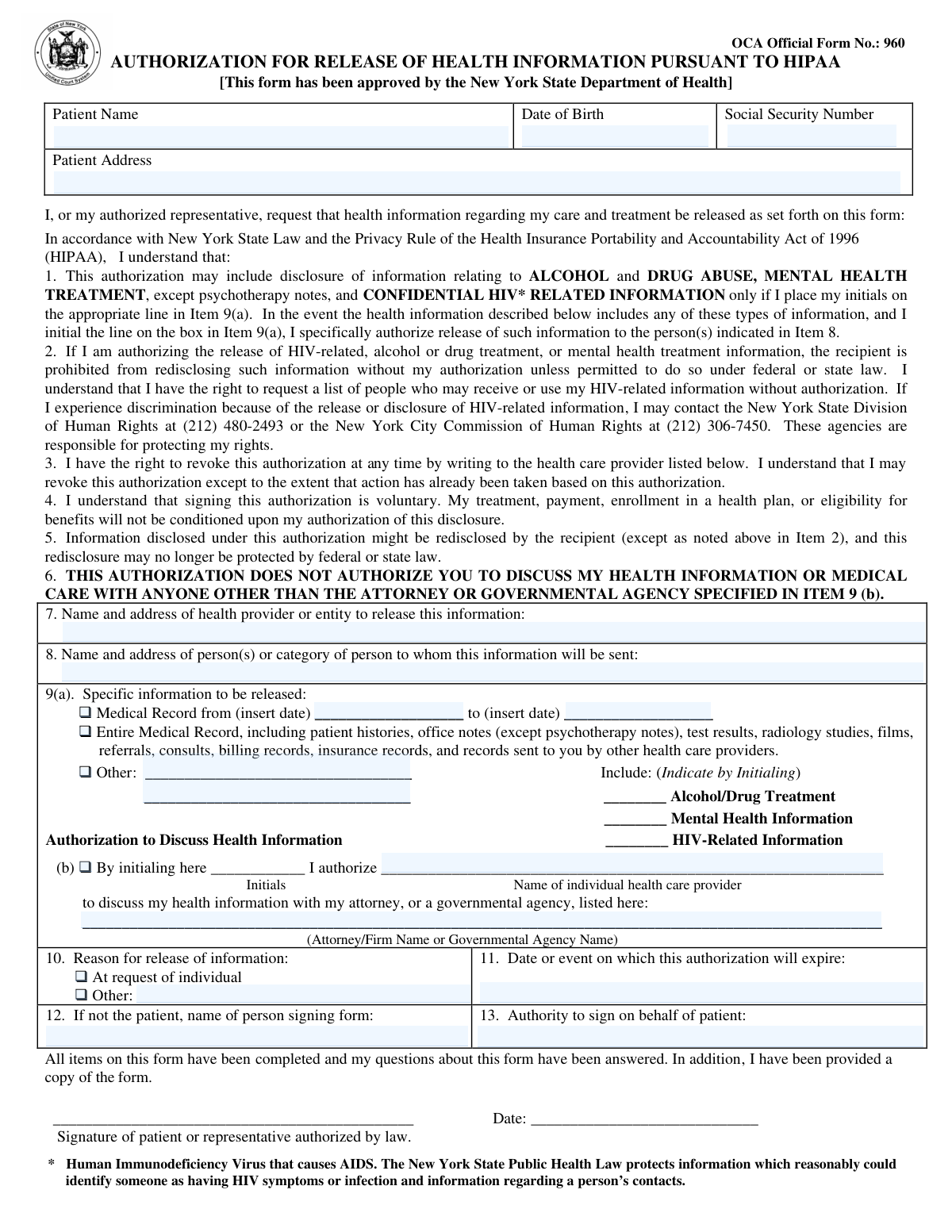
Yes! You can use AI to fill out OCA Official Form No.: 960, Authorization for Release of Health Information Pursuant to HIPAA
Don't type 21 fields by hand. Tell our AI about yourself, or upload the listing or an old lease, and it fills every field in seconds. You check it, then download, print or sign.
The AI does the filling. You just check it.
No typing into boxes, nothing to install.
What this form asks for
The AI fills all of it, from your answers or your documents.
The AI checks your answers before you download
12 checks built for this form, so a wrong date or a missing answer is caught before anyone else sees it.
This check ensures the 'Date of Birth' provided is a valid, properly formatted date that occurs in the past. It is critical for correctly identifying the patient and preventing data entry errors. If the date is invalid, in the future, or improperly formatted, the form submission should be rejected to avoid processing an authorization for the wrong individual or with incorrect data.
This validation verifies that if a Social Security Number is entered, it conforms to the standard 9-digit format, with or without hyphens (XXX-XX-XXXX or XXXXXXXXX). While often optional, if data is provided in this field, it must be structurally valid to ensure it can be processed correctly by receiving systems. An invalid format should trigger an error, prompting the user to correct the entry or leave it blank.
This check confirms that at least one of the primary checkboxes in Item 9(a) ('Medical Record from...', 'Entire Medical Record', or 'Other') has been selected. The entire purpose of the form is to authorize a release, so the specific information to be released must be clearly defined. A failure to select an option makes the authorization ambiguous and legally insufficient, so the form should be considered incomplete.
If the 'Medical Record from...' option is selected, this validation ensures that both a 'from' and 'to' date are provided and that the 'to' date is on or after the 'from' date. This prevents logical impossibilities and ensures the date range for the record release is clearly and correctly defined. An invalid range would lead to confusion and incorrect fulfillment of the request, so the submission must be blocked for correction.
This check ensures that if the 'Other' checkbox is selected in Item 9(a), the corresponding text field describing the specific information is not empty. Selecting 'Other' without specifying what information is being requested creates an invalid and unenforceable authorization. The form should be rejected if this field is left blank after the 'Other' option is chosen.
This validation verifies that if the 'Other' checkbox is selected for the 'Reason for release' in Item 10, the accompanying text field is filled out. An unspecified reason can cause processing delays or rejection by the releasing entity. If the 'Other' reason is selected but not described, the submission should be flagged as incomplete.
And 6 more checks
- Expiration Clause Presence (Item 11)
- Representative Authority Consistency (Items 12 & 13)
- Authorization to Discuss Completeness (Item 9b)
- Signature Date Presence and Logic
- Address Component Completeness
- Mandatory Patient and Provider/Recipient Information
Let AI fill out your OCA Form 960
No typing. Every field filled in seconds, checked, ready to sign.
How to Fill Out OCA Form 960 Online for Free in 2026
What the AI walks you through.
- Navigate to Instafill.ai and upload or select the OCA Form 960.
- Enter the patient's personal identification details, including full name, date of birth, and address.
- Specify the name and address of the health provider releasing the information and the person or entity who will receive it.
- Clearly define the information to be released by selecting date ranges, types of records, and initialing for sensitive information like mental health or HIV-related data.
- Indicate the reason for the release and set an expiration date or event for the authorization.
- If applicable, provide details for authorizing a provider to discuss your health information with an attorney or agency.
- Review all entered information for accuracy, then securely e-sign and date the form to complete the authorization.
Common Mistakes in Completing OCA Form 960
The ones the AI is built to catch.
Forgetting to Initial for Sensitive Information Release
Incomplete Authorization to Discuss Information
Ambiguous or Missing Expiration Date
Missing Representative's Information and Authority
Vague or Incorrect Releasing Provider Information
Unclear Scope of Medical Records Requested
Missing Signature or Date
Incorrect Patient Identification Details
Failure to Specify 'Other' Information
Submitting a Poorly Scanned or Unreadable Form
Frequently Asked Questions About OCA Form 960
Is it really free for 7 days?
Can I fill other forms too?
How do I cancel?
How does the AI fill out OCA Form 960?
What happens to my information?
How complex is OCA Form 960 to fill out?
What is the purpose of Form 960, the HIPAA Authorization for Release of Health Information?
Who needs to fill out this form?
What information do I need to have ready before filling out this form?
How do I authorize the release of sensitive information like mental health or HIV-related records?
What is the difference between releasing records in Section 9(a) and authorizing discussion in Section 9(b)?
How do I specify an expiration date in Section 11?
Can I change my mind after signing this form?
What happens to my information after it's released?
Where do I send the completed form?
I only want to release records from a specific time period. How do I indicate that?
Can someone else sign this form for me?
Do I have to sign this authorization form?
Can I use an AI tool to help me fill out this form?
How can I use Instafill.ai to complete this HIPAA authorization form online?
What should I do if the PDF version of this form I have is not fillable?
Get your OCA Form 960 filled out by AI
$0 today. Cancel before Nov 4 and you pay nothing.
Other forms like this one
authorization forms: Form I-765, Application for Employment Authorization, Form CMS-588, EFT Authorization Agreement, Form 8821, Tax Information Authorization, Form 8879, IRS e-file Signature Authorization, Form SSA-827, Authorization to Disclose Information, Form I-905, Application for Authorization to Issue Certification for Health Care Workers, Form G-1650, Authorization for ACH Transactions, Arizona Form 285, General Disclosure/Representation Authorization Form, Arizona Form 285-I, Individual Income Tax Disclosure/Representation Authorization Form, The Department of Medical Assistance Services Applied Behavior Analysis Preservice Service Authorization Request Form (Effective Dates of Service 09/01/2025 and after), Form CH-006: PA-BH-Res-PCS, Oregon Behavioral Health Support Program Plan of Care Authorization (Plan of Care Request for Behavioral Health Residential or Personal Care Services), Continental American Insurance Company (CAIC) / Aflac Group Critical Illness Claim Form (with Attending Physician’s Statement, HIPAA Authorization to Obtain Information, and Electronic Funds Transaction Authorization), HIPAA Authorization Form, Authorization for the Release of Protected Health Information, Form G-1450, Authorization for Credit Card Transactions, Prior Authorization (PA) Request Form – Adult Palliative Care (Alameda Alliance for Health), Alameda Alliance for Health Prior Authorization (PA) Request Form – Adult Palliative Care, Manulife Group Benefits Drug Prior Authorization Form – Mounjaro (Tirzepatide) (GL5197E), Manulife Group Benefits Drug Prior Authorization Form (Ozempic/Semaglutide) – GL5197E, Out-of-Network Pre-Authorization and Exception Request Form, Form SSA-827 (06-2024), Authorization to Disclose Information to the Social Security Administration (SSA)
health forms: Form 1095-A, Health Insurance Marketplace Statement, Form 8889, Health Savings Accounts, Form WH-380-E, Certification of Health Care Provider, Form 7206, Self-Employed Health Ins. Ded., Form 8885, Health Coverage Tax Credit, Form WH-380-F, Certification of Health Care Provider, Form 1095-C, Employer-Provided Health Insurance Offer and Coverage, Form 1095-B, Health Coverage, Form I-905, Application for Authorization to Issue Certification for Health Care Workers, Form BHVH, Outpatient Behavioral Health – ABA Treatment Request, Form SHA, Separation Health Assessment, DHS-6696-ENG, Minnesota Health Care Programs Application (MNsure/DHS), Geisinger Health Plan Behavioral Health Professional Services Questionnaire, Priority Health Small Group Renewal Decision Form, Form CH-006: PA-BH-Res-PCS, Oregon Behavioral Health Support Program Plan of Care Authorization (Plan of Care Request for Behavioral Health Residential or Personal Care Services), Form 7206 (2025), Self-Employed Health Insurance Deduction, HIPAA Authorization Form, Authorization for the Release of Protected Health Information, Prior Authorization (PA) Request Form – Adult Palliative Care (Alameda Alliance for Health), Medicare Enrolment Application (Australia) – Enrol in Medicare, Re-enrol/Extend Eligibility, Enrol a Newborn, and Register for My Health Record, Alameda Alliance for Health Prior Authorization (PA) Request Form – Adult Palliative Care
HIPAA forms: HIPAA Authorization for Release of Health-Related Information, Continental American Insurance Company (CAIC) / Aflac Group Critical Illness Claim Form (with Attending Physician’s Statement, HIPAA Authorization to Obtain Information, and Electronic Funds Transaction Authorization), HIPAA Authorization Form, Authorization for the Release of Protected Health Information, California HIPAA Authorization Form, Authorization for the Release of Protected Health Information, Kaiser Permanente Authorization for Use or Disclosure of Patient Health Information, Minnesota Standard Consent Form to Release Health Information, UCLA Form #30910, Authorization for Release of Health Information, HIPAA Authorization Form for Release of Protected Health Information
health information forms: Minnesota Standard Consent Form to Release Health Information, HIPAA Authorization Form, Authorization for the Release of Protected Health Information, Outpatient Behavioral Health (BH) – ABA Treatment Request: Required Information for Precertification (GR-69017-4), HIPAA Authorization for Release of Health-Related Information, Kaiser Permanente Authorization for Use or Disclosure of Patient Health Information, California HIPAA Authorization Form, Authorization for the Release of Protected Health Information, UCLA Form #30910, Authorization for Release of Health Information, HIPAA Authorization Form for Release of Protected Health Information, Form CMS-10106, Medicare Authorization to Disclose Personal Health Information, CenCal Health Provider Information Form, Gold Coast Health Plan (GCHP) Provider Information Update Form, Outpatient Behavioral Health (BH) – ABA Treatment Request: Required Information for Precertification, Authorization for Use or Disclosure of Protected Health Information
Let AI fill out your OCA Form 960
Your trial starts once a card is added. You pay nothing before Nov 4.
Our AI already knows this form, all 21 fields of it. Skip the typing: tell it about yourself, or upload what you have, and it fills the whole form in seconds.
- AI fills every field on the form, checkboxes included
- No typing into boxes: answer a few questions, or upload the listing or an old lease, an old copy of this form, a photo of a document
- The AI checks the answers; you review and change anything before you download
- Download the finished PDF, print it, or sign it online
- Encrypted, and never used to train AI
Cancel before Nov 4 and you pay nothing.
A card is needed to start the trial. Cancel in two clicks from your account.
Terms · Privacy