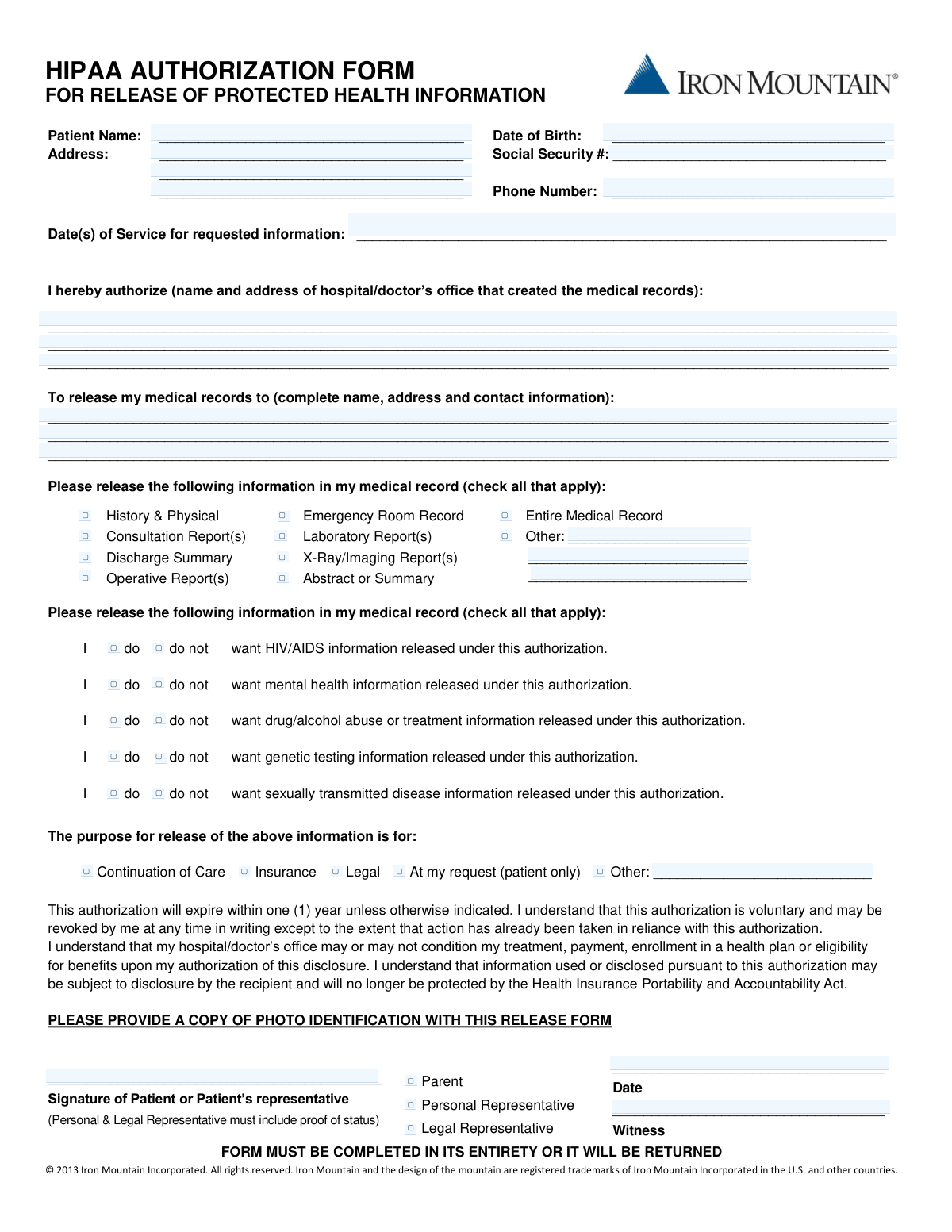
Yes! You can use AI to fill out HIPAA Authorization Form for Release of Protected Health Information
This form is a legally binding document under the Health Insurance Portability and Accountability Act (HIPAA) that allows a patient to grant specific permission for their healthcare provider to disclose their medical records to another person or organization. It details exactly what information can be shared, who can share it, who can receive it, and for what purpose. Today, this form can be filled out quickly and accurately using AI-powered services like Instafill.ai, which can also convert non-fillable PDF versions into interactive fillable forms.
Our AI automatically handles information lookup, data retrieval, formatting, and form filling.
It takes less than a minute to fill out HIPAA Authorization Form using our AI form filling.
Securely upload your data. Information is encrypted in transit and deleted immediately after the form is filled out.
Form specifications
| Form name: | HIPAA Authorization Form for Release of Protected Health Information |
| Number of pages: | 1 |
| Language: | English |
| Categories: | authorization forms, health forms, HIPAA forms |
Instafill Demo: How to fill out PDF forms in seconds with AI
How to Fill Out HIPAA Authorization Form Online for Free in 2026
Are you looking to fill out a HIPAA AUTHORIZATION FORM form online quickly and accurately? Instafill.ai offers the #1 AI-powered PDF filling software of 2026, allowing you to complete your HIPAA AUTHORIZATION FORM form in just 37 seconds or less.
Follow these steps to fill out your HIPAA AUTHORIZATION FORM form online using Instafill.ai:
- 1 Navigate to Instafill.ai and upload or select the HIPAA Authorization Form.
- 2 Enter the patient's personal information, including full name, address, date of birth, and Social Security Number.
- 3 Specify the name and address of the hospital or doctor's office authorized to release the medical records.
- 4 Provide the complete details of the person or entity who will receive the protected health information.
- 5 Check the boxes corresponding to the specific medical information to be released, and indicate your choices for sensitive information like mental health or HIV/AIDS records.
- 6 Select the purpose for the release of information, such as continuation of care, insurance, or legal reasons.
- 7 Carefully review all entered information, then provide your digital signature, date, and witness details to complete the authorization.
Our AI-powered system ensures each field is filled out correctly, reducing errors and saving you time.
Why Choose Instafill.ai for Your Fillable HIPAA Authorization Form Form?
Speed
Complete your HIPAA Authorization Form in as little as 37 seconds.
Up-to-Date
Always use the latest 2026 HIPAA Authorization Form form version.
Cost-effective
No need to hire expensive lawyers.
Accuracy
Our AI performs 10 compliance checks to ensure your form is error-free.
Security
Your personal information is protected with bank-level encryption.
Frequently Asked Questions About Form HIPAA Authorization Form
This form allows you, the patient, to grant permission to a healthcare provider, such as a hospital or doctor's office, to release your protected health information to a specific person or organization you designate.
The patient whose medical records are being requested should complete this form. If the patient is unable to sign, their legal representative can complete it but must provide proof of their status.
You must provide a copy of a valid photo ID with the completed form. If you are signing as a representative for the patient, you must also include proof of your legal status to do so.
In the section 'Please release the following information', check the boxes for the specific reports you need, such as 'Discharge Summary' or 'X-Ray/Imaging Report(s)'. To release all records, check the 'Entire Medical Record' box.
The form has a specific section where you must explicitly select 'do' or 'do not' for releasing information related to HIV/AIDS, mental health, substance abuse, and other sensitive categories. You must make a selection for each one.
The form states it must be completed in its entirety or it will be returned. An incomplete form will delay the processing of your medical records request.
Yes, this authorization automatically expires one year from the date you sign it unless otherwise specified. You can also revoke the authorization in writing at any time before your records have been released.
You must provide the complete name, full address, and contact information for the entity or individual you are authorizing to receive your medical records. Missing information can cause delays.
Enter the specific date or range of dates for the medical care you want records for. For example, you could write 'All dates of service' or a specific period like 'January 1, 2023 - March 31, 2023'.
Yes, services like Instafill.ai use AI to help you accurately auto-fill form fields, which can save time and reduce errors. This ensures all necessary information is included before you submit the form.
Simply upload the HIPAA Authorization form to the Instafill.ai platform. The AI will identify the fields, allowing you to quickly type in your information, sign electronically, and download the completed document.
You can use a service like Instafill.ai, which can convert flat, non-fillable PDFs into interactive, fillable forms. This allows you to type your information directly into the fields instead of printing and filling it out by hand.
If you are a parent, personal representative, or legal representative, you must sign the form, check the box indicating your relationship to the patient, and provide legal proof of your status to act on their behalf.
Compliance HIPAA Authorization Form
Validation Checks by Instafill.ai
1
Patient Identification Completeness
This check ensures that the 'Patient Name', 'Address', and 'Date of Birth' fields are all filled out. These fields are critical for uniquely identifying the correct patient and locating their medical records. If any of these fields are missing, the form cannot be processed, and it will be returned to the sender for completion.
2
Date of Birth Format and Plausibility
Validates that the 'Date of Birth' is entered in a recognized date format (e.g., MM/DD/YYYY) and represents a date in the past. This prevents data entry errors like typos or future dates, which would make patient identification impossible. An invalid or future date will trigger an error, requiring the user to correct the entry before submission.
3
Social Security Number Format
This validation checks if the 'Social Security Number', when provided, follows the standard 9-digit format, with or without hyphens (XXX-XX-XXXX or XXXXXXXXX). While often optional, ensuring a correct format for provided data maintains data integrity and usability. An incorrectly formatted SSN will prompt a correction message, but submission may be allowed if the field is optional.
4
Phone Number Format
Verifies that the 'Phone Number' field, if filled, conforms to a standard phone number pattern (e.g., (XXX) XXX-XXXX or XXXXXXXXXX). This ensures that the contact information is valid and can be used to reach the patient if necessary. An invalid format will result in a request for correction.
5
Authorizing Entity Completeness
Ensures that the name and address of the hospital or doctor's office authorized to release records are provided. This information is mandatory because it specifies the source from which the records must be requested. A submission lacking this information is incomplete and cannot be acted upon, so it will be rejected.
6
Recipient Entity Completeness
Validates that the complete name, address, and contact information for the recipient of the medical records are filled out. It is essential to know exactly where to send the protected health information. If the recipient's details are missing, the form will be considered incomplete and returned.
7
Record Type Selection Requirement
This check confirms that at least one checkbox specifying the information to be released (e.g., 'History & Physical', 'Entire Medical Record') has been selected. The authorization is meaningless without a clear indication of which records are being requested. If no selection is made, the form will be invalid and require correction.
8
Conditional 'Other' Record Type Specification
If the 'Other' checkbox under 'Information to be Released' is selected, this validation ensures that the corresponding text field(s) are not empty. This is important to clarify exactly what additional, non-standard information is being authorized for release. Failure to specify the 'Other' information will result in a validation error.
9
Exclusive Sensitive Information Authorization
For each category of sensitive information (HIV/AIDS, mental health, etc.), this check verifies that exactly one choice ('do' or 'do not') is selected. A user cannot select both or neither, as this creates ambiguity in the authorization. This is a critical check to comply with privacy regulations for sensitive data, and any ambiguity will halt the submission.
10
Purpose of Release Selection Requirement
Verifies that at least one checkbox indicating the purpose for the release of information (e.g., 'Continuation of Care', 'Legal') is selected. Understanding the purpose is a key component of a valid HIPAA authorization. If no purpose is selected, the form is incomplete and will be rejected.
11
Conditional 'Other' Purpose Specification
If the 'Other' checkbox under 'Purpose for release' is selected, this validation ensures the corresponding text field is filled in. This provides necessary context when the reason for the release does not fit standard categories. An empty 'Other' purpose field will trigger a validation failure.
12
Signature Date Validity
This check ensures the 'Date' field next to the signature is present, in a valid date format, and is not a future date. The signature date legally marks when the authorization was granted. A missing, invalid, or future date invalidates the authorization and will cause the form submission to fail.
13
Logical Date Consistency
Verifies that the 'Signature Date' is on or after the 'Date(s) of Service for requested information'. A person cannot authorize the release of records for a service that has not yet occurred. This logical check prevents invalid requests, and a failure would require the user to correct one or more of the date fields.
14
Representative Status Logic
If the form is signed by a representative, this check ensures that one of the status boxes ('Parent', 'Personal Representative', 'Legal Representative') is checked. This clarifies the signer's legal authority to act on the patient's behalf. The form also notes that proof is required, so a system may flag these submissions for manual verification of documentation.
Common Mistakes in Completing HIPAA Authorization Form
People often write a doctor's or clinic's name without the full address (e.g., 'Dr. Smith' instead of 'Dr. Jane Smith, MD, 123 Health St, Suite 400, Medville, ST 12345'). This ambiguity makes it impossible for staff to know where to get the records from or where to send them, leading to rejection. To avoid this, always provide the complete, specific name and full mailing address for both the authorizing entity and the recipient.
Instead of a specific date or a clear date range (e.g., '01/01/2022 - 12/31/2022'), individuals might write ambiguous terms like 'last year' or 'my visit in May.' This forces staff to guess, potentially leading to the release of incorrect information or the omission of necessary records. Always use a precise MM/DD/YYYY format for single dates or a clear start and end date for a range to ensure you receive exactly the records you need.
The form explicitly requires a copy of a photo ID to verify the patient's identity and prevent fraudulent access to health information. This is a critical security step that is very easy to overlook. Submitting the form without the required ID will result in an automatic rejection and delay the release of records until the ID is provided.
The section with 'do / do not' checkboxes for HIV, mental health, and substance abuse records is legally required and cannot be left blank. Many people skip this section, but leaving these boxes unchecked creates ambiguity and legally prevents the release of any records until clarification is received. You must explicitly select either 'do' or 'do not' for each category to create a valid authorization.
When a parent or legal representative signs on behalf of a patient, they must check the corresponding box and provide separate documentation proving their authority (e.g., power of attorney, guardianship papers). Simply signing and checking the box is insufficient and legally invalid, leading to immediate rejection of the form. Ensure all required legal documents proving your representative status are attached.
An unsigned or undated authorization form is legally invalid and cannot be acted upon. This is one of the most common errors, often happening when a person is in a hurry. Without a signature and date, the provider has no legal permission to release the information, and the form will be immediately returned. Always perform a final review to ensure you have signed and dated the form.
The form provides an 'Other' option for both the 'Information to be Released' and 'Purpose of Release' sections. People frequently check this box but forget to write in the specific information or purpose. This leaves the request incomplete and open to interpretation, which staff are not permitted to do, causing delays. If your needs aren't covered by the standard options, you must clearly specify your request in the 'Other' field.
Individuals sometimes get confused and incorrectly fill out the 'I hereby authorize...' and 'To release my medical records to...' sections, for example by listing the same clinic in both places. This makes the request nonsensical and impossible to process. Remember the 'authorize' section is for the entity that currently has your records, and the 'release to' section is for the entity that needs to receive them.
Since this form is often printed and filled out by hand, illegible handwriting is a frequent problem that can make names, dates, or provider information unreadable. This can lead to significant delays or outright rejection of the form. To avoid this, print clearly in block letters. If the form is a non-fillable PDF, tools like Instafill.ai can convert it into a fillable version, allowing you to type directly and ensure legibility.
While it seems easy, checking 'Entire Medical Record' when only specific reports are needed can lead to delays and potentially higher processing fees. It creates a much larger task for the records department. For faster processing, it is better to be specific and check only the boxes for the exact information you require, such as 'Laboratory Report(s)' or 'Discharge Summary'.
Saved over 80 hours a year
“I was never sure if my IRS forms like W-9 were filled correctly. Now, I can complete the forms accurately without any external help.”
Kevin Martin Green
Your data stays secure with advanced protection from Instafill and our subprocessors

Robust compliance program
Transparent business model
You’re not the product. You always know where your data is and what it is processed for.
ISO 27001, HIPAA, and GDPR
Our subprocesses adhere to multiple compliance standards, including but not limited to ISO 27001, HIPAA, and GDPR.
Security & privacy by design
We consider security and privacy from the initial design phase of any new service or functionality. It’s not an afterthought, it’s built-in, including support for two-factor authentication (2FA) to further protect your account.
Fill out HIPAA Authorization Form with Instafill.ai
Worried about filling PDFs wrong? Instafill securely fills hipaa-authorization-form-for-release-of-protected-health-information forms, ensuring each field is accurate.