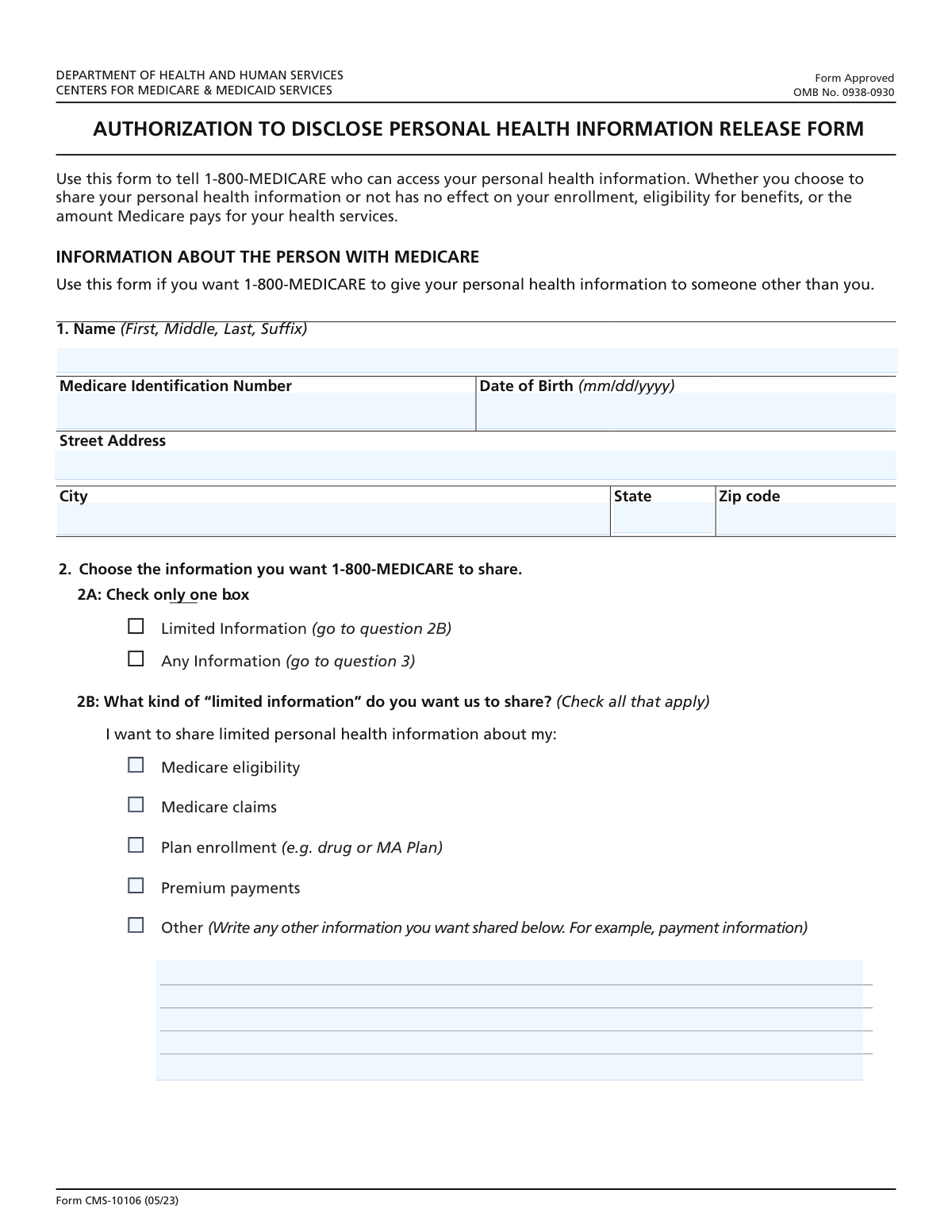
Yes! You can use AI to fill out Form CMS-10106, Medicare Authorization to Disclose Personal Health Information

Form CMS-10106 is the official document used by Medicare beneficiaries to authorize Medicare to disclose their personal health information (PHI) to a designated person or organization. This form is essential for allowing family members, caregivers, or other representatives to assist with managing Medicare claims, benefits, and payments on the beneficiary's behalf. Today, this form can be filled out quickly and accurately using AI-powered services like Instafill.ai, which can also convert non-fillable PDF versions into interactive fillable forms.
Our AI automatically handles information lookup, data retrieval, formatting, and form filling.
It takes less than a minute to fill out CMS-10106 using our AI form filling.
Securely upload your data. Information is encrypted in transit and deleted immediately after the form is filled out.

Form specifications

Form name: Form CMS-10106, Medicare Authorization to Disclose Personal Health Information
Number of fields: 45
Number of pages: 6
Language: English
Categories: authorization forms, CAR forms, CMS forms, health care forms, health forms, Medicare forms, L.A. Care forms
main-image

Instafill Demo: How to fill out PDF forms in seconds with AI

How to Fill Out CMS-10106 Online for Free in 2026

Are you looking to fill out a CMS-10106 form online quickly and accurately? Instafill.ai offers the #1 AI-powered PDF filling software of 2026, allowing you to complete your CMS-10106 form in just 37 seconds or less.
Follow these steps to fill out your CMS-10106 form online using Instafill.ai:
  1. 1 Navigate to Instafill.ai and upload or select Form CMS-10106, the Medicare Authorization to Disclose Personal Health Information.
  2. 2 Enter the Medicare beneficiary's full name, Medicare Identification Number, and date of birth in Part 1.
  3. 3 In Part 2, specify the name and address of the person(s) or organization(s) you authorize to receive your information.
  4. 4 Define the scope of the authorization by choosing what information to share, how long the authorization should last, and the reason for the disclosure.
  5. 5 Indicate whether to include or exclude sensitive information related to mental health, substance abuse, or HIV.
  6. 6 Review all the information for accuracy, then provide your signature, date, and telephone number. If you are a personal representative, complete the final section with your details.
  7. 7 Securely download, print, or share your completed and signed CMS-10106 form directly from the platform.

Our AI-powered system ensures each field is filled out correctly, reducing errors and saving you time.

Why Choose Instafill.ai for Your Fillable CMS-10106 Form?

Speed

Complete your CMS-10106 in as little as 37 seconds.

Up-to-Date

Always use the latest 2026 CMS-10106 form version.

Cost-effective

No need to hire expensive lawyers.

Accuracy

Our AI performs 10 compliance checks to ensure your form is error-free.

Security

Your personal information is protected with bank-level encryption.

Frequently Asked Questions About Form CMS-10106

This form allows you, the Medicare beneficiary, to authorize 1-800-MEDICARE to share your personal health information with a specific person or organization you designate.

The person with Medicare should complete and sign this form. A personal representative may also fill it out on the beneficiary's behalf by completing the specific 'Personal Representative' section.

You will need your Medicare Identification Number, date of birth, and address. You also need the full name and address of the person or organization you are authorizing to receive your information.

Choosing 'Limited Information' lets you select specific categories of data to share, like claims or eligibility. Selecting 'Any Information' allows 1-800-MEDICARE to share all of your personal health information.

Sensitive information refers to details about alcohol and drug abuse, mental health treatment, and HIV status. You must explicitly choose whether to include or exclude this specific information from being shared.

You can choose for the authorization to last indefinitely or for a specific period. If you choose a specific period, you must provide both a start and end date for the authorization.

Yes, the form includes sections to authorize up to two different people or organizations to receive your health information.

If you are signing as a personal representative, you must check the 'Signing as Personal Representative' box. You will then need to provide your own name, contact information, and relationship to the Medicare beneficiary.

Provide a brief, clear explanation for the authorization. For example, 'To allow my daughter to assist with my claims' or 'For my caregiver to discuss my plan enrollment'.

Submission instructions are typically provided with the form. You should mail the completed and signed document to the address specified by Medicare.

If you select 'Share for Specific Period' but leave the end date blank, the authorization may be considered incomplete. To make it last forever, you must check the 'Share Indefinitely' box.

Yes, services like Instafill.ai use AI to help you accurately auto-fill form fields with your information. This can save time and reduce the chance of making errors.

You can upload a PDF of the form to the Instafill.ai website. The service will make the fields interactive, allowing you to type your information directly onto the form and then download the completed document.

If you have a non-fillable or 'flat' PDF, you can use a tool like Instafill.ai. It can convert the document into an interactive, fillable form so you can easily type in your information.

Compliance CMS-10106
Validation Checks by Instafill.ai

1
Medicare ID Number Format Validation
Checks if the 'Medicare Identification Number' follows the 11-character alphanumeric format of a Medicare Beneficiary Identifier (MBI). This is critical for correctly identifying the beneficiary in the Medicare system. A failed validation will prevent form submission until a valid MBI is entered, ensuring data accuracy and preventing processing errors.
2
Exclusive Information Sharing Level Selection
Ensures that the user has selected either 'Limited Information' or 'Any Information', but not both. These options are mutually exclusive and define the entire scope of data sharing. If both or neither are selected, the form will display an error, forcing the user to make a clear choice before proceeding.
3
Conditional Requirement for Limited Information Details
Verifies that if the 'Limited Information' option is checked, at least one of the specific information type checkboxes (e.g., 'Medicare eligibility', 'claims') is also selected. This is important to ensure the authorization is not vague and clearly specifies what limited information can be shared. Failure to select a detail will prompt the user to specify the information type.
4
Conditional Requirement for 'Other' Information Text
Validates that if the 'Other' checkbox is selected under 'Details of Limited Information to Share', the corresponding 'Other Information Details' text field is not empty. This prevents an ambiguous authorization where the user indicates 'Other' but fails to specify what that entails. The form will require text input in this field if the 'Other' box is checked.
5
Exclusive Authorization Duration Selection
Confirms that the user has selected either 'Share Indefinitely' or 'Share for Specific Period', but not both. These choices determine the lifespan of the authorization and are mutually exclusive. An error will be shown if the user selects both or neither, requiring a single, unambiguous choice for the authorization's duration.
6
Authorization Date Period Logic
Checks that if 'Share for Specific Period' is selected, both 'Authorization Start Date' and 'Authorization End Date' are provided and are valid dates. It also ensures the 'Authorization End Date' is on or after the 'Authorization Start Date'. This prevents logical errors like an authorization ending before it begins and ensures the time-bound consent is clearly defined.
7
Date of Birth Validity Check
Ensures the 'Date of Birth' field contains a valid calendar date that is in the past. This check prevents typos, invalid date entries (like February 30th), and future dates, which are impossible for a date of birth. Correctly capturing the DOB is essential for verifying the identity of the person with Medicare.
8
Signature Date Logic and Validity
Validates that the 'Date Signed' is a valid date that is not in the future. It also checks that the signature date is on or after the 'Authorization Start Date', if one is specified. This ensures the signature is legally valid for the time period it is authorizing.
9
Conditional Completeness of Personal Representative Information
Verifies that if the 'Signing as Personal Representative' box is checked, all related fields (Full Name, Address, Phone, Relationship) are filled out completely. This is crucial for legal and verification purposes, establishing who is acting on the beneficiary's behalf. The form will not submit until this section is complete if the box is checked.
10
Zip Code Format Validation
This check ensures that all zip code fields on the form contain a valid 5-digit or 9-digit (ZIP+4) numeric format. Correctly formatted zip codes are essential for mail delivery and accurate location data. An invalid format will trigger an error message requesting correction.
11
Telephone Number Format Validation
This validation ensures that the 'Telephone Number (Signature Details)' and 'Personal Representative's Telephone Number' fields adhere to a standard 10-digit phone number format. This is important for ensuring the contact information is valid and can be used to reach the signatory if needed. The system will reject entries that do not match a recognizable phone number pattern.
12
Exclusive Information Inclusion Selection
This check ensures that the user selects either 'Include all information' or 'Don't include sensitive information', but not both. These options are mutually exclusive and govern the sharing of highly sensitive data related to mental health, substance abuse, and HIV. The form will prompt the user to make a single choice to ensure their privacy preferences are clearly recorded.
13
Completeness of Person's Address
Verifies that all parts of the 'Person's Address' (Street Address, City, State, Zip Code) are filled out. A complete address is mandatory for identity verification and for any official correspondence. If any part of the address is missing, the form submission will be blocked until the information is provided.

Common Mistakes in Completing CMS-10106

Conflicting Information Sharing Selections

Users often mistakenly check both 'Limited Information' and 'Any Information' boxes, creating a contradiction. This happens due to rushing or misunderstanding that these are mutually exclusive choices. Such an error will cause the form to be rejected or delayed, as the processing agent cannot determine the user's true intent for information sharing. To avoid this, carefully read each option and select only one that accurately reflects the level of access you wish to grant.

Incomplete 'Limited Information' Details

A frequent error is checking the 'Limited Information' box but then failing to check any of the corresponding boxes below it (e.g., 'Medicare eligibility', 'Medicare claims'). This leaves the authorization vague and unenforceable, as it doesn't specify what information can be shared. To prevent this, if you select 'Limited Information', you must also select at least one specific type of information to be disclosed.

Incorrect Medicare Identification Number

Entering the Medicare Identification Number (MBI) with typos, such as transposed letters or numbers, is a critical error. This often happens due to misreading the card or a simple data entry mistake. An incorrect MBI will lead to an immediate rejection of the form, as the system cannot locate the beneficiary's record, causing significant processing delays. Always double-check the number against your official Medicare card before submitting.

Ambiguous Authorization Duration

People frequently create ambiguity by either checking both 'Share Indefinitely' and 'Share for Specific Period', or by checking the latter and forgetting to enter the start and end dates. This invalidates the authorization timeline, forcing a rejection of the form. To avoid this, choose only one duration option and ensure you provide the required dates if selecting a specific period. AI-powered tools like Instafill.ai can help by flagging these incomplete or contradictory fields.

Missing Signature or Signature Date

Forgetting to sign the form or write the date of signature is one of the most common reasons for rejection. A signature and date are legally required to validate the authorization. This oversight often occurs when a person is focused on filling out the detailed sections and simply misses the final step. Always perform a final review of the form, paying special attention to the signature block, before submission.

Improper Personal Representative Declaration

An individual signing on behalf of a Medicare beneficiary may forget to check the 'Signing as Personal Representative' box and fill in their own name, address, and relationship. Conversely, the beneficiary might mistakenly fill out this section. This error creates confusion about who is legally authorizing the disclosure and can invalidate the form. Ensure this section is completed accurately only if you are not the person with Medicare but are legally authorized to sign for them.

Contradictory Sensitive Information Choices

Users sometimes select both 'Include all information' and 'Don't include sensitive information' regarding data on alcohol/drug abuse, mental health, and HIV. These are opposing instructions that make it impossible to process the request, leading to rejection. You must choose one or the other to clearly state your preference for sharing this specific type of protected health information. AI form-filling tools can prevent this by allowing only one selection in a mutually exclusive choice.

Incomplete 'Other' Information Field

When sharing limited information, a user might check the 'Other' box but then fail to write a description in the 'Other Information Details' text field. This makes the selection meaningless, as there is no instruction on what 'other' information can be shared. If you check 'Other', you must provide a clear and specific description in the space provided to ensure your request is understood and processed correctly.

Missing Recipient Organization/Person Details

The form requires the name and address of the person or organization authorized to receive the information, but this section is often left blank. Without a designated recipient, the authorization is incomplete and cannot be acted upon. This mistake renders the entire form useless. Always clearly specify who is allowed to receive your information by completely filling out the 'Person/Organization' section.

Using Incorrect Date Formats

Users may enter dates, such as the Date of Birth or Authorization End Date, in a format that is inconsistent or ambiguous (e.g., DD/MM/YYYY vs. MM/DD/YYYY). This can lead to data entry errors on the receiving end and potential issues with identifying the correct record or authorization period. To avoid this, use the standard MM/DD/YYYY format unless specified otherwise. Using a tool like Instafill.ai can help by automatically formatting dates correctly as you type.
Saved over 80 hours a year

“I was never sure if my IRS forms like W-9 were filled correctly. Now, I can complete the forms accurately without any external help.”

Kevin Martin Green

Your data stays secure with advanced protection from Instafill and our subprocessors

Robust compliance program

Transparent business model

You’re not the product. You always know where your data is and what it is processed for.

ISO 27001, HIPAA, and GDPR

Our subprocesses adhere to multiple compliance standards, including but not limited to ISO 27001, HIPAA, and GDPR.

Security & privacy by design

We consider security and privacy from the initial design phase of any new service or functionality. It’s not an afterthought, it’s built-in, including support for two-factor authentication (2FA) to further protect your account.

Fill out CMS-10106 with Instafill.ai

Worried about filling PDFs wrong? Instafill securely fills form-cms-10106-medicare-authorization-to-disclose-personal-health-information forms, ensuring each field is accurate.