
Yes! You can use AI to fill out State of Illinois Department of Human Services (IDHS) – Bureau of Child Care and Development Child Care Application (Form IL444-3455)
Don't type 1264 fields by hand. Tell our AI about yourself, or upload a document you already have, and it fills every field in seconds. You check it, then download, print or sign.
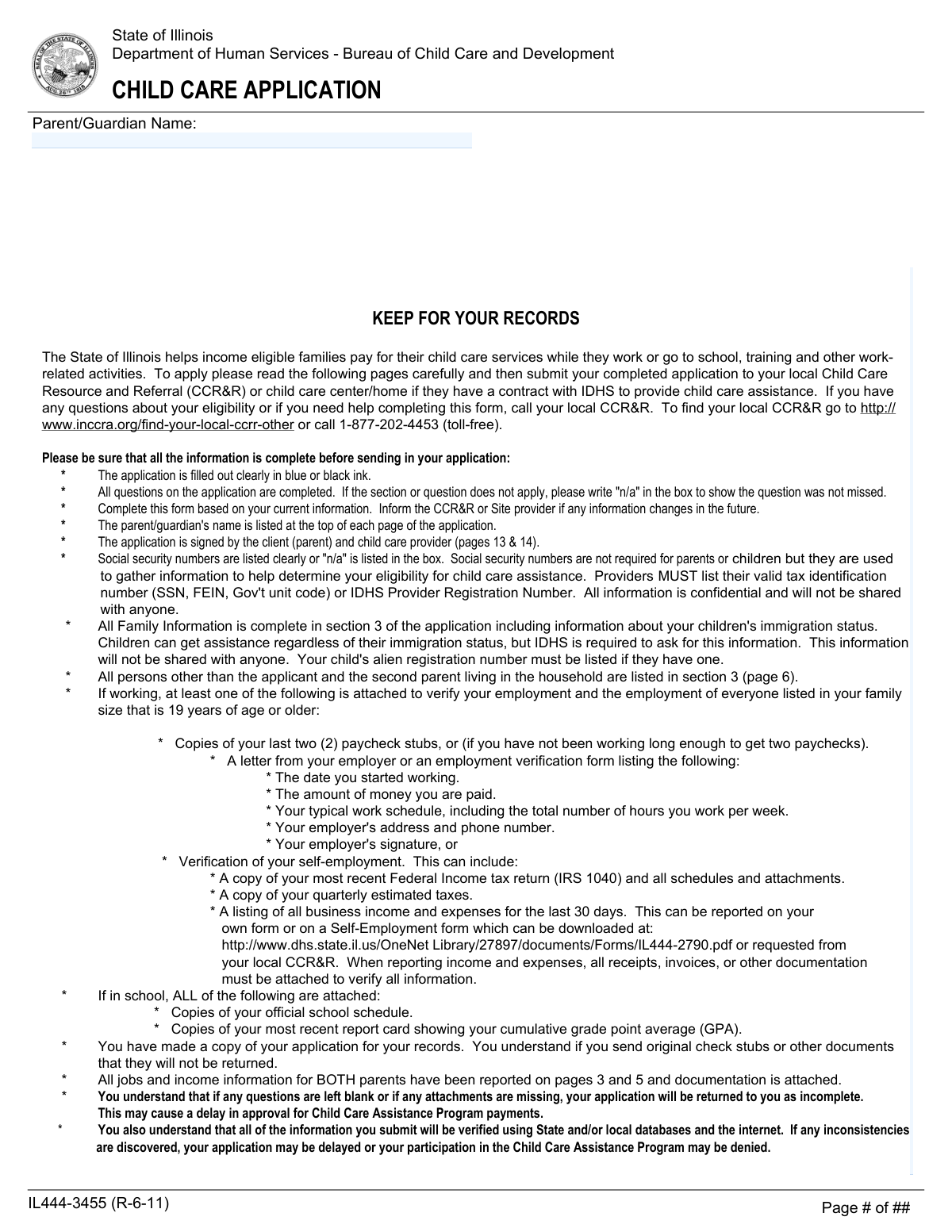
The AI does the filling. You just check it.
No typing into boxes, nothing to install.
What this form asks for
The AI fills all of it, from your answers or your documents.
The AI checks your answers before you download
18 checks built for this form, so a wrong date or a missing answer is caught before anyone else sees it.
Validate that the applicant’s first name, last name, date of birth, and sex selection (male/female) are provided, and that the parent/guardian name appears where required (top of each page in the form set). These fields establish the primary case identity and are needed for eligibility determination and record matching. If missing or illegible/blank, the submission should be flagged as incomplete and returned for correction.
Check that the home address includes street, city, state, and ZIP code, and that the state is a valid two-letter code (typically IL for Illinois). Validate ZIP code format (5 digits or ZIP+4) and ensure apartment number is present when indicated. Address accuracy is critical for notices, CCR&R routing, and cross-database verification. If invalid, the system should reject the address and require correction before processing.
Validate that at least one reachable phone number is provided (home, mobile, or alternate) and that all phone numbers follow a valid US format (10 digits, optional extension). If an email address is provided, validate it against standard email syntax rules. Reliable contact information is necessary to resolve missing documentation and prevent processing delays. If validation fails, prompt the applicant to correct the format or provide an alternate contact method.
If a Social Security Number is entered for a parent or child, validate it is exactly 9 digits (or formatted as XXX-XX-XXXX) and not an obviously invalid value (e.g., all zeros). If not provided, ensure the field is blank or explicitly marked as 'N/A' per form instructions, and do not treat it as a required field. This prevents data-entry errors while respecting that SSNs are optional for eligibility. If an SSN is partially entered or malformed, the submission should be flagged for correction to avoid mismatches in verification.
When a TANF/SNAP/Medical Assistance case number is provided, validate it matches expected numeric/alpha format and that a county is selected/entered. County and case number are used for cross-program verification and routing. If a case number is present but county is missing (or vice versa where required by workflow), the system should request completion or confirm the applicant is not applying with an existing case.
If the applicant (or other parent) indicates they are working or lists a number of jobs greater than zero, require completion of employer name, job title, employer address, start date, pay amount, pay frequency, and typical hours/days per week for each job. Also require at least one work schedule example (FROM/TO with days) or a clear explanation that the schedule varies. This information drives eligibility and authorized care hours. If any required job fields are missing for a declared job, the application should be marked incomplete.
And 12 more checks
- Employment Pay Rate and Pay Frequency Logical Validation
- Date Field Format and Chronology Validation (DOB, Job Start, Term Dates, Provider Start)
- School/Training Section Conditional Requirements
- Other Parent/Stepparent Household Presence and Activity Consistency
- Family Size and Household Member Listing Reconciliation
- Child Eligibility Age and Special Condition Validation
- Ethnic Origin Coding and Multi-Code Format Validation
- Child Care Provider Identification and Tax ID Requirement
- Provider Type vs Licensing Fields Consistency
- Child Care Schedule Integrity and School-Time Exclusion
- Monthly Income Totals and Non-Negative Amount Validation
- Required Signatures and Dates Present (Parent and Provider)
Let AI fill out your IL444-3455
No typing. Every field filled in seconds, checked, ready to sign.
How to Fill Out IL444-3455 Online for Free in 2026
What the AI walks you through.
- Enter parent/guardian contact information and identifiers (address, phone/email, optional SSN, case numbers if applicable) and indicate whether multiple providers are involved.
- Complete work and/or school/training/TANF-required activity sections for the applicant (and for the other parent/stepparent if living in the home), including employer details, pay frequency, hours, schedules, and travel time.
- List all household members and the children needing assistance in the Family Information section, including required federal reporting items (e.g., ethnicity) and citizenship/alien registration details if applicable.
- Fill out a Child Care Arrangement (Section 4) for each provider you want paid, listing each child’s care schedule (and school hours if applicable), rates, and whether schedules vary or discounts apply.
- Report total gross monthly income by type for all counted family members (employment, self-employment, child support, TANF, Social Security/other income) and subtract child support paid; attach required income and activity verifications (pay stubs, employer letter, tax/self-employment records, school schedule, GPA/report card, etc.).
- Have the child care provider complete the Provider Information sections (tax ID/registration number, provider type/licensing details, household members if required, and required disclosures), then obtain the provider’s signature and date.
- Review all certifications, sign and date the Parent/Guardian Certification (and other parent signature if required), make a copy for your records, and submit the full packet to your local CCR&R or contracted site provider.
Common Mistakes in Completing IL444-3455
The ones the AI is built to catch.
Leaving blanks instead of writing “N/A”
Not putting the parent/guardian name at the top of every page
Using the wrong ink color or submitting illegible handwriting
Reporting net pay or the wrong time period instead of gross monthly income
Missing required employment verification (or sending non-consecutive stubs)
Not listing all jobs or not completing a separate work page per job
Incomplete or inconsistent work/school schedules (FROM/TO, AM/PM, travel time)
Failing to complete the “Other Parent/Stepparent” section when they live in the home
Incorrect family size and missing household members age 19+
Errors in child information fields (DOB, relationship, ethnicity codes, citizenship/alien documentation)
Child care arrangement section completed incorrectly (school hours included, wrong provider, missing separate provider pages)
Missing signatures/dates from both parent and provider, or missing provider tax ID/registration details
Frequently Asked Questions About IL444-3455
Is it really free for 7 days?
Can I fill other forms too?
How do I cancel?
How does the AI fill out IL444-3455?
What happens to my information?
How complex is IL444-3455 to fill out?
What is the Illinois Child Care Application (IL444-3455) used for?
Who should fill out this application?
Where do I submit my completed application?
Do I need to have a child care provider before I apply?
Are Social Security Numbers required for parents and children?
What documents do I need to attach to verify employment?
What if I (or the other parent) have more than one job?
What if my work schedule varies week to week?
What school/training documents are required if I’m attending school or training?
Do I have to include the other parent/stepparent if they live in my home?
How do I complete Section 3 (Family Information) and who counts in my family size?
Does my child’s immigration status affect eligibility?
How do I fill out Section 4 (Child Care Arrangement) if my child is in school or Head Start part of the day?
Will I still have to pay something if I’m approved for child care assistance?
How long does it take to find out if I’m approved, and what causes delays?
Get your IL444-3455 filled out by AI
$0 today. Cancel before Nov 2 and you pay nothing.
Other forms like this one
CAR forms: Form SSA-44, Medicare Income-Related Monthly Adjustment Amount - Life-Changing Event, Form I-90, Application to Replace Permanent Resident Card, Form 2441, Child and Dependent Care Expenses, Form WH-380-E, Certification of Health Care Provider, Form 4137, Social Security and Medicare Tax on Unreported Tip Income, Form 8959, Additional Medicare Tax, Form 8919, Uncollected Social Security and Medicare Tax, Form CMS-1763, Request for Termination of Medicare Coverage, Form CMS-855O, Medicare Enrollment Application, Form CMS-460, Medicare Participation Agreement, Form CMS-4040, Request for Enrollment in Medicare Part B, Form WH-380-F, Certification of Health Care Provider, Form W-10, Dependent Care Provider’s Identification, Form 1099-K, Payment Card and Third Party Network Transactions, Form CMS-40B, Application for Enrollment in Medicare Part B, Form SS-5-FS, Application for a Social Security Card, Form REG 195, Disabled Person Placard, Form AR-11, Alien's Change of Address Card, Form I-905, Application for Authorization to Issue Certification for Health Care Workers, Form I-131A, Application for Carrier Documentation
child care forms: Form 2441, Child and Dependent Care Expenses, California Department of Social Services (CDSS) Community Care Licensing Child Care Forms Packet (LIC 9150, LIC 282, LIC 627, LIC 700, LIC 995A, CDPH 286, LIC 9227), State of Illinois Department of Children and Family Services Medical Report on an Adult in a Child Care Facility (CFS 602), Carer Payment and Carer Allowance – Medical Report (SA431) for a child under 16 years, Pennsylvania Application for Subsidized Child Care (CY 868), Form OCFS-6001, Child Care Provider, Staff, Volunteer and Household Member Information, Form T-3, Children with Special Health Care Needs (CSHCN) Services Program Application, Physician's Report for Child Care, Relationship and Child Care Arrangement Details Form, Level of Care (LOC) Assessment for Children in Foster Care, Intact Family Services Child Care Referral Form, Department of Children and Family Services (DCFS) Day Care Service Eligibility Application, Authorization for Background Check for Child Care, JFS 01443, Request for Payment for Special Services for Children in Out-of-Home Care, Form AD 838, Statement of Monies Paid for 24-Hour Care of Children, Superior Court of New Jersey Certification in Support of Request for Excuse from Jury Service: Personal Obligation to Provide Care for Minor Child(ren)
Illinois state forms: Illinois State Board of Education (ISBE) Application for Employment (ISBE 61-08), State of Illinois Department of Children and Family Services Medical Report on an Adult in a Child Care Facility (CFS 602), Illinois Advanced Practice Nurse Delegation of Prescriptive Authority for Controlled Substances (Delegation Statement)
OPM forms: County of Louisa Department of Community Development – New Non-Residential Building Permit Package, DS 1891, Applicant/Vendor Disclosure Statement (State of California Department of Developmental Services), Fauquier County Department of Community Development – Building Trades Permit or Amendment to Existing Permit Application (Residential or Commercial), NJ Department of Labor & Workforce Development Form MW-562, Payroll Certification for Public Works Projects (Contractor and Subcontractor’s Weekly and Final Certification), OPM Form 71, Request for Leave or Approved Absence, Form OF-612, Optional Application for Federal Employment, Treatment Authorization Request for Intermediate Care Facility for the Developmentally Disabled (ICF/DD), CFS 431-1, Summary of the Child's Educational and Developmental Status
human services forms: Arlington County Department of Human Services, Water Recreation Facility License Application, Health & Human Services Agency California Department of Social Services APPLICATION FOR A FAMILY CHILD HOME LICENSE LIC 279
PA state forms: Form 1095-A, Health Insurance Marketplace Statement, Form W-2, Wage and Tax Statement, Form 593, Real Estate Withholding, Form 8938, Statement of Specified Foreign Financial Assets, Form CMS-2567, Statement of Deficiencies, Form 1098, Mortgage Interest Statement, Form 1098-T, Tuition Statement, Form 1099-S, Proceeds From Real Estate Transactions, Form 1098-E, Student Loan Interest Statement, Form DS-3053, Statement of Consent, Form DS-86, Statement of Non-Receipt of a U.S. Passport, Form DS-86, Statement of Non-Receipt of a U.S. Passport, Form 108, Statement of Intention, Form 107, Statement of Financial Affairs, Form 121, Statement About Your SSNs, Form 122A-1, Chapter 7 Statement of Current Monthly Income, Center for Infertility & Reproductive Surgery – New Patient Questionnaire and Patient/Guarantor Statement (Brigham and Women’s Hospital, Department of Obstetrics and Gynecology), Adult Travel Document Application for Stateless and Protected Persons in Canada (16 years of age or over) (PPTC 190), Form W-8IMY (Rev. October 2021), Certificate of Foreign Intermediary, Foreign Flow-Through Entity, or Certain U.S. Branches for United States Tax Withholding and Reporting, Form W-2, Wage and Tax Statement (2025)
L.A. Care forms: Form SSA-44, Medicare Income-Related Monthly Adjustment Amount - Life-Changing Event, Form 2441, Child and Dependent Care Expenses, Form WH-380-E, Certification of Health Care Provider, Form 4137, Social Security and Medicare Tax on Unreported Tip Income, Form 8959, Additional Medicare Tax, Form 8919, Uncollected Social Security and Medicare Tax, Form CMS-1763, Request for Termination of Medicare Coverage, Form CMS-855O, Medicare Enrollment Application, Form CMS-460, Medicare Participation Agreement, Form CMS-4040, Request for Enrollment in Medicare Part B, Form WH-380-F, Certification of Health Care Provider, Form W-10, Dependent Care Provider’s Identification, Form CMS-40B, Application for Enrollment in Medicare Part B, Form I-905, Application for Authorization to Issue Certification for Health Care Workers, DHS-6696-ENG, Minnesota Health Care Programs Application (MNsure/DHS), California Department of Social Services (CDSS) Community Care Licensing Child Care Forms Packet (LIC 9150, LIC 282, LIC 627, LIC 700, LIC 995A, CDPH 286, LIC 9227), Form CH-006: PA-BH-Res-PCS, Oregon Behavioral Health Support Program Plan of Care Authorization (Plan of Care Request for Behavioral Health Residential or Personal Care Services), State of Illinois Department of Children and Family Services Medical Report on an Adult in a Child Care Facility (CFS 602), Carer Payment and Carer Allowance – Medical Report (SA431) for a child under 16 years, Pennsylvania Application for Subsidized Child Care (CY 868)
Department of State forms: Center for Infertility & Reproductive Surgery – New Patient Questionnaire and Patient/Guarantor Statement (Brigham and Women’s Hospital, Department of Obstetrics and Gynecology), State of Illinois Department of Children and Family Services Medical Report on an Adult in a Child Care Facility (CFS 602), State of Florida Department of Highway Safety and Motor Vehicles (FLHSMV) Form HSMV 82993, Separate Odometer Disclosure Statement and Acknowledgment, DS 1891, Applicant/Vendor Disclosure Statement (State of California Department of Developmental Services), New York State Department of State (Division of Licensing Services) Property Condition Disclosure Statement (DOS-1614-f), State of Hawaii Department of Commerce and Consumer Affairs (DCCA) Contractors License Board – Application for Contractor's License (Sole Proprietor) (CT-36) with supporting forms (Experience Certificate CT-03, Contractors Financial Statement CT-02, and Chronological History of Projects/Project List), Murrieta Police Department Citizen Complaint Form (California Penal Code § 148.6 Advisory Statement), Pennsylvania Department of State — Certificate of Termination (Domestic Limited Liability Company) (15 Pa.C.S. § 8872(f)) (DSCB:15-8872(f)), Colorado Judicial Department Form JDF 1111SC (Form 35.2), Sworn Financial Statement, New York State Department of Labor (NYSDOL) Division of Labor Standards Complaint Form (LS 223), New York State Department of Labor, Division of Labor Standards Complaint Form (LS 223), Dallas Area Rapid Transit Police Department Personal History Statement (Peace Officer / Telecommunicator), California Department of Social Services, Sworn Statement, State of California Department of Transportation California Civil Rights Laws Certification, State of California Department of Transportation Darfur Contracting Act Certification, Form DOT ADM-0077, State of California Department of Transportation, Contract Requirements, State of California Department of Transportation Subcontractor List, State of California Department of Transportation, Certified DVBE Summary, State of Florida Department of Business and Professional Regulation Form DBPR CILB 6-B, Application for Certified Building Contractor Who is Qualifying a Business, New York State Department of Health Certificate of Qualification Questionnaire - Virology
NJ state forms: Form 1095-A, Health Insurance Marketplace Statement, Form W-2, Wage and Tax Statement, Form 593, Real Estate Withholding, Form 8938, Statement of Specified Foreign Financial Assets, Form CMS-2567, Statement of Deficiencies, Form 1098, Mortgage Interest Statement, Form 1098-T, Tuition Statement, Form 1099-S, Proceeds From Real Estate Transactions, Form 1098-E, Student Loan Interest Statement, Form DS-3053, Statement of Consent, Form DS-86, Statement of Non-Receipt of a U.S. Passport, Form DS-86, Statement of Non-Receipt of a U.S. Passport, Form 108, Statement of Intention, Form 107, Statement of Financial Affairs, Form 121, Statement About Your SSNs, Form 122A-1, Chapter 7 Statement of Current Monthly Income, Center for Infertility & Reproductive Surgery – New Patient Questionnaire and Patient/Guarantor Statement (Brigham and Women’s Hospital, Department of Obstetrics and Gynecology), Adult Travel Document Application for Stateless and Protected Persons in Canada (16 years of age or over) (PPTC 190), Form W-8IMY (Rev. October 2021), Certificate of Foreign Intermediary, Foreign Flow-Through Entity, or Certain U.S. Branches for United States Tax Withholding and Reporting, Form W-2, Wage and Tax Statement (2025)
state ID forms: Application for Renewal or Duplicate of Alabama Driver License or ID card, Form 1095-A, Health Insurance Marketplace Statement, Form W-2, Wage and Tax Statement, Form 593, Real Estate Withholding, Form 8938, Statement of Specified Foreign Financial Assets, Form CMS-2567, Statement of Deficiencies, Form 1098, Mortgage Interest Statement, Form 1098-T, Tuition Statement, Form 1099-S, Proceeds From Real Estate Transactions, Form 1098-E, Student Loan Interest Statement, Form DS-3053, Statement of Consent, Form DS-86, Statement of Non-Receipt of a U.S. Passport, Form 108, Statement of Intention, Form 107, Statement of Financial Affairs, Form 121, Statement About Your SSNs, Form 122A-1, Chapter 7 Statement of Current Monthly Income, Center for Infertility & Reproductive Surgery – New Patient Questionnaire and Patient/Guarantor Statement (Brigham and Women’s Hospital, Department of Obstetrics and Gynecology), Adult Travel Document Application for Stateless and Protected Persons in Canada (16 years of age or over) (PPTC 190), Form W-8IMY (Rev. October 2021), Certificate of Foreign Intermediary, Foreign Flow-Through Entity, or Certain U.S. Branches for United States Tax Withholding and Reporting, Form W-2, Wage and Tax Statement (2025)
Let AI fill out your IL444-3455
Your trial starts once a card is added. You pay nothing before Nov 2.
Our AI already knows this form, all 1264 fields of it. Skip the typing: tell it about yourself, or upload what you have, and it fills the whole form in seconds.
- AI fills every field on all 17 pages, checkboxes included
- No typing into boxes: answer a few questions, or upload a document you already have, an old copy of this form, a photo of a document
- The AI checks the answers; you review and change anything before you download
- Download the finished PDF, print it, or sign it online
- Encrypted, and never used to train AI
Cancel before Nov 2 and you pay nothing.
A card is needed to start the trial. Cancel in two clicks from your account.
Terms · Privacy