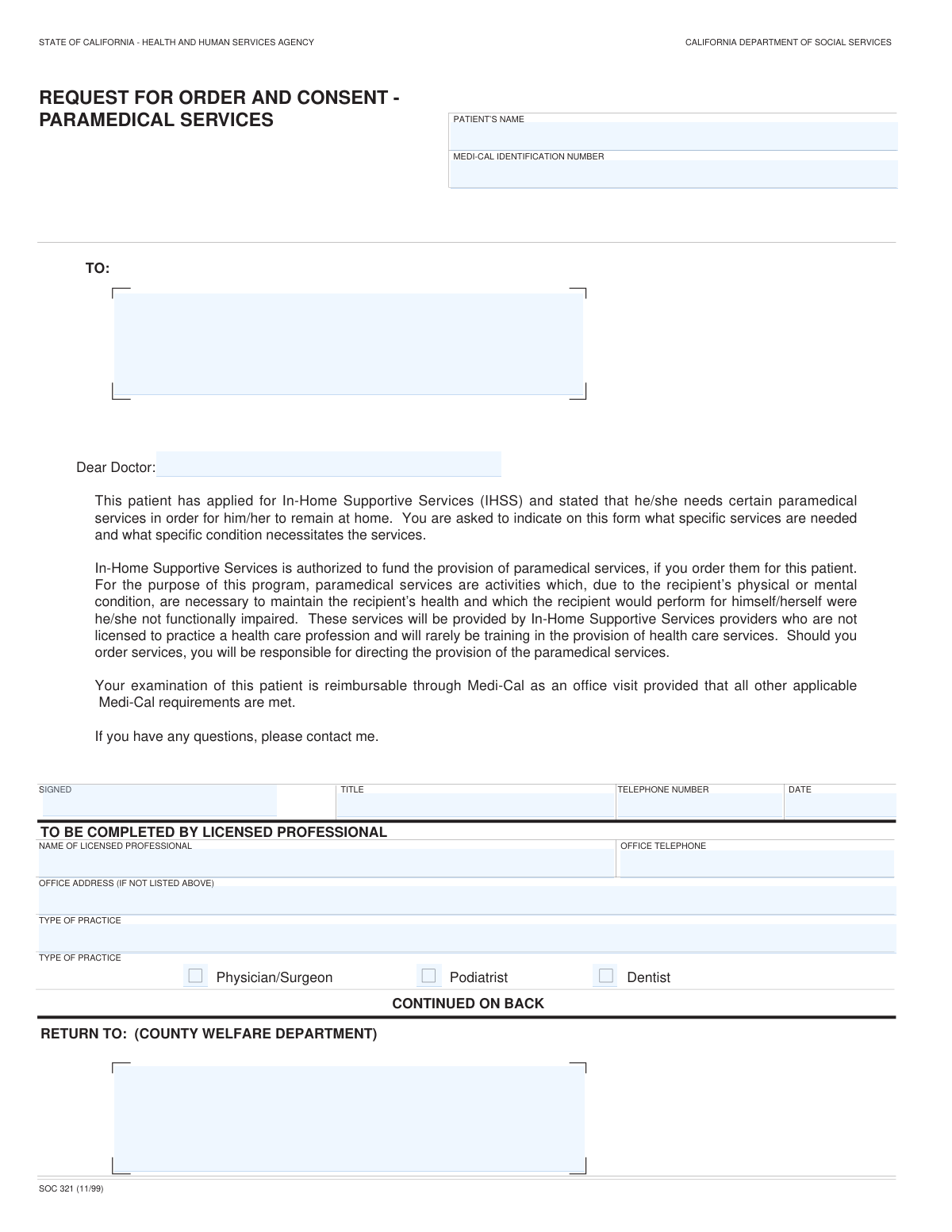
Yes! You can use AI to fill out State of California Form SOC 321, Request for Order and Consent - Paramedical Services

The California SOC 321, Request for Order and Consent for Paramedical Services, is a form used by the In-Home Supportive Services (IHSS) program to obtain a licensed healthcare professional's order for specific services a patient needs to remain safely at home. It documents the medical necessity of services like medication administration or wound care that will be performed by a non-licensed IHSS provider. Today, this form can be filled out quickly and accurately using AI-powered services like Instafill.ai, which can also convert non-fillable PDF versions into interactive fillable forms.
Our AI automatically handles information lookup, data retrieval, formatting, and form filling.
It takes less than a minute to fill out SOC 321 using our AI form filling.
Securely upload your data. Information is encrypted in transit and deleted immediately after the form is filled out.

Form specifications

Form name: State of California Form SOC 321, Request for Order and Consent - Paramedical Services
Number of fields: 58
Number of pages: 2
Language: English
Categories: California medical forms, California state forms, Medi-Cal forms, medical forms, medical request forms, NJ state forms, PA state forms, VA medical forms
main-image

Instafill Demo: How to fill out PDF forms in seconds with AI

How to Fill Out SOC 321 Online for Free in 2026

Are you looking to fill out a SOC 321 form online quickly and accurately? Instafill.ai offers the #1 AI-powered PDF filling software of 2026, allowing you to complete your SOC 321 form in just 37 seconds or less.
Follow these steps to fill out your SOC 321 form online using Instafill.ai:
  1. 1 Navigate to Instafill.ai and upload or select the SOC 321 form.
  2. 2 Enter the patient's name and Medi-Cal Identification Number in the designated fields.
  3. 3 The licensed professional completes their information, including name, practice type, and contact details.
  4. 4 The professional indicates if the patient has a qualifying medical condition and lists the specific conditions necessitating paramedical services.
  5. 5 Detail each required paramedical service, specifying the time required, frequency, and duration for each service ordered.
  6. 6 The licensed professional reviews the form, adds any necessary comments, and then signs and dates the certification section.
  7. 7 The patient or their representative provides their signature for informed consent, and the completed form is then ready to be submitted to the county welfare department.

Our AI-powered system ensures each field is filled out correctly, reducing errors and saving you time.

Why Choose Instafill.ai for Your Fillable SOC 321 Form?

Speed

Complete your SOC 321 in as little as 37 seconds.

Up-to-Date

Always use the latest 2026 SOC 321 form version.

Cost-effective

No need to hire expensive lawyers.

Accuracy

Our AI performs 10 compliance checks to ensure your form is error-free.

Security

Your personal information is protected with bank-level encryption.

Frequently Asked Questions About Form SOC 321

This form is used to get a doctor's order for specific paramedical services for an In-Home Supportive Services (IHSS) recipient. This medical order is required for IHSS to authorize and fund these specialized services.

A licensed medical professional, such as a physician, podiatrist, or dentist, must complete the medical information and sign the certification. The patient (or their representative) must also sign the 'Patient's Informed Consent' section.

Paramedical services are health-related tasks necessary to maintain your health, which you would do yourself if not for a functional impairment. These services are performed by non-licensed IHSS providers under the direction of your doctor.

The completed and signed form should be returned to the County Welfare Department. The specific mailing address is usually pre-filled in the 'RETURN TO' section of the form.

Your signature confirms that your doctor has explained the risks of a non-licensed IHSS provider performing the ordered services and that you consent to receive them. This is a mandatory step for authorization.

Your doctor must list each specific paramedical service, the time required to perform it, and the frequency (e.g., '2 times daily'). They also need to specify how long the service will be needed.

You will need the patient's full name and Medi-Cal Identification Number. The doctor will need to provide their professional details, list the patient's medical conditions, and specify the required services.

If more space is needed, the doctor can check the box for 'IF CONTINUED ON ANOTHER SHEET, CHECK HERE' and attach a separate, signed page with the additional information.

Yes, services like Instafill.ai use AI to help you accurately auto-fill your personal information, saving time. However, the medical assessment and service orders must be completed and signed by your licensed healthcare professional.

Simply upload the SOC 321 form to Instafill.ai, and its AI will make the fields interactive. You can then type in your information, save the form, and share it with your doctor to complete their section electronically.

You can use a service like Instafill.ai, which can convert flat, non-fillable PDFs into interactive forms. This allows you and your doctor to easily type information directly into the fields before printing and signing.

Your county IHSS social worker will typically provide you with this form during your assessment if they determine you may need paramedical services. You are then responsible for taking it to your doctor for completion.

By signing, the doctor certifies the medical necessity of the services and agrees to provide direction as needed to the IHSS provider. They are responsible for overseeing the ordered care.

Processing times vary by county. After your doctor completes the form and you submit it to the County Welfare Department, you should contact your local IHSS office for updates on the status of your request.

Compliance SOC 321
Validation Checks by Instafill.ai

1
Medi-Cal Identification Number Format
This check verifies that the 'Medi‑Cal Identification Number' is entered and follows the correct format expected by the Medi-Cal system. It is crucial for correctly identifying the patient and ensuring the services can be properly authorized and billed. If the format is invalid, the submission should be rejected to prevent processing errors and delays in care authorization.
2
Conditional Requirement for Medical Conditions and Services
This validation ensures that if the 'YES' box is checked for the question 'Does the patient have a medical condition which results in a need for IHSS paramedical services?', then the 'Medical condition(s)' field and at least one full service row are filled out. This is critical because an affirmative answer necessitates a justification (the condition) and an action (the service). A failure would mean the form is incomplete and the request cannot be understood or fulfilled.
3
Conditional Emptiness for No Medical Need
This check confirms that if the 'NO' box is checked for the medical condition question, then the 'Medical condition(s)' list and all service detail rows are left empty. This prevents contradictory information where services are listed despite the provider indicating they are not needed. Submissions failing this check should be flagged for correction to ensure logical consistency.
4
Service Row Integrity
For any service row where a 'Type of Service' is entered, this validation ensures that all other fields in that same row ('Time Required', 'Frequency # of Times', 'Frequency Period', 'Duration') are also completed. An incomplete service description is ambiguous and cannot be authorized or scheduled correctly. This check prevents incomplete orders from being processed, requiring the user to provide all necessary details for each requested service.
5
Chronological Date Verification
This check validates that the 'Certification Date' and 'Patient Consent Date' are on or after the initial 'Date Signed' by the licensed professional. A provider cannot certify an order, nor can a patient consent to it, before the order is officially dated and created. This ensures a logical and legally sound timeline of events; otherwise, the form's authenticity is questionable.
6
Provider Certification and Signature Requirement
This validation ensures that the 'Certifying Provider Signature' and 'Certification Date' fields are both completed. The signature and date are the legal attestation by the licensed professional that the ordered services are medically necessary. Without them, the form is merely a draft and has no authority, so the submission must be rejected until it is properly signed and dated.
7
Patient Informed Consent Requirement
This check verifies that the 'Patient/Recipient Signature' and 'Patient Consent Date' fields are filled. This is a critical legal and ethical requirement to confirm the patient has been informed of the risks and consents to the services being provided by a non-licensed IHSS provider. A submission lacking the patient's signed consent is invalid and cannot be acted upon.
8
Exclusive Practice Type Selection
This validation ensures that exactly one checkbox is selected from the 'Type of Practice' options ('Physician/Surgeon', 'Podiatrist', 'Dentist'). Selecting more than one or none at all would create ambiguity about the provider's qualifications and scope of practice. The form must be returned for clarification if this rule is violated.
9
Telephone Number Format
This check ensures that the 'Licensed Professional Telephone Number' and 'Office Telephone' fields are in a valid, standard phone number format (e.g., including area code). This is important for ensuring that county staff can easily contact the provider's office if there are questions about the order. An invalid format could lead to communication failures and delays in service provision.
10
Completeness of Patient Identifiers
This validation confirms that the 'Patient's Name' and 'Medi-Cal Identification Number' fields are not empty. These two fields are the primary identifiers for the patient and are essential for linking the form to the correct individual in the system. A submission without this core information is un-processable and must be rejected.
11
Numeric Value for Service Frequency
This check verifies that the 'Frequency (# of Times)' field within each service row contains a positive numeric value. This field specifies how many times a service should be performed and must be a number to be computationally useful for scheduling and authorization. Text or zero in this field would make the frequency unclear, thus invalidating the service entry.
12
Provider Name and Signature Consistency
This validation cross-references the 'Licensed Professional Name' field with the 'Certifying Provider Signature'. While an exact match isn't always possible with digital vs. wet signatures, the system should flag significant discrepancies for manual review. This helps prevent potential fraud and ensures the person filling out the form is the same one who is certifying it.

Common Mistakes in Completing SOC 321

Incomplete Service Frequency and Duration

Licensed professionals often enter a number for frequency (e.g., '2') but forget to specify the time period (e.g., 'per day'). Similarly, the duration field is often left blank or filled with ambiguous terms like 'as needed'. This ambiguity prevents the agency from accurately calculating and authorizing service hours, leading to processing delays and requests for clarification. Always specify both the number of times and the time period (daily, weekly) as well as a clear duration (e.g., '6 months' or 'ongoing').

Missing Patient's Informed Consent Signature

The form requires two separate signatures at the end: one from the licensed professional and one from the patient for informed consent. It is a very common error for the form to be submitted with only the professional's signature, completely missing the patient's. A missing patient signature invalidates the consent, making the form incomplete and causing it to be returned, which delays the start of necessary services.

Vague or Non-Specific Service Descriptions

In the 'Type of Service' column, users may write generic terms like 'help with ADLs' or 'personal care' instead of the required specific paramedical tasks. The form requires explicit orders like 'administer insulin injection,' 'catheter care,' or 'wound dressing change.' Vague descriptions will be rejected as they do not constitute a clear medical order, requiring the form to be redone and resubmitted.

Leaving the 'Return To' Address Blank

The 'RETURN TO: (COUNTY WELFARE DEPARTMENT)' field is frequently left empty by the medical provider's office, which may not have the specific county address on hand. When this address is missing, the completed form cannot be sent to the correct processing office, leading to significant delays or the form being lost entirely. Before sending the form to the doctor, the patient or case worker should pre-fill this section to ensure its proper return.

Incorrect or Mismatched Medi-Cal ID Number

Data entry errors, such as transposing digits or entering an old ID number, are common in the 'Medi-Cal Identification Number' field. An incorrect ID will cause a mismatch in the system, leading to an immediate rejection of the form and a delay in authorizing services until the correct information is provided. It is crucial to copy the number exactly as it appears on the patient's current Medi-Cal card. AI-powered tools like Instafill.ai can help validate number formats to reduce such errors.

Missing Licensed Professional's Signature or Date

A licensed professional may carefully detail all the necessary services but forget to sign or date the 'CERTIFICATION' section at the end. An unsigned or undated order is legally invalid and cannot be used to authorize services, forcing the agency to return the form. This simple oversight is a frequent cause of preventable delays in a patient receiving care.

Contradictory Answers for Medical Need

A common mistake is checking 'YES' to the question 'Does the patient have a medical condition which results in a need for IHSS paramedical services?' but then failing to list any conditions or services below. Conversely, sometimes 'NO' is checked, but the provider still lists services, creating a direct contradiction. This requires the agency to contact the provider for clarification, halting the approval process.

Illegible Handwriting on a Non-Fillable PDF

Since this form is often a scanned PDF, it is filled out by hand, and illegible handwriting is a major issue, especially for medical conditions and service details. If the county staff cannot read the provider's orders, they cannot process the request, leading to rejection or lengthy clarification calls. Using a tool like Instafill.ai can convert a flat PDF into a digitally fillable form, ensuring all entries are clear, legible, and professional.

Forgetting to Check the Professional's Practice Type

The form requires the professional to check a box indicating their practice type (Physician/Surgeon, Podiatrist, or Dentist). This checkbox is often overlooked, even when the rest of the professional's information is complete. This information is necessary for the agency to verify that the ordered services fall within the provider's scope of practice, and its absence can cause processing delays.
Saved over 80 hours a year

“I was never sure if my IRS forms like W-9 were filled correctly. Now, I can complete the forms accurately without any external help.”

Kevin Martin Green

Your data stays secure with advanced protection from Instafill and our subprocessors

Robust compliance program

Transparent business model

You’re not the product. You always know where your data is and what it is processed for.

ISO 27001, HIPAA, and GDPR

Our subprocesses adhere to multiple compliance standards, including but not limited to ISO 27001, HIPAA, and GDPR.

Security & privacy by design

We consider security and privacy from the initial design phase of any new service or functionality. It’s not an afterthought, it’s built-in, including support for two-factor authentication (2FA) to further protect your account.

Fill out SOC 321 with Instafill.ai

Worried about filling PDFs wrong? Instafill securely fills state-of-california-form-soc-321-request-for-order-and-consent-paramedical-services forms, ensuring each field is accurate.