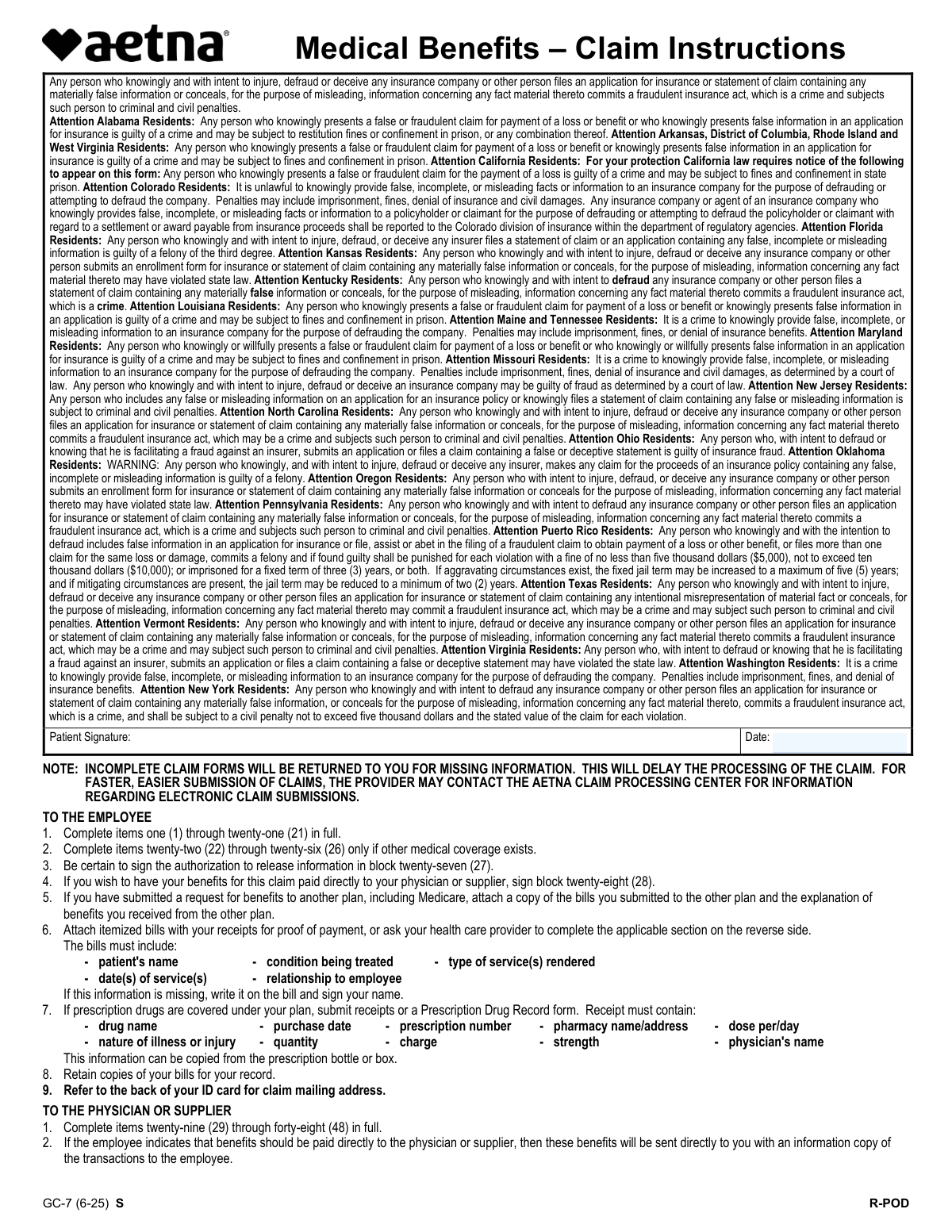
Yes! You can use AI to fill out Medical Benefits – Claim Instructions and Request

The Medical Benefits Claim Form is essential for individuals seeking reimbursement for medical expenses. It requires detailed information from both the patient (employee) and the healthcare provider to process claims correctly. Today, this form can be filled out quickly and accurately using AI-powered services like Instafill.ai, which can also convert non-fillable PDF versions into interactive fillable forms.
Medical Benefits Claim Form is part of the benefits claim forms, Medi-Cal forms, medical claim forms and medical request forms categories on Instafill.
Medical Benefits Claim Form has a complex Form Complexity Index of 68/100 — 106 fillable fields across 2 pages. Instafill’s AI completes it accurately in under a minute.

Form specifications

Form name: Medical Benefits – Claim Instructions and Request
Number of fields: 106
Number of pages: 3
FCI: Complex (68/100)
Language: English
Our AI automatically handles information lookup, data retrieval, formatting, and form filling.
It takes less than a minute to fill out Medical Benefits Claim Form using our AI form filling.
Securely upload your data. Information is encrypted in transit and deleted immediately after the form is filled out.
Preview of Medical Benefits – Claim Instructions and Request

Instafill Demo: How to fill out PDF forms in seconds with AI

How to Fill Out Medical Benefits Claim Form Online for Free in 2026

Are you looking to fill out a MEDICAL BENEFITS CLAIM FORM form online quickly and accurately? Instafill.ai offers the #1 AI-powered PDF filling software of 2026, allowing you to complete your MEDICAL BENEFITS CLAIM FORM form in just 37 seconds or less.
Follow these steps to fill out your MEDICAL BENEFITS CLAIM FORM form online using Instafill.ai:
  1. 1 Navigate to Instafill.ai and upload or select the Medical Benefits Claim Form.
  2. 2 The AI will automatically identify and extract all necessary fields from the form.
  3. 3 Provide the requested information for each field, either by typing it in or by uploading supporting documents for the AI to process.
  4. 4 Review the pre-filled information for accuracy and completeness, making any necessary edits.
  5. 5 Electronically sign the form where required.
  6. 6 Download the completed form or submit it directly through the Instafill.ai platform if supported.

Our AI-powered system ensures each field is filled out correctly, reducing errors and saving you time.

Why Choose Instafill.ai for Your Fillable Medical Benefits Claim Form Form?

Speed

Complete your Medical Benefits Claim Form in as little as 37 seconds.

Up-to-Date

Always use the latest 2026 Medical Benefits Claim Form form version.

Cost-effective

No need to hire expensive lawyers.

Accuracy

Our AI performs 10 compliance checks to ensure your form is error-free.

Security

Your personal information is protected with bank-level encryption.

Frequently Asked Questions About Medical Benefits Claim Form

Medical Benefits Claim Form has a Form Complexity Index of 68 out of 100, placing it in the complex complexity tier. This score is calculated deterministically from the form’s own structure using Instafill’s published Form Complexity Index methodology, so it can be reproduced and independently verified — it is not a subjective estimate.

For Medical Benefits Claim Form specifically, the score reflects 106 fillable fields across 2 pages, grouped into 31 sections, and 6 conditional fields that only apply depending on earlier answers, 1 table or repeating lists, plus 1 page of printed instructions. The number of fields is the largest factor in the base score (weighted 36%), followed by how difficult those fields are to complete based on their type, where free-text and signature fields count for more than simple checkboxes (26%). The number of pages that actually contain fields (15%), the amount of conditional “fill-only-if” logic (16%), and how many sections the form is divided into (7%) account for the rest of the base. On top of that base, the index adds points for tables and repeating lists, bundled instruction pages, and dense page layouts — capturing difficulty the base alone can miss.

In practical terms, a complex score means the form is demanding, with many fields, multiple pages and branching rules that are easy to get wrong. Instafill removes that effort entirely: our AI reads your information, maps each value to the correct field — including the conditional ones — and completes Medical Benefits Claim Form accurately in under a minute, with every field available for you to review before you download. See exactly how the Form Complexity Index is calculated.

This form is used to submit a claim for medical benefits. It collects necessary information from both the employee and the physician or supplier to process your claim accurately and efficiently.

The employee needs to complete sections 1 through 28, and the physician or supplier needs to complete sections 29 through 48. Specific sections are only required if other medical coverage exists or if benefits are to be paid directly to the provider.

The employee must provide their employer's details, personal identification numbers, contact information, patient details (if different from the employee), and information about any other medical coverage. Signatures are also required for authorization.

The physician or supplier must provide details about the illness or injury, dates of service, diagnoses, procedures performed, charges, and their identification and contact information. They also need to sign the form.

If you have other medical coverage, you need to complete items 22 through 26. You should also attach a copy of the bills submitted to the other plan and the explanation of benefits you received from them.

You need to attach itemized bills with receipts for proof of payment, or have your healthcare provider complete the applicable section on the reverse side. If prescription drugs are covered, submit receipts or a Prescription Drug Record form with specific details.

Incomplete claim forms will be returned to you for missing information, which will delay the processing of your claim. Ensure all required fields are filled out accurately.

For faster and easier submission, the provider may contact the Aetna Claim Processing Center for information regarding electronic claim submissions. You can also ensure your form is complete and all required documentation is attached.

Yes, AI services like Instafill.ai can help you fill out this form by accurately auto-filling form fields and saving you time. This can be particularly useful for complex forms with many sections.

You can upload the PDF to Instafill.ai, and its AI will automatically identify and fill in the relevant fields. This streamlines the process, especially if the PDF is not fillable.

If the PDF is not fillable, Instafill.ai can convert it into an interactive, fillable form. This allows you to easily complete all the necessary fields digitally before submitting.

Refer to the back of your Aetna ID card for the correct claim mailing address. Ensure you are sending it to the designated claims processing center.

This section authorizes healthcare providers to release your medical information to Aetna and its affiliates for the purpose of evaluating your claim. It also states that Aetna may provide benefit calculations to your employer.

Yes, if you wish to have your benefits paid directly to your physician or supplier, you can sign block 28 on the form to authorize this direct payment.

Compliance Medical Benefits Claim Form
Validation Checks by Instafill.ai

1
Employee Birthdate Format Validation
Ensures the Employee's Birthdate is entered in the MM/DD/YYYY format. This is crucial for age verification and eligibility determination. Failure to comply may result in the claim being returned for correction.
2
Patient Birthdate Format Validation
Validates that the Patient's Birthdate is entered in the MM/DD/YYYY format. This is essential for identifying the correct patient and verifying their relationship to the employee. Incorrect formatting can lead to processing delays.
3
Employee Daytime Phone Number Format Validation
Checks that the Employee's Daytime Telephone Number is entered in a valid format, including the area code and number. This ensures that Aetna can contact the employee if further information is needed. Incomplete or incorrectly formatted numbers will cause the claim to be returned.
4
Required Fields for Employee Information
Verifies that all mandatory fields for employee information (e.g., Employee Name, Employee Aetna ID Number, Employee Birthdate) are completed. Incomplete required fields will result in the claim form being returned, delaying processing.
5
Required Fields for Patient Information
Ensures that all essential patient information (e.g., Patient's Name, Patient's Birthdate, Patient's Relationship to Employee) is provided. Missing critical patient details will lead to the claim being returned for completion, thus delaying the claim resolution.
6
Conditional Field: Date of Retirement
Validates that the 'Date of Retirement' is only filled if the 'Retired' status is selected. This ensures data integrity and prevents confusion regarding the employee's current employment status. If 'Retired' is not checked, this field should be empty.
7
Conditional Field: Patient's Address
Confirms that the 'Patient's Address' is only provided if it is different from the employee's address. This prevents redundant data entry and ensures accuracy in correspondence. If the addresses are the same, this field should remain blank.
8
Conditional Field: Accident Details
Ensures that 'Accident Date' and 'Accident Time' are only provided if the claim is related to an accident ('Is claim related to an accident? — Yes'). This prevents irrelevant data from being submitted and ensures that accident-specific information is captured when necessary. Failure to follow this rule will result in the claim being returned.
9
Conditional Field: Other Insurance Details
Validates that details for 'Other Insurance' (Policy/Contract Holder, Number & Insurer) are only provided if the patient has other coverage ('Yes (other coverage)'). This ensures that only relevant secondary insurance information is captured, preventing unnecessary data collection. Incomplete or extraneous other insurance details will cause delays.
10
Date Format Validation for Illness/Injury/Pregnancy
Ensures that the 'Date of illness/injury (first symptom)' is entered in a valid date format (MM/DD/YYYY). This date is critical for establishing the timeline of the medical event. Incorrect formatting will lead to the claim being returned.
11
Logical Date Consistency: Illness vs. Consultation
Checks that the 'Date first consulted for condition' is on or after the 'Date of illness/injury (first symptom)'. This ensures a logical progression of events, as a consultation cannot occur before the onset of the condition. Inconsistent dates will cause the claim to be returned.
12
Conditional Field: Work Return Date
Validates that the 'Date patient able to return to work' is only provided if the patient was unable to work due to the condition. This field is not always applicable and should only be completed when relevant to the claim. If the patient was not disabled from work, this field should be left blank.
13
Procedure/Service Line Item Completeness
Ensures that if a 'Date of Service' is provided for a procedure or service line item, all associated fields (Place of Service, Procedure Code, Description of Service, Charges, Days or Units, Diagnosis Code) are also completed. This guarantees that each service billed is fully documented. Incomplete service lines will result in the claim being returned.
14
Physician/Supplier Taxpayer ID Format
Verifies that the 'Taxpayer Identifying Number (TIN) for 1099 reporting' for the physician or supplier is entered in a valid format (e.g., SSN or EIN). This is a legal requirement for tax reporting purposes. Incorrect or missing TINs can lead to penalties and claim rejection.
15
Charge Summary Consistency
Checks that the sum of 'Charges' for all individual procedure/service line items equals the 'Total Charge' listed in the 'Patient Account and Charges Summary' section. This ensures accuracy in billing and prevents discrepancies that could lead to claim denial or overpayment.
16
Required Signature and Date for Authorization
Confirms that both the 'Patient's or Authorized Person's Signature' and the 'Authorization Signature Date' are provided for the release of information. This is a critical legal requirement for processing the claim. Missing signature or date will cause the claim to be returned.

Common Mistakes in Completing Medical Benefits Claim Form

Incomplete Patient or Employee Information

Failing to fill out all required fields for the patient or employee, such as full name, Aetna ID, or birthdate. This can lead to claim delays or rejections as the insurer cannot verify the identity or eligibility of the claimant. Always double-check that all personal details are accurately and completely entered. AI-powered form filling tools can help by pre-populating known information and flagging missing fields.

Incorrect or Missing Policy/Group Number

Entering an incorrect, incomplete, or missing policy or group number. This is crucial for identifying the correct benefit plan and can result in the claim being misrouted or denied. Ensure this number is copied exactly from the insurance card or plan documents. Using tools that can auto-fill or validate this information can prevent errors.

Ambiguous or Missing Accident/Employment Relation Details

Not clearly indicating whether a claim is related to an accident or employment, or failing to provide the correct date and time if it is. This ambiguity can complicate claim processing, especially if the claim involves specific coverage or coordination of benefits. Always answer 'Yes' or 'No' clearly and provide all requested details if the answer is 'Yes'.

Incomplete or Incorrect Other Coverage Information

When other insurance coverage exists, failing to provide complete details such as the policyholder's name, policy number, and the insurance company's name and address. This is essential for coordinating benefits and can lead to payment delays or incorrect payment amounts if not provided accurately. Ensure all fields related to other coverage are filled out completely and correctly.

Missing or Illegible Signatures and Dates

Forgetting to sign the authorization to release information or the payment authorization, or not dating the signature. Claims cannot be processed without proper authorization and dated signatures. Always ensure all required signature lines are completed with the current date. AI tools can remind users to sign and date where necessary.

Incomplete Itemized Bills or Receipts

Submitting bills or receipts that lack essential information such as patient name, date(s) of service, condition treated, or charges. This missing information prevents the insurer from verifying the services rendered and their medical necessity, leading to claim rejection. Ensure all required details are present on all submitted documentation.

Incorrect or Missing Diagnosis and Procedure Codes

Providing incorrect, incomplete, or missing diagnosis codes (ICD) and procedure codes (CPT/HCPCS) for services rendered. These codes are vital for claim adjudication and determining medical necessity. Errors here can lead to claim denials or underpayments. It's crucial to ensure these codes are accurate and match the services provided. AI tools can assist in selecting the correct codes.

Failure to Specify Patient's Relationship to Employee

Not clearly indicating the patient's relationship to the employee (Self, Spouse, Child, Other) when the patient is not the employee. This can cause confusion in identifying the covered individual and their eligibility. Always select the correct relationship and provide further details if 'Other' is selected.

Incomplete Physician/Supplier Information

Failing to provide complete information for the physician or supplier, including their name, address, telephone number, and Taxpayer Identifying Number (TIN) or National Provider Identifier (NPI). This information is necessary for the insurer to process payments and verify the provider. Ensure all provider details are accurate and complete.

Incorrect Date Formatting

Entering dates in an inconsistent or incorrect format (e.g., MM/DD/YYYY, DD/MM/YYYY, or using slashes instead of hyphens). This can lead to misinterpretation of dates, such as birthdates or dates of service, causing processing errors. Always adhere to the specified format (MM/DD/YYYY for this form) or use an AI tool that automatically formats dates correctly.

Not Attaching Required Documentation for Other Plans

Failing to attach copies of bills and explanations of benefits (EOB) from other plans when benefits have been claimed elsewhere. This documentation is required for coordinating benefits and can lead to delays or denial if missing. Always include all requested supporting documents from other insurance providers.

Leaving 'Address is new' unchecked when address has changed

Not checking the 'Address is new' box when the employee's address has recently changed. This can result in important claim correspondence or Explanation of Benefits (EOBs) being sent to an old address, leading to missed communications and potential issues. Always update and flag a new address to ensure timely delivery of important documents.
Saved over 80 hours a year

“I was never sure if my IRS forms like W-9 were filled correctly. Now, I can complete the forms accurately without any external help.”

Kevin Martin Green

Your data stays secure with advanced protection from Instafill and our subprocessors

Robust compliance program

Transparent business model

You’re not the product. You always know where your data is and what it is processed for.

ISO 27001, HIPAA, and GDPR

Our subprocesses adhere to multiple compliance standards, including but not limited to ISO 27001, HIPAA, and GDPR.

Security & privacy by design

We consider security and privacy from the initial design phase of any new service or functionality. It’s not an afterthought, it’s built-in, including support for two-factor authentication (2FA) to further protect your account.

Fill out Medical Benefits Claim Form with Instafill.ai

Worried about filling PDFs wrong? Instafill securely fills medical-benefits-claim-instructions-and-request forms, ensuring each field is accurate.

Related forms by category

benefits claim forms United Kingdom (UK) State Pension claim form, VA Form 29-357, Claim for Disability Insurance Benefits (Government Life Insurance)
Medi-Cal forms Form OWCP-915, Claim for Medical Reimbursement, Form 8994, Employer Credit for Paid Family and Medical Leave, Form OF-178, Certificate of Medical Examination, Form N-648, Medical Certification for Disability Exceptions, U.S. Coast Guard Form CG-719K, Application for Medical Certificate, The Department of Medical Assistance Services Applied Behavior Analysis Preservice Service Authorization Request Form (Effective Dates of Service 09/01/2025 and after), State of Illinois Department of Children and Family Services Medical Report on an Adult in a Child Care Facility (CFS 602), Carer Payment and Carer Allowance – Medical Report (SA431) for a child under 16 years, Medically Prescribed Treatment (Non-Medication) Form — Provider Treatment Order Form | Office of School Health | School Year 2025–2026, VA Form 10-7959f-2, Foreign Medical Program (FMP) Claim Cover Sheet, ABA Authorization Request (Medi-Cal) – Initial and Concurrent Requests, Department of Medical Assistance Services Applied Behavior Analysis (97155, Et al.) Initial Service Authorization Request Form, Applied Behavior Analysis Concurrent Service Authorization Request Form (CPT Codes 97153, 97154, 97155, 97156, 97157, 97158, 0373T) – Virginia Department of Medical Assistance Services, Department of Medical Assistance Services Enhanced Services Individual Service Plan (ISP) Template, Form DS-1843, Medical History and Examination for Individuals Age 12 and Older, Scheduled Medical Leave of Absence (MLOA) - BLET 13, Admissions Application, School of Diagnostic Imaging, Mills-Peninsula Medical Center, Albany Medical Center 2024 Benefits Guide, Form BWC-1141, Request for Medical Information, VA Form 21P-8416, Medical Expense Report · + 41 more →
medical claim forms Form OWCP-915, Claim for Medical Reimbursement, VA Form 10-7959f-2, Foreign Medical Program (FMP) Claim Cover Sheet, Standard Health Insurance Claim Form - Part B, DD Form 2642, TRICARE DoD/CHAMPUS Medical Claim Patient's Request for Medical Payment, Cigna Medical Claim Form
medical request forms The Department of Medical Assistance Services Applied Behavior Analysis Preservice Service Authorization Request Form (Effective Dates of Service 09/01/2025 and after), Department of Medical Assistance Services Applied Behavior Analysis (97155, Et al.) Initial Service Authorization Request Form, Applied Behavior Analysis Concurrent Service Authorization Request Form (CPT Codes 97153, 97154, 97155, 97156, 97157, 97158, 0373T) – Virginia Department of Medical Assistance Services, Form BWC-1141, Request for Medical Information, Molina Healthcare Prior Authorization Request Form, Provider Pre-Service Organization Determination Request Form, Radiological Services Request (RSR), Radiology Prior Authorization Request Form, Texas Standard Prior Authorization Request Form for Health Care Services, Form CMS-40B, Request for Enrollment in Medicare Part B (Medical Insurance), Form CMS-1490S, Patient's Request for Medical Payment, Blue Shield Promise Durable Medical Equipment (DME) Treatment Authorization Request Form, State of California Form SOC 321, Request for Order and Consent - Paramedical Services, Form CMS-1763, Request for Termination of Premium Hospital and/or Supplementary Medical Insurance, Request to Resolve a Medical Fee Dispute, DD Form 2642, TRICARE DoD/CHAMPUS Medical Claim Patient's Request for Medical Payment, Physician Certification In Support of Medical Excuse Request (Jury), Aetna Form GC-7 (4-22) R, Medical Benefits Request, VA Form 0857e, Request for Medical Documentation, SOC 821, Request for Order and Consent for Paramedical Services