Yes! You can use AI to fill out United Kingdom (UK) State Pension claim form
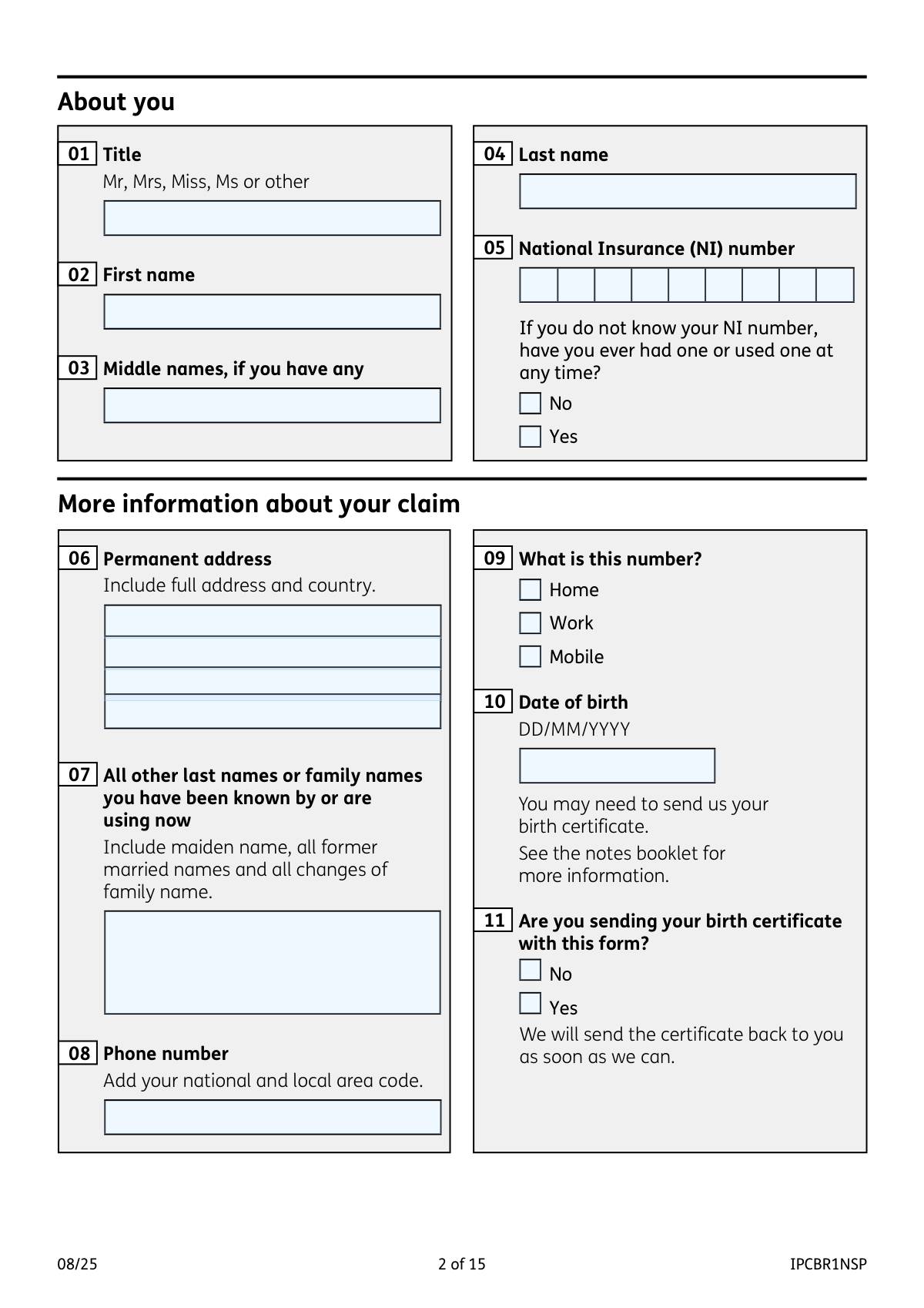
Form IPCBR1NSP is the application used to claim a UK State Pension for individuals residing abroad who reached the qualifying age on or after April 6, 2016. It gathers essential personal, employment, and marital history to determine eligibility and calculate pension entitlement from the UK government. Today, this form can be filled out quickly and accurately using AI-powered services like Instafill.ai, which can also convert non-fillable PDF versions into interactive fillable forms.
Our AI automatically handles information lookup, data retrieval, formatting, and form filling.
It takes less than a minute to fill out IPCBR1NSP using our AI form filling.
Securely upload your data. Information is encrypted in transit and deleted immediately after the form is filled out.
Form specifications
| Form name: | United Kingdom (UK) State Pension claim form |
| Number of pages: | 14 |
| Language: | English |
| Categories: | VA claim forms, PA state forms |
Instafill Demo: How to fill out PDF forms in seconds with AI
How to Fill Out IPCBR1NSP Online for Free in 2026
Are you looking to fill out a IPCBR1NSP form online quickly and accurately? Instafill.ai offers the #1 AI-powered PDF filling software of 2026, allowing you to complete your IPCBR1NSP form in just 37 seconds or less.
Follow these steps to fill out your IPCBR1NSP form online using Instafill.ai:
- 1 Navigate to a service like Instafill.ai and upload or select the UK State Pension claim form (IPCBR1NSP).
- 2 Provide your personal details, including your full name, date of birth, permanent address, and National Insurance (NI) number.
- 3 Detail your history in the UK, including past addresses, employment history, and any time spent in HM Forces.
- 4 Complete the section about your marital or civil partnership status, providing details for your current or former partners as required.
- 5 Disclose information about any other UK or international social security benefits you or your partner are receiving or have claimed.
- 6 Review all the information populated by the AI for accuracy, then digitally sign the declaration section.
- 7 Download the completed form and the separate International Pensions Direct Payment form, gather all required supporting documents, and mail them to the International Pension Centre.
Our AI-powered system ensures each field is filled out correctly, reducing errors and saving you time.
Why Choose Instafill.ai for Your Fillable IPCBR1NSP Form?
Speed
Complete your IPCBR1NSP in as little as 37 seconds.
Up-to-Date
Always use the latest 2026 IPCBR1NSP form version.
Cost-effective
No need to hire expensive lawyers.
Accuracy
Our AI performs 10 compliance checks to ensure your form is error-free.
Security
Your personal information is protected with bank-level encryption.
Frequently Asked Questions About Form IPCBR1NSP
This form is used to claim the UK State Pension if you live abroad and reached your State Pension age on or after April 6, 2016. You must fill this out to start receiving your pension payments.
No, you should not use this form. The instructions state that you need to fill out a different UK State Pension claim form for those who reached pension age before this date.
Yes, it is a mandatory separate form used to provide your banking details for payment. Your claim will be delayed if you do not complete and return it with your pension claim form.
You should still complete the form. In question 5, indicate that you have had an NI number before but do not know it, and provide as much other information as possible, such as past UK addresses and employers, to help locate your record.
Depending on your circumstances, you may need to send original documents like your birth certificate, marriage or civil partnership certificates, and divorce or death certificates. The form specifies which documents are needed for each section, but notes that photocopies may be acceptable in some cases.
Yes, the form asks for both your marriage certificate and your decree absolute (or decree of divorce). This is to establish your full marital history, which can affect your pension entitlement.
You must send the completed claim form, the International Pensions Direct Payment form, and any supporting documents to the International Pension Centre in Wolverhampton, UK. The full address is provided in the 'What you need to do now' section of the form.
The form does not specify a processing time but notes that providing all requested information and documents will help them decide quickly. They advise not to call for progress updates unless you need to report a change in your circumstances.
Provide as much information as you can recall in question 20, such as the employer's name, the town or city they were in, and the approximate dates you worked there. Use the 'Other information' section if you need more space or have partial details.
The UK has social security agreements with many countries, and this information helps determine if your time abroad can contribute to your eligibility for a UK State Pension. Providing details of your social security contributions in other countries can potentially increase your pension amount.
Yes, services like Instafill.ai use AI to help you fill out forms accurately and efficiently. It can auto-fill your personal information, saving you time and reducing the risk of errors.
You can use a service like Instafill.ai to upload the PDF and fill it out directly on your computer. This allows you to type your answers, save your progress, and easily print the completed form for submission.
If you have a non-fillable or 'flat' PDF, you can use a tool like Instafill.ai to convert it into an interactive, fillable form. This lets you type directly into the fields instead of having to print and fill it out by hand.
Compliance IPCBR1NSP
Validation Checks by Instafill.ai
1
Validates Date of Birth for Pension Age Eligibility
This check verifies that the applicant's date of birth (Q10) corresponds to them reaching the UK State Pension age on or after 6 April 2016. This is a fundamental eligibility requirement for this specific form. If the date of birth indicates the applicant reached pension age before this date, the submission should be blocked and the user directed to the correct form.
2
Ensures National Insurance (NI) Number Format and Completeness
This validation checks that the provided National Insurance number (Q05) follows the correct UK format (e.g., two letters, six numbers, one final letter like QQ123456C). It also ensures that if the NI number is left blank, the user must select either 'Yes' or 'No' to the question 'have you ever had one?'. This is critical for correctly identifying the applicant's contribution record, and failure to provide a valid or complete response will delay processing.
3
Verifies Chronological Order of Employment Dates
For each employer listed in question 20, this check ensures the 'Date you started working' is before the 'Date you stopped working'. This maintains logical consistency in the applicant's work history. An invalid date range would make it impossible to accurately assess contribution periods and could lead to incorrect pension calculations or application rejection.
4
Conditional Requirement for Partner Details based on Marital Status
This check enforces conditional logic based on the marital status selected in question 22. If the status is 'Married', 'Divorced', 'Widowed', or similar, then the subsequent section with the partner's details (Q23-Q32) becomes mandatory. If the status is 'Single', this section should be disabled or hidden. This ensures all necessary information for a potential derived pension is collected, preventing incomplete submissions.
5
Validates Date of Death against Date of Marriage
If an applicant's marital status (Q22) is 'Widowed or surviving civil partner', this check ensures the date of death provided in question 32 is on or after the date of marriage provided in question 30. This is a logical consistency check to prevent data entry errors. An illogical date sequence would require manual intervention and delay the claim.
6
Ensures Completeness of Mandatory Personal Information
This validation confirms that essential personal identification fields, specifically 'First name' (Q02) and 'Last name' (Q04), are not left empty. These fields are the minimum required to identify an individual. A submission without a full name is incomplete and cannot be processed.
7
Verifies Chronological Order of UK Residence Dates
For each UK address provided in question 15, this check validates that the 'Date you started living there' is before the 'Date you stopped living there'. This ensures the applicant's residency history is logical and can be used for verification purposes. Inconsistent dates would flag the application for manual review and clarification.
8
Conditional Requirement for UK Address History
This validation checks that if the applicant answers 'Yes' to having lived or worked in the UK (Q14), they must provide details for at least one address in question 15. Answering 'Yes' without providing any corresponding address details makes the application incomplete. This check ensures the form's skip logic is followed correctly.
9
Validates Format of All Date Fields
This is a universal check across the entire form for all date fields (e.g., Q10, Q15, Q20, Q29-Q32) to ensure they are entered in the specified DD/MM/YYYY format and represent a valid calendar date. This prevents data corruption and processing errors that arise from ambiguous or non-existent dates. Submissions with invalid date formats would be rejected at the point of entry.
10
Ensures Declaration Section is Signed and Dated
This check verifies that the 'Declaration' section at the end of the form has been signed and dated by the applicant. The signature and date are legal requirements confirming the accuracy of the provided information. An unsigned or undated form is not legally valid and cannot be processed, leading to an immediate rejection of the claim.
11
Validates UK Postcode Format
For all fields requiring a UK postcode (e.g., Q15, Q20, Q28), this check validates that the entry conforms to the standard UK postcode format (e.g., SW1A 0AA, M1 1AE). Correctly formatted postcodes are essential for address verification, correspondence, and linking records. An invalid format could lead to returned mail and significant delays.
12
Validates Deferred Pension Claim Date
If the applicant answers 'No' to claiming their pension from the earliest possible date (Q49), this check ensures that the custom date they provide is a valid future date. The date cannot be in the past or before their official State Pension age. This prevents invalid deferral requests and ensures the claim is activated on the correct, intended date.
13
Ensures Completeness of Permanent Address
This validation ensures that the applicant has provided a full permanent address in question 6, including address lines and country. A complete address is critical for all future correspondence regarding the pension claim, including decision letters and payment information. An incomplete address will halt the process until it can be verified.
14
Conditional Requirement for HM Forces Details
This check ensures that if an applicant answers 'Yes' to having been in HM Forces (Q17), they must provide the required service details in question 18. This information is necessary to locate relevant service and contribution records. Failing to provide these details after indicating service history would render the section incomplete and require follow-up.
Common Mistakes in Completing IPCBR1NSP
Applicants often overlook the repeated instructions to complete and include this separate, mandatory form for international payments. This is one of the most common reasons for delays, as the claim cannot be processed without your payment details. To avoid this, download the payment form from the gov.uk website when you get the main claim form and attach it before sending, as prompted by the checklist on page 15.
The form requires original documents like birth, marriage, divorce, or death certificates to verify identity and marital history (Questions 11, 22, 33-35). People often forget to include them, send uncertified photocopies, or worry about losing the originals, causing significant processing delays. Always gather all required original documents before starting the form and send them via a tracked postal service; the department will return them.
In Question 7, applicants frequently forget to list all previous names, such as maiden names, names from former marriages, or legally changed names. This is critical because National Insurance contributions may be recorded under different names, and omitting them can lead to an incomplete contribution history and a lower pension amount. Carefully list every last name you have ever used for official purposes to ensure all your records are found.
Questions 15 and 20 ask for a detailed history of UK addresses and employers, which can be difficult to recall accurately. Applicants often provide partial addresses, miss postcodes, or guess dates, which hinders the verification of their National Insurance contribution record. To prevent this, consult old documents like tax records, payslips, or letters to provide precise addresses, employer names, and employment dates. AI-powered tools like Instafill.ai can help by auto-completing addresses and ensuring they are in the correct format.
The NI number (Question 5) is the primary identifier for your pension record, but people may enter it with typos, transpositions, or leave it blank if they don't immediately know it. An incorrect NI number will prevent the department from finding your contribution history, halting your claim. Double-check the number against an official document like a payslip or P60, and if you've lost it, indicate 'Yes' to having had one so the department can try to trace it.
The form specifies a DD/MM/YYYY format for all dates, but applicants, especially those living abroad, may default to their local format (e.g., MM/DD/YYYY). This can cause confusion and errors, particularly for dates where the day is 12 or under, potentially leading to incorrect records for birth, marriage, or employment periods. Always write the day first, then the month, then the full four-digit year to avoid ambiguity and ensure your data is processed correctly.
After filling out 13 pages of detailed information, it is surprisingly common for applicants to miss the signature and date fields on the Declaration page. An unsigned form is legally invalid and will be returned, causing an unnecessary delay in the claim process. Before sealing the envelope, perform a final check of page 14 to ensure you have provided your signature, full name in capital letters, and the current date.
The form explicitly states it is for individuals who reached UK State Pension age on or after April 6, 2016. Applicants who reached their pension age before this date sometimes fill out this form by mistake, which is a fundamental error. This results in a rejected application and the need to start over with the correct form, wasting significant time. Always confirm your State Pension age on the gov.uk website before selecting a claim form.
Questions 54 and 57 ask about other benefits you or your partner receive from the UK or other countries. Applicants may forget to list a benefit, or fail to provide the reference number, believing it's irrelevant. However, your State Pension can affect, or be affected by, other benefits, and omitting this information can lead to incorrect payment amounts or future overpayment issues. Review all correspondence for any benefits you receive and list them completely with their reference numbers.
The form provides limited space for histories like UK addresses (Q15) or employers (Q20), instructing applicants to use the 'Other information' section on page 13 for overflow. Many people fail to do this, providing an incomplete history which can negatively impact their pension calculation. If you run out of space, always continue in the designated section or on a separate, signed sheet to provide a full and accurate record. If the form is a non-fillable PDF, a tool like Instafill.ai can convert it to a fillable version with expandable fields to prevent this issue.
Saved over 80 hours a year
“I was never sure if my IRS forms like W-9 were filled correctly. Now, I can complete the forms accurately without any external help.”
Kevin Martin Green
Your data stays secure with advanced protection from Instafill and our subprocessors

Robust compliance program
Transparent business model
You’re not the product. You always know where your data is and what it is processed for.
ISO 27001, HIPAA, and GDPR
Our subprocesses adhere to multiple compliance standards, including but not limited to ISO 27001, HIPAA, and GDPR.
Security & privacy by design
We consider security and privacy from the initial design phase of any new service or functionality. It’s not an afterthought, it’s built-in, including support for two-factor authentication (2FA) to further protect your account.
Fill out IPCBR1NSP with Instafill.ai
Worried about filling PDFs wrong? Instafill securely fills united-kingdom-uk-state-pension-claim-form forms, ensuring each field is accurate.