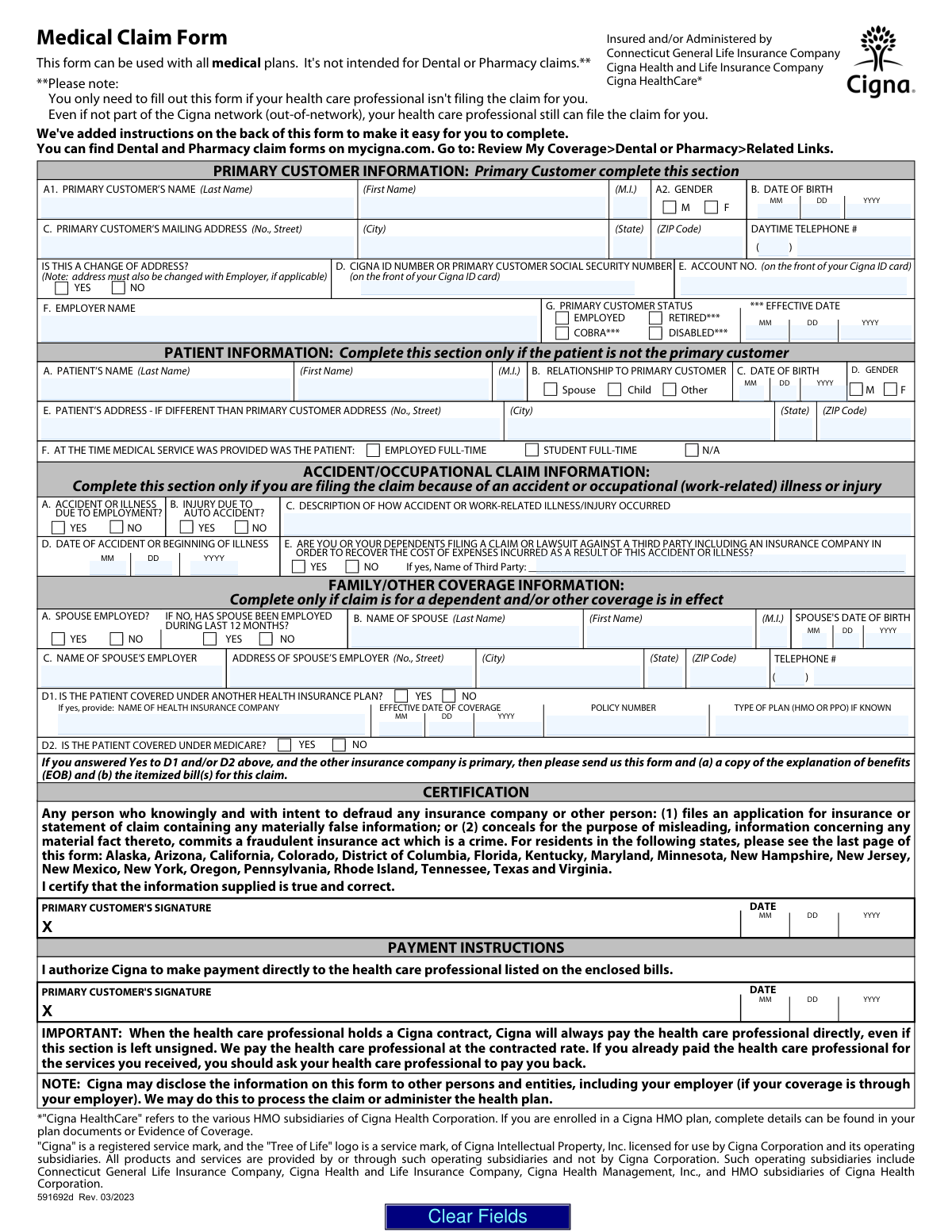
Yes! You can use AI to fill out Cigna Medical Claim Form
The Cigna Medical Claim Form is a document policyholders use to request reimbursement from Cigna for medical expenses they have paid for directly. It is typically used when a healthcare professional does not file the claim on the patient's behalf, which is common for out-of-network services. Properly completing this form with attached itemized bills is crucial for receiving payment for covered medical services. Today, this form can be filled out quickly and accurately using AI-powered services like Instafill.ai, which can also convert non-fillable PDF versions into interactive fillable forms.
Our AI automatically handles information lookup, data retrieval, formatting, and form filling.
It takes less than a minute to fill out 591692d using our AI form filling.
Securely upload your data. Information is encrypted in transit and deleted immediately after the form is filled out.
Form specifications
| Form name: | Cigna Medical Claim Form |
| Number of fields: | 83 |
| Number of pages: | 3 |
| Language: | English |
Instafill Demo: How to fill out PDF forms in seconds with AI
How to Fill Out 591692d Online for Free in 2026
Are you looking to fill out a 591692D form online quickly and accurately? Instafill.ai offers the #1 AI-powered PDF filling software of 2026, allowing you to complete your 591692D form in just 37 seconds or less.
Follow these steps to fill out your 591692D form online using Instafill.ai:
- 1 Navigate to Instafill.ai and upload or select the Cigna Medical Claim Form.
- 2 Provide the Primary Customer's information, including name, address, Cigna ID number, and employment status.
- 3 If the patient is not the primary customer, complete the Patient Information section with their details and relationship to the primary.
- 4 Fill out the Accident/Occupational Claim and Family/Other Coverage sections if they are relevant to your claim.
- 5 Indicate your payment instructions, authorizing Cigna to pay the healthcare professional directly or to send the payment to you.
- 6 Review all entered information for accuracy, then sign and date the certification section.
- 7 Submit the completed form along with all required itemized bills to the Cigna address listed on your insurance ID card.
Our AI-powered system ensures each field is filled out correctly, reducing errors and saving you time.
Why Choose Instafill.ai for Your Fillable 591692d Form?
Speed
Complete your 591692d in as little as 37 seconds.
Up-to-Date
Always use the latest 2026 591692d form version.
Cost-effective
No need to hire expensive lawyers.
Accuracy
Our AI performs 10 compliance checks to ensure your form is error-free.
Security
Your personal information is protected with bank-level encryption.
Frequently Asked Questions About Form 591692d
You only need to fill out this form if your healthcare provider does not file the claim on your behalf, which is common for out-of-network providers. This form is for medical services only, not for dental or pharmacy claims.
You must attach a detailed, itemized bill from your healthcare provider for each service. Cigna cannot accept receipts, balance due statements, or canceled checks as a substitute for the required itemized bill.
Mail the completed claim form and all required itemized bills to the Cigna address listed on your member ID card. Do not staple the documents; use a paper clip if you are sending multiple claims in one envelope.
Cigna must receive your claim within 180 days from the date you received the medical service. Some state laws or specific plans may allow for a longer submission period.
No, you must use a separate claim form for each healthcare professional you saw. You also need to use a separate form for each family member who received services.
You must complete the 'Family/Other Coverage Information' section on the form. If the other insurance plan is primary, you must also submit a copy of their Explanation of Benefits (EOB) along with your itemized bill.
If your provider is in-network, Cigna pays them directly, and you should ask the provider for a refund. For out-of-network providers, Cigna may send the reimbursement to you, especially if you leave the 'Payment Instructions' section unsigned.
After Cigna processes your claim, you will receive an Explanation of Benefits (EOB). The EOB explains how your benefits were applied, what Cigna paid, and any amount you may still owe the provider.
Yes, if the claim is for an injury from an accident or a work-related illness, you must complete the 'Accident/Occupational Claim Information' section and describe how the incident occurred.
Complete the 'Primary Customer Information' section with your details, and then fill out the 'Patient Information' section with the details of the family member who received care.
Yes, services like Instafill.ai use AI to accurately auto-fill form fields from your saved information, which can save you significant time and help prevent errors.
Simply upload the Cigna Medical Claim Form to the Instafill.ai platform. The AI will identify the fields, and you can then fill them out interactively or have the system auto-fill them with your securely stored personal data.
You can use a service like Instafill.ai, which can convert flat, non-fillable PDFs into interactive, fillable forms. This allows you to type your information directly into the fields before printing.
Compliance 591692d
Validation Checks by Instafill.ai
1
Ensures Primary Customer Cigna ID or SSN is Provided
Checks that the 'CIGNA ID NUMBER OR PRIMARY CUSTOMER SOCIAL SECURITY NUMBER' field is not empty. This number is the primary key for identifying the customer's policy and benefits. Without this information, the claim cannot be looked up or processed, leading to an immediate rejection of the form.
2
Verifies Primary Customer Signature for Certification
Confirms that the 'PRIMARY CUSTOMER'S SIGNATURE' field in the Certification section has been signed. This signature certifies that the provided information is true and correct, which is a legal requirement for processing insurance claims. A missing signature invalidates the claim submission and will cause it to be returned to the customer.
3
Validates Date of Birth Format and Plausibility
This check ensures that all Date of Birth fields (for the Primary Customer, Patient, and Spouse) are entered in a valid MM/DD/YYYY format and represent a plausible date in the past. This is crucial for verifying identity and determining eligibility based on age. An invalid or future date will cause a processing error and require correction.
4
Conditional Requirement for Patient Information Section
Validates that if the patient is not the same person as the primary customer, the 'PATIENT INFORMATION' section (Name, DOB, Relationship) is completed. This is necessary to correctly identify the individual who received the medical service and apply the correct benefits under the policy. If this section is left blank when required, the claim cannot be processed for the dependent.
5
Ensures Accident Details are Provided When Applicable
This check verifies that if 'ACCIDENT OR ILLNESS DUE TO EMPLOYMENT?' or 'INJURY DUE TO AUTO ACCIDENT?' is marked 'Yes', then the 'DESCRIPTION OF HOW ACCIDENT...OCCURRED' and 'DATE OF ACCIDENT' fields are filled out. This information is critical for determining liability and whether another party or insurance (like auto or workers' compensation) is primary. Missing details will delay the claim pending further investigation.
6
Validates Completeness of Other Health Insurance Information
If the user indicates the patient is covered by another health insurance plan by checking 'Yes' for question D1, this validation ensures the corresponding fields (Name of Company, Policy Number, etc.) are completed. This is essential for coordination of benefits (COB) to determine which plan pays first. Failure to provide these details will halt claim processing until the information is supplied.
7
Verifies Date of Accident or Illness is Not a Future Date
This validation checks that the 'DATE OF ACCIDENT OR BEGINNING OF ILLNESS' is a valid date that is on or before the current date. A future date is logically impossible and indicates a data entry error. Submitting a claim for a future event would be fraudulent and will result in immediate rejection.
8
Ensures Patient Relationship to Primary Customer is Specified
When the 'PATIENT INFORMATION' section is completed, this check ensures that one of the relationship options ('Spouse', 'Child', 'Other') is selected. This defines the patient's eligibility for coverage under the primary customer's plan. Without a specified relationship, the system cannot verify dependent coverage, and the claim will be rejected.
9
Requires Third Party Name if Lawsuit is Indicated
This check ensures that if the user answers 'Yes' to question E in the 'ACCIDENT/OCCUPATIONAL CLAIM INFORMATION' section (regarding filing a claim/lawsuit against a third party), the 'Name of Third Party' field is filled in. This information is vital for Cigna's subrogation rights to recover costs from the responsible party. A missing name will delay the claim while Cigna requests the necessary information.
10
Validates Spouse's Employer Details if Spouse is Employed
If 'SPOUSE EMPLOYED?' is marked 'Yes', this validation confirms that the spouse's employer name and address are provided. This information is used for coordination of benefits, as the spouse's plan may be the primary insurer for the spouse or dependents. Incomplete information will delay processing as it prevents the determination of primary vs. secondary coverage.
11
Validates ZIP Code Format for All Address Fields
This check verifies that all ZIP code fields (for the Primary Customer, Patient, and Spouse's Employer) contain a valid 5-digit or 9-digit (ZIP+4) numeric format. Correctly formatted ZIP codes are essential for mail delivery of payments and Explanations of Benefits (EOBs). An invalid format can lead to returned mail and significant delays.
12
Ensures Daytime Telephone Number is in a Valid Format
This validation checks that the 'DAYTIME TELEPHONE #' field for the primary customer is entered in a recognizable 10-digit format (including area code). A valid phone number is crucial for the claims processor to contact the customer if there are questions or issues with the claim. An invalid or missing number can turn a simple query into a lengthy delay resolved only through mail.
13
Verifies Patient's Date of Birth is Before Date of Accident/Illness
This is a logical consistency check to ensure the patient's Date of Birth is earlier than the 'DATE OF ACCIDENT OR BEGINNING OF ILLNESS'. It is impossible for a medical service or accident to occur before the patient was born. A validation failure indicates a significant data entry error that must be corrected before the claim can be processed.
14
Ensures All Required Primary Customer Information is Complete
This check validates that the primary customer's full name (First, Last) and full mailing address (Street, City, State, ZIP) are provided. This information is fundamental for identifying the policyholder and for all communications, including sending the Explanation of Benefits (EOB). Incomplete information will result in the claim being returned as unprocessable.
Common Mistakes in Completing 591692d
Many claims are rejected because the user submits a cash register receipt, a 'balance due' statement, or a canceled check instead of a formal itemized bill. The instructions clearly state that the bill must include specific details like procedure codes, diagnosis codes, and the provider's Tax ID number. To avoid this, always request a detailed, itemized statement from your healthcare provider and ensure it's included with your submission. AI-powered tools like Instafill.ai can help by reminding you to attach required documents before submission.
When a patient is covered by more than one insurance plan, users often fail to correctly identify the primary insurer or neglect to submit the primary insurer's Explanation of Benefits (EOB) along with the Cigna claim. This leads to immediate processing delays or rejection, as Cigna cannot determine its payment responsibility without knowing what the primary plan paid. To prevent this, always complete the 'Family/Other Coverage Information' section accurately and attach the EOB from the primary plan if Cigna is secondary.
The form requires two separate signatures: one to certify the information is correct and another for payment authorization. Users frequently miss one or both signatures, which invalidates the claim. A missing signature in the 'Certification' section stops the claim entirely, while a missing signature in 'Payment Instructions' can affect whether you or the provider gets paid for out-of-network services. Always double-check for two signatures and two dates before mailing the form.
The form asks for a 'Cigna ID Number OR... Social Security Number' in box D and a separate 'Account No.' in box E. Users often enter the wrong number in the wrong box, transpose digits, or leave one field blank when both are present on the ID card. This error can cause the system to fail in identifying the correct policy, leading to processing delays. To avoid this, carefully copy the numbers exactly as they appear on the front of your Cigna ID card.
When a claim is related to an accident, users often provide a minimal description in section C or fail to check the 'Yes/No' boxes for employment or auto-related incidents. This lack of detail forces the claims processor to request more information, delaying payment. Be as specific as possible about how, when, and where the injury occurred to expedite the review process for potential third-party liability.
The instructions specify using a separate claim form for each family member and for each healthcare professional. However, to save time, users may try to combine bills from different doctors or for different patients onto a single form. This confuses the processing system and will result in the claim being returned. Always use a fresh, separate form for each unique patient and provider combination.
Users often sign the payment authorization without understanding its impact, especially for out-of-network providers. Signing this section authorizes Cigna to pay the provider directly. If you have already paid the provider out-of-pocket, you should leave this section blank to ensure the reimbursement check is sent to you. Misunderstanding this can lead to you having to chase the provider for a refund.
The form consistently asks for dates in YYYY/MM/DD format, but people are accustomed to writing MM/DD/YYYY, leading to data entry errors and potential rejections. Key dates like Date of Birth, Date of Service, and Accident Date are critical for processing. Using an AI form-filler like Instafill.ai can help prevent this by automatically formatting dates correctly and flagging any mandatory date fields that have been left empty.
The instructions state that claims must be received within 180 days from the date of service. Many people are unaware of this deadline or lose track of time, especially after a prolonged treatment, and submit their claims too late. Late submissions are typically denied, leaving the patient responsible for the full bill. It is crucial to file claims as soon as you receive the itemized bill from your provider.
When filling out a printed PDF by hand, users may use non-black ink or have poor handwriting, making it difficult for the optical character recognition (OCR) software to read the form. This leads to manual data entry, increasing the chance of errors and delays. The form is a non-fillable PDF, but tools like Instafill.ai can convert it into an interactive, fillable version, ensuring all entries are typed, legible, and correctly placed, which guarantees a clean submission.
Saved over 80 hours a year
“I was never sure if my IRS forms like W-9 were filled correctly. Now, I can complete the forms accurately without any external help.”
Kevin Martin Green
Your data stays secure with advanced protection from Instafill and our subprocessors

Robust compliance program
Transparent business model
You’re not the product. You always know where your data is and what it is processed for.
ISO 27001, HIPAA, and GDPR
Our subprocesses adhere to multiple compliance standards, including but not limited to ISO 27001, HIPAA, and GDPR.
Security & privacy by design
We consider security and privacy from the initial design phase of any new service or functionality. It’s not an afterthought, it’s built-in, including support for two-factor authentication (2FA) to further protect your account.
Fill out 591692d with Instafill.ai
Worried about filling PDFs wrong? Instafill securely fills cigna-medical-claim-form forms, ensuring each field is accurate.