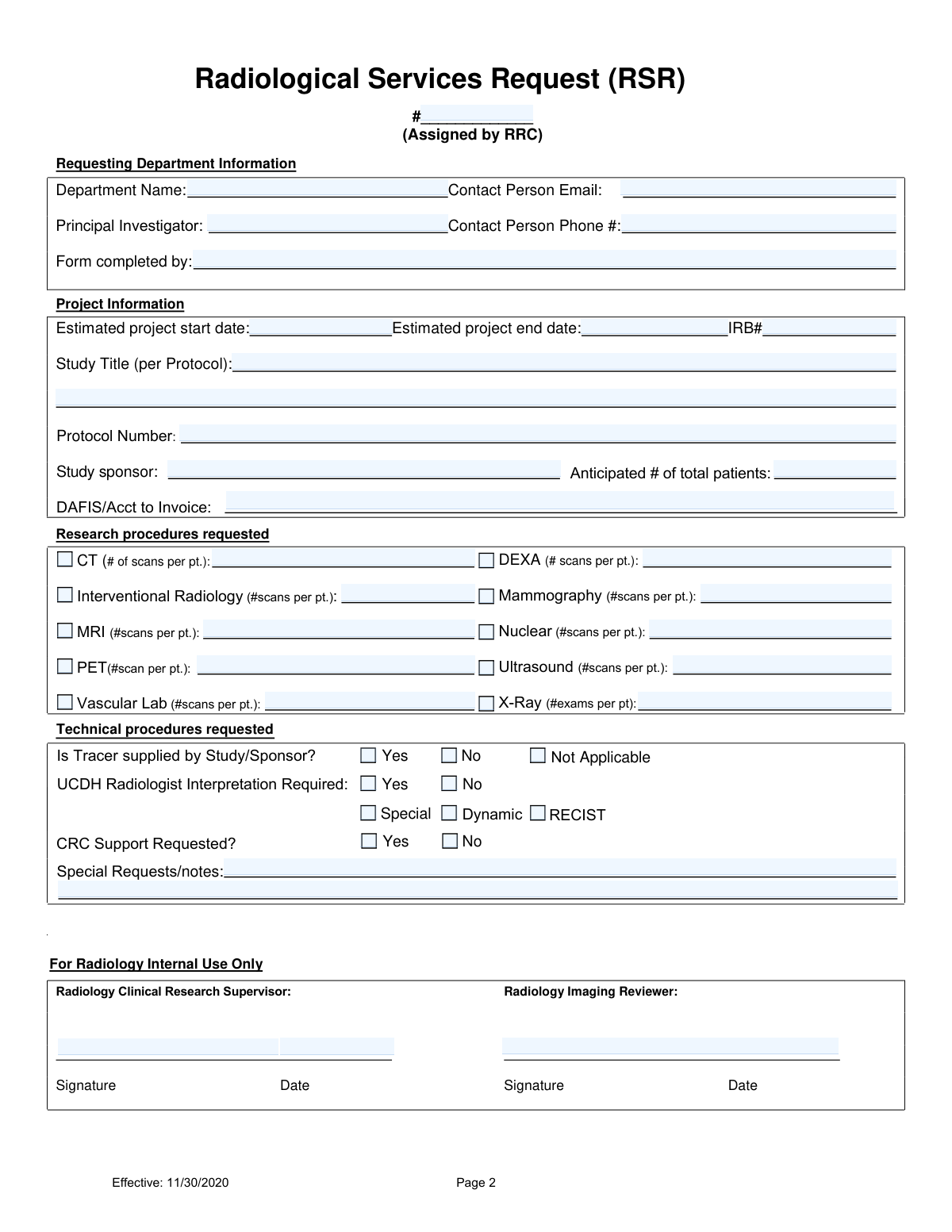
Yes! You can use AI to fill out Radiological Services Request (RSR)
The Radiological Services Request (RSR) is a mandatory form for Principal Investigators at UCD Health who need to use the Department of Radiology's services for clinical research. Submitting this form initiates a review by the Radiology Research Committee to determine the scope and cost of the requested support. Today, this form can be filled out quickly and accurately using AI-powered services like Instafill.ai, which can also convert non-fillable PDF versions into interactive fillable forms.
Our AI automatically handles information lookup, data retrieval, formatting, and form filling.
It takes less than a minute to fill out RSR using our AI form filling.
Securely upload your data. Information is encrypted in transit and deleted immediately after the form is filled out.
Form specifications
| Form name: | Radiological Services Request (RSR) |
| Number of pages: | 2 |
| Language: | English |
Instafill Demo: How to fill out PDF forms in seconds with AI
How to Fill Out RSR Online for Free in 2026
Are you looking to fill out a RSR form online quickly and accurately? Instafill.ai offers the #1 AI-powered PDF filling software of 2026, allowing you to complete your RSR form in just 37 seconds or less.
Follow these steps to fill out your RSR form online using Instafill.ai:
- 1 Navigate to Instafill.ai and upload or select the Radiological Services Request (RSR) form.
- 2 Use the AI assistant to automatically populate requesting department information, such as the Principal Investigator's name, contact details, and department.
- 3 Enter key project details, including the study title, protocol number, IRB number, and estimated start and end dates.
- 4 Specify the research procedures required by checking the relevant boxes (e.g., CT, MRI, X-Ray) and entering the number of scans per patient for each.
- 5 Indicate technical requirements, such as whether a UCDH radiologist interpretation is needed or if a tracer is supplied by the study sponsor.
- 6 Add any special requests or notes in the provided text field.
- 7 Review all the information populated by the AI for accuracy, make any final adjustments, and then download or submit the completed RSR form.
Our AI-powered system ensures each field is filled out correctly, reducing errors and saving you time.
Why Choose Instafill.ai for Your Fillable RSR Form?
Speed
Complete your RSR in as little as 37 seconds.
Up-to-Date
Always use the latest 2026 RSR form version.
Cost-effective
No need to hire expensive lawyers.
Accuracy
Our AI performs 10 compliance checks to ensure your form is error-free.
Security
Your personal information is protected with bank-level encryption.
Frequently Asked Questions About Form RSR
The RSR form is mandatory for any clinical research at UCD Health that requires support from the Department of Radiology. It must be completed by the Principal Investigator (PI) or their Clinical Research Coordinator (CRC) before conducting the research.
Your initial submission must include the completed RSR form, the study protocol, any available Imaging Acquisition Guidelines, and a copy of the Billing Grid or Medicare Coverage Analysis (MCA).
The Radiology Research Committee (RRC) will review your submission and provide either an Exemption or an RSR Estimate within 14 days of receipt. The form notes that urgent requests will be considered.
All research procedure request packets, including the RSR form and supporting documents, must be submitted via email to [email protected].
After receiving final IRB approval, you must send an email notification to the RRC. The RRC will then contact you to schedule a study start-up meeting.
If the RRC determines your study has no research-only procedures, it will be granted an Exemption. If it does involve research-only procedures, you will receive an RSR Estimate detailing the costs and requirements.
The form states that it is the responsibility of the Investigator or the research team to obtain, de-identify, and transmit images to sponsors. This is not a service provided by the Radiology department.
The current research rates for radiological services are posted on the UCD Health website at https://health.ucdavis.edu/radiology/research/rates.html.
This field requires the specific DAFIS or Account number that the Department of Radiology should use for invoicing the costs associated with the requested research services.
Yes, you can use services like Instafill.ai, which leverage AI to accurately auto-fill form fields from your saved information, helping you save time and reduce potential errors.
To fill out the form online, you can use a service like Instafill.ai. Simply upload the PDF, and the platform will make it an interactive, fillable form that you can complete and save digitally.
If you have a non-fillable or 'flat' PDF, you can use a tool like Instafill.ai. It can convert the document into an interactive, fillable form online, making it easy to complete.
This section is for specifying if a UCDH radiologist needs to officially read and interpret the scans for your research. You can select 'Yes', 'No', or specify a special interpretation type like RECIST.
Compliance RSR
Validation Checks by Instafill.ai
1
Validates Contact Person Email Format
This check ensures that the value entered in the 'Contact Person Email' field follows the standard email format (e.g., [email protected]). This is critical for ensuring that communications regarding the request can be successfully delivered to the contact person. If the format is invalid, the form submission will be rejected with a message prompting the user to enter a valid email address.
2
Validates Contact Person Phone Number Format
This check verifies that the 'Contact Person Phone #' field contains a valid phone number, conforming to a standard format like (XXX) XXX-XXXX or XXXXXXXXXX. Correctly formatted phone numbers are essential for direct communication if email is unresponsive or for urgent matters. A validation failure would prevent submission and ask the user to correct the phone number.
3
Ensures Project Dates are Chronological
This validation confirms that the 'Estimated project end date' is on or after the 'Estimated project start date'. This prevents logical errors in project planning and scheduling. A project cannot end before it begins, and enforcing this logic at the point of entry maintains data integrity. If the end date is before the start date, an error message will be displayed.
4
Ensures Mandatory Project Identifiers are Complete
This check verifies that the 'Principal Investigator', 'Study Title', and 'IRB#' fields are not empty. These fields are fundamental for identifying, tracking, and processing the research request within the UCD Health system. Failure to provide this information would make the request ambiguous and unprocessable, so the form cannot be submitted until they are filled.
5
Validates Anticipated Patient Count
This check ensures that the 'Anticipated # of total patients' field contains a positive integer greater than zero. This number is crucial for resource planning, estimating costs, and understanding the scope of the study. A non-integer, zero, or negative value is illogical and would cause a validation failure, requiring the user to input a valid whole number.
6
Requires at Least One Research Procedure Selection
This validation ensures that at least one of the research procedure checkboxes (e.g., CT, MRI, X-Ray) has been selected. A request for radiological services is meaningless without specifying which services are needed. If no procedures are selected, the form submission will be blocked, and the user will be prompted to select at least one procedure.
7
Ensures Scan Count for Selected Procedures
This is a conditional check that verifies if a research procedure checkbox is selected, its corresponding '# of scans per pt.' field must contain a number greater than zero. This ensures that for every requested procedure, the volume of work is clearly defined for accurate cost estimation and scheduling. If a procedure is checked but the count is missing or zero, an error will be triggered.
8
Validates Presence of Billing Account Number
This check ensures that the 'DAFIS/Acct to Invoice' field is not empty. This account number is mandatory for the financial processing of the request and for invoicing the correct department or grant. Without this information, the radiology department cannot bill for its services, so the form is considered incomplete and cannot be submitted.
9
Ensures Exclusive Selection for Tracer Supply
This validation confirms that for the 'Is Tracer supplied by Study/Sponsor?' question, exactly one option ('Yes', 'No', or 'Not Applicable') is selected. This is a radio button-style question where multiple or no selections would be ambiguous and could impact material ordering and billing. The form will show an error if the selection is not singular.
10
Ensures Exclusive Selection for CRC Support
This check verifies that for the 'CRC Support Requested?' question, exactly one of the 'Yes' or 'No' options is selected. This information is required to determine if additional coordination and resources from the Clinical Research Center (CRC) are needed. An ambiguous response (neither or both selected) would halt planning, so the form requires a single, clear choice.
11
Validates Mutually Exclusive Radiologist Interpretation
This check ensures that the 'Yes' and 'No' options for 'UCDH Radiologist Interpretation Required' cannot be selected simultaneously. These are mutually exclusive choices that define a core requirement of the service. Allowing both would create a logical conflict, so the system will flag an error if the user selects both options.
12
Ensures Project Start Date is Not in the Past
This validation checks that the 'Estimated project start date' is either the current date or a future date. Requesting services for a project that has already started without prior arrangement is not standard procedure and can cause significant scheduling issues. This check ensures all requests are for upcoming work, allowing for proper review and planning.
13
Validates Internal Supervisor Date Format
This check, applied to the 'For Radiology Internal Use Only' section, ensures the 'Supervisor Date' field is a valid date. Maintaining a consistent and valid date format is crucial for auditing and record-keeping purposes. An invalid date would compromise the integrity of the approval record.
14
Ensures Signature and Date Co-dependency
This validation ensures that if the 'Supervisor Signature' field is filled, the 'Supervisor Date' field must also be filled, and vice-versa. A signature is legally and administratively valid only when dated. This check enforces completeness for internal approval records, preventing undated signatures or dates without a corresponding signature.
Common Mistakes in Completing RSR
Users often check a box for a requested procedure like 'CT' or 'MRI' but forget to fill in the corresponding '(# of scans per pt.)' field. This happens due to oversight while quickly completing the form. Without the number of scans, the Radiology Research Committee (RRC) cannot generate an accurate cost estimate or plan for resource allocation, leading to delays. To avoid this, carefully review each requested procedure and ensure both the checkbox and the number of scans are filled out. AI-powered tools like Instafill.ai can flag these incomplete pairings to ensure all required information is provided before submission.
The form requires the 'Study Title (per Protocol)' and 'Protocol Number', but applicants sometimes enter an abbreviated title, a working nickname, or an outdated protocol number. This discrepancy makes it difficult for reviewers to match the request with the correct protocol and IRB documents, causing processing delays and potential rejection. Always copy the title and protocol number directly from the final, approved protocol document to ensure accuracy. Using a form-filling tool can help store and populate this official information consistently across all related documents.
The 'DAFIS/Acct to Invoice' field is critical for billing, but it is frequently left blank, or an incorrect or expired account number is entered. This mistake halts the financial approval process and can prevent the study from starting until the correct billing information is provided and verified. Before submitting, confirm the active and correct DAFIS or account number with your department's financial administrator. AI tools can help validate the format of such numbers and prevent submission with a blank critical field.
The instructions clearly state that the initial submission must include the completed RSR Form, the Protocol, and Imaging Acquisition Guidelines. A common error is to email only the RSR form, assuming other documents will be requested later. This incomplete submission will be put on hold until all required documents are received, delaying the 14-day review timeline. To prevent this, create a checklist and ensure all specified documents are attached to the initial submission email.
The workflow has two distinct email steps: an 'Initial Submission' for review and a later 'Email to establish Study Startup' after IRB approval. Researchers mistakenly believe the initial submission is the only step, and they fail to send the follow-up email with the final IRB approval and signed RSR Estimate. This failure prevents the RRC from scheduling the mandatory study startup meeting, effectively stalling the project. Carefully read the instructions and set a reminder to send the second notification once IRB approval is secured.
When specifying if a 'UCDH Radiologist Interpretation' is required, users may check 'Yes' without selecting the specific type (Special, Dynamic, RECIST) or check conflicting options. This ambiguity forces the RRC to seek clarification, delaying the estimate. Be specific about the interpretation requirements as defined in your study protocol. If you are unsure, consult with the PI or the study sponsor before completing this section.
The 'Contact Person Email' is the primary channel for all communication, including the RSR Estimate and scheduling requests. Providing a personal email, a misspelled address, or the email of a person who is not actively monitoring the project can lead to missed deadlines and critical communications. Always provide an official, regularly monitored institutional email address for the designated contact person to ensure timely correspondence.
Researchers may have specific needs not covered by checkboxes, such as non-standard imaging sequences, specific timing for dynamic scans, or patient scheduling constraints, but they neglect to detail them in the 'Special Requests/notes' field. This omission can lead to incorrect scheduling, improper image acquisition, and unusable data. Use this field to communicate any and all study requirements that deviate from standard procedures to ensure the radiology team is fully prepared.
For PET and Nuclear Medicine studies, the question 'Is Tracer supplied by Study/Sponsor?' is crucial for budgeting and logistics, yet it is often left unanswered. The cost and sourcing of radiotracers are significant, and failing to specify this information prevents an accurate cost estimate. Always select 'Yes', 'No', or 'Not Applicable' to avoid delays while the RRC seeks clarification. Since this form is a non-fillable PDF, a tool like Instafill.ai can convert it into a fillable version, making it easier to see and complete all required fields, including these radio buttons.
Saved over 80 hours a year
“I was never sure if my IRS forms like W-9 were filled correctly. Now, I can complete the forms accurately without any external help.”
Kevin Martin Green
Your data stays secure with advanced protection from Instafill and our subprocessors

Robust compliance program
Transparent business model
You’re not the product. You always know where your data is and what it is processed for.
ISO 27001, HIPAA, and GDPR
Our subprocesses adhere to multiple compliance standards, including but not limited to ISO 27001, HIPAA, and GDPR.
Security & privacy by design
We consider security and privacy from the initial design phase of any new service or functionality. It’s not an afterthought, it’s built-in, including support for two-factor authentication (2FA) to further protect your account.
Fill out RSR with Instafill.ai
Worried about filling PDFs wrong? Instafill securely fills radiological-services-request-rsr forms, ensuring each field is accurate.