Yes! You can use AI to fill out Advanced Imaging Prior Authorization Request Form
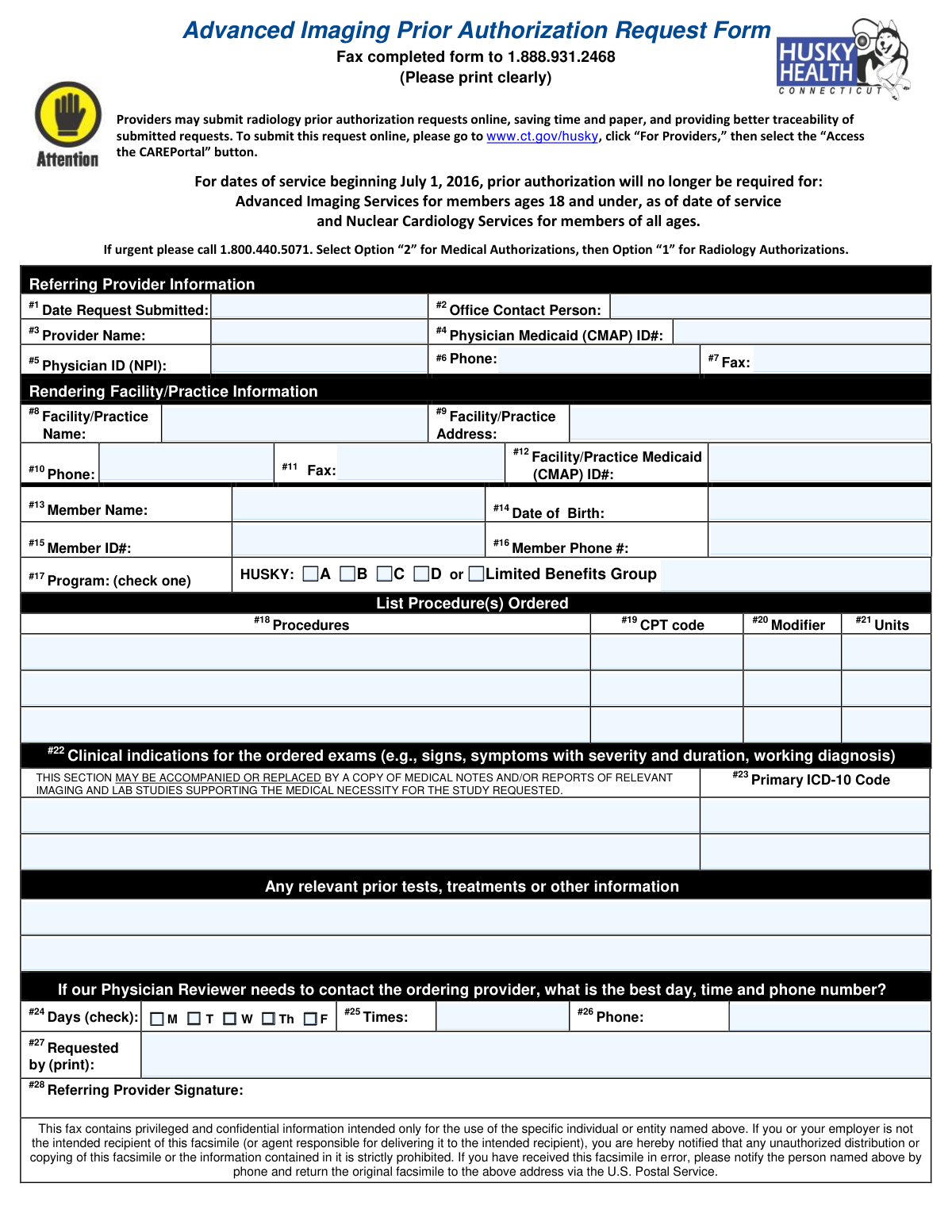
This form is a request submitted by a referring provider to an insurance plan, such as Connecticut's HUSKY program, to get approval before an advanced imaging procedure is performed on a patient. It ensures the service is medically necessary and will be covered, requiring details about the provider, patient, facility, and clinical justification for the procedure. Today, this form can be filled out quickly and accurately using AI-powered services like Instafill.ai, which can also convert non-fillable PDF versions into interactive fillable forms.
Our AI automatically handles information lookup, data retrieval, formatting, and form filling.
It takes less than a minute to fill out Advanced Imaging Prior Auth using our AI form filling.
Securely upload your data. Information is encrypted in transit and deleted immediately after the form is filled out.
Form specifications
| Form name: | Advanced Imaging Prior Authorization Request Form |
| Number of pages: | 1 |
| Language: | English |
| Categories: | prior authorization forms, authorization forms |
Instafill Demo: How to fill out PDF forms in seconds with AI
How to Fill Out Advanced Imaging Prior Auth Online for Free in 2026
Are you looking to fill out a ADVANCED IMAGING PRIOR AUTH form online quickly and accurately? Instafill.ai offers the #1 AI-powered PDF filling software of 2026, allowing you to complete your ADVANCED IMAGING PRIOR AUTH form in just 37 seconds or less.
Follow these steps to fill out your ADVANCED IMAGING PRIOR AUTH form online using Instafill.ai:
- 1 Navigate to Instafill.ai and upload or select the Advanced Imaging Prior Authorization Request Form.
- 2 Use the AI assistant to accurately input the referring provider's information, including name, contact person, Medicaid ID, and NPI.
- 3 Enter the details for the rendering facility or practice where the imaging will be performed.
- 4 Provide the patient's (member's) information, such as their name, date of birth, Member ID, and their specific HUSKY program.
- 5 List the ordered procedures with their corresponding CPT codes, modifiers, and units.
- 6 Supply the clinical justification for the exam, including symptoms, duration, and the primary ICD-10 diagnosis code to prove medical necessity.
- 7 Review all auto-filled information for accuracy, provide the referring provider's signature, and submit the completed form via fax or the designated online portal.
Our AI-powered system ensures each field is filled out correctly, reducing errors and saving you time.
Why Choose Instafill.ai for Your Fillable Advanced Imaging Prior Auth Form?
Speed
Complete your Advanced Imaging Prior Auth in as little as 37 seconds.
Up-to-Date
Always use the latest 2026 Advanced Imaging Prior Auth form version.
Cost-effective
No need to hire expensive lawyers.
Accuracy
Our AI performs 10 compliance checks to ensure your form is error-free.
Security
Your personal information is protected with bank-level encryption.
Frequently Asked Questions About Form Advanced Imaging Prior Auth
This form is used by healthcare providers to request prior authorization for advanced imaging services for members covered by HUSKY Health or Limited Benefits programs. It helps ensure the requested procedure is medically necessary before it is performed.
The referring or ordering provider who is requesting the advanced imaging service for a patient is responsible for completing and signing this form. Information for both the referring provider and the rendering facility is required.
You can fax the completed form to 1.888.931.2468 or, for a faster and more traceable method, submit it online via the CAREPortal on the ct.gov/husky website.
For urgent requests, you should call 1.800.440.5071 and select option '2' for Medical Authorizations, then option '1' for Radiology Authorizations. This is faster than submitting by fax for time-sensitive cases.
No, as of July 1, 2016, prior authorization is not required for advanced imaging services for members aged 18 and under. It is also not required for nuclear cardiology services for members of any age.
The CMAP ID is the provider's Medicaid ID number, and the NPI is the National Provider Identifier. Both of these numbers are mandatory for the referring provider and must be entered in fields #4 and #5.
You can either fill in the 'Clinical indications' section with the patient's signs and symptoms or attach copies of medical notes and relevant lab reports. A primary ICD-10 code is required for each procedure requested.
No, the Facility/Practice Medicaid (CMAP) ID is listed as optional on the form. You should provide it if it is available, but it is not required for submission.
Yes, services like Instafill.ai use AI to accurately auto-fill form fields, which can save you significant time and reduce errors. These tools can pull information from your records to populate patient, provider, and facility details.
Simply upload the Advanced Imaging Prior Authorization Request Form to the Instafill.ai platform. The AI will identify the fields, allowing you to quickly fill them out online, save the completed form, and prepare it for submission.
If you have a non-fillable or 'flat' PDF, you can use a service like Instafill.ai to convert it into an interactive, fillable form. This allows you to type directly into the fields, making the completion process much easier and neater.
Yes, the form requires the signature of the ordering provider in field #28. The provider's name must also be printed in field #27.
This information is requested in case the physician reviewer has questions about the medical necessity of the request. Providing a direct phone number and the best time to call helps expedite the review process and avoid delays.
Compliance Advanced Imaging Prior Auth
Validation Checks by Instafill.ai
1
NPI Format and Validity
Validates that the Physician ID (NPI) in field #5 is a 10-digit number. The system should also perform a lookup against the National Plan and Provider Enumeration System (NPPES) to confirm the NPI is active and corresponds to the provider's name. This is crucial for verifying the identity and credentials of the referring provider, and failure can lead to claim rejection or processing delays.
2
Mandatory CMAP ID Presence
Ensures the 'Physician Medicaid (CMAP) ID#' in field #4 is not empty, as it is explicitly marked as 'Mandatory'. This ID is essential for state-specific billing and provider tracking within the Medicaid system. A missing CMAP ID will result in an immediate rejection of the form for incompleteness.
3
Date Format and Plausibility
Checks that the 'Date Request Submitted' (#1) and 'Member Date of Birth' (#14) are in a valid MM/DD/YYYY format. It also verifies that the Date of Birth is a date in the past and the Date Request Submitted is not a future date. This prevents data entry errors and ensures the chronological accuracy of the request.
4
Member Age Eligibility Rule
Calculates the member's age based on the 'Date of Birth' (#14) and flags submissions for members aged 18 or under. The form states prior authorization is not required for this age group for advanced imaging, so this check prevents unnecessary administrative work. The submission would be returned with an informational message explaining why it may not be needed.
5
Standard Phone Number Formatting
Verifies that all phone number fields (#6, #10, #16, #26) conform to the specified 1 (XXX) XXX-XXXX format. Consistent formatting is essential for reliable communication and for automated systems that may use these numbers for notifications. Incorrectly formatted numbers will cause a validation error, requiring the user to correct the entry.
6
Exclusive Program Selection
Validates that exactly one program checkbox under field #17 (HUSKY A, B, C, D, or Limited Benefits Group) is selected. A member can only be enrolled in one program at a time. Submissions with zero or multiple selections are ambiguous and will be rejected until a single, valid program is indicated.
7
Procedure and CPT Code Requirement
Ensures that at least the first procedure row is filled out, containing both a procedure description (#18) and a corresponding CPT code (#19). A prior authorization request is meaningless without a procedure to authorize. The form will be considered incomplete and rejected if no procedure information is provided.
8
CPT to ICD-10 Linkage
Checks for logical consistency by ensuring that for every CPT code entered, a corresponding Primary ICD-10 Code is also provided. Medical necessity is established by linking a diagnosis (ICD-10) to a procedure (CPT). A missing link makes it impossible to evaluate the request, leading to rejection for insufficient information.
9
ICD-10 Code Structural Validation
Validates that the value entered in the 'Primary ICD-10 Code' field (#23) adheres to the standard ICD-10 format, which consists of 3 to 7 alphanumeric characters. Using a valid code structure is fundamental for processing, as invalid codes cannot be recognized by billing or clinical review systems. An invalid format will trigger an error, preventing submission.
10
Clinical Justification Completeness
Verifies that clinical justification is provided, either by text entered into the 'Clinical indications' field (#22) or by an indicator that supporting medical notes are attached. This justification is the primary basis for determining medical necessity. If this field is empty and no attachment is indicated, the request lacks essential information and cannot be reviewed.
11
Provider Name Consistency Check
Compares the 'Provider Name' in field #3 with the printed name in the 'Requested by' field (#27). This check helps ensure the person signing and requesting the authorization is the same as the referring provider on record. A significant mismatch could flag the request for manual review to prevent potential fraud or errors.
12
Positive Integer for Units
Ensures the 'Units' field (#21) for any requested procedure contains a positive integer greater than zero. Requesting zero, negative, or fractional units for a procedure is not logical and indicates a data entry error. The submission will be blocked until a valid, positive number of units is entered.
13
Referring Provider Signature Requirement
For a digital submission, this validation confirms that the provider's signature or an equivalent digital attestation (#28) is present. The signature legally certifies the request and its contents. A submission lacking this attestation is incomplete and cannot be processed, as it lacks the necessary legal and professional verification.
Common Mistakes in Completing Advanced Imaging Prior Auth
This mistake involves omitting or entering incorrect data in the mandatory 'Physician Medicaid (CMAP) ID' (#4) and 'Physician ID (NPI)' (#5) fields. These errors often happen due to simple typos or not having the information readily available. An incorrect or missing ID prevents the system from verifying the referring provider, leading to immediate rejection of the request and delays in patient care. To avoid this, always double-check these numbers against a trusted source before submission; AI-powered tools like Instafill.ai can store and accurately populate this information automatically.
Providing vague or incomplete information in the 'Clinical indications' section (#22) is a primary reason for denial. Simply stating a symptom like 'back pain' is not enough; reviewers need details on duration, severity, failed treatments, and a working diagnosis to establish medical necessity. This forces a time-consuming appeal process. To prevent this, provide a detailed clinical narrative or attach legible, relevant medical notes that directly support the need for the requested imaging.
An error occurs when the written procedure description in field #18 does not match the CPT code in field #19. For example, writing 'MRI Brain' but using a CPT code for an MRI with contrast, without justifying the contrast. This discrepancy flags the request for manual review and clarification, delaying the authorization. Always ensure the CPT code and its description are perfectly aligned before submitting the form.
Forgetting to obtain the provider's signature in field #28 is a frequent and critical error, often happening when administrative staff complete the form. An unsigned request is not legally valid and will be rejected outright, requiring the form to be re-submitted from scratch. To avoid this, establish a clear workflow where the referring provider always reviews and signs the form before it is faxed.
Transposing digits in the 'Member ID#' (#15) or entering the wrong 'Date of Birth' (#14) are common data entry mistakes. This causes a patient-not-found error in the payer's system, resulting in an automatic rejection of the prior authorization request. Using an AI form-filling tool like Instafill.ai can help prevent these errors by validating data formats and pulling correct information from a patient's record.
Since this form is often printed and faxed, illegible handwriting can make critical fields like names, ID numbers, and clinical notes unreadable. This forces the reviewer to either reject the form or call the office for clarification, causing significant delays. To avoid this, print clearly in block letters or use an online portal when available. Tools like Instafill.ai can also convert flat PDFs into digitally fillable forms, eliminating handwriting issues entirely.
Failing to include a required modifier in field #20, such as 'RT' (right) or 'LT' (left) for a unilateral procedure, creates ambiguity. The reviewer cannot approve a request for an 'MRI Knee' without knowing which knee is affected, leading to requests for more information. Always specify the exact location or side by using the appropriate modifier to ensure the request is clear and can be processed quickly.
Staff may mistakenly enter the referring provider's information into the 'Rendering Facility/Practice Information' section (#8-12), or vice-versa. This is common when the provider's office is part of a larger hospital system. This confusion complicates processing and can lead to the authorization being sent to the wrong entity. Carefully read each section header to ensure the correct provider and facility details are entered in their respective fields.
The form requires at least one primary ICD-10 code (#23) to justify the procedure. Common mistakes include forgetting to add the code, using an outdated ICD-9 code, or using a non-specific code that doesn't adequately support medical necessity. A missing or invalid code will halt the review process until a correct one is provided. Ensure a valid and specific ICD-10 code that corresponds to the clinical indication is always included.
The form instructions clearly state that prior authorization is not required for members 18 and under or for nuclear cardiology services. Offices that fail to read these instructions waste time and resources by completing and submitting unnecessary paperwork. Always read the form's header and instructions carefully to confirm if a prior authorization is actually needed for the specific patient and service.
Saved over 80 hours a year
“I was never sure if my IRS forms like W-9 were filled correctly. Now, I can complete the forms accurately without any external help.”
Kevin Martin Green
Your data stays secure with advanced protection from Instafill and our subprocessors

Robust compliance program
Transparent business model
You’re not the product. You always know where your data is and what it is processed for.
ISO 27001, HIPAA, and GDPR
Our subprocesses adhere to multiple compliance standards, including but not limited to ISO 27001, HIPAA, and GDPR.
Security & privacy by design
We consider security and privacy from the initial design phase of any new service or functionality. It’s not an afterthought, it’s built-in, including support for two-factor authentication (2FA) to further protect your account.
Fill out Advanced Imaging Prior Auth with Instafill.ai
Worried about filling PDFs wrong? Instafill securely fills advanced-imaging-prior-authorization-request-form forms, ensuring each field is accurate.