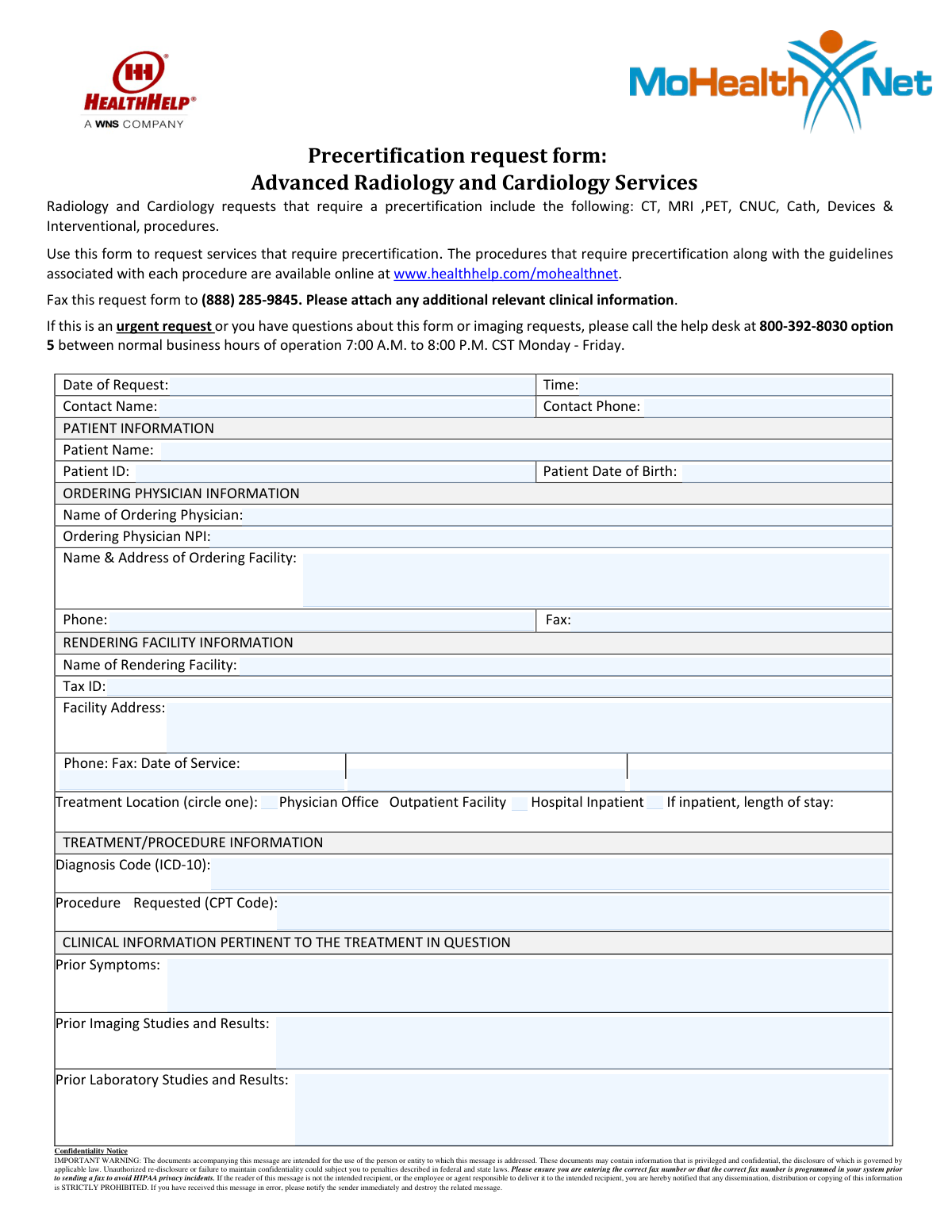
Yes! You can use AI to fill out Precertification request form: Advanced Radiology and Cardiology Services

This form is a formal request submitted by a healthcare provider to an insurance or health plan administrator to get approval before a specific medical service is rendered. It is crucial for ensuring that advanced radiology and cardiology procedures are deemed medically necessary and will be covered by the patient's insurance plan. Today, this form can be filled out quickly and accurately using AI-powered services like Instafill.ai, which can also convert non-fillable PDF versions into interactive fillable forms.
Our AI automatically handles information lookup, data retrieval, formatting, and form filling.
It takes less than a minute to fill out Radiology & Cardiology Precertification Form using our AI form filling.
Securely upload your data. Information is encrypted in transit and deleted immediately after the form is filled out.

Form specifications

Form name: Precertification request form: Advanced Radiology and Cardiology Services
Number of pages: 1
Language: English
Categories: CAR forms, certification forms
main-image

Instafill Demo: How to fill out PDF forms in seconds with AI

How to Fill Out Radiology & Cardiology Precertification Form Online for Free in 2026

Are you looking to fill out a RADIOLOGY & CARDIOLOGY PRECERTIFICATION FORM form online quickly and accurately? Instafill.ai offers the #1 AI-powered PDF filling software of 2026, allowing you to complete your RADIOLOGY & CARDIOLOGY PRECERTIFICATION FORM form in just 37 seconds or less.
Follow these steps to fill out your RADIOLOGY & CARDIOLOGY PRECERTIFICATION FORM form online using Instafill.ai:
  1. 1 Navigate to Instafill.ai and upload or select the Precertification Request Form.
  2. 2 Use the AI assistant to automatically fill in request details like date, time, and contact information.
  3. 3 Enter the patient's personal details, including their name, ID number, and date of birth.
  4. 4 Provide the complete information for both the ordering physician and the rendering facility, including NPI and Tax ID numbers.
  5. 5 Specify the treatment details by entering the correct ICD-10 diagnosis code and the CPT code for the requested procedure.
  6. 6 Input all relevant clinical information, such as prior symptoms, imaging studies, and laboratory results, to support the request.
  7. 7 Review all the information for accuracy before downloading the completed form to fax or submit as required.

Our AI-powered system ensures each field is filled out correctly, reducing errors and saving you time.

Why Choose Instafill.ai for Your Fillable Radiology & Cardiology Precertification Form Form?

Speed

Complete your Radiology & Cardiology Precertification Form in as little as 37 seconds.

Up-to-Date

Always use the latest 2026 Radiology & Cardiology Precertification Form form version.

Cost-effective

No need to hire expensive lawyers.

Accuracy

Our AI performs 10 compliance checks to ensure your form is error-free.

Security

Your personal information is protected with bank-level encryption.

Frequently Asked Questions About Form Radiology & Cardiology Precertification Form

This form is used to request prior authorization for specific advanced radiology and cardiology services, such as CT scans, MRIs, and cardiac catheterizations, to ensure they are medically necessary.

The ordering physician's office or the facility where the procedure will be performed is responsible for completing and submitting this precertification request on behalf of the patient.

Precertification is required for advanced services including CT, MRI, PET, CNUC (Cardiovascular Nuclear Medicine), Cath (Cardiac Catheterization), Devices, and other Interventional procedures.

You must submit the completed request form by faxing it to (888) 285-9845. Be sure to attach any additional relevant clinical information.

For urgent requests, please call the help desk directly at 800-392-8030, option 5, during normal business hours (7:00 A.M. to 8:00 P.M. CST, Monday - Friday).

The 'Ordering Physician' is the doctor who requested the procedure for the patient. The 'Rendering Facility' is the hospital, clinic, or office where the procedure will actually be performed.

You need to provide the patient's prior symptoms, results from any prior imaging or laboratory studies, and the relevant ICD-10 diagnosis code and CPT procedure code.

Yes, the form states that you should attach any additional relevant clinical information to support the medical necessity of the request.

The specific guidelines for each procedure are available online at www.healthhelp.com/mohealthnet.

If the service is for a hospital inpatient, you must circle 'Hospital Inpatient' under the Treatment Location section and provide the expected length of stay.

Yes, services like Instafill.ai use AI to accurately auto-fill form fields from your records, which can save significant time and reduce errors.

If you have a non-fillable PDF, you can use a service like Instafill.ai to convert it into an interactive, fillable form that you can complete online.

Simply upload the form to the Instafill.ai platform. It will make the document interactive, allowing you to easily fill in all the required fields before downloading or printing the completed form.

Compliance Radiology & Cardiology Precertification Form
Validation Checks by Instafill.ai

1
Date of Request Validity
This check ensures the 'Date of Request' is a validly formatted date and is not set in the future. It is important for establishing an accurate timeline for the precertification process. A submission with an invalid or future date will be rejected, as it indicates a data entry error that could compromise the request's audit trail.
2
Patient Date of Birth Logic
This validation verifies that the 'Patient Date of Birth' is a valid date in the past and represents a plausible age for a human patient (e.g., not more than 120 years ago). This is crucial for correct patient identification and for applying age-specific clinical guidelines. An invalid date will prevent processing and require correction to ensure patient safety and proper record-keeping.
3
Date of Service Chronology
This check ensures the 'Date of Service' is on or after the 'Date of Request'. A service cannot logically occur before it is requested for precertification. This validation prevents logical inconsistencies in the timeline of care, and failure would trigger an error requiring the user to correct the dates before submission.
4
Ordering Physician NPI Format
This validation verifies that the 'Ordering Physician NPI' is a 10-digit numeric identifier. The National Provider Identifier (NPI) is a standard, unique identifier for health care providers, and its correctness is essential for billing and regulatory compliance. An incorrectly formatted NPI will cause the form to be rejected until a valid 10-digit number is provided.
5
Rendering Facility Tax ID Format
This check ensures the 'Rendering Facility Tax ID' is a valid 9-digit number, consistent with the format of a federal Employer Identification Number (EIN). Correctly identifying the rendering facility is critical for payment and network management. Submissions with an improperly formatted Tax ID will be flagged for correction to ensure accurate provider identification.
6
Diagnosis Code (ICD-10) Structure
This validation confirms that the 'Diagnosis Code (ICD-10)' field contains a code that follows the standard ICD-10 format (3 to 7 alphanumeric characters). Accurate diagnosis codes are fundamental for determining medical necessity and processing the precertification request. An invalid format will result in an error, as the system cannot process or validate a non-standard code.
7
Procedure Code (CPT) Structure
This check verifies that the 'Procedure Requested (CPT Code)' is a 5-digit numeric code as per the Current Procedural Terminology standard. The CPT code specifies the exact medical service being requested and is the primary subject of the precertification. If the code is not in the correct format, the request cannot be matched against clinical guidelines and will be rejected.
8
Phone Number Format Validation
This validation ensures that all phone number fields ('Contact Phone', 'Ordering Facility Phone', 'Rendering Facility Phone') adhere to a standard format (e.g., 10 digits with an optional country code). Standardized phone numbers are essential for reliable communication if questions or issues arise during the review process. An invalid format would prompt the user for correction to prevent communication failures.
9
Mandatory Patient Demographics
This check ensures that 'Patient Name', 'Patient ID', and 'Patient Date of Birth' are all completed. These fields are the minimum required information to uniquely and correctly identify the patient for whom the service is being requested. A submission lacking any of this core information is incomplete and will be rejected immediately.
10
Treatment Location Exclusivity
This validation ensures that exactly one of the 'Treatment Location' options ('Physician Office', 'Outpatient Facility', 'Hospital Inpatient') is selected. The location of service impacts reimbursement rates and applicable guidelines, so the selection must be clear and unambiguous. If zero or more than one option is selected, the form will be considered invalid and require correction.
11
Conditional Inpatient Stay Requirement
This check enforces a conditional rule: if 'Hospital Inpatient' is selected as the treatment location, the 'Inpatient Length of Stay' field must be populated with a positive number. The length of stay is a critical data point for inpatient precertification and resource planning. Failure to provide this information when required will halt the submission process until the field is completed.
12
Clinical Justification Presence
This validation verifies that at least one of the clinical information fields ('Prior Symptoms', 'Prior Imaging Studies and Results', 'Prior Laboratory Studies and Results') contains information. Providing clinical context is essential for a reviewer to determine the medical necessity of the requested procedure. A request submitted without any clinical justification is likely to be denied or delayed pending more information.
13
Mandatory Treatment Codes
This check ensures that both the 'Diagnosis Code (ICD-10)' and 'Procedure Requested (CPT Code)' fields are filled out. These two codes form the basis of the precertification request, defining what is being done and why. A submission without both codes is fundamentally incomplete and cannot be processed for a medical necessity review.

Common Mistakes in Completing Radiology & Cardiology Precertification Form

Using Incorrect or Outdated Medical Codes

Entering an incorrect, incomplete, or outdated ICD-10 (diagnosis) or CPT (procedure) code is a frequent and critical error. This often happens due to clerical mistakes or using old code lists. An incorrect code can lead to an immediate denial of the precertification request for not meeting medical necessity guidelines, requiring the entire submission process to be restarted and causing significant delays in patient care.

Providing Vague or Insufficient Clinical Information

Many submissions are delayed because the 'Prior Symptoms' and 'Prior Studies' sections are not detailed enough. For example, writing 'back pain' instead of 'acute lumbar pain radiating to the left leg for 3 weeks, unresponsive to NSAIDs'. Without specific, detailed clinical justification, reviewers cannot establish medical necessity, leading to denials and the need for time-consuming appeals with additional information.

Confusing the Ordering and Rendering Facility Information

Users often mistakenly enter the same information for both the 'Ordering Physician/Facility' and the 'Rendering Facility'. The ordering facility is the physician's office that requested the procedure, while the rendering facility is the hospital or imaging center where the procedure will actually be performed. This error causes delays in processing, incorrect routing of approvals, and potential billing problems down the line.

Entering an Invalid NPI or Tax ID

Transposing digits or entering an incorrect National Provider Identifier (NPI) for the ordering physician or Tax ID for the rendering facility is a common data entry mistake. These numbers are essential for verification and processing. An invalid ID will halt the precertification process until the correct information is obtained, usually through a follow-up call that delays approval.

Forgetting to Attach Supporting Clinical Documents

The form explicitly requests attaching relevant clinical information, but this step is often overlooked. The limited space on the form is rarely sufficient to prove medical necessity for complex procedures. Forgetting to fax supporting notes, lab results, or prior imaging reports almost guarantees a denial or a request for more information, delaying the patient's procedure.

Overlooking the 'Date of Service' Field

The 'Date of Service' field is small and placed next to the rendering facility's phone and fax numbers, making it easy to miss. Submitting the form without the scheduled or anticipated date of the procedure leaves out a critical piece of information. This forces the reviewer to contact the sender to get the date, delaying a decision on the request.

Failing to Specify the Treatment Location

The form requires the sender to circle one of three treatment locations: Physician Office, Outpatient Facility, or Hospital Inpatient. Because this is a manual action on a paper form, it is frequently forgotten. This omission can impact the review, as approval criteria and reimbursement can differ significantly between inpatient and outpatient settings.

Submitting Illegible Information via Fax

Since this form is designed to be faxed, poor handwriting or low-quality fax transmissions can render critical information like names, dates, and ID numbers unreadable. This can lead to the entire request being rejected as unprocessable or cause data entry errors on the reviewer's end. To avoid this, it's best to use clear, block lettering. AI-powered tools like Instafill.ai can also convert non-fillable PDFs into digital, typable forms to eliminate handwriting issues entirely.

Incorrect Contact Phone Number

A simple typo in the 'Contact Phone' number can cause major delays. If the reviewer has a simple question that could resolve an issue in minutes, being unable to reach the contact person may force them to deny the request or send a formal letter asking for more information. Always double-check that the contact number is correct and is for a person who can answer questions about the submission.

Using Incomplete Patient or Physician Names

Entering partial names like 'J. Doe' for a patient or 'Dr. Smith' for a physician can create ambiguity and slow down the verification process. It is crucial to use the full legal name for the patient and the full name for the physician as listed in provider directories. This ensures the request is matched correctly to the patient's file and the physician's credentials can be confirmed without issue.
Saved over 80 hours a year

“I was never sure if my IRS forms like W-9 were filled correctly. Now, I can complete the forms accurately without any external help.”

Kevin Martin Green

Your data stays secure with advanced protection from Instafill and our subprocessors

Robust compliance program

Transparent business model

You’re not the product. You always know where your data is and what it is processed for.

ISO 27001, HIPAA, and GDPR

Our subprocesses adhere to multiple compliance standards, including but not limited to ISO 27001, HIPAA, and GDPR.

Security & privacy by design

We consider security and privacy from the initial design phase of any new service or functionality. It’s not an afterthought, it’s built-in, including support for two-factor authentication (2FA) to further protect your account.

Fill out Radiology & Cardiology Precertification Form with Instafill.ai

Worried about filling PDFs wrong? Instafill securely fills precertification-request-form-advanced-radiology-and-cardiology-services forms, ensuring each field is accurate.